
rlm
rlm sets memory, CPU and I/O limits on your own Linux processes without root, from a CLI or a GTK app, and can run a small guard that freezes or caps a runaway app under memory pressure instead of killing it.
What it does today
Limits. rlm uses cgroup v2 under systemd user delegation, so it needs no root for your own processes.
rlm runstarts a command inside a new limited cgroup.rlm limitlimits processes that are already running, by PID, by name, by application (one shared pool) or by a list of PIDs.rlm unlimitremoves limits.- Profiles are named sets of limits: four built-in presets plus your own in
~/.config/rlm/config.yaml. - Persistent rules (
rlm limit --application <exe> ... --save) are applied by rlm-guard to running and future instances of an app.
The guard (rlm-guard). This is an optional per-user service.
- It acts only on your own apps under systemd's
app.sliceand on the cgroups rlm itself created. - It acts when apps are stalling on memory (PSI) and available memory is below 20% of RAM, or at once when available memory drops below 400 MB, stall or not.
- It freezes the app for 5 seconds, then applies a soft
memory.highcap if pressure stays high. - A freeze always ends after those 5 seconds; a cap is lifted after 30 seconds of calm.
- It never sends a signal to any process.
- It holds at most 3 apps at a time.
Not yet
- Protecting the desktop session's own memory (a
memory.minchain for the session). - Event-driven PSI triggers. The guard samples once per second.
- Notifications with Resume or Keep paused actions. Today the guard can send a plain
notify-sendwarning when pressure rises. - A system-wide mode for other users or system services.
What it is not
- Not a replacement for systemd-oomd or earlyoom. Those kill processes; rlm pauses and slows them. You can run both.
- Run as your user, it has no effect on processes of other users or of root.
Supported distros
The CLI and the guard run on any Linux with cgroup v2, PSI and systemd. The GUI (rlm-gtk) also needs GTK 4 and libadwaita 1.4 or newer.
The release packages and the tarball for the CLI and guard are built on Ubuntu 22.04 and need glibc 2.35 or newer. The GUI packages are built on Ubuntu 24.04 and need glibc 2.39 or newer. The table lists where the release packages install:
| Distro | CLI and guard | GUI |
|---|---|---|
| Ubuntu | 22.04+ | 24.04+ |
| Debian | 12+ | 13+ |
| Fedora | 36+ | 40+ |
| RHEL / Rocky / Alma | 10+ | 10+ |
| Arch (AUR) | current | current |
| openSUSE Tumbleweed | current | current |
The GUI needs libadwaita 1.4, which Ubuntu 22.04, Debian 12 and RHEL 9 do not ship; use the CLI there. On a distro with cgroup v2 but an older glibc (RHEL 9, Fedora 31 to 35), build the CLI and guard with cargo install rlmctl instead of using the packages. A distro that still boots with cgroup v1 may work with the systemd.unified_cgroup_hierarchy=1 kernel boot parameter.
Install
From packages
Download from Releases (packages are available from 0.2.0 on):
# Debian/Ubuntu
# Fedora/RHEL
The rlm package ships rlm, rlm-guard, a systemd user unit for the guard and the delegation drop-in rlm-delegate.conf. rlm-gtk is the GUI.
Arch Linux (AUR)
The AUR packages are rlm and rlm-gtk (from 0.2.0 on):
crates.io
From 0.2.0 on:
This installs rlm and rlm-guard and needs Rust 1.87 or newer. The GUI is not on crates.io because it needs the GTK4 and libadwaita development headers to build; install it from source.
Upgrading a 0.1 cargo install
In 0.1, rlm and rlm-guard were installed by cargo packages named rlm and rlm-guard. From 0.2 on both binaries belong to the package rlmctl, and cargo refuses to overwrite a binary another package owns ("binary rlm already exists in destination as part of rlm v0.1.0"). Remove the old packages first:
Skipping the restart leaves the 0.1 guard running until you log out.
From source
After installing
-
Enable cgroup delegation. The packages do this for you. For crates.io and source installs:
| -
Log out and back in.
-
Run
rlm doctor. It checks cgroup v2, delegated controllers, PSI, your config file and the guard binary, unit and service. -
Optional: run
rlm guard enable. When no packaged unit exists (crates.io and source installs), it writes~/.config/systemd/user/rlm-guard.servicepointing at yourrlm-guard, then enables and starts it withsystemctl --user.
After you upgrade the binary, restart the guard so the new version runs:
CLI usage
Limit a running process
# By PID (individual limit)
# By name (limits all matching processes individually)
# By application (all processes share one limit pool)
# Several PIDs sharing one pool
# With I/O limits
# Preview without applying
With --application or --all-pids, the processes share the limits: 10 processes with a 4G limit get 4G in total, not 4G each. See APPLICATION_LIMITING.md.
- Sizes use binary units and accept decimals and
B/iBsuffixes:512M,1.5G,2GiB,512MBare all valid. Memory limits below 8M and I/O limits below 64K/s are rejected. - CPU is a percentage of one core:
50%is half a core,200%is two cores. - Batch operations (
--name,--application,--all-pids) ask for confirmation. Pass--yesto skip it. When 2 or more processes match and stdin is not a terminal, for example in scripts,--yesis required. - Processes on the guard protect list (desktop session, shells, audio) are refused unless you pass
--force.rlm limitreads that list from your config, so it refuses to run while the config file is invalid; fix the file, or pass--forceto skip the protect list. - Processes owned by other users are always refused (unless you run rlm as root).
--forcedoes not change that.
Persistent rules
A saved rule is applied by rlm-guard, so the guard service must be running for it to cover future instances. rlm unlimit --application firefox drops the live limit but keeps the rule; add --forget to delete the rule too.
Run a command with limits
# Using a profile (names are case-insensitive); explicit flags override the profile
Remove limits
rlm unlimit says so when there was nothing to remove. A released process can be limited again.
Other commands
How limits behave
--memorysetsmemory.max, plusmemory.highat 90% of it so reclaim starts before the hard limit, andmemory.swap.max=0so the limited app cannot spill into swap. The limit is a real RAM ceiling.- Memory a process allocated before you limited it stays charged to its previous cgroup. Only new allocations count against the limit. To cap an app's whole footprint, start it with
rlm run. rlm runkeeps limits applied to everything the command started. If a launcher forks and exits, its children stay limited in therun-*cgroup and rlm prints the cgroup name.rlm statuslists that cgroup, andrlm unlimit --cgroup <name>removes it.rlm runexits with the command's exit code, or with 128+N if signal N killed it (137 for SIGKILL). When the memory limit caused the kernel to kill a process, rlm says so.
GUI
Launch with rlm-gtk. Pages:
- Managed Processes: what rlm is limiting now
- Limit Running: limit running processes, grouped by application
- Launch New: start a command with limits
- Profiles: create, edit and delete profiles
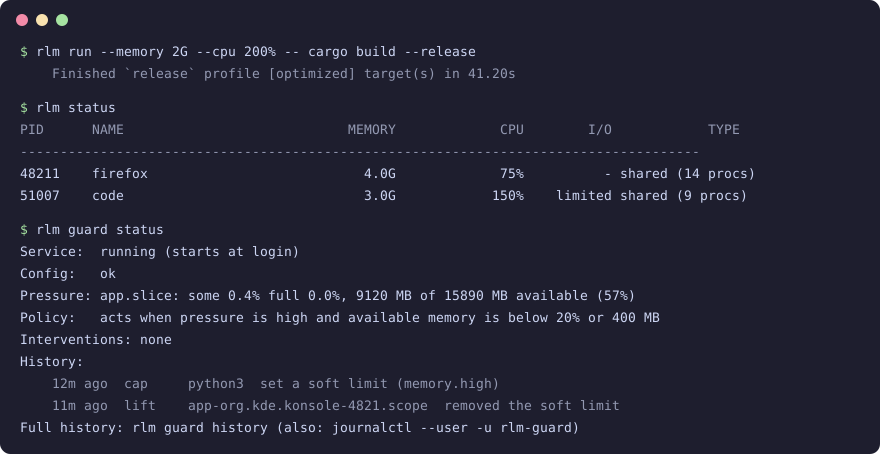
- Guard: service state, pressure, active interventions and history
- About: version and license
Ctrl+1 to Ctrl+6 switch pages. Ctrl+Q quits. The GUI hides processes on the protect list; use the CLI with --force if you really need to limit one.
Freeze guard
Configure it under guard: in ~/.config/rlm/config.yaml. Every key is optional; these are the defaults:
guard:
enabled: true
trigger:
psi_some_warn: 10
psi_some_high: 30
psi_full_critical: 10
mem_available_floor_mb: 400
act_below_available_pct: 20
timing:
freeze_hold_secs: 5
calm_hold_secs: 30
freeze_cooldown_secs: 60
sample_interval_ms: 1000
selection:
min_rss_mb: 200
protect: # names here are added to the built-in protect list
notify: true
enabled: falseturns off freezing and capping; rlm-guard still applies persistent rules.notifysends a plainnotify-sendwarning when pressure rises.- Unknown keys and out-of-range values are errors.
calm_hold_secsandfreeze_cooldown_secsgo up to 86400 (one day),freeze_hold_secsup to 60,sample_interval_msfrom 100 to 60000, andmem_available_floor_mbandmin_rss_mbup to 16777216 (16 TiB). With an invalid config, rlm-guard exits with status 78 and stays stopped until you fix the file, then runsystemctl --user restart rlm-guard.rlm guard statusshows the error.
How the guard stays safe
Can it kill my app?
No. It only freezes the app's cgroup (through systemd, with a direct cgroup.freeze write as fallback) or sets memory.high. It never sends a signal. The kernel's own OOM killer is not affected, so a hard memory limit you set can still end in an OOM kill.
What if the guard crashes while an app is frozen?
Every freeze and cap is written to a journal, ~/.local/state/rlm/guard-journal.jsonl, before it is applied. On the next start, including a start that fails on a bad config, the guard replays the journal and restores the app. Entries are keyed by boot and cgroup identity, so it never touches a cgroup that was since recreated for something else. On a normal stop (SIGTERM) it undoes everything before exiting. Only one guard runs per user: a second rlm-guard finds ~/.local/state/rlm/rlm-guard.lock held and exits with status 75 without touching the journal. The service does not restart on status 75; run systemctl --user restart rlm-guard once the other guard has stopped. When no state dir is known, the journal, lock and history go in $XDG_RUNTIME_DIR/rlm instead. Without either dir the guard never uses a shared dir such as /tmp: it does not freeze or cap, keeps applying persistent rules, and records no history.
Could it freeze my desktop or terminal?
Processes on the protect list are never frozen: desktop shells and compositors, Xorg and Xwayland, sshd, systemd, dbus-daemon, the audio stack, bash, zsh, fish, rlm-guard, common terminal emulators (GNOME Terminal, Ptyxis, Console, Konsole, kitty, Alacritty, WezTerm, foot, Tilix, Xfce Terminal, xterm, Terminator) and the tmux and screen multiplexers. Names are matched on the executable name, or on the process name when the executable is a script interpreter (Terminator runs as python3) or renames itself (the tmux server). A scope that contains a protected process, such as a terminal whose shell shares the scope with a runaway script, is capped and never frozen. Add your own names under guard.selection.protect.
Why did it not act when my machine was slow?
It needs apps under app.slice stalling on memory while available memory is below 20% of RAM. The one exception is available memory below 400 MB: then it acts even without a stall. Slowness from CPU or disk load does not count. A stall inside one cgroup that rlm limited is ignored by design: that app is hitting the limit you set, and the rest of the system is fine.
How hard is a cap?
Soft. A cap never goes below 90% of the app's current memory or below 256 MiB. On hosts without swap it never asks for more than the app's file cache can give back. The app slows down while the kernel reclaims; it is not killed. A cap never loosens a lower memory.high that was already in place.
Seeing what the guard did
rlm guard status: current state and the last few eventsrlm guard history: the recorded history (~/.local/state/rlm/guard-history.jsonl)- The GUI Guard page, which also has a switch that runs
rlm guard enableorrlm guard disable journalctl --user -u rlm-guardfor the full log
Configuration
Create ~/.config/rlm/config.yaml:
profiles:
  browser:
    memory: "4G"
    cpu: "200%"
  dev:
    memory: "8G"
    cpu: "400%"
    io_read: "100M"
    io_write: "50M"
A system-wide file at /etc/rlm/config.yaml is read first; your file overrides it.
Built-in presets
| Preset | Memory | CPU | I/O read/write |
|---|---|---|---|
| Light | 512M | 25% | - |
| Medium | 2G | 50% | 50M/25M |
| Heavy | 4G | 100% | 100M/50M |
| Browser | 4G | 75% | - |
Profile names are case-insensitive: rlm run --profile medium -- ./command.
Cgroup delegation (non-root usage)
rlm writes to cgroups your systemd user manager owns, so the memory, cpu and io controllers must be delegated to it. The .deb, .rpm and AUR packages install the drop-in rlm-delegate.conf; log out and back in after installing.
For crates.io and source installs:
|
Then log out and back in, and run rlm doctor to verify.
License
Apache 2.0