# Plugin Integration Guide
This guide explains how to integrate rlm-rs with AI coding assistants through plugins, skills, and commands. While the examples focus on Claude Code, the patterns apply to any AI assistant that can execute shell commands.
## Overview
rlm-rs is designed as a **CLI-first tool** that AI assistants invoke via shell execution. This architecture enables:
- **Universal Compatibility**: Any assistant with shell access can use rlm-rs
- **No Custom APIs**: Standard stdin/stdout/stderr communication
- **JSON Output**: Machine-readable format for programmatic integration
- **Stateless Commands**: Each invocation is independent (state lives in SQLite)
---
## Claude Code Integration
### Plugin Architecture
The [rlm-rs Claude Code plugin](https://github.com/zircote/rlm-plugin) implements the RLM pattern:
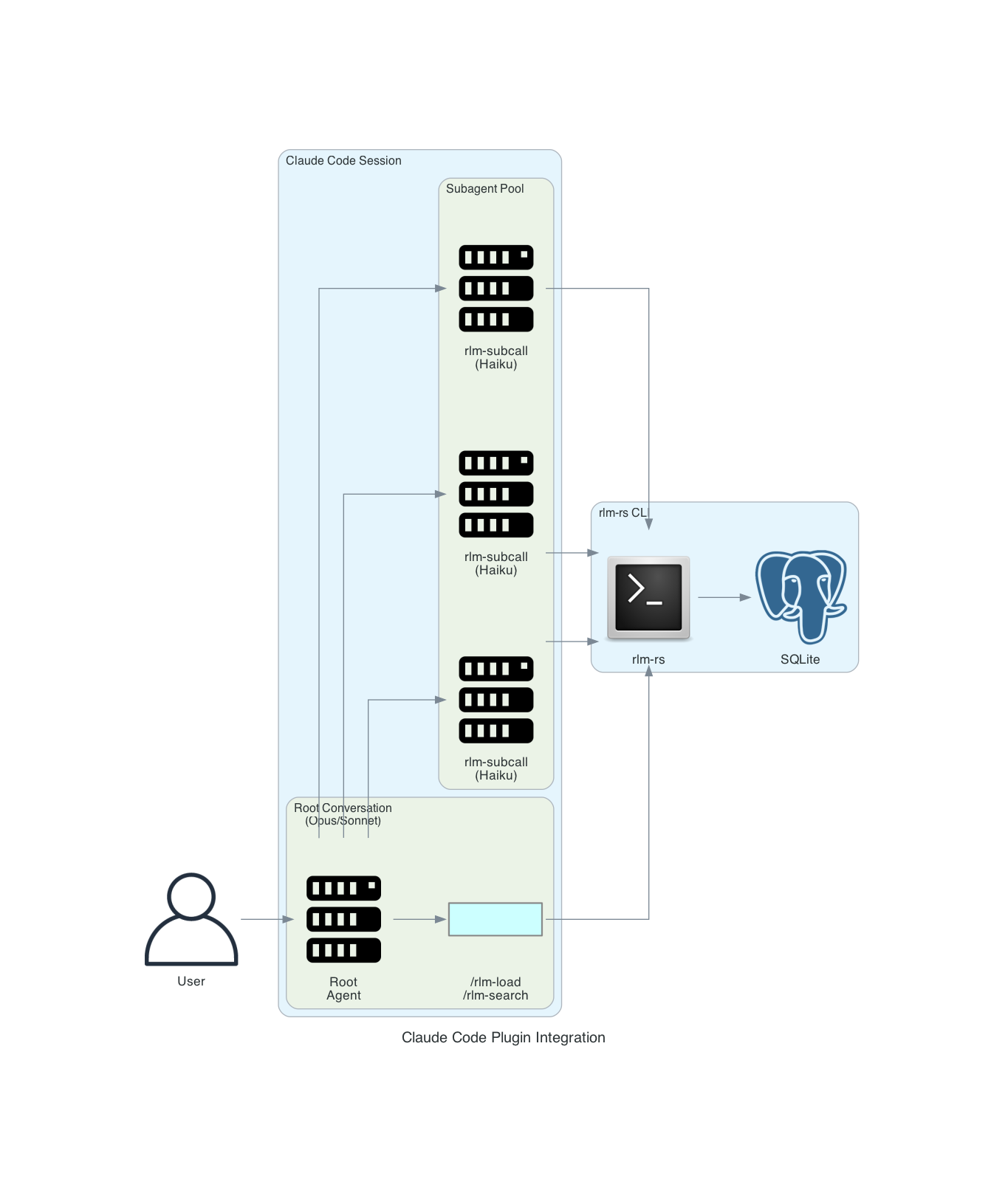
### Components
#### 1. Slash Commands (Skills)
User-invocable shortcuts for common operations:
| `/rlm-load` | Load file into RLM | `rlm-rs load <file>` |
| `/rlm-search` | Search loaded content | `rlm-rs search <query>` |
| `/rlm-status` | Show RLM state | `rlm-rs status` |
| `/rlm-analyze` | Full RLM analysis workflow | Orchestrated multi-step |
**Example Skill Definition** (`.claude/skills/rlm-load.md`):
```markdown
---
name: rlm-load
description: Load a file or directory into RLM for analysis
arguments:
- name: path
description: File or directory to load
required: true
- name: name
description: Buffer name (defaults to filename)
required: false
---
Load content into RLM for semantic search and chunk-based analysis.
## Workflow
1. Check if rlm-rs is installed: `which rlm-rs`
2. Initialize if needed: `rlm-rs init`
3. Load the content: `rlm-rs load {{path}} --name {{name}} --chunker semantic`
4. Report status: `rlm-rs status --format json`
## Output
Report the number of chunks created and confirm embeddings were generated.
```
#### 2. Subagents
Specialized agents for chunk-level processing:
**rlm-subcall Agent** (`.claude/agents/rlm-subcall.md`):
```markdown
---
name: rlm-subcall
model: haiku
description: Efficient chunk-level analysis for RLM workflow
tools:
- Bash
- Read
---
You are a focused analysis agent processing individual chunks from large documents.
## Instructions
1. Retrieve the chunk: `rlm-rs chunk get <chunk_id>`
2. Analyze according to the prompt
3. Return structured JSON findings:
```json
{
"chunk_id": <id>,
"findings": [...],
}
```
Keep responses concise. You're part of a larger workflow.
```
**rlm-synthesizer Agent** (`.claude/agents/rlm-synthesizer.md`):
```markdown
---
name: rlm-synthesizer
model: sonnet
description: Synthesize findings from multiple chunk analyses
tools:
- Read
- Bash
---
You aggregate results from multiple rlm-subcall analyses.
## Instructions
1. Review all chunk findings
2. Identify patterns and connections
3. Synthesize into coherent narrative
4. Highlight key insights and recommendations
```
#### 3. Hooks
Automated triggers for RLM operations:
**Auto-load on large files** (`.claude/hooks/large-file-rlm.md`):
```markdown
---
event: PostToolUse
tool: Read
---
If the file read was larger than 50KB, suggest loading it into RLM:
"This is a large file. Consider using `/rlm-load {{file_path}}` for semantic search."
```
### Typical Workflow
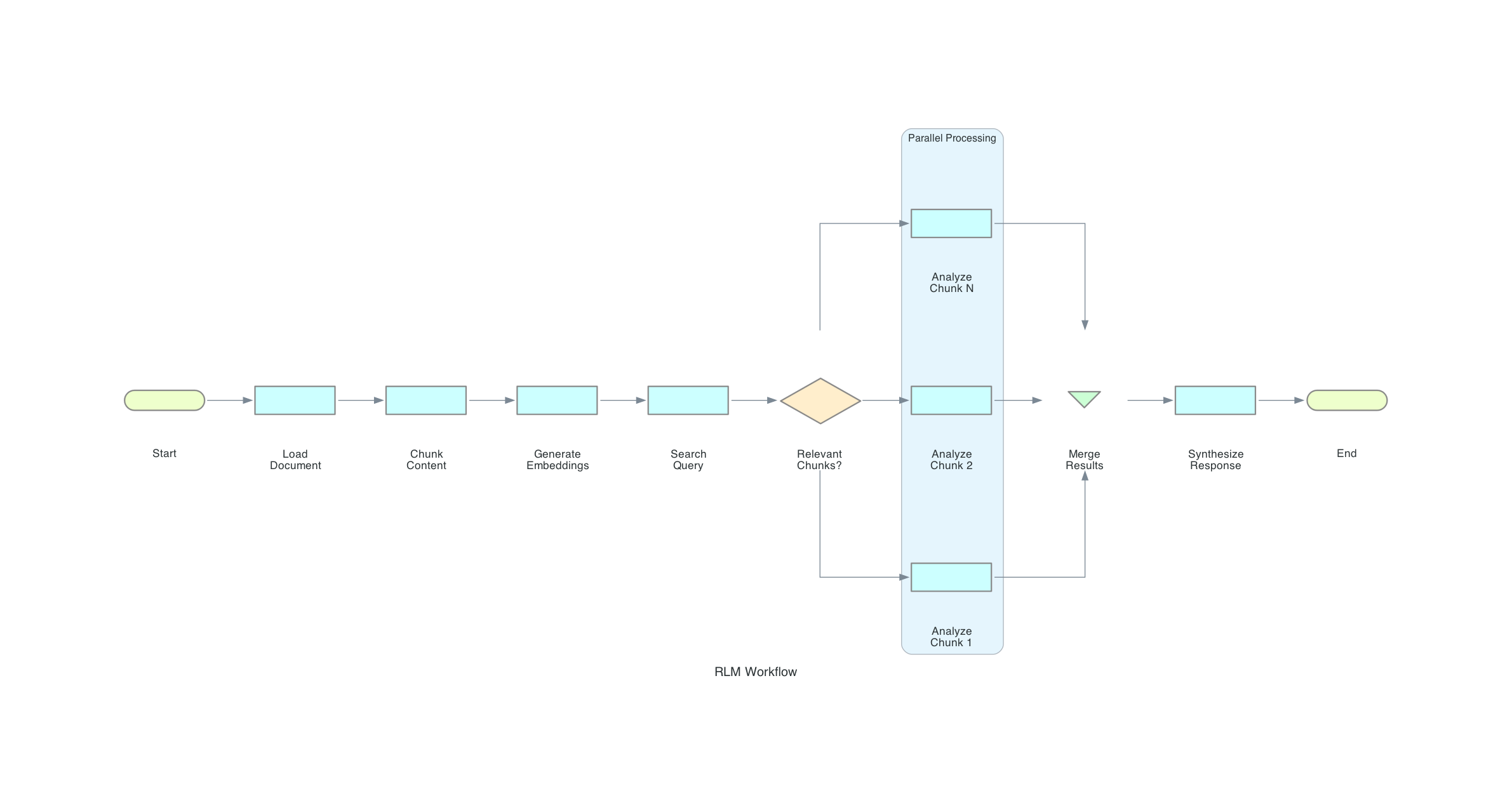
---
## Portable Integration Patterns
### Generic CLI Integration
Any AI assistant can integrate with rlm-rs using these patterns:
#### Pattern 1: Search-Then-Retrieve
```bash
# 1. Load content (one-time setup)
rlm-rs load large-document.md --name docs
# 2. Search for relevant chunks
RESULTS=$(rlm-rs --format json search "your query" --top-k 5)
# 3. Extract chunk IDs
CHUNK_IDS=$(echo "$RESULTS" | jq -r '.results[].chunk_id')
# 4. Retrieve and process each chunk
for ID in $CHUNK_IDS; do
CONTENT=$(rlm-rs chunk get $ID)
# Process $CONTENT...
done
```
#### Pattern 2: Grep-Based Analysis
```bash
# Find specific patterns
# Get context around matches
rlm-rs grep docs "error.*handling" --window 200
```
#### Pattern 3: Progressive Refinement
```bash
# Broad search first
rlm-rs search "authentication" --top-k 20
# Narrow down
rlm-rs search "JWT token validation" --top-k 5 --mode semantic
# Exact match
rlm-rs search "validateToken function" --mode bm25
```
### JSON Output Schema
All commands with `--format json` return structured data:
**Search Results**:
```json
{
"count": 3,
"mode": "hybrid",
"query": "authentication",
"results": [
{
"chunk_id": 42,
"buffer_id": 1,
"buffer_name": "auth.rs",
"score": 0.0328,
"semantic_score": 0.0499,
"bm25_score": 0.0000016
}
]
}
```
**Status**:
```json
{
"initialized": true,
"db_path": ".rlm/rlm-state.db",
"db_size_bytes": 245760,
"buffer_count": 3,
"chunk_count": 42,
"total_content_bytes": 125000,
"embeddings_count": 42
}
```
**Chunk**:
```json
{
"id": 42,
"buffer_id": 1,
"buffer_name": "auth.rs",
"index": 3,
"byte_range": [12000, 15000],
"size": 3000,
"content": "...",
"has_embedding": true
}
```
---
## Platform-Specific Notes
### GitHub Copilot
Copilot can invoke rlm-rs through its terminal integration:
```
@terminal rlm-rs load src/ --name code
@terminal rlm-rs search "error handling"
```
### Codex CLI
Codex can execute rlm-rs commands directly:
```bash
codex "Load the documentation and find sections about API authentication"
# Codex runs: rlm-rs load docs/ && rlm-rs search "API authentication"
```
### OpenCode / Aider
These tools can use rlm-rs as an external helper:
```bash
# In .aider.conf.yml or similar
tools:
- name: rlm-search
command: rlm-rs --format json search "$QUERY"
```
### VS Code Extensions
Extensions should use `execFile` instead of `exec` for security (avoids shell injection):
```typescript
import { execFile } from 'child_process';
import { promisify } from 'util';
const execFileAsync = promisify(execFile);
interface SearchResult {
chunk_id: number;
score: number;
}
interface SearchResponse {
results: SearchResult[];
}
async function searchRLM(query: string): Promise<SearchResult[]> {
// Using execFile (not exec) prevents shell injection
const { stdout } = await execFileAsync('rlm-rs', [
'--format', 'json',
'search', query
]);
const response: SearchResponse = JSON.parse(stdout);
return response.results;
}
```
---
## Best Practices
### 1. Use Semantic Chunking for Code
```bash
rlm-rs load src/ --chunker semantic --chunk-size 3000
```
Semantic chunking respects function and class boundaries.
### 2. Name Buffers Meaningfully
```bash
rlm-rs load src/auth/ --name auth-module
rlm-rs load src/api/ --name api-handlers
rlm-rs load docs/ --name documentation
```
This makes search results more interpretable.
### 3. Use Hybrid Search by Default
```bash
rlm-rs search "query" --mode hybrid
```
Hybrid combines semantic understanding with keyword matching.
### 4. Batch Subagent Calls
Instead of sequential calls, use parallel Task invocations:
```
# Good: Parallel
# Avoid: Sequential
Task(rlm-subcall, chunk 12)
Task(rlm-subcall, chunk 27)
Task(rlm-subcall, chunk 33)
```
### 5. Store Intermediate Results
```bash
# After subcall analysis
rlm-rs add-buffer auth-analysis "$(cat subcall-results.json)"
# Later retrieval
rlm-rs show auth-analysis
```
---
## Error Handling for AI Assistants
When integrating rlm-rs into AI workflows, proper error handling ensures graceful recovery and good user experience. This section provides structured patterns for handling common errors.
### Error Detection
All rlm-rs commands return:
- **Exit code 0**: Success
- **Exit code 1**: Error (details in stderr)
With JSON format, errors are structured:
```json
{
"error": "storage error: RLM not initialized. Run: rlm-rs init",
"code": "NOT_INITIALIZED"
}
```
### Common Errors and Recovery Strategies
| `RLM not initialized` | Database not created | Run `rlm-rs init` |
| `buffer not found: <name>` | Buffer doesn't exist | Run `rlm-rs list` to verify |
| `chunk not found: <id>` | Invalid chunk ID | Re-run search to get valid IDs |
| `No results found` | Query too specific | Broaden query or lower threshold |
| `embedding error` | Model loading issue | Check disk space, retry once |
| `file not found` | Invalid path | Verify path exists before load |
### Structured Error Handling Pattern
```bash
# Robust error handling for AI assistants
RESULT=$(rlm-rs --format json search "$QUERY" 2>&1)
EXIT_CODE=$?
if [ $EXIT_CODE -ne 0 ]; then
# Parse error
ERROR=$(echo "$RESULT" | jq -r '.error // empty')
case "$ERROR" in
*"not initialized"*)
rlm-rs init
# Retry original command
RESULT=$(rlm-rs --format json search "$QUERY")
;;
*"buffer not found"*)
echo "Buffer not found. Available buffers:"
rlm-rs list
;;
*"No results"*)
echo "No results. Try broader query or: --threshold 0.1"
;;
*)
echo "Error: $ERROR"
;;
esac
fi
```
### Retry Logic
For transient errors (embedding model loading, database locks):
```bash
MAX_RETRIES=3
RETRY_DELAY=1
for i in $(seq 1 $MAX_RETRIES); do
RESULT=$(rlm-rs --format json chunk embed "$BUFFER" 2>&1)
if [ $? -eq 0 ]; then
break
fi
if [ $i -lt $MAX_RETRIES ]; then
sleep $RETRY_DELAY
RETRY_DELAY=$((RETRY_DELAY * 2)) # Exponential backoff
fi
done
```
### Pre-flight Checks
Before complex workflows, verify prerequisites:
```bash
# Check 1: rlm-rs is installed
if ! command -v rlm-rs &> /dev/null; then
echo "rlm-rs not found. Install with: cargo install rlm-rs"
exit 1
fi
# Check 2: Database is initialized
if ! rlm-rs status &> /dev/null; then
rlm-rs init
fi
# Check 3: Content is loaded
BUFFER_COUNT=$(rlm-rs --format json status | jq '.buffer_count')
if [ "$BUFFER_COUNT" -eq 0 ]; then
echo "No content loaded. Use: rlm-rs load <file>"
exit 1
fi
# Check 4: Embeddings exist for semantic search
EMBED_COUNT=$(rlm-rs --format json chunk status | jq '.embedded_chunks')
if [ "$EMBED_COUNT" -eq 0 ]; then
echo "No embeddings. Generating..."
rlm-rs chunk embed --all
fi
```
### Graceful Degradation
When semantic search fails, fall back to BM25:
```bash
# Try semantic first
RESULT=$(rlm-rs --format json search "$QUERY" --mode semantic 2>&1)
RESULT=$(rlm-rs --format json search "$QUERY" --mode bm25)
fi
```
### Error Messages for Users
When reporting errors to users, provide actionable guidance:
```markdown
**Good**: "Buffer 'config' not found. Available buffers: main, auth. Did you mean one of these?"
**Bad**: "Error: buffer not found: config"
```
---
## Troubleshooting
### Command Not Found
```bash
# Check installation
which rlm-rs
# Install if missing
cargo install rlm-rs
# or
brew install zircote/tap/rlm-rs
```
### Database Not Initialized
```bash
rlm-rs init
```
### No Search Results
1. Check if content is loaded: `rlm-rs list`
2. Verify embeddings exist: `rlm-rs chunk status`
3. Try broader query or lower threshold: `--threshold 0.1`
### JSON Parsing Errors
Ensure you're using `--format json`:
```bash
rlm-rs --format json search "query" # Correct
rlm-rs search "query" --format json # Also correct
```
---
## System Prompt Templates
Ready-to-use system prompts for AI assistants integrating with rlm-rs are available in the `prompts/` directory:
| [rlm-orchestrator.md](prompts/rlm-orchestrator.md) | Coordinates search, dispatch, and synthesis | sonnet |
| [rlm-analyst.md](prompts/rlm-analyst.md) | Analyzes individual chunks | haiku |
| [rlm-synthesizer.md](prompts/rlm-synthesizer.md) | Aggregates analyst findings | sonnet |
### Quick Start
1. **Orchestrator** receives user request and searches for relevant chunks
2. **Analysts** (parallel) process individual chunks and return structured findings
3. **Synthesizer** aggregates findings into a coherent report
```
User Request
│
▼
┌─────────────┐
│ Orchestrator │──▶ rlm-rs search "query"
└─────────────┘
│
▼ dispatch
┌─────────────────────────────────┐
│ ┌─────────┐ ┌─────────┐ ┌─────────┐ │
│ │Analyst 1│ │Analyst 2│ │Analyst N│ │ (parallel)
│ └─────────┘ └─────────┘ └─────────┘ │
└─────────────────────────────────┘
│ collect
▼
┌─────────────┐
│ Synthesizer │──▶ Final Report
└─────────────┘
```
---
## See Also
- [RLM-Inspired Design](rlm-inspired-design.md) - Architectural philosophy
- [CLI Reference](cli-reference.md) - Complete command documentation
- [Architecture](architecture.md) - Internal implementation details
- [Prompt Templates](prompts/) - System prompts for AI integration