<p align="center">
<a href="https://rightcommit.com">
<img src=".github/assets/rightcommit-icon.png" alt="rightcommit icon" width="128" height="128">
</a>
</p>
<h1 align="center">
<a href="https://rightcommit.com">
<picture>
<source media="(prefers-color-scheme: dark)" srcset="https://github.com/rightcommit/rightcommit/raw/HEAD/.github/assets/rightcommit-wordmark-dark.svg?sanitize=true">
<img src=".github/assets/rightcommit-wordmark-light.svg" alt="rightcommit" width="360" height="72">
</picture>
</a>
</h1>
<p align="center">
<strong>AI agents say “done”. rightcommit proves it.</strong>
</p>
<p align="center">
Self-hosted orchestration for Claude Code, Codex and Pi Agent.<br>
Parallel workflows, full control over every commit, and FinOps that shows exactly what each
agent and model costs.
</p>
<p align="center">
<a href="https://rightcommit.com"><strong>Website</strong></a> ·
<a href="https://github.com/rightcommit/rightcommit"><strong>GitHub</strong></a> ·
<a href="#quickstart"><strong>Quickstart</strong></a> ·
<a href="#documentation"><strong>Docs</strong></a> ·
<a href="#license"><strong>License</strong></a>
</p>
<p align="center">
<a href="LICENSE"><img src="https://img.shields.io/badge/license-FSL--1.1--ALv2-6254e8" alt="License: FSL-1.1-ALv2"></a>
<img src="https://img.shields.io/badge/built%20with-Rust-b7410e" alt="Built with Rust">
<img src="https://img.shields.io/badge/runs%20in-one%20container-2496ed" alt="Runs in one container">
</p>
---
## Why rightcommit
AI coding agents are fast, but "done" often means "I stopped". rightcommit puts the agents
inside a workflow you can see and control: work moves on only when there is proof. The task
list is complete, the server has run the tests, a second agent has reviewed the result, and
you have approved it. Only then is a commit made.
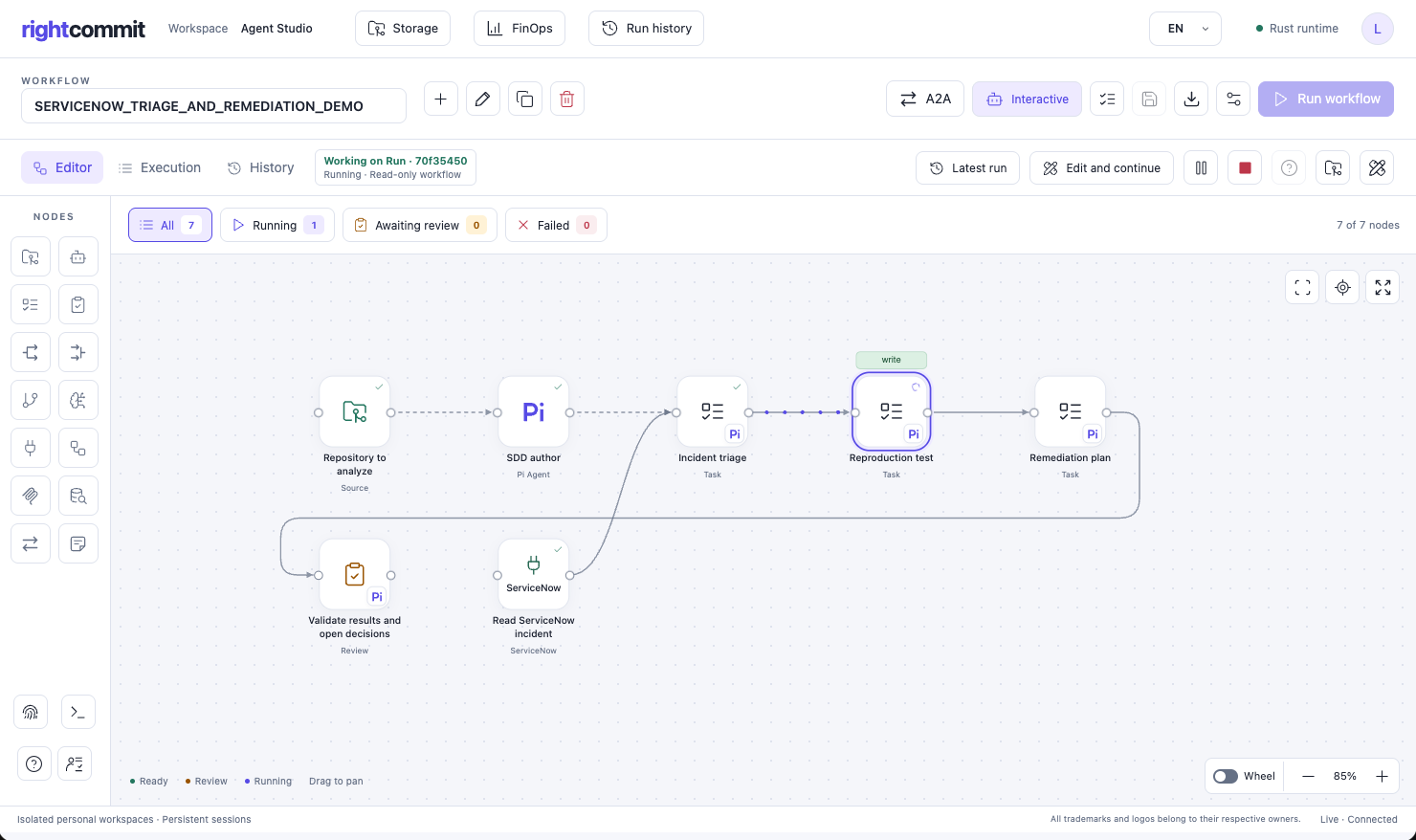
You design the workflow on a visual canvas, or describe it and let the built-in Project
Manager draft it. A Rust engine runs the agents and tools, keeps the execution state, checks
the quality and sends work back for fixes when a check fails.
Learn more at **[rightcommit.com](https://rightcommit.com)**.
## What you get
- **Agentic Workflow Orchestration.** Design, execute, and orchestrate intelligent workflows combining AI agents, enterprise
data, and external tools. Expose workflows as A2A-compatible agents, enabling seamless
interoperability across agentic ecosystems.
- **Verified outcomes.** Tasks must be ticked, tests run on the server and a second agent
(even a different one) reviews the work. If anything changes after the tests, tests and
review run again.
- **Traceable work.** Every step saves its files as versions with a SHA-256 fingerprint and
a line-by-line diff. Failed checks send the work back for correction, within a set number
of attempts.
- **Transparent costs.** The FinOps panel shows cost and tokens per step, run, workflow,
agent and model. Reported and estimated costs are always kept apart.
- **A workflow that fits the job.** Three steps or a full delivery pipeline. Start from one
of the ready-made workflows, such as Spec Kit specification → plan → tasks → implementation,
or build your own.
- **Your agents, coordinated.** Claude Code, Codex and Pi in one workspace. Each step uses
the agent and model you picked, with no silent fallback. Model-Agnostic by Design.
- **You stay in control.** Run interactively, assisted or unattended. Pause for human
decisions and resume where you left off.
- **Beyond Traditional Automation.** Automate business processes with orchestrated AI agents.
Run workflows on a schedule, attended or unattended, with human oversight where needed.
## Connections
- **Agents:** Claude Code, Codex and Pi, with an API key or an authorized gateway (Anthropic,
OpenAI, OpenRouter, AWS Bedrock, Google Vertex, Microsoft Foundry and more).
- **Services:** GitHub, Azure DevOps, ServiceNow, and Jira, Confluence and Bitbucket through
the Atlassian CLI. Every write to an outside system waits for your confirmation of the
exact content.
- **Open standards:** MCP to give agents tools from your MCP servers, and A2A to publish a
workflow that other agents can call.
## Who it's for
rightcommit supports individual use and internal organizational deployments with separate
user accounts. Read [Provider terms and permitted use](PROVIDER_TERMS.md) and
[Intended use and third-party provider obligations](INTENDED_USE.md). Provider names identify integrations
and do not imply affiliation or endorsement.
- **Developers** running agents on their own laptop, with their own keys.
- **Consultants** applying their methods within a client's authorized deployment, with
credentials and provider billing controlled by that client.
- **Teams** running it on their own servers, with authorized organizational credentials,
separate user settings and workspaces.
## Quickstart
You need [Docker](https://www.docker.com/products/docker-desktop/) and an API key or authorized provider configuration for at
least one agent (Claude Code, Codex or Pi).
**1. Get rightcommit.**
```sh
git clone https://github.com/rightcommit/rightcommit.git
cd rightcommit
```
No Git? Click **Code** → **Download ZIP** on this page, extract it and open a terminal in the
extracted folder (the one with `compose.yaml`).
**2. Start the container.**
```sh
docker compose up -d --build
```
The first build downloads a lot of files and takes a few minutes.
**3. Create the first account.** Open <http://localhost:8080>. The first user becomes the
administrator, and public sign-up closes after that.
**4. Connect an agent.** Open **Personal settings** → **Agents**, add your key and pick a
model. Keys are encrypted in the database (AES-256-GCM) and never sent back to the browser.
For API keys, gateways, cloud providers and local models, see
[Configuring the agents](#configuring-the-agents).
**5. Run a workflow.** Press **+**, choose a ready-made workflow (or ask the Project Manager to
draft one) and run it.
Useful commands:
| Stop the app | `docker compose down` |
| Update after getting a new version | `docker compose up -d --build` |
| Use another port | set `RIGHTCOMMIT_PORT=9090` in a `.env` file, then `docker compose up -d` |
> [!WARNING]
> Never run `docker compose down -v`: it deletes the `rightcommit-data` volume, with all
> accounts, workflows and keys.
By default the app listens only on `localhost`. Your code and keys stay on your machine.
## Other ways to install
| [INSTALL.md](INSTALL.md) | Docker on macOS, Windows and Linux, step by step |
| [INSTALL_MAC.md](INSTALL_MAC.md) | macOS without containers: Homebrew, crates.io or source |
| [INSTALL_LINUX.md](INSTALL_LINUX.md) | Linux and WSL2 without containers: crates.io or source |
| [INSTALL_PODMAN.md](INSTALL_PODMAN.md) | Podman instead of Docker |
## Configuring the agents
Start with [Provider terms and permitted use](PROVIDER_TERMS.md). All three agents support multiple users;
provider authorization and credential scope still apply.
| [HOW_TO_CONFIGURE_CLAUDECODE.md](HOW_TO_CONFIGURE_CLAUDECODE.md) | Claude Code: API keys, gateways, Bedrock, Vertex, Foundry |
| [HOW_TO_CONFIGURE_CODEX.md](HOW_TO_CONFIGURE_CODEX.md) | Codex: API keys and compatible provider configuration |
| [HOW_TO_CONFIGURE_PI.md](HOW_TO_CONFIGURE_PI.md) | Pi with Anthropic or OpenAI |
| [HOW_TO_CONFIGURE_PI_OPENROUTER.md](HOW_TO_CONFIGURE_PI_OPENROUTER.md) | Pi with OpenRouter |
| [HOW_TO_CONFIGURE_PI_LOCAL.md](HOW_TO_CONFIGURE_PI_LOCAL.md) | Pi with a local model (Ollama, LM Studio, vLLM) |
## Documentation
| [CHANGELOG.md](CHANGELOG.md) | What changed in each version |
| [ADD_A_SKILL.md](ADD_A_SKILL.md) | Give a skill to Claude Code, Codex and Pi in one step |
| [ADD-PI-PACKAGES.md](ADD-PI-PACKAGES.md) | Add packages from pi.dev to the Pi agent |
| [ADD-OPENSPEC.md](ADD-OPENSPEC.md) | Use OpenSpec in your workflows |
| [UPDATE-PI-DEFAULT-PACKAGES.md](UPDATE-PI-DEFAULT-PACKAGES.md) | Update the Pi tools rightcommit ships (maintainers) |
| [CONFIGURATION GUIDES](guides/README.md) | Configure access and run workflow examples for ServiceNow (ITSM, catalog Requests and Spec Kit), Atlassian (Jira, Bitbucket and Confluence), and GitHub (issues and CI) |
## License
Copyright (c) 2026 Lorenzo Toscano
rightcommit is [Fair Source](https://fair.io), released under the
**[Functional Source License, Version 1.1, ALv2 Future License (FSL-1.1-ALv2)](LICENSE)**.
- You can read, use, modify and share the code, and self-host it for free.
- Internal use, non-commercial education and research, and professional services for your
clients are explicitly permitted.
- Offering a competing commercial product or service is not permitted.
- Each version becomes available under the **Apache License 2.0** two years after its release.
The permissions above concern rightcommit itself. Any third-party product or service used
with it remains subject to its own terms and the [supported deployment scope](#intended-use-and-third-party-provider-obligations).
See [fsl.software](https://fsl.software) for background on the license.
Third-party notices for bundled icons and Spec Kit files are in [`licenses/`](licenses).
## Contributing
Pull requests are welcome. Before your first one is merged you sign the
[Contributor License Agreement](CLA.md): a bot comments on the pull request, and you reply with
the sentence it asks for. You only need to do this once. See [CONTRIBUTING.md](CONTRIBUTING.md).
Found a bug or have an idea? [Open an issue](https://github.com/rightcommit/rightcommit/issues).
Questions and feedback: [hello@rightcommit.com](mailto:hello@rightcommit.com).
---
<sub>Claude Code, Codex, Pi, GitHub, Azure DevOps, ServiceNow, Jira, Confluence, Bitbucket,
Spec Kit, Rust, Docker and other names and marks belong to their owners. rightcommit is not
affiliated with them.</sub>