
Why rightcommit
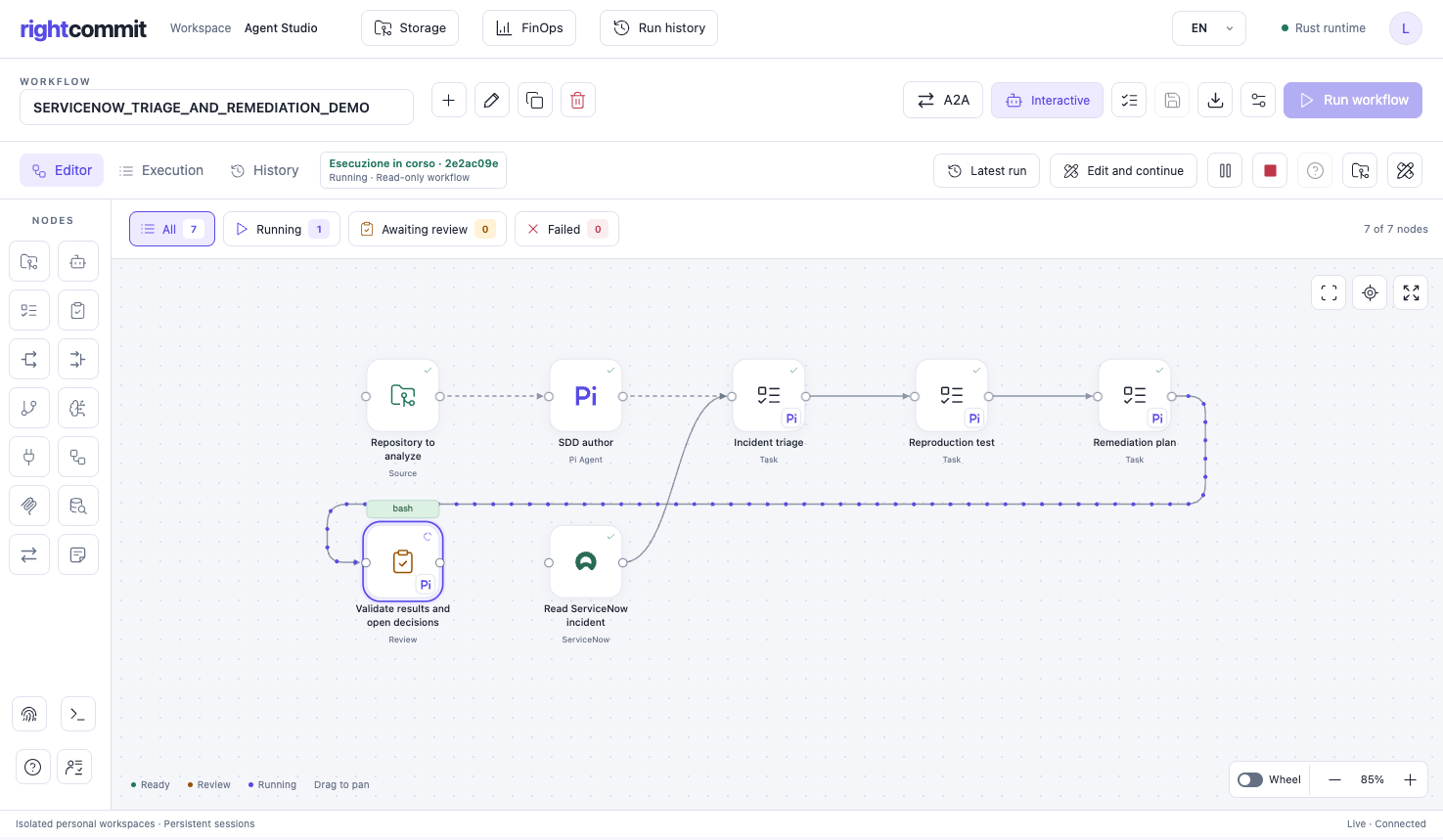
AI coding agents are fast, but "done" often means "I stopped". rightcommit puts the agents inside a workflow you can see and control: work moves on only when there is proof. The task list is complete, the server has run the tests, a second agent has reviewed the result, and you have approved it. Only then is a commit made.
You design the workflow on a visual canvas, or describe it and let the built-in Project Manager draft it. A Rust engine runs the agents and tools, keeps the execution state, checks the quality and sends work back for fixes when a check fails.
Learn more at rightcommit.com.
What you get
- Agentic Workflow Orchestration
Design, execute, and orchestrate intelligent workflows combining AI agents, enterprise data, and external tools. Expose workflows as A2A-compatible agents, enabling seamless interoperability across agentic ecosystems. - Verified outcomes. Tasks must be ticked, tests run on the server and a second agent (even a different one) reviews the work. If anything changes after the tests, tests and review run again.
- Traceable work. Every step saves its files as versions with a SHA-256 fingerprint and a line-by-line diff. Failed checks send the work back for correction, within a set number of attempts.
- Transparent costs. The FinOps panel shows cost and tokens per step, run, workflow, agent and model. Reported and estimated costs are always kept apart.
- A workflow that fits the job. Three steps or a full delivery pipeline. Start from one of the ready-made workflows, such as Spec Kit specification → plan → tasks → implementation, or build your own.
- Your agents, coordinated. Claude Code, Codex and Pi in one workspace. Each step uses the agent and model you picked, with no silent fallback. Model-Agnostic by Design.
- You stay in control. Run interactively, assisted or unattended. Pause for human decisions and resume where you left off.
- Beyond Traditional Automation. Automate business processes with orchestrated AI agents. Run workflows on a schedule, attended or unattended, with human oversight where needed.
Scheduled workflows
The Run execution menu offers Run now and Scheduled. Schedule a single run or a recurring workflow every N minutes/hours, daily or weekly, with a time zone and optional end date. The dialog previews upcoming occurrences using the app's existing controls.
Each schedule appears once in the execution register and workflow history, with its runs grouped underneath. Pause or delete the schedule to stop future starts; use the existing run controls to pause or stop an execution already in progress. Saved workflow changes apply to subsequent runs.
The local service must be running. Missed occurrences are skipped, and a previous run still running, paused or waiting for input prevents overlapping starts from that schedule. Schedule settings and history survive service restarts.
Connections
- Agents: Claude Code, Codex and Pi, with an API key, a login or a gateway (Anthropic, OpenAI, OpenRouter, AWS Bedrock, Google Vertex, Microsoft Foundry and more).
- Services: GitHub, Azure DevOps, ServiceNow, and Jira, Confluence and Bitbucket through the Atlassian CLI. Every write to an outside system waits for your confirmation of the exact content.
- Open standards: MCP to give agents tools from your MCP servers, and A2A to publish a workflow that other agents can call.
Who it's for
- Developers running agents on their own laptop, with their own keys.
- Consultants who reuse a method from client to client, with proof of what was done.
- Teams running it on their own servers, with multiple users, separate keys and workspaces.
Pi with multiple providers
In Personal settings → Agents → Pi, choose Multi-provider. Each Pi Agent node then gets a Provider selector and a model field. The default Pi provider/model apply to the manager, supervisor and nodes that inherit personal preferences.
Set provider credentials and parameters in .env before starting the app, for example
OPENAI_API_KEY, XAI_API_KEY, AZURE_OPENAI_BASE_URL or AWS_REGION. Native Pi logins
are also supported. The generic personal API-key field is ignored in Multi-provider mode;
only variables declared for the selected provider reach its Pi process. See .env.example
for supported variables. Credential files and cloud profiles must be accessible inside the
container when using Docker.
When running rightcommit without Docker, .env is loaded automatically from the current
working directory before services start. Existing process environment variables take
precedence, including values supplied by Docker Compose. Empty file entries remain unset,
so optional placeholders keep platform defaults. A missing .env is allowed; an
invalid file stops startup without printing its contents. Parent directories are not searched,
and MCP utility commands do not load a workspace .env.
For local models, set PI_LOCAL_BASE_URL and optionally PI_LOCAL_API_KEY; an Agent node
can override the local URL. Provider/model selections and local endpoint overrides are recorded with each
session, and missing provider configuration is reported before workflow preparation.
Use Memory nodes when handing work to another Agent, including across providers.
The chat-provider catalog is synchronized with the pinned Pi version in
distribution/pi-providers.json. After updating Pi, regenerate it with
node scripts/sync-pi-providers.mjs /path/to/pi-coding-agent and update the environment
entries in both Compose files and .env.example for any newly introduced providers.
Quickstart
You need Docker and a key or login for at least one agent (Claude Code, Codex or Pi).
1. Get rightcommit.
No Git? Click Code → Download ZIP on this page, extract it and open a terminal in the
extracted folder (the one with compose.yaml).
2. Start the container.
The first build downloads a lot of files and takes a few minutes.
3. Create the first account. Open http://localhost:8080. The first user becomes the administrator, and public sign-up closes after that.
4. Connect an agent. Open Personal settings → Agents, add your key and pick a model. Keys are encrypted in the database (AES-256-GCM) and never sent back to the browser. For logins, gateways, cloud providers and local models, see Configuring the agents.
5. Run a workflow. Press +, choose a ready-made workflow (or ask the Project Manager to draft one) and run it.
Useful commands:
| What | Command |
|---|---|
| Stop the app | docker compose down |
| Update after getting a new version | docker compose up -d --build |
| Use another port | set RIGHTCOMMIT_PORT=9090 in a .env file, then docker compose up -d |
[!WARNING] Never run
docker compose down -v: it deletes therightcommit-datavolume, with all accounts, workflows and keys.
By default the app listens only on localhost. Your code and keys stay on your machine.
Other ways to install
| Guide | For |
|---|---|
| INSTALL.md | Docker on macOS, Windows and Linux, step by step |
| INSTALL_MAC.md | macOS without containers: Homebrew, crates.io or source |
| INSTALL_LINUX.md | Linux and WSL2 without containers: crates.io or source |
| INSTALL_PODMAN.md | Podman instead of Docker |
Configuring the agents
| Guide | Covers |
|---|---|
| HOW_TO_CONFIGURE_CLAUDECODE.md | Claude Code: API key, subscription login, gateways, Bedrock, Vertex, Foundry |
| HOW_TO_CONFIGURE_CODEX.md | Codex: API key, ChatGPT login, access token, compatible endpoints |
| HOW_TO_CONFIGURE_PI.md | Pi with Anthropic or OpenAI |
| HOW_TO_CONFIGURE_PI_OPENROUTER.md | Pi with OpenRouter |
| HOW_TO_CONFIGURE_PI_LOCAL.md | Pi with a local model (Ollama, LM Studio, vLLM) |
Documentation
| Document | What it covers |
|---|---|
| CHANGELOG.md | What changed in each version |
| ADD_A_SKILL.md | Give a skill to Claude Code, Codex and Pi in one step |
| ADD-PI-PACKAGES.md | Add packages from pi.dev to the Pi agent |
| ADD-OPENSPEC.md | Use OpenSpec in your workflows |
| UPDATE-PI-DEFAULT-PACKAGES.md | Update the Pi tools rightcommit ships (maintainers) |
| How-to Guides | Configure access and run workflow examples for ServiceNow (ITSM, catalog Requests and Spec Kit), Atlassian (Jira, Bitbucket and Confluence), and GitHub (issues and CI) |
License
Copyright (c) 2026 Lorenzo Toscano
rightcommit is Fair Source, released under the Functional Source License, Version 1.1, ALv2 Future License (FSL-1.1-ALv2).
- You can read, use, modify and share the code, and self-host it for free.
- Internal use, non-commercial education and research, and professional services for your clients are explicitly permitted.
- Offering a competing commercial product or service is not permitted.
- Each version becomes available under the Apache License 2.0 two years after its release.
See fsl.software for background on the license.
Third-party notices for bundled icons and Spec Kit files are in licenses/.
Contributing
Pull requests are welcome. Before your first one is merged you sign the Contributor License Agreement: a bot comments on the pull request, and you reply with the sentence it asks for. You only need to do this once. See CONTRIBUTING.md.
Found a bug or have an idea? Open an issue.
Questions and feedback: hello@rightcommit.com.
Claude Code, Codex, Pi, GitHub, Azure DevOps, ServiceNow, Jira, Confluence, Bitbucket, Spec Kit, Rust, Docker and other names and marks belong to their owners. rightcommit is not affiliated with them.
Guides · Configuring ServiceNow: ITSM classification, catalog Requests and Spec Kit.