# Revw
[](https://crates.io/crates/revw)
[](https://opensource.org/licenses/MIT)
[](https://github.com/rlelf/revw)
[](https://ratatui.rs/)
A vim-like TUI for managing notes and resources.
## Features
- Vim-like terminal user interface
- Clipboard integration
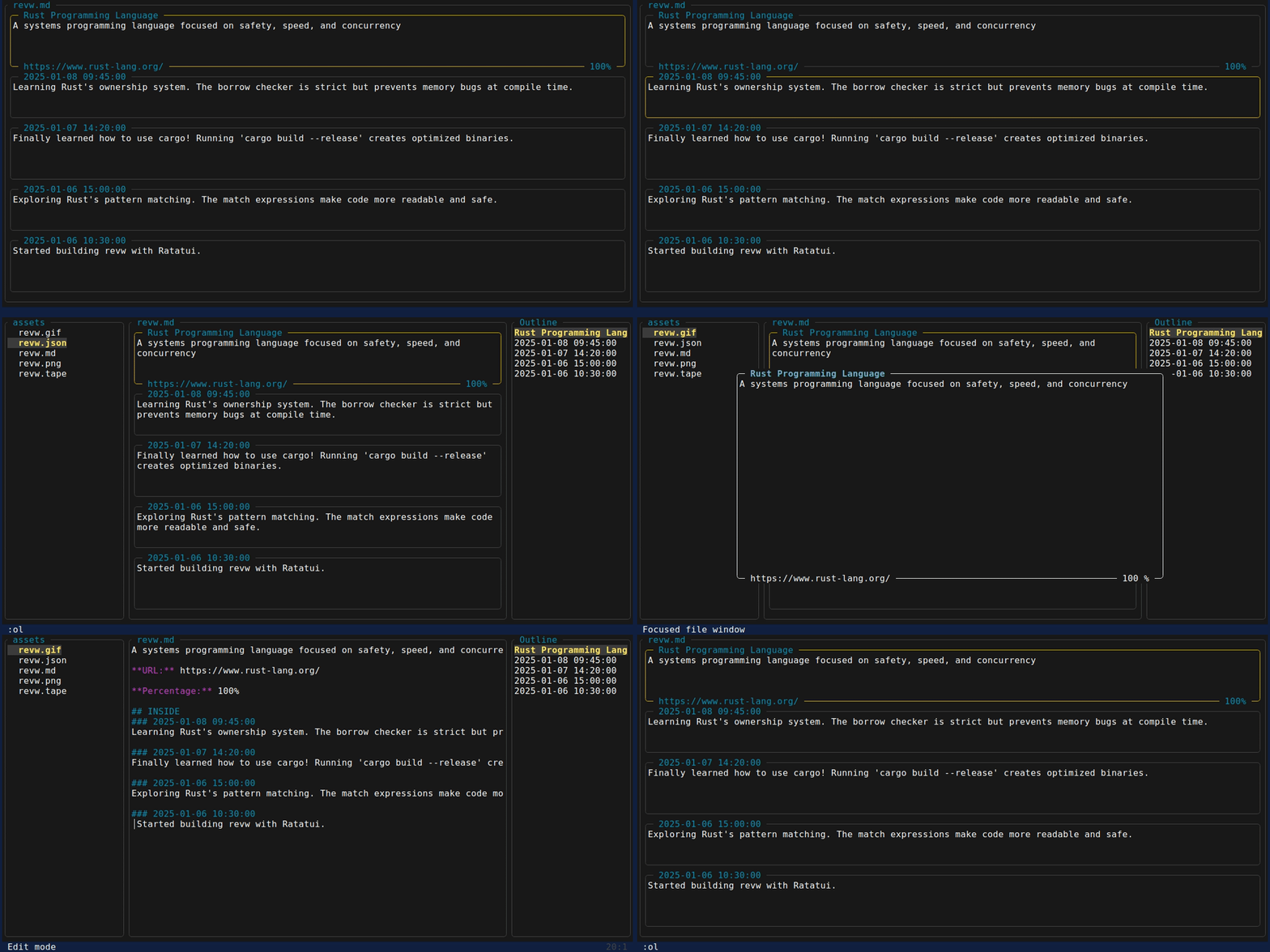
- Clean card-based interface
- Toggle between View mode and raw JSON mode
## Relf Format
### Outside
External resources and references:
- **Name**: Title or identifier of the resource
- **Context**: Description or notes about the resource
- **URL**: Web address or link
- **Percentage**: Score or progress indicator, sortable for ordering
### Inside
Internal notes or thoughts with timestamps:
- **Date**: Timestamp of the entry, sortable for ordering
- **Context**: notes or thoughts
```json
{
"outside": [
{
"name": "Rust Programming Language",
"context": "A systems programming language focused on safety, speed, and concurrency.",
"url": "https://www.rust-lang.org/",
"percentage": 100
}
],
"inside": [
{
"date": "2025-01-01 00:00:00",
"context": "Finally learned how to use cargo! Running 'cargo new my_project' creates such a clean project structure."
}
]
}
```
This format is also available in [relf](https://github.com/rlelf/relf)
## Install
```bash
cargo install revw
```
Or install from source:
```bash
cargo install --git https://github.com/rlelf/revw.git --locked
```
Or download from [Releases](https://github.com/rlelf/revw/releases)
## Use Cases
### Notes and resources Management
Track learning resources, books, articles, and tools you're exploring.
### Learning diary
Document your daily learning progress with timestamped notes.
### LLM-Assisted Workflows
Revw integrates seamlessly with AI assistants:
**Workflow 1: LLM generates → You review**
1. Ask an LLM to generate a reading list or resource collection
2. Paste the JSON into Revw (`:v` key)
3. Browse and organize visually
**Workflow 2: You create → LLM assists**
1. Maintain your notes in Revw's clean interface
2. Copy sections to clipboard (`:c`, `:ci`, `:co`)
3. Share with LLM for analysis, summarization, or questions
### Command Line Options
```bash
# View help
revw --help
# Show version
revw --version
# Start without file
revw
# View mode
revw file.json
# Edit mode
revw --json file.json
# Output to stdout
revw --stdout file.json
# Output to file
revw --output output.txt file.json
# Output only INSIDE section
revw --stdout --inside file.json
# Output only OUTSIDE section
revw --stdout --outside file.json
```
## Controls
### View Mode
**Navigation:**
- `j/k` or `↑/↓` select card (or mouse wheel)
- `gg` select first card
- `G` select last card
- `:gi` jump to first INSIDE entry
- `:go` jump to first OUTSIDE entry
- `/` search forward
- `n/N` next/prev match (jumps to card)
- `:noh` clear search highlighting
**Editing:**
- `Enter` open edit overlay for selected card
- `:ai` add new INSIDE entry (jumps to it)
- `:ao` add new OUTSIDE entry (jumps to it)
- `:dd` delete selected entry (entire object)
- `:yy` duplicate selected entry (entire object)
- `:o` order entries and auto-save
- `:f pattern` filter entries by pattern
**Copy/Paste:**
- `:c` copy all rendered content (with OUTSIDE/INSIDE headers)
- `:ci` copy INSIDE section only
- `:co` copy OUTSIDE section only
- `:cu` copy URL from selected card
- `:v` paste file path or JSON content
- `:vu` paste URL from clipboard to selected card
- `:vi` paste INSIDE from clipboard (overwrite)
- `:vo` paste OUTSIDE from clipboard (overwrite)
- `:va` paste both INSIDE and OUTSIDE from clipboard (append)
- `:vai` paste INSIDE from clipboard (append)
- `:vao` paste OUTSIDE from clipboard (append)
- `:xi` clear INSIDE section
- `:xo` clear OUTSIDE section
**Filter:**
- `:f pattern` filter entries by pattern
- `:nof` clear filter
**Settings:**
- `:set number` or `:set nu` enable line numbers (Edit mode)
- `:set nonumber` or `:set nonu` disable line numbers
- `:set card=N` set max visible cards (1-10, default: 5)
**Other:**
- `r` toggle View/Edit mode
- `:x` clear content
- `:h` or `?` toggle help mode
- `q` or `Esc` quit
#### Edit Overlay
**Field Selection Mode (default):**
- `j/k` or `↑/↓` navigate between fields
- `Enter` enter field editing mode (shows cursor)
- `w` save changes
- `Esc` or `q` cancel
**Field Editing Mode:**
- `h/l` or `←/→` move cursor left/right
- `0` move to start of field
- `$` move to end of field
- `w` next word
- `b` previous word
- `e` end of word
- `g` or `gg` jump to start
- `G` jump to end
- `i` enter insert mode
- `Esc` or `Ctrl+[` exit to field selection mode
**Insert Mode:**
- Type to edit text
- `←/→` move cursor
- `Backspace` delete character
- `Esc` or `Ctrl+[` exit to field editing mode
### Edit Mode
**Navigation:**
- `h/j/k/l` or arrow keys - move cursor
- `w` next word start
- `e` next word end
- `b` previous word start
- `0` move to start of line
- `$` move to end of line
- `gg` jump to top
- `G` jump to bottom
- `:gi` jump to first INSIDE entry
- `:go` jump to first OUTSIDE entry
- Mouse wheel - scroll (drag disabled)
**Editing:**
- `i` enter insert mode
- `Esc` or `Ctrl+[` exit insert mode
- `:dd` delete current entry (entire object)
- `:yy` duplicate current entry (entire object)
- `u` undo
- `Ctrl+r` redo
- `g-` undo
- `g+` redo
**Search:**
- `/` search forward
- `n/N` next/prev match
- `:noh` clear search highlighting
**Commands:**
- `:ai` add INSIDE entry
- `:ao` add OUTSIDE entry
- `:o` order entries
- `:dd` delete current entry (entire object)
- `:yy` duplicate current entry (entire object)
- `:c` copy all content
- `:ci` copy INSIDE section (JSON format)
- `:co` copy OUTSIDE section (JSON format)
- `:v` paste from clipboard
- `:vi` paste INSIDE from clipboard (overwrite)
- `:vo` paste OUTSIDE from clipboard (overwrite)
- `:va` paste both INSIDE and OUTSIDE from clipboard (append)
- `:vai` paste INSIDE from clipboard (append)
- `:vao` paste OUTSIDE from clipboard (append)
- `:x` clear all content
- `:xi` clear INSIDE section
- `:xo` clear OUTSIDE section
- `:nof` clear filter
- `:w` save
- `:wq` save and quit
- `:q` quit
- `:e` reload file
- `:ar` toggle auto-reload (default: on)
- `:h` or `?` help
**Settings:**
- `:set number` or `:set nu` enable line numbers
- `:set nonumber` or `:set nonu` disable line numbers
- `:set card=N` set max visible cards (1-10, default: 5)
**Substitute:**
- `:s/pattern/replacement/` substitute first occurrence in current line
- `:s/pattern/replacement/g` substitute all occurrences in current line
- `:%s/pattern/replacement/` substitute first occurrence in all lines
- `:%s/pattern/replacement/g` substitute all occurrences in all lines
## Changelog
See [CHANGELOG](https://github.com/rlelf/revw/blob/main/CHANGELOG.md) for version history and changes.
## License
MIT