
revector
Declarative, versioned schema & config migrations for Qdrant — Alembic for vector collections.



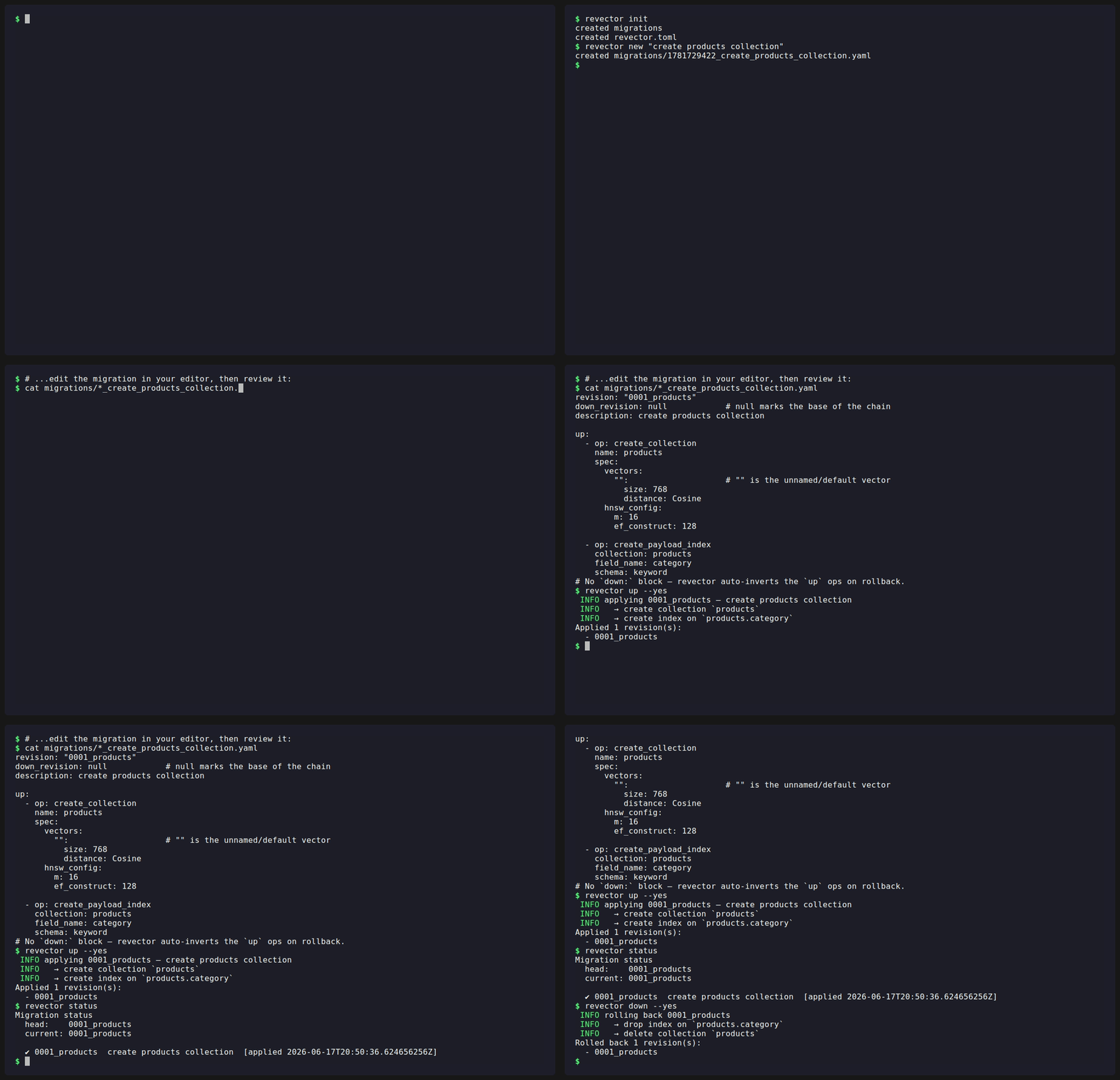
revector brings ordered, reversible, database-tracked migrations to Qdrant — the piece that, unlike for relational databases, didn't exist yet. You write declarative YAML migrations, commit them next to your code, and apply or roll them back with a single static binary. No Python venv, no external state store.
Schema, not data. revector manages collection schema and config — collections, payload indexes, named vectors, aliases, and all tunable knobs. Moving points between instances is a solved problem (see
qdrant/migration); that's explicitly out of scope. The one data operation revector does help with — re-embedding — is handled through an exec-hook.
📖 Full docs: https://diegoglozano.github.io/revector/
Qdrant compatibility
revector tracks Qdrant closely. Each release pins to — and is tested against — a
specific Qdrant server line, kept in lockstep with the qdrant-client crate:
| revector | qdrant-client crate |
Qdrant server (tested) |
|---|---|---|
| 0.2.x | 1.18 | 1.18.x (CI runs v1.18.2) |
How this stays current. A weekly
qdrant-compat CI job re-runs the full
integration suite against qdrant/qdrant:latest. When a new Qdrant version ships
and that job stays green, we bump the qdrant-client crate, the pinned server
tag, and this table together; if it goes red, the new version needs code changes
first. Dependabot proposes the matching qdrant-client bump as its own PR. The
pinned server version lives in SUPPORTED_QDRANT_VERSION (tests/integration.rs)
and can be overridden with the REVECTOR_QDRANT_VERSION env var when running the
tests locally.
Install
Once a release is cut, prebuilt binaries for Linux, macOS, and Windows are attached to each GitHub Release by cargo-dist, with installers:
# Shell (Linux/macOS) — downloads the right prebuilt binary
|
# Windows (PowerShell)
Or build from source (requires Rust 1.82+):
Homebrew and crates.io are planned — see ROADMAP.md.
Quick start
# 1. Scaffold a config + migrations/ directory
# 2. Create your first migration
# → migrations/1718480000_create_products_collection.yaml
# 3. Edit the file (see the format below), then apply
# 4. Inspect state
# 5. Roll back the last migration
Migration files
A migration is a YAML file with a revision id, a link to its parent, and up /
optional down operation lists. Each operation names itself with an op: key.
revision: "0001_products"
down_revision: null            # null marks the base of the chain
description: create products collection

up:
  - op: create_collection
    name: products
    spec:
      vectors:
        "":                    # "" is the unnamed/default vector
          size: 768
          distance: Cosine
      hnsw_config:
        m: 16
        ef_construct: 128

  - op: create_payload_index
    collection: products
    field_name: category
    schema: keyword

# Optional. If omitted, revector auto-inverts the `up` ops in reverse order
# and refuses the downgrade if any step is irreversible.
down:
  - op: delete_collection
    name: products
Supported operations
op: |
Effect | Auto-reversible? |
|---|---|---|
create_collection |
Create a collection from a full spec | ✔ → delete_collection |
delete_collection |
Drop a collection | ✘ (data loss) |
update_collection |
Patch hnsw_config, quantization_config, optimizers_config, or per-vector params in place |
✘ (prior state unknown) |
create_vector |
Add a named dense vector (Qdrant v1.18+) | ✔ → delete_vector |
create_sparse_vector |
Add a named sparse vector | ✔ → delete_vector |
delete_vector |
Drop a named vector | ✘ (data loss) |
create_payload_index |
Index a payload field | ✔ → delete_payload_index |
delete_payload_index |
Remove a payload index | ✔ iff schema: is given |
create_alias |
Point an alias at a collection | ✔ → delete_alias |
delete_alias |
Remove an alias | ✘ (target unknown) |
switch_alias |
Atomically repoint an alias (zero-downtime swap) | ✘ (prior target unknown) |
exec |
Run a shell command (the re-embedding escape hatch) | ✘ unless down provided |
Each operation page links to a runnable example and the full list of spec
fields. The shapes referenced above (CollectionSpec, VectorSpec,
HnswConfigSpec, QuantizationSpec, …) are documented on the
Specs page.
Commands
| Command | Description |
|---|---|
revector init |
Create migrations/ and a starter revector.toml. |
revector new <name> |
Scaffold a new migration chained onto the current head. |
revector status |
Show applied vs pending revisions, checksums, and reversibility. |
revector up [--to <rev>] [--dry-run] |
Apply pending migrations. |
revector down [--to <rev>] [--steps N] [--dry-run] |
Roll back migrations. |
revector to <rev> [--dry-run] |
Migrate to an exact revision (up or down). |
revector validate |
Parse all migrations and resolve the chain offline — no Qdrant connection. |
revector stamp <rev|head|base> [--dry-run] |
Mark the DB as being at a revision without running any ops. |
revector diff <collection> --spec <file.yaml> |
Compare a declared collection spec against the live collection. |
Full command, configuration, and flag reference: https://diegoglozano.github.io/revector/reference/commands.html.
More
- Quick start
- Migration files
- Operations reference
- Specs
- Drift detection (
diff) - Re-embedding (the exec-hook)
- Adopting an existing collection
- CI/CD integration
- How state is tracked
- Security & supply chain
- Development
License
Licensed under either of MIT or Apache-2.0 at your option.