
Repartee
A modern terminal IRC client built with Rust, Ratatui, and Tokio.
Inspired by irssi. Designed for the future.




Demo
Terminal, mobile web, and desktop web — all in real-time sync:
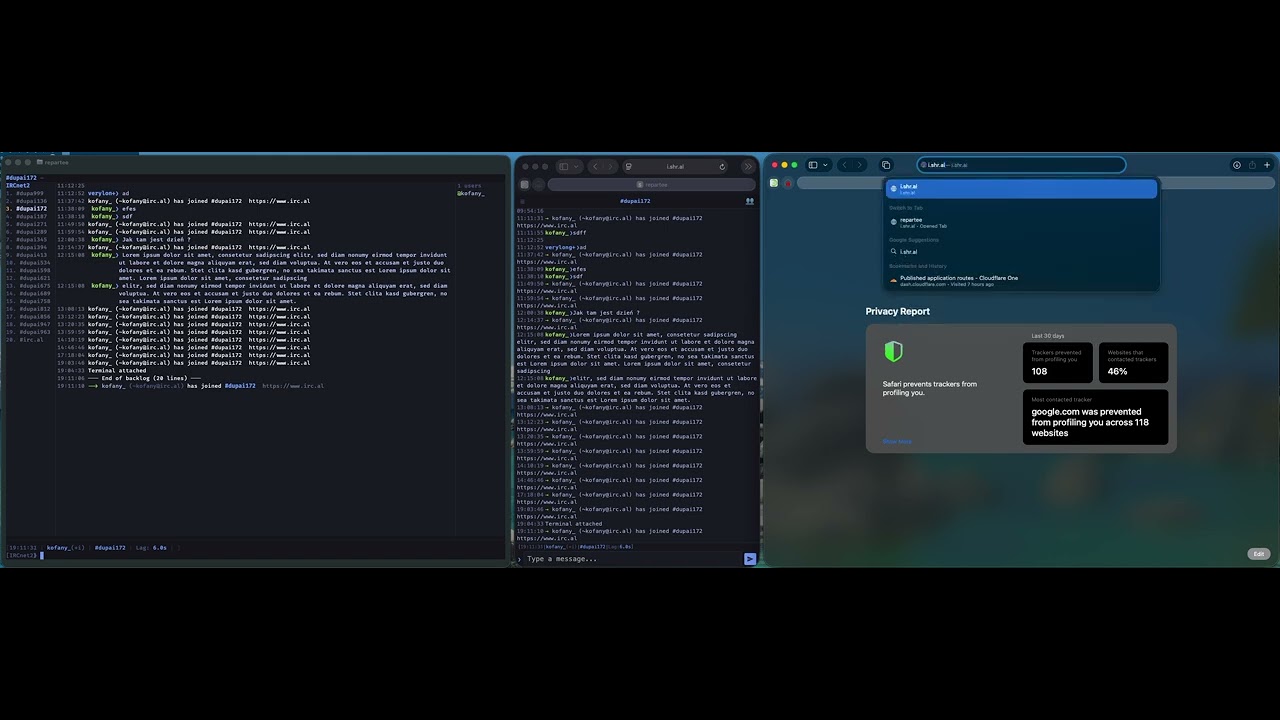
TUI (left) | Mobile web (center) | Desktop web (right) — 1:1 state sync across all interfaces.
Features
- Full IRC protocol — channels, queries, CTCP, TLS, channel modes, ban/except/invex lists
- IRCv3 — server-time, echo-message, away-notify, account-notify, chghost, multi-prefix, BATCH netsplit grouping, message-tags, and more
- SASL — PLAIN, EXTERNAL (client certificate), and SCRAM-SHA-256
- irssi-style navigation — Esc+1–9 window switching, aliases, familiar
/commands - Mouse support — click buffers and nicks, scroll chat history
- Lua 5.4 scripting — event bus, custom commands, full IRC and state access, sandboxed per-script environments
- Persistent logging — SQLite with WAL, FTS5 full-text search, optional AES-256-GCM encryption
- Netsplit detection — batches join/part floods into single events
- Flood protection — blocks CTCP spam and nick-change floods automatically
- Nick coloring — deterministic per-nick colors (WeeChat-style) with HSL hue wheel for truecolor, 256-color and 16-color fallbacks, auto-detected terminal capability, configurable saturation/lightness
- Theming — irssi-compatible format strings with 24-bit color support and custom abstracts
- Web frontend — built-in HTTPS web UI with mobile support, real-time sync with the terminal, swipe gestures, 5 themes
- DCC CHAT — direct client-to-client messaging with active and passive (reverse) connections
- Spell check — inline correction with Hunspell dictionaries, multilingual, Tab to cycle suggestions, computing/IT dictionary with 7,400+ terms, replace and highlight modes
- Embedded shell — full PTY terminal inside Repartee (
/shell) — run vim, btop, irssi without leaving the client. Also available in the web frontend via beamterm WebGL2 renderer with Nerd Font, mouse selection, Ctrl+/- font resize, and clipboard paste - Detach & reattach — detach from your terminal and reattach later; IRC connections stay alive
- Extban —
$a:accountban type with/ban -ashorthand - Single binary — ~20MB (SQLite, Lua, and WASM frontend bundled). Runtime dependency:
libchafa(image rendering)
Installation
Pre-built binaries
Download from GitHub Releases:
| Platform | Binary |
|---|---|
| macOS ARM64 | repartee-macos-arm64.tar.gz |
| Linux x86_64 | repartee-linux-amd64.tar.gz |
| Linux ARM64 | repartee-linux-arm64.tar.gz |
| FreeBSD x86_64 | repartee-freebsd-amd64.tar.gz |
From crates.io
From source
Requirements
- Runtime:
libchafa>= 1.8.0 (image rendering) —brew install chafa/apt install libchafa-dev/pkg install chafa - Build: Rust 1.85+ (2024 edition) — install via rustup
- A terminal with 256-color or truecolor support (iTerm2, Alacritty, kitty, WezTerm, Ghostty, Subterm, etc.)
- A modern web browser for the web frontend (optional)
Quick Start
Launch repartee:
Add a server and connect:
/server add libera irc.libera.chat
/connect libera
/join #repartee
Or edit ~/.repartee/config.toml directly:
[]
= "Libera"
= "irc.libera.chat"
= 6697
= true
= true
= ["#repartee"]
Key Bindings
| Key | Action |
|---|---|
Esc + 1–9 |
Switch to buffer |
Ctrl+N / Ctrl+P |
Next / previous buffer |
Tab |
Nick completion |
Up / Down |
Input history |
Mouse click |
Select buffer or nick |
Mouse wheel |
Scroll chat |
Ctrl+] |
Exit shell input mode |
Ctrl+Z |
Detach from terminal |
/detach or /dt |
Detach from terminal |
Directory Layout
~/.repartee/
  config.toml        # main configuration
  .env               # credentials (SASL passwords, log encryption key)
  themes/            # custom .theme files
  scripts/           # Lua scripts
  logs/messages.db   # chat logs (SQLite)
  sessions/          # Unix sockets for detached sessions
Sessions & Detach
repartee can run in the background while you close your terminal:
# Detach: press Ctrl+Z or type /detach — terminal is restored
# Reattach from any terminal:
# Or start headless (no terminal needed):
Everything survives detach — IRC connections, scrollback, scripts, and channel state.
Scripting
Scripts are Lua 5.4 files placed in ~/.repartee/scripts/:
meta =
Load at runtime:
/script load hello
Or autoload in config:
[]
= ["hello"]
Theming
Themes are TOML files in ~/.repartee/themes/ using irssi-compatible format strings with 24-bit color extensions:
[]
= "1a1b26"
= "a9b1d6"
= "e0af68"
= "7aa2f7"
[]
= "{pubmsgnick $0}$1"
= "{ownmsgnick $0}$1"
Set the active theme:
[]
= "mytheme"
Documentation
Full documentation is available at repart.ee/docs.
- Installation
- Quick Start
- Configuration
- Themes
- Commands
- Web Frontend
- Sessions & Detach
- Lua Scripting
- Lua API Reference
- Logging & Search
License
MIT — see LICENSE.