# rendercsv
Command line tool to quicky get picture from CSV file, manually specifyig cell dimensions. Main use case is to create create animated tables from a series of CSV files (obtained e.g. using `qsv partition --drop`).
## Features
* Rotating specific cells (to economize horizontal space in header row)
* Setting colour of specific cells (to emulate conditional formatting)
## Limitations
* Table geometry is not calculated. You need to specify a number of command line parameters for the table to looks OK.
* Text alignment is fixed.
* Default font is lean. Specify custom font to render more text.
## Cell text prefixes
Text in a cell is parsed for the following prefixes:
* `rot:` - rotate this cell
* `l=N:` - set cell background colour lightness to N
* `s=N:` - set cell background colour saturation to N
* `h=N:` - set cell background colour hue to N
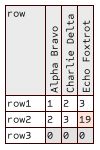
## Example
```
$ cat test.csv
row,rot:Alpha Bravo,rot:Charlie Delta,rot:Echo Foxtrot
row1,1,2,3
row2,2,3,h=30:s=40:19
row3,l=90:0,l=90:0,l=90:0
$ rendercsv test.csv test2.png --first-column-width 40 --column-width 16 --first-row-height 90 -W 100 -H 150
```
## Installation
Download a pre-built executable from [Github releases](https://github.com/vi/rendercsv/releases) or install from source code with `cargo install --path .` or `cargo install rendercsv`.
## CLI options
<details><summary> rendercsv --help output</summary>
```
Usage: rendercsv [OPTIONS] <INPUT_CSV> <OUTPUT_PNG>
Arguments:
<INPUT_CSV>
<OUTPUT_PNG>
Options:
-W, --width <WIDTH>
[default: 1280]
-H, --height <HEIGHT>
[default: 720]
--font <FONT>
font file (ttf) to render legend text. Default is embedded font Dharma Type Sometype Mono
-s, --font-scale <FONT_SCALE>
Text size [default: 12.0]
-Y, --first-row-height <FIRST_ROW_HEIGHT>
[default: 60]
-y, --row-height <ROW_HEIGHT>
[default: 16]
-X, --first-column-width <FIRST_COLUMN_WIDTH>
[default: 80]
-x, --column-width <COLUMN_WIDTH>
[default: 60]
-h, --help
Print help
```
</details>
