# C++ quick start
## Installing the Rerun Viewer
The Rerun C++ SDK works by connecting to an awaiting Rerun Viewer over TCP.
If you need to install the viewer, follow the [installation guide](https://www.rerun.io/docs/getting-started/installing-viewer). Two of the more common ways to install the Rerun are:
* Via cargo: `cargo install rerun-cli`
* Via pip: `pip install rerun-sdk`
After you have installed it, you should be able to type `rerun` in your terminal to start the viewer.
## Using the Rerun C++ SDK with CMake
```cmake
include(FetchContent)
FetchContent_Declare(rerun_sdk URL
https://github.com/rerun-io/rerun/releases/latest/download/rerun_cpp_sdk.zip)
FetchContent_MakeAvailable(rerun_sdk)
```
This will download a bundle with pre-built Rerun C static libraries for most desktop platforms,
all Rerun C++ sources and headers, as well as CMake build instructions for them.
By default this will in turn download & build [Apache Arrow](https://arrow.apache.org/)'s C++ library which is required to build the Rerun C++.
To learn more about how Rerun's CMake script can be configured, see [CMake Setup in Detail](https://ref.rerun.io/docs/cpp/stable/md__2home_2runner_2work_2rerun_2rerun_2rerun__cpp_2cmake__setup__in__detail.html) in the C++ reference documentation.
Make sure you link with `rerun_sdk`:
```cmake
target_link_libraries(your_executable PRIVATE rerun_sdk)
```
### Logging your own data
Put the following code to your `main.cpp`:
```cpp
${EXAMPLE_CODE_CPP_SPAWN}
```
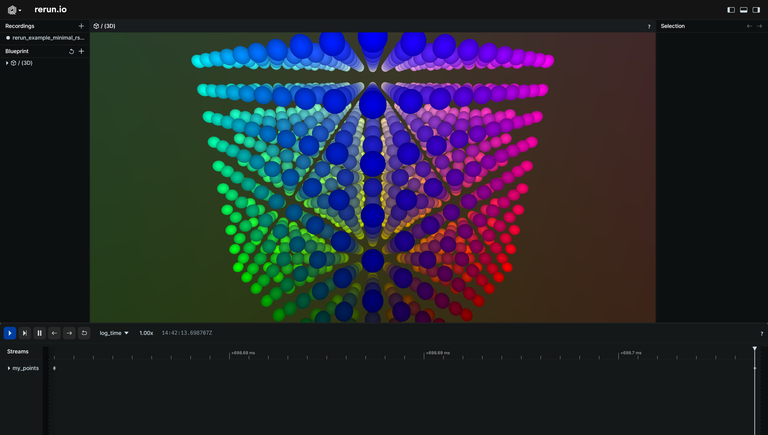
Build and run your C++ program; you should see the points in this viewer:
${HOW_DOES_IT_WORK}