
RavenRS
Beautiful native interfaces, powered by Rust.
One declarative UI, drawn on the GPU, in a native window on Windows, macOS and Linux, and in the browser through WebAssembly + WebGPU.
Live gallery · Getting started · API docs · Components · Parity tracker · Architecture · Contributing



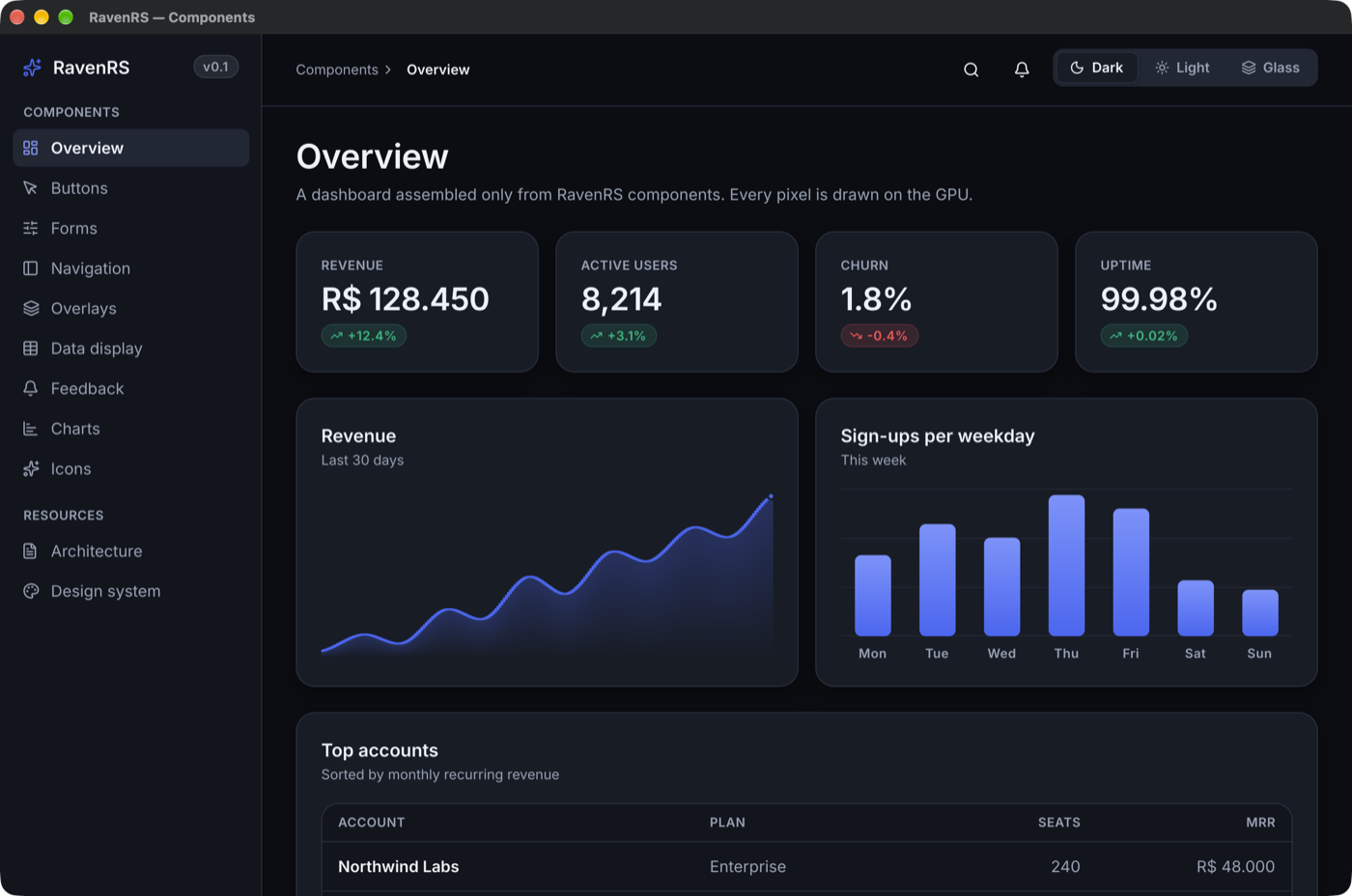
RavenRS is a free, open source GUI framework for Rust with a large component library: 60+ components including a virtualized DataGrid for 100,000+ rows, an Office-style Ribbon, a command palette, calendars, menus, dialogs, charts and 200 icons. Everything is drawn by RavenRS itself with wgpu, so the same code looks the same on the desktop and on the web.
Versions follow the component-vendor model:
YY.R.P, with new features in.2and monthly fixes. Until 28.1.0 any release may hold breaking changes, so pin an exact version if that matters to you; from then on they come only in each year's.1(docs/VERSIONING.md). The current line, 26.x, is young: docs/QUALITY.md lists what is still missing. docs/PARITY.md tracks every component family of shadcn/ui, DevExpress and Telerik and where RavenRS stands.
Why RavenRS
- One UI, every platform. Desktop windows and a browser
<canvas>share the renderer, the layout engine and every component. No webview, no DOM widgets. - Declarative and reactive. Compose views with typed builders.
State<T>knows who reads it, so a change redraws only when something on screen depends on it, and an idle app uses no CPU or GPU. - Beautiful by default. Three themes (Raven Dark, Raven Light, Raven Glass) built from semantic design tokens, with text contrast checked against WCAG AA in the test suite.
- Batteries included. Data grid, ribbon, date pickers, command palette, toasts, context menus, splitters, carousels, forms with validation and more, all keyboard-operable.
- Built to be extended. Your components use the same public API as the built-in ones, from a simple
Componentto a fully customViewthat draws, scrolls, opens overlays and handles input.
Quick start
Add RavenRS from crates.io:
Write your UI:
use *;
The getting started guide covers the browser build, state, components of your own, themes and the data grid.
Components
| Group | Components |
|---|---|
| Inputs | Button (4 styles, 3 sizes, icons), IconButton, ToggleButton, ToggleGroup, TextField, Select, Combobox, Checkbox, RadioGroup, Toggle, Slider, Stepper, ThemePicker, ThemeEditor, TextArea, NumberField, MaskedField, TimePicker, DateTimePicker, LookupField, TagBox, ColorPicker, FileUpload, ImageField, FormLayout, FilterBuilder, Wizard, Toolbar, SplitButton, ConfirmDialog, SegmentedControl, InputOtp, Calendar, DatePicker, DateRangePicker, EventCalendar, Scheduler, RecurrenceEditor, ThemeSwitcher |
| Forms | FormField with validate::{required, email, min_length} and custom rules, Label |
| Navigation | Ribbon, Menubar, Tabs, Sidebar, Breadcrumb, Pagination, Disclosure, Accordion, CommandPalette (⌘K) |
| Overlays | Dialog, Sheet, SplashScreen, Popover, HoverCard, Tooltip, DropdownMenu, ContextMenu, Toaster |
| Data | TreeView, CardView, DataGrid (virtualized; multi-sort, filter row, search, grouping, summaries, resize, column chooser, selection, editing, templates, CSV export), Table, List, Stat, Chart (line, area, bar, pie, doughnut, scatter, sparkline), BarChart, AreaChart, Barcode (QR Code and linear codes) |
| Layout | TileLayout, VStack, HStack, Grid, ScrollView, Splitter, Card, GlassCard, Section, AspectRatio, Spacer, Footer, StatusBar, ToolRail, responsive, and .padding(), .background(), .frame(), .grow() on any view |
| Media and feedback | Image (PNG/JPEG), Icon (200 Lucide icons), Carousel, Avatar, Badge, Alert, ProgressBar, Spinner, Skeleton, Kbd, Divider, Canvas, CodeBlock, ReleaseNotes, Timeline |
Training and support (ravenrs::movie) |
Recorder, MoviePlayer, MovieAssistant, MovieChat, MovieEditor, FlightRecorder, BugReporter: vector films of the app that ship inside it, edited on a timeline, and bug reports that show what happened |
Every component is in examples/component-gallery, which runs natively and in your browser. For a whole app, see examples/family-finance: family expenses and bills to pay on SQLite, with reports.
Your own components
use *;
/// State lives in the struct; `body` composes views and runs on every rebuild.
Need full control? Implement View and use BuildCx: layout boxes, any drawing through Paint::Custom, per-instance state with cx.use_state, floating layers with cx.overlay, virtualized scrolling, timers with cx.wake_at, and input through on_click, on_key, on_drag, on_context_menu and shortcut. Every built-in component is written this way.
Run the examples
Requirements: Rust stable 1.88+. For the browser: the wasm32-unknown-unknown target and wasm-bindgen-cli 0.2.130 (it must match the crate version).
&&
Then open http://localhost:8080 in a browser with WebGPU (Chrome, Edge, Safari 18+, or Firefox with WebGPU enabled). Without WebGPU, the page explains what is missing.
AI assistants
RavenRS ships a skill and an MCP server so coding assistants write against the real API instead of guessing it.
- The skill teaches how to compose screens, use tokens instead of literal values, meet the quality bar and build for the web.
- The MCP server (
ravenrs-mcp) is read-only and works offline. It lists components, shows their API and real examples, looks up design tokens, reports parity status and validates expressions.
Install the server, then add the Claude Code plugin, which brings both:
For other MCP clients, configure the command ravenrs-mcp over stdio. The skill is a plain file: plugins/ravenrs/skills/ravenrs/SKILL.md.
Crates
| Crate | What it does |
|---|---|
ravenrs |
The facade and prelude. Start here. |
ravenrs-widgets |
Every component, the View/Component/BuildCx API and the Ui runtime. |
ravenrs-reactive |
State, Binding, Derived and dependency-tracking observers. |
ravenrs-style |
Design tokens and the Raven Dark, Light and Glass themes. |
ravenrs-layout |
Flexbox and grid layout on Taffy. |
ravenrs-text |
Text with Parley; Inter and the icon font embedded. |
ravenrs-render |
The wgpu renderer: SDF shapes, shadows, gradients, images, glyph atlas, clipping. |
ravenrs-core |
Geometry, colors, input events and the Scene display list. |
ravenrs-platform-native |
Desktop windows with winit. |
ravenrs-platform-web |
<canvas> + WebGPU in the browser. |
ravenrs-mcp |
A read-only MCP server for coding assistants. A tool, not a dependency of your app. |
Roadmap
- Application framework, in progress: declare a record and get its screens. See docs/APP-FRAMEWORK.md.
- Reporting: the engine, the report designer, PDF, XLSX and CSV export, and a report server with scheduled delivery are here. Next: subreports and a table of contents. See docs/REPORTING.md.
- DataGrid parity: frozen columns, drag reordering and drag-to-group, header filters, master-detail.
- Vector paths for line and pie charts and gauges, and backdrop blur for Raven Glass.
- Platform: IME composition display, right-to-left layout.
- Motion: rotation and true group opacity, which need transforms and layers in the renderer.
See docs/PARITY.md for the full list and CHANGELOG.md for what changed.
Contributing
Issues, ideas and pull requests are welcome. CONTRIBUTING.md explains how to build, test and add a component. Please follow the code of conduct.
License
Licensed under either of Apache License 2.0 or MIT, at your option. The embedded Inter font is under the SIL Open Font License 1.1; the icons come from Lucide under the ISC License.
Unless you state otherwise, any contribution you submit is dual-licensed as above, without additional terms.