1
2
3
4
5
6
7
8
9
10
11
12
13
14
15
16
17
18
19
20
21
22
23
24
25
26
27
28
29
30
31
32
33
34
35
36
37
38
39
40
41
42
43
44
45
46
47
48
49
50
51
52
53
54
55
56
57
58
59
60
61
62
63
64
65
66
67
68
69
70
71
72
73
74
75
76
77
78
79
80
81
82
83
84
85
86
87
88
89
90
91
92
93
94
95
96
97
98
99
100
101
102
103
104
105
106
107
108
109
110
111
112
113
114
115
116
117
118
119
120
121
122
123
124
125
126
127
128
129
130
131
132
133
134
135
136
137
138
139
140
141
142
143
144
145
146
147
148
149
150
151
152
153
154
155
156
157
158
159
160
161
162
163
164
165
166
167
168
169
170
171
172
173
174
175
176
177
178
179
180
181
182
183
184
185
186
187
188
189
190
191
192
193
194
195
196
197
198
199
200
201
202
203
204
205
206
207
208
209
210
211
212
213
214
215
216
217
218
219
220
221
222
223
224
225
226
227
228
229
230
231
232
233
234
235
236
237
238
239
240
241
242
243
244
245
246
247
248
249
250
251
252
253
254
255
256
257
258
259
260
261
262
263
264
265
266
//! A module for generic representation of image.
// from rust
use std::collections::HashMap;
// from external crate
// from local crate
use error::{RasterError, RasterResult};
use color::Color;
/// A struct for easily representing a raster image.
#[derive(Debug, Clone)]
pub struct Image {
/// Width of image in pixels.
pub width: i32, // i32 type is used as computation with negative integers is common.
/// Height of image in pixels.
pub height: i32,
/// Vector containing sequence of bytes in RGBA format.
pub bytes: Vec<u8>,
}
impl<'a> Image {
/// Create a blank image. Default color is black.
///
/// # Examples
///
/// ```
/// use raster::Image;
///
/// let image = Image::blank(2, 2);
///
/// println!("{:?}", image.bytes);
///
/// assert_eq!(image.width, 2);
/// assert_eq!(image.height, 2);
/// ```
pub fn blank(w:i32, h:i32) -> Image {
let mut bytes = Vec::with_capacity((w * h) as usize * 4);
for _ in 0..h {
for _ in 0..w {
bytes.extend_from_slice(&[0, 0, 0, 255]);
}
}
Image {
width: w,
height: h,
bytes: bytes
}
}
/// Check if there is a pixel at this location given by x and y.
///
/// # Examples
///
/// ```
/// use raster::Image;
///
/// let image = Image::blank(2, 2);
///
/// assert_eq!(image.check_pixel(0, 0), true);
/// assert_eq!(image.check_pixel(3, 3), false);
/// ```
pub fn check_pixel(&self, x: i32, y:i32) -> bool {
if y < 0 || y > self.height { // TODO: check on actual vectors and not just width and height?
false
} else {
!(x < 0 || x > self.width)
}
}
/// Get the histogram of the image.
///
/// # Examples
///
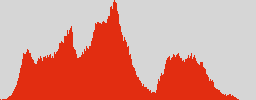
/// Visualizing the histogram of the red channel of this image:
///
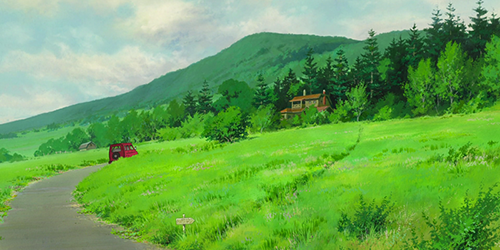
/// Image:
///
/// 
///
/// Code:
///
/// ```
/// use raster::Image;
/// use raster::Color;
///
/// let image = raster::open("tests/in/sample.png").unwrap();
///
/// let (r_bin, _, _, _) = image.histogram().unwrap();
///
/// let mut max_r_bin = 0;
/// for (_, count) in &r_bin {
/// if *count > max_r_bin {
/// max_r_bin = *count;
/// }
/// }
///
/// let canvas_w = 256;
/// let canvas_h: i32 = 100;
/// let mut image = Image::blank(canvas_w, canvas_h);
/// raster::editor::fill(&mut image, Color::rgb(214, 214, 214)).unwrap();
///
/// for x in 0..256 as i32 { // 0-255
/// let key = x as u8;
/// match r_bin.get(&key) {
/// Some(count) => {
///
/// let height = (canvas_h as f32 * (*count as f32 / max_r_bin as f32)).round() as i32;
///
/// for y in canvas_h-height..canvas_h {
///
/// image.set_pixel(x, y, Color::hex("#e22d11").unwrap()).unwrap();
///
/// }
/// },
/// None => {}
/// }
/// }
///
/// raster::save(&image, "tests/out/histogram.png").unwrap();
/// ```
///
/// Histogram:
///
/// 
///
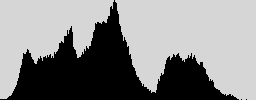
/// Photoshop's result:
///
/// 
///
pub fn histogram(&self) -> RasterResult<Histogram> {
let w = self.width;
let h = self.height;
let mut r_bin: HashMap<u8, u32> = HashMap::new();
let mut g_bin: HashMap<u8, u32> = HashMap::new();
let mut b_bin: HashMap<u8, u32> = HashMap::new();
let mut a_bin: HashMap<u8, u32> = HashMap::new();
for y in 0..h {
for x in 0..w {
let pixel = try!(self.get_pixel(x, y));
let r_bin_c = r_bin.entry(pixel.r).or_insert(0); // Insert the key with a value of 0 if key does not exist yet. Then return the count (which is zero).
*r_bin_c += 1; // +1 to the count.
let g_bin_c = g_bin.entry(pixel.g).or_insert(0);
*g_bin_c += 1;
let b_bin_c = b_bin.entry(pixel.b).or_insert(0);
*b_bin_c += 1;
let a_bin_c = a_bin.entry(pixel.a).or_insert(0);
*a_bin_c += 1;
}
}
Ok((r_bin, g_bin, b_bin, a_bin))
}
/// Get pixel in a given x and y location of an image.
///
/// # Errors
///
/// If either the x or y coordinate falls out of bounds, this will fail with
/// `RasterError::PixelOutOfBounds`.
///
/// # Examples
///
/// ```
/// use raster::Image;
/// use raster::Color;
///
/// let mut image = Image::blank(2, 2); // Creates a 2x2 black image.
///
/// let pixel = image.get_pixel(0, 0).unwrap();
///
/// assert_eq!(0, pixel.r);
/// assert_eq!(0, pixel.g);
/// assert_eq!(0, pixel.b);
/// assert_eq!(255, pixel.a);
/// ```
pub fn get_pixel(&self, x: i32, y:i32) -> RasterResult<Color> {
let rgba = 4;
let start = (y * self.width) + x;
let start = start * rgba;
let end = start + rgba;
let len = self.bytes.len();
if start as usize > len || end as usize > len {
Err(RasterError::PixelOutOfBounds(x, y))
} else {
let slice = &self.bytes[start as usize..end as usize];
Ok(Color {
r: slice[0],
g: slice[1],
b: slice[2],
a: slice[3],
})
}
}
/// Set pixel in a given x and y location of an image.
///
/// # Errors
///
/// If either the x or y coordinate falls out of bounds, this will fail with
/// `RasterError::PixelOutOfBounds`.
///
/// If the calculated byte start index is less than 0, this will fail with
/// `RasterError::InvalidStartIndex`.
///
/// # Examples
///
/// ```
/// use raster::Image;
/// use raster::Color;
///
/// let mut image = Image::blank(2, 2); // Creates a 2x2 black image.
///
/// let _ = image.set_pixel(0, 0, Color::rgba(255, 0, 0, 255)); // Set first pixel to red
///
/// let pixel = image.get_pixel(0, 0).unwrap();
///
/// assert_eq!(255, pixel.r);
/// assert_eq!(0, pixel.g);
/// assert_eq!(0, pixel.b);
/// assert_eq!(255, pixel.a);
/// ```
pub fn set_pixel(&mut self, x: i32, y:i32, color: Color ) -> RasterResult<()> {
let rgba = 4; // length
let start = (y * &self.width) + x;
let start = start * rgba;
if x >= self.width || y >= self.height {
Err(RasterError::PixelOutOfBounds(x, y))
} else if start < 0 {
Err(RasterError::InvalidStartIndex(start))
} else {
self.bytes[start as usize] = color.r;
self.bytes[start as usize + 1] = color.g;
self.bytes[start as usize + 2] = color.b;
self.bytes[start as usize + 3] = color.a;
Ok(())
}
}
}
/// Holds histogram information.
pub type Histogram = (HashMap<u8, u32>, HashMap<u8, u32>, HashMap<u8, u32>, HashMap<u8, u32>);
/// Enumeration of supported raster formats.
#[derive(Debug)]
pub enum ImageFormat {
Gif,
Jpeg,
Png,
}