<div align="center">
<img alt="Ranim Logo" src="./assets/ranim.png" width="200" height="200" />
# Ranim
<div>
<img alt="license" src="https://img.shields.io/github/license/AzurIce/ranim" />
<img alt="crates.io" src="https://img.shields.io/crates/v/ranim.svg" />
<img alt="commit" src="https://img.shields.io/github/commit-activity/m/AzurIce/ranim?color=%23ff69b4">
</div>
<div>
<img alt="build check" src="https://github.com/AzurIce/ranim/actions/workflows/build.yml/badge.svg" />
<img alg="website check" src="https://github.com/AzurIce/ranim/actions/workflows/website.yml/badge.svg" />
</div>
<div>
<img alt="stars" src="https://img.shields.io/github/stars/AzurIce/ranim?style=social">
</div>
</div>
<div style="display: flex;">
<img alt="hello_ranim" src="./assets/hello_ranim.gif" width="48%" />
<img alt="ranim_logo" src="./assets/ranim_logo.gif" width="48%" />
</div>
> [examples/hello_ranim](./examples/hello_ranim)
>
> [examples/ranim_logo](./examples/ranim_logo)
Ranim is an animation engine crate implemented in pure rust, inspired heavily by [Manim](https://github.com/3b1b/manim/tree/master) and [jkjkil4/JAnim](https://github.com/jkjkil4/JAnim).
> [!WARNING]
> Ranim is now WIP. It only supports some basic *items* and *animations*, the apis are unstable and may change frequently, the documentation is also not complete.
## Dependencies
Runtime dependencies:
- ffmpeg: encode videos
Ranim will try to use ffmpeg from system's path environment variable first, if no ffmpeg is found, ranim will automatic download ffmpeg to the current working dir.
## Installation
Currently, it is experimental on crates.io:
```toml
[dependencies]
ranim = "0.1.4"
```
You can also use from git for the latest updates:
```toml
[dependencies]
ranim = { git = "https://github.com/azurice/ranim" }
```
For the usage, check out the [examples](./examples) folder. You can run the examples with:
```bash
cargo run --example <example-name>
```
and you can use `--release` flag for faster rendering.
### Ranim Cli
Ranim cli is a command line tool to help you build the animation. It enables animation previewing with hot reload through dylib.
Please notice that you can use ranim without ranim-cli, the previewing and rendering process can be achieved by simply invoking apis provided by *ranim*, but it may enhance your experience.
You can install it with:
```bash
cargo install ranim-cli
```
Or install from git:
```bash
cargo install --git https://github.com/azurice/ranim
```
Basic Usage:
- `ranim preview`: Launch a preview app and invoke cargo to build your library automatically when the source code is changed, then reload it through *libloading* and show it in the preview app.
- `ranim render[ <scene-name>]`: Render scene's output, when no scene name is specified, render all scenes.
You can specify the package with `--package` (just like cargo), and other aditional arguments you want to pass to `cargo build` can be passed after `--`.
For example:
```bash
ranim render -p xxx scene_a scene_b -- --release
```
## Feature Flags
- `app`: enable the preview app api
use `preview` or `run_scene_app` API to launch an preview app on a scene
https://github.com/user-attachments/assets/5bf287e2-b06f-42f8-83b6-76f3775e298e
- `profiling`: enable profiling with https://github.com/EmbarkStudios/puffin
CPU uses `127.0.0.1:8585` and GPU uses `127.0.0.1:8586`

## Design
Once the design is stablized, I may write about it.
For now, you can check out the code.
## Aknowledgements
- [3b1b/manim](https://github.com/3b1b/manim)
- [ManimCommunity/manim](https://github.com/ManimCommunity/manim/)
- [jkjkil4/JAnim](https://github.com/jkjkil4/JAnim)
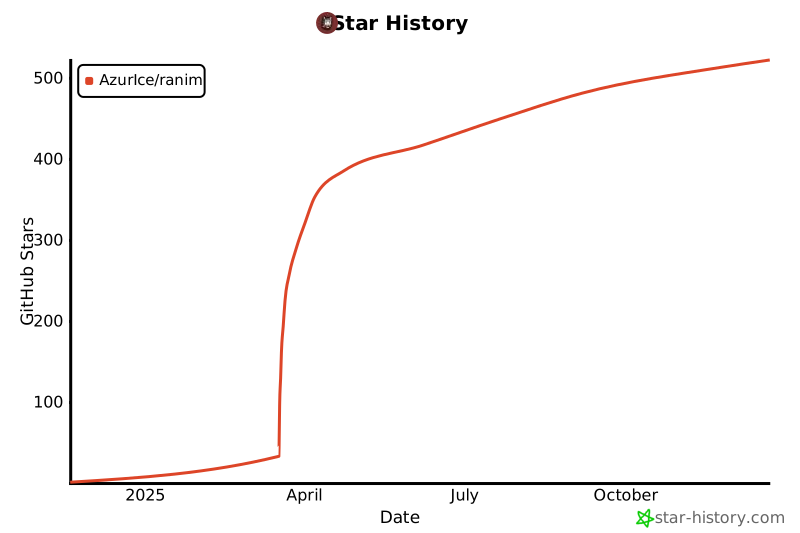
## Star History
[](https://www.star-history.com/#AzurIce/ranim&Date)