


randpaper
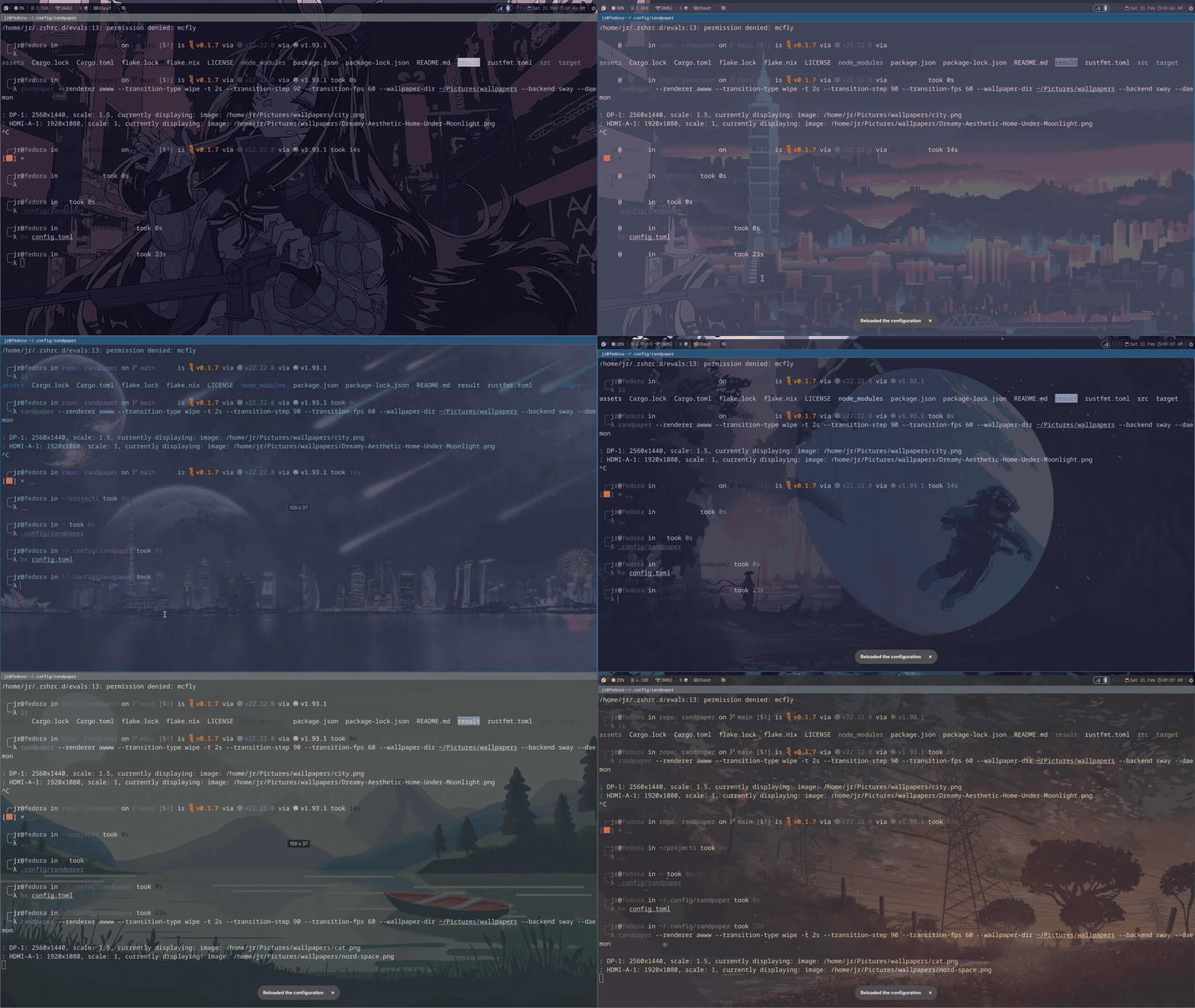
Fast per-monitor wallpaper rotation + optional theme syncing for Wayland (Sway/Hyprland/MangoWM).
randpaper caches your wallpaper list once, picks random images per output, and
can optionally generate theme files (terminals + Waybar) from the current
wallpaper.
🚀 Features
-
⚡ Performance: Written in Rust using
tokio. Scans your image directory once into memory (caching paths) to prevent disk I/O spikes, even with massive wallpaper collections. -
🎨 Dynamic Theming: Automatically extracts dominant colors from the current wallpaper and generates config files for Ghostty, Kitty, and Foot, keeping your terminal in sync with your desktop.
- Waybar Theming: Generates CSS variables based on the image palette.
[!NOTE] Waybar theming: Colors update on the next Waybar restart. Live reload (
SIGUSR2) causes all windows to briefly reflow due to Waybar unmapping its layer surface. (Disabled by default now)
-
🖥️ Multi-Monitor: Assigns a unique random image to every active output simultaneously.
-
🔄 Dual Operating Modes: Run as a background daemon with automatic cycling, or use one-shot mode for manual wallpaper changes.
-
🛠️ Modular Backends: Works seamlessly with Sway ,Hyprland, and MangoWM)) (via Sway IPC ,
hyprctl, ormmsg) and supports bothswaybg,awww, andnativerenderers. -
Support for both
awwwandswwwfor compatibility.
🛠 Installation
Prerequisites
swaybg or (awww / swww) are no longer required, if you want a simple
renderer that's built in, try native.
If you want slick animations and more, choose awww.
# From source
# crates.io
After randpaper and awww are installed, you can ensure that it automatically
detects your monitors and see which transition you like with commands like:
If you're on atomic fedora, it is required to install libxkbcommon-devel.
# Use fade transitions
# Use wipe transitions for hyprland
# Use wipe transitions for mango
Once you find what you like, either add an exec to the chosen command, or
throw the options in a config.toml and simplify the exec greatly.
[!NOTE] It’s safe to use
exec_alwayswithrandpaper --daemon; extra starts exit cleanly if an instance is already running. (Same with from the CLI)
Native Renderer
randpaper includes a built-in Wayland wallpaper renderer written in Rust using
smithay-client-toolkit and wayland-client (no swww or swaybg required).
It creates a zwlr_layer_shell_v1 surface at the background layer and renders
directly via shared memory (wl_shm), one surface per monitor.
[!NOTE] The native renderer is a WIP. It's functional but bare bones, no transitions, no animation. Use
--renderer nativeto opt in.
📚️ Configuration (Optional)
Config file (XDG):
~/.config/randpaper/config.toml
Example:
= "/home/user/Pictures/wallpapers"
= "sway" # "sway" | "hyprland" | "mango"
= "awww" # "swaybg" | "awww" | "native"
= "30m" # used only in daemon mode
# The following only work with awww/swww
= "wipe"
= 90
= 60
# outputs = ["DP-1", "HDMI-A-1"]
Precedence:
- CLI args override
config.toml.
Usage
Command flag table
| Flag | Description | Default |
|---|---|---|
[DIR] |
Directory containing images | . |
-t, --time |
Time between changes(e.g., 15m, 1h) | NA |
--daemon |
Activate daemon-mode, --time also required |
NA |
-w, --wallpaper-dir |
Directory containing wallpaper images | . |
--config |
Directory containing config.toml |
NA |
-b, --backend |
Detection backend: sway or hyprland |
sway |
-o, --outputs |
Specific outputs to target (Sway only) | Auto-discover |
-r, --renderer |
Renderer tool: swaybg or awww |
swaybg |
--transition-type |
swww transition: fade, wipe, outer |
simple |
-s, --transition-step |
swww transition step (0-100) | 90 |
-f, --transition-fps |
swww target frame rate for transitions | 30 |
--transition-type: Choose between (simple,fade,wipe,outer,inner,random)
[!NOTE] All transition options are ignored when using
--renderer swaybgand--renderer native
One-shot (default)
Applies a wallpaper + updates themes once, then exits.
# Runs with settings from `config.toml`
# Without using the `config.toml` any command without both `--daemon` & `--time` set
# are one-shot commands
# or
Recommended one-shot keybinds:
Sway
bindsym $mod+Shift+n exec randpaper
Hyprland
bind = $mainMod SHIFT, N, exec, randpaper
MangoWM
bind=SUPER+SHIFT,N,spawn,randpaper
[!NOTE] For this to work, you need to add
randpaperandawww's PATHS to MangoWM's startup environment. (i.e., add environment variables).
mango/env.conf# ~/.config/mango/env.conf env=PATH,/home/jr/.local/bin:/home/jr/.cargo/bin:/usr/local/bin:/usr/bin:/bin
- Make sure to source it, in your main config add:
source=./env.conf
Daemon mode (--daemon)
Runs continuously and rotates wallpapers on a timer.
Daemon mode Requirements:
-
--daemonmust be provided. -
timemust be set (viaconfig.tomlor--time).
Recommended autostart:
Sway
# With `config.toml`
exec pgrep -x randpaper || randpaper --daemon
# Or something like this without using the config:
exec randpaper -w ~/Pictures/wallpapers -t 5m -r awww --daemon
Hyprland
exec-once = randpaper --daemon
MangoWM
Add the following to your mango/autostart.sh:
randpaper --daemon 2>&1 &
On standard filesystem hierarchy systems you can also force the daemon to cycle without spawning a separate process (there's a guard preventing this anyways):
[!NOTE] Using
pkillcan be hit or miss. Try the new IPC when using the daemon.
Randpaper IPC
IPC
randpaper exposes a Unix socket for runtime control via the randpaper_ipc
crate. The socket is created at
$XDG_RUNTIME_DIR/randpaper/randpaper-<session>.sock on daemon startup.
Commands are sent via randpaper subcommands:
| Command | Effect |
|---|---|
randpaper next |
Cycle to the next wallpaper immediately |
randpaper pause |
Pause automatic cycling |
randpaper resume |
Resume automatic cycling |
randpaper status |
Print current daemon state |
The socket is cleaned up and re-created on each daemon start, so stale sockets from a previous session are handled automatically.
[!IMPORTANT] On sway, use this exec command to prevent multiple daemon instances and ensure
SWAYSOCKis available at startup:exec pgrep -x randpaper || SWAYSOCK=$(ls /run/user/1000/sway-ipc.*.sock 2>/dev/null | head -1) randpaper --daemonThe
SWAYSOCKassignment is necessary because the environment variable may not be inherited when launched from the sway config.
🎨 Automatic Terminal Theming
Now with much more readable themes!!
- WIP, this works best without
zsh-syntax-highlighting.
randpaper automatically extracts a 16-color palette from your wallpaper and
generates theme files in ~/.config/randpaper/themes/.
To use them, add the include line to your terminal config:
Ghostty
File: ~/.config/ghostty/config
config-file = ~/.config/randpaper/themes/ghostty.config
Foot
File: ~/.config/foot/foot.ini (Place near end of file)
[main]
include=~/.config/randpaper/themes/foot.ini
Kitty
File: ~/.config/kitty/kitty.conf
allow_remote_control yes
listen_on unix:/tmp/mykitty
include ~/.config/randpaper/themes/kitty.conf
Add a keybind to your Sway or Hyprland config to start kitty with remote control enabled (Sway example):
$mod+Shift+t exec kitty -o allow_remote_control=yes --listen-on unix:/tmp/mykitty
Live-Reload of Terminal Themes
-
Ghostty: live reload works with either "cycle" keybind (i.e., theme updates immediately with either
pkill -USR1 randpaperfrom either a keybind or the command line or a keybind set toexec randpaper ~/Pictures/wallpapers)(Tested on Fedora with Sway, expect different behavior on NixOS) -
Kitty: live reloads work with the one-shot keybind if you follow the steps above.
-
Foot: the theme file is updated, but existing windows may not live-reload reliably; close and reopen the terminal to pick up the new theme. (Work in Progress)
Waybar
To use randpaper with a waybar setup, ensure you call the daemon via
exec waybar in your Sway or Hyprland config.
(Sway Example ~/.config/sway/config):
exec randpaper --time 15m --wallpaper-dir ~/Pictures/wallpapers --daemon

bar {
    swaybar_command waybar
}
# ---snip---
randpaper automatically generates a Waybar CSS color file from the current
wallpaper palette and writes it to:
~/.config/randpaper/themes/waybar.css
This file only defines color variables (it doesn't change your bar by itself).
To use it, you import it from your Waybar style.css and then reference the
variables in your existing rules.
The theme will be applied on the next Waybar restart.
Example of the generated waybar.css file:
/* auto-generated by randpaper */
@@@@@@@- Import the generated file
At the very top of your Waybar style.css (Change YOUR_USER to your
username):
- Use the variables in your CSS
Replace hard-coded colors with variables like @rp_bg, @rp_fg, @rp_accent,
etc.
Example:
}
}
Obviously, the more hard-coded colors you replace with the dynamically generated CSS variables the more noticeable it will be.
[!NOTE] Just adding the
@importat the top makes the variables available, you need to reference them for the changes to be applied.
- On NixOS, after cycling with one-shot run
pkill -USR2 waybarto apply the new theme. (Causes a flicker)
NixOS
Add as a flake input:
inputs = {
  randpaper.url = "github:saylesss88/randpaper";
};
Install in environment.systemPackages or home.packages:
environment.systemPackages = {
  inputs.randpaper.packages.${pkgs.stdenv.hostPlatform.system}.default
};
- Pass
inputsthroughspecialArgsin yourflake.nix
And add an exec for either hyprland or sway, only for randpaper:
Hyprland Example:
wayland.windowManager.hyprland = {
  settings = {
    exec-once = [
  # Standard Usage
  "randpaper --time 15m /home/your-user/Pictures/wallpapers --backend hyprland --renderer swww"
  # UWSM Usage w/ swaybg
  "uwsm app -- randpaper --time 15m /home/your-user/Pictures/wallpapers --backend hyprland --renderer swaybg"
    ];
  };
}
Sway Example:
wayland.windowManager.sway = {
  extraConfig = ''
    # Default backend is Sway
     exec randpaper --time 30m /home/your-user/wallpapers
  '';
};
Note:
randpapermanages the renderer process for you. You do not need separateexec-once = swaybg ...orexec-once = swww ...lines in your config.
Using the config.toml on NixOS
To use the config file on NixOS you can do something like this:
home.file = {
  ".config/randpaper/config.toml".text = ''
      # ~/.config/randpaper/config.toml
      time = "10m"
      renderer = "awww"
      backend = "hyprland"
      wallpaper_dir = "/home/user/Pictures/Wallpapers"
  '';
};
And now your exec can be simplified to:
exec-once = [
  "randpaper --daemon"
];
Terminal & Waybar Theming on NixOS
GhosTTY
# home.nix or ghostty.nix
programs.ghostty = {
  enable = true;
  settings = {
    # The '?' makes the include optional/non-blocking
    "config-file" = "?~/.config/randpaper/themes/ghostty.config";
  };
};
-
On boot up, the generated theme will be applied.
-
Run the cycle command then type
pkill -USR2 ghosttyto apply the theme instantly.
Kitty (Recommended on NixOS)
programs.kitty = {
  extraConfig = ''
    allow_remote_control yes
    listen_on unix:/tmp/mykitty
    include ~/.config/randpaper/themes/kitty.conf
  '';
};
Add this keybind:
"$mod,T,exec,kitty -o allow_remote_control=yes --listen-on unix:/tmp/mykitty"
# One-Shot for Hyprland
"$mod SHIFT,N,exec, randpaper --backend hyprland /home/Your-User/Pictures/wallpapers"
Now running the above one-shot command will dynamically reload the kitty theme and apply it automatically.
Waybar on NixOS
⚙️ How it Works
- Startup: Caches all valid image paths (
jpg,png,bmp,webp) from the target directory into memory.
2 Loop(daemon mode): Every interval (e.g., 30m):
-
Queries active monitors via IPC.
-
Picks a random image for the primary monitor and extracts its color palette.
-
Generates theme files and triggers terminal reloads.
-
Spawns a non-blocking background process (
swaybgdaemon orawwwclient) to update the display. -
Sleeps efficiently until the next cycle.
- One-Shot (no
--timeor--daemon): Picks wallpaper, updates themes, exits immediately.