# Raden
[](https://crates.io/crates/raden)
[](https://docs.rs/raden)
[](https://opensource.org/licenses/Apache-2.0)
> [!IMPORTANT]
> 性能や安定性、信頼性が必要な場合は Blend2D を利用するべきです。このライブラリは実験的なプロジェクトであり、API や内部実装は予告なく大幅に変更される可能性があります。
## About Shiguredo's open source software
We will not respond to PRs or issues that have not been discussed on Discord. Also, Discord is only available in Japanese.
Please read <https://github.com/shiguredo/oss> before use.
## 時雨堂のオープンソースソフトウェアについて
利用前に <https://github.com/shiguredo/oss> をお読みください。
## 概要
Raden は [Cranelift](https://cranelift.dev/) を利用した 2D ベクターグラフィックスライブラリです。CPU のみで利用できます。
API は [Blend2D](https://blend2d.com/) にできるだけ寄せており、Blend2D の利用経験があればそのまま使い始められるライブラリを目指しています。
<https://github.com/user-attachments/assets/23145334-3847-4317-ae81-81b51dda689b>
raden と [raw-player-rs](https://github.com/shiguredo/raw-player-rs) を組み合わせて 120 fps での映像なども描画可能です。
## 目的
GPU を利用できない CI 環境において、CPU のみを利用して 1080p / 120fps 以上の複雑なダミー映像を高速に生成するためのライブラリとして開発しています。
## 現在の機能
### 描画 API (`Context`)
| `fill_all()` | 画像全体をフィルスタイルで塗りつぶす |
| `fill_rect(&Rect)` | 矩形塗りつぶし。クリッピング付き |
| `fill_path(&Path)` | 任意パス塗りつぶし。ベジェ平坦化 + ラスタライズ |
| `fill_circle(&Circle)` | 円塗りつぶし。内部で Path に変換 |
| `fill_pie(&Arc)` | 扇形塗りつぶし。中心から弧を経由して中心に戻る閉じた領域 |
| `fill_text(x, y, &Font, text)` | テキスト描画。全グリフを 1 つの Path に結合して `fill_path` で一括描画 |
| `stroke_line(&Line)` | 線分のストローク描画 |
| `stroke_rect(&Rect)` | 矩形のストローク描画 |
| `stroke_circle(&Circle)` | 円のストローク描画 |
| `stroke_path(&Path)` | 任意パスのストローク描画。stroke-to-fill 変換後 `fill_path` で描画 |
| `translate(tx, ty)` | 平行移動を現在の変換行列に適用する |
| `scale(sx, sy)` | スケーリングを現在の変換行列に適用する |
| `rotate(angle)` | 回転を現在の変換行列に適用する (ラジアン) |
| `apply_matrix(&Matrix2D)` | 任意の変換行列を現在の変換行列に適用する |
| `reset_matrix()` | 変換行列を単位行列にリセットする |
| `user_to_meta()` | ユーザー変換をメタ変換に統合する |
| `save()` | 現在の描画状態をスタックに保存する |
| `restore()` | スタックから描画状態を復元する |
### フィルスタイル
| `set_fill_style(Rgba32)` | 単色塗りつぶし |
| `set_fill_style_gradient(&Gradient)` | グラデーション塗りつぶし (Linear / Radial / Conic) |
| `set_fill_style_pattern(&Pattern)` | 画像パターン塗りつぶし |
| `set_stroke_style(Rgba32)` | ストローク色を設定する |
| `set_fill_rule(FillRule)` | 塗りつぶし規則を設定する (`NonZero` / `EvenOdd`) |
| `set_comp_op(CompOp)` | 合成モードを設定する |
### グラデーション (`Gradient`)
| Linear | 2 点間の線形グラデーション |
| Radial | 中心・焦点・半径による放射グラデーション |
| Conic | 中心と角度による円錐グラデーション |
範囲外処理モード (`ExtendMode`): `Pad` (デフォルト) / `Repeat` / `Reflect`
### パターン (`Pattern`)
画像をタイルとして繰り返す塗りつぶし。並進オフセット対応。`ExtendMode` は `Pad` / `Repeat` をサポート。
### 合成モード (`CompOp`)
Porter-Duff 基本セット + Clear + Plus の 13 種類と、ブレンドモード 16 種類の計 29 種類。
#### Porter-Duff 合成
| `SrcOver` | 0 | `out = src + dst * (1 - srcA)` (デフォルト) |
| `SrcCopy` | 1 | `out = src` |
| `SrcIn` | 2 | `out = src * dstA` |
| `SrcOut` | 3 | `out = src * (1 - dstA)` |
| `SrcAtop` | 4 | `out = src * dstA + dst * (1 - srcA)` |
| `DstOver` | 5 | `out = dst + src * (1 - dstA)` |
| `DstCopy` | 6 | `out = dst` |
| `DstIn` | 7 | `out = dst * srcA` |
| `DstOut` | 8 | `out = dst * (1 - srcA)` |
| `DstAtop` | 9 | `out = dst * srcA + src * (1 - dstA)` |
| `Xor` | 10 | `out = src * (1 - dstA) + dst * (1 - srcA)` |
| `Clear` | 11 | `out = 0` |
| `Plus` | 12 | `out = min(src + dst, 1)` |
#### ブレンドモード
| `Minus` | 13 | 飽和減算。`out = max(dst - src, 0)` |
| `Modulate` | 14 | チャネル乗算。`out = src * dst` |
| `Multiply` | 15 | Multiply ブレンド |
| `Screen` | 16 | `out = src + dst - src * dst` |
| `Overlay` | 17 | 条件分岐。暗部は Multiply、明部は Screen |
| `Darken` | 18 | `blend = min(src * dstA, dst * srcA)` |
| `Lighten` | 19 | `blend = max(src * dstA, dst * srcA)` |
| `ColorDodge` | 20 | 覆い焼き。除算ベース |
| `ColorBurn` | 21 | 焼き込み。除算ベース |
| `LinearBurn` | 22 | `out = max(src + dst - srcA * dstA, 0)` |
| `LinearLight` | 23 | LinearDodge + LinearBurn の組み合わせ |
| `PinLight` | 24 | 条件分岐 + min/max |
| `HardLight` | 25 | Overlay の src/dst 入替。条件分岐 |
| `SoftLight` | 26 | 柔らかい光。除算 + sqrt |
| `Difference` | 27 | `blend = abs(src * dstA - dst * srcA)` |
| `Exclusion` | 28 | `out = src + dst - 2 * src * dst` |
### 塗りつぶし規則 (`FillRule`)
| `NonZero` | ワインディングナンバーが非ゼロなら内側 (デフォルト) |
| `EvenOdd` | ワインディングナンバーが奇数なら内側 |
### ストロークパラメータ
| `set_stroke_width(f64)` | ストローク幅を設定する |
| `set_stroke_cap(StrokeCap)` | 線端の形状を一括設定 (`Butt`, `Square`, `Round`) |
| `set_stroke_start_cap(StrokeCap)` | 始端の形状を個別設定 |
| `set_stroke_end_cap(StrokeCap)` | 終端の形状を個別設定 |
| `set_stroke_join(StrokeJoin)` | 接合部の形状 (`MiterClip`, `MiterBevel`, `MiterRound`, `Bevel`, `Round`) |
| `set_stroke_miter_limit(f64)` | マイター限界値を設定する (デフォルト 4.0) |
| `set_stroke_dash_array(&[f64])` | ダッシュパターンを設定する (SVG 準拠、奇数パターンは 2 回繰り返す) |
| `set_stroke_dash_offset(f64)` | ダッシュパターンの開始オフセットを設定する |
### フォント
| `FontData` | フォントファイルのバイトデータ。`from_file(path)` または `from_bytes(bytes)` で作成 |
| `FontFace` | パース済みフォントフェイス。TrueType テーブル (head, hhea, hmtx, cmap, loca, glyf) を解析 |
| `Font` | サイズ指定済みフォント。`from_face(&FontFace, size)` で作成し `fill_text` に渡す |
### パス (`Path`)
| `move_to(x, y)` | サブパス開始点を設定する |
| `line_to(x, y)` | 直線を追加する |
| `quad_to(cpx, cpy, x, y)` | 2 次ベジェ曲線を追加する |
| `cubic_to(cp1x, cp1y, cp2x, cp2y, x, y)` | 3 次ベジェ曲線を追加する |
| `close()` | サブパスを閉じる |
| `add_circle(cx, cy, r)` | 円を 4 本の cubic Bezier で近似して追加する (Blend2D 互換の KAPPA 定数使用) |
### その他
| `Image` | 画像バッファ管理。`new(width, height, format)` で生成、`data()` でバイト列参照 |
| `PixelFormat::Prgb32` | 32-bit premultiplied ARGB。現在唯一のフォーマット |
| BMP 出力 | `Image::write_to_file()` で BI_BITFIELDS 形式の top-down BMP を出力する |
## JIT パイプライン
描画パイプラインは Cranelift JIT コンパイラでネイティブコードを生成する。
- 29 種類の合成モード全てに対して完全カバレッジ版 + カバレッジ付き版のパイプラインを JIT 生成
- I32X4 (128-bit 整数 SIMD) による 4 ピクセル並列合成 (x86_64: SSE2, AArch64: NEON)
- F32X4 (128-bit 浮動小数点 SIMD) による Radial グラデーションの 4 並列 sqrt
- Linear グラデーションの固定小数点最適化 (内部ループで浮動小数点演算ゼロ)
- Linear fill_path の fetch + coverage + blend 融合パイプライン (中間バッファ排除)
- sweep 関数 (prefix sum + FillRule 変換) の JIT 生成
- エッジ座標変換の F64X2 SIMD JIT
- パイプラインキャッシュにより同一パラメータの関数は再コンパイルしない
## サンプル
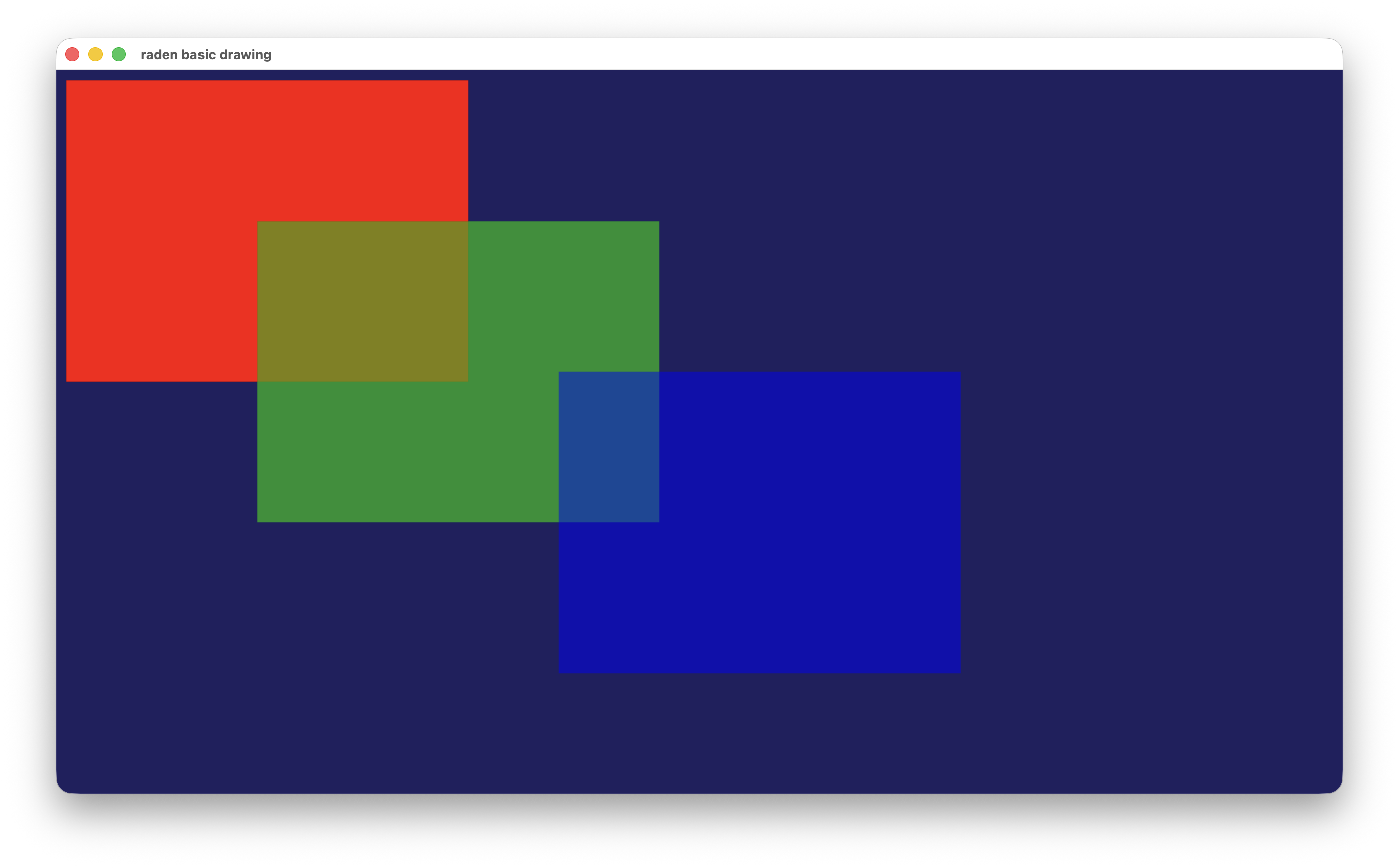
### basic_drawing
矩形の描画、BMP 出力、raw_player でのウィンドウ表示を行うサンプル。
```bash
cargo run --example basic_drawing
```
[](https://gyazo.com/a3a5eb75c5e8450ecbdf2aa291ea2ae1)
### animation
円を大量に描画するアニメーション。SDL3 ウィンドウで表示する。
```bash
# 通常実行 (デフォルト: 1280x720, 60fps)
cargo run --example animation --release
# 解像度と FPS を指定
cargo run --example animation --release -- --width 1920 --height 1080 --fps 120
# ヘッドレスベンチマークモード (ウィンドウなし、指定秒数分のフレームを描画して統計出力)
cargo run --example animation --release -- --duration 5
cargo run --example animation --release -- --width 1920 --height 1080 --fps 120 --duration 5
```
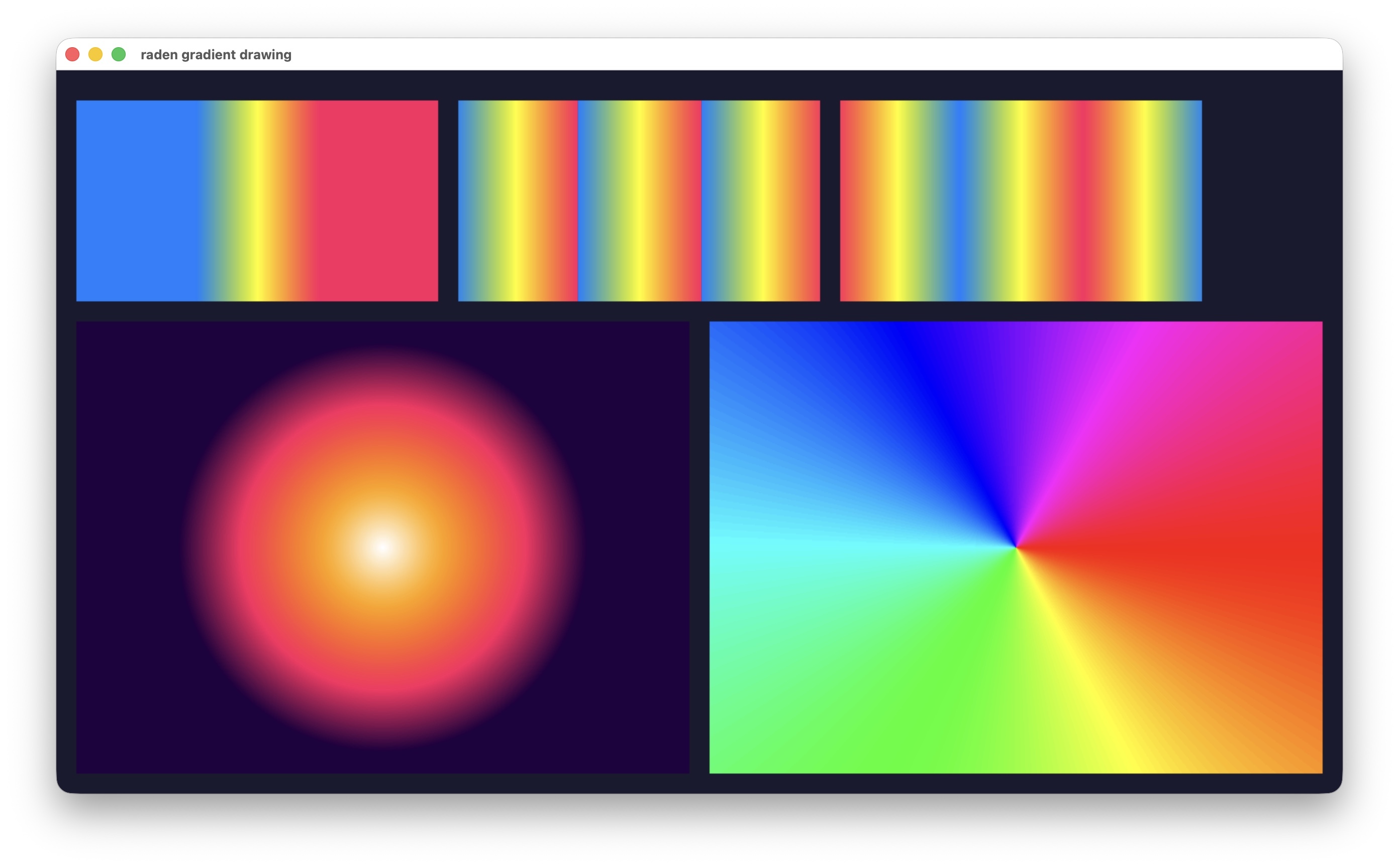
### gradient_drawing
グラデーション描画のサンプル。Linear (Pad / Repeat / Reflect)、Radial、Conic の 5 パターンを 1 枚に並べて描画する。
```bash
cargo run --example gradient_drawing
```
[](https://gyazo.com/bdf92cfbbea23d857d32628cb32c6838)
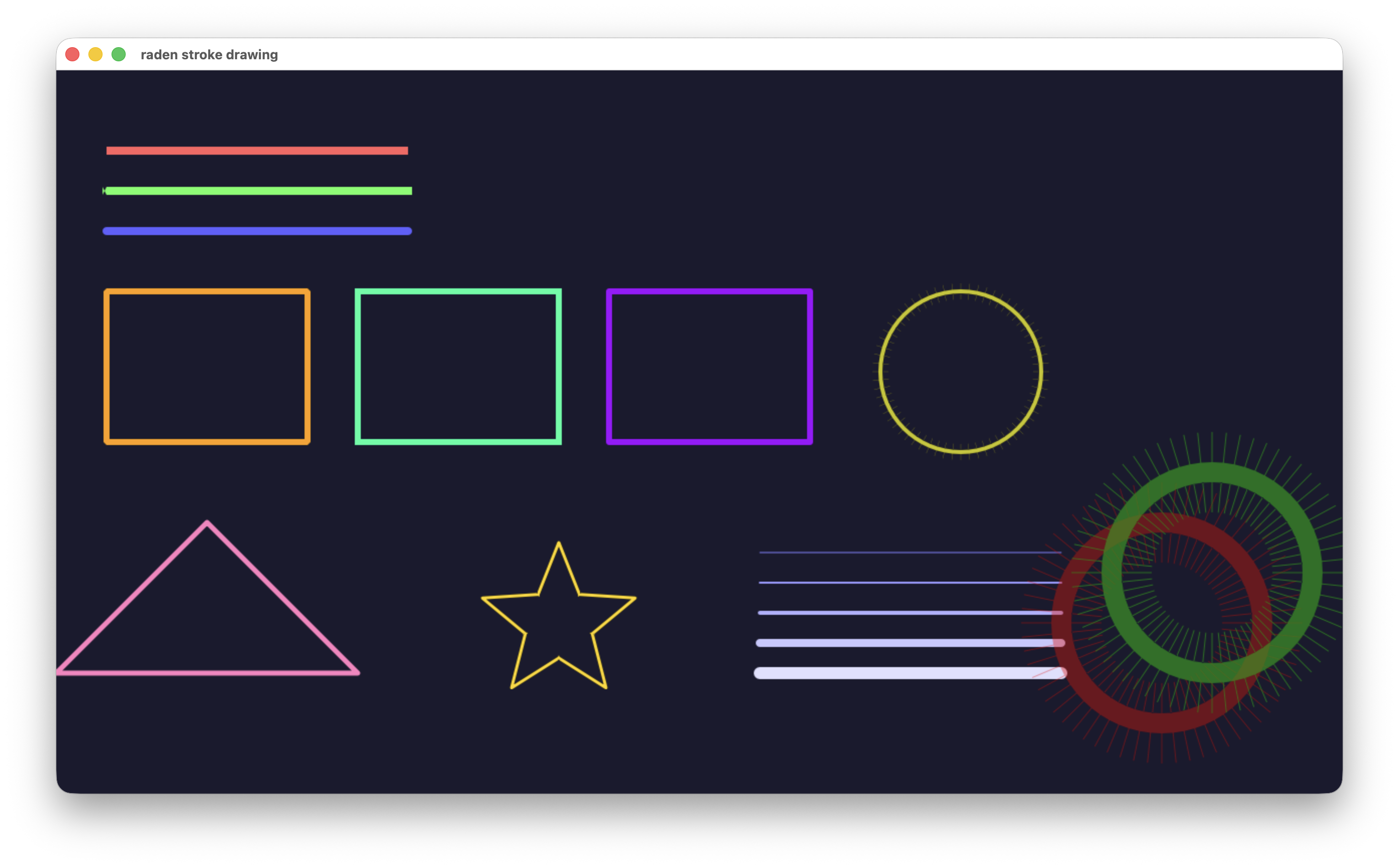
### stroke_drawing
ストローク描画のサンプル。キャップ、ジョイン、パスストローク、半透明ストロークを描画する。
```bash
cargo run --example stroke_drawing
```
[](https://gyazo.com/8f2c7ae6e5fa641c8881e15a13563195)
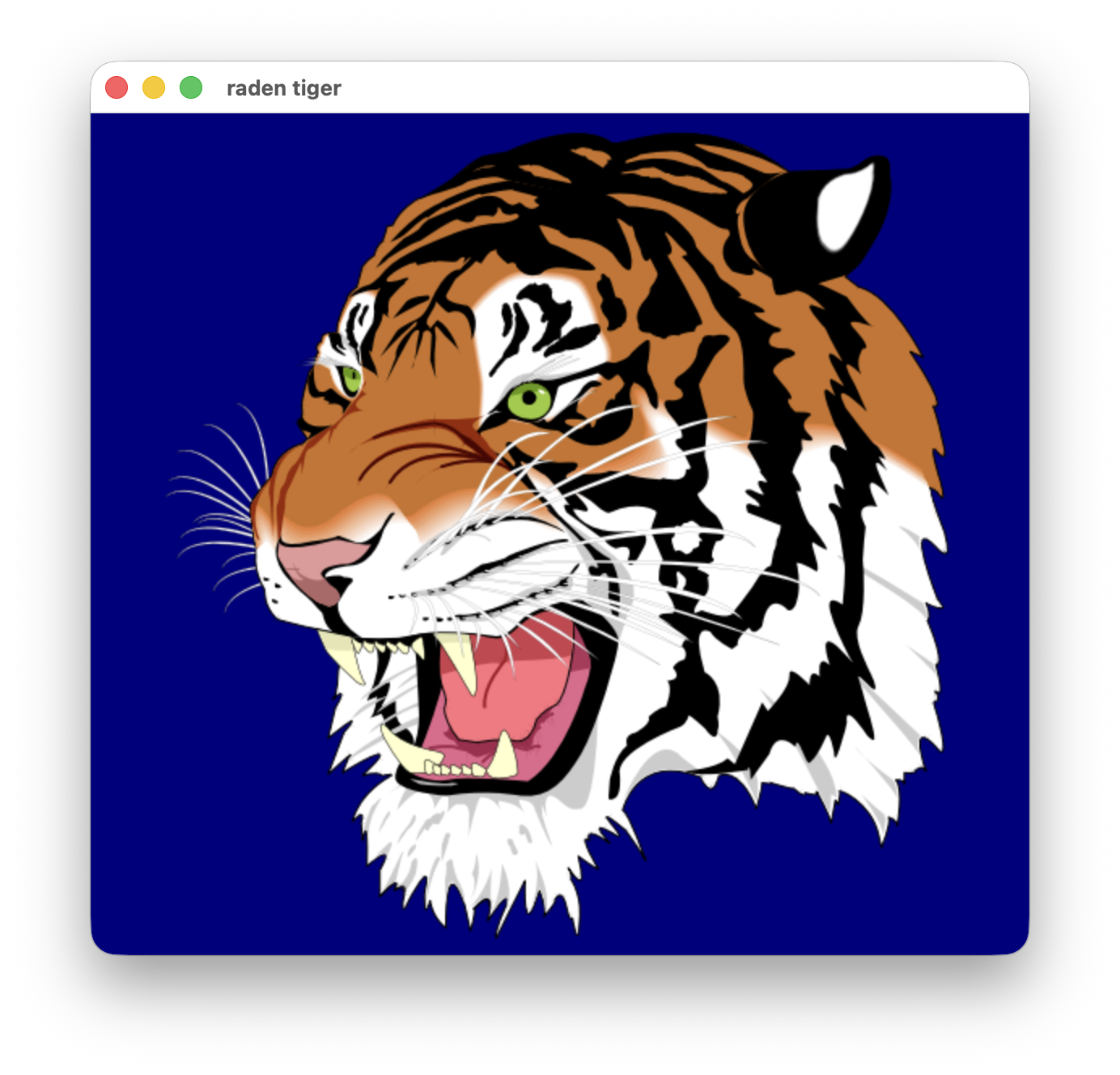
### tiger
AmanithVG 由来の tiger ベクターグラフィックスを描画するサンプル。240 以上のパスによるフィル・ストロークの組み合わせを実演する。
```bash
cargo run --example tiger --release
```
[](https://gyazo.com/8220dfa48f64e0239fd67c5d78439216)
### raden_player
[raw-player](https://github.com/shiguredo/raw-player) の `blend2d_player.py` と同等のアニメーションを
`raw_player::VideoPlayer` API で表示する。
```bash
cargo run --example raden_player --release
```
## 最小コード例
```rust
use raden::{Circle, CompOp, Context, Image, PipelineRuntime, PixelFormat, Rect, Rgba32};
fn main() -> Result<(), Box<dyn std::error::Error>> {
let mut image = Image::new(320, 240, PixelFormat::Prgb32);
let mut runtime = PipelineRuntime::new();
let mut ctx = Context::new(&mut image, &mut runtime);
// 背景を塗る
ctx.set_comp_op(CompOp::SrcCopy);
ctx.set_fill_style(Rgba32::rgb(0x20, 0x20, 0x60));
ctx.fill_rect(&Rect::new(0.0, 0.0, 320.0, 240.0));
// 半透明の円を重ねる
ctx.set_comp_op(CompOp::SrcOver);
ctx.set_fill_style(Rgba32::new(0xFF, 0x40, 0x40, 0xC0));
ctx.fill_circle(&Circle::new(160.0, 120.0, 72.0));
ctx.end();
image.write_to_file("output.bmp")?;
Ok(())
}
```
## 制約
- `PixelFormat` は現在 `Prgb32` のみ
- グラデーション/パターンはフィルスタイルのみ対応 (ストロークスタイルは単色のみ)
- フォントは TrueType アウトライン (glyf/loca) のみ対応 (CFF, OpenType Layout 未対応)
- クリッピングは未対応
## ライセンス
```text
Copyright 2026-2026, Shiguredo Inc.
Licensed under the Apache License, Version 2.0 (the "License");
you may not use this file except in compliance with the License.
You may obtain a copy of the License at
http://www.apache.org/licenses/LICENSE-2.0
Unless required by applicable law or agreed to in writing, software
distributed under the License is distributed on an "AS IS" BASIS,
WITHOUT WARRANTIES OR CONDITIONS OF ANY KIND, either express or implied.
See the License for the specific language governing permissions and
limitations under the License.
```