1
2
3
4
5
6
7
8
9
10
11
12
13
14
15
16
17
18
19
20
21
22
23
24
25
26
27
28
29
30
31
32
33
34
35
36
37
38
39
40
41
42
43
44
45
46
47
48
49
50
51
52
53
54
55
56
57
58
59
60
61
62
63
64
65
66
67
68
69
70
71
72
73
74
75
76
77
78
79
80
81
82
83
84
85
86
87
88
89
90
91
92
93
94
95
96
97
98
99
100
101
102
103
104
105
106
107
108
109
110
111
112
113
114
115
116
117
118
119
120
121
122
123
124
125
126
127
128
129
130
131
132
133
134
135
136
137
138
139
140
141
142
143
144
145
146
147
148
149
150
151
152
153
154
155
156
157
158
159
160
161
162
163
164
165
166
167
168
169
170
171
172
173
174
175
176
177
178
179
180
181
182
183
184
185
186
187
188
189
190
191
192
193
194
195
196
197
198
199
200
201
202
203
204
205
206
207
208
209
210
211
212
213
214
215
216
217
218
219
220
221
222
223
224
225
226
227
228
229
230
231
232
233
234
235
236
237
238
239
240
241
242
243
244
245
246
247
248
249
250
251
252
253
254
255
256
257
258
259
260
261
262
263
264
265
266
267
268
269
270
271
272
273
274
275
276
277
278
279
280
281
282
283
284
285
286
287
288
289
290
291
292
293
294
295
296
297
298
299
300
301
302
303
304
305
306
307
308
309
310
311
312
313
314
315
316
317
318
319
320
321
322
323
324
325
326
327
328
329
330
331
332
333
334
335
336
337
338
339
340
341
342
343
344
345
346
347
348
349
350
351
352
353
354
355
356
357
358
359
360
361
362
363
364
365
366
367
368
369
370
371
372
373
374
375
376
377
378
379
380
381
382
383
384
385
386
387
388
389
390
391
392
393
394
395
396
397
398
399
400
401
402
403
404
405
406
407
408
409
410
411
412
413
414
415
416
417
418
419
420
421
422
423
424
425
426
427
428
429
430
431
432
433
434
435
436
437
438
439
440
441
442
443
444
445
446
447
448
449
450
451
452
453
454
455
456
457
458
459
460
461
462
463
464
465
466
467
468
469
470
471
472
473
474
475
476
477
478
479
480
481
482
483
484
485
486
487
488
489
490
491
492
493
494
495
496
497
498
499
500
501
502
503
504
505
506
507
508
509
510
511
512
513
514
515
516
517
518
519
520
521
522
523
524
525
526
527
528
529
530
531
532
533
534
535
536
537
538
539
540
541
542
543
544
545
546
547
548
549
550
551
552
553
554
555
556
557
558
559
560
561
562
563
564
565
566
567
568
569
570
571
572
573
574
575
576
577
578
579
580
581
582
583
584
585
586
587
588
589
590
591
592
593
594
595
596
597
598
599
600
601
602
603
604
605
606
607
608
609
610
611
612
613
614
615
616
617
618
619
620
621
622
623
624
625
626
627
628
629
630
631
632
633
634
635
636
637
638
639
640
641
642
643
644
645
646
647
648
649
650
651
652
653
654
655
656
657
658
659
660
661
662
663
664
665
666
667
668
669
670
671
672
673
674
675
676
677
678
679
680
681
682
683
684
685
686
687
688
689
690
691
692
693
694
695
696
697
698
699
700
701
702
703
704
705
706
707
708
709
710
711
712
713
714
715
716
717
718
719
720
721
722
723
724
725
726
727
728
729
730
731
732
733
734
735
736
737
738
739
740
741
742
743
744
745
746
747
748
749
750
751
/*
* Copyright (c) 2023 R3BL LLC
* All rights reserved.
*
* Licensed under the Apache License, Version 2.0 (the "License");
* you may not use this file except in compliance with the License.
* You may obtain a copy of the License at
*
* http://www.apache.org/licenses/LICENSE-2.0
*
* Unless required by applicable law or agreed to in writing, software
* distributed under the License is distributed on an "AS IS" BASIS,
* WITHOUT WARRANTIES OR CONDITIONS OF ANY KIND, either express or implied.
* See the License for the specific language governing permissions and
* limitations under the License.
*/
//! # Why R3BL?
//!
//! <img src="https://raw.githubusercontent.com/r3bl-org/r3bl-open-core/main/r3bl-term.svg?raw=true" height="256px">
//!
//! <!-- R3BL TUI library & suite of apps focused on developer productivity -->
//!
//! <span style="color:#FD2F53">R</span><span style="color:#FC2C57">3</span><span style="color:#FB295B">B</span><span style="color:#FA265F">L</span><span style="color:#F92363">
//! </span><span style="color:#F82067">T</span><span style="color:#F61D6B">U</span><span style="color:#F51A6F">I</span><span style="color:#F31874">
//! </span><span style="color:#F11678">l</span><span style="color:#EF137C">i</span><span style="color:#ED1180">b</span><span style="color:#EB0F84">r</span><span style="color:#E90D89">a</span><span style="color:#E60B8D">r</span><span style="color:#E40A91">y</span><span style="color:#E10895">
//! </span><span style="color:#DE0799">&</span><span style="color:#DB069E">
//! </span><span style="color:#D804A2">s</span><span style="color:#D503A6">u</span><span style="color:#D203AA">i</span><span style="color:#CF02AE">t</span><span style="color:#CB01B2">e</span><span style="color:#C801B6">
//! </span><span style="color:#C501B9">o</span><span style="color:#C101BD">f</span><span style="color:#BD01C1">
//! </span><span style="color:#BA01C4">a</span><span style="color:#B601C8">p</span><span style="color:#B201CB">p</span><span style="color:#AE02CF">s</span><span style="color:#AA03D2">
//! </span><span style="color:#A603D5">f</span><span style="color:#A204D8">o</span><span style="color:#9E06DB">c</span><span style="color:#9A07DE">u</span><span style="color:#9608E1">s</span><span style="color:#910AE3">e</span><span style="color:#8D0BE6">d</span><span style="color:#890DE8">
//! </span><span style="color:#850FEB">o</span><span style="color:#8111ED">n</span><span style="color:#7C13EF">
//! </span><span style="color:#7815F1">d</span><span style="color:#7418F3">e</span><span style="color:#701AF5">v</span><span style="color:#6B1DF6">e</span><span style="color:#6720F8">l</span><span style="color:#6322F9">o</span><span style="color:#5F25FA">p</span><span style="color:#5B28FB">e</span><span style="color:#572CFC">r</span><span style="color:#532FFD">
//! </span><span style="color:#4F32FD">p</span><span style="color:#4B36FE">r</span><span style="color:#4739FE">o</span><span style="color:#443DFE">d</span><span style="color:#4040FE">u</span><span style="color:#3C44FE">c</span><span style="color:#3948FE">t</span><span style="color:#354CFE">i</span><span style="color:#324FFD">v</span><span style="color:#2E53FD">i</span><span style="color:#2B57FC">t</span><span style="color:#285BFB">y</span>
//!
//! We are working on building command line apps in Rust which have rich text user interfaces (TUI).
//! We want to lean into the terminal as a place of productivity, and build all kinds of awesome
//! apps for it.
//!
//! 1. 🔮 Instead of just building one app, we are building a library to enable any kind of rich TUI
//! development w/ a twist: taking concepts that work really well for the frontend mobile and web
//! development world and re-imagining them for TUI & Rust.
//!
//! - Taking inspiration from things like [React](https://react.dev/),
//! [SolidJS](https://www.solidjs.com/),
//! [Elm](https://guide.elm-lang.org/architecture/),
//! [iced-rs](https://docs.rs/iced/latest/iced/), [Jetpack
//! Compose](https://developer.android.com/compose),
//! [JSX](https://ui.dev/imperative-vs-declarative-programming),
//! [CSS](https://www.w3.org/TR/CSS/#css), but making everything async (so they can
//! be run in parallel & concurrent via [Tokio](https://crates.io/crates/tokio)).
//! - Even the thread running the main event loop doesn't block since it is async.
//! - Using proc macros to create DSLs to implement something inspired by
//! [CSS](https://www.w3.org/TR/CSS/#css) &
//! [JSX](https://ui.dev/imperative-vs-declarative-programming).
//!
//! 2. 🌎 We are building apps to enhance developer productivity & workflows.
//!
//! - The idea here is not to rebuild `tmux` in Rust (separate processes mux'd onto a
//! single terminal window). Rather it is to build a set of integrated "apps" (or
//! "tasks") that run in the same process that renders to one terminal window.
//! - Inside of this terminal window, we can implement things like "app" switching,
//! routing, tiling layout, stacking layout, etc. so that we can manage a lot of TUI
//! apps (which are tightly integrated) that are running in the same process, in the
//! same window. So you can imagine that all these "app"s have shared application
//! state. Each "app" may also have its own local application state.
//! - Here are some examples of the types of "app"s we plan to build (for which this
//! infrastructure acts as the open source engine):
//! 1. Multi user text editors w/ syntax highlighting.
//! 2. Integrations w/ github issues.
//! 3. Integrations w/ calendar, email, contacts APIs.
//!
//! All the crates in the `r3bl-open-core`
//! [repo](https://github.com/r3bl-org/r3bl-open-core/) provide lots of useful
//! functionality to help you build TUI (text user interface) apps, along w/ general
//! niceties & ergonomics that all Rustaceans 🦀 can enjoy 🎉.
//!
//! # Table of contents
//!
//! <!-- TOC -->
//!
//! - [Introduction](#introduction)
//! - [Changelog](#changelog)
//! - [Learn how these crates are built, provide feedback](#learn-how-these-crates-are-built-provide-feedback)
//! - [How to use it as a library?](#how-to-use-it-as-a-library)
//! - [APIs](#apis)
//! - [select_from_list](#select_from_list)
//! - [select_from_list_with_multi_line_header](#select_from_list_with_multi_line_header)
//! - [How to use it as a binary?](#how-to-use-it-as-a-binary)
//! - [Interactive user experience](#interactive-user-experience)
//! - [Paths](#paths)
//! - [Style the components](#style-the-components)
//! - [Choose one of the 3 built-in styles](#choose-one-of-the-3-built-in-styles)
//! - [Create your style](#create-your-style)
//! - [Build, run, test tasks](#build-run-test-tasks)
//! - [Prerequisites](#prerequisites)
//! - [Nushell scripts to build, run, test, etc.](#nu-shell-scripts-to-build-run-test-etc)
//! - [References](#references)
//!
//! <!-- /TOC -->
//!
//! # Introduction
//!
//! `r3bl_tuify` is a Rust crate that allows you to add simple interactivity to your CLI app.
//!
//! `r3bl_tuify` crate can be used in two ways:
//!
//! 1. **As a library**. This is useful if you want to add simple interactivity to your CLI
//! app written in Rust. You can see an example of this in the `examples` folder in the
//! `main_interactive.rs` file. You can run it using `cargo run --example
//! main_interactive`.
//!
//! 1. **As a binary**. This is useful if you want to use this crate as a command line tool.
//! The binary target is called `rt`.
//!
//! # Changelog
//!
//! Please check out the
//! [changelog](https://github.com/r3bl-org/r3bl-open-core/blob/main/CHANGELOG.md#r3bl_tuify) to
//! see how the library has evolved over time.
//!
//! # Learn how these crates are built, provide feedback
//!
//! To learn how we built this crate, please take a look at the following resources.
//! - If you like consuming video content, here's our [YT channel](https://www.youtube.com/@developerlifecom). Please consider [subscribing](https://www.youtube.com/channel/CHANNEL_ID?sub_confirmation=1).
//! - If you like consuming written content, here's our developer [site](https://developerlife.com/). Please consider subscribing to our [newsletter](https://developerlife.com/subscribe.html).
//! - If you have questions, please join our [discord server](https://discord.gg/8M2ePAevaM).
//!
//! # How to use it as a library?
//!
//! Here's a demo of the library target of this crate in action.
//!
//! <video width="100%" controls>
//! <source src="https://github.com/r3bl-org/r3bl-open-core/assets/22040032/46850043-4973-49fa-9824-58f32f21e96e" type="video/mp4"/>
//! </video>
//!
//! To install the crate as a library, add the following to your `Cargo.toml` file:
//!
//! ```toml
//! [dependencies]
//! r3bl_tuify = "*" # Get the latest version at the time you get this.
//! r3bl_core = "*" # Get the latest version at the time you get this.
//! ```
//!
//! The following example illustrates how you can use this as a library. The function that
//! does the work of rendering the UI is called
//! [`select_from_list`]. It takes a list of items and returns
//! the selected item or items (depending on the selection mode). If the user does not
//! select anything, it returns `None`. The function also takes the maximum height and
//! width of the display, and the selection mode (single select or multiple select).
//!
//! It works on macOS, Linux, and Windows. And is aware
//! of the terminal color output limitations of each. For eg, it uses Windows API on Windows for
//! keyboard input. And on macOS Terminal.app it restricts color output to a 256 color palette.
//!
//! ```rust
//! use r3bl_core::*;
//! use r3bl_tuify::*;
//! use std::io::Result;
//!
//! fn main() -> Result<()> {
//! // Get display size.
//! let max_width_col_count: usize = get_size().map(|it| it.col_count).unwrap_or(ch!(80)).into();
//! let max_height_row_count: usize = 5;
//!
//! let user_input = select_from_list(
//! "Select an item".to_string(),
//! [
//! "item 1", "item 2", "item 3", "item 4", "item 5", "item 6", "item 7", "item 8",
//! "item 9", "item 10",
//! ]
//! .iter()
//! .map(|it| it.to_string())
//! .collect(),
//! max_height_row_count,
//! max_width_col_count,
//! SelectionMode::Single,
//! StyleSheet::default(),
//! );
//!
//! match &user_input {
//! Some(it) => {
//! println!("User selected: {:?}", it);
//! }
//! None => println!("User did not select anything"),
//! }
//!
//! Ok(())
//! }
//! ```
//!
//! # APIs
//!
//! We provide 2 APIs:
//!
//! - [`select_from_list`]: Use this API if you want to display a list of items with a single line header.
//! - [`select_from_list_with_multi_line_header`]: Use this API if you want to display a list of items
//! with a multi line header.
//!
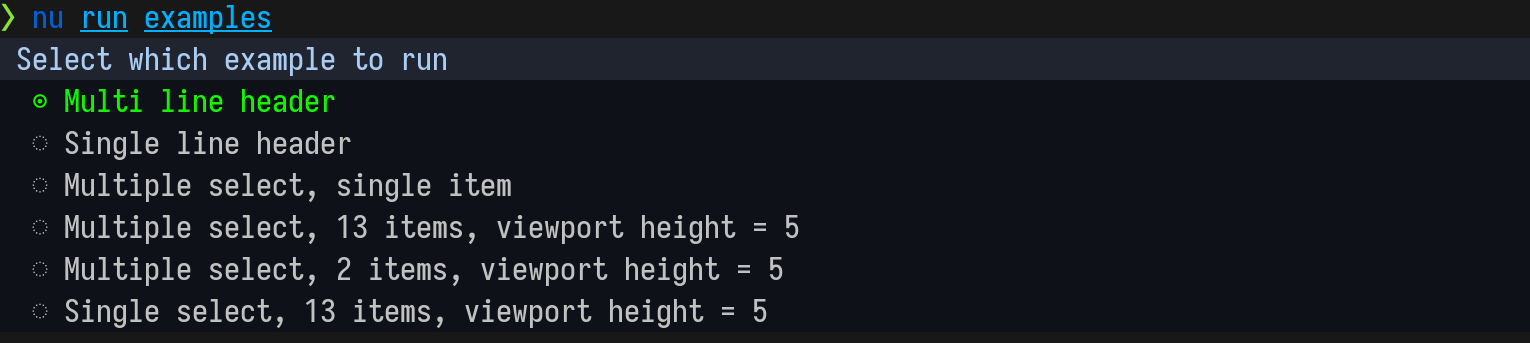
//! ## select_from_list
//!
//! Use this API if you want to display a list of items with a single line header.
//!
//! 
//!
//! [select_from_list] code example:
//!
//! ```rust
//! use r3bl_core::*;
//! use r3bl_tuify::*;
//! use std::io::Result;
//!
//! fn main() -> Result<()> {
//! // Get display size.
//! let max_height_row_count: usize = 5;
//! let user_input = select_from_list(
//! "Select an item".to_string(),
//! [
//! "item 1", "item 2", "item 3", "item 4", "item 5", "item 6", "item 7", "item 8",
//! "item 9", "item 10",
//! ]
//! .iter()
//! .map(|it| it.to_string())
//! .collect(),
//! max_height_row_count,
//! 0,
//! SelectionMode::Single,
//! StyleSheet::default(),
//! );
//!
//! match &user_input {
//! Some(it) => {
//! println!("User selected: {:?}", it);
//! }
//! None => println!("User did not select anything"),
//! }
//!
//! Ok(())
//! }
//! ```
//!
//! ## select_from_list_with_multi_line_header
//!
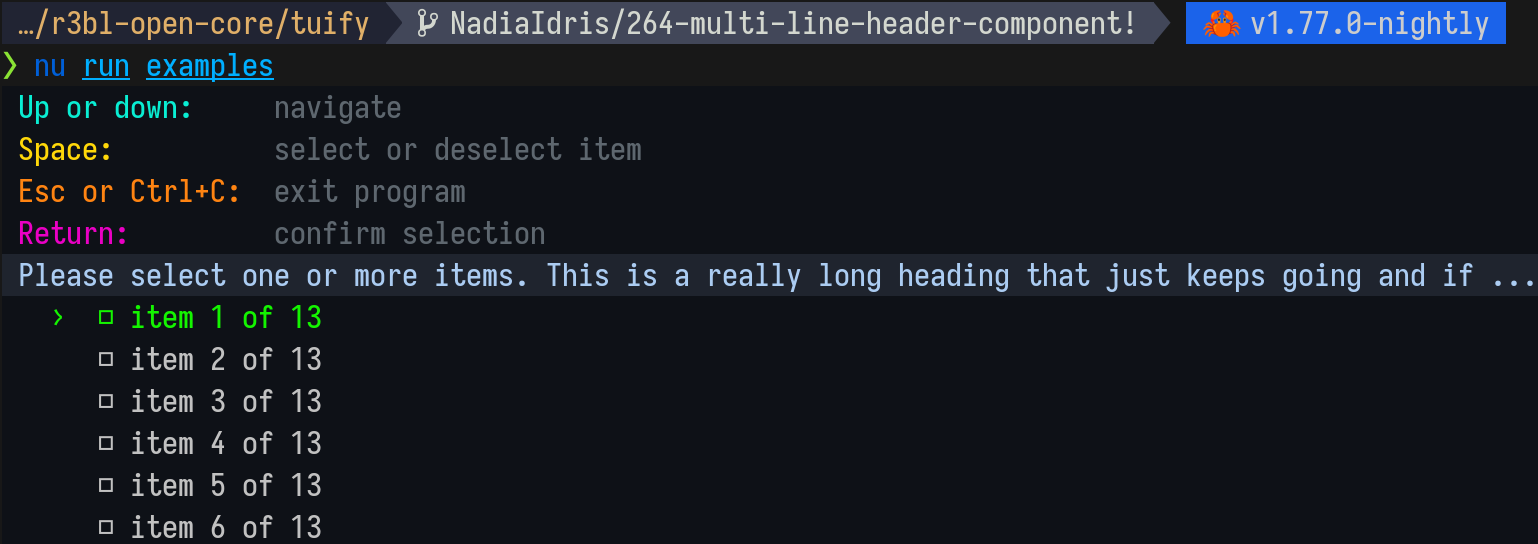
//! Use the `select_from_list_with_multi_line_header` API if you want to display a list of items with a
//! multi line header. The first 5 lines are all part of the multi line header.
//!
//! 
//!
//! [select_from_list_with_multi_line_header] code example:
//!
//! ```rust
//! use std::{io::Result, vec};
//!
//! use r3bl_ansi_color::{AnsiStyledText, Color, Style as RStyle};
//! use r3bl_core::*;
//! use r3bl_tuify::{
//! components::style::StyleSheet,
//! select_from_list_with_multi_line_header,
//! SelectionMode,
//! };
//!
//! fn multi_select_instructions() -> Vec<Vec<AnsiStyledText<'static>>> {
//! let up_and_down = AnsiStyledText {
//! text: " Up or down:",
//! style: &[
//! RStyle::Foreground(Color::Rgb(9, 238, 211)),
//! RStyle::Background(Color::Rgb(14, 17, 23)),
//! ],
//! };
//! let navigate = AnsiStyledText {
//! text: " navigate",
//! style: &[
//! RStyle::Foreground(Color::Rgb(94, 103, 111)),
//! RStyle::Background(Color::Rgb(14, 17, 23)),
//! ],
//! };
//!
//! let line_1 = vec![up_and_down, navigate];
//!
//! let space = AnsiStyledText {
//! text: " Space:",
//! style: &[
//! RStyle::Foreground(Color::Rgb(255, 216, 9)),
//! RStyle::Background(Color::Rgb(14, 17, 23)),
//! ],
//! };
//! let select = AnsiStyledText {
//! text: " select or deselect item",
//! style: &[
//! RStyle::Foreground(Color::Rgb(94, 103, 111)),
//! RStyle::Background(Color::Rgb(14, 17, 23)),
//! ],
//! };
//!
//! let line_2 = vec![space, select];
//!
//! let esc = AnsiStyledText {
//! text: " Esc or Ctrl+C:",
//! style: &[
//! RStyle::Foreground(Color::Rgb(255, 132, 18)),
//! RStyle::Background(Color::Rgb(14, 17, 23)),
//! ],
//! };
//! let exit = AnsiStyledText {
//! text: " exit program",
//! style: &[
//! RStyle::Foreground(Color::Rgb(94, 103, 111)),
//! RStyle::Background(Color::Rgb(14, 17, 23)),
//! ],
//! };
//!
//! let line_3 = vec![esc, exit];
//! let return_key = AnsiStyledText {
//! text: " Return:",
//! style: &[
//! RStyle::Foreground(Color::Rgb(234, 0, 196)),
//! RStyle::Background(Color::Rgb(14, 17, 23)),
//! ],
//! };
//! let confirm = AnsiStyledText {
//! text: " confirm selection",
//! style: &[
//! RStyle::Foreground(Color::Rgb(94, 103, 111)),
//! RStyle::Background(Color::Rgb(14, 17, 23)),
//! ],
//! };
//! let line_4 = vec![return_key, confirm];
//! vec![line_1, line_2, line_3, line_4]
//! }
//!
//! fn main() -> Result<()> {
//! let header = AnsiStyledText {
//! text: " Please select one or more items. This is a really long heading that just keeps going and if your terminal viewport is small enough, this heading will be clipped",
//! style: &[
//! RStyle::Foreground(Color::Rgb(171, 204, 242)),
//! RStyle::Background(Color::Rgb(31, 36, 46)),
//! ],
//! };
//!
//! let mut instructions_and_header: Vec<Vec<AnsiStyledText>> = multi_select_instructions();
//! instructions_and_header.push(vec![header]);
//!
//! let user_input = select_from_list_with_multi_line_header(
//! instructions_and_header,
//! [
//! "item 1 of 13",
//! "item 2 of 13",
//! "item 3 of 13",
//! "item 4 of 13",
//! "item 5 of 13",
//! "item 6 of 13",
//! "item 7 of 13",
//! "item 8 of 13",
//! "item 9 of 13",
//! "item 10 of 13",
//! "item 11 of 13",
//! "item 12 of 13",
//! "item 13 of 13",
//! ]
//! .iter()
//! .map(|it| it.to_string())
//! .collect(),
//! Some(6),
//! None,
//! SelectionMode::Multiple,
//! StyleSheet::default(),
//! );
//! match &user_input {
//! Some(it) => {
//! println!("User selected: {:?}", it);
//! }
//! None => println!("User did not select anything"),
//! }
//! Ok(())
//! }
//! ```
//!
//! # How to use it as a binary?
//!
//! Here's a demo of the binary target of this crate in action.
//!
//! <video width="100%" controls>
//! <source src="https://github-production-user-asset-6210df.s3.amazonaws.com/2966499/267427392-2b42db72-cd62-4ea2-80ae-ccc01008190c.mp4" type="video/mp4"/>
//! </video>
//!
//! You can install the binary using `cargo install r3bl_tuify` (from crates.io). Or
//! `cargo install --path .` from source. `rt` is a command line tool that allows you to select one of the options from the list that is passed into it
//! via `stdin`. It supports both `stdin` and `stdout` piping.
//!
//! Here are the command line arguments that it accepts:
//! 1. `-s` or `--selection-mode` - Allows you to select the selection mode. There are two
//! options: `single` and `multiple`.
//! 1. `-c` or `--command-to-run-with-selection` - Allows you to specify the command to
//! run with the selected item. For example `"echo foo \'%\'"` simply prints each
//! selected item.
//! 1. `-t` or `--tui-height` - Optionally allows you to set the height of the TUI. The
//! default is 5.
//!
//! ## Interactive user experience
//!
//! Typically a CLI app is not interactive. You can pass commands, subcommands, options, and
//! arguments to it, but if you get something wrong, then you get an error and have to start
//! all over again. This "conversation" style interface might require a lot of trial and error
//! to get the desired result.
//!
//! The following is an example of using the binary with many subcommands, options, and arguments.
//!
//! ```shell
//! cat TODO.todo | cargo run -- select-from-list \
//! --selection-mode single \
//! --command-to-run-with-each-selection "echo %"
//! ```
//!
//! Here's a video of this in action.
//!
//! <!-- tuify-long-command -->
//! <video width="100%" controls>
//! <source src="https://github.com/r3bl-org/r3bl-open-core/assets/2966499/c9b49bfb-b811-460e-a844-fe260eaa860a" type="video/mp4"/>
//! </video>
//!
//! What does this do?
//!
//! 1. `cat TODO.todo` - prints the contents of the `TODO.todo` file to `stdout`.
//! 1. `|` - pipes the output of the previous command to the next command, which is `rt` (ie,
//! the binary target of this crate).
//! 1. `cargo run --` - runs the `rt` debug binary in the target folder.
//! 1. `select-from-list` - runs the `rt` binary with the `select-from-list`
//! subcommand. This subcommand requires 2 arguments: `--selection-mode` and
//! `--command-to-run-with-each-selection`. Whew! This is getting long!
//! 1. `--selection-mode single` - sets the selection mode to `single`. This means that the
//! user can only select one item from the list. What list? The list that is piped in from
//! the previous command (ie, `cat TODO.todo`).
//! 1. `--command-to-run-with-each-selection "echo %"` - sets the command to run with each
//! selection. In this case, it is `echo %`. The `%` is a placeholder for the selected
//! item. So if the user selects `item 1`, then the command that will be run is `echo item
//! 1`. The `echo` command simply prints the selected item to `stdout`.
//!
//! Now that is a lot to remember. It is helpful to use `clap` to provide nice command line help but
//! that are still quite a few things that you have to get right for this command to work.
//!
//! It doesn't have to be this way. The binary can be interactive along with
//! the use of `clap` to specify some of the subcommands, and arguments. It doesn't
//! have to be an all or nothing approach. We can have the best of both worlds. The following
//! videos illustrate what happens when:
//!
//! 1. `--selection-mode` and `--command-to-run-with-each-selection` are *not* passed in the
//! command line.
//! ```shell
//! cat TODO.todo | cargo run -- select-from-list
//! ```
//!
//! Here are the 3 scenarios that can happen:
//!
//! - The user first chooses `single` selection mode (using a list selection component),
//! and then types in `echo %` in the terminal, as the command to run with each
//! selection. This is an
//! interactive scenario since the user has to provide 2 pieces of information: the selection mode, and the command to run with each
//! selection. They didn't provide this upfront when they ran the command.
//! <!-- tuify-interactive-happy-path -->
//! <video width="100%" controls>
//! <source src="https://github.com/r3bl-org/r3bl-open-core/assets/2966499/51de8867-513b-429f-aff2-63dd25d71c82" type="video/mp4"/>
//! </video>
//!
//! - Another scenario is that the user does not provide the required information even when
//! prompted interactively. In this scenario, the program exits with an error and help
//! message.
//!
//! Here they don't provide what `selection-mode` they want. And they don't provide what
//! `command-to-run-with-each-selection` they want. Without this information the program
//! can't continue, so it exits and provides some help message.
//! <!-- tuify-interactive-unhappy-path -->
//! <video width="100%" controls>
//! <source src="https://github.com/r3bl-org/r3bl-open-core/assets/2966499/664d0367-90fd-4f0a-ad87-3f4745642ad0" type="video/mp4"/>
//! </video>
//!
//! 1. `--selection-mode` is *not* passed in the command line. So it only interactively
//! prompts the user for this piece of information. Similarly, if the user does not provide
//! this information, the app exits and provides a help message.
//! ```shell
//! cat TODO.todo | cargo run -- select-from-list --command-to-run-with-each-selection "echo %"
//! ```
//! <!-- tuify-interactive-selection-mode-not-provided -->
//! <video width="100%" controls>
//! <source src="https://github.com/r3bl-org/r3bl-open-core/assets/2966499/be65d9b2-575b-47c0-8291-110340bd2fe7" type="video/mp4"/>
//! </video>
//!
//! 1. `--command-to-run-with-each-selection` is *not* passed in the command line. So it only
//! interactively prompts the user for this piece of information. Similarly, if the user
//! does not provide this information, the app exits and provides a help message.
//! ```shell
//! cat TODO.todo | cargo run -- select-from-list --selection-mode single
//! ```
//! <!-- tuify-interactive-command-to-run-with-selection-not-provided -->
//! <video width="100%" controls>
//! <source src="https://github.com/r3bl-org/r3bl-open-core/assets/2966499/d8d7d419-c85e-4c10-bea5-345aa31a92a3" type="video/mp4"/>
//! </video>
//!
//! ## Paths
//!
//! There are a lot of different execution paths that you can take with this relatively
//! simple program. Here is a list.
//!
//! - Happy paths:
//! 1. `rt` - prints help.
//! 1. `cat Cargo.toml | rt -s single -c "echo foo \'%\'"` - `stdin` is piped
//! in, and it prints the user selected option to `stdout`.
//! 1. `cat Cargo.toml | rt -s multiple -c "echo foo \'%\'"` - `stdin` is piped
//! in, and it prints the user selected option to `stdout`.
//!
//! - Unhappy paths (`stdin` is _not_ piped in and, or `stdout` _is_ piped out):
//! 1. `rt -s single` - expects `stdin` to be piped in, and prints help.
//! 1. `rt -s multiple` - expects `stdin` to be piped in, and prints help.
//! 1. `ls -la | rt -s single | xargs -0` - does not expect `stdout` to be piped out,
//! and prints help.
//! 1. `ls -la | rt -s multiple | xargs -0` - does not expect `stdout` to be piped out,
//! and prints help.
//!
//! > Due to how unix pipes are implemented, it is not possible to pipe the
//! > `stdout` of this command to anything else. Unix pipes are non-blocking. So there is no
//! > way to stop the pipe "midway". This is why `rt` displays an error when the `stdout` is
//! > piped out. It is not possible to pipe the `stdout` of `rt` to another command. Instead,
//! > the `rt` binary simply takes a command that will run after the user has made their
//! > selection. Using the selected item(s) and applying them to this command.
//!
//! # Style the components
//!
//! ## Choose one of the 3 built-in styles
//!
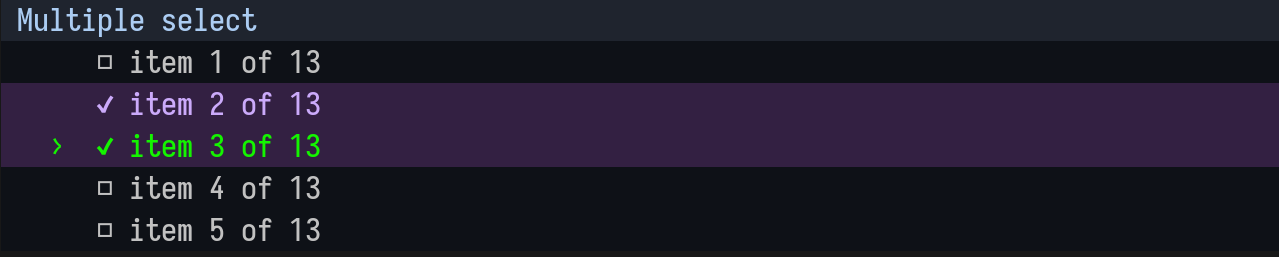
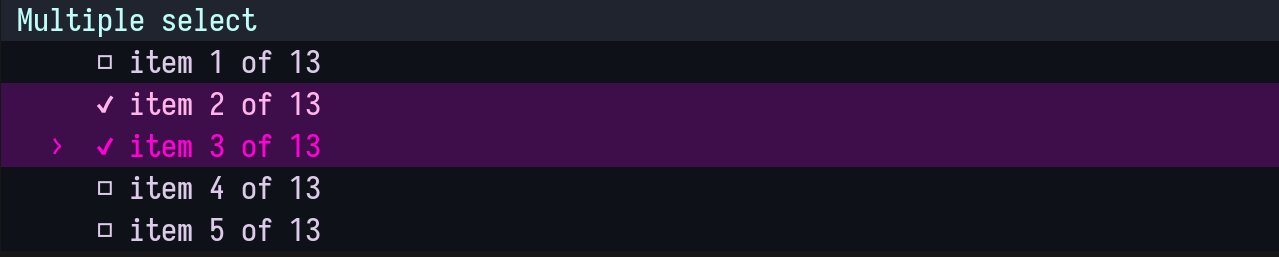
//! Built-in styles are called `default`, `sea_foam_style`, and `hot_pink_style`. You can find them in the `style.rs` file (tuify/src/components/style.rs).
//!
//! Default style:
//! 
//!
//! `sea_foam_style`:
//! 
//!
//! `hot_pink_style`:
//! 
//!
//! To use one of the built-in styles, simply pass it as an argument to the `select_from_list` function.
//!
//! ```rust
//! use r3bl_core::*;
//! use r3bl_tuify::*;
//! use std::io::Result;
//!
//! fn main() -> Result<()> {
//! // 🎨 Uncomment the lines below to choose the other 2 built-in styles.
//! // let default_style = StyleSheet::default();
//! // let hot_pink_style = StyleSheet::hot_pink_style();
//! let sea_foam_style = StyleSheet::sea_foam_style();
//!
//! let max_width_col_count: usize = get_size().map(|it| it.col_count).unwrap_or(ch!(80)).into();
//! let max_height_row_count: usize = 5;
//!
//! let user_input = select_from_list(
//! "Select an item".to_string(),
//! [
//! "item 1", "item 2", "item 3", "item 4", "item 5", "item 6", "item 7", "item 8",
//! "item 9", "item 10",
//! ]
//! .iter()
//! .map(|it| it.to_string())
//! .collect(),
//! max_height_row_count,
//! max_width_col_count,
//! SelectionMode::Single,
//! sea_foam_style, // 🖌️ or default_style or hot_pink_style
//! );
//!
//! match &user_input {
//! Some(it) => {
//! println!("User selected: {:?}", it);
//! }
//! None => println!("User did not select anything"),
//! }
//!
//! Ok(())
//! }
//! ```
//!
//! ## Create your style
//!
//! To create your style, you need to create a `StyleSheet` struct and pass it as an argument to the `select_from_list` function.
//!
//! ```rust
//! use std::io::Result;
//! use r3bl_ansi_color::{AnsiStyledText, Color};
//! use r3bl_tuify::{components::style::{Style, StyleSheet},
//! select_from_list,
//! SelectionMode};
//!
//! fn main() -> Result<()> {
//! // This is how you can define your custom style.
//! // For each Style struct, you can define different style overrides.
//! // Please take a look at the Style struct to see what you can override.
//! let my_custom_style = StyleSheet {
//! focused_and_selected_style: Style {
//! fg_color: Color::Rgb(255, 244, 0),
//! bg_color: Color::Rgb(15, 32, 66),
//! ..Style::default()
//! },
//! focused_style: Style {
//! fg_color: Color::Rgb(255, 244, 0),
//! ..Style::default()
//! },
//! unselected_style: Style { ..Style::default() },
//! selected_style: Style {
//! fg_color: Color::Rgb(203, 170, 250),
//! bg_color: Color::Rgb(15, 32, 66),
//! ..Style::default()
//! },
//! header_style: Style {
//! fg_color: Color::Rgb(171, 204, 242),
//! bg_color: Color::Rgb(31, 36, 46),
//! ..Style::default()
//! },
//! };
//!
//! // Then pass `my_custom_style` as the last argument to the `select_from_list` function.
//! let user_input = select_from_list(
//! "Multiple select".to_string(),
//! ["item 1 of 3", "item 2 of 3", "item 3 of 3"]
//! .iter()
//! .map(|it| it.to_string())
//! .collect(),
//! 6, // max_height_row_count
//! 80, // max_width_col_count
//! SelectionMode::Multiple,
//! my_custom_style,
//! );
//!
//! match &user_input {
//! Some(it) => {
//! println!("User selected: {:?}", it);
//! }
//! None => println!("User did not select anything"),
//! }
//! Ok(())
//! }
//! ```
//!
//! # Build, run, test tasks
//!
//! ## Prerequisites
//!
//! 🌠 For these to work you have to install the Rust toolchain, `nu`, `cargo-watch`,
//! `bat`, and `flamegraph` on your system. Here are the instructions:
//!
//! 1. Install the Rust toolchain using `rustup` by following the instructions
//! [here](https://rustup.rs/).
//! 1. Install `cargo-watch` using `cargo install cargo-watch`.
//! 1. Install `flamegraph` using `cargo install flamegraph`.
//! 1. Install `bat` using `cargo install bat`.
//! 1. Install [`nu`](https://crates.io/crates/nu) shell on your system using `cargo install
//! nu`. It is available for Linux, macOS, and Windows.
//!
//! ## Nushell scripts to build, run, test, etc.
//!
//! Go to the `tuify` folder and run the commands below. These commands are defined in the `./run` folder.
//!
//! | Command | Description |
//! | -------------------------------------- | ------------------------------------------ |
//! | `nu run examples` | Run examples in the `./examples` folder |
//! | `nu run piped` | Run binary with piped input |
//! | `nu run build` | Build |
//! | `nu run clean` | Clean |
//! | `nu run all` | All |
//! | `nu run examples-with-flamegraph-profiling` | Run examples with flamegraph profiling |
//! | `nu run test` | Run tests |
//! | `nu run clippy` | Run clippy |
//! | `nu run docs` | Build docs |
//! | `nu run serve-docs` | Serve docs over VSCode Remote SSH session. |
//! | `nu run upgrade-deps` | Upgrade deps |
//! | `nu run rustfmt` | Run rustfmt |
//!
//! The following commands will watch for changes in the source folder and re-run:
//!
//! | Command | Description |
//! | --------------------------------------------------- | ---------------------------------- |
//! | `nu run watch-examples` | Watch run examples |
//! | `nu run watch-all-tests` | Watch all test |
//! | `nu run watch-one-test <test_name>` | Watch one test |
//! | `nu run watch-clippy` | Watch clippy |
//! | `nu run watch-macro-expansion-one-test <test_name>` | Watch macro expansion for one test |
//!
//! There's also a `run` script at the **top level folder** of the repo. It is intended to
//! be used in a CI/CD environment w/ all the required arguments supplied or in
//! interactive mode, where the user will be prompted for input.
//!
//! | Command | Description |
//! | ----------------------------- | ---------------------------------- |
//! | `nu run all` | Run all the tests, linting, formatting, etc. in one go. Used in CI/CD |
//! | `nu run build-full` | This will build all the crates in the Rust workspace. It will install all the required pre-requisite tools needed to work with this crate (what `install-cargo-tools` does) and clear the cargo cache, cleaning, and then do a really clean build. |
//! | `nu run install-cargo-tools` | This will install all the required pre-requisite tools needed to work with this crate (things like `cargo-deny`,and `flamegraph` will all be installed in one go) |
//! | `nu run check-licenses` | Use `cargo-deny` to audit all licenses used in the Rust workspace |
//!
//! # References
//!
//! CLI UX guidelines:
//!
//! - [Handling Arguments](https://rust-cli-recommendations.sunshowers.io/handling-arguments.html)
//! - [Configuration](https://rust-cli-recommendations.sunshowers.io/configuration.html)
//! - [Hierarchical Config](https://rust-cli-recommendations.sunshowers.io/hierarchical-config.html)
//! - [Hierarchical Config](https://rust-cli-recommendations.sunshowers.io/hierarchical-config.html)
//! - [Clap Derive Overview](https://docs.rs/clap/latest/clap/_derive/#overview)
//! - [Command Line Interface Guidelines](https://clig.dev/#foreword)
//!
//! ANSI escape codes:
//!
//! - [ANSI Escape Codes Notes](https://notes.burke.libbey.me/ansi-escape-codes/)
//! - [ANSI Escape Code - Wikipedia](https://en.wikipedia.org/wiki/ANSI_escape_code)
//! - [ASCII Table](https://www.asciitable.com/)
//! - [Xterm 256 Color Chart](https://commons.wikimedia.org/wiki/File:Xterm_256color_chart.svg)
//! - [256 Colors Cheat Sheet](https://www.ditig.com/256-colors-cheat-sheet)
//! - [List of ANSI Color Escape Sequences - Stack Overflow](https://stackoverflow.com/questions/4842424/list-of-ansi-color-escape-sequences)
//! - [Color Metric](https://www.compuphase.com/cmetric.htm)
// https://github.com/rust-lang/rust-clippy
// https://rust-lang.github.io/rust-clippy/master/index.html
pub use *;
pub use *;
pub use *;
pub use *;
pub use *;
pub use *;
pub use *;
pub use *;
pub use *;
/// Enable file logging. You can use `tail -f log.txt` to watch the logs.
pub const DEVELOPMENT_MODE: bool = false;