1
2
3
4
5
6
7
8
9
10
11
12
13
14
15
16
17
18
19
20
21
22
23
24
25
26
27
28
29
30
31
32
33
34
35
36
37
38
39
40
41
42
43
44
45
46
47
48
49
50
51
52
53
54
55
56
57
58
59
60
61
62
63
64
65
66
67
68
69
70
71
72
73
74
75
76
77
78
79
80
81
82
83
84
85
86
87
88
89
90
91
92
93
94
95
96
97
98
99
100
101
102
103
104
105
106
107
108
109
110
111
112
113
114
115
116
117
118
119
120
121
122
123
124
125
126
127
128
129
130
131
132
133
134
135
136
137
138
139
140
141
142
143
144
145
146
147
148
149
150
151
152
153
154
155
156
157
158
159
160
161
162
163
164
165
166
167
168
169
170
171
172
173
174
175
176
177
178
179
180
181
182
183
184
185
186
187
188
189
190
191
192
193
194
195
196
197
198
199
200
201
202
203
204
205
206
207
208
209
210
211
212
213
214
215
216
217
218
219
220
221
222
223
224
225
226
227
228
229
230
231
232
233
234
235
236
237
238
239
240
241
242
243
244
245
246
247
248
249
250
251
252
253
254
255
256
257
258
259
260
261
262
263
264
265
266
267
268
269
270
271
272
273
274
275
276
277
278
279
280
281
282
283
284
285
286
287
288
289
290
291
292
293
294
295
296
297
298
299
300
301
302
303
304
305
306
307
308
309
310
311
312
313
314
315
316
317
318
319
320
321
322
323
324
325
326
327
328
329
330
331
332
333
334
335
336
337
338
339
340
341
342
343
344
345
346
347
348
349
350
351
352
353
354
355
356
357
358
359
360
361
362
363
364
365
366
367
368
369
370
371
372
373
374
375
376
377
378
379
380
381
382
383
384
385
386
387
388
389
390
391
392
393
394
395
396
397
398
399
400
401
402
403
404
405
406
407
408
409
410
411
412
413
414
415
416
417
418
419
420
421
422
423
424
425
426
427
428
429
430
431
432
433
434
435
436
437
438
439
440
441
442
443
444
445
446
447
448
449
450
451
452
453
454
455
456
457
458
459
460
461
462
463
464
465
466
467
468
469
470
471
472
473
474
475
476
477
478
479
480
481
482
483
484
485
486
487
488
489
/*
* Copyright (c) 2024 R3BL LLC
* All rights reserved.
*
* Licensed under the Apache License, Version 2.0 (the "License");
* you may not use this file except in compliance with the License.
* You may obtain a copy of the License at
*
* http://www.apache.org/licenses/LICENSE-2.0
*
* Unless required by applicable law or agreed to in writing, software
* distributed under the License is distributed on an "AS IS" BASIS,
* WITHOUT WARRANTIES OR CONDITIONS OF ANY KIND, either express or implied.
* See the License for the specific language governing permissions and
* limitations under the License.
*/
//! # Why R3BL?
//!
//! <img
//! src="https://raw.githubusercontent.com/r3bl-org/r3bl-open-core/main/r3bl-term.svg?raw=true"
//! height="256px">
//!
//! <!-- R3BL TUI library & suite of apps focused on developer productivity -->
//!
//! <span style="color:#FD2F53">R</span><span style="color:#FC2C57">3</span><span
//! style="color:#FB295B">B</span><span style="color:#FA265F">L</span><span
//! style="color:#F92363"> </span><span style="color:#F82067">T</span><span
//! style="color:#F61D6B">U</span><span style="color:#F51A6F">I</span><span
//! style="color:#F31874"> </span><span style="color:#F11678">l</span><span
//! style="color:#EF137C">i</span><span style="color:#ED1180">b</span><span
//! style="color:#EB0F84">r</span><span style="color:#E90D89">a</span><span
//! style="color:#E60B8D">r</span><span style="color:#E40A91">y</span><span
//! style="color:#E10895"> </span><span style="color:#DE0799">&</span><span
//! style="color:#DB069E"> </span><span style="color:#D804A2">s</span><span
//! style="color:#D503A6">u</span><span style="color:#D203AA">i</span><span
//! style="color:#CF02AE">t</span><span style="color:#CB01B2">e</span><span
//! style="color:#C801B6"> </span><span style="color:#C501B9">o</span><span
//! style="color:#C101BD">f</span><span style="color:#BD01C1"> </span><span
//! style="color:#BA01C4">a</span><span style="color:#B601C8">p</span><span
//! style="color:#B201CB">p</span><span style="color:#AE02CF">s</span><span
//! style="color:#AA03D2"> </span><span style="color:#A603D5">f</span><span
//! style="color:#A204D8">o</span><span style="color:#9E06DB">c</span><span
//! style="color:#9A07DE">u</span><span style="color:#9608E1">s</span><span
//! style="color:#910AE3">e</span><span style="color:#8D0BE6">d</span><span
//! style="color:#890DE8"> </span><span style="color:#850FEB">o</span><span
//! style="color:#8111ED">n</span><span style="color:#7C13EF"> </span><span
//! style="color:#7815F1">d</span><span style="color:#7418F3">e</span><span
//! style="color:#701AF5">v</span><span style="color:#6B1DF6">e</span><span
//! style="color:#6720F8">l</span><span style="color:#6322F9">o</span><span
//! style="color:#5F25FA">p</span><span style="color:#5B28FB">e</span><span
//! style="color:#572CFC">r</span><span style="color:#532FFD"> </span><span
//! style="color:#4F32FD">p</span><span style="color:#4B36FE">r</span><span
//! style="color:#4739FE">o</span><span style="color:#443DFE">d</span><span
//! style="color:#4040FE">u</span><span style="color:#3C44FE">c</span><span
//! style="color:#3948FE">t</span><span style="color:#354CFE">i</span><span
//! style="color:#324FFD">v</span><span style="color:#2E53FD">i</span><span
//! style="color:#2B57FC">t</span><span style="color:#285BFB">y</span>
//!
//! We are working on building command line apps in Rust which have rich text user
//! interfaces (TUI). We want to lean into the terminal as a place of productivity, and
//! build all kinds of awesome apps for it.
//!
//! 1. 🔮 Instead of just building one app, we are building a library to enable any kind
//! of rich TUI development w/ a twist: taking concepts that work really well for the
//! frontend mobile and web development world and re-imagining them for TUI & Rust.
//!
//! - Taking inspiration from things like [React](https://react.dev/),
//! [SolidJS](https://www.solidjs.com/),
//! [Elm](https://guide.elm-lang.org/architecture/),
//! [iced-rs](https://docs.rs/iced/latest/iced/), [Jetpack
//! Compose](https://developer.android.com/compose),
//! [JSX](https://ui.dev/imperative-vs-declarative-programming),
//! [CSS](https://www.w3.org/TR/CSS/#css), but making everything async (so they can
//! be run in parallel & concurrent via [Tokio](https://crates.io/crates/tokio)).
//! - Even the thread running the main event loop doesn't block since it is async.
//! - Using proc macros to create DSLs to implement something inspired by
//! [CSS](https://www.w3.org/TR/CSS/#css) &
//! [JSX](https://ui.dev/imperative-vs-declarative-programming).
//!
//! 2. 🌎 We are building apps to enhance developer productivity & workflows.
//!
//! - The idea here is not to rebuild `tmux` in Rust (separate processes mux'd onto a
//! single terminal window). Rather it is to build a set of integrated "apps" (or
//! "tasks") that run in the same process that renders to one terminal window.
//! - Inside of this terminal window, we can implement things like "app" switching,
//! routing, tiling layout, stacking layout, etc. so that we can manage a lot of TUI
//! apps (which are tightly integrated) that are running in the same process, in the
//! same window. So you can imagine that all these "app"s have shared application
//! state. Each "app" may also have its own local application state.
//! - Here are some examples of the types of "app"s we plan to build (for which this
//! infrastructure acts as the open source engine):
//! 1. Multi user text editors w/ syntax highlighting.
//! 2. Integrations w/ github issues.
//! 3. Integrations w/ calendar, email, contacts APIs.
//!
//! All the crates in the `r3bl-open-core`
//! [repo](https://github.com/r3bl-org/r3bl-open-core/) provide lots of useful
//! functionality to help you build TUI (text user interface) apps, along w/ general
//! niceties & ergonomics that all Rustaceans 🦀 can enjoy 🎉.
//!
//! # Table of contents
//!
//! <!-- cspell:disable -->
//! <!-- TOC -->
//!
//! - [Introduction](#introduction)
//! - [Changelog](#changelog)
//! - [Learn how these crates are built, provide
//! feedback](#learn-how-these-crates-are-built-provide-feedback)
//! - [Features](#features)
//! - [Pause and resume support](#pause-and-resume-support)
//! - [Input Editing Behavior](#input-editing-behavior)
//! - [Examples](#examples)
//! - [How to use this crate](#how-to-use-this-crate)
//! - [TerminalAsync::try_new, which is the main entry point for most use
//! cases](#terminalasynctry_new-which-is-the-main-entry-point-for-most-use-cases)
//! - [Readline overview please see the docs for this struct for
//! details](#readline-overview-please-see-the-docs-for-this-struct-for-details)
//! - [Spinner::try_start](#spinnertry_start)
//! - [Build this crate with Naz on YouTube](#build-this-crate-with-naz-on-youtube)
//! - [Why another async readline crate?](#why-another-async-readline-crate)
//! - [References for blocking and thread cancellation in
//! Rust](#references-for-blocking-and-thread-cancellation-in-rust)
//! - [Educational references for Linux TTY and async
//! Rust](#educational-references-for-linux-tty-and-async-rust)
//!
//! <!-- /TOC -->
//! <!-- cspell:enable -->
//!
//! # Introduction
//!
//! The `r3bl_terminal_async` library lets your CLI program be asynchronous and
//! interactive without blocking the main thread. Your spawned tasks can use it to
//! concurrently write to the display output, pause and resume it. You can also display of
//! colorful animated spinners ⌛🌈 for long running tasks. With it, you can create
//! beautiful, powerful, and interactive REPLs (read execute print loops) with ease.
//!
//! 1. Because
//! [`read_line()`](https://doc.rust-lang.org/std/io/struct.Stdin.html#method.read_line)
//! is blocking. And there is no way to terminate an OS thread that is blocking in
//! Rust. To do this you have to exit the process (who's thread is blocked in
//! `read_line()`).
//!
//! - There is no way to get `read_line()` unblocked once it is blocked.
//! - You can use
//! [`process::exit()`](https://doc.rust-lang.org/std/process/fn.exit.html) or
//! [`panic!()`](https://doc.rust-lang.org/std/panic/index.html) to kill the entire
//! process. This is not appealing.
//! - Even if that task is wrapped in a [`thread::spawn()` or
//! `thread::spawn_blocking()`](https://tokio.rs/tokio/tutorial/spawning), it isn't
//! possible to cancel or abort that thread, without cooperatively asking it to
//! exit. To see what this type of code looks like, take a look at
//! [this](https://github.com/nazmulidris/rust-scratch/blob/fcd730c4b17ed0b09ff2c1a7ac4dd5b4a0c66e49/tcp-api-server/src/client_task.rs#L275).
//!
//! 2. Another problem is that when a thread is blocked in `read_line()`, and you have to
//! display output to `stdout` concurrently, this poses some challenges.
//!
//! - This is because the caret is moved by `read_line()` and it blocks.
//! - When another thread / task writes to `stdout` concurrently, it assumes that the
//! caret is at row 0 of a new line.
//! - This results in output that doesn't look good since it clobbers the
//! `read_line()` output, which assumes that no other output will be produced, while
//! is blocking for user input, resulting in a bad user experience.
//!
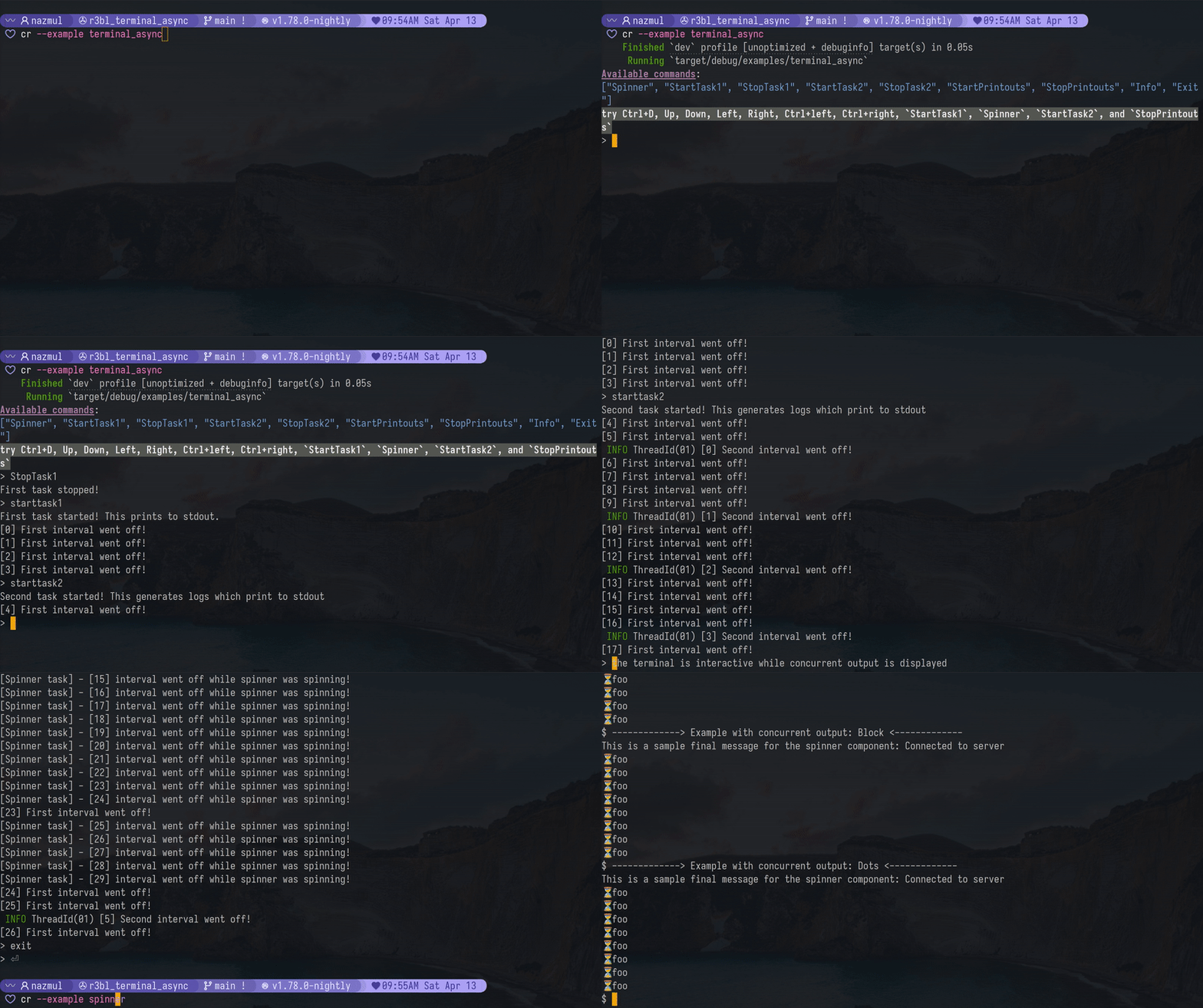
//! Here is a video of the `terminal_async` and `spinner` examples in this crate, in
//! action:
//!
//! 
//!
//! # Changelog
//!
//! Please check out the
//! [changelog](https://github.com/r3bl-org/r3bl-open-core/blob/main/CHANGELOG.md#r3bl_terminal_async)
//! to see how the library has evolved over time.
//!
//! # Learn how these crates are built, provide feedback
//!
//! To learn how we built this crate, please take a look at the following resources.
//! - If you like consuming video content, here's our [YT
//! channel](https://www.youtube.com/@developerlifecom). Please consider
//! [subscribing](https://www.youtube.com/channel/CHANNEL_ID?sub_confirmation=1).
//! - If you like consuming written content, here's our developer
//! [site](https://developerlife.com/). Please consider subscribing to our
//! [newsletter](https://developerlife.com/subscribe.html).
//! - If you have questions, please join our [discord
//! server](https://discord.gg/8M2ePAevaM).
//!
//! # Features
//!
//! 1. Read user input from the terminal line by line, while your program concurrently
//! writes lines to the same terminal. One [`Readline`] instance can be used to spawn
//! many async `stdout` writers ([r3bl_core::SharedWriter]) that can write to
//! the terminal concurrently. For most users the [`TerminalAsync`] struct is the
//! simplest way to use this crate. You rarely have to access the underlying
//! [`Readline`] or [`r3bl_core::SharedWriter`] directly. But you can if you
//! need to. [`r3bl_core::SharedWriter`] can be cloned and is thread-safe.
//! However, there is only one instance of [`Readline`] per [`TerminalAsync`] instance.
//!
//! 2. Generate a spinner (indeterminate progress indicator). This spinner works
//! concurrently with the rest of your program. When the [`Spinner`] is active it
//! automatically pauses output from all the [`r3bl_core::SharedWriter`]
//! instances that are associated with one [`Readline`] instance. Typically a spawned
//! task clones its own [`r3bl_core::SharedWriter`] to generate its output.
//! This is useful when you want to show a spinner while waiting for a long-running
//! task to complete. Please look at the example to see this in action, by running
//! `cargo run --example terminal_async`. Then type `starttask1`, press Enter. Then
//! type `spinner`, press Enter.
//!
//! 3. Use tokio tracing with support for concurrent `stout` writes. If you choose to log
//! to `stdout` then the concurrent version ([`r3bl_core::SharedWriter`]) from
//! this crate will be used. This ensures that the concurrent output is supported even
//! for your tracing logs to `stdout`.
//!
//! 4. You can also plug in your own terminal, like `stdout`, or `stderr`, or any other
//! terminal that implements [`SendRawTerminal`] trait for more details.
//!
//! This crate can detect when your terminal is not in interactive mode. Eg: when you pipe
//! the output of your program to another program. In this case, the `readline` feature is
//! disabled. Both the [`TerminalAsync`] and [`Spinner`] support this functionality. So if
//! you run the examples in this crate, and pipe something into them, they won't do
//! anything.
//!
//! Here's an example:
//!
//! ```bash
//! # This will work.
//! cargo run --examples terminal_async
//!
//! # This won't do anything. Just exits with no error.
//! echo "hello" | cargo run --examples terminal_async
//! ```
//!
//! ## Pause and resume support
//!
//! The pause and resume functionality is implemented using:
//! - [LineState::is_paused] - Used to check if the line state is paused and affects
//! rendering and input.
//! - [LineState::set_paused] - Use to set the paused state via the
//! [r3bl_core::SharedWriter] below. This can't be called directly (outside the
//! crate itself).
//! - [r3bl_core::SharedWriter::line_state_control_channel_sender] - Mechanism
//! used to manipulate the paused state.
//!
//! The [Readline::new] or [TerminalAsync::try_new] create a `line_channel` to send and
//! receive [r3bl_core::LineStateControlSignal]:
//! 1. The sender end of this channel is moved to the [r3bl_core::SharedWriter].
//! So any [r3bl_core::SharedWriter] can be used to send
//! [r3bl_core::LineStateControlSignal]s to the channel, which will be
//! processed in the task started, just for this, in [Readline::new]. This is the
//! primary mechanism to switch between pause and resume. Some helper functions are
//! provided in [TerminalAsync::pause] and [TerminalAsync::resume], though you can just
//! send the signals directly to the channel's sender via the
//! [r3bl_core::SharedWriter::line_state_control_channel_sender].
//! 2. The receiver end of this [tokio::sync::mpsc::channel] is moved to the task that is
//! spawned by [Readline::new]. This is where the actual work is done when signals are
//! sent via the sender (described above).
//!
//! While the [Readline] is suspended, no input is possible, and only <kbd>Ctrl+C</kbd>
//! and <kbd>Ctrl+D</kbd> are allowed to make it through, the rest of the keypresses are
//! ignored.
//!
//! See [Readline] module docs for more implementation details on this.
//!
//! ## Input Editing Behavior
//!
//! While entering text, the user can edit and navigate through the current input line
//! with the following key bindings:
//!
//! - Works on all platforms supported by `crossterm`.
//! - Full Unicode Support (Including Grapheme Clusters).
//! - Multiline Editing.
//! - In-memory History.
//! - Left, Right: Move cursor left/right.
//! - Up, Down: Scroll through input history.
//! - Ctrl-W: Erase the input from the cursor to the previous whitespace.
//! - Ctrl-U: Erase the input before the cursor.
//! - Ctrl-L: Clear the screen.
//! - Ctrl-Left / Ctrl-Right: Move to previous/next whitespace.
//! - Home: Jump to the start of the line.
//! - When the "emacs" feature (on by default) is enabled, Ctrl-A has the same effect.
//! - End: Jump to the end of the line.
//! - When the "emacs" feature (on by default) is enabled, Ctrl-E has the same effect.
//! - Ctrl-C, Ctrl-D: Send an `Eof` event.
//! - Ctrl-C: Send an `Interrupt` event.
//! - Extensible design based on `crossterm`'s `event-stream` feature.
//!
//! # Examples
//!
//! ```bash
//! cargo run --example terminal_async
//! cargo run --example spinner
//! cargo run --example shell_async
//! ```
//!
//! # How to use this crate
//!
//! ## [`TerminalAsync::try_new()`], which is the main entry point for most use cases
//!
//! 1. To read user input, call [`TerminalAsync::get_readline_event()`].
//! 2. You can call [`TerminalAsync::clone_shared_writer()`] to get a
//! [`r3bl_core::SharedWriter`] instance that you can use to write to `stdout`
//! concurrently, using [`std::write!`] or [`std::writeln!`].
//! 3. If you use [`std::writeln!`] then there's no need to [`TerminalAsync::flush()`]
//! because the `\n` will flush the buffer. When there's no `\n` in the buffer, or you
//! are using [`std::write!`] then you might need to call [`TerminalAsync::flush()`].
//! 4. You can use the [`TerminalAsync::println`] and [`TerminalAsync::println_prefixed`]
//! methods to easily write concurrent output to the `stdout`
//! ([`r3bl_core::SharedWriter`]).
//! 5. You can also get access to the underlying [`Readline`] via the
//! [`Readline::readline`] field. Details on this struct are listed below. For most use
//! cases you won't need to do this.
//!
//! ## [`Readline`] overview (please see the docs for this struct for details)
//!
//! - Structure for reading lines of input from a terminal while lines are output to the
//! terminal concurrently. It uses dependency injection, allowing you to supply
//! resources that can be used to:
//! 1. Read input from the user, typically
//! [`crossterm::event::EventStream`](https://docs.rs/crossterm/latest/crossterm/event/struct.EventStream.html).
//! 2. Generate output to the raw terminal, typically [`std::io::Stdout`].
//!
//! - Terminal input is retrieved by calling [`Readline::readline()`], which returns each
//! complete line of input once the user presses Enter.
//!
//! - Each [`Readline`] instance is associated with one or more
//! [`r3bl_core::SharedWriter`] instances. Lines written to an associated
//! [`r3bl_core::SharedWriter`] are output to the raw terminal.
//!
//! - Call [`Readline::new()`] to create a [`Readline`] instance and associated
//! [`r3bl_core::SharedWriter`].
//!
//! - Call [`Readline::readline()`] (most likely in a loop) to receive a line of input
//! from the terminal. The user entering the line can edit their input using the key
//! bindings listed under "Input Editing" below.
//!
//! - After receiving a line from the user, if you wish to add it to the history (so that
//! the user can retrieve it while editing a later line), call
//! [`Readline::add_history_entry()`].
//!
//! - Lines written to the associated [`r3bl_core::SharedWriter`] while
//! `readline()` is in progress will be output to the screen above the input line.
//!
//! - When done, call [`crate::manage_shared_writer_output::flush_internal()`] to ensure
//! that all lines written to the [`r3bl_core::SharedWriter`] are output.
//!
//! ## [`Spinner::try_start()`]
//!
//! This displays an indeterminate spinner while waiting for a long-running task to
//! complete. The intention with displaying this spinner is to give the user an indication
//! that the program is still running and hasn't hung up or become unresponsive. When
//! other tasks produce output concurrently, this spinner's output will not be clobbered.
//! Neither will the spinner output clobber the output from other tasks. It suspends the
//! output from all the [`r3bl_core::SharedWriter`] instances that are associated
//! with one [`Readline`] instance. Both the `terminal_async.rs` and `spinner.rs` examples
//! shows this (`cargo run --example terminal_async` and `cargo run --example spinner`).
//!
//! [`Spinner`]s also has cancellation support. Once a spinner is started,
//! <kbd>Ctrl+C</kbd> and <kbd>Ctrl+D</kbd> are directed to the spinner, to cancel it.
//! Spinners can also be checked for completion or cancellation by long running tasks, to
//! ensure that they exit as a response to user cancellation. Take a look at the
//! `examples/terminal_async.rs` file to get an understanding of how to use this API.
//!
//! The third change is that [`TerminalAsync::try_new()`] now accepts prompts that can
//! have ANSI escape sequences in them. Here's an example of this.
//!
//! ```
//! # use r3bl_terminal_async::TerminalAsync;
//! # use crossterm::style::Stylize;
//! # pub async fn sample() -> Result<(), Box<dyn std::error::Error>> {
//! let prompt = {
//! let user = "naz";
//! let prompt_seg_1 = "╭".magenta().on_dark_grey().to_string();
//! let prompt_seg_2 = format!("┤{user}├").magenta().on_dark_grey().to_string();
//! let prompt_seg_3 = "╮".magenta().on_dark_grey().to_string();
//! format!("{}{}{} ", prompt_seg_1, prompt_seg_2, prompt_seg_3)
//! };
//! let maybe_terminal_async = TerminalAsync::try_new(prompt.as_str()).await?;
//! let Some(mut terminal_async) = maybe_terminal_async else {
//! return Err(miette::miette!("Failed to create terminal").into());
//! };
//! Ok(())
//! # }
//! ```
//!
//! # Build this crate with Naz on YouTube
//!
//! Watch the following videos to learn more about how this crate was built:
//!
//! - [Part 1: Why?](https://youtu.be/6LhVx0xM86c)
//! - [Part 2: What?](https://youtu.be/3vQJguti02I)
//! - [Part 3: Do the refactor and rename the crate](https://youtu.be/uxgyZzOmVIw)
//! - [Part 4: Build the spinner](https://www.youtube.com/watch?v=fcb6rstRniI)
//! - [Part 5: Add color gradient animation to
//! spinner](https://www.youtube.com/watch?v=_QjsGDds270)
//! - [Part 6: Publish the crate and overview](https://youtu.be/X5wDVaZENOo)
//! - [Testing
//! playlist](https://www.youtube.com/watch?v=Xt495QLrFFk&list=PLofhE49PEwmwLR_4Noa0dFOSPmSpIg_l8)
//! - [Part 1: Intro](https://www.youtube.com/watch?v=Xt495QLrFFk)
//! - [Part 2: Deep dive](https://www.youtube.com/watch?v=4iM9t5dgvU4)
//!
//! The following playlists are relevant to this crate:
//!
//! - [Build with Naz, async readline and spinner for CLI in
//! Rust](https://www.youtube.com/watch?v=3vQJguti02I&list=PLofhE49PEwmwelPkhfiqdFQ9IXnmGdnSE)
//! - [Build with Naz : Explore Linux TTY, process, signals w/
//! Rust](https://www.youtube.com/playlist?list=PLofhE49PEwmw3MKOU1Kn3xbP4FRQR4Mb3)
//! - [Build with Naz, testing in
//! Rust](https://www.youtube.com/watch?v=Xt495QLrFFk&list=PLofhE49PEwmwLR_4Noa0dFOSPmSpIg_l8)
//!
//! # Why another async readline crate?
//!
//! This crate & repo is forked from
//! [rustyline-async](https://github.com/zyansheep/rustyline-async). However it has mostly
//! been rewritten and re-architected. Here are some changes made to the code:
//!
//! - Rearchitect the entire crate from the ground up to operate in a totally different
//! manner than the original. All the underlying mental models are different, and
//! simpler. The main event loop is redone. And a task is used to monitor the line
//! channel for communication between multiple [`r3bl_core::SharedWriter`]s and
//! the [`Readline`], to properly support pause and resume, and other control functions.
//! - Drop support for all async runtimes other than `tokio`. Rewrite all the code for
//! this.
//! - Drop crates like `pin-project`, `thingbuf` in favor of `tokio`. Rewrite all the code
//! for this.
//! - Drop `simplelog` and `log` dependencies. Add support for `tokio-tracing`. Rewrite
//! all the code for this, and add `tracing_setup.rs`.
//! - Remove all examples and create new ones to mimic a real world CLI application.
//! - Add `spinner_impl`, `readline_impl`, and `public_api` modules.
//! - Add tests.
//!
//! ## References for blocking and thread cancellation in Rust
//! <a href="markdown-references-for-blocking-and-thread-cancellation-in-rust"
//! name="references-for-blocking-and-thread-cancellation-in-rust"></a>
//!
//! - [Docs: tokio's `stdin`](https://docs.rs/tokio/latest/tokio/io/struct.Stdin.html)
//! - [Discussion: Stopping a thread in
//! Rust](https://users.rust-lang.org/t/stopping-a-thread/6328/7)
//! - [Discussion: Support for
//! `Thread::cancel()`](https://internals.rust-lang.org/t/thread-cancel-support/3056/16)
//! - [Discussion: stdin, stdout redirection for spawned
//! processes](https://stackoverflow.com/questions/34611742/how-do-i-read-the-output-of-a-child-process-without-blocking-in-rust)
//!
//! ## Educational references for Linux TTY and async Rust
//! <a href="markdown-educational-references-for-linux-tty-and-async-rust"
//! name="educational-references-for-linux-tty-and-async-rust"></a>
//!
//! - [Linux TTY and async Rust - Article on
//! developerlife.com](https://developerlife.com/2024/08/20/tty-linux-async-rust/)
//! - [Linux TTY and async Rust - Playlist on developerlife.com YT
//! channel](https://www.youtube.com/watch?v=bolScvh4x7I&list=PLofhE49PEwmw3MKOU1Kn3xbP4FRQR4Mb3)
// Skip rustfmt for rest of file.
// https://stackoverflow.com/a/75910283/2085356
// Attach sources.
// Re-export the public API.
pub use *;
pub use *;
pub use *;
// External crates.
use ;
// r3bl-open-core crates.
use ;
// Type aliases.
pub type SafeLineState = ;
pub type SafeHistory = ;
pub type SafeBool = ;
pub type PauseBuffer = ;
pub type SafePauseBuffer = ;
// Constants.
pub const CHANNEL_CAPACITY: usize = 1_000;
pub const HISTORY_SIZE_MAX: usize = 1_000;