
qcli
A small coding agent in the terminal: chat with a model that reads, searches, edits and runs in one folder, and asks before it changes anything.



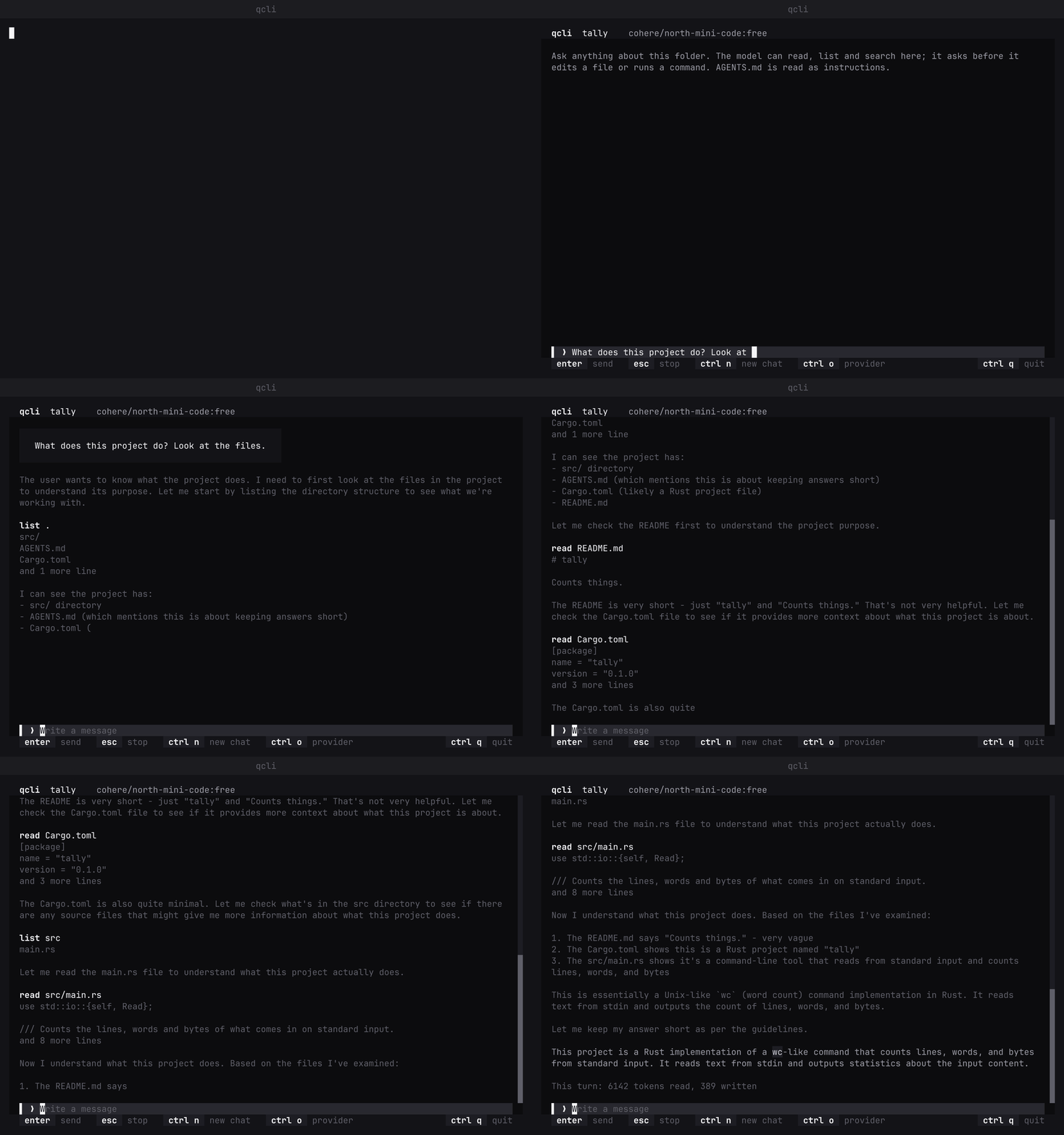
quvyta-cli opens a full-screen chat in the folder you start it in. You write, and the model's answer streams in. The model can look at the folder on its own; before it changes a file it shows you the diff, and before it runs a command it shows you the command, and nothing happens until you allow it. Nothing outside the folder can be reached. Each folder keeps its own conversation, so opening qcli there again goes on where you stopped. It is part of the Quvyta ecosystem of terminal applications, is built on quvyta-framework and is open source under the MIT licence.
Alpha. This is a first, deliberately small version. It runs the commands you allow in your own shell, with your rights, so read each one before you allow it. Settings, keys and the saved conversations may change between alpha releases. Please report anything that looks wrong at https://github.com/quvyta/cli/issues.
Install
This installs two commands that do the same thing: qcli and its long name quvyta-cli. Rust 1.95 or newer is needed.
Set up a provider
qcli talks to one model provider that speaks the Anthropic Messages API, streaming. On the first start a form asks for it; later ctrl+o opens the same form. The settings are kept in ~/.config/quvyta/cli.conf:
= "https://api.example.com/anthropic" # requests go to {address}/v1/messages
= "model-name"
= "~/.config/quvyta/example-key" # the path of a file that holds only the key
= "api-key" # leave it out for x-api-key; some servers want another name
The provider form on a first start, filled in with made-up values and saved:
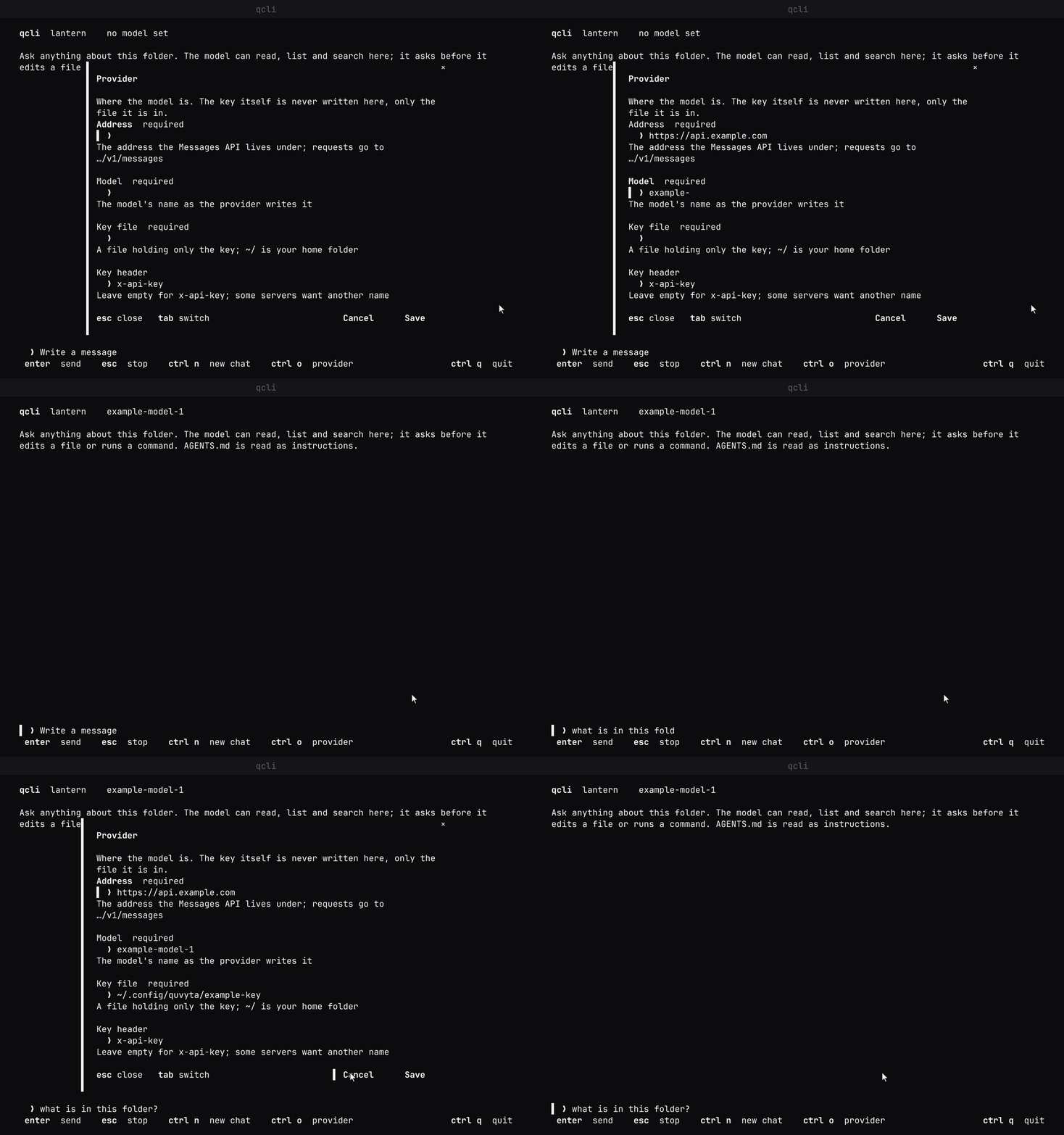
The settings name the key file, never the key. qcli reads the key from that file each time it sends a request, and it never writes the key anywhere: not to the settings, not to a saved conversation, not to the screen and not into an error message. Keep the file readable only by you (chmod 600).
The language, theme and icons follow the settings every Quvyta app shares in ~/.config/quvyta/quvyta.conf.
In a QCode profile
qcli can also run as a program of a QCode profile. QCode then tells it the provider in two environment variables, QCLI_ADDRESS (QCode's relay inside the container) and QCLI_MODEL (the model the profile chose), and cli.conf is not read for the provider nor written. The relay adds the key outside the container, so qcli reads no key and sends none; for that reason QCLI_ADDRESS must be an address of the same machine (localhost, 127.x or ::1), and qcli does not open if it is anything else or if only one of the two is set. ctrl+o then says the provider is changed on QCode's Profiles page. Every edit and command still asks first.
What the model can do
| Action | What it does | Asks you first |
|---|---|---|
| read a file | reads a text file in the folder, either the top of it or a range of lines you name, and says how much of the file is not shown (a long one is cut, and the model is told so) | no |
| list a folder | lists what is in a folder, or gives a tree of the folders below it with the size of every file | no |
| search | finds a piece of text in the folder's files and says where, with or without case and narrowed to the names you match (skipping .git, target and node_modules); it stops after 30 seconds, or when you press Esc, with what it found |
no |
| edit a file | replaces one exact piece of text with another, or writes a new file; you see the diff | yes |
| run a command | runs a command with sh -c in the folder, for at most two minutes; you see the command |
yes |
Every path is resolved inside the folder qcli was started in, links included; anything whose real place is outside it is refused. A command cannot be confined the same way, which is why every command is shown and asked about. When you decline an edit or a command, the model is told that you declined and goes on from there.
If the folder has an AGENTS.md, it is sent to the model with every request as the folder's instructions.
Keys
| Key | What it does |
|---|---|
enter |
send |
esc |
stop the reply or the command going on |
y / n |
allow or decline the edit or command on the card |
ctrl+n |
put the conversation aside and start a new one (the old one is kept) |
ctrl+o |
provider settings |
ctrl+q |
quit |
The mouse works everywhere: the buttons can be clicked and the conversation scrolls with the wheel. While an answer streams in you can scroll up to read; the view stays where you are until you go back to the end.
Network
qcli connects to two places.
- Your provider, at the address in your settings. Nothing goes to it when qcli starts; the first request leaves when you send your first message. Each request carries the conversation of that folder up to a fixed size — your first message, the newest turn and the system prompt whole, with older tool results cut and a note in their place — the folder's
AGENTS.mdif there is one, the full path of the working folder (in the system prompt, so the model knows where it is; it has your user name in it when the folder is under your home), and the key in the header you named. - crates.io, to say when a newer version is out (not asked in a QCode profile, where qcli comes with the profile's image). When qcli opens, at most once a day and without waiting for the answer, it asks crates.io's index for the versions of
quvyta-cli. Only the package's name and the version you run go out (as the request'sUser-Agent); nothing about you, the folder or the conversation. A newer version is said in the corner with how to update. No network is silence. It is one switch for the whole Quvyta ecosystem:update-notice = falsein~/.config/quvyta/quvyta.confturns it off for every Quvyta application.
qcli sends nothing anywhere else.
Where things are kept
- Settings:
~/.config/quvyta/cli.conf. - When the update question was last asked:
~/.local/state/quvyta/cli/update-check. - Conversations:
~/.local/state/quvyta/cli/conversations/, one file per folder, written after every message and readable only by you. They hold what was read and what commands printed.ctrl+nrenames the old file with the time in it instead of deleting it.
Licence
MIT