# qrab
`qrab` compiles a small, readable quantum-circuit language into standalone
LaTeX/TikZ, Typst ([Quill](https://github.com/Mc-Zen/quill)), SVG, or a URL for
the interactive [Quirk simulator](https://algassert.com/quirk). It is inspired
by [qpic](https://github.com/qpic/qpic), but a circuit is written as statements
in a language with types, functions, and imports rather than as positional
commands and token-substitution macros.
```qrab
circuit bell_pair {
h q[0]
x q[1] if q[0]
measure q[0], q[1]
}
```

Try it in the browser: **[playground](https://inmzhang.com/qrab/)** —
the compiler runs as WebAssembly, so nothing is uploaded and nothing is
installed.
## Features
- **Four backends from one source.** LaTeX/TikZ and Typst/Quill for papers,
SVG for the web and quick previews, and Quirk URLs for interactive
simulation. SVG and Quirk need no external toolchain.
- **Named wires, arrays, and ranges.** `qubit q[4]`, `q[0..3]`, and named
registers instead of counting rows.
- **Real composition.** `fn`, `let`, named `style` blocks, and relative
`import`s, all checked at compile time.
- **Structured layout.** `parallel` and `overlay` blocks, `repeat`, and
`reverse` replay of a marked range.
- **The full qpic visual model.** Controls, boxes, measurements, swaps,
barriers, braces, cuts, notes, groups, permutations, ellipses, wire
lifecycle changes, and orientation.
- **Portable styling.** Twelve named colors plus hex, sizes in points, shapes,
opacity, and hyperlinks — all of which mean the same thing in every document
backend.
- **Portable mathematical text.** Every visible string accepts literal text
with inline `$...$` LaTeX math, rendered consistently in LaTeX, Typst, and
SVG.
- **Diagnostics that point at your source.** Errors carry a line, a column, a
labelled span, and a suggestion, and one run reports more than one error.
- **Escape hatches.** `backend latex { … }` and `backend typst { … }` inject
raw code into exactly one backend.
## Design philosophy
**A circuit is a program, not a picture.** Positional macro languages make the
easy diagram quick and the interesting diagram unmaintainable. `qrab` gives you
the constructs you already reach for — naming a thing, calling it twice,
importing it from another file — and checks that you used them correctly.
**Say it once, get every format.** The parser produces one semantic model. Each
backend renders that model; none of them can see the source text.
**Portable styling or none at all.** Style options exist only where all
document backends can honor them. Anything genuinely backend-specific goes in
a `backend` block, where it is visibly quarantined instead of silently ignored
somewhere else. Quirk intentionally receives circuit semantics, not page
styling.
**Errors are part of the language.** Every diagnostic knows where it came
from — across `import` boundaries — and says what to do about it.
## Install
The distribution channels below are configured but stay pending until the first
public release.
| Cargo | `cargo install qrab` |
| cargo-binstall | `cargo binstall qrab` |
| npm / Bun | `npm i -g @inmzhang/qrab` · `npx @inmzhang/qrab` · `bunx @inmzhang/qrab` |
| Homebrew | `brew install --formula https://github.com/inmzhang/qrab/releases/latest/download/qrab.rb` |
| Shell | `curl --proto '=https' --tlsv1.2 -LsSf https://github.com/inmzhang/qrab/releases/latest/download/qrab-installer.sh \| sh` |
| PowerShell | `powershell -ExecutionPolicy Bypass -c "irm https://github.com/inmzhang/qrab/releases/latest/download/qrab-installer.ps1 \| iex"` |
Until then, install from a checkout:
```sh
cargo install --path . --locked
```
## Usage
```sh
qrab check circuit.qrab # parse and report, render nothing
qrab compile circuit.qrab # also writes circuit.url
qrab compile circuit.qrab --target svg # writes circuit.svg
qrab compile circuit.qrab --target quirk # writes an interactive URL to circuit.url
qrab compile circuit.qrab -t latex -o out.tex
qrab import-quirk 'https://algassert.com/quirk#circuit=...' -o circuit.qrab
qrab install-skill # writes .agents/skills/qrab/SKILL.md
```
`--target` takes `latex` (alias `tikz`), `typst` (alias `quill`), `svg`,
`quirk`, or `all`; `-o` requires a single backend. SVG and the Quirk URL are
finished output. The other two are sources, so hand them to their own compiler:
```sh
tectonic circuit.tex --outdir build
typst compile circuit.typ build/circuit.pdf
```
`import-quirk` accepts both Quirk's percent-escaped links and raw JSON links.
It writes qrab source to stdout unless `-o` is given. Other Quirk operators
become labeled boxes; read-only displays are omitted, while unsupported
state-changing detectors are rejected. The playground provides the same
conversion through **Import Quirk**.
Tectonic and Typst are only needed to turn those sources into PDFs; neither is
required for `qrab check`, for source generation, or for SVG. Typst 0.15.1
downloads Quill 0.8.0 on its first build and MiTeX 0.2.7 when a diagram uses
mathematical text.
All visible strings use the same convention: text outside `$...$` is literal,
and text inside is LaTeX math. This applies to wire endpoints, gates,
measurements, labels, notes, braces, cuts, bundles, and groups; write `\$`
inside a quoted qrab string for a literal dollar sign. The LaTeX backend emits
the math directly, Typst uses MiTeX, and SVG renders it as paths.
The Quirk target maps H, X, Y, Z, S, T, indexed phase gates, controls,
measurements, swaps, and recognized input states. Arbitrary named boxes become
labeled no-op custom gates because qrab does not define their unitary. Quirk is
limited to 16 qubits; regions, styling, wire labels, and other drawing-only
annotations without a Quirk equivalent are omitted.
Quirk has no math typesetter, so it removes the `$` delimiters and uses the
remaining TeX source as the closest deterministic label.
## Examples
Every example below is a file in [`examples/`](examples), and every diagram is
generated from it by `qrab` itself. The three run from the simplest circuit to
the most involved.
### Teleportation
Named wires carry their input and output labels. `if` turns any gate into a
controlled gate, `measure` switches a wire to a classical double rule, and
`barrier` separates the protocol's phases.
```qrab
circuit teleportation {
qubit bob: "|0>" -> "|psi>"
h alice
x bob if alice
barrier
x alice if message
h message
measure message, alice
x bob if alice
z bob if message
}
```

### Annotations
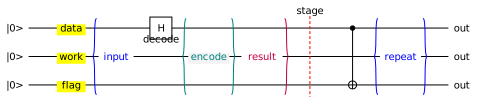
Ranges (`q[0..3]`) select several wires at once. `labels`, `brace`, `equals`,
`note`, and `cut` annotate a column without consuming one, and `layout` tunes
the shared geometry that every document backend reads.
```qrab
circuit annotations {
layout {
gate_size: 22
corner_radius: 3
comment_width: 72
}
labels "data", "work", "flag" on q[0..3] with fill: yellow
brace left "input" on q[0..3] with stroke: blue
h q[0]
note "decode" on q[1]
equals "encode" on q[0..3] braced both with fill: "#F3F3F3", stroke: teal
brace right "result" on q[0..3] with stroke: purple
cut on q[0..3] as "stage" with stroke: red
x q[2] if q[0]
brace both "repeat" on q[0..3] with stroke: blue
}
```
### Functions, constants, and styles
`let` names a value, `style` names a set of portable style options, and `fn`
names a sequence of operations over wire parameters. Functions call functions,
and arity is checked at the call site. This is the whole point of the language:
the circuit below has one description of "entangle", used three times.
```qrab
let entangler = "E"
let accent = "#DDEEFF"
style highlighted {
fill: accent
stroke: blue
shape: circle
}
fn entangle(control, target) {
h control
gate entangler on target if control with highlighted
}
fn prepare_ghz(first, second, third) {
entangle(first, second)
x third if second
barrier
}
circuit function_composition {
prepare_ghz(q[0], q[1], q[2])
gate entangler on q[0], q[2] with highlighted, opacity: 0.7
measure q[0], q[1], q[2]
}
```

### More
[`lifecycle.qrab`](examples/lifecycle.qrab) bounds a wire's lifetime with
`start` and `end`, changes the kind of line it draws, and reorders rows with
`permute`; [`styling.qrab`](examples/styling.qrab) draws the same circuit
top-to-bottom on a tinted background with per-gate colors and shapes;
[`regions.qrab`](examples/regions.qrab) boxes a marked range of operations;
[`programming.qrab`](examples/programming.qrab) uses `repeat` and `reverse`;
[`measurements.qrab`](examples/measurements.qrab) covers the measurement
shapes; [`ellipsis.qrab`](examples/ellipsis.qrab) omits register rows;
[`math-labels.qrab`](examples/math-labels.qrab) uses inline LaTeX math
throughout one diagram;
[`escapes.qrab`](examples/escapes.qrab) reaches into one backend; and
[`imports.qrab`](examples/imports.qrab) pulls declarations from another file.
## Documentation
**[The qrab Manual](docs/manual.pdf)** is the place to start: 43 pages covering
the language, the compiler, and the rendering model, with a worked, rendered
example for every construct. It is typeset from
[docs/manual.typ](docs/manual.typ), and every snippet in it is a real file under
[docs/manual/examples](docs/manual/examples) that `qrab` itself renders, so the
code and the picture beside it can never drift apart.
The library API is documented on [docs.rs](https://docs.rs/qrab). See the
[qpic compatibility notes](docs/qpic-coverage.md), [contributor guide](CONTRIBUTING.md),
and [release guide](docs/releasing.md) for maintenance details.
## License
MIT. See [LICENSE](LICENSE).