```
╔═══════════════════════════════════════════════════════════╗
║ ██████╗ ███████╗███╗ ███╗██╗ ██╗██╗ ██╗ ║
║ ██╔══██╗██╔════╝████╗ ████║██║ ██║╚██╗██╔╝ ║
║ ██████╔╝███████╗██╔████╔██║██║ ██║ ╚███╔╝ ║
║ ██╔═══╝ ╚════██║██║╚██╔╝██║██║ ██║ ██╔██╗ ║
║ ██║ ███████║██║ ╚═╝ ██║╚██████╔╝██╔╝ ██╗ ║
║ ╚═╝ ╚══════╝╚═╝ ╚═╝ ╚═════╝ ╚═╝ ╚═╝ ║
║ Born in PowerShell. Made in Rust. 🦀 ║
║ Terminal Multiplexer for Windows ║
╚═══════════════════════════════════════════════════════════╝
```
<p align="center">
<strong>The native Windows tmux. Born in PowerShell, made in Rust.</strong><br/>
Full mouse support · tmux themes · tmux config · 76 commands · blazing fast
</p>
<p align="center">
<a href="#installation">Install</a> ·
<a href="#usage">Usage</a> ·
<a href="docs/claude-code.md">Claude Code</a> ·
<a href="docs/features.md">Features</a> ·
<a href="docs/compatibility.md">Compatibility</a> ·
<a href="docs/performance.md">Performance</a> ·
<a href="docs/plugins.md">Plugins</a> ·
<a href="docs/keybindings.md">Keys</a> ·
<a href="docs/scripting.md">Scripting</a> ·
<a href="docs/configuration.md">Config</a> ·
<a href="docs/mouse-ssh.md">Mouse/SSH</a> ·
<a href="docs/faq.md">FAQ</a> ·
<a href="#related-projects">Related Projects</a>
</p>
---
# psmux
**The real tmux for Windows.** Not a port, not a wrapper, not a workaround.
psmux is a **native Windows terminal multiplexer** built from the ground up in Rust. It uses Windows ConPTY directly, speaks the tmux command language, reads your `.tmux.conf`, and supports tmux themes. All without WSL, Cygwin, or MSYS2.
> 💡 **Tip:** psmux ships with `tmux` and `pmux` aliases. Just type `tmux` and it works!
👀 On Windows 👇

## Installation
### Using WinGet
```powershell
winget install psmux
```
### Using Cargo
```powershell
cargo install psmux
```
This installs `psmux`, `pmux`, and `tmux` binaries to your Cargo bin directory.
### Using Scoop
```powershell
scoop bucket add psmux https://github.com/psmux/scoop-psmux
scoop install psmux
```
### Using Chocolatey
```powershell
choco install psmux
```
### From GitHub Releases
Download the latest `.zip` from [GitHub Releases](https://github.com/psmux/psmux/releases) and add to your PATH.
### From Source
```powershell
git clone https://github.com/psmux/psmux.git
cd psmux
cargo build --release
```
Built binaries:
```text
target\release\psmux.exe
target\release\pmux.exe
target\release\tmux.exe
```
### Docker (build environment)
A ready-made Windows container with Rust + MSVC + SSH for building psmux:
```powershell
cd docker
docker build -t psmux-dev .
docker run -d --name psmux-dev -p 127.0.0.1:2222:22 -e ADMIN_PASSWORD=YourPass123! psmux-dev
ssh ContainerAdministrator@localhost -p 2222
```
See [docker/README.md](docker/README.md) for full details.
### Requirements
- Windows 10 or Windows 11
- **PowerShell 7+** (recommended) or cmd.exe
- Download PowerShell: `winget install --id Microsoft.PowerShell`
- Or visit: https://aka.ms/powershell
## Why psmux?
If you've used tmux on Linux/macOS and wished you had something like it on Windows, **this is it**. Split panes, multiple windows, session persistence, full mouse support, tmux themes, 76 commands, 126+ format variables, 53 vim copy-mode keys. Your existing `.tmux.conf` works. Full details: **[docs/features.md](docs/features.md)** · **[docs/compatibility.md](docs/compatibility.md)**
## Usage
Use `psmux`, `pmux`, or `tmux` — they're identical:
```powershell
psmux # Start a new session
psmux new-session -s work # Named session
psmux ls # List sessions
psmux attach -t work # Attach to a session
psmux --help # Show help
```
## Claude Code Agent Teams
psmux has first-class support for Claude Code agent teams. When Claude Code runs inside a psmux session, teammate agents automatically spawn in separate tmux panes instead of running in-process.
```powershell
psmux new-session -s work # Start a psmux session
claude # Run Claude Code — agent teams just work
```
No extra configuration needed. Full guide: **[docs/claude-code.md](docs/claude-code.md)**
## Documentation
| **[Features](docs/features.md)** | Full feature list — mouse, copy mode, layouts, format engine |
| **[Compatibility](docs/compatibility.md)** | tmux command/config compatibility matrix |
| **[Performance](docs/performance.md)** | Benchmarks and optimization details |
| **[Key Bindings](docs/keybindings.md)** | Default keys and customization |
| **[Scripting](docs/scripting.md)** | 76 commands, hooks, targets, pipe-pane |
| **[Configuration](docs/configuration.md)** | Config files, options, environment variables |
| **[Plugins & Themes](docs/plugins.md)** | Plugin ecosystem — Catppuccin, Dracula, Nord, and more |
| **[Mouse Over SSH](docs/mouse-ssh.md)** | SSH mouse support and Windows version requirements |
| **[Claude Code](docs/claude-code.md)** | Agent teams integration guide |
| **[FAQ](docs/faq.md)** | Common questions and answers |
## Related Projects
<table>
<tr>
<td align="center" width="50%">
<a href="https://github.com/psmux/pstop">
<img src="https://raw.githubusercontent.com/psmux/pstop/master/pstop-demo.gif" width="400" alt="pstop demo" /><br/>
<b>pstop</b>
</a><br/>
<sub>htop for Windows — real-time system monitor with per-core CPU bars, tree view, 7 color schemes</sub><br/>
<code>cargo install pstop</code>
</td>
<td align="center" width="50%">
<a href="https://github.com/psmux/psnet">
<img src="https://raw.githubusercontent.com/psmux/psnet/master/image.png" width="400" alt="psnet screenshot" /><br/>
<b>psnet</b>
</a><br/>
<sub>Real-time TUI network monitor — live speed graphs, connections, traffic log, packet sniffer</sub><br/>
<code>cargo install psnet</code>
</td>
</tr>
<tr>
<td align="center" width="50%">
<a href="https://github.com/psmux/Tmux-Plugin-Panel">
<img src="https://raw.githubusercontent.com/psmux/Tmux-Plugin-Panel/master/screenshot.png" width="400" alt="Tmux Plugin Panel screenshot" /><br/>
<b>Tmux Plugin Panel</b>
</a><br/>
<sub>TUI plugin & theme manager for tmux and psmux — browse, install, update from your terminal</sub><br/>
<code>cargo install tmuxpanel</code>
</td>
<td align="center" width="50%">
<a href="https://github.com/psmux/omp-manager">
<img src="https://raw.githubusercontent.com/psmux/omp-manager/master/screenshot.png" width="400" alt="OMP Manager screenshot" /><br/>
<b>OMP Manager</b>
</a><br/>
<sub>Oh My Posh setup wizard — browse 100+ themes, install fonts, configure shells automatically</sub><br/>
<code>cargo install omp-manager</code>
</td>
</tr>
</table>
## License
MIT
## Contributing
Contributions welcome — bug reports, PRs, docs, and test scripts via [GitHub Issues](https://github.com/psmux/psmux/issues).
If psmux helps your Windows workflow, consider giving it a ⭐ on GitHub!
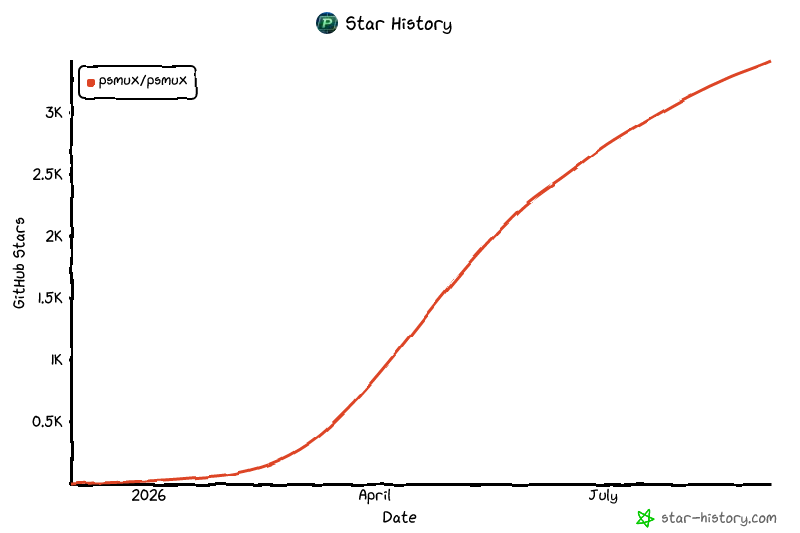
## Star History
[](https://www.star-history.com/?repos=psmux%2Fpsmux&type=date&legend=top-left)
---
<p align="center">
Made with ❤️ for PowerShell using Rust 🦀
</p>

