<p align="center">
<img src="logo.svg" width="256" height="256" alt="procmod-overlay">
</p>

<h1 align="center">procmod-overlay</h1>

<p align="center">Game overlay rendering with transparent click-through windows.</p>

---

Create a transparent, click-through overlay window on top of any game window and draw shapes, text, and HUD elements. Direct3D 11 backend, immediate-mode API, built-in font rendering.

<p align="center">
<img src="example.png" width="600" alt="procmod-overlay demo showing ESP boxes, health bars, and crosshair">
<br>
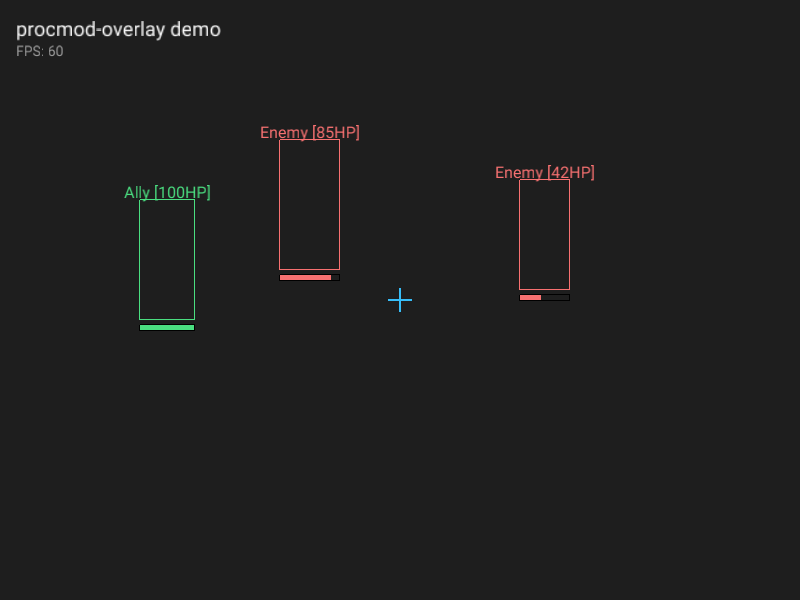
<sub>Live output from the included demo binary. The dark background is a stand-in for a game window.</sub>
</p>

## Install

```toml
[dependencies]
procmod-overlay = "3.0.0"
```

## Quick start

Draw status information and projected debug geometry over a game window:

```rust
use procmod_overlay::{Overlay, OverlayTarget, Color};

fn main() -> procmod_overlay::Result<()> {
    let mut overlay = Overlay::new(OverlayTarget::Title("My Game".into()))?;

    loop {
        overlay.begin_frame()?;

        overlay.rect(100.0, 50.0, 60.0, 120.0, Color::RED);
        overlay.rect_filled(100.0, 175.0, 45.0, 8.0, Color::GREEN);
        overlay.text(20.0, 20.0, "instrumentation active", 16.0, Color::WHITE);

        overlay.end_frame()?;
    }
}
```

## Usage

### Creating an overlay

Find the target window by title, class name, HWND, or process ID:

```rust
// by window title (substring match)
let overlay = Overlay::new(OverlayTarget::Title("Counter-Strike".into()))?;

// by window class
let overlay = Overlay::new(OverlayTarget::Class("UnrealWindow".into()))?;

// by process ID
let overlay = Overlay::new(OverlayTarget::Pid(1234))?;

// by raw HWND
let overlay = Overlay::new(OverlayTarget::Hwnd(0x00010A3C))?;
```

PID lookup only enumerates windows on the caller's current interactive desktop. The overlay must run in the logged-in desktop session that contains the target window. A process started directly from a noninteractive SSH session cannot discover windows on another desktop or session.

`ProcessNotFound` means the PID does not exist or cannot be queried. `ProcessWindowNotFound` means the process exists but has no visible top-level window on the current desktop. Windows does not expose enough information here to reliably distinguish a process with no window from one whose window belongs to another desktop or session.

### Interaction

Overlays are click-through and non-activating by default. Applications can explicitly enter an interactive control mode and consume window input events:

```rust
use procmod_overlay::{InputEvent, InteractionMode, MouseButton};

overlay.set_interaction_mode(InteractionMode::Interactive)?;

for event in overlay.drain_input_events() {
    match event {
        InputEvent::MouseButton {
            button: MouseButton::Left,
            pressed: false,
            x,
            y,
        } => println!("clicked at {x}, {y}"),
        InputEvent::Key {
            virtual_key: 0x1b,
            ..
        } => overlay.set_interaction_mode(InteractionMode::PassThrough)?,
        _ => {}
    }
}
```

`Interactive` removes click-through and no-activate styles, requests foreground activation, displays the overlay cursor, and reports mouse, wheel, keyboard, text, focus, and close events. Returning to `PassThrough` immediately restores click-through behavior, releases mouse capture, and requests target-window activation. Windows can deny either foreground request; input routing still changes successfully, and the current focus is observable through `Focused` events, `is_target_foreground`, and `is_overlay_foreground`. Applications own hit testing, widgets, key bindings, and menu state.

Input is collected while `begin_frame` pumps the window message queue. Consecutive mouse-move events are coalesced and the queue is bounded. `take_dropped_input_event_count` reports and resets the number of events discarded at capacity. Text events decode UTF-16 characters, but IME composition is not exposed.

`CloseRequested` lets the application save state or ask for confirmation. Call `overlay.close()` to accept the request; the next `begin_frame` returns `OverlayClosed`.

### Lifecycle

`begin_frame` reports `OverlayClosed` when the overlay window closes and `TargetWindowLost` when the target HWND is destroyed or becomes inaccessible. Renderer failures remain renderer errors. The consumer owns reconnection policy and any application-state reset after reconnecting.

A driver reset, a GPU hang, or an adapter change destroys the graphics device. The overlay releases the dead device, builds a replacement during the next `begin_frame`, and re-uploads the glyph atlas, so drawing code needs no changes and the render loop keeps running. The frame in flight when the device went away is dropped. `take_device_reset_count` reports and resets how many rebuilds happened, for applications that log it or reset frame timing:

```rust
overlay.begin_frame()?;

if overlay.take_device_reset_count() > 0 {
    // the previous frame was lost with the device
}
```

`Error::DeviceLost` is only returned when the replacement device cannot be built, which usually means the adapter is gone for good.

### Drawing shapes

All drawing happens between `begin_frame` and `end_frame`:

```rust
overlay.begin_frame()?;

// filled and outlined rectangles
overlay.rect_filled(10.0, 10.0, 200.0, 30.0, Color::rgba(0, 0, 0, 180));
overlay.rect(10.0, 10.0, 200.0, 30.0, Color::WHITE);

// lines
overlay.line(0.0, 0.0, 100.0, 100.0, 2.0, Color::RED);

// circles
overlay.circle_filled(150.0, 150.0, 20.0, Color::rgba(56, 189, 248, 128));
overlay.circle(150.0, 150.0, 20.0, Color::CYAN);

overlay.end_frame()?;
```

### Drawing text

Text rendering uses an embedded font with configurable size:

```rust
overlay.text(20.0, 20.0, "Player1 [100HP]", 16.0, Color::WHITE);
overlay.text(20.0, 40.0, "Distance: 42m", 12.0, Color::YELLOW);

// measure text bounds before drawing
let (w, h) = overlay.text_bounds("centered text", 16.0);
overlay.text(320.0 - w / 2.0, 10.0, "centered text", 16.0, Color::WHITE);
```

### Outlined and aligned text

An overlay draws over scenery it does not control, and text with no outline vanishes wherever the background happens to match the text color. `TextStyle` adds an outline and per-line alignment:

```rust
use procmod_overlay::{TextAlign, TextStyle};

let label = TextStyle::new(16.0, Color::WHITE)
    .outlined(Color::BLACK, 1.5)
    .aligned(TextAlign::Center);

for enemy in &enemies {
    overlay.text_styled(enemy.x, enemy.y - 20.0, &enemy.name, &label);
}
```

The outline is read from a distance field baked into the glyph atlas when the overlay starts, so its thickness stays uniform around curves and corners, and drawing a string costs one extra draw call however long the string is. Outline width is clamped to `TextStyle::max_outline_width(size)`, which is 7 pixels at size 16 and grows with the font size.

Each line of a multi-line string is aligned independently. `text` draws left-aligned text with no outline.

## Platform support

| Platform | Backend | Status |
|----------|---------|--------|
| Windows  | Direct3D 11 | Supported |
| Linux    | - | Planned |
| macOS    | - | Planned |

The crate compiles on all platforms but only exports the overlay API on Windows.

## How it works

The overlay creates a transparent, always-on-top window (`WS_EX_LAYERED | WS_EX_TRANSPARENT`) positioned over the target game window. All mouse and keyboard input passes through to the game. The overlay tracks the target window's position and resizes automatically.

Rendering uses Direct3D 11 with alpha blending. Geometry accumulates into one vertex and index buffer per frame, and consecutive runs that need the same pipeline state are merged into a single draw call. Text is rasterized into a two-channel glyph atlas at startup, holding coverage for the fill and a distance field for outlines, and rendered as textured quads.

## Demo

Run the visual demo on Windows to see the overlay in action:

```
cargo run --example demo
```

This creates a dark window simulating a game scene, overlays it with ESP boxes, health bars, a crosshair, and text labels. The screenshot above was captured from this demo.

## License

MIT