# Changelog

All notable changes to this project will be documented in this file.

The format is based on [Keep a Changelog](https://keepachangelog.com/en/1.0.0/),
and this project adheres to [Semantic Versioning](https://semver.org/spec/v2.0.0.html).

## [Unreleased]

## [2.0.0] - 2026-10-28

This is a major release. Read **Changed** first: a name now matches the whole process name (add `--cmd` for the old matching), and `--json` no longer counts as `--yes`. The library API changed too (see the entries marked **Library API**).

### Added

- **Several targets can be separate arguments.** `proc kill 1234 5678 :8080` is the form `kill`, `docker kill` and `killport` use, and it now works everywhere proc took a comma-separated list: `kill`, `stop`, `freeze`, `thaw`, `free`, `on`, `why`, `wait`, `unstick`, `watch` and the names of `list` (`info` already did). Separate arguments and comma lists mix (`proc kill 123 :3000,:8080 node`), and a process named twice is still handled once, except by the read-only `on` and `why`, which answer each target under its own header. A message that repeated the target now shows the targets as typed, joined by spaces (`No process found matching '1234 5678'`; `wait --json` has them in `target` the same way), and the JSON `not_found` lists still have one entry per target. `by`, `tree`, `in` and `for` take a single value, as before. Because `--in` may take a value, it takes the next word as its directory unless that word starts with `-`: `proc kill --in 123 456` reads `123` as the directory, so put `--in` after the targets or write `--in=DIR`. Every `--in` says so in `--help`

- **`--cmd` matches names the old way.** `proc kill serve --cmd` matches any process with `serve` in its name or full command line, like `pkill -f`. It is on every command that takes a name target or `--by`: `on`, `by`, `in`, `for`, `list`, `info`, `ports`, `tree`, `watch`, `why`, `kill`, `stop`, `freeze`, `thaw`, `unstick`, `wait`, `orphans` and `stuck`. It has no short form, so a wider match is always spelled out. When a name matches nothing but some command lines have it, the not-found message now says so, for example `2 processes have 'serve' in their command line (add --cmd to match those)`. The hint costs nothing: the same pass over the processes counts them. `tree` shows it too; `list` (it prints an empty list) and the `--by` filters that only narrow a result (`kill --by`, `ports --by` and the like) do not

- **`--wide` / `-w` on `list`, `by`, `in`, `for`, `stuck`, `orphans` and `watch`**: prints directories and arguments in full instead of fitting them to the terminal, for when you need the whole path and your terminal can scroll
- **[FAQ page](https://proc-cli.com/faq)**: 16 answers to the most searched process and port questions ("address already in use", killing a process on a port on Mac and Windows, zombies, orphans, pausing a process), each with the proc command and the classic alternative
- **Blog post**: [What's new in proc](https://proc-cli.com/posts/whats-new-in-proc), covering the releases since March
- **Structured data**: SoftwareApplication on the home page, FAQPage on the FAQ, BreadcrumbList on posts and command pages, and an author (`yazeed`, linked to GitHub) on posts, shown with an avatar next to the date. Every page also has a social card image
- **Favicon**: `proc-cli.com/favicon.ico` was a 404. The site now has an icon, the pink chevron and a blue cursor on the terminal's dark square (`favicon.svg`, `favicon.ico` at 16, 32 and 48 px, and a 180 px `apple-touch-icon.png`), linked from every page

### Changed

- **`--version` says when a build isn't a release.** `main` keeps the last released version number until the release, so a build from `main` printed `proc 1.14.5`, the same as the real 1.14.5 release, and a bug report citing it was ambiguous. A build from the release tag still prints the plain version (`proc 2.0.0`); any other build in a git checkout prints `proc 2.0.0-dev (main@5e94647, 3 commits after v2.0.0)`, naming the branch (`detached@` when HEAD is detached), the commit and the distance from the latest `v*` tag, with `, modified` added when tracked files have uncommitted changes. Builds without git (crates.io, `cargo install proc-cli`, a Docker context without `.git`) print the plain version. `proc_cli::VERSION` carries the same string. The Dockerfiles now copy `build.rs`, which gathers the git facts
- **BREAKING: a name matches the whole process name, not any part of the name or command line.** `proc kill node` used to kill every process whose name or full command line contained `node`, ignoring case. On one Mac a dry run matched 193 processes, among them `Claude Helper` and `Obsidian Helper (Renderer)`, and `proc kill go` matched 55, including Chrome renderers and another Claude Code session whose command line said `Google`; with `--yes` all of them would have been killed. A name now equals the process name, the file name of its executable, or the file name of its first argument, ignoring case, as `killall` and `pkill` read it (`proc kill node` matches `node` only). The executable and first argument count because Linux cuts a process name to 15 characters, so a longer name only matches through them. On Windows a trailing `.exe` is optional on either side, so `node` matches `node.exe`. The same rule applies to every name target (`on`, `by`, `list`, `info`, `tree`, `watch`, `why`, `kill`, `stop`, `freeze`, `thaw`, `unstick`, `wait`) and to every `--by` filter (also `in`, `for`, `ports`, `orphans`, `stuck`), which used to match a part of the name or the command line, or on `ports` a part of the name. proc itself and its ancestor shells are still left out. A path is not a name: `proc kill ./server` and `proc kill /usr/bin/node` find nothing, because the pattern is compared with file names; use `--cmd`, or `proc for <file>` for an executable. An empty name, which used to match every process, now matches nothing (with `--cmd` it still matches everything, as `pkill -f ''` does), and a name that matches nothing no longer reports how many command lines contain the empty string. **Migration:** add `--cmd` to keep the old matching (`proc kill node --cmd`), or name the process exactly. A script that passed a part of a name now gets exit 2 (`No process found matching`) where it matched before; one that relied on a command-line match needs `--cmd`
- **On macOS the JSON `address` of an IPv6 listener loses its brackets**: `[::1]` is now `::1`, matching Linux and Windows. A script that matched the bracketed form must drop the brackets
- **CI fails when a line or a flag has no test.** The coverage gate is no longer report-only: a change that drops line coverage below 100% of `src/`, merged across Linux, macOS and Windows, fails the build, and so does a long flag (`--name`) or short flag (`-n`) of any process command that no test exercises (`completions` and `manpage`, `--help`/`-h` and `--version`/`-V` are not checked). The gate also fails if one OS's coverage run is missing, or a source file has no coverage data, so a broken job can't pass as a smaller report. `scripts/coverage-local.sh` shows the Linux numbers locally, and CONTRIBUTING.md describes the rule for excluding a line. The gate's report also prints each OS's own total, right after the merged TOTAL and labelled by its lcov file (when several are given; the percentage is cut, not rounded), so a platform that runs far less than the others is visible; it is for information only, and the merged 100% stays the only rule
- **Every CI job has a time limit** (5 to 45 minutes, at least twice a normal run), so a hung test fails the job instead of holding a runner for up to six hours
- **"Not supported on this OS" is exit 4.** `freeze` and `thaw` on Windows exited 1, while `stop --signal` on Windows exited 4. Both mean the same thing, so they now share one code: `freeze`, `thaw` and `stop --signal` exit 4 on Windows, and the skill's exit-code table says so
- **`orphans` is not supported on Windows: it exits 4.** On Windows `proc orphans` (also `--kill` and `--dry-run`) always reported "No orphaned processes found", because an orphan is a process whose parent is PID 1, and Windows has no PID 1 and does not re-parent a process whose parent exited. It now exits 4 with "orphans is not supported on Windows: Windows doesn't re-parent processes, so there is no reliable way to tell an orphan", like `freeze` and `thaw`. A script that ran `orphans` on Windows and treated the empty answer as "nothing to clean up" now sees the error. Linux and macOS are unchanged
- **`--json` no longer counts as a yes.** Commands that change processes (`kill`, `stop`, `free`, `freeze`, `thaw`, `unstick`, `orphans --kill`, `stuck --kill`) acted without asking when given `--json`, because the prompt was skipped for JSON output. `--json` only changes how results are printed, so they now need `--yes` like everywhere else: without it they exit 4 and change nothing. The same goes for running without a terminal, which used to fail with "Dialog error: not a terminal". `--dry-run` still previews without `--yes`. With `--json` the error also carries `needs_confirmation: true` and the `processes` the command would have changed, so a caller can show the list before retrying with `--yes`. A test now checks that every command takes `--json`/`-j` and `--verbose`/`-v`, and every command that changes processes `--yes`/`-y` and `--dry-run`
- **Library API: name matching.** `Process::find_by_name`, `resolve_target`, `resolve_targets`, `resolve_targets_excluding_self`, `matches_by_filter` and `apply_filters` take a `proc_cli::core::NameMatch` (`Exact` or `Command`) as a last argument. `resolve_targets` and `resolve_targets_excluding_self` return a `Resolved { processes, not_found, hints }` instead of a tuple. `Process` has two new fields, `argv0` and `raw` (neither serialized), so a `Process { .. }` literal needs them; `raw` is `None` unless a name, executable or command line had control characters escaped, and holds the unescaped text name matching reads. `ProcError` has a new variant, `NameNotFound { name, in_command_line }` (exit 2), returned when a name matched nothing but is in some command lines; an exhaustive `match` must handle it. The matcher itself is `proc_cli::core::name_match`
- **Action JSON lists the targets that weren't found.** `proc kill <pid> 99999999 --dry-run --json` returned `success: true` with no sign that a target was missing, so an agent could not tell. Every command that takes targets now puts `not_found` in its JSON, an array that is empty when every target was found: `kill`, `stop`, `freeze`, `thaw`, `unstick`, `free` and `wait` in the dry run, the result and the `needs_confirmation` error (exit 4), and `why` in its result (`info` and `on` already had it). `free` lists the ports as typed (`":3000"`). The found processes are still handled, so `success` and the exit codes are unchanged, and the human output still warns `Not found: …` (`unstick` did not before). When every target is missing the command is still the not-found error (exit 2), which names them in `error`, except `free`: a port nobody holds is success (exit 0) with the ports in `not_found`. `orphans` and `stuck` take no targets and have no `not_found`
- **Help and docs examples never pair `--yes` with a name.** The `kill`, `freeze` and `thaw` command headers and the FAQ showed a name followed by `--yes`, and it was copied by agents with no skill loaded, and it kills everything the name matches without a look. `--yes` now appears only with a `:port` or a PID in `--help`, the README and the command pages; a name is shown with `--dry-run`, or without `--yes` so it asks first. A test reads those files and fails on a name next to `--yes`. The wildcard note changed too: proc has no wildcards, an unquoted `node*` is expanded by your shell into file names, and `--cmd` is the way to a partial match
- **Library API: `PortInfo::find_by_port` is now `PortInfo::holders_of`.** It returns every process listening on the port (a `Vec`, empty when nothing does), each once, instead of the first one found. A caller that wanted one process takes the first element
- **Library API: confirmation.** `proc_cli::ui::must_confirm(action, yes, json, processes, not_found)` is new and takes the processes the command would change and, for a command with targets, the ones that matched nothing (its first form, written earlier in this unreleased work, took three arguments; no release has either). `Printer::with_not_found` makes a printer put `not_found` in the JSON it writes. `Printer::ask_confirm` no longer treats `--json` as a yes: it returns an error where it used to return `Ok(true)`, so a library caller that passed a JSON printer without `yes` now gets `ProcError::ConfirmationRequired`
- **Library API: `ProcError` has a new variant, `ConfirmationRequired { message, processes, not_found }`.** It is what a missing `--yes` returns (exit 4). `ProcError` is not `#[non_exhaustive]`, so an exhaustive `match` on it in library code must handle the new variant
- **Library API: `Process::find_orphans` returns `ProcError::NotSupported` on Windows.** It returned an empty list there, which read as "no orphans"; Windows has no PID 1 and does not re-parent a process whose parent exited, so nothing can be checked. The signature is unchanged (it returns a `Result`); a caller that ran it on Windows now gets the error (exit 4 in the `orphans` command)
- **Library API: `ProcError::FilteredOut { target, reason }`, and `NotSupported` exits 4.** `FilteredOut` (exit 2) is what `proc on` returns when `--in` or `--by` ruled out everything a target matched; it replaces a `ProcessNotFound` whose text had the reason inside the target, so an exhaustive `match` must handle it. `ProcError::NotSupported` now maps to exit 4 (it was 1). `ProcError::command_line_hint` and `proc_cli::error::command_line_hint` build the `--cmd` hint of `NameNotFound`
- **Library API: other changed and new public items.** The command structs (`KillCommand` and the rest) changed their fields, so a struct literal needs updating: `target` is a `Vec<String>` on `kill`, `freeze`, `thaw`, `free`, `on` and `why`, `watch`'s `target` was an `Option<String>` and is a `Vec<String>`, `list`'s `name` was an `Option<String>` and is a `Vec<String>`, `ports`' `range` is an `Option<(u16, u16)>` (parsed, not text), and `cmd` (every command that takes a name target or `--by`) and `wide` (`list`, `by`, `in`, `for`, `stuck`, `orphans`, `watch`) are new. `Process::kill_and_wait` returns `Result<()>` instead of `Result<Option<ExitStatus>>`. New: `Process::names`, `Process::looks_stuck_now`, `Process::cpu_over` (Unix only), `Process::measure_cpu`, `proc_cli::core::{escape_control, RawText, apply_to_each, flatten_targets, validate_target_arg}`, `proc_cli::core::filters::{cwd_within, resolve_dir, strip_verbatim_prefix}`, `PortInfo::is_exposed` and `PortInfo::is_local`, `proc_cli::ui::{process_table_budget, ProcessTableBudget}`, `Printer::wide`, and the modules `proc_cli::cli` (`Cli` and `Commands`, moved out of the binary) and `proc_cli::version`. `proc_cli::VERSION` is built by `build.rs` and can carry a `-dev` suffix (see above). `truncate_string` and `truncate_path` count display columns, so their length argument is a width
- **The agent skill asks before touching what it didn't start.** Its rule was "only touch processes you started or the user named", while the skill page promised the agent "checks with you" first. The rule now says to ask: preview with `--dry-run --json`, show the user the list, and add `--yes` only once they agree, since `--yes` is consent given on their behalf. The page describes what the skill tells agents and what proc enforces itself
- **The agent skill is rewritten for 2.0.0.** `SKILL.md` now opens with a safety model instead of a list of commands: a table of what only reads, what can be undone and what ends a process; seven ranked rules (a process is yours only if you started it and recorded its PID, a name is a search and never approval, preview with `--dry-run --json` and show the user, `--yes` is the user's consent to one list and never a retry, act by PID with an `--in`/`--by` guard, then verify); and what to do on exit 4 `needs_confirmation`. The old rule "always pass `--yes`" is gone, and no template pairs `--yes` with a name. Targets are `:port` and PID first; names are exact whole names for a search, `--cmd` only after a dry run, several targets are separate arguments, and `stuck --kill` and `orphans --kill` are never used. A permission failure is documented as it happens (a `failed` entry and exit 1, not exit 3), as are ports with several holders, `not_found`, and the false positives of `stuck` and `orphans`, with measured counts. The description now says when not to use proc (containers, system services, remote hosts). `reference.md` has a contents list and a section on older versions, where `--json` counted as a yes; the version pin is replaced by "proc 2.0 or later". New `skills/proc-cli/evals.md` lists twelve tasks with what the agent must and must never do, and `tests/doc_examples.rs` now also reads `skills/proc-cli/*.md`: it fails on a name next to `--yes`, on `--yes` with `orphans` or `stuck`, and on a comma list of targets outside a line that says commas are deprecated. `<pid>` and `:<port>` placeholders are accepted next to `--yes`; `<name>` is not
- **A bare `proc` orients you instead of listing all 19 commands.** It now leads with the one idea that unlocks the rest — a target is the same everywhere — and shows four commands that run exactly as printed, with `proc --help` still listing everything. The full list told a newcomer what exists without telling them how the tool thinks, and the measure that matters for a CLI is how long it takes someone who has never run it to get a correct answer
- **One process is always one line.** The process table truncates to the terminal width instead of letting cells wrap: on a machine with ten sibling repos, fourteen processes used to render as roughly seventy interleaved fragments with the columns no longer lining up, which stopped it being a table at all. Long directories keep their root and their tail (`/Users/…/maliqe-website/.next/standalone`), because the tail is the part that differs between rows, and `proc watch` now does the same: its table was a separate copy of the old layout, so it kept wrapping after the other one was fixed. Both tables now size their columns from one shared budget, so they cannot drift apart again
- **Website redesign ([proc-cli.com](https://proc-cli.com)).** A new layout and type built for reading: a 42rem text column, Atkinson Hyperlegible Next and JetBrains Mono, light and dark themes. Code blocks are dark terminals with copy buttons and spacing above and below, so the text after a block no longer sits against it. The home page leads with an interactive command reader: pick any of the 19 commands and one of its targets, and it says what that exact command does and how proc reads the target (58 examples, in `docs/_data/reader.yml`). "Target" in the headline uses the same colour as the target in the reader. Command pages have a sidebar listing every command, and the changelog has one listing every version with its release date, grouped by minor version and marking the one you're reading. The header and the install page show the latest version, read from `docs/_data/release.yml`, which RELEASE.md now bumps with the others
- **Sentence case across the site**: page titles, headings, tables and post titles
- **`proc wait` notices an exit within a quarter second.** It used to check only every `--interval` (5 seconds by default), so it could return 5 seconds late. `--interval` now sets how often the status line is printed
- **`proc stop` asks every process at once and waits for them together**, so several processes share one `--timeout`. They used to be handled one after another: five processes that ignore SIGTERM took 50 seconds instead of 10
- **`proc ports` and `proc on :port` show full process names on macOS** (`python3.12`, `ControlCenter`, `OpenCode Helper`). lsof cut them to 9 characters, so a helper process could look like the app itself
- **`proc stuck` needs a process to stay stuck.** A process counts as stuck when it has been running longer than `--timeout` and, in two readings a second apart, is using over 50% CPU or is blocked in uninterruptible sleep (waiting in the kernel, usually for I/O). A single half-second reading used to be enough, so any long-running process that was busy for a moment counted, and `stuck --kill` could catch it; a hang that uses no CPU wasn't found at all. `stuck` now takes about 2 seconds. A long build at full CPU still looks the same as a loop that never ends, so the docs say to check the list before `--kill`
- **Port lookups on Linux need nothing installed.** proc reads the kernel's socket tables in `/proc` itself instead of running `ss`, so `on :port`, `ports`, `free` and `wait :port` work on minimal systems without iproute2 (Alpine, debian-slim, distroless). The Docker image no longer installs iproute2. The same port listening on IPv4 and IPv6 is listed once, as on macOS

### Deprecated

- **Comma-separated targets** (`proc kill :3000,:8080`). They still work throughout 2.x, and a command that uses one now prints a single `note:` on stderr naming the fix, built from your own targets: `note: comma-separated targets are deprecated and will be removed in a future major release; pass them as separate arguments: proc kill :3000 :8080`. It appears in human output only, so `--json` output is unchanged on stdout and stderr; it is printed once however many commas there are, and only for the targets of `on`, `info`, `list`, `kill`, `stop`, `watch`, `unstick`, `freeze`, `thaw`, `why`, `free` and `wait` (a comma in a `--by` or `--in` value, or in the one value of `by`, `in`, `for` or `tree`, is just text). It is coloured on a terminal unless `NO_COLOR` is set. Separate arguments (`proc kill :3000 :8080`) are the recommended form and commas will be removed in a future major release

### Removed

- **Printing helpers nothing called.** `Printer::error`, `Printer::print_ports`, `Printer::print_port_info` and `Printer::print_kill_result` (in `proc_cli::ui::output`) are gone, along with the output types behind the two port printers. proc itself never used them: `ports` and `on` print through their own code, and `kill` reports through `print_action_result`
- **Two library functions nothing called.** `proc_cli::core::resolve_target_single` and `Process::wait` are gone. proc itself never used them: every command resolves targets with `resolve_targets` (or `resolve_target`), and `proc wait` polls for the exit instead of calling `Process::wait`
- **Unused dependencies `tokio`, `anyhow` and `indicatif`.** Nothing in proc used them; builds are smaller and faster (20 fewer crates to compile)

### Fixed

- **`proc free` called a port free when a copy of the holder took it back a moment later.** It looked once after stopping the holders, so a supervisor or forked worker that rebinds the port within milliseconds could be missed between the old holder's exit and its own bind, and `free` reported the port freed (exit 0) while it was in use again. A port now counts as free only when it reads free in two looks a quarter of a second apart; one that is taken again is reported `still in use` (exit 1, `"freed": false`) as before. A free port costs a quarter of a second more
- **Name matching read escaped text in some places and the raw text in others.** A control character in a process's name, executable or command line is shown escaped (`\x07`), but `Process::from_sysinfo` stored the escaped first argument while the lookup compared the raw one, so a process `find_by_name` found could be dropped by `--by` (`proc in . --by NAME`, `kill --by`), and the other way round with `--cmd`. Matching now always reads the text as the OS gave it, in `find_by_name`, `watch` and every `--by` filter, and display keeps the escapes. Only a name with a control character in it was affected
- **`proc watch <name>` listed the shell that launched it.** Its name lookup left out proc itself but not its ancestors, so `sh -c 'proc watch node --cmd'` showed that shell, and a shell started under the name showed even without `--cmd`. `watch` now skips the ancestors as `by`, `kill` and `tree` do
- **A port held by several processes was handled as if one held it.** One port number can be open in two processes, one on `127.0.0.1` and one on `[::1]`, which are different sockets. `proc ports` listed both, but every lookup by `:port` took the first one it found: `proc free :3000 --yes` killed one process, the port stayed busy, and it exited 1 with `freed: false` and nothing left for the next call to find; `kill :3000` and `stop :3000` left the other holder running; `on :3000`, `info`, `wait`, `tree`, `watch` and `why` showed one process. A `:port` now means every process listening on it, in all of them, including a master and the workers it forked that share one listen socket (nginx, Apache prefork, gunicorn): Linux used to credit the socket to one of them, so `free :80` stopped one and the workers kept the port; `ports` on Linux now lists every such process, as it already did on macOS. `free` kills them all and reports the port freed only when none is left, and `why :3000` traces each holder. `on :3000 --json` keeps `process` as the first holder, so existing scripts read what they did, and adds `processes` with all of them; the human output lists each holder under "Port 3000 is used by 2 processes:"
- **Windows never listed IPv6 listeners, and macOS reported them differently.** On Windows proc ran `netstat -p TCP`, which shows IPv4 sockets only, so ports open on `[::]` or `[::1]` were missing from `ports`, `on :port`, `free` and `wait :port`, and from `--exposed` and `--local`; proc now also runs `netstat -p TCPv6` (if that call fails, the IPv4 listeners are still listed); macOS kept the brackets in the address (`[::1]`). Windows and macOS now read it with one function that splits at the last colon and drops the brackets, so every OS reports `::1` and `::`, as the `address` field is documented. `*` is still `0.0.0.0` and scope suffixes (`fe80::1%eth0`) stay. Linux already read the kernel tables and was correct. The bracket special case in `--local` is gone (thanks @gtwatts, #1)
- **`proc kill --graceful` reported success on Windows when nothing happened.** A graceful kill there runs `taskkill` without `/F`, which only asks a program to close its windows, so a console program (a server, a script, anything without a window) is left running and taskkill fails; proc ignored taskkill's answer and reported the process as killed. It now reports the failure with taskkill's own reason, on one line. `proc stop` still stops such a process: when the polite request can't be delivered, it waits out `--timeout` and force-kills, as before. `proc free` does the same without a warning: on Windows it used to print `Failed to send SIGTERM to node.exe` for that refused request, then force-kill the process and report the port as freed, and the warning (now worded without SIGTERM, which Windows doesn't have) only appears for a request that fails on another OS or for a process that is gone
- **`proc unstick --force` on Windows reports a process that is already gone as terminated.** If the process exited between the polite request and the kill, `kill` failed and the process was reported as `failed` (exit 1) although it was gone. It is now reported as `terminated`, the same as on Linux and macOS
- **`proc stuck` never found a stuck process on Windows, and targeted `unstick` never saw one as stuck.** Both read CPU through sysinfo's own figure over two reads, and on Windows sysinfo stores no baseline in a process's first update, so the next read divides the process's lifetime CPU by all the CPU time since boot: a process spinning a full core read about 0%. `stuck` and the stuck check of a targeted `unstick` now measure CPU the way `list` and `info` already did on every OS: the CPU time each process used between two reads over the wall time between them. `stuck` now also reports that measured figure in its output. What `unstick` does to a stuck process on Windows is unchanged: it has no gentle step there, so without `--force` it reports `still_stuck`, and with `--force` it asks the process to close and then force-kills it
- **`proc tree <name>` listed the shell that launched it.** Name matching is meant to skip proc's own ancestors, whose command lines hold proc's arguments (`sh -c 'proc tree node'`), but the walk up started from proc's own entry in the process list, and that list leaves proc out, so it stopped at once and only proc itself was skipped. The shell, and the terminal or IDE wrapper above it, matched and appeared as results. The walk now starts from proc's parent, so name matching in `tree` skips any ancestor of proc whose command line matches, for example `proc tree zsh` run from zsh. `tree --ancestors <name>` had the same problem
- **`--in` found nothing when the path was a symlink or not in the OS's own form.** The directory was only made absolute, then compared with each process's cwd, which the OS reports with symlinks resolved. On macOS `proc in /tmp/x`, `--in /var/folders/...` and anything under `$TMPDIR` matched no process, because processes report `/private/tmp/...` and `/private/var/...`; a symlinked project directory failed the same way; on Windows a process reports its cwd in the form it was started with, so a directory typed as `C:\Users\RUNNER~1\...` (8.3 short name) or `C:\Users\runneradmin\...` (long) found only the processes started from the same form. An existing directory is now canonicalized first (and on Windows the `\\?\` prefix removed), and on Windows a process's cwd is compared both as reported and canonicalized, so the short and the long form both find it, for `list`, `by`, `in`, `tree`, `on`, `ports`, `for`, `watch` and every command that takes `--in`, and `list --path` resolves the same way. As a result `in` and `list --in` now print the canonical directory in "Found N process in …" and in the JSON context (`/private/tmp/x` for `/tmp/x` on macOS). A path that does not exist is still only made absolute, so processes that outlived their directory can still be found
- **`proc stuck --timeout N` needed a process to be N+1 seconds old.** A process's age is read in whole seconds and was compared with `>`, so `--timeout 0` skipped a process that read 0 seconds and `--timeout 5` one that read 5, though both had run "longer than --timeout" by the command's own definition. The comparison is now `>=`: `--timeout N` finds processes that have run N seconds or more
- **`proc for <file>` found nothing on Windows.** The path was resolved with `canonicalize`, which on Windows returns the extended form `\\?\D:\...`, while process executable paths are plain `D:\...`, so no process ever matched. The `\\?\` prefix is now removed (`\\?\UNC\server\share` becomes `\\server\share`) before the comparison
- **Not-found messages no longer nest a sentence inside a sentence.** `proc for ./Cargo.toml` printed `No process found matching 'No processes found for file: ./Cargo.toml'`, and `proc on <name>` with a filter that matched nothing doubled its quotes. Both passed pre-formatted text into an error template that supplies its own wording and quoting; they now pass the target, so the message reads `No process found matching './Cargo.toml'`.
- **`proc on` put the filter note inside the quotes of its not-found message.** When `--in` or `--by` ruled out everything a target matched, `proc on node --by zzz` said `No process found matching 'node (no matches with specified filters)'`, and `proc on :3000 --in DIR` and `proc on 1234 --in DIR` did the same with `port 3000 (...)` and `PID 1234 (...)`. The target now sits in the quotes and the reason follows them: `No process found matching 'node' (no matches with specified filters)`. The exit code is still 2
- **proc could crash on a non-ASCII path, process name or argument.** Truncation cut strings by byte position, so a cut landing inside a multi-byte character (an accent, CJK, an emoji) panicked instead of printing a row. The cut point is derived from the terminal width, so the same command crashed or succeeded depending on how wide the window was. Truncation now counts display columns and never splits a character, and CJK and emoji — two columns wide each — stay aligned
- **`proc stop`, `orphans --kill` and `stuck --kill` could hang forever** when a killed process became a zombie whose parent didn't reap it (seen on Linux: `proc stop` never returned). Waiting after SIGKILL is now limited to 5 seconds
- **A zombie (exited, not yet reaped) counted as running** on Linux, so `wait` timed out on processes that had already exited, and `stop`, `free` and `unstick` waited out their timeouts on them
- **Zombies were never listed on macOS**, so `proc list --status zombie` found nothing; they are now read from the kernel, as `ps` does
- **A reused PID counted as the original process**: `wait`, `stop` and the others now compare the start time too
- **`proc wait --timeout` overshot by up to `--interval`**: `--timeout 1` took 5 seconds. A process that exited at the last moment could also be reported as still running
- **`proc free --wait` wasn't a maximum**: the wait for the port started again after the force kill, so `--wait 10` could take 15 seconds
- **`proc watch --interval` with `nan`, `inf` or a negative number crashed**, and `0` refreshed in a busy loop using a full CPU core. It now needs at least 0.1 seconds, and anything else exits 4
- **`proc ports --range` ignored a range it couldn't read** (`abc`, `70000-80000`) and listed every port; a reversed range (`9000-8000`) matched nothing. Both now exit 4 and say why
- **A mistyped port such as `:70000` was searched for as a process name** and reported "not found" (exit 2). Every command that takes targets now rejects it as invalid input (exit 4): ports go from `:1` to `:65535`. `list` and `by` take names, not ports, so they still treat `:70000` as a name that matches nothing
- **IPv6 addresses on Linux came out as `]`** (`[::]:80` was split at the wrong colon), so `ports --exposed` left out ports listening on `::` and `--local` missed `::1`. They are now `::` and `::1`, as the filters expect
- **`proc unstick <target>` never tried.** It read CPU over a few milliseconds, which is about 0% for any process, so a named target was always "not stuck", and in the recovery steps every process looked recovered after the first signal. Stuck is now measured like `proc stuck`, and recovery over a full second
- **CPU readings were wrong: a process using a whole core showed as about 0.4%.** Every lookup read CPU a few milliseconds after its first refresh, so `list --sort cpu`, `--min-cpu` and every CPU column were close to meaningless. `list`, `by`, `in`, `for`, `info`, `on`, `tree`, `orphans` and `wait -v` now measure CPU over 0.2 s, from each process's CPU time, before they show, filter or sort by it, which makes them about 0.2 s slower (one wait for all processes, not one each). `kill`, `stop`, `freeze` and `thaw` measure only for a dry run or the confirmation prompt, so with `--yes` they're as fast as before

### Security

- **Signals can't reach a process that reused the PID.** Every signal (`kill`, `stop`, `free`, `freeze`, `thaw`, `unstick` and the `--kill` flags) first checks that the PID still belongs to the same process, by its start time. `stop` sends its SIGKILL up to `--timeout` seconds after finding the target, long enough for a PID to be reused
- **Process names from lsof can't inject terminal escapes or crash proc (macOS).** The full-name change above decodes lsof's `\xNN` escapes; only printable characters are decoded now, so a process named with escape sequences can't control the terminal, and a name with `\x` before a multi-byte character can't make `proc ports` panic. Neither was in a release
- **Process data can't control the terminal.** Names, command lines, working directories, executable paths and users are set by whoever runs a process, and proc printed them as they were, so a process with escape sequences in its arguments, or running from a directory named with them, could recolour, retitle or rewrite the terminal of whoever ran `proc list`, `info`, `ports` or `watch`, or write to its clipboard. Control characters are now shown as visible escapes (`\x1b`, `\n`, `\u{202e}`), as `ps` and `lsof` do, in every view and in JSON. Ordinary text, non-ASCII included, is unchanged

## [1.14.5] - 2026-10-25

### Changed

- **Uptime in every process view.** It was missing from several:
  - `proc on <PID|name>` shows an `Uptime:` line, like `proc on :port`
  - `proc tree` (including `--ancestors`) and `proc why` show `up 3m 12s` on each line, so a long-lived parent such as a forgotten tmux session stands out
  - `proc watch` has the UPTIME column on terminals at least 100 columns wide, and an `uptime:` line with `--verbose`
  - in JSON, `uptime_secs` is now on `tree` and `tree --ancestors` nodes, on `why`'s process and ancestry entries, and on `unstick`'s results; every other command already had it

  The JSON changes only add fields
- **`proc for` uses the standard layouts.** One process gets the same detail view as `proc on :port` (directory, path, listening ports, resources, uptime). Several get the standard process table (directory, arguments, uptime, status) followed by the ports they listen on, instead of a table of their own
- **`proc on :port`** reads uptime from `uptime_secs`, like every other command, instead of working it out from `start_time`
- **npm package: no install script.** The binary is now downloaded the first time you run `proc`, which is already what happened on npm 12 and newer (they skip install scripts). Its checksum is verified either way. `node install.js` in the package directory still downloads it ahead of time, for example in an image that will run offline. This removes the "install scripts" supply-chain alert that scanners such as Socket raise
- **Socket badge** in the README
- **Website: an [agent skill](https://proc-cli.com/skill) page.** It covers installing the skill (`npx skills add`, `bunx`, the Claude Code plugin), updating it, what it teaches agents, and prompts to try. It's linked from the navigation, the install page and the README
- **Demo recording** re-rendered, so `proc why` shows the uptime of each process in the chain

### Fixed

- **Uptime of about 56 years for other users' processes on macOS.** proc can't read their start time, and the system reports it as 0, so `start_time` was `0`, `uptime_secs` was roughly the time since 1970, and `--min-uptime` always matched them. On one Mac that was 233 of 1,516 processes, including `launchd`. Their start time and uptime are now reported as unknown: left out of JSON, `-` in tables, and never matched by `--min-uptime`
- **`--status` with an unknown value matched every process**, so a typo such as `--status stoped` listed everything. It now exits 4 and lists the valid values (`running`, `sleeping`, `stopped`, `zombie`); `stop`, `sleep` and any letter case still work. The same filter is shared by `list`, `by`, `in`, `for` and `tree`, which each had their own copy
- **Windows: `proc stop --signal` ignored the signal** and sent an ordinary stop. Windows has no signals, so `--signal` now exits 4 there with an explanation

## [1.14.4] - 2026-10-25

### Fixed

- **Linux: threads were listed as processes.** `list`, `by`, `in`, `orphans`, `stuck`, `watch` and name targets listed every thread of a process as a separate entry, with the process's command line. A Node dev server, for example, showed up a dozen times, and a name target such as `proc kill node` resolved those extra entries too. Only processes are listed now. macOS and Windows were not affected
- **`proc orphans` and `proc stuck`** printed two headlines for one result ("⚠ Found 2 orphaned processes", then "✓ Found 2 processes"). They now print one

### Changed

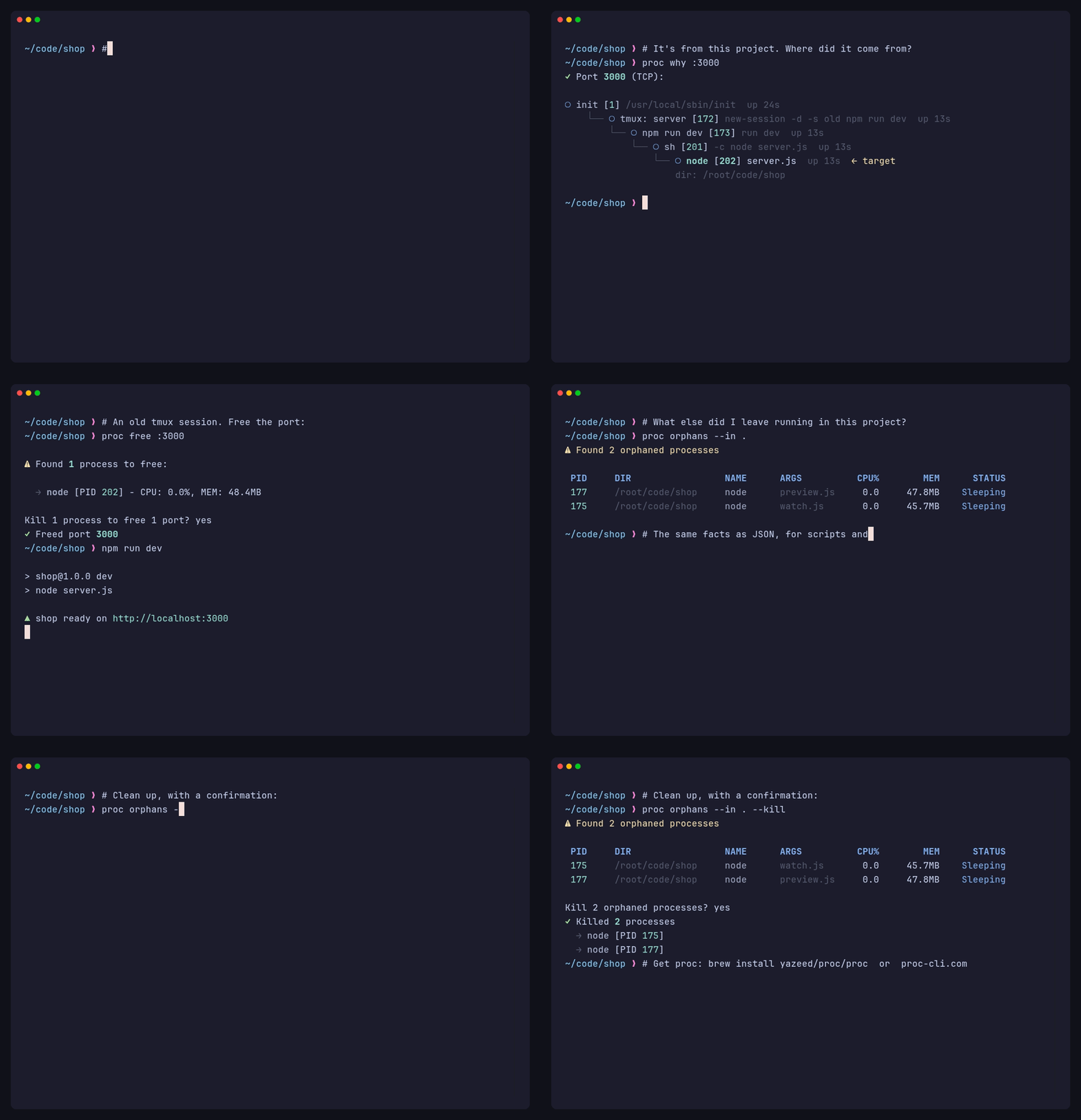
- **New demo recording** (README GIF and website video). It tells one story:
  - `npm run dev` fails because port 3000 is taken
  - `proc on`, `proc why` and `proc free` find the old tmux session holding the port and free it
  - `proc orphans` finds the leftovers, shows them as JSON, and cleans them up after a confirmation

  It's recorded in a staged project (`demo/`), so the recording tool's own processes no longer appear, and it's larger and easier to read. To regenerate it, run the two commands at the top of `demo.Dockerfile`
- **`.dockerignore`** keeps `target/` and other unused folders out of Docker build contexts

## [1.14.3] - 2026-10-25

### Changed

- **Repository renamed to [`yazeed/proc-cli`](https://github.com/yazeed/proc-cli)**, matching the crate, the npm package, the agent skill and proc-cli.com. Old `github.com/yazeed/proc` links, git remotes and release downloads redirect, so existing installs keep working. Install commands now use the new name: `npx skills add yazeed/proc-cli`, `/plugin marketplace add yazeed/proc-cli`, `nix profile install github:yazeed/proc-cli`. The Homebrew command is unchanged (`brew install yazeed/proc/proc`)
- **Docker image published as `yazeed/proc-cli`.** Docker Hub can't rename repositories, so each release also pushes the same image to `yazeed/proc`, and `docker pull yazeed/proc` keeps getting updates

### Removed

- **`Formula/proc.rb` and `pkg/scoop/proc.json`**: hand-maintained copies left over from before publishing was automated (frozen at 1.2.2 and 1.3.3 since January). Releases have written the real Homebrew formula and Scoop manifest to `yazeed/homebrew-proc` and `yazeed/scoop-bucket-proc` ever since; nothing read these

## [1.14.2] - 2026-10-25

### Changed

- **Website** moved to [proc-cli.com](https://proc-cli.com). The old `yazeed.github.io/proc` address redirects there
- **PHILOSOPHY.md** describes proc as it is today: every command in the grammar, the JSON and exit-code contract shared by people, scripts and agents, how targets are read without guessing, and `--kill` on `orphans`/`stuck`

### Fixed

- **`proc stop --signal`** only checked the signal name after the dry run and the confirmation prompt. `--dry-run` reported success for a signal the real run rejects (`--signal 9`), and without `--yes` you confirmed before being told the name was invalid. An unknown signal now exits 4 straight away, with or without `--dry-run`

## [1.14.1] - 2026-10-25

### Changed

- **Skill**: tells agents when to reach for proc. It covers:
  - a fuller description of situations that trigger the skill (a busy port, `EADDRINUSE`, leftover dev servers and headless browsers, a slow machine)
  - a table of the shell commands proc replaces (`lsof`, `ps | grep`, `pkill`, `kill`)
  - playbooks for a busy port, cleaning up background work, checking for leftovers before finishing, a slow machine, and clean restarts
  - safety rules for not touching other people's or other agents' processes
  - how to check the installed version and install proc
  - the command aliases, and the flags it was missing (`list --path`, `ports --local`, `tree --depth`/`--compact`, `orphans --kill`)
  - new gotchas: `kill`/`stop` don't signal children, how to find processes left running in a deleted directory, and an orphan isn't necessarily abandoned
- **Release checklist**: triggers a skills.sh refresh after publishing, since skills.sh only re-reads the repo when someone installs the skill

### Fixed

- **`proc in <dir>`** exited 4 ("Directory not found") when the directory had been deleted, even with processes still running in it, such as a dev server left behind in a removed git worktree. It now lists them. A missing path with nothing running in it still exits 4, as a typo
- **Linux: processes in a deleted directory** reported their `cwd` as `<dir> (deleted)`, which the kernel appends, so `--in <dir>` never matched them. `cwd` now shows the plain path, as on macOS, and `--in` matches it

## [1.14.0] - 2026-10-25

### Added

- **Uptime in process output**: every process in JSON has `uptime_secs`; tables from `list`, `by`, `in` and the other process lists show an `UPTIME` column on terminals at least 100 columns wide, and `--verbose` prints it
- **`proc inspect`**: alias of `proc info`, next to `i`
- **Skill**: explains that inspecting a process means `proc info` (or `proc inspect`) and what it reports, that `by` takes one pattern while `list` takes comma-separated ones, and that `start_time` is a timestamp while `uptime_secs` is the duration

### Changed

- **Release checklist**: after publishing, upgrades the local Homebrew `proc` on its own (`brew upgrade yazeed/proc/proc`) and checks its version

## [1.13.4] - 2026-10-25

### Fixed

- **Linux binaries** failed to start on anything older than Ubuntu 24.04 (`GLIBC_2.39 not found`, e.g. on Debian 12), because they were built on the `ubuntu-latest` runner and linked against its glibc. They are now static musl builds (`x86_64-unknown-linux-musl`, `aarch64-unknown-linux-musl`) with no glibc dependency. Tested on x86_64 and ARM64 with Amazon Linux 2, Debian 10, 11 and 12, Ubuntu 20.04 and Alpine 3.20. File names are unchanged, so the curl install, npm, Homebrew on Linux and cargo-binstall pick them up as before
- **Docker image**: `on :port`, `ports` and `free` failed with `Failed to run ss: No such file or directory`, because the image didn't include `ss`, which port lookups use on Linux. The image now installs `iproute2`. The documented `docker run` command adds `--net=host`, which port lookups need to see the host's ports
- **`user`** showed the numeric user ID (e.g. `"501"`) in JSON, `info`, `list` and `watch`. It now shows the user name, and falls back to the ID when the ID has no name on the system. Scripts that read `user` as a number need updating

### Changed

- **CI** builds the same Linux targets as a release, including ARM64, so a broken release build shows up on every push instead of at tag time
- **cargo-binstall**: musl hosts (Alpine) now resolve to the Linux release files
- **Release checklist**: runs the published Linux binaries on Debian 11 and Alpine

## [1.13.3] - 2026-10-24

### Fixed

- **`npm install proc-cli`** failed for every version with `Redirect to untrusted host: release-assets.githubusercontent.com`. GitHub now serves release downloads from that host, which the installer's allowlist didn't include. It is now allowed; the existing hosts and the SHA-256 checksum check are unchanged
- **npm 12**: install scripts no longer run by default, so the binary was never downloaded and `proc` crashed. The `proc` command now downloads and verifies the binary on first run when it is missing, with progress on stderr so `--json` output stays clean. If the package directory isn't writable, the binary goes to `~/.cache/proc-cli/<version>` (`%LOCALAPPDATA%\proc-cli\<version>` on Windows). A failed download during install no longer fails `npm install`; it is retried on first run
- **npm wrapper**: a `proc` killed by a signal now exits non-zero, and a binary that can't be started reports an error instead of crashing

### Changed

- **Release checklist**: installs the npm package from a local tarball before tagging, and runs a real `npm install` after publishing

## [1.13.2] - 2026-10-24

### Changed

- **npm publishing** uses Trusted Publishing (OIDC) from the release workflow instead of a stored token. The `NPM_TOKEN` secret is no longer used. The publish job runs on Node 24 with npm 11.5.1 or newer, as Trusted Publishing requires. 1.13.0 and 1.13.1 were not published to npm, so npm goes from 1.12.3 to 1.13.2

## [1.13.1] - 2026-10-24

### Fixed

- **Docker image**: the binary failed to start (`GLIBC_2.39 not found`) on both amd64 and arm64, since at least 1.12.3. The build stage used `rust:latest`, which moved to Debian trixie, while the runtime stage is `debian:bookworm-slim` (glibc 2.36). The build stage now uses `rust:1-bookworm`
- **Release workflow**: the crates.io and npm publish steps reported success even when publishing failed, because the result was piped through `tee` without `pipefail`. This hid that 1.13.0 was never published to npm

## [1.13.0] - 2026-10-24

A consistent JSON and exit-code contract: every command prints one JSON document, `action` is always the command name, and `"success": false` always comes with a non-zero exit code. Scripts that relied on the old behaviour should check the **Changed** entries below.

### Changed

- **`--dry-run --json`** now reports the command's own `action` (e.g. `"kill"`) and `"dry_run": true`, instead of a list result with `"action": "list"` (`kill`, `stop`, `freeze`, `thaw`, `free`, `orphans --kill`, `stuck --kill`)
- **`proc orphans --kill` / `proc stuck --kill` with `--json`** print one action result (`"action": "orphans"`/`"stuck"`, `succeeded`/`failed`) instead of two JSON documents
- **`proc thaw --json`** reports `"action": "thaw"` instead of `"resume"`
- **`proc why` / `proc tree` JSON** use lowercase `status` (`"running"`) and `protocol` (`"tcp"`), matching the Process and Port objects
- **Invalid flags and arguments** exit with code 4 (invalid input) instead of 2, which meant "not found"; with `--json` the error is a JSON object on stdout
- **`proc wait --json` on timeout** exits 1, as it already did without `--json`
- **`proc stop`, `freeze`, `thaw`, `orphans --kill`, `stuck --kill`** exit 1 when any process fails, as `proc kill` already did
- **`proc free`** exits 1 when a port is still in use after `--wait`
- **`proc unstick`** exits 1 when a process is still stuck or failed; an explicit target removed by `--in`/`--by` is "not found" (exit 2)
- **`proc info`** exits 2 when no target is found
- **`proc on` with multiple targets and `--json`** prints one document (`count`, `results` with `target`/`process`/`ports`, `not_found`) instead of one per target; exits 2 when no target is found
- **`proc in <path>`** exits 4 when the directory does not exist, like `proc for` with a missing file

### Fixed

- **`proc why --json`** prints a JSON error and exits 2 when nothing is found, instead of printing nothing and exiting 0; multiple targets print one document instead of one per target
- **`proc kill --json`** no longer prints a second JSON error document after a partial failure
- **Error `action`** uses the canonical command name when an alias is used (`proc k` → `"kill"`)
- **JSON errors** are detected for short-flag clusters such as `-yj`
- **Human output**: "Stopped" instead of "Stoped"
- **Agent skill**: `SKILL.md` covers `proc for`, `proc in`, `proc unstick`, `--ancestors`, `--graceful`, `--exposed`/`--local`/`--range`, `--status`, `--min-uptime`, `--parent`, with a per-command filter table and the bounded `proc watch --json` stream; `reference.md` adds the `on <PID>`, `tree --ancestors`, `--dry-run`, `unstick`, and `watch` shapes
- **Plugin manifest**: `.claude-plugin/marketplace.json` version kept in sync and added to the release checklist

### Added

- **Docs**: agent skill install instructions (`npx skills add yazeed/proc`, Claude Code plugin) in README and the install page; exit code table in README and the commands page
- **Tests**: JSON contract integration tests (`tests/cli_json.rs`)

## [1.12.3] - 2026-05-03

### Fixed

- **Clippy**: Use `sort_by_key` instead of `sort_by` for name sorting (Rust 1.95+ lint)

## [1.12.2] - 2026-03-30

### Security

- **npm install script hardened**: SHA-256 checksum verification, redirect host pinning, `execFileSync` (no shell injection), dead code removed

### Fixed

- **README**: SafeSkill badge, correct badge ordering
- **Skills**: Added `proc for` and empty result JSON schemas to reference
- **Rust docs**: Added `wait`, `free`, `why`, `freeze/thaw`, `--signal`, `--json` to Quick Start and Features

## [1.12.1] - 2026-03-27

### Fixed

- **CI**: Upgrade to `softprops/action-gh-release@v2` — v1 fails with immutable releases enabled

## [1.12.0] - 2026-03-27

### Added

- **`proc wait`**: Block until process(es) exit — the pipe-friendly replacement for `while ps aux | grep ... | grep -v grep; do sleep; done`
  - `proc wait node` — wait until all node processes exit
  - `proc wait :3000 --timeout 60` — wait up to 60s for port process to exit
  - `proc wait node -n 10 -q` — check every 10s, quiet mode for scripting
  - Supports `--in`, `--by`, `--json`, `--verbose` like other commands
  - Reports each process as it exits, with elapsed time
  - JSON output includes per-process exit timing and timeout status

### Fixed

- **`--by` now matches full command line**: The `--by` filter across all commands now matches against both process name AND command line arguments (consistent with how positional targets and `proc by` work). Previously `proc wait node --by KXBTCD` would not match a process whose args contained "KXBTCD" — now it does. Affects: kill, stop, freeze, thaw, info, tree, stuck, unstick, orphans, wait, on, watch, for
- **JSON output for empty results**: Commands that find nothing (`stuck`, `orphans`, `free` when ports already free) now output `{"action":"...", "success":true, "count":0, "message":"..."}` in JSON mode instead of empty stdout
- **Consistent JSON envelopes**: `on` (name target), `for`, `why` now wrap results in `{"action":"...", "success":true, "count":N, "results":[...]}` instead of outputting bare arrays
- **Consistent JSON action field**: All commands now use lowercase action names (`"kill"`, `"stop"`, `"freeze"`, `"resume"`) instead of mixed-case past-tense verbs (`"Killed"`, `"Stopped"`)
- **Command-specific action names**: `by`, `in`, `stuck`, `orphans` now report their own command name as the JSON `action` field instead of generic `"list"`
- **`wait` timeout no longer double-outputs JSON**: Previously emitted both a WaitOutput and an error envelope; now emits a single `{"success":false, "timed_out":true, ...}` object
- **Error envelope includes `action` field**: JSON error responses now include the command name (e.g. `{"action":"kill", "success":false, "error":"...", "exit_code":2}`)
- **`watch` JSON includes `success` field**: Consistent with all other commands
- **`tree --ancestors` uses `action: "tree"`**: Consistent regardless of `--ancestors` flag
- **Ancestor chain exclusion**: Name matching now excludes the entire ancestor process chain (up to 10 levels) instead of just the immediate parent. Prevents false matches in deep shell environments (IDE → terminal → shell → shell wrapper → proc)

### Changed

- **Shared `matches_by_filter`**: Extracted the `--by` matching logic into `core::filters::matches_by_filter()`, replacing 14 inline copies with a single consistent implementation
- **Agent Skills**: Added `proc wait` to skill reference, added "Agent/Pipe Readiness" section documenting which commands are safe for agents vs interactive-only
- **`src/lib.rs`**: Clarified `watch` as interactive TUI, `wait` as pipe-friendly blocking

### Updated

- Updated dependencies (`mio`, `roff`, `unicode-segmentation`, `wasm-bindgen`)

## [1.11.0] - 2026-03-23

### Changed

- **CLAUDE.md**: Added explicit rules requiring user approval before every push, tag, and release. Added mandatory RELEASE.md checklist compliance for all versions including patches

### Updated

- Updated dependencies (`itoa`, `unicode-segmentation`)

## [1.10.1] - 2026-03-23

### Fixed

- **Parent shell self-matching**: Name-based searches (`proc by`, `proc on <name>`, `proc tree <name>`) no longer match the parent shell process whose command line contains proc's own arguments. Previously, `proc on :99999 --json` would match the shell running proc instead of returning "not found". Now correctly returns exit code 2 with a JSON error

## [1.10.0] - 2026-03-23

### Added

- **JSON error envelope**: With `--json`, errors now output `{"success":false, "error":"...", "exit_code":N}` to stdout instead of plain text to stderr — enables reliable machine parsing by LLMs and scripts
- **Agent Skills**: `skills/proc-cli/SKILL.md` — Claude Code skill for process management with proc. Includes structured command reference, JSON output schemas, and LLM usage guidelines. Compatible with the [Agent Skills](https://agentskills.io) open standard

## [1.9.1] - 2026-03-16

### Fixed

- **Windows build**: Gate unix-only imports behind `#[cfg(unix)]` in `freeze.rs` and `thaw.rs` — fixes unused import errors with `-D warnings` on Windows CI

## [1.9.0] - 2026-03-16

### Added

- **`proc freeze`**: Pause processes with SIGSTOP
  - `proc freeze node` — freeze all node processes
  - `proc freeze :3000 --yes` — freeze by port, skip confirmation
  - Supports `--in`, `--by`, `--dry-run`, `--json`, `--verbose`
- **`proc thaw`**: Resume frozen processes with SIGCONT
  - `proc thaw node` — resume all frozen node processes
  - `proc thaw :3000` — resume process on port 3000
  - Supports `--in`, `--by`, `--dry-run`, `--json`, `--verbose`
- **`proc orphans`**: Find orphaned processes (parent exited, reparented to init/launchd)
  - `proc orphans` — list orphaned processes
  - `proc orphans --in .` — orphans in current directory
  - `proc orphans --kill --yes` — find and kill orphans
  - Filters out system daemons on both macOS and Linux
- **`proc why`**: Trace why a port is busy or show process ancestry
  - `proc why :3000` — ancestry chain with port context
  - `proc why node` — how was this node process started?
  - Shows working directory and command for the target process
  - Full JSON output support
- **`proc free`**: Free ports by killing the process and verifying availability
  - `proc free :3000` — kill process, verify port freed
  - `proc free :3000,:8080 --yes` — free multiple ports
  - `proc free :3000 --wait 30` — wait up to 30s for port to free
  - Reports per-port success/failure (handles TIME_WAIT)
  - Port-only targets; rejects PIDs/names with clear error message
- **`--signal` flag on `proc stop`**: Send custom initial signal instead of SIGTERM
  - `proc stop nginx --signal HUP` — reload config (SIGHUP)
  - `proc stop worker --signal USR1` — application-defined signal
  - Accepts signal names: HUP, INT, QUIT, ABRT, KILL, TERM, STOP, CONT, USR1, USR2

### Changed

- **Core**: Added `Process::send_signal()` for arbitrary Unix signal delivery
- **Core**: Added `Process::find_orphans()` for orphan detection with system process filtering

### Updated

- Updated dependencies (`clap`, `sysinfo`, `libc`, `tempfile`, and others)

## [1.8.1] - 2026-03-06

### Fixed

- **README demo image**: Use absolute URL for demo.gif so it renders on Docker Hub, crates.io, and npm

### Added

- **GitHub Pages blog** ([yazeed.github.io/proc](https://yazeed.github.io/proc/)): 7 technical posts covering Unix process management, awk pipelines, ss/netstat/lsof internals, zombie processes, and shell scripting patterns
- **Install page**: Dedicated [install page](https://yazeed.github.io/proc/install) with all platforms, shell completions, and man page setup
- **Blog redesign**: Custom terminal editorial theme — Azeret Mono + Newsreader typography, syntax highlighting, SEO meta tags
- **Blog badge** in README linking to GitHub Pages

## [1.8.0] - 2026-03-06

### Added

- **`proc watch`**: Real-time process monitoring with auto-refresh
  - Watch all processes: `proc watch` (alias: `proc top`, `proc w`)
  - Watch by target: `proc watch node`, `proc watch :3000`, `proc watch 1234`
  - Configurable refresh interval: `--interval/-n` (default: 2s)
  - Sort by cpu, mem, pid, name: `--sort/-s` (default: cpu)
  - Limit results: `--limit/-l`
  - Combines with existing filters: `--in`, `--by`, `--min-cpu`, `--min-mem`
  - Alternate screen + raw mode for clean terminal experience
  - Exit with `q`, `Esc`, or `Ctrl+C` — terminal always restored
  - NDJSON output (`--json`) for streaming to other tools
  - Non-TTY detection: single snapshot when piped
  - Panic hook ensures terminal state is restored on crash

### Fixed

- **Multi-target "not found" output**: Commands (`kill`, `stop`, `info`) now show a single consolidated warning (e.g., `Not found: :3000, :8080`) instead of one line per missing target

## [1.7.4] - 2026-03-01

### Fixed

- **Self-exclusion**: `proc` no longer shows itself in results when using `list`, `by`, `in`, `stuck`, or any command that enumerates all processes. Previously only `find_by_name` excluded the proc process; now `find_all` does too.

## [1.7.3] - 2026-02-26

### Added

- **Working directory in output**: `proc on`, `proc info`, and all table views now show the process working directory — instantly tells you which project folder a process is running from
  - `proc on :3000` shows `Directory: /Users/you/Sites/my-app` instead of only the binary path
  - `proc info` shows `Directory:` between Name and Path
  - `proc on <name>` reverse lookup shows `Directory:` for each process

### Changed

- **Table `PATH` → `DIR` column**: Process tables (`list`, `by`, `in`, `kill`, `stop`, `stuck`) now show the working directory instead of the executable's parent directory — far more useful for identifying which project a process belongs to

### Updated

- Updated dependencies (`clap`, `sysinfo`, `syn`, `regex-syntax`, and others)

## [1.7.2] - 2026-02-11

### Fixed

- **Table column widths**: Fixed columns (PID, CPU%, MEM, STATUS) now account for comfy-table's per-cell padding (2 chars), preventing wrapping of "Sleeping", "Running", and wide memory values
- **ARGS column dominance**: Added upper boundary (`width / 2`) and content truncation so ARGS no longer squeezes PATH and NAME columns on narrow terminals

### Changed

- **`--sort` shows possible values**: Sort flags now use `ValueEnum` enums — invalid values show `[possible values: cpu, mem, pid, name]` instead of a generic error
- **Shared sort logic**: Deduplicated sort match blocks across 5 commands into `sort_processes()` in `src/core/filters.rs`
- **CLAUDE.md release checklist**: Added detailed release steps so the process is always followed

## [1.7.1] - 2026-02-11

### Fixed

- **STATUS column wrapping**: Fixed table column too narrow for "Running"/"Sleeping" text
- **Memory display**: Human-readable adaptive units — `512KB`, `6.0MB`, `3.0GB` instead of always showing MB
- **PATH column too narrow**: Removed hardcoded 19-char truncation, increased minimum width so paths are readable
- **ARGS column showing executable**: When a process has no arguments, shows `-` instead of repeating the full executable path
- **Misleading error tips**: Replaced clap's confusing `tip: to pass '...' as a value, use '-- ...'` with smart "did you mean?" suggestions using edit distance and substring matching (e.g., `--cpu` → `did you mean '--min-cpu'?`)
- **Help example consistency**: Removed `-y` flag from kill example to match the pattern of other examples

## [1.7.0] - 2026-02-11

### Added

- **Terminal-adaptive tables**: Process and port tables now use `comfy-table` with `ContentArrangement::Dynamic` — tables adapt to terminal width automatically, no more overflow on 80-column terminals. Falls back to 120 chars when stdout is not a TTY
- **New filters**:
  - `--min-uptime <seconds>`: Filter by process uptime (on `list`, `by`, `in`, `for`, `tree`)
  - `--parent <pid>`: Filter by parent PID (on `list`, `by`, `in`)
  - `--range <start-end>`: Filter ports by range, e.g. `--range 3000-9000` (on `ports`)
  - `--limit/-n`: Limit result count (on `ports`, `for`)
  - `--sort/-s`: Sort results by cpu, mem, pid, or name (on `for`)
  - `--dry-run`: Preview before killing stuck processes (on `stuck --kill`)
- **Multi-target `proc list`**: Comma-separated names with PID deduplication
  - `proc list node,python` — find both node and python processes
- **`--verbose/-v`**: Added to `stop`, `tree`, and `unstick` (previously missing)
- **Shared utility modules**: `src/core/filters.rs` and `src/ui/format.rs`
- **Unified confirmation prompts**: `print_confirmation` and `print_action_result` in Printer

### Changed

- **`--json` short flag standardized**: All commands now use explicit `-j` (previously some used inferred short flags)
- **`--in` flag on `on` and `for`**: Now supports `num_args = 0..=1` with `default_missing_value = "."` matching all other commands
- **Confirmation prompts unified**: All destructive commands now use `⚠` icon consistently (stop previously used `!`)
- **Philosophy criterion #5 updated**: Changed from "Is it something you'd use weekly?" to "Does it deepen proc's command of its domain?"

### Removed

- **Duplicated code**: Eliminated 12 copies of `resolve_in_dir`, 3 copies of `format_duration`, 3 copies of `truncate_string`, and inline `colorize_status` — all replaced by shared modules

## [1.6.0] - 2026-02-09

### Added

- **`--in` and `--by` flags across all commands**: Consistent filtering by directory and process name
  - `proc kill node --in .` — Only kill node processes in current directory
  - `proc stop node --by worker` — Only stop node processes matching "worker"
  - `proc info node --in . --by server` — Scoped process info
  - `proc tree node --in .` — Tree scoped to directory (targeted mode only)
  - `proc stuck --by node` — Only stuck node processes
  - `proc unstick --in . --by node` — Scoped unstick
- **`--in` flag for `proc ports`**: Filter listening ports by process working directory
  - `proc ports --in .` — Only ports from processes in current directory

### Changed

- **`proc ports`**: Renamed `--filter`/`-f` to `--by`/`-b` for consistency with other commands

### Updated

- Updated dependencies (`clap`, `sysinfo`, `regex`, `anyhow`, and others)

## [1.5.1] - 2026-02-03

### Security

- Updated `bytes` dependency to 1.11.1 to fix integer overflow vulnerability (RUSTSEC-2026-0007)

### Changed

- Added `cargo audit` to release checklist

## [1.5.0] - 2026-02-02

### Added

- **`proc for <file>`**: Find processes by file path
  - Find processes running a specific executable: `proc for /usr/bin/node`
  - Find processes with a file open (via lsof): `proc for ./data.json`
  - Supports relative paths, absolute paths, and tilde expansion: `proc for ~/bin/myapp`
  - Shows process info AND listening ports (like `on` command)
  - Composable filters: `--in`, `--by`, `--min-cpu`, `--min-mem`, `--status`

### Removed

- **`--path` filter from `proc by`**: Use `proc for <file>` instead
- **`--exe-path` filter from `proc in`**: Use `proc for <file>` instead

## [1.4.2] - 2026-02-01

### Fixed

- **Self-matching bug**: `proc kill <target>` no longer kills itself when target matches its own command line arguments
- **Dry-run message visibility**: Message now appears after the process table (not before) so it's visible without scrolling
- **Kill feedback**: All killed processes now show in results (previously proc would die mid-loop if it matched itself)

### Changed

- Destructive commands (`kill`, `stop`, `unstick`) now exclude the current process from target resolution

## [1.4.1] - 2026-02-01

### Added

- **PHILOSOPHY.md**: Project manifesto documenting principles, values, and the feature test
- **RELEASE.md**: Comprehensive release checklist and publishing process
- **CLAUDE.md**: Project-specific instructions for Claude Code
- **Shell completions docs**: Added to README.md
- **Man page docs**: Added to README.md

### Changed

- **ROADMAP.md**: Updated with v1.4.0 highlights, competitive context, and philosophy references
- **src/lib.rs**: Updated crate docs for docs.rs with v1.3/v1.4 features

## [1.4.0] - 2026-01-29

### Added

- **Shell completions**: Generate completions for bash, zsh, and fish
  - `proc completions bash > /etc/bash_completion.d/proc`
  - `proc completions zsh > ~/.zsh/completions/_proc`
  - `proc completions fish > ~/.config/fish/completions/proc.fish`

- **Man page generation**: `proc manpage > /usr/local/share/man/man1/proc.1`

- **`--dry-run` for stop command**: Preview what would be stopped
  - `proc stop node --dry-run`

## [1.3.3] - 2026-01-29

### Changed

- Docs: Complete README rewrite for clarity and completeness
- Docs: Streamlined package READMEs (npm, Scoop, Homebrew) to link to main docs

## [1.3.2] - 2026-01-29

### Added

- **Scoop bucket**: `scoop bucket add proc https://github.com/yazeed/scoop-proc`
- CI: Automated Scoop bucket updates on release

### Fixed

- CI: npm publishing now uses automation token (NPM_TOKEN secret)

## [1.3.1] - 2026-01-29

### Changed

- CI: npm trusted publishing via OIDC (no long-lived tokens)
- CI: Automated Homebrew tap updates on release
- CI: Fixed ARM64 Linux cross-compilation
- CI: Updated Dockerfile to `rust:latest` for edition2024 support
- Docs: Improved README hero examples showcasing multi-target support
- Docs: Added npm badge to README

### Fixed

- npm package now includes README for better discoverability

## [1.3.0] - 2026-01-28

### Added

- **Proc Query Language**: Composable process discovery primitives
  - **`proc by <name>`** — Filter processes by name with all filters
    - Example: `proc by node --in . --min-cpu 5`
  - **`proc in <path>`** — Filter processes by working directory
    - Example: `proc in ~/projects --by python`
    - Supports `.`, relative paths, absolute paths, and `~` expansion

- **Multi-target support** for kill, stop, info, and on commands
  - Comma-separated targets: `proc kill :3000,:8080,node`
  - Mixed target types: ports (`:3000`), PIDs (`1234`), names (`node`)
  - PID deduplication prevents double-kills on overlapping targets
  - Single confirmation prompt shows all targets before action
  - Not-found targets show warnings but don't block found targets

- **Combinable filters** across commands
  - `proc on node --in .` — Node processes on ports, filtered by directory
  - `proc by node --in .` — Node processes in current directory
  - `proc in . --by node` — Same result, different entry point

- **Comprehensive help examples** covering all command variants and scenarios

### Changed

- Updated dependencies: colored 3.1, sysinfo 0.38, indicatif 0.18, nix 0.31

- `proc on` now supports `--in` filter for directory-based filtering
- `proc info` now supports comma-separated targets
- Help text reorganized into semantic sections (Discovery, Info, Kill, Stop, etc.)

## [1.2.3] - 2026-01-21

### Added

- **Tier 3 distribution channels**:
  - **Scoop** (Windows): `pkg/scoop/proc.json` manifest with auto-update
  - **AUR** (Arch Linux): `pkg/aur/PKGBUILD` for `yay -S proc`
  - **npm** wrapper: `pkg/npm/` for `npm install -g proc-cli`
  - **Nix flake**: `flake.nix` for `nix profile install github:yazeed/proc`

## [1.2.2] - 2026-01-21


### Added

- **cargo-binstall support**: `cargo binstall proc-cli` now downloads pre-built binaries
  - 10x faster than `cargo install` (no compilation required)
  - Configured for all platforms: macOS, Linux, Windows (Intel and ARM)
- **Docker Hub automation**: Images automatically published on release
  - Multi-arch support: linux/amd64, linux/arm64
  - Available at `docker run yazeed/proc`

## [1.2.1] - 2026-01-15

### Changed

- Updated dependencies: colored 3.1, sysinfo 0.38, indicatif 0.18, nix 0.31

- Enhanced `--version` output to include repository URL and license

## [1.2.0] - 2026-01-15

### Added

- **ARGS column** in `proc list` output showing command arguments
  - Displays script names for Python/Node processes (e.g., `daily_spread_trader.py`)
  - Simplifies paths to filenames for readability
  - Enables finding processes by script name: `proc list my_script.py`

### Changed

- Updated dependencies: colored 3.1, sysinfo 0.38, indicatif 0.18, nix 0.31

- Reorganized `proc list` columns: PID, PATH, NAME, ARGS, CPU%, MEM, STATUS
- Improved process identification for interpreted languages (Python, Node, Ruby, etc.)

## [1.1.0] - 2026-01-14

### Changed

- Updated dependencies: colored 3.1, sysinfo 0.38, indicatif 0.18, nix 0.31

- **Breaking:** Renamed `ps` command to `list` for better semantics
  - `ps` remains as an alias for backwards compatibility
- Updated tagline: "Semantic CLI tool for process management. Target by port, process id (PID), name or path."

## [1.0.2] - 2026-01-13

### Changed

- Updated dependencies: colored 3.1, sysinfo 0.38, indicatif 0.18, nix 0.31

- Streamlined README with cleaner structure and code-first approach
- Added Targets section explaining unified `:port`, `PID`, `name` syntax
- Removed "Why proc?" comparison section

### Fixed

- Fixed README filter table incorrectly stating `--in` and `--path` work with `tree` (ps-only)

## [1.0.1] - 2026-01-13

### Fixed

- Fixed outdated error message suggesting removed `proc find --all` command
- Fixed `--cwd` references in help text and documentation (renamed to `--in`)
- Fixed JSON output action field from "find" to "ps"

## [1.0.0] - 2026-01-12

Initial public release.

### Commands

All commands accept **targets**: `:port`, `PID`, or `name` where applicable.

**Discovery** (nouns — observe state)
- `proc on <target>` — Bidirectional port/process lookup
  - `:port` → What process is using this port?
  - `PID` → What ports is this process using?
  - `name` → What ports are these processes using?
- `proc ports` — List all listening ports
- `proc ps [name]` — List processes (filter by name, path, or resources)
- `proc info <target>` — Detailed process information
- `proc tree [target]` — Process hierarchy view
- `proc stuck` — Find hung processes

**Lifecycle** (verbs — change state)
- `proc kill <target>` — Force kill (SIGKILL)
- `proc stop <target>` — Graceful stop (SIGTERM, then SIGKILL after timeout)
- `proc unstick [target]` — Attempt to recover stuck processes
  - Tries SIGCONT → SIGINT recovery sequence
  - Use `--force` to terminate if recovery fails

### Features

- **Unified targets**: Most commands accept `:port`, `PID`, or process `name`
- **Path filtering**: `--in` and `--path` filters for `proc ps`
- **Resource filtering**: `--min-cpu`, `--min-mem`, `--status` filters for `ps` and `tree`
- **Bidirectional lookup**: `proc on` works both ways (port→process and process→ports)
- **Cross-platform**: macOS (Apple Silicon, Intel), Linux (x86_64, ARM64), Windows (x86_64)
- **Output formats**: Colored terminal output, JSON (`--json`) for scripting
- **Safety**: Confirmation prompts before destructive actions

### Principles

- **Semantic**: Commands mean what they say
- **Explicit**: User intent must be clear
- **Complete**: Cover the full workflow, nothing more
- **Fast**: Sub-100ms for all operations
- **Obvious**: If you have to read the docs, we failed

### Values

- **Unified targets**: `:port`, `PID`, and `name` work the same way everywhere
- **Natural grammar**: Nouns to observe, verbs to act
- **Practical simplicity**: Every feature solves a real, repeated problem
- **Easy to remember**: Consistent patterns—know one command, know them all

---

[Unreleased]: https://github.com/yazeed/proc-cli/compare/v2.0.0...HEAD
[2.0.0]: https://github.com/yazeed/proc-cli/compare/v1.14.5...v2.0.0
[1.14.5]: https://github.com/yazeed/proc-cli/compare/v1.14.4...v1.14.5
[1.14.4]: https://github.com/yazeed/proc-cli/compare/v1.14.3...v1.14.4
[1.14.3]: https://github.com/yazeed/proc-cli/compare/v1.14.2...v1.14.3
[1.14.2]: https://github.com/yazeed/proc-cli/compare/v1.14.1...v1.14.2
[1.14.1]: https://github.com/yazeed/proc-cli/compare/v1.14.0...v1.14.1
[1.14.0]: https://github.com/yazeed/proc-cli/compare/v1.13.4...v1.14.0
[1.13.4]: https://github.com/yazeed/proc-cli/compare/v1.13.3...v1.13.4
[1.13.3]: https://github.com/yazeed/proc-cli/compare/v1.13.2...v1.13.3
[1.13.2]: https://github.com/yazeed/proc-cli/compare/v1.13.1...v1.13.2
[1.13.1]: https://github.com/yazeed/proc-cli/compare/v1.13.0...v1.13.1
[1.13.0]: https://github.com/yazeed/proc-cli/compare/v1.12.3...v1.13.0
[1.12.3]: https://github.com/yazeed/proc-cli/compare/v1.12.2...v1.12.3
[1.12.2]: https://github.com/yazeed/proc-cli/compare/v1.12.1...v1.12.2
[1.12.1]: https://github.com/yazeed/proc-cli/compare/v1.12.0...v1.12.1
[1.12.0]: https://github.com/yazeed/proc-cli/compare/v1.11.0...v1.12.0
[1.11.0]: https://github.com/yazeed/proc-cli/compare/v1.10.1...v1.11.0
[1.10.1]: https://github.com/yazeed/proc-cli/compare/v1.10.0...v1.10.1
[1.10.0]: https://github.com/yazeed/proc-cli/compare/v1.9.1...v1.10.0
[1.9.1]: https://github.com/yazeed/proc-cli/compare/v1.9.0...v1.9.1
[1.9.0]: https://github.com/yazeed/proc-cli/compare/v1.8.1...v1.9.0
[1.8.1]: https://github.com/yazeed/proc-cli/compare/v1.8.0...v1.8.1
[1.8.0]: https://github.com/yazeed/proc-cli/compare/v1.7.4...v1.8.0
[1.7.4]: https://github.com/yazeed/proc-cli/compare/v1.7.3...v1.7.4
[1.7.3]: https://github.com/yazeed/proc-cli/compare/v1.7.2...v1.7.3
[1.7.2]: https://github.com/yazeed/proc-cli/compare/v1.7.1...v1.7.2
[1.7.1]: https://github.com/yazeed/proc-cli/compare/v1.7.0...v1.7.1
[1.7.0]: https://github.com/yazeed/proc-cli/compare/v1.6.0...v1.7.0
[1.6.0]: https://github.com/yazeed/proc-cli/compare/v1.5.1...v1.6.0
[1.5.1]: https://github.com/yazeed/proc-cli/compare/v1.5.0...v1.5.1
[1.5.0]: https://github.com/yazeed/proc-cli/compare/v1.4.2...v1.5.0
[1.4.2]: https://github.com/yazeed/proc-cli/compare/v1.4.1...v1.4.2
[1.4.1]: https://github.com/yazeed/proc-cli/compare/v1.4.0...v1.4.1
[1.4.0]: https://github.com/yazeed/proc-cli/compare/v1.3.3...v1.4.0
[1.3.3]: https://github.com/yazeed/proc-cli/compare/v1.3.2...v1.3.3
[1.3.2]: https://github.com/yazeed/proc-cli/compare/v1.3.1...v1.3.2
[1.3.1]: https://github.com/yazeed/proc-cli/compare/v1.3.0...v1.3.1
[1.3.0]: https://github.com/yazeed/proc-cli/compare/v1.2.3...v1.3.0
[1.2.3]: https://github.com/yazeed/proc-cli/compare/v1.2.2...v1.2.3
[1.2.2]: https://github.com/yazeed/proc-cli/compare/v1.2.1...v1.2.2
[1.2.1]: https://github.com/yazeed/proc-cli/compare/v1.2.0...v1.2.1
[1.2.0]: https://github.com/yazeed/proc-cli/compare/v1.1.0...v1.2.0
[1.1.0]: https://github.com/yazeed/proc-cli/compare/v1.0.2...v1.1.0
[1.0.2]: https://github.com/yazeed/proc-cli/compare/v1.0.1...v1.0.2
[1.0.1]: https://github.com/yazeed/proc-cli/compare/v1.0.0...v1.0.1
[1.0.0]: https://github.com/yazeed/proc-cli/releases/tag/v1.0.0