# PrismTTY
<p align="center">
<img src="https://prismtty.com/assets/prismtty-logo.svg" alt="PrismTTY" width="760">
</p>
<p align="center">
<a href="https://prismtty.com/"><img alt="website" src="https://img.shields.io/badge/website-prismtty-22d3ee?style=flat-square"></a>
<a href="https://crates.io/crates/prismtty"><img alt="crates.io" src="https://img.shields.io/crates/v/prismtty?style=flat-square"></a>
<a href="https://github.com/inxbit/prismtty/actions/workflows/ci.yml"><img alt="CI" src="https://img.shields.io/github/actions/workflow/status/inxbit/prismtty/ci.yml?branch=main&style=flat-square"></a>
<a href="https://github.com/inxbit/prismtty/releases"><img alt="release" src="https://img.shields.io/github/v/release/inxbit/prismtty?style=flat-square"></a>
<a href="https://github.com/inxbit/prismtty/blob/main/LICENSE"><img alt="license" src="https://img.shields.io/github/license/inxbit/prismtty?style=flat-square"></a>
</p>
PrismTTY is a fast terminal output highlighter focused on network devices and
Linux/Unix administration. It is intended as a ChromaTerm-style CLI wrapper with
network-focused built-in profiles.
Website: [prismtty.com](https://prismtty.com/).
## Quick Demo

## Preview
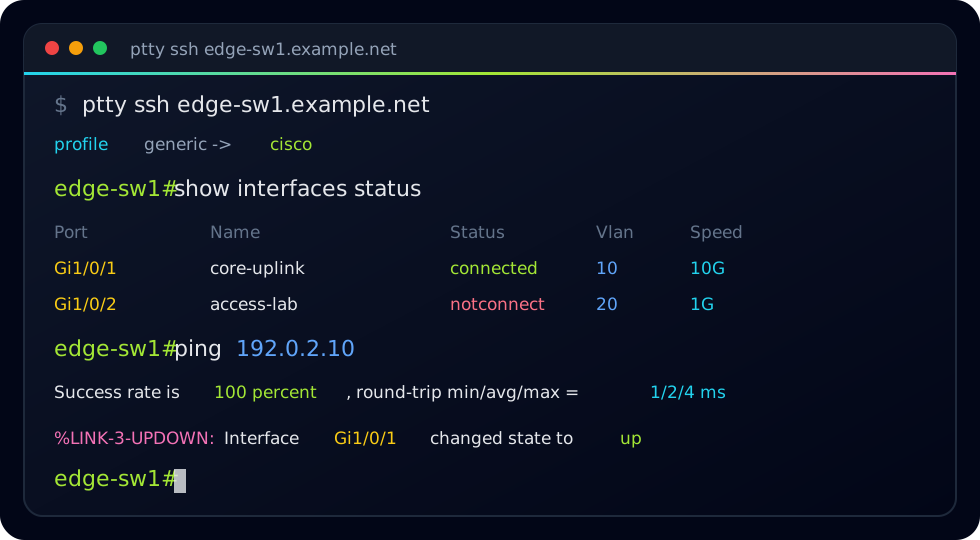
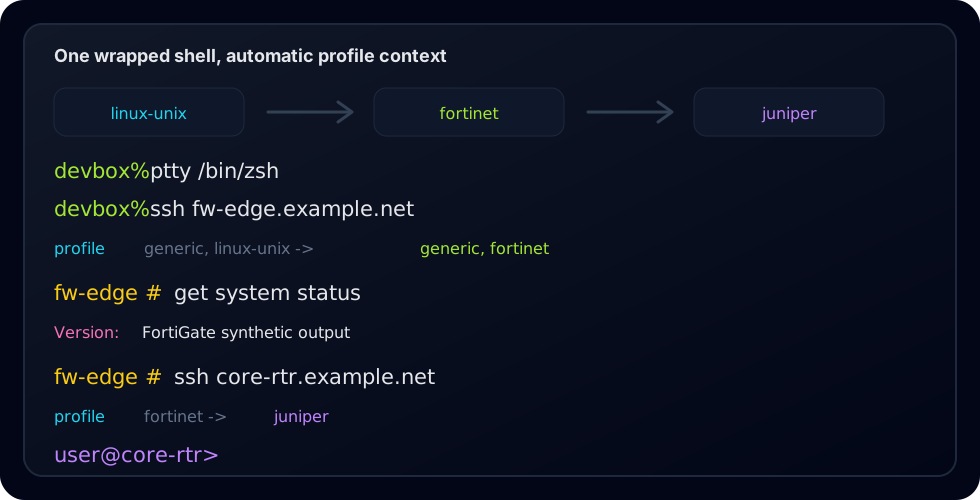
Synthetic terminal previews using documentation-only hostnames and addresses:
## What This Is / What This Is Not
PrismTTY is live terminal output highlighting for shells, SSH sessions, pipes,
and logs. It sits in the terminal stream and adds color to prompts, interfaces,
addresses, protocol state, counters, severity, and common vendor terms.
PrismTTY is not an NMS, a configuration management tool, a source of truth, a
SIEM, a log platform, or a device inventory system. It does not log in to
devices by itself, collect inventory, push configuration, or store operational
data. It only highlights the terminal output already flowing through it.
## Install
### Homebrew
Install the latest release from the PrismTTY Homebrew tap:
```sh
brew install inxbit/tap/prismtty
```
The Homebrew formula installs `prismtty`, `ptty`, `ct`, bundled profiles, and
shell completions. It also installs the required PCRE2 runtime dependency.
### Cargo
Install from crates.io:
```sh
cargo install prismtty
```
Cargo builds PrismTTY from source and installs the command binaries. You need
Rust 1.85 or newer plus PCRE2 and `pkg-config` available on your system.
For `cargo install` on macOS, install the native build dependencies first:
```sh
brew install pcre2 pkg-config
```
For `cargo install` on Debian/Ubuntu, install:
```sh
sudo apt-get install libpcre2-dev pkg-config
```
### GitHub Release
Prebuilt release archives and checksums are available on the
[GitHub releases page](https://github.com/inxbit/prismtty/releases).
Each release archive contains the binaries, license/readme files, example
profiles, shell completions, and a `.tar.gz.sha256` checksum.
## Usage
```sh
ptty /bin/zsh
ptty ssh router.example.net
prismtty --reload
```
The recommended interactive workflow is to start one wrapped shell from your
terminal profile:
```sh
ptty /bin/zsh
```
From inside that shell, run normal `ssh`, `telnet`, or console-wrapper commands.
PrismTTY dynamically switches profiles from observed login banners and prompts,
then keeps the selected remote profile locked for the session.
Use pipe mode for noninteractive output:
```sh
```
Important options:
- `-p, --profile <name>` forces one or more profiles.
- `--no-auto-detect` uses only `generic` unless profiles are forced.
- `--no-dynamic-profile` disables profile switching inside wrapped interactive shells.
- `-c, --config <file>` loads a ChromaTerm-compatible YAML file.
- `--strip-ansi` removes existing ANSI before PrismTTY styles output.
- `--show-profile` prints profile selections and transitions to stderr.
- `--local-echo` locally echoes printable typed keys for no-echo device sessions.
- `--trace-io <file>` appends hex-encoded PTY input/output plus rendered-output diagnostics.
- `-R, --rgb` forces RGB color output.
- `--pcre` is accepted for ChromaTerm compatibility; PCRE2 is always used.
- `-b, --benchmark` prints per-rule timing and match-count data.
- `-r, --reload` asks running PrismTTY sessions to reload config.
Profile commands:
```sh
prismtty profiles list
prismtty profiles show cisco
prismtty profiles validate ~/.config/prismtty/profiles.d/my-vendor.yml
prismtty profiles test cisco fixtures/cisco.txt
```
## Configuration
PrismTTY loads built-in profiles first, then user rules. By default it checks:
- `~/.chromaterm.yml`
- `~/.chromaterm.yaml`
- `~/.config/chromaterm/chromaterm.yml`
- `~/.config/chromaterm/chromaterm.yaml`
- `~/.config/prismtty/config.yml`
- `~/.config/prismtty/config.yaml`
- `/etc/chromaterm/chromaterm.yml`
- `/etc/chromaterm/chromaterm.yaml`
- `~/.config/prismtty/profiles.d/*.yml`
- `~/.config/prismtty/profiles.d/*.yaml`
ChromaTerm-style rules are supported directly:
```yaml
rules:
- description: IPv4
regex: '\b192\.0\.2\.\d+\b'
color: f#00ffff
```
Native profile files add metadata:
```yaml
profile:
name: custom-router
inherits: [generic]
detection:
- CustomOS
rules:
- description: custom interface
regex: '\bcust\d+/\d+\b'
color: f#00ffff bold
```
Profiles under `~/.config/prismtty/profiles.d/` are first-class profiles: they
appear in `profiles list`, can be shown with `profiles show`, can inherit
built-in or other user profiles, and participate in auto-detection through their
`detection` hints.
## Feedback Wanted
Testing feedback is especially useful for Cisco, Juniper, Fortinet, Palo Alto,
Arista, Aruba CX, Versa, Linux/Unix, and custom profile files for other vendors,
appliances, and terminal workflows.
## More Information
- Website: [prismtty.com](https://prismtty.com/)
- Source: [github.com/inxbit/prismtty](https://github.com/inxbit/prismtty)
- Releases: [github.com/inxbit/prismtty/releases](https://github.com/inxbit/prismtty/releases)