# PrismTTY
<p align="center">
<img src="https://prismtty.com/assets/prismtty-logo.svg" alt="PrismTTY" width="760">
</p>
<p align="center">
<a href="https://prismtty.com/"><img alt="website" src="https://img.shields.io/badge/website-prismtty-22d3ee?style=flat-square"></a>
<a href="https://crates.io/crates/prismtty"><img alt="crates.io" src="https://img.shields.io/crates/v/prismtty?style=flat-square"></a>
<a href="https://github.com/inxbit/prismtty/actions/workflows/ci.yml"><img alt="CI" src="https://img.shields.io/github/actions/workflow/status/inxbit/prismtty/ci.yml?branch=main&style=flat-square"></a>
<a href="https://github.com/inxbit/prismtty/releases"><img alt="release" src="https://img.shields.io/github/v/release/inxbit/prismtty?style=flat-square"></a>
<a href="https://github.com/inxbit/prismtty/blob/main/LICENSE"><img alt="license" src="https://img.shields.io/github/license/inxbit/prismtty?style=flat-square"></a>
</p>
PrismTTY is a fast terminal output highlighter focused on network devices and
Linux/Unix administration. It is intended as a ChromaTerm-style CLI wrapper with
network-focused built-in profiles.
Website: [prismtty.com](https://prismtty.com/).
## Preview
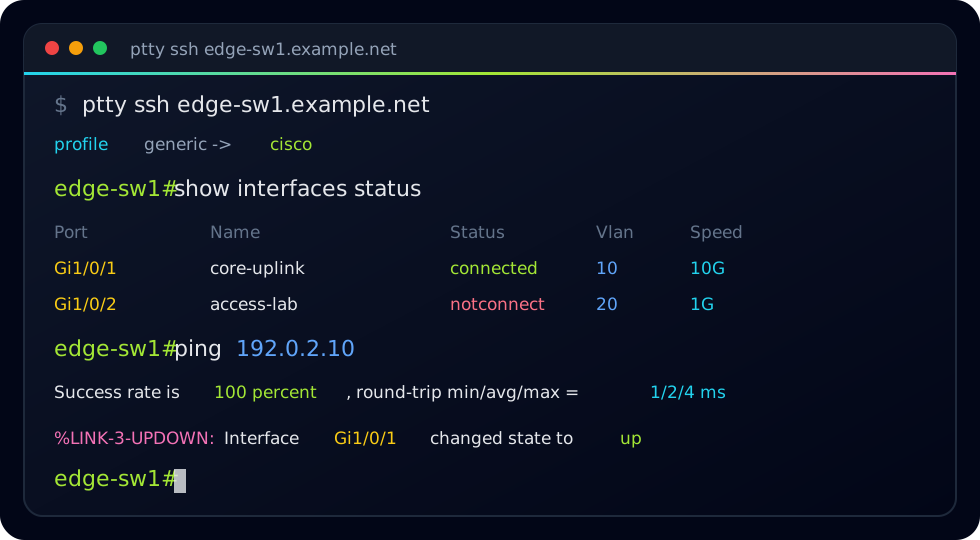
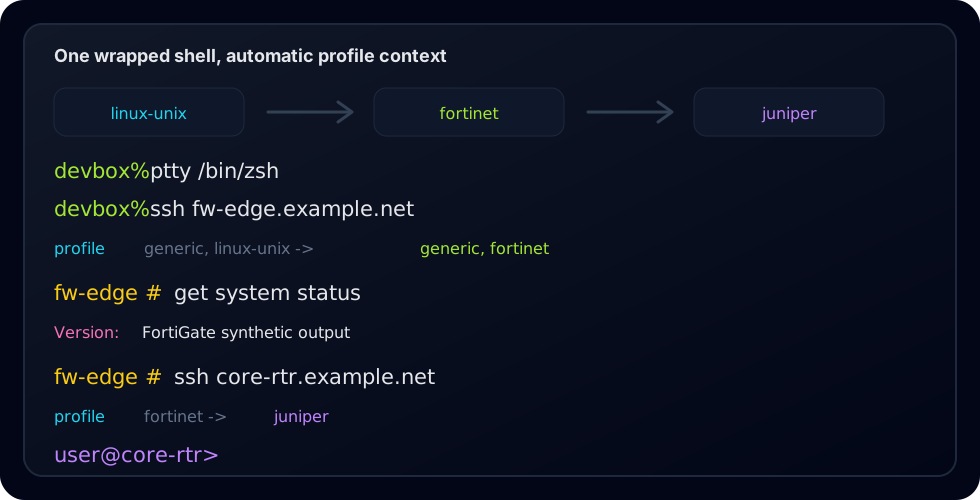
Synthetic terminal previews using documentation-only hostnames and addresses:
## Install
### Homebrew
Install the latest release from the PrismTTY Homebrew tap:
```sh
brew install inxbit/tap/prismtty
```
The Homebrew formula installs `prismtty`, `ptty`, `ct`, bundled profiles, and
shell completions. It also installs the required PCRE2 runtime dependency.
### Cargo
Install from crates.io:
```sh
cargo install prismtty
```
Cargo builds PrismTTY from source and installs the command binaries. You need
Rust 1.85 or newer plus PCRE2 and `pkg-config` available on your system.
For `cargo install` on macOS, install the native build dependencies first:
```sh
brew install pcre2 pkg-config
```
For `cargo install` on Debian/Ubuntu, install:
```sh
sudo apt-get install libpcre2-dev pkg-config
```
### GitHub Release
Prebuilt release archives and checksums are available on the
[GitHub releases page](https://github.com/inxbit/prismtty/releases).
Each release archive contains the binaries, license/readme files, example
profiles, shell completions, and a `.tar.gz.sha256` checksum.
## Usage
```sh
ptty /bin/zsh
ptty ssh router.example.net
prismtty --reload
```
The recommended interactive workflow is to start one wrapped shell from your
terminal profile:
```sh
ptty /bin/zsh
```
From inside that shell, run normal `ssh`, `telnet`, or console-wrapper commands.
PrismTTY dynamically switches profiles from observed login banners and prompts,
then keeps the selected remote profile locked for the session.
Use pipe mode for noninteractive output:
```sh
```
Important options:
- `-p, --profile <name>` forces one or more profiles.
- `--no-auto-detect` uses only `generic` unless profiles are forced.
- `--no-dynamic-profile` disables profile switching inside wrapped interactive shells.
- `-c, --config <file>` loads a ChromaTerm-compatible YAML file.
- `--strip-ansi` removes existing ANSI before PrismTTY styles output.
- `--show-profile` prints profile selections and transitions to stderr.
- `--local-echo` locally echoes printable typed keys for no-echo device sessions.
- `--trace-io <file>` appends hex-encoded PTY input/output plus rendered-output diagnostics.
- `-R, --rgb` forces RGB color output.
- `--pcre` is accepted for ChromaTerm compatibility; PCRE2 is always used.
- `-b, --benchmark` prints per-rule timing and match-count data.
- `-r, --reload` asks running PrismTTY sessions to reload config.
Profile commands:
```sh
prismtty profiles list
prismtty profiles show cisco
prismtty profiles validate ~/.config/prismtty/profiles.d/my-vendor.yml
prismtty profiles test cisco fixtures/cisco.txt
```
## Configuration
PrismTTY loads built-in profiles first, then user rules. By default it checks:
- `~/.chromaterm.yml`
- `~/.chromaterm.yaml`
- `~/.config/chromaterm/chromaterm.yml`
- `~/.config/chromaterm/chromaterm.yaml`
- `~/.config/prismtty/config.yml`
- `~/.config/prismtty/config.yaml`
- `/etc/chromaterm/chromaterm.yml`
- `/etc/chromaterm/chromaterm.yaml`
- `~/.config/prismtty/profiles.d/*.yml`
- `~/.config/prismtty/profiles.d/*.yaml`
ChromaTerm-style rules are supported directly:
```yaml
rules:
- description: IPv4
regex: '\b192\.0\.2\.\d+\b'
color: f#00ffff
```
Native profile files add metadata:
```yaml
profile:
name: custom-router
inherits: [generic]
detection:
- CustomOS
rules:
- description: custom interface
regex: '\bcust\d+/\d+\b'
color: f#00ffff bold
```
Profiles under `~/.config/prismtty/profiles.d/` are first-class profiles: they
appear in `profiles list`, can be shown with `profiles show`, can inherit
built-in or other user profiles, and participate in auto-detection through their
`detection` hints.
## More Information
- Website: [prismtty.com](https://prismtty.com/)
- Source: [github.com/inxbit/prismtty](https://github.com/inxbit/prismtty)
- Releases: [github.com/inxbit/prismtty/releases](https://github.com/inxbit/prismtty/releases)