# pr-note
A command-line tool to generate PR notes summarizing unmerged PRs on GitHub between two branches.
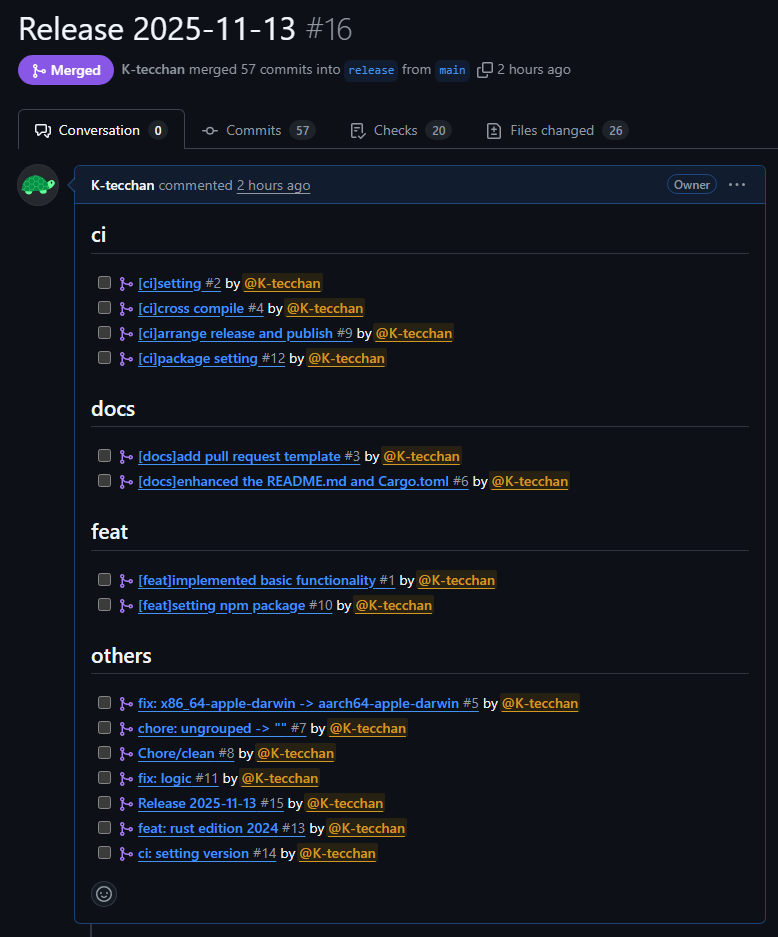
## Usage
For example, to create a release pull request from the `feature` to the `main` in the [octocat/Hello-World](https://github.com/octocat/Hello-World) repository, do the following:
```bash
pr-note \
--owner octocat \
--repo Hello-World \
--base main \
--head feature \
--token <github_token>
```
Alternatively, if environment variables are set in a CI/CD environment, corresponding arguments can be omitted as follows:
```bash
export PR_NOTE_GITHUB_TOKEN="<GITHUB_TOKEN>"
pr-note \
--owner octocat \
--repo Hello-World \
--base main \
--head feature
```
Executing the above command will create a pull request from the head branch to the base branch.
If a pull request already exists, it will be updated instead.
Pull request body and title can be customized using a template file. The first line of the template file is used as the pull request title, and the rest as the body. [Default template](src/doc/template.tera) is used if no template file is specified.
Template uses [Tera](https://keats.github.io/tera/) syntax.
In the template, the `prs` object is available, which is the list of pull requests that have been merged into the head branch but not into the base branch. Each pull request object has the following fields:
- `number`: Pull request number
- `author`: Pull request author
- `title`: Pull request title
- `body`: Pull request body as markdown
- `labels`: List of labels attached to the pull request
- `group`: Group name if `--group-by` option is used, otherwise ""
`group` is determined based on the value of `--group-by` option:
- If `label` is specified, labels attached to the pull request are arranged in lexicographical order and joined with " / " to form the group name. If no labels are attached, "others" is used.
- If `title` is specified, one or more \[bracket\] segments at the beginning of the title are arranged in lexicographical order and joined with " / " to form the group name. If no bracketed segments are found, "others" is used.
- If not specified, all pull requests are considered as "".
## Installation
### [cargo](https://crates.io/crates/pr-note)
```bash
cargo install pr-note
```
### [npm](https://www.npmjs.com/package/@pr-note/pr-note)
```bash
# If you want to install globally
npm install -g @pr-note/pr-note
# If you want to install as a development dependency in a project
npm install -D @pr-note/pr-note
```
### Homebrew
```bash
brew install K-tecchan/tap/pr-note
```
## Options
```bash
$ pr-note --help
Generate or update a GitHub Pull Request (PR) note summarizing unmerged PRs between two branches.
Usage: pr-note [OPTIONS] --owner <OWNER> --repo <REPO> --base <BASE> --head <HEAD> --token <TOKEN>
Options:
--host <HOST>
API host domain for GitHub. Default is "api.github.com".
For GitHub Enterprise, set your enterprise host domain.
[env: PR_NOTE_GITHUB_HOST=]
[default: api.github.com]
-o, --owner <OWNER>
The owner of the repository.
[env: PR_NOTE_REPO_OWNER=]
-r, --repo <REPO>
The name of the repository.
[env: PR_NOTE_REPO_NAME=]
-b, --base <BASE>
The name of the base branch.
[env: PR_NOTE_BASE_BRANCH=]
-a, --head <HEAD>
The name of the head branch.
[env: PR_NOTE_HEAD_BRANCH=]
-t, --token <TOKEN>
GitHub API token with appropriate repository permissions:
- Contents: read
- Metadata: read
- Pull requests: write
[env: PR_NOTE_GITHUB_TOKEN]
-p, --template-path <TEMPLATE_PATH>
Template file path for PR title and body.
First line is used as the title, rest as the body.
If not specified, the default template will be used.
[env: PR_NOTE_TEMPLATE_PATH=]
-g, --group-by <GROUP_BY>
Grouping options for unmerged PRs.
Options are "label" or "title".
[env: PR_NOTE_GROUP_BY=]
[possible values: label, title]
-d, --dry-run
Dry run mode.
With this option, no PR will be created or updated, only output the generated text to stdout.
[env: PR_NOTE_DRY_RUN=]
-h, --help
Print help (see a summary with '-h')
-V, --version
Print version
```
## Inspiration & Alternatives
Tools that inspired this project or can be used as alternatives:
- https://github.com/x-motemen/git-pr-release
- https://github.com/uiur/github-pr-release