
Plurimus





A Bevy-native terminal renderer: cameras, widgets, and 2d/3d pipelines drawn to terminal cells.
Plurimus renders a Bevy world to the terminal the way bevy_render renders one
to a window. The program is an ordinary Bevy App, and plurimus adds a render
sub-app that turns that world into cells and presents them.
No single draw callback owns the frame. Any number of systems contribute to it,
and one presenter writes to the terminal, diffing against the previous frame so
only changed cells are sent. Multiple TerminalCameras with cell-space
viewports split the screen the way multiple cameras split a window - a map view,
a sidebar, and a minimap are three cameras, composited in order.
The cell model and widget ecosystem are ratatui's: Buffer, Cell, Style,
and the stock widgets, wrapped as components. Plurimus adds viewports and
z-ordered composition, pointer routing and hit testing, focus and directional
navigation, flexbox layout, world-space 2d, and GPU camera readback.
See ARCHITECTURE.md for how the crates fit together.
Features
Each feature enables one crate, and the tiers stack. The default set -
plurimus_core, plurimus_input, plurimus_crossterm - renders a live
terminal app and reads its input. Anything not enabled is not compiled.
Core (plurimus_core)
The render sub-app, cameras, compositing, and the presenter. Always compiled.
TerminalCamera carries an order (higher composites on top), a Viewport
(Full, a Fixed cell rect, a Docked edge strip, or Fill for what
remains), and a background. Entities carrying a UiWidget - any ratatui widget,
including stateful ones - are placed by UiArea, ordered by UiOrder, and
drawn every frame. The TerminalSize resource tracks the terminal, so a resize
is a value change layout systems react to.
The presenter is generic over ratatui's Backend, so core renders without a
terminal. Dependencies are bevy_app, bevy_ecs, bevy_color, and
ratatui-core.
Input (plurimus_input)
Terminal input in two shapes from the same events. Discrete messages -
KeyMessage, MouseMessage (cell coordinates), PasteMessage,
FocusMessage - for text entry and keymaps; polled ButtonInput<KeyCode> and
ButtonInput<MouseButton> for game loops.
InputCapabilities records what the terminal reports. Terminals implementing
the kitty keyboard protocol give real press, repeat, and release; elsewhere
releases are synthesized on a ReleaseTimeout, which is degraded but documented
rather than silent.
Crossterm (plurimus_crossterm)
Terminal ownership: raw mode, alternate screen, mouse capture, bracketed paste, and the kitty keyboard protocol where available, restored on exit and on panic. It detects color support from the environment, translates crossterm events into input messages, reports resizes, and supplies the backend to core's presenter.
The writer is generic: stdout by default, or the controlling terminal via
CrosstermPlugin::tty() so stdout stays free for piped output.
UI (plurimus_ui)
Interaction over any entity with an area. It computes widget areas, resolves
hover with z-order hit testing, and routes pointer press, drag, release, click,
and wheel events. Focus runs over bevy_input_focus, with a directional
navigation map for arrow-key movement, scrolling through ScrollArea and
ScrollIntoView, and the modal-overlay primitives menus and popovers are built
from.
It also owns the theming contract a widget library resolves against: the
UiTheme resource, UiStyle to patch one entity's style, and StylistDisabled
to take one entity's look over entirely.
Nothing here is specific to stock widgets - an entity of your own with an area is hoverable, clickable, and focusable.
Widgets (plurimus_widgets)
Buttons, checkboxes, radio groups, sliders, scrollbars, list boxes, panes,
menus, popovers, single-line text input, and a multi-line text editor. Theming
runs through per-widget stylists resolving the UiTheme that plurimus_ui
owns.
The component and event vocabulary mirrors bevy_ui_widgets: widgets are
stateless controllers emitting Activate and ValueChange, applied by the app
for controlled behavior or by the stock *_self_update observers for
uncontrolled.
bevy_ui Layout (plurimus_bui)
bevy_ui's layout stack - Node trees computed by taffy - run against terminal
cameras at one pixel per cell, with backgrounds, borders, gradients, and text.
Only layout runs: bevy_ui's text, focus, picking, and asset systems stay out,
and text is measured by grapheme width rather than font rasterization.
Use it instead of hand-computed Rects for responsive panels and nested rows
and columns. Nodes bridge into the interaction routers, so they hover, click,
and scroll like other widgets.
2d Rendering (plurimus_2d)
Glyph, GlyphBlock, and Pixel entities positioned by Transforms,
projected per camera, so panning and zooming are camera properties.
RenderLayers masks which cameras see which entities, and SubcellMode renders
in halfblocks or braille for two or eight times the vertical resolution of a
cell.
3d Rendering (plurimus_3d)
A GPU camera read back and converted to cells. Render3dPlugins assembles a
headless bevy render stack; the camera renders to an image, the pixels are read
back, and a Strategy3d converts them - halfblock color, luminance ramps
(ASCII, blocks, braille, shading), or depth ramps. Depth readback drives
cross-camera occlusion and sobel edge overlays.
This is the only tier pulling in bevy_render and wgpu, and it needs a GPU
adapter. Scene building stays with the app: plurimus stops at the render stack,
and the app adds its material system (PbrPlugin) and asset loading such as
bevy_gltf.
Usage
Adding it
[]
= "0.2"
= "0.19"
= "0.19"
= "0.3"
Plurimus does not re-export the bevy crates, the same way bevy_pbr does not
re-export bevy_reflect: add whichever you use at bevy 0.19 and cargo unifies
them with plurimus's. ratatui_core is re-exported as
plurimus::core::ratatui_core; the stock widget set is your own dependency
unless the widgets feature is on, which re-exports it.
| feature | crate | gives you |
|---|---|---|
| (none) | plurimus_core |
rendering, always on |
input |
plurimus_input |
keys, mouse, paste, focus |
crossterm |
plurimus_crossterm |
a live terminal (implies input) |
ui |
plurimus_ui |
interaction, focus (implies input) |
widgets |
plurimus_widgets |
stock controls (implies ui) |
bevy-ui |
plurimus_bui |
flexbox layout (implies ui) |
2d |
plurimus_2d |
world-space sprites |
3d |
plurimus_3d |
GPU camera readback |
default = ["crossterm"]. default-features = false gives core alone,
rendering into your own Backend.
A first app
use Duration;
use ;
use Commands;
use ;
use CrosstermPlugin;
use Block;
use Paragraph;
Driving the frame loop
A terminal app has no window to pace it, so add
ScheduleRunnerPlugin::run_loop(interval) from bevy_app or the app updates
once and stops. The interval is the frame budget; the presenter writes only
changed cells, so an idle screen stays cheap at any tick rate.
Reading input
Both APIs come from the same events, so systems can mix them:
use ;
use ;
// Discrete: one action per press.
// Polled: continuous, for movement.
Exiting
No plurimus crate writes AppExit; exit policy belongs to the app. Write it
from a key handler, and the crossterm tier restores the terminal on the way out.
Splitting the screen
Viewports compose: dock a status strip to the bottom, dock a sidebar to the
left, and let the main view Fill the rest, and the three stay correct across
resizes. A higher order composites a camera on top, which is how overlays and
modal layers are built.
Widgets drawn with default styling inherit whatever a 2d or 3d pipeline drew beneath them, so a HUD over a rendered world belongs on its own camera: a docked strip, or a transparent-background overlay.
Testing headlessly
Nothing outside the presenter touches the terminal, so a test builds a real app,
drives it, and reads the composed frame - no terminal and no CrosstermPlugin.
The frame is a FrameBuffer resource in the render sub-app, holding the ratatui
Buffer the presenter would have written:
use App;
use ;
use ;
use Paragraph;
let mut app = new;
app.add_plugins;
app.insert_resource;
app.world_mut.spawn;
app.world_mut.spawn;
app.update;
let frame = &app.sub_app.world..0;
let top_row: String =
.filter_map
.collect;
assert!;
Input is injected the same way the backend delivers it - write a KeyMessage or
MouseMessage into the world and run app.update().
Examples
basic renders every stock ratatui widget as an entity in a grid on default
features, with no ui or widgets crate, and re-lays the tiles on resize. q
or ctrl-c quits.
widgets runs the control library twice side by side: themed widgets at fixed
cell rects on the left, the same widget logic under bevy_ui flex layout on the
right. Tab and Shift-Tab move focus, arrows navigate and adjust the focused
slider, Enter or Space activates, the mouse hovers, clicks, and drags, and a
menu resets or disables every widget. Esc unfocuses; q with nothing focused
quits. Wants roughly 80x30 or larger.
pong puts the 2d and ui pipelines in one camera: a halfblock ball and
paddles in world space under a widget score line. W/S steps the left paddle,
Up/Down the right, and r serves immediately.
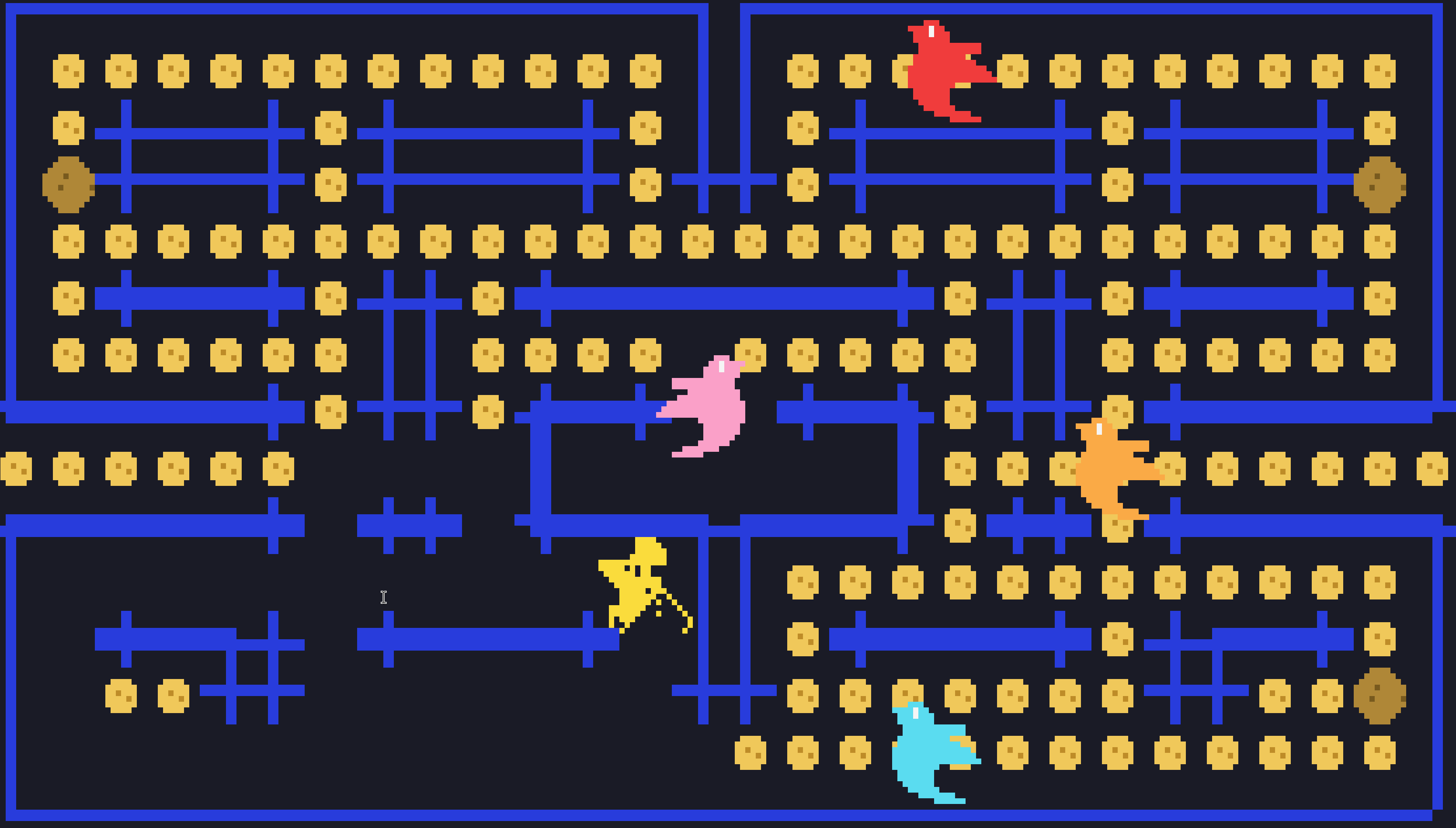
ratman is a maze chase drawn entirely as halfblock pixel art: a ratatui rat
eats cheese while four bevy birds hunt it, each sprite traced from its logo.
Arrows or WASD steer, a power cheese turns the birds edible, and r starts
over. Wants roughly 280x76 or larger.
lander flies a moon lander through the 3d pipeline with a widget HUD. W or
space burns the main thruster, A/D tilt, t cycles the pixel-to-cell strategy,
e cycles the sobel edge overlay, r resets. The first frames take a few
seconds while GPU pipelines compile.
Requirements
| plurimus | bevy | ratatui-core |
|---|---|---|
| 0.2 | 0.19 | 0.1 |
- Rust 1.95 or newer, edition 2024.
- Bevy 0.19 for any bevy crates added alongside.
- A terminal. Anything crossterm supports; the kitty keyboard protocol adds real key releases. Truecolor, 256-color, and 16-color terminals are detected and composited down.
- A GPU adapter, for the
3dtier only. Every other tier is CPU-only.
Status
Pre-1.0, versioned in lockstep across the workspace. The architecture is settled; the API still moves between minor releases, and CHANGELOG.md records what changed.
License
Licensed under either of
- Apache License, Version 2.0 (LICENSE-APACHE)
- MIT license (LICENSE-MIT)
at your option.
Unless you explicitly state otherwise, any contribution intentionally submitted for inclusion in the work by you, as defined in the Apache-2.0 license, shall be dual licensed as above, without any additional terms or conditions.