1
2
3
4
5
6
7
8
9
10
11
12
13
14
15
16
17
18
19
20
21
22
23
24
25
26
27
28
29
30
31
32
33
34
35
36
37
38
39
40
41
42
43
44
45
46
47
48
49
50
51
52
53
54
55
56
57
58
59
60
61
62
63
64
65
66
67
68
69
70
71
72
73
74
75
76
77
78
79
80
81
82
83
84
85
86
87
88
89
90
91
92
93
94
95
96
97
98
99
100
101
102
103
104
105
106
107
108
109
110
111
112
113
114
115
116
117
118
119
120
121
122
123
124
125
126
127
128
129
130
use crate::chart::{axes3d::Axes3dStyle, ChartContext};
use crate::coord::{
cartesian::Cartesian3d,
ranged1d::{Ranged, ValueFormatter},
ranged3d::{ProjectionMatrix, ProjectionMatrixBuilder},
};
use plotters_backend::DrawingBackend;
mod draw_impl;
#[derive(Clone, Debug)]
pub(crate) enum Coord3D<X, Y, Z> {
X(X),
Y(Y),
Z(Z),
}
impl<X, Y, Z> Coord3D<X, Y, Z> {
fn get_x(&self) -> &X {
match self {
Coord3D::X(ret) => ret,
_ => panic!("Invalid call!"),
}
}
fn get_y(&self) -> &Y {
match self {
Coord3D::Y(ret) => ret,
_ => panic!("Invalid call!"),
}
}
fn get_z(&self) -> &Z {
match self {
Coord3D::Z(ret) => ret,
_ => panic!("Invalid call!"),
}
}
fn build_coord([x, y, z]: [&Self; 3]) -> (X, Y, Z)
where
X: Clone,
Y: Clone,
Z: Clone,
{
(x.get_x().clone(), y.get_y().clone(), z.get_z().clone())
}
}
impl<'a, DB, X, Y, Z, XT, YT, ZT> ChartContext<'a, DB, Cartesian3d<X, Y, Z>>
where
DB: DrawingBackend,
X: Ranged<ValueType = XT> + ValueFormatter<XT>,
Y: Ranged<ValueType = YT> + ValueFormatter<YT>,
Z: Ranged<ValueType = ZT> + ValueFormatter<ZT>,
{
/**
Create an axis configuration object, to set line styles, labels, sizes, etc.
Default values for axis configuration are set by function `Axes3dStyle::new()`.
# Example
```
use plotters::prelude::*;
let drawing_area = SVGBackend::new("configure_axes.svg", (300, 200)).into_drawing_area();
drawing_area.fill(&WHITE).unwrap();
let mut chart_builder = ChartBuilder::on(&drawing_area);
let mut chart_context = chart_builder.margin_bottom(30).build_cartesian_3d(0.0..4.0, 0.0..3.0, 0.0..2.7).unwrap();
chart_context.configure_axes().tick_size(8).x_labels(4).y_labels(3).z_labels(2)
.max_light_lines(5).axis_panel_style(GREEN.mix(0.1)).bold_grid_style(BLUE.mix(0.3))
.light_grid_style(BLUE.mix(0.2)).label_style(("Calibri", 10))
.x_formatter(&|x| format!("x={x}")).draw().unwrap();
```
The resulting chart reflects the customizations specified through `configure_axes()`:
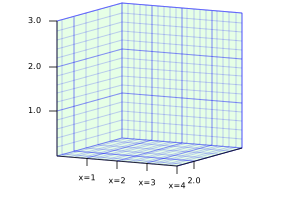
All these customizations are `Axes3dStyle` methods.
In the chart, `tick_size(8)` produces tick marks 8 pixels long. You can use
`(5u32).percent().max(5).in_pixels(chart.plotting_area()` to tell Plotters to calculate the tick mark
size as a percentage of the dimensions of the figure. See [`crate::style::RelativeSize`] and
[`crate::style::SizeDesc`] for more information.
`x_labels(4)` specifies a maximum of 4
tick marks and labels in the X axis. `max_light_lines(5)` specifies a maximum of 5 minor grid lines
between any two tick marks. `axis_panel_style(GREEN.mix(0.1))` specifies the style of the panels in
the background, a light green color. `bold_grid_style(BLUE.mix(0.3))` and `light_grid_style(BLUE.mix(0.2))`
specify the style of the major and minor grid lines, respectively. `label_style()` specifies the text
style of the axis labels, and `x_formatter(|x| format!("x={x}"))` specifies the string format of the X
axis labels.
# See also
[`ChartContext::configure_mesh()`], a similar function for 2D plots
*/
pub fn configure_axes(&mut self) -> Axes3dStyle<'a, '_, X, Y, Z, DB> {
Axes3dStyle::new(self)
}
}
impl<'a, DB, X: Ranged, Y: Ranged, Z: Ranged> ChartContext<'a, DB, Cartesian3d<X, Y, Z>>
where
DB: DrawingBackend,
{
/// Override the 3D projection matrix. This function allows to override the default projection
/// matrix.
/// - `pf`: A function that takes the default projection matrix configuration and returns the
/// projection matrix. This function will allow you to adjust the pitch, yaw angle and the
/// centeral point of the projection, etc. You can also build a projection matrix which is not
/// relies on the default configuration as well.
pub fn with_projection<P: FnOnce(ProjectionMatrixBuilder) -> ProjectionMatrix>(
&mut self,
pf: P,
) -> &mut Self {
let (actual_x, actual_y) = self.drawing_area.get_pixel_range();
self.drawing_area
.as_coord_spec_mut()
.set_projection(actual_x, actual_y, pf);
self
}
/// Sets the 3d coordinate pixel range.
pub fn set_3d_pixel_range(&mut self, size: (i32, i32, i32)) -> &mut Self {
let (actual_x, actual_y) = self.drawing_area.get_pixel_range();
self.drawing_area
.as_coord_spec_mut()
.set_coord_pixel_range(actual_x, actual_y, size);
self
}
}