# plotters-wxdragon
`plotters-wxdragon` is a backend for [Plotters], to draw plots in a GUI window
managed by [wxDragon].
[wxDragon] is a binding of wxWidgets for rust. wxWidgets is a cross-platform
GUI library toolkit for desktop applications, that uses the native GUI toolkit
on Windows, macOS, and Linux.
[Plotters] is a Rust drawing library focusing on data plotting for both WASM
and native applications.
[Plotters]: https://crates.io/crates/plotters
[wxDragon]: https://crates.io/crates/wxdragon
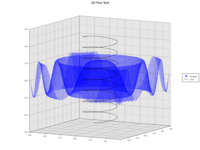
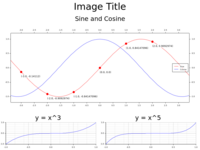
Examples of bitmaps produced with this backend:
[](./tests/3d_plot.png)
[](./tests/chart.png)
[](./tests/mandelbrot.png)
## Getting started
### Quick start
1. Follow [wxDragon] instructions to install the `wxdragon` crate. You will
need the wxWidgets library for your OS so be sure to follow the
instructions.
2. Clone this repository and run the `x2` plotting example to check that it
works for you.
```bash
git clone https://github.com/threefold3/plotters-wxdragon.git
cd plotters-wxdragon
cargo run --example x2
```
This will open a new window displaying a simple `y=x^2` plot.
### Integrating with a project
1. Add the following to your `Cargo.toml` file:
```toml
[dependencies]
wxdragon = "0.9"
plotters = "0.3"
plotters-wxdragon = "0.1"
```
2. Create an app with a `wxdragon::Panel`, and use the panel's `on_paint`
handler to create a new `wxdragon::AutoBufferedPaintDC` (device context)
each time, wrap it in a `WxBackend` and then draw on it.
```rust
use plotters::prelude::*;
use plotters::style::text_anchor::{HPos, Pos, VPos};
use plotters_wxdragon::WxBackend;
use wxdragon::{self as wx, WindowEvents, WxWidget};
struct DrawingPanel {
panel: wx::Panel,
}
impl DrawingPanel {
fn new(parent: &wx::Frame) -> Self {
let panel = wx::PanelBuilder::new(parent).build();
panel.set_background_style(wx::BackgroundStyle::Paint);
panel.on_paint(move |_event| {
let dc = wx::AutoBufferedPaintDC::new(&panel);
let mut backend = WxBackend::new(&dc);
backend
.draw_rect((300, 250), (500, 350), &BLACK, false)
.unwrap();
let style = TextStyle::from(("monospace", 32.0).into_font())
.pos(Pos::new(HPos::Center, VPos::Center));
backend
.draw_text("hello, world", &style, (400, 300))
.unwrap();
backend.present().expect("present");
});
panel.on_size(move |_event| {
panel.refresh(true, None);
});
Self { panel }
}
}
impl std::ops::Deref for DrawingPanel {
type Target = wx::Panel;
fn deref(&self) -> &Self::Target {
&self.panel
}
}
fn main() {
let _ = wxdragon::main(|_| {
let frame = wx::Frame::builder()
.with_title("Getting started")
.with_size(wx::Size::new(852, 689))
.build();
let drawing_panel = DrawingPanel::new(&frame);
drawing_panel.refresh(true, None);
frame.show(true);
});
}
```
You can find more details in the examples for how to integrate a plot in
your wxWidgets application:
+ [`x2`](./examples/x2.rs): simple `y=x^2` plot in a wxWidgets frame
+ [`text`](./examples/text.rs): a single window that shows various text
orientations and a toolbar that can modify application state
There are also more [tests](./tests), that illustrate that most existing
plotters examples work without change. In these tests we write to to an
in-memory device context instead of a device context linked to a `Panel`,
and compare to a reference png images to ensure non-regression.
## How this works
This crate implements a backend for [Plotters]. It uses the existing drawing
context of wxWidgets, and maps plotters drawing primitives to corresponding
calls fo the wxWidgets API.
See also [`plotters-backend`] for reference on implementing a backend for
plotters.
[`plotters-backend`]: https://docs.rs/plotters-backend/latest/plotters_backend/
## Roadmap
This project is in its early stages. Future plans include:
* Canvas interaction with the mouse (zoom/pan).
* Canvas interaction with toolbar buttons (zoom/pan/reset/select).
* Test the `blit_bitmap` function (no working example found yet).
* Performance benchmark.
* Make default font size more consistent with [Plotters].
* Find a way to use wxGLCanvas for hardware acceleration?
## License
This project is dual-licensed under [Apache 2.0](./LICENSE-APACHE) and
[`MIT`](./LICENSE-MIT) terms.
## Contributions
Unless explicitly stated otherwise, contributions to this project, as defined
in the Apache 2.0 license, are dual-licensed under Apache 2.0 and MIT. You do
not need to explicitly state this when contributing. To opt out, please
explicitly state "Not a Contribution" with your submission.
This project follows the following guidelines:
* Format the code with `cargo fmt`.
* For any changes in markdown files, use `rumdl fmt`.
* Lint your code with `cargo check`, `cargo test`, `cargo clippy`,
and `cargo doc`.
* Use [conventional commits](https://www.conventionalcommits.org/en/v1.0.0/).