plotters_druid/lib.rs
1/*!
2
3Use [Plotters](https://crates.io/crates/plotters) to draw plots in [Druid](https://crates.io/crates/druid).
4
5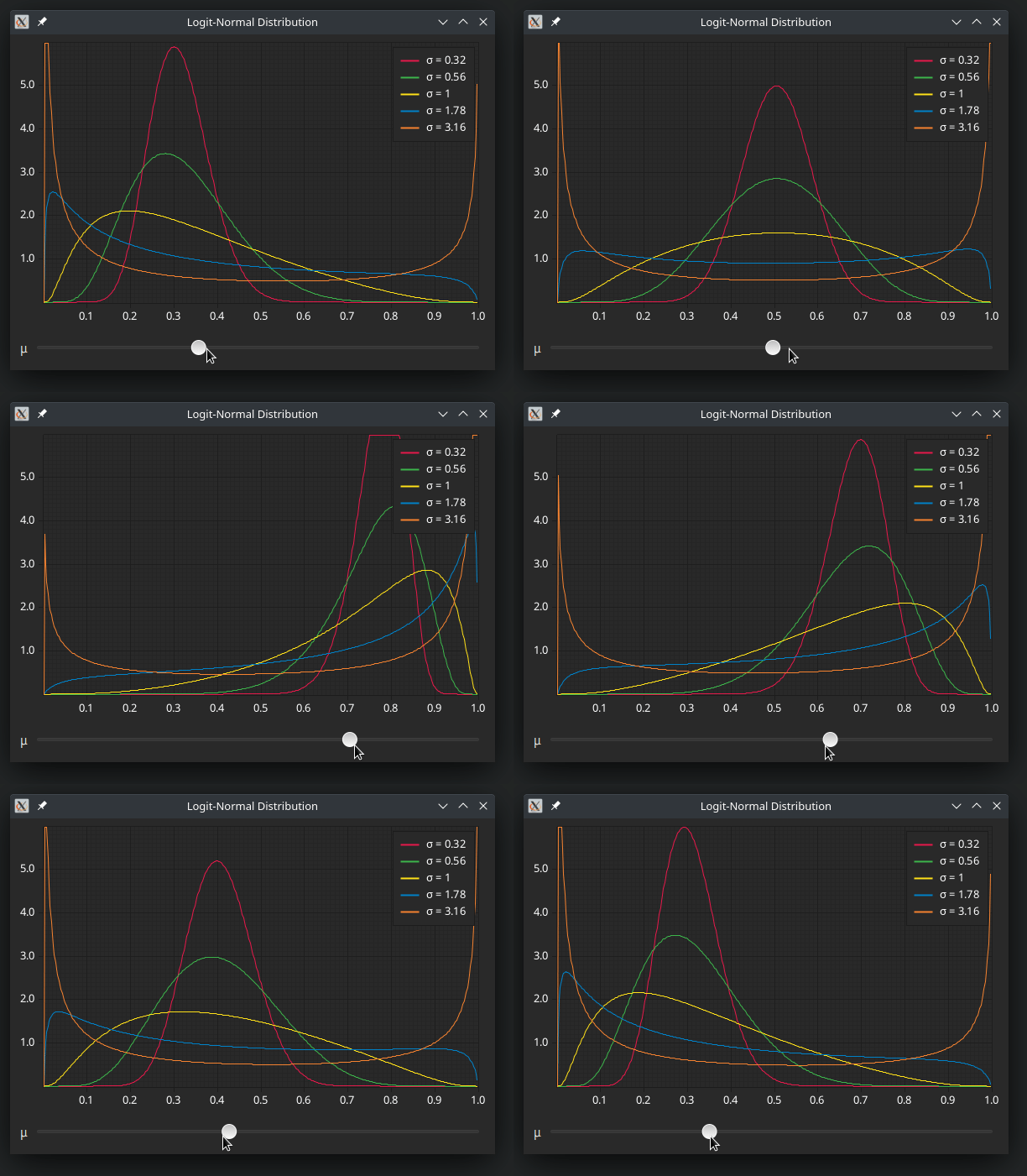
6
7All the features of plotters should just work. Additionally, transparency is also supportet, i.e. you don't
8have to fill the background with a solid colour as is usually done in plotters examples, the background can
9instead just be whatever background colour is given through druid.
10
11Note that this is not directly a plotters backend in the sense described in
12[plotters_backend](https://docs.rs/plotters-backend/latest/plotters_backend/), instead this uses
13the plotters-piet backend and wraps it in a struct that implements [`druid::Widget`].
14
15You'll mainly need [`Plot::new`] from this crate.
16
17# Example
18
19For more complete examples see [the GitHub repo](https://github.com/Pascal-So/plotters-druid#examples)
20
21```rust
22# use druid::{Widget, WindowDesc, AppLauncher};
23# use plotters_druid::Plot;
24# use plotters::prelude::*;
25# #[derive(Clone, druid::Data)]
26# struct AppState;
27fn build_plot_widget() -> impl Widget<AppState> {
28 Plot::new(|(width, height), data: &AppState, root| {
29 root.fill(&WHITE).unwrap();
30 let mut chart = ChartBuilder::on(&root)
31 .build_cartesian_2d(-1f32..1f32, -0.1f32..1f32)
32 .unwrap();
33
34 // see the plotters documentation on how to use `chart`
35 })
36}
37
38# fn main() {
39let main_window = WindowDesc::new(build_plot_widget());
40# }
41```
42
43# Limitations
44
45It's currently not possible to propagate errors that might be returned from the plotters API. Right now
46this means you'll probably have to use `.unwrap()` a lot in the closure that you pass to [`Plot::new`],
47or alternatively just log it and shrug.
48
49The possible errors in there mostly come from the drawing backend, e.g. cairo / direct2d / whatever piet
50uses on your platform. Just directly propagating these in the widget's draw function doesn't really make
51sense because it's not clear what druid is supposed to do with these errors. Ideally we'd probably change
52something in the data to notify the rest of the application of the error. If anyone has a good suggestion
53for a possible API feel free to open an issue.
54
55*/
56
57use druid::{Data, Widget};
58use plotters::{
59 coord::Shift,
60 prelude::{DrawingArea, IntoDrawingArea},
61};
62use plotters_piet::PietBackend;
63
64/// The type of a plot widget.
65///
66/// See [`Plot::new`] for information on how to construct this.
67///
68/// This implements [`druid::Widget`] so it can be used like
69/// any other widget type.
70/// ```rust
71/// # use druid::{Widget, WindowDesc, AppLauncher};
72/// # use plotters_druid::Plot;
73/// fn build_plot_widget() -> impl Widget<()> {
74/// // ... construct and return widget using Plot::new()
75/// # Plot::new(|_, _, _|{})
76/// }
77///
78/// # fn main() {
79/// let main_window = WindowDesc::new(build_plot_widget());
80/// # }
81/// ```
82pub struct Plot<T: Data> {
83 #[allow(clippy::type_complexity)]
84 plot: Box<dyn Fn((u32, u32), &T, &DrawingArea<PietBackend, Shift>)>,
85}
86
87impl<T: Data> Plot<T> {
88 /// Create a plot widget
89 ///
90 /// This takes a function that should draw the plot using the normal plotters API.
91 /// The function has access to the width and height of the plotting area, to the
92 /// [`Data`] of the rust widget, and to a plotters [`DrawingArea`].
93 ///
94 /// ```rust
95 /// # use plotters_druid::Plot;
96 /// # use plotters::prelude::*;
97 /// # #[derive(Clone, druid::Data)]
98 /// # struct AppState;
99 /// Plot::new(|(width, height), data: &AppState, root| {
100 /// root.fill(&WHITE).unwrap();
101 /// let mut chart = ChartBuilder::on(&root)
102 /// .build_cartesian_2d(-1f32..1f32, -0.1f32..1f32)
103 /// .unwrap();
104 ///
105 /// // see the plotters documentation on how to use `chart`
106 /// });
107 /// ```
108 pub fn new(f: impl Fn((u32, u32), &T, &DrawingArea<PietBackend, Shift>) + 'static) -> Plot<T> {
109 Plot { plot: Box::new(f) }
110 }
111}
112
113impl<T> Widget<T> for Plot<T>
114where
115 T: Data,
116{
117 fn event(&mut self, _: &mut druid::EventCtx, _: &druid::Event, _: &mut T, _: &druid::Env) {}
118
119 fn lifecycle(
120 &mut self,
121 _: &mut druid::LifeCycleCtx,
122 _: &druid::LifeCycle,
123 _: &T,
124 _: &druid::Env,
125 ) {
126 }
127
128 fn update(&mut self, ctx: &mut druid::UpdateCtx, old_data: &T, data: &T, _env: &druid::Env) {
129 if !old_data.same(data) {
130 ctx.request_paint();
131 }
132 }
133
134 fn layout(
135 &mut self,
136 _: &mut druid::LayoutCtx,
137 bc: &druid::BoxConstraints,
138 _: &T,
139 _: &druid::Env,
140 ) -> druid::Size {
141 bc.max()
142 }
143
144 fn paint(&mut self, ctx: &mut druid::PaintCtx, data: &T, _: &druid::Env) {
145 let druid::Size { width, height } = ctx.size();
146 let size = (width as u32, height as u32);
147 let backend = PietBackend {
148 size,
149 render_ctx: ctx.render_ctx,
150 };
151
152 (self.plot)(size, data, &backend.into_drawing_area());
153 }
154}