1
2
3
4
5
6
7
8
9
10
11
12
13
14
15
16
17
18
19
20
21
22
23
24
25
26
27
28
29
30
31
32
33
34
35
36
37
38
39
40
41
42
43
44
45
46
47
48
49
50
51
52
53
54
55
56
57
58
59
60
61
62
63
64
65
66
67
68
69
70
71
72
73
74
75
76
77
78
79
80
81
82
83
84
85
86
87
88
89
90
91
92
93
94
95
96
97
98
99
100
101
102
103
104
105
106
107
108
109
110
111
112
113
114
115
116
117
118
119
120
121
122
123
124
125
126
127
128
129
130
131
132
133
134
135
136
//! Rust plotting library using Python and Matplotlib
//!
//! This library implements high-level functions to generate plots and drawings.
//! Although we use Python/Matplotlib, the goal is to provide a convenient Rust library
//! that is **different** than Matplotlib. The difference happens because we want **convenience**
//! for the Rust developer while getting the **fantastic quality of Matplotlib** 😀.
//!
//! Internally, we use [Matplotlib](https://matplotlib.org/) via a Python 3 script.
//! First, we generate a python code in a directory of your choice (e.g., `/tmp/plotpy`),
//! and then we call **python3** using Rust's [std::process::Command].
//!
//! The Python script has the same name as the figure name given to the [Plot::save] function,
//! but with the `.py` extension. The figure name can have the (png, pdf, or svg) extension
//! (see [Matplotlib](https://matplotlib.org/stable/api/_as_gen/matplotlib.pyplot.savefig.html))
//! for more information regarding file extensions.
//!
//! We generate the Python script with the preamble listed in [PYTHON_HEADER] and the file
//! should be useful for double checking or even directly adding Python/Matplotlib commands,
//! in case the functionality is not implemented here yet.
//!
//! When calling [Plot::save()] or [Plot::show()], if an error occurs, we generate a log
//! file in the same output directory with the same filename as the figure (and python script),
//! but with the `.log` extension.
//!
//! The typical use of this library is by allocating structures such as [Canvas], [Curve], [Contour],
//! [Histogram], [Surface], [Text] (and more) and then passing them to [Plot] for the generation
//! of the files mentioned above. The [Plot::show()] function may also be used to immediately
//! see the plot or drawing on the screen.
//!
//! Alternatively, [if evcxr is installed](https://github.com/evcxr/evcxr), the function
//! [Plot::show_in_jupyter()] can be used to show the resulting figure in a Jupyter notebook.
//!
//! Each structure (e.g. [Curve], [Legend], or [Text]) defines many configuration options
//! that can be set by calling their own `set_...` function. Typically, these structures provide
//! `draw_...` functions to plot/draw features. Afterwards, we call [Plot::add] to add these structures
//! to the [Plot] and then call [Plot::save]. The `draw` method of each object must be called
//! before adding to `Plot`.
//!
//! # Example
//!
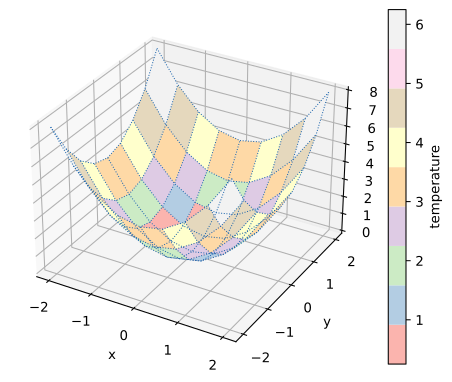
//! ```
//! use plotpy::{generate3d, Plot, StrError, Surface};
//!
//! fn main() -> Result<(), StrError> {
//! let mut surface = Surface::new();
//! surface
//! .set_with_wireframe(true)
//! .set_colormap_name("Pastel1")
//! .set_with_colorbar(true)
//! .set_colorbar_label("temperature")
//! .set_wire_line_color("#1862ab")
//! .set_wire_line_style(":")
//! .set_wire_line_width(0.75);
//!
//! // draw surface
//! let n = 9;
//! let (x, y, z) = generate3d(-2.0, 2.0, -2.0, 2.0, n, n, |x, y| x * x + y * y);
//! surface.draw(&x, &y, &z);
//!
//! // add surface to plot
//! let mut plot = Plot::new();
//! plot.add(&surface);
//!
//! // save figure
//! plot.save("/tmp/plotpy/example_main.svg")?;
//! Ok(())
//! }
//! ```
//!
//! 
/// Defines a type alias for the error type as a static string
pub type StrError = &'static str;
// modules
// re-export
pub use *;
pub use *;
pub use *;
pub use *;
pub use *;
pub use *;
pub use *;
pub use *;
use *;
pub use *;
pub use *;
use *;
pub use *;
pub use *;
pub use *;
pub use *;
pub use *;
pub use *;
pub use *;
pub use *;
pub use *;
pub use *;
pub use *;
// run code from README file