# Rust plotting library using Python (Matplotlib) <!-- omit from toc -->
[](https://docs.rs/plotpy)
[](https://www.trackawesomelist.com/rust-unofficial/awesome-rust/)
[](https://github.com/cpmech/plotpy/actions/workflows/test_and_coverage.yml)
## Contents <!-- omit from toc -->
- [Introduction](#introduction)
- [Installation](#installation)
- [Setting Cargo.toml](#setting-cargotoml)
- [Use of Jupyter via evcxr](#use-of-jupyter-via-evcxr)
- [Examples](#examples)
- [Barplot](#barplot)
- [Boxplot](#boxplot)
- [Canvas](#canvas)
- [Contour](#contour)
- [Curve](#curve)
- [Histogram](#histogram)
- [Image](#image)
- [InsetAxes](#insetaxes)
- [Surface](#surface)
- [Text](#text)
## Introduction
This crate implements functions for generating plots and drawings in Rust. It uses Python/Matplotlib but is designed specifically for Rust developers, combining the convenience of a Rust-native API with the exceptional quality of Matplotlib 😀.
Plotpy is more verbose than native Matplotlib because the aim here is to take advantage of the intelligence of the IDE (e.g., VS Code) to auto-complete the code while developing in Rust.
Plotpy generates Python code in a temporary directory (e.g., `/tmp/plotpy`). It then runs the code via `Python 3` using Rust's `std::process::Command`. The result is an image file such as `SVG`.
For more information (and examples), check out the [plotpy documentation on docs.rs](https://docs.rs/plotpy).
See also the [examples directory](https://github.com/cpmech/plotpy/tree/main/examples) with the output of the [integration tests](https://github.com/cpmech/plotpy/tree/main/tests).
## Installation
*This code is mainly tested on Debian/Ubuntu/Linux.*
This crate needs Python3 and Matplotlib, of course.
On Debian/Ubuntu/Linux, run:
```bash
sudo apt install python3-matplotlib
```
**Important:** The Rust code will call `python3` via `std::process::Command`. However, there is an option to call a different python executable; for instance (the code below is no tested):
```text
let mut plot = Plot::new();
plot.set_python_exe("C:\Windows11\WhereIs\python.exe")
.add(...)
.save(...)?;
```
## Setting Cargo.toml
[](https://crates.io/crates/plotpy)
👆 Check the crate version and update your Cargo.toml accordingly:
```toml
[dependencies]
plotpy = "*"
```
## Use of Jupyter via evcxr
Plotpy can be used with Jupyter via [evcxr](https://github.com/evcxr/evcxr). Thus, it can interactively display the plots in a Jupyter Notebook. This feature requires the installation of `evcxr`. See the [Jupyter/evcxr article](https://depth-first.com/articles/2020/09/21/interactive-rust-in-a-repl-and-jupyter-notebook-with-evcxr/).
The following code shows a minimal example (not tested)
```text
// set the python path
let python = "where-is-my/python";
// set the figure path and name to be saved
let path = "my-figure.svg";
// plot and show in a Jupyter notebook
let mut plot = Plot::new();
plot.set_python_exe(python)
.set_label_x("x")
.set_label_y("y")
.show_in_jupyter(path)?;
```
## Examples
### Barplot
[See the documentation](https://docs.rs/plotpy/latest/plotpy/struct.Barplot.html)
```rust
use plotpy::{Barplot, Plot, StrError};
fn main() -> Result<(), StrError> {
// data
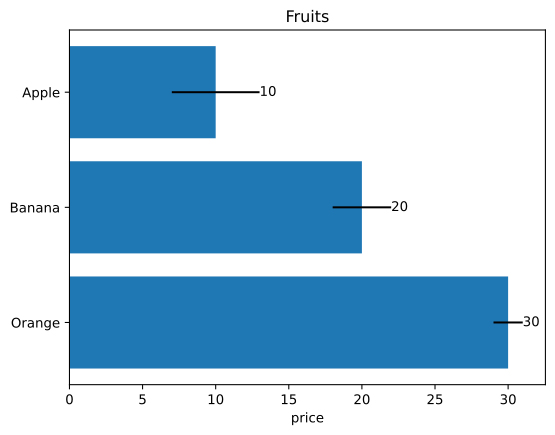
let fruits = ["Apple", "Banana", "Orange"];
let prices = [10.0, 20.0, 30.0];
let errors = [3.0, 2.0, 1.0];
// barplot object and options
let mut bar = Barplot::new();
bar.set_errors(&errors)
.set_horizontal(true)
.set_with_text("edge")
.draw_with_str(&fruits, &prices);
// save figure
let mut plot = Plot::new();
plot.set_inv_y()
.add(&bar)
.set_title("Fruits")
.set_label_x("price");
// plot.save("/tmp/plotpy/doc_tests/doc_barplot_3.svg")?;
Ok(())
}
```
### Boxplot
[See the documentation](https://docs.rs/plotpy/latest/plotpy/struct.Boxplot.html)
```rust
use plotpy::{Boxplot, Plot, StrError};
fn main() -> Result<(), StrError> {
// data (as a nested list)
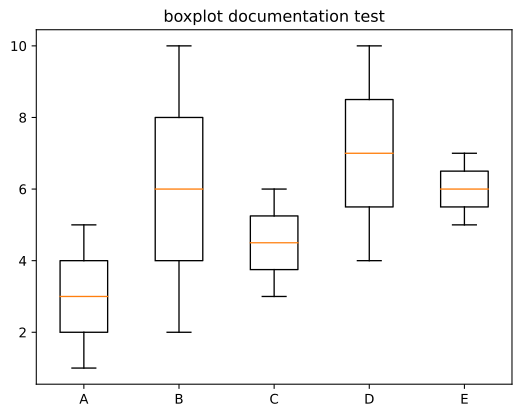
let data = vec![
vec![1, 2, 3, 4, 5], // A
vec![2, 3, 4, 5, 6, 7, 8, 9, 10], // B
vec![3, 4, 5, 6], // C
vec![4, 5, 6, 7, 8, 9, 10], // D
vec![5, 6, 7], // E
];
// x ticks and labels
let n = data.len();
let ticks: Vec<_> = (1..(n + 1)).into_iter().collect();
let labels = ["A", "B", "C", "D", "E"];
// boxplot object and options
let mut boxes = Boxplot::new();
boxes.draw(&data);
// save figure
let mut plot = Plot::new();
plot.add(&boxes)
.set_title("boxplot documentation test")
.set_ticks_x_labels(&ticks, &labels);
// plot.save("/tmp/plotpy/doc_tests/doc_boxplot_2.svg")?;
Ok(())
}
```
### Canvas
[See the documentation](https://docs.rs/plotpy/latest/plotpy/struct.Canvas.html)
```rust
use plotpy::{Canvas, Plot, PolyCode, StrError};
fn main() -> Result<(), StrError> {
// codes
let data = [
(3.0, 0.0, PolyCode::MoveTo),
(1.0, 1.5, PolyCode::Curve4),
(0.0, 4.0, PolyCode::Curve4),
(2.5, 3.9, PolyCode::Curve4),
(3.0, 3.8, PolyCode::LineTo),
(3.5, 3.9, PolyCode::LineTo),
(6.0, 4.0, PolyCode::Curve4),
(5.0, 1.5, PolyCode::Curve4),
(3.0, 0.0, PolyCode::Curve4),
];
// polycurve
let mut canvas = Canvas::new();
canvas.set_face_color("#f88989").set_edge_color("red");
canvas.polycurve_begin();
for (x, y, code) in data {
canvas.polycurve_add(x, y, code);
}
canvas.polycurve_end(true);
// add canvas to plot
let mut plot = Plot::new();
plot.add(&canvas);
// save figure
plot.set_range(1.0, 5.0, 0.0, 4.0)
.set_frame_borders(false)
.set_hide_axes(true)
.set_equal_axes(true)
.set_show_errors(true);
// plot.save("/tmp/plotpy/doc_tests/doc_canvas_polycurve.svg")?;
Ok(())
}
```

### Contour
[See the documentation](https://docs.rs/plotpy/latest/plotpy/struct.Contour.html)
```rust
use plotpy::{generate3d, Contour, Plot, StrError};
fn main() -> Result<(), StrError> {
// generate (x,y,z) matrices
let n = 21;
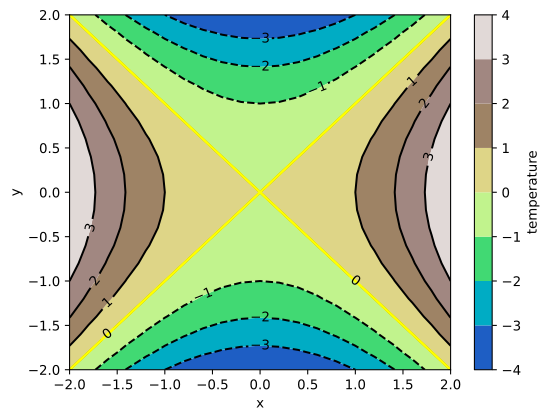
let (x, y, z) = generate3d(-2.0, 2.0, -2.0, 2.0, n, n, |x, y| x * x - y * y);
// configure contour
let mut contour = Contour::new();
contour
.set_colorbar_label("temperature")
.set_colormap_name("terrain")
.set_selected_level(0.0, true);
// draw contour
contour.draw(&x, &y, &z);
// add contour to plot
let mut plot = Plot::new();
plot.add(&contour)
.set_labels("x", "y");
// plot.save("/tmp/plotpy/readme_contour.svg")?;
Ok(())
}
```
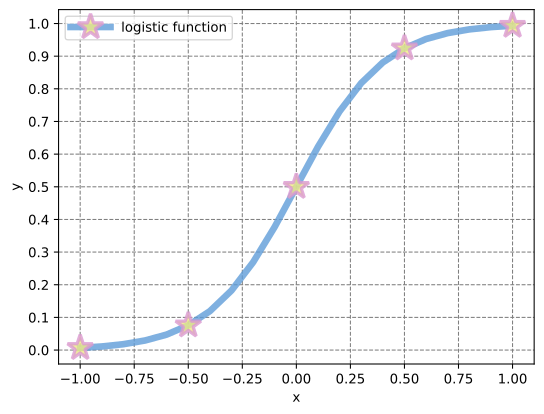
### Curve
[See the documentation](https://docs.rs/plotpy/latest/plotpy/struct.Curve.html)
```rust
use plotpy::{linspace, Curve, Plot, StrError};
fn main() -> Result<(), StrError> {
// generate (x,y) points
let x = linspace(-1.0, 1.0, 21);
let y: Vec<_> = x.iter().map(|v| 1.0 / (1.0 + f64::exp(-5.0 * *v))).collect();
// configure curve
let mut curve = Curve::new();
curve
.set_label("logistic function")
.set_line_alpha(0.8)
.set_line_color("#5f9cd8")
.set_line_style("-")
.set_line_width(5.0)
.set_marker_color("#eeea83")
.set_marker_every(5)
.set_marker_line_color("#da98d1")
.set_marker_line_width(2.5)
.set_marker_size(20.0)
.set_marker_style("*");
// draw curve
curve.draw(&x, &y);
// add curve to plot
let mut plot = Plot::new();
plot.add(&curve)
.set_num_ticks_y(11)
.grid_labels_legend("x", "y");
// plot.save("/tmp/plotpy/doc_tests/doc_curve.svg")?;
Ok(())
}
```
### Histogram
[See the documentation](https://docs.rs/plotpy/latest/plotpy/struct.Histogram.html)
```rust
use plotpy::{Histogram, Plot, StrError};
fn main() -> Result<(), StrError> {
// set values
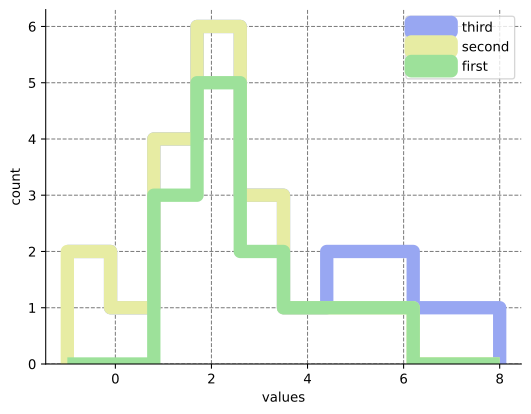
let values = vec![
vec![1, 1, 1, 2, 2, 2, 2, 2, 3, 3, 4, 5, 6], // first series
vec![-1, -1, 0, 1, 2, 3], // second series
vec![5, 6, 7, 8], // third series
];
// set labels
let labels = ["first", "second", "third"];
// configure and draw histogram
let mut histogram = Histogram::new();
histogram.set_colors(&["#9de19a", "#e7eca3", "#98a7f2"])
.set_line_width(10.0)
.set_stacked(true)
.set_style("step");
histogram.draw(&values, &labels);
// add histogram to plot
let mut plot = Plot::new();
plot.add(&histogram)
.set_frame_border(true, false, true, false)
.grid_labels_legend("values", "count");
// plot.save("/tmp/plotpy/doc_tests/doc_histogram.svg")?;
Ok(())
}
```
### Image
```rust
use plotpy::{Image, Plot, StrError};
fn main() -> Result<(), StrError> {
// set values
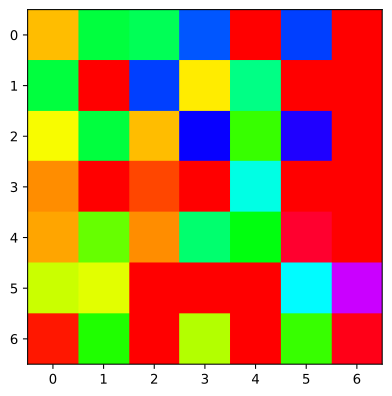
let data = [
[0.8, 2.4, 2.5, 3.9, 0.0, 4.0, 0.0],
[2.4, 0.0, 4.0, 1.0, 2.7, 0.0, 0.0],
[1.1, 2.4, 0.8, 4.3, 1.9, 4.4, 0.0],
[0.6, 0.0, 0.3, 0.0, 3.1, 0.0, 0.0],
[0.7, 1.7, 0.6, 2.6, 2.2, 6.2, 0.0],
[1.3, 1.2, 0.0, 0.0, 0.0, 3.2, 5.1],
[0.1, 2.0, 0.0, 1.4, 0.0, 1.9, 6.3],
];
// image plot and options
let mut img = Image::new();
img.set_colormap_name("hsv").draw(&data);
// save figure
let mut plot = Plot::new();
plot.add(&img);
// plot.save("/tmp/plotpy/doc_tests/doc_image_1.svg")?;
Ok(())
}
```
### InsetAxes
```rust
use plotpy::{Curve, InsetAxes, Plot, StrError};
fn main() -> Result<(), StrError> {
// draw curve
let mut curve = Curve::new();
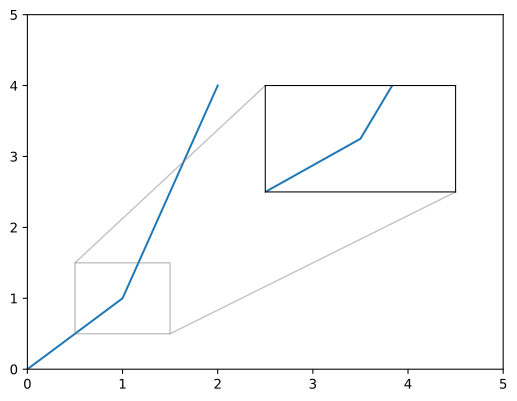
curve.draw(&[0.0, 1.0, 2.0], &[0.0, 1.0, 4.0]);
// allocate inset and add curve to it
let mut inset = InsetAxes::new();
inset
.add(&curve) // add curve to inset
.set_range(0.5, 1.5, 0.5, 1.5) // set the range of the inset
.draw(0.5, 0.5, 0.4, 0.3);
// add curve and inset to plot
let mut plot = Plot::new();
plot.add(&curve)
.set_range(0.0, 5.0, 0.0, 5.0)
.add(&inset); // IMPORTANT: add inset after setting the range
// plot.save("/tmp/plotpy/doc_tests/doc_inset_axes_add.svg")?;
Ok(())
}
```
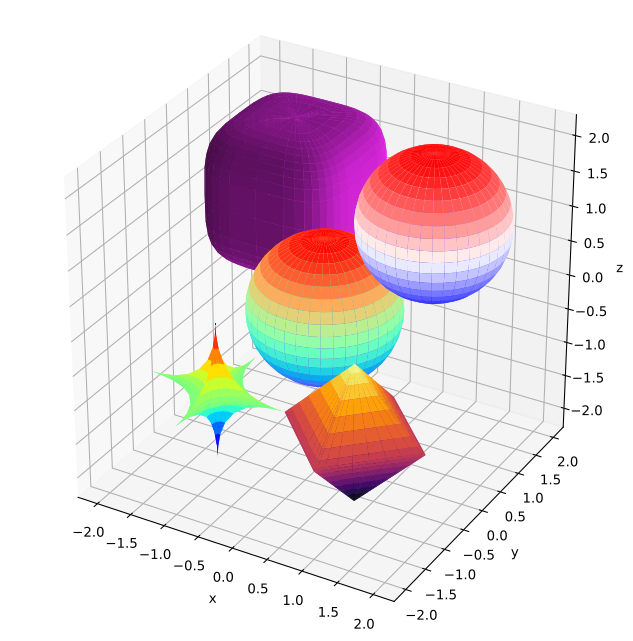
### Surface
[See the documentation](https://docs.rs/plotpy/latest/plotpy/struct.Surface.html)
```rust
use plotpy::{Plot, StrError, Surface};
fn main() -> Result<(), StrError> {
// star
let r = &[1.0, 1.0, 1.0];
let c = &[-1.0, -1.0, -1.0];
let k = &[0.5, 0.5, 0.5];
let mut star = Surface::new();
star.set_colormap_name("jet")
.draw_superquadric(c, r, k, -180.0, 180.0, -90.0, 90.0, 40, 20)?;
// pyramids
let c = &[1.0, -1.0, -1.0];
let k = &[1.0, 1.0, 1.0];
let mut pyramids = Surface::new();
pyramids
.set_colormap_name("inferno")
.draw_superquadric(c, r, k, -180.0, 180.0, -90.0, 90.0, 40, 20)?;
// rounded cube
let c = &[-1.0, 1.0, 1.0];
let k = &[4.0, 4.0, 4.0];
let mut cube = Surface::new();
cube.set_surf_color("#ee29f2")
.draw_superquadric(c, r, k, -180.0, 180.0, -90.0, 90.0, 40, 20)?;
// sphere
let c = &[0.0, 0.0, 0.0];
let k = &[2.0, 2.0, 2.0];
let mut sphere = Surface::new();
sphere
.set_colormap_name("rainbow")
.draw_superquadric(c, r, k, -180.0, 180.0, -90.0, 90.0, 40, 20)?;
// sphere (direct)
let mut sphere_direct = Surface::new();
sphere_direct.draw_sphere(&[1.0, 1.0, 1.0], 1.0, 40, 20)?;
// add features to plot
let mut plot = Plot::new();
plot.add(&star)
.add(&pyramids)
.add(&cube)
.add(&sphere)
.add(&sphere_direct);
// save figure
plot.set_equal_axes(true)
.set_figure_size_points(600.0, 600.0);
// plot.save("/tmp/plotpy/readme_superquadric.svg")?;
Ok(())
}
```
### Text
```rust
use plotpy::{Plot, Text, StrError};
use std::path::Path;
fn main() -> Result<(), StrError> {
// configure text
let mut text = Text::new();
text.set_color("purple")
.set_align_horizontal("center")
.set_align_vertical("center")
.set_fontsize(30.0)
.set_bbox(true)
.set_bbox_facecolor("pink")
.set_bbox_edgecolor("black")
.set_bbox_alpha(0.3)
.set_bbox_style("roundtooth,pad=0.3,tooth_size=0.2");
// draw text
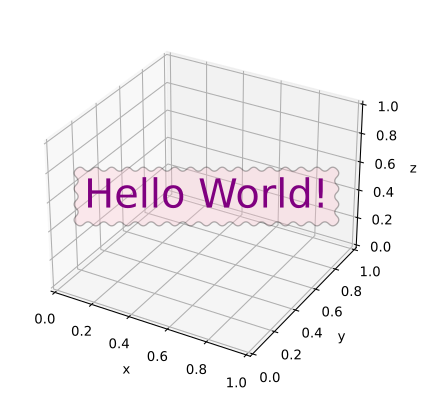
text.draw_3d(0.5, 0.5, 0.5, "Hello World!");
// add text to plot
let mut plot = Plot::new();
plot.add(&text);
// plot.save("/tmp/plotpy/doc_tests/doc_text.svg")?;
Ok(())
}
```