# Playwright for Rust
[](https://crates.io/crates/playwright-rs)
[](https://docs.rs/playwright-rs)
[](https://github.com/padamson/playwright-rust/actions/workflows/test.yml)
[](LICENSE)
[](https://playwright.dev)
> Rust language bindings for [Microsoft Playwright](https://playwright.dev) — the industry standard for cross-browser end-to-end testing.
**Status:** Pre-1.0, API stabilizing. See [coverage](#coverage) for the path to v1.0.
> This README describes the latest published release on crates.io. For changes
> on `main` that haven't been released yet (new features, breaking changes,
> bug fixes), see [`crates/playwright/CHANGELOG.md`](crates/playwright/CHANGELOG.md)
> under `[Unreleased]`.
## 🎯 Why playwright-rust?
Read our [WHY.md](WHY.md) to understand the vision, timing, and philosophy behind this project.
**TL;DR:** Rust is emerging as a serious web development language, with frameworks like Axum and Actix gaining traction. AI coding assistants are making Rust accessible to more developers. Test-Driven Development is experiencing a renaissance as the optimal way to work with AI agents. **These trends are converging now, and they need production-quality E2E testing.** `playwright-rust` fills that gap by bringing Playwright's industry-leading browser automation to the Rust ecosystem.
## Roadmap and Goals
See [Development Roadmap](docs/roadmap.md) for plans and status of the development approach for `playwright-rust`.
**Goal:** Build this library to a production-quality state for broad adoption as `@playwright/rust` or `playwright-rs`. Provide official-quality Rust bindings for Microsoft Playwright, following the same architecture as [playwright-python](https://github.com/microsoft/playwright-python), [playwright-java](https://github.com/microsoft/playwright-java), and [playwright-dotnet](https://github.com/microsoft/playwright-dotnet).
## Quick Comparison: Python vs Rust
The API matches Playwright's cross-language conventions — if you know playwright-python, you know playwright-rust:
<table>
<tr><th>Python</th><th>Rust</th></tr>
<tr><td>
```python
from playwright.sync_api import sync_playwright
with sync_playwright() as p:
browser = p.chromium.launch()
page = browser.new_page()
page.goto("https://example.com")
# Locator with auto-waiting
heading = page.locator("h1")
assert heading.text_content() == "Example Domain"
# Response body access
resp = page.goto("https://api.example.com/data")
data = resp.json()
browser.close()
```
</td><td>
```rust
use playwright_rs::Playwright;
let pw = Playwright::launch().await?;
let browser = pw.chromium().launch().await?;
let page = browser.new_page().await?;
page.goto("https://example.com", None).await?;
// Locator with auto-waiting
let heading = page.locator("h1").await;
assert_eq!(heading.text_content().await?, Some("Example Domain".into()));
// Response body access
let resp = page.goto("https://api.example.com/data", None).await?.unwrap();
let data: serde_json::Value = resp.json().await?;
browser.close().await?;
```
</td></tr>
</table>
## Coverage
**Full Python API parity + agent integration.** All Playwright Python
classes and methods are implemented, plus `Browser::bind()` /
`Browser::unbind()` (Playwright 1.59) for exposing a Rust-launched browser
to external clients like `@playwright/mcp`, the Playwright CLI, or
third-party agent tooling.
The remaining path to v1.0 is multi-month dogfooding, API polish, and
performance tuning rather than new surface area. See the
[v1.0 gap analysis](docs/implementation-plans/v1.0-gap-analysis.md) for
the detailed state of each class.
## How It Works
`playwright-rust` follows Microsoft's proven architecture for language bindings:
```
┌──────────────────────────────────────────────┐
│ playwright-rs (Rust API) │
│ - High-level, idiomatic Rust API │
│ - Async/await with tokio │
│ - Type-safe bindings │
└─────────────────────┬────────────────────────┘
│ JSON-RPC over stdio
┌─────────────────────▼────────────────────────┐
│ Playwright Server (Node.js/TypeScript) │
│ - Browser automation logic │
│ - Cross-browser protocol abstraction │
│ - Maintained by Microsoft Playwright team │
└─────────────────────┬────────────────────────┘
│ Native protocols
┌─────────────┼─────────────┐
▼ ▼ ▼
Chromium Firefox WebKit
```
This means:
- ✅ **Full feature parity** with Playwright (JS/Python/Java/.NET)
- ✅ **Cross-browser support** (Chromium, Firefox, WebKit)
- ✅ **Automatic updates** when Playwright server updates
- ✅ **Minimal maintenance** - protocols handled by Microsoft's server
- ✅ **Production-tested** architecture used by millions
### API Design Philosophy
Following Playwright's cross-language consistency:
1. **Match Playwright API exactly** - Same method names, same semantics
2. **Idiomatic Rust** - Use Result<T>, async/await, builder patterns where appropriate
3. **Type safety** - Leverage Rust's type system for compile-time safety
4. **Auto-waiting** - Built-in smart waits like other Playwright implementations
5. **Testing-first** - Designed for reliable end-to-end testing
## Installation
Add to your `Cargo.toml`:
```toml
[dependencies]
playwright-rs = "0.13" # Auto-updates to latest 0.13.x
tokio = { version = "1", features = ["full"] }
```
The default-on `macros` feature re-exports the
[`locator!()`](https://docs.rs/playwright-rs-macros) compile-time
selector macro. Opt-in features: `cli` (installer binary, see below),
`screenshot-diff` (pixel-diff assertions). For programmatic trace-zip
inspection (CI bots, agent feedback loops), add
[`playwright-rs-trace`](https://docs.rs/playwright-rs-trace) as a
`[dev-dependencies]` entry.
See the [CHANGELOG](CHANGELOG.md) for version history and features.
### Browser Installation (Required)
Browsers must be installed before use. Install once, then run tests as many times as needed.
```bash
# Install all browsers
npx playwright@1.60.0 install
# Or install specific browsers
npx playwright@1.60.0 install chromium firefox webkit
```
**In CI/CD:** Add this to your GitHub Actions workflow:
```yaml
- name: Install Playwright Browsers
run: npx playwright@1.60.0 install chromium firefox webkit --with-deps
```
**Programmatic installation:** For setup scripts, Docker images, or tools built on playwright-rs, you can install browsers from Rust code:
```rust
use playwright_rs::install_browsers;
install_browsers(None).await?; // all browsers
install_browsers(Some(&["chromium"])).await?; // specific browsers
```
**Why version matters:** The library bundles Playwright driver **1.60.0**. Each release expects specific browser builds. Using the matching version ensures compatible browsers.
**What happens if I don't install browsers?** You'll get a helpful error message with the correct install command when trying to launch a browser.
## Development
### Prerequisites
- Rust 1.88+
- Node.js 18+ (for Playwright server and browser installation)
- tokio async runtime
### Building from Source
```bash
# Clone repository
git clone https://github.com/YOUR_USERNAME/playwright-rust.git
cd playwright-rust
# Install pre-commit hooks
pip install pre-commit
pre-commit install
# Build
cargo build
```
### Installing Browsers
After building, install browsers as described in [Browser Installation](#browser-installation-required) above:
```bash
cargo build
npx playwright@1.60.0 install chromium firefox webkit
```
The build script automatically downloads the Playwright driver to `drivers/` (gitignored). CI handles browser installation automatically - see `.github/workflows/test.yml`.
**Platform Support:** ✅ Windows, macOS, Linux
**Known limitation**: WebKit `launch_persistent_context()` fails on native
Windows with "Initial load failed" — this is an upstream Playwright issue
([microsoft/playwright#36936](https://github.com/microsoft/playwright/issues/36936),
also tracked as playwright-rust [#39](https://github.com/padamson/playwright-rust/issues/39)).
Microsoft is building a `channel: "webkit-wsl"` replacement
([microsoft/playwright#37036](https://github.com/microsoft/playwright/issues/37036)).
Chromium and Firefox persistent contexts work on all platforms. Non-persistent
WebKit (`browser.new_context()`) works on Windows. Use WSL or macOS/Linux for
WebKit persistent contexts.
### Running Tests
This project uses [cargo-nextest](https://nexte.st/). Install once: `cargo install cargo-nextest`
```bash
cargo nextest run # All tests
cargo nextest run -p playwright-rs --lib # Unit tests only (~2s, no browsers)
cargo nextest run -p playwright-rs -E 'test(locator)' # Pattern match
cargo test --doc --workspace -- --ignored # Doc-tests (requires browsers)
```
### Running Examples
See [examples/](crates/playwright/examples/) for usage examples.
```bash
cargo run --package playwright-rs --example basic
```
## Testing & Debugging
**See the source line that failed.** When `?` propagates an `Error` out of
your test, you see the message but no Rust source location. Use
[`anyhow`](https://docs.rs/anyhow) for tests and run with `RUST_BACKTRACE=1`:
```rust,ignore
use anyhow::{Context, Result};
#[tokio::test]
async fn my_test() -> Result<()> {
// ...
let content = heading.text_content().await.context("read heading")?;
// ...
Ok(())
}
```
Run as `RUST_BACKTRACE=1 cargo nextest run` (or `cargo test`). The backtrace
points at the failing `?`, and `.context("...")` adds breadcrumbs to the
error chain. This matches how playwright-java/dotnet rely on the test
runner's stack trace rather than baking source locations into the library.
**Save a Playwright trace when a test fails.** Rust has no async `Drop`,
so trace cleanup is explicit. Capture the test result, then run cleanup
unconditionally and pass the trace path only on failure:
```rust,ignore
let result = run_test_body(&context).await;
let _ = browser.close().await;
result?;
```
See [`examples/trace_on_failure.rs`](crates/playwright/examples/trace_on_failure.rs)
for a runnable end-to-end example. Open the resulting `trace.zip` at
<https://trace.playwright.dev>.
## Using with Claude Code / AI agents
If you're writing playwright-rs tests with Claude Code or another
coding agent, two artifacts in this repo are designed to be copied
into your downstream project so the agent has the right API model
loaded:
- [**`docs/agent/CLAUDE_SNIPPET.md`**](docs/agent/CLAUDE_SNIPPET.md) —
a ~50-line section to paste into your project's `CLAUDE.md`. Covers
the object model, conventions (builder pattern, `locator!()`,
auto-wait), and the trace-on-failure pattern. Zero-friction install:
one paste.
- [**`.claude/skills/playwright-rs-usage/`**](.claude/skills/playwright-rs-usage/) —
the same content in skill form (auto-loads when the trigger
description matches the user's request). Install with
`cp -r path/to/playwright-rust/.claude/skills/playwright-rs-usage your-project/.claude/skills/`.
Both point back at [docs.rs](https://docs.rs/playwright-rs) and the
[examples](crates/playwright/examples/) for the API surface itself —
they're a thin "what to reach for, what to avoid" overlay rather than
a duplicate of the API reference.
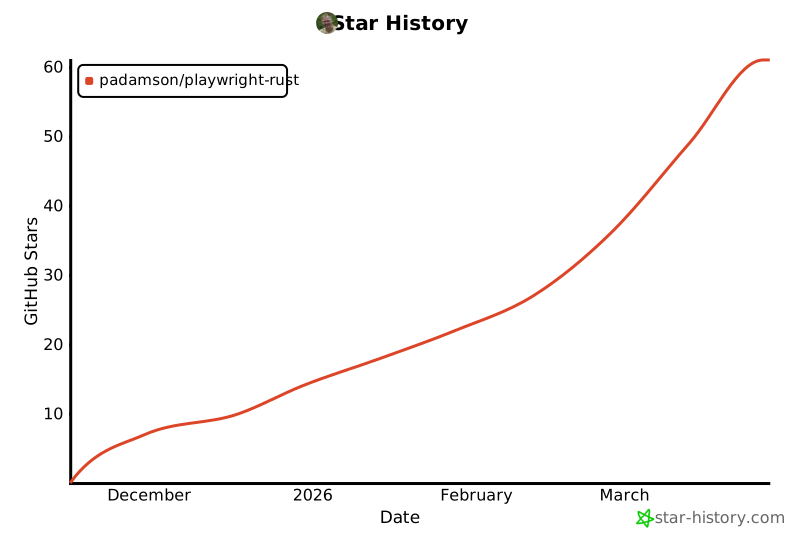
## Star History
[](https://star-history.com/#padamson/playwright-rust&Date)
## Contributing
This project aims for **production-quality** Rust bindings matching Playwright's standards. Contributions should:
- Follow Playwright API conventions
- Include comprehensive tests
- Maintain type safety
- Document public APIs with examples
- Pass CI checks (fmt, clippy, tests)
## License
Apache-2.0 (same as Microsoft Playwright)
## Acknowledgments
- **Microsoft Playwright Team** - For the amazing browser automation framework
- **playwright-python** - API design reference