
playr
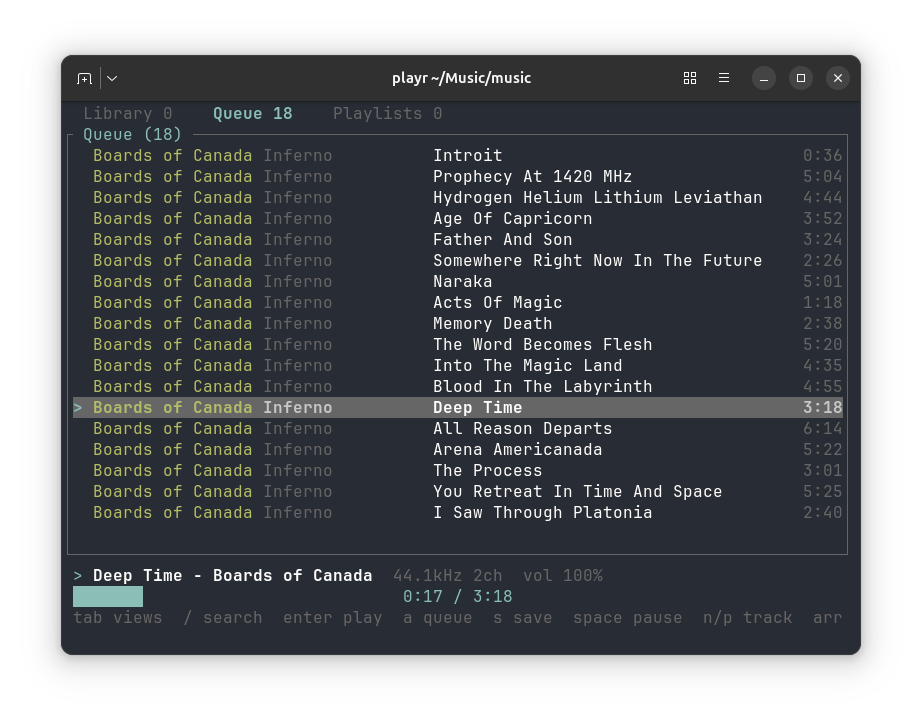
A minimal TUI music player. Plays a directory, a saved playlist, or the results of a search. Keeps a SQLite index of your library.
It contacts no server, fetches no metadata, scrobbles nothing, and has no network code in it at all.
Features
Playback
-
Plays a file, a directory recursively, a saved playlist, or a search result
-
Gapless within a run of tracks that share a sample rate
-
Play, pause, next, previous, stop
-
Four playback modes on one key: normal, shuffle, repeat, repeat one
-
Seek by 5 seconds in either direction, or 30 with shift, resuming on the exact sample
-
Marks:
bmarks a moment in a track,Bundoes the last mark,,and.seek between marks, and marks are kept in the library -
Samples:
:slicewrites regions between marks, equal parts or onset slices as lossless WAV files that rtrack loads as a sample bank -
Varispeed in semitone steps, 0.5x to 2.0x, pitch moving with tempo
-
Volume as a float gain applied before quantisation
-
A file it cannot decode is reported and skipped, never fatal
Audio quality
-
Opens the output at the file's own sample rate whenever the device allows it, so nothing is resampled in the common case
-
Sinc resampling when a rate is refused, not linear interpolation
-
f32 throughout: decode, mix and gain, quantised once at the device
-
Plays to float, 32-bit, 24-bit and 16-bit integer devices
-
Lock-free ring between the decoder and the realtime callback
-
Underruns emit silence rather than repeating stale samples
Library
-
Recursive scan with tag and stream-property reading
-
Rescan skips files whose size and modification time are unchanged
-
Rows for deleted files under the scanned directory are pruned
-
Scans commit every 500 files, so an interrupted scan keeps its progress
-
Full-text search over title, artist, album, album artist and file name, or within one of them with
artist:evans -
Search results play directly, in library order
-
Playlists saved to and loaded from the database
Interface
-
Four views: library, selection, playlists, and a sampler showing the playing track's waveform
-
Search filters as you type
-
A selection to collect tracks into, edit and save as a playlist; it does not change what plays, and its tracks are marked
+in the library -
Now playing shows title, artist, source rate and channels
-
Progress bar with elapsed and total time
-
Skipped files and audio device errors shown in the status line
-
Vim and arrow key navigation
-
Vim-style
:commands for every action, with Tab completion and a history; they also take arguments such as:seek 1:23or:playlist late night -
?lists the keys for the view you are in; the bottom line shows messages, speed, volume, and a level meter -
The level meter reads momentary loudness in LUFS (ITU-R BS.1770, 400 ms) and holds the sample peak for 1.5 s. It measures the recording before the volume setting
-
The meter bar runs from -40 dB to full scale and fills green below -18 dB, yellow to -6 dB, and red above; the peak marker
|takes the colour of where it sits. Red on the bar means near the top, which is normal for loud masters. The peak number turns red only at full scale, where the recording clips
Install
Each GitHub release has prebuilt binaries, with Opus, for:
- Linux: x86_64 and arm64, glibc 2.35 or later
- macOS: arm64 and x86_64, 11.0 or later
- Windows: x86_64
SHA256SUMS in each release holds the archives' checksums.
From crates.io:
From a clone:
Building needs Rust 1.89+, ALSA headers on Linux (libasound2-dev on Debian and Ubuntu), and a C compiler. SQLite is vendored and compiled from source, which is what the C compiler is for; no SQLite package has to be installed.
Opus
Opus is off by default. It needs libopus, which is vendored and built with cmake -- the only part of playr that needs it. To include it:
Without it, Opus files are reported as undecodable and skipped, the same as WMA or DSD. playr formats says which build you have. make install builds without Opus; to install with it, copy target/release/playr after the build above, or use cargo install playr --features opus.
Use
playr <command> --help describes each command. A search that starts with - goes after --, as in playr search -- -ology. --json prints an array with one object per track, holding every library column, null for a missing tag, and duration_ms in milliseconds; no match prints [] and exits with status 1. Bad arguments exit with status 2.
The library lives at $XDG_DATA_HOME/playr/library.db, or ~/.local/share/playr/library.db. Override it with --db <path>. Only playr scan creates it. Until then the other commands run without a library, and s cannot save a playlist. Paths are stored in full, so a scan run from any directory finds the same rows. A path that is not valid UTF-8 is skipped and counted as unreadable.
Rescanning only re-reads files whose size or modification time changed, and drops rows under the scanned directory whose files are gone. Rows elsewhere are kept, so a scan made while a drive is unmounted does not empty its playlists.
Keys
| keys | action |
|---|---|
tab, 1 2 3 4 |
switch view; 4 is the sampler |
j k, up/down |
move |
g G, home/end |
jump to first or last |
| page up/down | move by ten |
enter |
play from here; in playlists, play it |
a |
select or unselect, then move down |
/ |
search; esc clears |
r |
rename the selected playlist |
s |
save the selection; asks before overwriting |
d |
remove from selection; delete a playlist |
J K, shift up/down |
move a track within the selection |
c |
clear the selection; asks y/n |
space |
play or pause |
n p |
next or previous track |
x |
stop |
m M |
next or previous playback mode |
| left/right | seek back or forward 5 seconds |
| shift left/right | seek back or forward 30 seconds |
b |
mark the playing position |
, . |
seek to the previous or next mark |
B |
undo the last mark |
C |
clear all marks in this track; asks y/n |
[ ] |
varispeed down or up, one semitone a press |
\ |
back to normal speed |
+ - |
volume |
: |
type a command; see Commands |
? |
list the keys for this view |
q |
quit |
Searching filters as you type, across title, artist, album, album artist and the file name without its folder or extension. The file name is what finds an untagged file, which the list shows by that name. Pressing enter on the results plays them.
Every word must match, as the start of a word. Prefix a word with a field to match it in that field alone: title:, artist:, album:, albumartist:, or file:. Quote words to match them together in order, as in artist:"bill evans"; unquoted, a field applies only to the word it is attached to. A prefix that is not one of these fields is searched as text, so op:1 still finds a title with a colon in it.
Enter plays the list you are looking at, from the selected track: the library, search results, the selection, or a playlist. The selection is separate from what plays. It starts empty. In the library, a selects the track under the cursor, or unselects it if it is marked +, without interrupting playback. On a playlist, a adds its tracks, skipping any already selected but keeping the playlist's own repeats. s saves the selection as a playlist. To edit a playlist, add it to the selection with a, change it, and save it under the same name.
Playback modes
m steps through four modes and M steps back. The bottom line names the mode unless it is normal.
| mode | order | after the last track |
|---|---|---|
| normal | list order | stop |
| shuffle | every track once per pass, in random order | reshuffle, go on |
| repeat | list order | start again |
| repeat one | the current track only | play it again |
A mode applies to whatever list is playing: the library, search results, the selection, or a playlist. To shuffle across several playlists, add them to the selection with a and play the selection. Shuffle keeps the list on screen in its own order, and p goes back through the tracks it has played. Under repeat one, n moves on to the next track, which then repeats. Changing mode takes effect from the next track, even if it has already started loading.
Marks
b marks the playing position in the current track. Marks show as ^ under the progress bar. . seeks to the next mark and , to the previous one; within a second after a mark, , goes to the one before it, so pressing it twice steps back twice. A mark within half a second of an existing one is not added again.
Marks form a chain: B removes the mark added most recently, then the one before, whatever their positions in the track. C clears all of the track's marks; it asks first, and only y confirms.
Marks are stored in the library by file path and source frame, so they survive a rescan and stay exact at any playback speed. Without a library file they last until playr exits. A mark lands slightly after the moment you meant, by your reaction time.
Samples
:slice writes parts of the playing track as WAV files, for rtrack or any sampler. Marks set the regions. The region is the span between the marks either side of the playhead, from the start of the track or to its end where there is no mark on that side.
| command | writes |
|---|---|
:slice region |
the region |
:slice marks |
the whole track, cut at every mark |
:slice N |
the region in N equal parts, 2 to 256 |
:slice onsets [S] |
the region, cut where hits start; S from 0 to 1, higher finds more |
Each export writes a new directory, named after the track, under samples in settings.toml, by default ~/Music/playr/samples. A second export of amen.flac goes to amen-2. The directory holds:
000-amen_S00.wav,001-amen_S01.wav, and so on, one file per slice, in the layout rtrack loads as a sample bank.samples.json, with the source file and each slice's start and end frame.
Slices are read from the source file, so volume and speed do not apply. They are 24-bit WAV at the source's sample rate and channel count; 16- and 24-bit sources are copied bit for bit. Without S, :slice onsets uses onset_sensitivity from settings.toml, 0.5 by default. Onset detection is rtrack's: a hit within 50 ms of the region's start stays in the first slice, and each slice starts up to 10 ms before its hit. It reads the region into memory, up to about 23 minutes at 48 kHz. Export runs in the background, and the bottom line reports when it is done.
For MP3 and AAC, frame positions follow playr's decoder. Another decoder can count the codec's encoder delay differently and place the same slice up to a few thousand frames away.
docs/sampler.md shows how regions and cuts fit together, what samples.json holds, and how precise a mark is.
Sampler view
4 opens a view of the playing track's waveform, read from the file the first time the view opens for that track. Marks show as | under it, the playhead as ^, and the region between the marks either side of the playhead in the accent colour. The detail line gives the region's times to the millisecond.
| key | command | does |
|---|---|---|
z Z |
:zoom +, :zoom - |
zoom in or out, centred on the playhead |
0 |
:zoom all |
show the whole track |
w |
:display |
switch display: envelope, dB, Braille |
enter |
:write |
write the slices planned |
esc |
:discard |
discard them |
- Displays. The envelope draws each column as two bars in eighth blocks: its RMS level in the bright colour, inside its peak level in a darker one. The waveform is folded, with negative samples counted by their size, so the bars use the full height. RMS shows loudness, such as a verse against a chorus, where a mastered track's peaks are near full scale everywhere; peak shows where each hit starts. The Braille display draws the waveform around a centre line, two dots across and four down a cell, which shows its shape. Both scale to the loudest sample in the track.
- dB. The dB display draws the same bars on a scale from -48 dBFS to full scale, not scaled to the track. A linear scale puts RMS 12 dB below full scale a quarter of the way up; this puts it three quarters of the way, which spreads out quiet passages and the level changes between sections. Levels below -48 dB draw nothing.
- Zoom. Each step halves the time a column shows, down to 64 frames, 1.5 ms at 44.1 kHz. Columns start on the 32-frame buckets the peaks are kept in, so a column never shows a neighbour's hit.
- Planning. In this view,
:sliceplans slices instead of writing them, and draws their edges as+. Enter writes exactly those slices; esc discards them, and so does a change of track. Outside the view,:slicewrites at once.
The waveform glyphs are the view's only characters outside ASCII. Marks are still placed at the playhead, and a region cannot be heard on its own yet; both are planned.
Varispeed
[ and ] change playback speed in semitone steps, and pitch moves with it, as on a tape machine or a turntable. Twelve presses is exactly an octave, so the range is 0.5x to 2.0x. The speed shows in the status bar as 1.19x (+3 st) and \ returns to normal.
This is not the pitch-preserving speed change of a podcast app. That is time-stretching, which needs a phase vocoder; this is a change of resampling ratio, which is what varispeed means.
Commands
: opens a command line: :seek 1:23, :volume 60, :playlist late night. Every key's action has a command, and commands also take arguments no key can, such as a time or a name. Some commands work only in one view, as :remove in the selection. Tab completes, up recalls earlier lines, and :help lists every command. docs/cheatsheet.md has the full list.
Configuration
playr reads $XDG_CONFIG_HOME/playr/settings.toml, or ~/.config/playr/settings.toml, when it starts. --settings <path> reads another file instead. The file is optional, and it is read on top of the defaults in crates/playr-core/src/settings.toml and the default keys in crates/playr-app/src/keys.toml, so it only needs what it changes. Copying either defaults file whole, or both into one, is also valid.
= 60 # percent, 0 to 100
= "shuffle" # normal, shuffle, repeat or repeat-one, in full
= -3 # semitones, -12 to 12
= 0.7 # for :slice onsets without a number, 0 to 1
= "~/Music/playr/samples" # where :slice writes
[] # every view
= "seek +10"
= "seek +60"
= "save"
= "nop"
= "help"
[] # one view: library, selection, playlists or sampler
= "remove"
- Each key's value is a
:command, as listed in docs/cheatsheet.md."nop"makes a key do nothing, and"command"opens the:prompt. - A key under
[keys.VIEW]wins in that view over the same key under[keys]. - A key under
[keys]needs a command that works in every view.d = "remove"there is refused, with the table to put it in. - Keys are named by their character (
j,J), or asspace,enter,esc,tab,backtab,backspace,delete,insert,up,down,left,right,home,end,pageup,pagedown, orf1tof12. Prefixctrl-,alt-orshift-for a chord; a chord only matches a binding that names it. TOML needs quotes around a key that is not a letter, digit,-or_, such as"?". ctrl-calways quits, and the keys inside prompts and help lists cannot be changed.
Any error stops playr before it starts, and every bad setting is listed with its line number. ? lists the keys as bound in the view you are in. :map and :unmap change keys until playr exits.
Formats
Decoded: FLAC, ALAC, MP3, MP1, MP2, AAC-LC, Vorbis, PCM and ADPCM, in WAV, AIFF, CAF, MP4/M4A, MKV/WebM, OGG and raw FLAC containers. Opus as well, when built with --features opus.
Opus is decoded by playr itself, in both OGG and WebM. Symphonia 0.6 demuxes Opus but ships no decoder, so crates/playr-core/src/audio/opus.rs supplies one on top of libopus via the opus crate and registers it in a custom codec registry. Mono and stereo only; multistream surround is not handled.
Tags are not read from CAF, MKV or WebM files. Those are indexed under their file names, and MKV and WebM files also show no duration.
Not decoded: WavPack, WMA, Musepack, APE, DSD, TTA, TAK, and Opus unless the feature is enabled. playr reports such a file and moves to the next track rather than stopping. Run playr formats for the current list.
Audio quality
The output stream is opened at the file's own sample rate whenever the device accepts it, so nothing is resampled in the common case. When a rate is refused, a sinc resampler converts it rather than linear interpolation. Decoding, mixing and volume are all f32, quantised once at the device. The device format is chosen in the order f32, f64, 32-bit, 24-bit, then 16-bit integer.
This is not bit-perfect output. On a PipeWire system the ALSA default device accepts every rate and may convert internally. Bit-perfect playback would need a hw: device, which playr does not yet select.
Volume is a float gain applied before quantisation.
Roadmap
TODO.md lists what is missing and what is blocked upstream.
Design
docs/architecture.md describes how the code splits into playr-core, playr-app and the terminal, so another frontend, such as an egui or Tauri app, can reuse everything but the terminal.
Tests
make test runs the suite for all three crates in the workspace, playr-core, playr-app and playr, twice: with and without the opus feature, so neither build can rot unnoticed. The format and scanner tests generate real audio with ffmpeg when it is present and skip themselves when it is not. The rendering tests draw into a headless terminal, so they need no audio device. The engine, key-handling and device-failure tests play to a fake output device, so they need no audio device. One smoke test plays to the real default device at zero volume, and skips without one. Set PLAYR_REQUIRE_FFMPEG=1 or PLAYR_REQUIRE_DEVICE=1 to fail instead of skip, so a CI run cannot pass by testing nothing.
.github/workflows/test.yml runs both builds' tests on Linux, macOS and Windows on every branch push and pull request, with PLAYR_REQUIRE_FFMPEG=1, and checks formatting and clippy on Linux. Runners have no audio device, so only the real-device smoke test skips there.
Opus output was checked against ffmpeg by decoding the same file both ways: identical frame counts and 138.7 dB SNR, with no alignment offset.
License
MIT. See LICENSE.