# playr
A local music player for active listeners, with a sampler, a tape looper and two DJ decks. It plays from a directory, your library, a saved playlist or search results, and by design contacts no service or cloud.
When you download playr, you get three implementations: `playr`, a terminal app, `playr-gui`, a desktop gui app, and `playr-server`, a server for a machine without a screen, controlled from a web page or Open Sound Control (OSC).
None of the three contact external services or download any metadata and images. Indeed, `playr` and `playr-gui` have no network code at all. `playr-server` runs on your local network and communicates only with the browsers and OSC apps you connect to it.
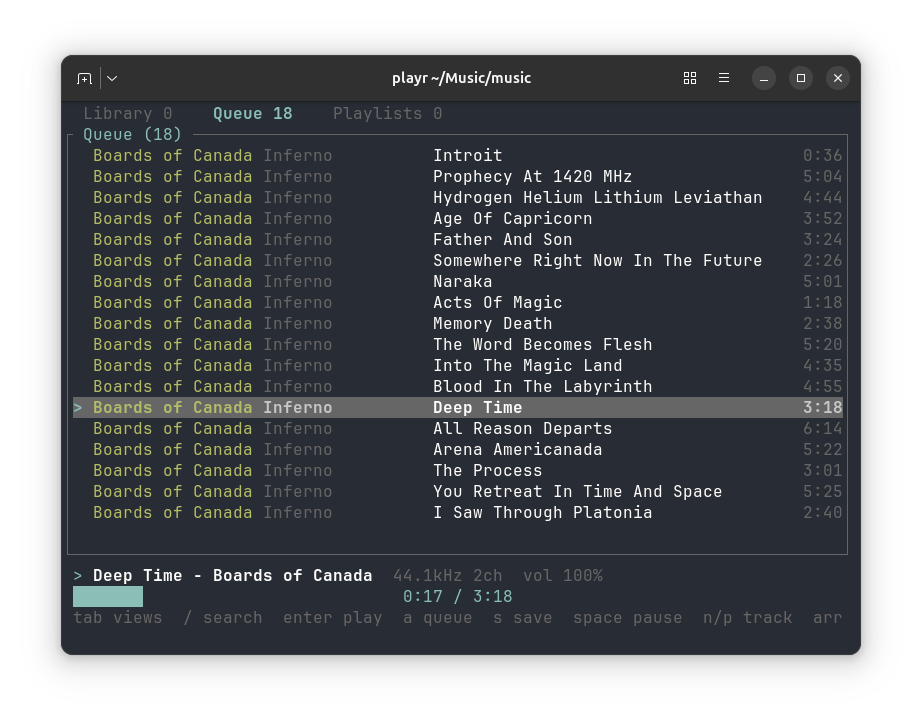
## Features
- Plays files, directories, playlists and searches, gapless where tracks share a sample rate, with a crossfade between any two if asked
- A library with search, saved searches, SQL, marks, analysis of loudness, tempo and file health, and ReplayGain
- A sampler: zoom to single frames, set ranges, and slice by marks, beats or onsets into WAV kits for hardware samplers
- A four-voice tape looper and two DJ decks with beat grids and a mixer
- Three programs over one core: a terminal app, a desktop window, and a server driven from a web page or OSC
[docs/manual.md](docs/manual.md) describes all of it.
## Install
### Release archives
Each [GitHub release](https://github.com/shakfu/playr/releases) has prebuilt archives, with Opus, for:
- Linux: x86_64 and arm64, glibc 2.35 or later
- macOS: arm64 and x86_64, 11.0 or later
- Windows: x86_64
Each archive holds the three programs, with `SHA256SUMS` in the release for checking them, and the release has a TouchOSC layout for `playr-server`. Put `playr` and `playr-server` on your `PATH`; the window needs one more step on macOS and Linux:
- **macOS:** the window is `playr.app`; move it to `Applications`. It is not signed or notarized, so macOS refuses to open it once downloaded with a browser; allow it under System Settings, Privacy & Security, or run `xattr -dr com.apple.quarantine playr.app`.
- **Linux:** copy `playr-gui` onto your `PATH`, `playr.desktop` to `~/.local/share/applications`, and `playr.png` to `~/.local/share/icons/hicolor/256x256/apps`, and playr is listed among your applications.
- **Windows:** run `playr-gui.exe`; it opens without a console window.
The macOS and Linux archives also hold `playr.1`, the man page, and completions for bash, zsh and fish under `completions/`. `playr --man` and `playr --completions SHELL` print the same for any build, so after `cargo install`:
```sh
playr --man > ~/.local/share/man/man1/playr.1
playr --completions bash > ~/.local/share/bash-completion/completions/playr
playr --completions zsh > ~/.zfunc/_playr # a directory on $fpath
playr --completions fish > ~/.config/fish/completions/playr.fish
```
### From a clone
```sh
make install # the three programs, and the window as an application
make install-dev # the same, as a debug build
make gui # run the window without installing
make app # macOS: build target/dist/playr.app
```
`make install` builds `playr`, `playr-gui` and `playr-server` as they ship, with the `dist` profile, and copies them to `~/.local/bin`. On macOS it also puts `playr.app` in `~/Applications`; on Linux it adds `playr.desktop` and its icon under `~/.local/share`. `make install-dev` does the same with a debug build, stripped, quicker to build and slower to run.
### With cargo
```sh
cargo install playr # the terminal, from crates.io
cargo install --git https://github.com/shakfu/playr playr-gui # the window, from GitHub
cargo install --git https://github.com/shakfu/playr playr-server # the server, from GitHub
```
`playr-gui` and `playr-server` are not on crates.io yet. `cargo install` builds only the program, without the macOS bundle or the Linux desktop entry. Each builds with Opus, so it needs cmake; see "Opus".
### Building
Building needs Rust 1.89+ and a C compiler; the window, `playr-gui`, needs Rust 1.95+, as egui does. SQLite is vendored and compiled from source, which is what the C compiler is for; no SQLite package has to be installed. On Linux it also needs the ALSA headers, and the window needs the X11 and Wayland development headers. On Debian and Ubuntu:
```sh
sudo apt install libasound2-dev # both programs
sudo apt install libxkbcommon-dev libwayland-dev \
libxcb-render0-dev libxcb-shape0-dev libxcb-xfixes0-dev # the window
```
### Opus
Opus is on by default. It needs libopus, which is vendored and built with **cmake** -- the only part of playr that needs it. To build without it, and without cmake:
```sh
cargo build --release --no-default-features # the terminal
cargo build --release -p playr-gui --no-default-features # the window
```
Without it, Opus files are reported as undecodable and skipped, the same as WMA or DSD. `playr formats` says which build you have.
## First session
```sh
playr scan ~/music # index a directory into the library
playr # browse it; ? lists the keys, : opens the command line
```
In the library view, `j` and `k` move, `enter` plays from the row, and `/` searches as you type. `space` pauses, `n` and `p` skip, and `-` and `=` change the volume. `a` adds a row to the selection, which `s` saves as a playlist. `b` marks a moment, and `5` opens the sampler on the playing track. `q` quits. `playr-gui` opens the same library in a window.
## Documentation
- [docs/manual.md](docs/manual.md): every feature, key, command and setting
- [docs/cheatsheet.md](docs/cheatsheet.md): every command on one page
- Guides: [library](docs/guide-library.md), [sampler](docs/guide-sampler.md), [tape](docs/guide-tape.md), [DJ](docs/guide-dj.md), [server](docs/guide-server.md)
- [CHANGELOG.md](CHANGELOG.md) and [TODO.md](TODO.md)
## License
MIT. See `LICENSE`.