# pix
Library for image conversion and compositing.
A raster image can be cheaply converted to and from raw byte buffers,
enabling interoperability with other crates.
Many image formats are supported:
* Bit depth: 8- or 16-bit integer and 32-bit float
* Alpha: *premultiplied* or *straight*
* Gamma: *linear* or *sRGB*
* Color models:
- `RGB` / `BGR` (*red*, *green*, *blue*)
- `CMY` (*cyan*, *magenta*, *yellow*)
- `Gray` (*luma* / *relative luminance*)
- `HSV` (*hue*, *saturation*, *value*)
- `HSL` (*hue*, *saturation*, *lightness*)
- `HWB` (*hue*, *whiteness*, *blackness*)
- `YCbCr` (used by JPEG)
- `Matte` (*alpha* only)
- `OkLab` (*lightness*, *green/red*, *blue/yellow*)
- `XYZ` (CIE 1931 XYZ)
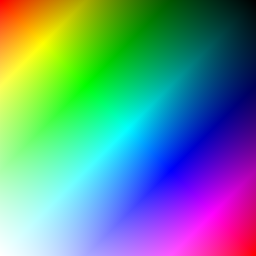
### HWB Color Example
```rust
use pix::{hwb::SHwb8, rgb::SRgb8, Raster};
let mut r = Raster::with_clear(256, 256);
for (y, row) in r.rows_mut(()).enumerate() {
for (x, p) in row.iter_mut().enumerate() {
let h = ((x + y) >> 1) as u8;
let w = y.saturating_sub(x) as u8;
let b = x.saturating_sub(y) as u8;
*p = SHwb8::new(h, w, b);
}
}
// Convert to SRgb8 color model
let raster = Raster::<SRgb8>::with_raster(&r);
```
### Compositing Example
Compositing is supported for *premultiplied* images with *linear* gamma.
```rust
use pix::{ops::SrcOver, rgb::Rgba8p, Raster};
let mut r0 = Raster::with_clear(100, 100);
let r1 = Raster::with_color(5, 5, Rgba8p::new(80, 0, 80, 200));
r0.composite_raster((40, 40), &r1, (), SrcOver);
```
## Documentation
[https://docs.rs/pix](https://docs.rs/pix)