[<img src="https://devforum.okta.com/uploads/oktadev/original/1X/bf54a16b5fda189e4ad2706fb57cbb7a1e5b8deb.png" align="right" width="256px"/>](https://devforum.okta.com/)
[](https://devforum.okta.com)
[](https://travis-ci.org/okta/okta-auth-js)
[](https://www.npmjs.com/package/@okta/okta-auth-js)
# Okta Auth JavaScript SDK
* [Release status](#release-status)
* [Need help?](#need-help)
* [Browser compatibility / polyfill](#browser-compatibility--polyfill)
* [Third party cookies](#third-party-cookies)
* [Getting started](#getting-started)
* [Usage guide](#usage-guide)
* [Configuration reference](#configuration-reference)
* [API Reference](#api-reference)
* [Building the SDK](#building-the-sdk)
* [Node JS and React Native Usage](#node-js-and-react-native-usage)
* [Migrating from previous versions](#migrating-from-previous-versions)
* [Contributing](#contributing)
The Okta Auth JavaScript SDK builds on top of our [Authentication API](https://developer.okta.com/docs/api/resources/authn) and [OpenID Connect & OAuth 2.0 API](https://developer.okta.com/docs/api/resources/oidc) to enable you to create a fully branded sign-in experience using JavaScript.
You can learn more on the [Okta + JavaScript][lang-landing] page in our documentation.
This library uses semantic versioning and follows Okta's [library version policy](https://developer.okta.com/code/library-versions/).
## Release Status
:heavy_check_mark: The current stable major version series is: `4.x`
| Version | Status |
| ------- | -------------------------------- |
| `4.x` | :heavy_check_mark: Stable |
| `3.x` | :warning: Retiring on 2021-05-30 |
| `2.x` | :warning: Retiring on 2020-09-30 |
| `1.x` | :x: Retired |
| `0.x` | :x: Retired |
The latest release can always be found on the [releases page][github-releases].
## Need help?
If you run into problems using the SDK, you can:
* Ask questions on the [Okta Developer Forums][devforum]
* Post [issues][github-issues] here on GitHub (for code errors)
### Browser compatibility / polyfill
This SDK is known to work with current versions of Chrome, Firefox, and Safari on desktop and mobile.
Compatibility with IE 11 / Edge can be accomplished by adding polyfill/shims for the following objects:
* ES Promise
* Array.from
* TextEncoder
* Object.assign
* UInt8 typed array
* webcrypto (crypto.subtle)
This module provides an entrypoint that implements all required polyfills.
If you are using the JS on a web page from the browser, you can copy the `node_modules/@okta/okta-auth-js/dist` contents to publicly hosted directory, and include a reference to the `okta-auth-js.polyfill.js` file in a `<script>` tag. It should be loaded before any other scripts which depend on the polyfill.
If you're using a bundler like [Webpack](https://webpack.github.io/) or [Browserify](http://browserify.org/), you can simply import import or require `@okta/okta-auth-js/polyfill` at or near the beginning of your application's code:
```javascript
import '@okta/okta-auth-js/polyfill';
```
or
```javascript
require('@okta/okta-auth-js/polyfill');
```
### Third party cookies
Many browsers have started blocking cross-origin or "third party" cookies by default. Although most of the Okta APIs supported by this SDK do not rely upon cookies, there are a few methods which do. These methods will break if third party cookies are blocked:
* [session](#session) APIs require access to cookies stored on the Okta domain.
* [session.setCookieAndRedirect](#sessionsetcookieandredirectsessiontoken-redirecturi)
* [session.exists](#sessionexists)
* [session.get](#sessionget)
* [session.refresh](#sessionrefresh)
* [closeSession](#closesession)
* [token](#token)
* [token.getWithoutPrompt](#tokengetwithoutpromptoptions) must have access to cookies on the Okta domain via an iFrame running on your application's page.
* [token.renew](#tokenrenewtokentorenew) uses [token.getWithoutPrompt](#tokengetwithoutpromptoptions) and is subject to the same limitations.
If your application depends on any of these methods, you should try to either rewrite your application to avoid using these methods or communicate to your users that they must enable third party cookies. Okta engineers are currently working on a better long-term solution to this problem.
## Getting started
Installing the Authentication SDK is simple. You can include it in your project via our npm package, [@okta/okta-auth-js](https://www.npmjs.com/package/@okta/okta-auth-js).
You'll also need:
* An Okta account, called an _organization_ (sign up for a free [developer organization](https://developer.okta.com/signup) if you need one)
* An Okta application, which can be created using the Okta Admin UI
### Creating your Okta application
When creating a new Okta application, you can specify the application type. This SDK is designed to work with `SPA` (Single-page Applications) or `Web` applications. A `SPA` application will perform all logic and authorization flows client-side. A `Web` application will perform authorization flows on the server.
### Configuring your Okta application
From the Okta Admin UI, click `Applications`, then select your application. You can view and edit your Okta application's configuration under the application's `General` tab.
#### Client ID
A string which uniquely identifies your Okta application.
#### Login redirect URIs
To sign users in, your application redirects the browser to an Okta-hosted sign-in page. Okta then redirects back to your application with information about the user. You can learn more about how this works on [Okta-hosted flows](https://developer.okta.com/docs/concepts/okta-hosted-flows/).
You need to whitelist the login redirect URL in your Okta application settings.
#### Logout redirect URIs
After you sign users out of your app and out of Okta, you have to redirect users to a specific location in your application. You need to whitelist the post sign-out URL in your Okta application settings.
### Using the npm module
Using our npm module is a good choice if:
* You have a build system in place where you manage dependencies with npm.
* You do not want to load scripts directly from third party sites.
To install [@okta/okta-auth-js](https://www.npmjs.com/package/@okta/okta-auth-js):
```bash
# Run this command in your project root folder.
# yarn
yarn add @okta/okta-auth-js
# npm
npm install --save @okta/okta-auth-js
```
If you are using the JS on a web page from the browser, you can copy the `node_modules/@okta/okta-auth-js/dist` contents to publicly hosted directory, and include a reference to the `okta-auth-js.min.js` file in a `<script>` tag.
However, if you're using a bundler like [Webpack](https://webpack.github.io/) or [Browserify](http://browserify.org/), you can simply import the module or require using CommonJS.
```javascript
// ES module
import { OktaAuth } from '@okta/okta-auth-js'
const authClient = new OktaAuth(/* configOptions */)
```
```javascript
// CommonJS
var OktaAuth = require('@okta/okta-auth-js').OktaAuth;
var authClient = new OktaAuth(/* configOptions */);
```
## Usage guide
For an overview of the client's features and authentication flows, check out [our developer docs](https://developer.okta.com/code/javascript/okta_auth_sdk). There, you will learn how to use the Auth SDK on a simple static page to:
* Retrieve and store an OpenID Connect (OIDC) token
* Get an Okta session
> :warning: The developer docs may be written for an earlier version of this library. See [Migrating from previous versions](#migrating-from-previous-versions).
You can also browse the full [API reference documentation](#api-reference).
### Usage with Typescript
Types are implicitly provided by this library through the `types` entry in `package.json`. Types can also be referenced explicitly by importing them.
```typescript
import {
OktaAuth,
OktaAuthOptions,
TokenManager,
AccessToken,
IDToken,
UserClaims,
TokenParams
} from '@okta/okta-auth-js'
const config: OktaAuthOptions = {
issuer: 'https://{yourOktaDomain}'
}
const authClient: OktaAuth = new OktaAuth(config)
const tokenManager: TokenManager = authClient.tokenManager;
const accessToken: AccessToken = await tokenManager.get('accessToken') as AccessToken;
const idToken: IDToken = await tokenManager.get('idToken') as IDToken;
const userInfo: UserClaims = await authClient.getUserInfo(accessToken, idToken);
if (!userInfo) {
const tokenParams: TokenParams = {
scopes: ['openid', 'email', 'custom_scope'],
}
authClient.token.getWithRedirect(tokenParams);
}
```
## Configuration reference
Whether you are using this SDK to implement an OIDC flow or for communicating with the [Authentication API](https://developer.okta.com/docs/api/resources/authn), the only required configuration option is `issuer`, which is the URL to an Okta [Authorization Server](https://developer.okta.com/docs/guides/customize-authz-server/overview/)
### About the Issuer
You may use the URL for your Okta organization as the issuer. This will apply a default authorization policy and issue tokens scoped at the organization level.
```javascript
var config = {
issuer: 'https://{yourOktaDomain}'
};
var authClient = new OktaAuth(config);
```
Okta allows you to create multiple custom OAuth 2.0 authorization servers that you can use to protect your own resource servers. Within each authorization server you can define your own OAuth 2.0 scopes, claims, and access policies. Many organizations have a "default" authorization server.
```javascript
var config = {
issuer: 'https://{yourOktaDomain}/oauth2/default'
};
var authClient = new OktaAuth(config);
```
You may also create and customize additional authorization servers.
```javascript
var config = {
issuer: 'https://{yourOktaDomain}/oauth2/custom-auth-server-id'
};
var authClient = new OktaAuth(config);
```
### Configuration options
These configuration options can be included when instantiating Okta Auth JS (`new OktaAuth(config)`) or in `token.getWithoutPrompt`, `token.getWithPopup`, or `token.getWithRedirect` (unless noted otherwise). If included in both, the value passed in the method takes priority.
#### The `tokenManager`
**Important:** This configuration option can be included **only** when instantiating Okta Auth JS.
Specify the type of storage for tokens. Defaults to [localStorage](https://developer.mozilla.org/en-US/docs/Web/API/Window/localStorage) and will fall back to [sessionStorage](https://developer.mozilla.org/en-US/docs/Web/API/Window/sessionStorage), and/or [cookie](https://developer.mozilla.org/en-US/docs/Web/API/Document/cookie) if the previous type is not available.
```javascript
var config = {
url: 'https://{yourOktaDomain}',
tokenManager: {
storage: 'sessionStorage'
}
};
var authClient = new OktaAuth(config);
```
Even if you have specified `localStorage` or `sessionStorage` in your config, the `TokenManager` may fall back to using `cookie` storage on some clients. If your site will always be served over a HTTPS connection, you may want to enable "secure" cookies. This option will prevent cookies from being stored on an HTTP connection.
```javascript
tokenManager: {
secure: true
}
```
By default, the `tokenManager` will attempt to renew tokens before they expire. If you wish to manually control token renewal, set `autoRenew` to false to disable this feature. You can listen to [`expired`](#tokenmanageronevent-callback-context) events to know when the token has expired.
```javascript
tokenManager: {
autoRenew: false
}
```
Renewing tokens slightly early helps ensure a stable user experience. By default, the `expired` event will fire 30 seconds before actual expiration time. If `autoRenew` is set to true, tokens will be renewed within 30 seconds of expiration. You can customize this value by setting the `expireEarlySeconds` option. The value should be large enough to account for network latency and clock drift between the client and Okta's servers.
```javascript
// Emit expired event 2 minutes before expiration
// Tokens accessed with tokenManager.get() will auto-renew within 2 minutes of expiration
tokenManager: {
expireEarlySeconds: 120
}
```
##### Storage
You may provide a custom storage provider. It should implement two functions:
* `getItem(key)`
* `setItem(key, value)`
The storage provider will receive the users's raw tokens, as a string. Any custom storage provider should take care to save this string in a secure location which is not accessible by other users.
```javascript
tokenManager: {
storage: {
getItem: function(key) {
// custom get
},
setItem: function(key, val) {
// custom set
}
}
}
```
#### responseMode
When requesting tokens using [token.getWithRedirect](#tokengetwithredirectoptions) values will be returned as parameters appended to the [redirectUri](#additional-options).
In most cases you will not need to set a value for `responseMode`. Defaults are set according to the [OpenID Connect 1.0 specification](https://openid.net/specs/openid-connect-core-1_0.html#Authentication).
* For [PKCE OAuth Flow](#pkce-oauth-20-flow)), the authorization code will be in search query of the URL. Clients using the PKCE flow can opt to instead receive the authorization code in the hash fragment by setting the [responseMode](#additional-options) option to "fragment".
* For [Implicit OAuth Flow](#implicit-oauth-20-flow)), tokens will be in the hash fragment of the URL. This cannot be changed.
#### Required Options
| Option | Description |
| -------------- | ------------ |
| `issuer` | The URL for your Okta organization or an Okta authentication server. [About the issuer](#about-the-issuer) |
#### Additional Options
| Option | Description |
| -------------- | ------------ |
| `clientId` | Client Id pre-registered with Okta for the OIDC authentication flow. [Creating your Okta application](#creating-your-okta-appliation) |
| `redirectUri` | The url that is redirected to when using `token.getWithRedirect`. This must be listed in your Okta application's [Login redirect URIs](#login-redirect-uris). If no `redirectUri` is provided, defaults to the current origin (`window.location.origin`). [Configuring your Okta application](#configuring-your-okta-application) |
| `postLogoutRedirectUri` | Specify the url where the browser should be redirected after [signOut](#signout). This url must be listed in your Okta application's [Logout redirect URIs](#logout-redirect-uris). If not specified, your application's origin (`window.location.origin`) will be used. [Configuring your Okta application](#configuring-your-okta-application) |
| `responseMode` | Applicable only for SPA clients using [PKCE OAuth Flow](#pkce-oauth-20-flow). By default, the authorization code is requested and parsed from the search query. Setting this value to `fragment` will cause the URL hash fragment to be used instead. If your application uses or alters the search query portion of the `redirectUri`, you may want to set this option to "fragment". This option affects both [token.getWithRedirect](#tokengetwithredirectoptions) and [token.parseFromUrl](#tokenparsefromurloptions) |
| `pkce` | Enable the [PKCE OAuth Flow](#pkce-oauth-20-flow). Default value is `true`. If set to `false`, the authorization flow will use the [Implicit OAuth Flow](#implicit-oauth-20-flow). When PKCE flow is enabled the authorize request will use `response_type=code` and `grant_type=authorization_code` on the token request. All these details are handled for you, including the creation and verification of code verifiers. Tokens can be retrieved on the login callback by calling [token.parseFromUrl](#tokenparsefromurloptions) |
| `authorizeUrl` | Specify a custom authorizeUrl to perform the OIDC flow. Defaults to the issuer plus "/v1/authorize". |
| `userinfoUrl` | Specify a custom userinfoUrl. Defaults to the issuer plus "/v1/userinfo". |
| `tokenUrl` | Specify a custom tokenUrl. Defaults to the issuer plus "/v1/token". |
| `ignoreSignature` | ID token signatures are validated by default when `token.getWithoutPrompt`, `token.getWithPopup`, `token.getWithRedirect`, and `token.verify` are called. To disable ID token signature validation for these methods, set this value to `true`. |
| | This option should be used only for browser support and testing purposes. |
| `maxClockSkew` | Defaults to 300 (five minutes). This is the maximum difference allowed between a client's clock and Okta's, in seconds, when validating tokens. Setting this to 0 is not recommended, because it increases the likelihood that valid tokens will fail validation. |
| `tokenManager` | An object containing additional properties used to configure the internal token manager. |
* `autoRenew`:
By default, the library will attempt to renew tokens before they expire. If you wish to to disable auto renewal of tokens, set autoRenew to false.
* `storage`:
You may pass an object or a string. If passing an object, it should meet the requirements of a [custom storage provider](#storage). Pass a string to specify one of the built-in storage types:
* [`localStorage`](https://developer.mozilla.org/en-US/docs/Web/API/Window/localStorage) (default)
* [`sessionStorage`](https://developer.mozilla.org/en-US/docs/Web/API/Window/sessionStorage)
* [`cookie`](https://developer.mozilla.org/en-US/docs/Web/API/Document/cookie)
* `memory`: a simple in-memory storage provider
* `storageKey`: By default all tokens will be stored under the key `okta-token-storage`. You may want to change this if you have multiple apps running on a single domain which share the same storage type. Giving each app a unique storage key will prevent them from reading or writing each other's token values.
| `cookies` | An object containing additional properties used when setting cookies. |
* `secure`: Defaults to `true`, unless the application origin is `http://localhost`, in which case it is forced to `false`. If `true`, the SDK will set the "Secure" option on all cookies. When this option is `true`, an exception will be thrown if the application origin is not using the HTTPS protocol. Setting to `false` will allow setting cookies on an HTTP origin, but is not recommended for production applications.
* `sameSite`: Defaults to `none` if the `secure` option is `true`, or `lax` if the `secure` option is false. Allows fine-grained control over the same-site cookie setting. A value of `none` allows embedding within an iframe. A value of `lax` will avoid being blocked by user "3rd party" cookie settings. A value of `strict` will block all cookies when redirecting from Okta and is not recommended.
##### Example Client
```javascript
var config = {
// Required config
issuer: 'https://{yourOktaDomain}/oauth2/default',
// Required for login flow using getWithRedirect()
clientId: 'GHtf9iJdr60A9IYrR0jw',
redirectUri: 'https://acme.com/oauth2/callback/home',
// Parse authorization code from hash fragment instead of search query
responseMode: 'fragment',
// Configure TokenManager to use sessionStorage instead of localStorage
tokenManager: {
storage: 'sessionStorage'
}
};
var authClient = new OktaAuth(config);
```
##### PKCE OAuth 2.0 flow
The PKCE OAuth flow will be used by default. It is widely supported by most modern browsers when running on an HTTPS connection. PKCE requires that the browser implements `crypto.subtle` (also known as `webcrypto`). [Most modern browsers provide this](https://caniuse.com/#feat=cryptography) when running in a secure context (on an HTTPS connection). PKCE also requires the [TextEncoder](https://caniuse.com/#feat=textencoder) object. This is available on all major browsers except IE Edge. In this case, we recommend using a polyfill/shim such as [text-encoding](https://www.npmjs.com/package/text-encoding).
If the user's browser does not support PKCE, an exception will be thrown. You can test if a browser supports PKCE before construction with this static method:
`OktaAuth.features.isPKCESupported()`
#### Implicit OAuth 2.0 flow
Implicit OAuth flow is available as an option if PKCE flow cannot be supported in your deployment. It is widely supported by most browsers, and can work over an insecure HTTP connection. Note that implicit flow is less secure than PKCE flow, even over HTTPS, since raw tokens are exposed in the browser's history. For this reason, we highly recommending using the PKCE flow if possible.
Implicit flow can be enabled by setting the `pkce` option to `false`
```javascript
var config = {
pkce: false,
// other config
issuer: 'https://{yourOktaDomain}/oauth2/default',
};
var authClient = new OktaAuth(config);
```
### Optional configuration options
### `httpRequestClient`
The http request implementation. By default, this is implemented using [cross-fetch](https://github.com/lquixada/cross-fetch). To provide your own request library, implement the following interface:
1. Must accept:
* method (http method)
* url (target url)
* args (object containing headers and data)
2. Must return a Promise that resolves with a raw XMLHttpRequest response
```javascript
var config = {
url: 'https://{yourOktaDomain}',
httpRequestClient: function(method, url, args) {
// args is in the form:
// {
// headers: {
// headerName: headerValue
// },
// data: postBodyData,
// withCredentials: true|false,
// }
return Promise.resolve(/* a raw XMLHttpRequest response */);
}
}
```
## API Reference
* [signIn](#signinoptions)
* [signOut](#signout)
* [closeSession](#closesession)
* [revokeAccessToken](#revokeaccesstokenaccesstoken)
* [forgotPassword](#forgotpasswordoptions)
* [unlockAccount](#unlockaccountoptions)
* [verifyRecoveryToken](#verifyrecoverytokenoptions)
* [webfinger](#webfingeroptions)
* [fingerprint](#fingerprintoptions)
* [tx.resume](#txresume)
* [tx.exists](#txexists)
* [transaction.status](#transactionstatus)
* [LOCKED_OUT](#locked_out)
* [PASSWORD_EXPIRED](#password_expired)
* [PASSWORD_RESET](#password_reset)
* [PASSWORD_WARN](#password_warn)
* [RECOVERY](#recovery)
* [RECOVERY_CHALLENGE](#recovery_challenge)
* [MFA_ENROLL](#mfa_enroll)
* [MFA_ENROLL_ACTIVATE](#mfa_enroll_activate)
* [MFA_REQUIRED](#mfa_required)
* [MFA_CHALLENGE](#mfa_challenge)
* [SUCCESS](#success)
* [session](#session)
* [session.setCookieAndRedirect](#sessionsetcookieandredirectsessiontoken-redirecturi)
* [session.exists](#sessionexists)
* [session.get](#sessionget)
* [session.refresh](#sessionrefresh)
* [token](#token)
* [token.getWithoutPrompt](#tokengetwithoutpromptoptions)
* [token.getWithPopup](#tokengetwithpopupoptions)
* [token.getWithRedirect](#tokengetwithredirectoptions)
* [token.parseFromUrl](#tokenparsefromurloptions)
* [token.decode](#tokendecodeidtokenstring)
* [token.renew](#tokenrenewtokentorenew)
* [token.getUserInfo](#tokengetuserinfoaccesstokenobject-idtokenobject)
* [token.verify](#tokenverifyidtokenobject)
* [token.isLoginRedirect](#tokenisloginredirect)
* [tokenManager](#tokenmanager)
* [tokenManager.add](#tokenmanageraddkey-token)
* [tokenManager.get](#tokenmanagergetkey)
* [tokenManager.remove](#tokenmanagerremovekey)
* [tokenManager.clear](#tokenmanagerclear)
* [tokenManager.renew](#tokenmanagerrenewkey)
* [tokenManager.on](#tokenmanageronevent-callback-context)
* [tokenManager.off](#tokenmanageroffevent-callback)
------
### `signIn(options)`
The goal of an authentication flow is to [set an Okta session cookie on the user's browser](https://developer.okta.com/use_cases/authentication/session_cookie#retrieving-a-session-cookie-by-visiting-a-session-redirect-link) or [retrieve an `id_token` or `access_token`](https://developer.okta.com/use_cases/authentication/session_cookie#retrieving-a-session-cookie-via-openid-connect-authorization-endpoint). The flow is started using `signIn`.
* `username` - User’s non-qualified short-name (e.g. dade.murphy) or unique fully-qualified login (e.g dade.murphy@example.com)
* `password` - The password of the user
* `sendFingerprint` - Enabling this will send a `X-Device-Fingerprint` header. Defaults to `false`. See [Primary authentication with device fingerprint](https://developer.okta.com/docs/reference/api/authn/#primary-authentication-with-device-fingerprinting) for more information on the `X-Device-Fingerprint` header.
```javascript
authClient.signIn({
username: 'some-username',
password: 'some-password'
})
.then(function(transaction) {
if (transaction.status === 'SUCCESS') {
authClient.session.setCookieAndRedirect(transaction.sessionToken); // Sets a cookie on redirect
} else {
throw 'We cannot handle the ' + transaction.status + ' status';
}
})
.catch(function(err) {
console.error(err);
});
```
### `signOut()`
Signs the user out of their current [Okta session](https://developer.okta.com/docs/api/resources/sessions) and clears all tokens stored locally in the `TokenManager`. By default, the access token is revoked so it can no longer be used. Some points to consider:
* Will redirect to an Okta-hosted page before returning to your app.
* If a `postLogoutRedirectUri` has not been specified or configured, `window.location.origin` will be used as the return URI. This URI must be listed in the Okta application's [Login redirect URIs](#login-redirect-uris). If the URI is unknown or invalid the redirect will end on a 400 error page from Okta. This error will be visible to the user and cannot be handled by the app.
* Requires a valid ID token. If an ID token is not available, `signOut` will fallback to using the XHR-based [closeSession](#closesession) method. This method may fail to sign the user out if 3rd-party cookies have been blocked by the browser.
* For more information, see [Logout](https://developer.okta.com/docs/reference/api/oidc/#logout) in the OIDC API documentation.
`signOut` takes the following options:
* `postLogoutRedirectUri` - Setting a value will override the `postLogoutRedirectUri` configured on the SDK.
* `state` - An optional value, used along with `postLogoutRedirectUri`. If set, this value will be returned as a query parameter during the redirect to the `postLogoutRedirectUri`
* `idToken` - Specifies the ID token object. By default, `signOut` will look for a token object named `idToken` within the `TokenManager`. If you have stored the id token object in a different location, you should retrieve it first and then pass it here.
* `revokeAccessToken` - If `false`, the access token will not be revoked. Use this option with care: not revoking the access token may pose a security risk if the token has been leaked outside the application.
* `accessToken` - Specifies the access token object. By default, `signOut` will look for a token object named `accessToken` within the `TokenManager`. If you have stored the access token object in a different location, you should retrieve it first and then pass it here. This options is ignored if the `revokeAccessToken` option is `false`.
```javascript
// Sign out using the default options
authClient.signOut()
```
```javascript
// Override the post logout URI for this call
authClient.signOut({
postLogoutRedirectUri: `${window.location.origin}/logout/callback`
});
```
```javascript
// In this case, the ID token is stored under the 'myIdToken' key
var idToken = await authClient.tokenManager.get('myIdToken');
authClient.signOut({
idToken: idToken
});
```
```javascript
// In this case, the access token is stored under the 'myAccessToken' key
var accessToken = await authClient.tokenManager.get('myAccessToken');
authClient.signOut({
accessToken: accessToken
});
```
### `closeSession()`
> :warning: This method requires access to [third party cookies](#third-party-cookies)
Signs the user out of their current [Okta session](https://developer.okta.com/docs/api/resources/sessions) and clears all tokens stored locally in the `TokenManager`. This method is an XHR-based alternative to [signOut](#signout), which will redirect to Okta before returning to your application. Here are some points to consider when using this method:
* Executes in the background. The user will see not any change to `window.location`.
* The method will fail to sign the user out if 3rd-party cookies are blocked by the browser.
* Does not revoke the access token. It is strongly recommended to call [revokeAccessToken](#revokeaccesstokenaccesstoken) before calling this method
* It is recommended (but not required) for the app to call `window.location.reload()` after the `XHR` method completes to ensure your app is properly re-initialized in an unauthenticated state.
* For more information, see [Close Current Session](https://developer.okta.com/docs/reference/api/sessions/#close-current-session) in the Session API documentation.
```javascript
await authClient.revokeAccessToken(); // strongly recommended
authClient.closeSession()
.then(() => {
window.location.reload(); // optional
})
.catch(e => {
if (e.xhr && e.xhr.status === 429) {
// Too many requests
}
})
```
### `revokeAccessToken(accessToken)`
Revokes the access token for this application so it can no longer be used to authenticate API requests. The `accessToken` parameter is optional. By default, `revokeAccessToken` will look for a token object named `accessToken` within the `TokenManager`. If you have stored the access token object in a different location, you should retrieve it first and then pass it here. Returns a promise that resolves when the operation has completed. This method will succeed even if the access token has already been revoked or removed.
### `forgotPassword(options)`
Starts a [new password recovery transaction](https://developer.okta.com/docs/api/resources/authn#forgot-password) for a given user and issues a recovery token that can be used to reset a user’s password.
* `username` - User’s non-qualified short-name (e.g. dade.murphy) or unique fully-qualified login (e.g dade.murphy@example.com)
* `factorType` - Recovery factor to use for primary authentication. Supported options are `SMS`, `EMAIL`, or `CALL`
* `relayState` - Optional state value that is persisted for the lifetime of the recovery transaction
```javascript
authClient.forgotPassword({
username: 'dade.murphy@example.com',
factorType: 'SMS',
})
.then(function(transaction) {
return transaction.verify({
passCode: '123456' // The passCode from the SMS or CALL
});
})
.then(function(transaction) {
if (transaction.status === 'SUCCESS') {
authClient.session.setCookieAndRedirect(transaction.sessionToken);
} else {
throw 'We cannot handle the ' + transaction.status + ' status';
}
})
.catch(function(err) {
console.error(err);
});
```
### `unlockAccount(options)`
Starts a [new unlock recovery transaction](https://developer.okta.com/docs/api/resources/authn#unlock-account) for a given user and issues a recovery token that can be used to unlock a user’s account.
* `username` - User’s non-qualified short-name (e.g. dade.murphy) or unique fully-qualified login (e.g dade.murphy@example.com)
* `factorType` - Recovery factor to use for primary authentication. Supported options are `SMS`, `EMAIL`, or `CALL`
* `relayState` - Optional state value that is persisted for the lifetime of the recovery transaction
```javascript
authClient.unlockAccount({
username: 'dade.murphy@example.com',
factorType: 'SMS',
})
.then(function(transaction) {
return transaction.verify({
passCode: '123456' // The passCode from the SMS
});
})
.then(function(transaction) {
if (transaction.status === 'SUCCESS') {
authClient.session.setCookieAndRedirect(transaction.sessionToken);
} else {
throw 'We cannot handle the ' + transaction.status + ' status';
}
})
.catch(function(err) {
console.error(err);
});
```
### `verifyRecoveryToken(options)`
Validates a recovery token that was distributed to the end-user to continue the [recovery transaction](https://developer.okta.com/docs/api/resources/authn#verify-recovery-token).
* `recoveryToken` - Recovery token that was distributed to end-user via an out-of-band mechanism such as email
```javascript
authClient.verifyRecoveryToken({
recoveryToken: '00xdqXOE5qDZX8-PBR1bYv8AESqIFinDy3yul01tyh'
})
.then(function(transaction) {
if (transaction.status === 'SUCCESS') {
authClient.session.setCookieAndRedirect(transaction.sessionToken);
} else {
throw 'We cannot handle the ' + transaction.status + ' status';
}
})
.catch(function(err) {
console.error(err);
});
```
### `webfinger(options)`
Calls the [Webfinger](https://tools.ietf.org/html/rfc7033) API and gets a response.
* `resource` - URI that identifies the entity whose information is sought, currently only acct scheme is supported (e.g acct:dade.murphy@example.com)
* `rel` - Optional parameter to request only a subset of the information that would otherwise be returned without the "rel" parameter
```javascript
authClient.webfinger({
resource: 'acct:john.joe@example.com',
rel: 'okta:idp'
})
.then(function(res) {
// use the webfinger response to select an idp
})
.catch(function(err) {
console.error(err);
});
```
### `fingerprint(options)`
Creates a browser fingerprint. See [Primary authentication with device fingerprint](https://developer.okta.com/docs/reference/api/authn/#primary-authentication-with-device-fingerprinting) for more information.
* `timeout` - Time in ms until the operation times out. Defaults to `15000`.
```javascript
authClient.fingerprint()
.then(function(fingerprint) {
// Do something with the fingerprint
})
.catch(function(err) {
console.log(err);
})
```
### `tx.resume()`
Resumes an in-progress **transaction**. This is useful if a user navigates away from the login page before authentication is complete.
```javascript
var exists = authClient.tx.exists();
if (exists) {
authClient.tx.resume()
.then(function(transaction) {
console.log('current status:', transaction.status);
})
.catch(function(err) {
console.error(err);
});
}
```
### `tx.exists()`
Check for a **transaction** to be resumed. This is synchronous and returns `true` or `false`.
```javascript
var exists = authClient.tx.exists();
if (exists) {
console.log('a session exists');
} else {
console.log('a session does not exist');
}
```
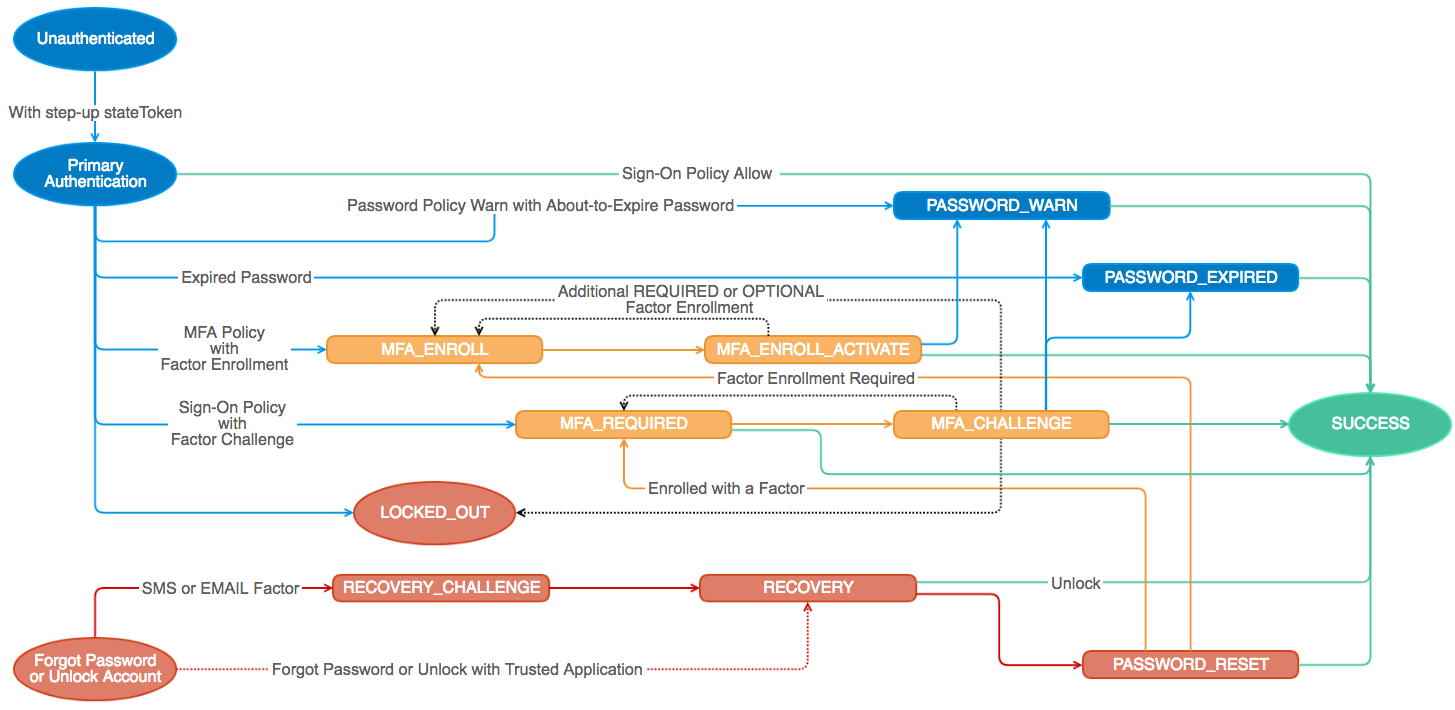
### `transaction.status`
When Auth Client methods resolve, they return a **transaction** object that encapsulates [the new state in the authentication flow](https://developer.okta.com/docs/api/resources/authn#transaction-model). This **transaction** contains metadata about the current state, and methods that can be used to progress to the next state.
#### Common methods
##### `cancel()`
Terminates the current auth flow.
```javascript
transaction.cancel()
.then(function() {
// transaction canceled. You can now start another with authClient.signIn
});
```
##### `changePassword(options)`
[Changes](https://developer.okta.com/docs/api/resources/authn#reset-password) a user's password.
* `oldPassword` - User’s current password that is expired
* `newPassword` - New password for user
```javascript
transaction.changePassword({
oldPassword: '0ldP4ssw0rd',
newPassword: 'N3wP4ssw0rd'
});
```
##### `resetPassword(options)`
[Reset](https://developer.okta.com/docs/api/resources/authn#reset-password) a user's password.
* `newPassword` - New password for user
```javascript
transaction.resetPassword({
newPassword: 'N3wP4ssw0rd'
});
```
##### `skip()`
Ignore the warning and continue.
```javascript
transaction.skip();
```
#### LOCKED_OUT
The user account is [locked](https://developer.okta.com/docs/api/resources/authn#show-lockout-failures); self-service unlock or admin unlock is required.
<details>
<summary><b>Example Response</b></summary>
```javascript
{
status: 'LOCKED_OUT',
unlock: function(options) { /* returns another transaction */ },
cancel: function() { /* terminates the auth flow */ },
data: { /* the parsed json response */ }
}
```
</details>
##### `unlock(options)`
[Unlock](https://developer.okta.com/docs/api/resources/authn#unlock-account) the user account.
* `username` - User’s non-qualified short-name (e.g. dade.murphy) or unique fully-qualified login (e.g dade.murphy@example.com)
* `factorType` - Recovery factor to use for primary authentication. Supported options are `SMS`, `EMAIL`, or `CALL`
* `relayState` - Optional state value that is persisted for the lifetime of the recovery transaction
```javascript
transaction.unlock({
username: 'dade.murphy@example.com',
factorType: 'EMAIL'
});
```
#### PASSWORD_EXPIRED
The user’s password was successfully validated but is [expired](https://developer.okta.com/docs/api/resources/authn#response-example-expired-password).
<details>
<summary><b>Example Response</b></summary>
```javascript
{
status: 'PASSWORD_EXPIRED',
expiresAt: '2014-11-02T23:39:03.319Z',
user: {
id: '00ub0oNGTSWTBKOLGLNR',
profile: {
login: 'isaac@example.org',
firstName: 'Isaac',
lastName: 'Brock',
locale: 'en_US',
timeZone: 'America/Los_Angeles'
}
},
changePassword: function(options) { /* returns another transaction */ },
cancel: function() { /* terminates the auth flow */ },
data: { /* the parsed json response */ }
}
```
</details>
#### PASSWORD_RESET
The user successfully answered their recovery question and can set a new password.
<details>
<summary><b>Example Response</b></summary>
```javascript
{
status: 'PASSWORD_EXPIRED',
expiresAt: '2014-11-02T23:39:03.319Z',
user: {
id: '00ub0oNGTSWTBKOLGLNR',
profile: {
login: 'isaac@example.org',
firstName: 'Isaac',
lastName: 'Brock',
locale: 'en_US',
timeZone: 'America/Los_Angeles'
}
},
resetPassword: function(options) { /* returns another transaction */ },
cancel: function() { /* terminates the auth flow */ },
data: { /* the parsed json response */ }
}
```
</details>
#### PASSWORD_WARN
The user’s password was successfully validated but is about to expire and should be changed.
<details>
<summary><b>Example Response</b></summary>
```javascript
{
status: 'PASSWORD_WARN',
expiresAt: '2014-11-02T23:39:03.319Z',
user: {
id: '00ub0oNGTSWTBKOLGLNR',
profile: {
login: 'isaac@example.org',
firstName: 'Isaac',
lastName: 'Brock',
locale: 'en_US',
timeZone: 'America/Los_Angeles'
}
},
policy: {
expiration:{
passwordExpireDays: 0
},
complexity: {
minLength: 8,
minLowerCase: 1,
minUpperCase: 1,
minNumber: 1,
minSymbol: 0,
excludeUsername: true
},
age:{
minAgeMinutes:0,
historyCount:0
}
},
changePassword: function(options) { /* returns another transaction */ },
skip: function() { /* returns another transaction */ },
cancel: function() { /* terminates the auth flow */ },
data: { /* the parsed json response */ }
}
```
</details>
#### RECOVERY
The user has requested a recovery token to reset their password or unlock their account.
<details>
<summary><b>Example Response</b></summary>
```javascript
{
status: 'RECOVERY',
expiresAt: '2014-11-02T23:39:03.319Z',
recoveryType: 'PASSWORD', // or 'UNLOCK'
user: {
id: '00ub0oNGTSWTBKOLGLNR',
profile: {
login: 'isaac@example.org',
firstName: 'Isaac',
lastName: 'Brock',
locale: 'en_US',
timeZone: 'America/Los_Angeles'
},
recovery_question: {
question: "Who's a major player in the cowboy scene?"
}
},
answer: function(options) { /* returns another transaction */ },
recovery: function(options) { /* returns another transaction */ },
cancel: function() { /* terminates the auth flow */ },
data: { /* the parsed json response */ }
}
```
</details>
##### `answer(options)`
* `answer` - [Answer](https://developer.okta.com/docs/api/resources/authn#answer-recovery-question) to user’s recovery question
```javascript
transaction.answer({
answer: 'My favorite recovery question answer'
});
```
##### `recovery(options)`
* `recoveryToken` - [Recovery](https://developer.okta.com/docs/api/resources/authn#verify-recovery-token) token that was distributed to end-user via out-of-band mechanism such as email
```javascript
transaction.recovery({
recoveryToken: '00xdqXOE5qDZX8-PBR1bYv8AESqIFinDy3yul01tyh'
});
```
#### RECOVERY_CHALLENGE
The user must verify the factor-specific recovery challenge.
<details>
<summary><b>Example Response</b></summary>
```javascript
{
status: 'RECOVERY_CHALLENGE',
expiresAt: '2014-11-02T23:39:03.319Z',
recoveryType: 'PASSWORD', // or 'UNLOCK',
factorType: 'EMAIL', // or 'SMS'
user: {
id: '00ub0oNGTSWTBKOLGLNR',
profile: {
login: 'isaac@example.org',
firstName: 'Isaac',
lastName: 'Brock',
locale: 'en_US',
timeZone: 'America/Los_Angeles'
}
},
verify: function(options) { /* returns another transaction */ },
resend: function() { /* returns another transaction */ },
cancel: function() { /* terminates the auth flow */ },
data: { /* the parsed json response */ }
}
```
</details>
##### `verify(options)`
* `passCode` - OTP sent to device for [verification](https://developer.okta.com/docs/api/resources/authn#verify-sms-recovery-factor)
```javascript
transaction.verify({
passCode: '615243'
});
```
##### `resend()`
[Resend](https://developer.okta.com/docs/api/resources/authn#resend-sms-recovery-challenge) the recovery email or text.
```javascript
transaction.resend();
```
#### MFA_ENROLL
When MFA is required, but a user isn’t enrolled in MFA, they must enroll in at least one factor.
<details>
<summary><b>Example Response</b></summary>
```javascript
{
status: 'MFA_ENROLL',
expiresAt: '2014-11-02T23:39:03.319Z',
user: {
id: '00ub0oNGTSWTBKOLGLNR',
profile: {
login: 'isaac@example.org',
firstName: 'Isaac',
lastName: 'Brock',
locale: 'en_US',
timeZone: 'America/Los_Angeles'
}
},
factors: [{
provider: 'OKTA',
factorType: 'question',
questions: function() { /* returns an array of possible questions */ },
enroll: function(options) { /* returns another transaction */ }
}, {
provider: 'OKTA',
factorType: 'sms',
enroll: function(options) { /* returns another transaction */ }
}, {
provider: 'OKTA',
factorType: 'call',
enroll: function(options) { /* returns another transaction */ }
}, {
provider: 'OKTA',
factorType: 'push',
enroll: function(options) { /* returns another transaction */ }
}, {
provider: 'OKTA',
factorType: 'token:software:totp',
enroll: function(options) { /* returns another transaction */ }
}, {
provider: 'GOOGLE',
factorType: 'token:software:totp',
enroll: function(options) { /* returns another transaction */ }
}, {
provider: 'YUBICO',
factorType: 'token:hardware',
enroll: function(options) { /* returns another transaction */ }
}, {
provider: 'RSA',
factorType: 'token',
enroll: function(options) { /* returns another transaction */ }
}, {
provider: 'SYMANTEC',
factorType: 'token',
enroll: function(options) { /* returns another transaction */ }
}],
cancel: function() { /* terminates the auth flow */ },
data: { /* the parsed json response */ }
}
```
</details>
To enroll in a factor, select one from the factors array, then use the following methods.
```javascript
var factor = transaction.factors[/* index of the desired factor */];
```
##### `questions()`
List the available [questions](https://developer.okta.com/docs/api/resources/factors#list-security-questions) for the question factorType.
```javascript
var questionFactor = transaction.factors.find(function(factor) {
return factor.provider === 'OKTA' && factor.factorType === 'question';
});
questionFactor.questions()
.then(function(questions) {
// Display questions for the user to select from
});
```
##### `enroll(options)`
The enroll options depend on the desired factor.
###### [OKTA question](https://developer.okta.com/docs/api/resources/factors#enroll-okta-security-question-factor)
```javascript
var questionFactor = transaction.factors.find(function(factor) {
return factor.provider === 'OKTA' && factor.factorType === 'question';
});
questionFactor.enroll({
profile: {
question: 'disliked_food', // all questions available using questionFactor.questions()
answer: 'mayonnaise'
}
});
```
###### [OKTA sms](https://developer.okta.com/docs/api/resources/factors#enroll-okta-sms-factor)
```javascript
var factor = transaction.factors.find(function(factor) {
return factor.provider === 'OKTA' && factor.factorType === 'sms';
});
factor.enroll({
profile: {
phoneNumber: '+1-555-415-1337',
updatePhone: true
}
});
// The passCode sent to the phone is verified in MFA_ENROLL_ACTIVATE
```
###### [OKTA call](https://developer.okta.com/docs/api/resources/factors#enroll-okta-call-factor)
```javascript
var factor = transaction.factors.find(function(factor) {
return factor.provider === 'OKTA' && factor.factorType === 'call';
});
factor.enroll({
profile: {
phoneNumber: '+1-555-415-1337',
updatePhone: true
}
});
// The passCode from the call is verified in MFA_ENROLL_ACTIVATE
```
###### [OKTA push](https://developer.okta.com/docs/api/resources/factors#enroll-okta-verify-push-factor)
```javascript
var factor = transaction.factors.find(function(factor) {
return factor.provider === 'OKTA' && factor.factorType === 'push';
});
factor.enroll();
// The phone will need to scan a QR Code in MFA_ENROLL_ACTIVATE
```
###### [OKTA token:software:totp](https://developer.okta.com/docs/api/resources/factors#enroll-okta-verify-totp-factor)
```javascript
var factor = transaction.factors.find(function(factor) {
return factor.provider === 'OKTA' && factor.factorType === 'token:software:totp';
});
factor.enroll();
// The phone will need to scan a QR Code in MFA_ENROLL_ACTIVATE
```
###### [GOOGLE token:software:totp](https://developer.okta.com/docs/api/resources/factors#enroll-google-authenticator-factor)
```javascript
var factor = transaction.factors.find(function(factor) {
return factor.provider === 'GOOGLE' && factor.factorType === 'token:software:totp';
});
factor.enroll();
// The phone will need to scan a QR Code in MFA_ENROLL_ACTIVATE
```
###### [YUBICO token:hardware](https://developer.okta.com/docs/api/resources/factors#enroll-yubikey-factor)
```javascript
var factor = transaction.factors.find(function(factor) {
return factor.provider === 'YUBICO' && factor.factorType === 'token:hardware';
});
factor.enroll({
passCode: 'cccccceukngdfgkukfctkcvfidnetljjiknckkcjulji'
});
```
###### [RSA token](https://developer.okta.com/docs/api/resources/factors#enroll-rsa-securid-factor)
```javascript
var factor = transaction.factors.find(function(factor) {
return factor.provider === 'RSA' && factor.factorType === 'token';
});
factor.enroll({
passCode: '5275875498',
profile: {
credentialId: 'dade.murphy@example.com'
}
});
```
###### [SYMANTEC token](https://developer.okta.com/docs/api/resources/factors#enroll-symantec-vip-factor)
```javascript
var factor = transaction.factors.find(function(factor) {
return factor.provider === 'SYMANTEC' && factor.factorType === 'token';
});
factor.enroll({
passCode: '875498',
nextPassCode: '678195',
profile: {
credentialId: 'VSMT14393584'
}
});
```
#### MFA_ENROLL_ACTIVATE
The user must activate the factor to complete enrollment.
<details>
<summary><b>Example Response</b></summary>
```javascript
{
status: 'MFA_ENROLL_ACTIVATE',
expiresAt: '2014-11-02T23:39:03.319Z',
factorResult: 'WAITING', // or 'TIMEOUT',
user: {
id: '00ugti3kwafWJBRIY0g3',
profile: {
login: 'isaac@example.org',
firstName: 'Isaac',
lastName: 'Brock',
locale: 'en_US',
timeZone: 'America/Los_Angeles'
},
},
factor: {
id: 'opfh52xcuft3J4uZc0g3',
provider: 'OKTA',
factorType: 'push',
profile: {},
activation: {
expiresAt: '2015-04-01T15:57:32.000Z',
qrcode: {
href: 'https://acme.okta.com/api/v1/users/00ugti3kwafWJBRIY0g3/factors/opfh52xcuft3J4uZc0g3/qr/00fukNElRS_Tz6k-CFhg3pH4KO2dj2guhmaapXWbc4',
type: 'image/png'
}
}
},
resend: function() { /* returns another transaction */ },
activate: function(options) { /* returns another transaction */ },
poll: function() { /* returns another transaction */ },
prev: function() { /* returns another transaction */ },
cancel: function() { /* terminates the auth flow */ },
data: { /* the parsed json response */ }
}
```
</details>
##### `resend()`
Send another OTP if user doesn’t receive the original activation SMS OTP.
```javascript
transaction.resend();
```
##### `activate(options)`
* `passCode` - OTP- sent to device for [activation](https://developer.okta.com/docs/api/resources/authn#activate-sms-factor)
```javascript
transaction.activate({
passCode: '615243'
});
```
##### `poll()`
[Poll](https://developer.okta.com/docs/api/resources/authn#activate-push-factor) until factorResult is not WAITING. Throws AuthPollStopError if prev, resend, or cancel is called.
```javascript
transaction.poll();
```
##### `prev()`
End current factor enrollment and [return to](https://developer.okta.com/docs/api/resources/authn#previous-transaction-state) `MFA_ENROLL`.
```javascript
transaction.prev();
```
#### MFA_REQUIRED
The user must provide additional verification with a previously enrolled factor.
<details>
<summary> <b>Example Response</b> </summary>
```javascript
{
status: 'MFA_REQUIRED',
expiresAt: '2014-11-02T23:39:03.319Z',
user: {
id: '00ugti3kwafWJBRIY0g3',
profile: {
login: 'isaac@example.org',
firstName: 'Isaac',
lastName: 'Brock',
locale: 'en_US',
timeZone: 'America/Los_Angeles'
},
},
factors: [{
id: 'ufsigasO4dVUPM5O40g3',
provider: 'OKTA',
factorType: 'question',
profile: {
question: 'disliked_food',
questionText: 'What is the food you least liked as a child?'
},
verify: function(options) { /* returns another transaction */ }
}, {
id: 'opfhw7v2OnxKpftO40g3',
provider: 'OKTA',
factorType: 'push',
profile: {
credentialId: 'isaac@example.org',
deviceType: 'SmartPhone_IPhone',
keys: [
{
kty: 'PKIX',
use: 'sig',
kid: 'default',
x5c: [
'MIIBIjANBgkqhkiG9w0BAQEFBAOCAQ8AMIIBCgKCAQEAs4LfXaaQW6uIpkjoiKn2g9B6nNQDraLyC3XgHP5cvX/qaqry43SwyqjbQtwRkScosDHl59r0DX1V/3xBtBYwdo8rAdX3I5h6z8lW12xGjOkmb20TuAiy8wSmzchdm52kWodUb7OkMk6CgRJRSDVbC97eNcfKk0wmpxnCJWhC+AiSzRVmgkpgp8NanuMcpI/X+W5qeqWO0w3DGzv43FkrYtfSkvpDdO4EvDL8bWX1Ad7mBoNVLWErcNf/uI+r/jFpKHgjvx3iqs2Q7vcfY706Py1m91vT0vs4SWXwzVV6pAVjD/kumL+nXfzfzAHw+A2vb6J2w06Rj71bqUkC2b8TpQIDAQAB'
]
}
],
name: 'Isaac\'s iPhone',
platform: 'IOS',
version: '8.1.3'
},
verify: function() { /* returns another transaction */ }
}, {
id: 'smsigwDlH85L9FyQK0g3',
provider: 'OKTA',
factorType: 'sms',
profile: {
phoneNumber: '+1 XXX-XXX-3355'
},
verify: function() { /* returns another transaction */ }
}, {
id: 'ostigevBq2NObXmTh0g3',
provider: 'OKTA',
factorType: 'token:software:totp',
profile: {
credentialId: 'isaac@example.org'
},
verify: function() { /* returns another transaction */ }
}, {
id: 'uftigiEmYTPOmvqTS0g3',
provider: 'GOOGLE',
factorType: 'token:software:totp',
profile: {
credentialId: 'isaac@example.org'
},
verify: function() { /* returns another transaction */ }
}],
cancel: function() { /* terminates the auth flow */ },
data: { /* the parsed json response */ }
}
```
</details>
##### [Verify Factor](https://developer.okta.com/docs/api/resources/authn#verify-factor)
To verify a factor, select one from the factors array, then use the following methods.
```javascript
var factor = transaction.factors[/* index of the desired factor */];
```
###### [OKTA question](https://developer.okta.com/docs/api/resources/authn#verify-security-question-factor)
```javascript
var questionFactor = transaction.factors.find(function(factor) {
return factor.provider === 'OKTA' && factor.factorType === 'question';
});
questionFactor.verify({
answer: 'mayonnaise'
});
```
###### [OKTA push](https://developer.okta.com/docs/api/resources/authn#verify-push-factor)
* `autoPush` - Optional parameter to send a push notification immediately the next time `verify` is called on a push factor
```javascript
var pushFactor = transaction.factors.find(function(factor) {
return factor.provider === 'OKTA' && factor.factorType === 'push';
});
pushFactor.verify({
autoPush: true
});
```
###### [All other factors](https://developer.okta.com/docs/api/resources/authn#verify-factor)
```javascript
var factor = transaction.factors.find(function(factor) {
return factor.provider === 'YOUR_PROVIDER' && factor.factorType === 'yourFactorType';
});
factor.verify();
```
#### MFA_CHALLENGE
The user must verify the factor-specific challenge.
<details>
<summary><b>Example Response</b></summary>
```javascript
{
status: 'MFA_CHALLENGE',
expiresAt: '2014-11-02T23:39:03.319Z',
factorResult: 'WAITING', // or CANCELLED, TIMEOUT, or ERROR
user: {
id: '00ugti3kwafWJBRIY0g3',
profile: {
login: 'isaac@example.org',
firstName: 'Isaac',
lastName: 'Brock',
locale: 'en_US',
timeZone: 'America/Los_Angeles'
},
},
factor: {
id: 'smsigwDlH85L9FyQK0g3',
factorType: 'sms',
provider: 'OKTA',
profile: {
phoneNumber: '+1 XXX-XXX-6688'
}
},
verify: function(options) { /* returns another transaction */ },
poll: function() { /* returns another transaction */ },
prev: function() { /* returns another transaction */ },
cancel: function() { /* terminates the auth flow */ },
data: { /* the parsed json response */ }
}
```
</details>
##### `verify(options)`
* `passCode` - OTP sent to device
* `autoPush` - Optional parameter to send a push notification immediately the next time [`verify`](https://developer.okta.com/docs/api/resources/authn#verify-factor) is called on a push factor
```javascript
transaction.verify({
passCode: '615243',
autoPush: true
});
```
##### `poll(options)`
* `autoPush` - Optional parameter to send a push notification immediately the next time `verify` is called on a push factor
[Poll](https://developer.okta.com/docs/api/resources/authn#activate-push-factor) until factorResult is not WAITING. Throws AuthPollStopError if prev, resend, or cancel is called.
```javascript
transaction.poll({
autoPush: true
});
```
##### `prev()`
End current factor verification and [return to](https://developer.okta.com/docs/api/resources/authn#previous-transaction-state) `MFA_REQUIRED`.
```javascript
transaction.prev();
```
#### SUCCESS
The end of the authentication flow! This transaction contains a sessionToken you can exchange for an Okta cookie, an `id_token`, or `access_token`.
<details>
<summary><b>Example Response</b></summary>
```javascript
{
expiresAt: '2015-06-08T23:34:34.000Z',
status: 'SUCCESS',
sessionToken: '00p8RhRDCh_8NxIin-wtF5M6ofFtRhfKWGBAbd2WmE',
user: {
id: '00uhm5QzwyZZxjrfp0g3',
profile: {
login: 'exampleUser@example.com',
firstName: 'Test',
lastName: 'User',
locale: 'en_US',
timeZone: 'America/Los_Angeles'
}
}
}
```
</details>
### `session`
#### `session.setCookieAndRedirect(sessionToken, redirectUri)`
> :warning: This method requires access to [third party cookies](#third-party-cookies)
This allows you to create a session using a sessionToken.
* `sessionToken` - Ephemeral one-time token used to bootstrap an Okta session.
* `redirectUri` - After setting a cookie, Okta redirects to the specified URI. The default is the current URI.
```javascript
authClient.session.setCookieAndRedirect(transaction.sessionToken);
```
#### `session.exists()`
> :warning: This method requires access to [third party cookies](#third-party-cookies)
Returns a promise that resolves with `true` if there is an existing Okta [session](https://developer.okta.com/docs/api/resources/sessions#example), or `false` if not.
```javascript
authClient.session.exists()
.then(function(exists) {
if (exists) {
// logged in
} else {
// not logged in
}
});
```
#### `session.get()`
> :warning: This method requires access to [third party cookies](#third-party-cookies)
Gets the active [session](https://developer.okta.com/docs/api/resources/sessions#example).
```javascript
authClient.session.get()
.then(function(session) {
// logged in
})
.catch(function(err) {
// not logged in
});
```
#### `session.refresh()`
> :warning: This method requires access to [third party cookies](#third-party-cookies)
Refresh the current session by extending its lifetime. This can be used as a keep-alive operation.
```javascript
authClient.session.refresh()
.then(function(session) {
// existing session is now refreshed
})
.catch(function(err) {
// there was a problem refreshing (the user may not have an existing session)
});
```
### `token`
#### Authorize options
The following configuration options can **only** be included in `token.getWithoutPrompt`, `token.getWithPopup`, or `token.getWithRedirect`.
| Options | Description |
| :-------: | ----------|
| `sessionToken` | Specify an Okta sessionToken to skip reauthentication when the user already authenticated using the Authentication Flow. |
| `responseType` | Specify the [response type](https://developer.okta.com/docs/api/resources/oidc#request-parameters) for OIDC authentication when using the [Implicit OAuth Flow](#implicit-oauth-20-flow). The default value is `['token', 'id_token']` which will request both an access token and ID token. If `pkce` is `true`, both the access and ID token will be requested and this option will be ignored. |
| `scopes` | Specify what information to make available in the returned `id_token` or `access_token`. For OIDC, you must include `openid` as one of the scopes. Defaults to `['openid', 'email']`. For a list of available scopes, see [Scopes and Claims](https://developer.okta.com/docs/api/resources/oidc#access-token-scopes-and-claims). |
| `state` | A string that will be passed to `/authorize` endpoint and returned in the OAuth response. The value is used to validate the OAuth response and prevent cross-site request forgery (CSRF). The `state` value passed to [getWithRedirect](#tokengetwithredirectoptions) will be returned along with any requested tokens from [parseFromUrl](#tokenparsefromurloptions). Your app can use this string to perform additional validation and/or pass information from the login page. Defaults to a random string. |
| `nonce` | Specify a nonce that will be validated in an `id_token`. This is usually only provided during redirect flows to obtain an authorization code that will be exchanged for an `id_token`. Defaults to a random string. |
| `idp` | Identity provider to use if there is no Okta Session. |
| `idpScope` | A space delimited list of scopes to be provided to the Social Identity Provider when performing [Social Login](social-login) These scopes are used in addition to the scopes already configured on the Identity Provider. |
| `display` | The display parameter to be passed to the Social Identity Provider when performing [Social Login](social-login). |
| `prompt` | Determines whether the Okta login will be displayed on failure. Use `none` to prevent this behavior. Valid values: `none`, `consent`, `login`, or `consent login`. See [Parameter details](https://developer.okta.com/docs/reference/api/oidc/#parameter-details) for more information. |
| `maxAge` | Allowable elapsed time, in seconds, since the last time the end user was actively authenticated by Okta. |
| `loginHint` | A username to prepopulate if prompting for authentication. |
For more details, see Okta's [Authorize Request API](https://developer.okta.com/docs/api/resources/oidc#request-parameters).
##### Example
```javascript
authClient.token.getWithoutPrompt({
sessionToken: '00p8RhRDCh_8NxIin-wtF5M6ofFtRhfKWGBAbd2WmE',
scopes: [
'openid',
'email',
'profile'
],
state: '8rFzn3MH5q',
nonce: '51GePTswrm',
// Use a custom IdP for social authentication
idp: '0oa62b57p7c8PaGpU0h7'
})
.then(function(res) {
var tokens = res.tokens;
// Do something with tokens, such as
authClient.tokenManager.add('idToken', tokens.idToken);
})
.catch(function(err) {
// handle OAuthError or AuthSdkError
});
```
#### `token.getWithoutPrompt(options)`
> :warning: This method requires access to [third party cookies](#third-party-cookies)
When you've obtained a sessionToken from the authorization flows, or a session already exists, you can obtain a token or tokens without prompting the user to log in.
* `options` - See [Authorize options](#authorize-options)
```javascript
authClient.token.getWithoutPrompt({
responseType: 'id_token', // or array of types
sessionToken: 'testSessionToken' // optional if the user has an existing Okta session
})
.then(function(res) {
var tokens = res.tokens;
// Do something with tokens, such as
authClient.tokenManager.add('idToken', tokens.idToken);
})
.catch(function(err) {
// handle OAuthError or AuthSdkError (AuthSdkError will be thrown if app is in OAuthCallback state)
});
```
#### `token.getWithPopup(options)`
Create token with a popup.
* `options` - See [Authorize options](#authorize-options)
```javascript
authClient.token.getWithPopup(options)
.then(function(res) {
var tokens = res.tokens;
// Do something with tokens, such as
authClient.tokenManager.add('idToken', tokens.idToken);
})
.catch(function(err) {
// handle OAuthError or AuthSdkError (AuthSdkError will be thrown if app is in OAuthCallback state)
});
```
#### `token.getWithRedirect(options)`
Create token using a redirect. After a successful authentication, the browser will be redirected to the configured [redirectUri](#additional-options). The authorization code, access, or ID Tokens will be available as parameters appended to this URL. Values will be returned in either the search query or hash fragment portion of the URL depending on the [responseMode](#responsemode)
* `options` - See [Authorize options](#authorize-options)
```javascript
authClient.token.getWithRedirect({
responseType: ['token', 'id_token'],
state: 'any-string-you-want-to-pass-to-callback' // will be URI encoded
})
.catch(function(err) {
// handle AuthSdkError (AuthSdkError will be thrown if app is in OAuthCallback state)
});
```
#### `token.parseFromUrl(options)`
Parses the authorization code, access, or ID Tokens from the URL after a successful authentication redirect. Values are parsed from either the search query or hash fragment portion of the URL depending on the [responseMode](#responsemode).
If an authorization code is present, it will be exchanged for token(s) by posting to the `tokenUrl` endpoint.
The ID token will be [verified and validated](https://github.com/okta/okta-auth-js/blob/master/lib/token.js#L186-L190) before available for use.
The `state` string which was passed to `getWithRedirect` will be also be available on the response.
```javascript
authClient.token.parseFromUrl()
.then(function(res) {
var state = res.state; // passed to getWithRedirect(), can be any string
// manage token or tokens
var tokens = res.tokens;
// Do something with tokens, such as
authClient.tokenManager.add('idToken', tokens.idToken);
authClient.tokenManager.add('accessToken', tokens.accesstoken);
})
.catch(function(err) {
// handle OAuthError
});
```
After reading values, this method will rewrite either the hash fragment or search query portion of the URL (depending on the [responseMode](#responsemode)) so that the code or tokens are no longer present or visible to the user. For this reason, it is recommended to use a dedicated route or path for the [redirectUri](#additional-options) so that this URL rewrite does not interfere with other URL parameters which may be used by your application. A complete login flow will usually save the current URL before calling `getWithRedirect` and restore the URL after saving tokens from `parseFromUrl`.
```javascript
// On any page while unauthenticated. Begin login flow
// Save URL
sessionStorage.setItem('url', window.location.href);
// Redirect to Okta
authClient.token.getWithRedirect({
responseType: 'token'
});
```
```javascript
// On callback (redirectUri) page
authClient.token.parseFromUrl()
.then(function(res) {
// Save token
authClient.tokenManager.add('accessToken', res.tokens.accessToken);
// Read saved URL from storage
const url = sessionStorage.getItem('url');
sessionStorage.removeItem('url');
// Restore URL
window.location.assign(url);
})
.catch(function(err) {
// Handle OAuthError
});
```
#### `token.decode(idTokenString)`
Decode a raw ID Token
* `idTokenString` - an id_token JWT
```javascript
authClient.token.decode('YOUR_ID_TOKEN_JWT');
```
#### `token.renew(tokenToRenew)`
> :warning: This method requires access to [third party cookies](#third-party-cookies)
Returns a new token if the Okta [session](https://developer.okta.com/docs/api/resources/sessions#example) is still valid.
* `tokenToRenew` - an access token or ID token previously provided by Okta. note: this is not the raw JWT
```javascript
// this token is provided by Okta via getWithoutPrompt, getWithPopup, and parseFromUrl
var tokenToRenew = {
idToken: 'YOUR_ID_TOKEN_JWT',
claims: { /* token claims */ },
expiresAt: 1449699930,
scopes: ['openid', 'email'],
authorizeUrl: 'https://{yourOktaDomain}/oauth2/v1/authorize',
issuer: 'https://{yourOktaDomain}',
clientId: 'NPSfOkH5eZrTy8PMDlvx'
};
authClient.token.renew(tokenToRenew)
.then(function(freshToken) {
// manage freshToken
})
.catch(function(err) {
// handle OAuthError
});
```
#### `token.getUserInfo(accessTokenObject, idTokenObject)`
Retrieve the [details about a user](https://developer.okta.com/docs/api/resources/oidc#response-example-success).
* `accessTokenObject` - (optional) an access token returned by this library. **Note**: this is not the raw access token.
* `idTokenObject` - (optional) an ID token returned by this library. **Note**: this is not the raw ID token.
By default, if no parameters are passed, both the access token and ID token objects will be retrieved from the TokenManager. If either token has expired it will be renewed automatically by the TokenManager before the user info is requested. It is assumed that the access token is stored using the key "accessToken" and the ID token is stored under the key "idToken". If you have stored either token in a non-standard location, this logic can be skipped by passing the access and ID token objects directly.
```javascript
// access and ID tokens are retrieved automatically from the TokenManager
authClient.token.getUserInfo()
.then(function(user) {
// user has details about the user
})
.catch(function(err) {
// handle OAuthError or AuthSdkError (AuthSdkError will be thrown if app is in OAuthCallback state)
});
```
```javascript
// In this example, the access token is stored under the key 'myAccessToken', the ID token is stored under the key "myIdToken"
Promise.all([
authClient.tokenManager.get('myAccessToken'),
authClient.tokenManager.get('myIdToken')
])
.then(([accessTokenObject, idTokenObject]) => {
return authClient.token.getUserInfo(accessTokenObject, idTokenObject);
})
.then(function(user) {
// user has details about the user
})
.catch((err) => {
// handle AuthSdkError (AuthSdkError will be thrown if app is in OAuthCallback state)
});
```
#### `token.verify(idTokenObject)`
Manually verify the validity of an ID token's claims and check the signature on browsers that support web cryptography.
> **Note:** Token validation occurs [automatically](https://github.com/okta/okta-auth-js/blob/master/lib/token.js#L186-L190) when tokens are returned via `getWithoutPrompt`, `getWithPopup`, and `getWithRedirect`.
* `idTokenObject` - an ID token returned by this library. note: this is not the raw ID token JWT
* `validationOptions` - Optional object to assert ID token claim values. Defaults to the configuration passed in during client instantiation.
```javascript
var validationOptions = {
issuer: 'https://{yourOktaDomain}/oauth2/{authorizationServerId}'
}
authClient.token.verify(idTokenObject, validationOptions)
.then(function() {
// the idToken is valid
})
.catch(function(err) {
// handle AuthSdkError
});
```
#### `token.isLoginRedirect`
Check `window.location` to verify if the app is in OAuth callback state or not. This function is synchronous and returns `true` or `false`.
```javascript
authClient.token.isLoginRedirect();
```
### `tokenManager`
#### `tokenManager.add(key, token)`
After receiving an `access_token` or `id_token`, add it to the `tokenManager` to manage token expiration and renew operations. When a token is added to the `tokenManager`, it is automatically renewed when it expires.
* `key` - Unique key to store the token in the `tokenManager`. This is used later when you want to get, delete, or renew the token.
* `token` - Token object that will be added
```javascript
authClient.token.getWithPopup()
.then(function(res) {
authClient.tokenManager.add('idToken', res.tokens.idToken);
});
```
#### `tokenManager.get(key)`
Get a token that you have previously added to the `tokenManager` with the given `key`. The token object will be returned if it exists in storage. Tokens will be removed from storage if they have expired and `autoRenew` is false or if there was an error while renewing the token. The `tokenManager` will emit a `removed` event when tokens are removed.
* `key` - Key for the token you want to get
```javascript
authClient.tokenManager.get('idToken')
.then(function(token) {
if (token && !authClient.tokenManager.hasExpired(token)) {
// Token is valid
console.log(token);
} else {
// Token has been removed due to expiration or error while renewing
}
})
.catch(function(err) {
// handle OAuthError or AuthSdkError (AuthSdkError will be thrown if app is in OAuthCallback state)
console.error(err);
});
```
#### `tokenManager.hasExpired(token)`
A synchronous method which returns `true` if the token has expired. The `tokenManager` will automatically remove expired tokens in the background. However, when the app first loads this background process may not have completed, so there is a chance that an expired token may exist in storage. This method can be called to avoid this potential race condition.
#### `tokenManager.remove(key)`
Remove a token from the `tokenManager` with the given `key`.
* `key` - Key for the token you want to remove
```javascript
authClient.tokenManager.remove('idToken');
```
#### `tokenManager.clear()`
Remove all tokens from the `tokenManager`.
```javascript
authClient.tokenManager.clear();
```
#### `tokenManager.renew(key)`
Manually renew a token before it expires and update the stored value.
* `key` - Key for the token you want to renew
```javascript
// Because the renew() method is async, you can wait for it to complete
// by using the returned Promise:
authClient.tokenManager.renew('idToken')
.then(function (newToken) {
console.log(newToken);
});
// Alternatively, you can subscribe to the 'renewed' event:
authClient.tokenManager.on('renewed', function (key, newToken, oldToken) {
console.log(newToken);
});
authClient.tokenManager.renew('idToken');
```
#### `tokenManager.on(event, callback[, context])`
Subscribe to an event published by the `tokenManager`.
* `event` - Event to subscribe to. Possible events are:
* `expired` - Fired before a token is set to expire (using `expireEarlySeconds` option, 30 seconds by default). If `autoRenew` option is set to true, a listener will be attached to this event and an attempt will be made to renew the token when the event fires.
* `error` - Fired when a token renew attempt has failed. This is a permanent error, and the token will be removed from storage.
* `renewed` - Fired when a token has been renewed by the `tokenManager`, either via the `autoRenew` process or as a result of calling `tokenManager.renew`
* `removed` - Fired when a token is removed from storage as a result of renew failure, or a call to `tokenManager.remove`. (This event will not fire from `tokenManager.clear`)
* `callback` - Function to call when the event is triggered
* `context` - Optional context to bind the callback to
```javascript
// Triggered when a token has expired
authClient.tokenManager.on('expired', function (key, expiredToken) {
console.log('Token with key', key, ' has expired:');
console.log(expiredToken);
});
// Triggered when a token has been renewed
authClient.tokenManager.on('renewed', function (key, newToken, oldToken) {
console.log('Token with key', key, 'has been renewed');
console.log('Old token:', oldToken);
console.log('New token:', newToken);
});
// Triggered when an OAuthError is returned via the API (typically during token renew)
authClient.tokenManager.on('error', function (err) {
console.log('TokenManager error:', err);
// err.name
// err.message
// err.errorCode
// err.errorSummary
// err.tokenKey
// err.accessToken
});
```
#### `tokenManager.off(event[, callback])`
Unsubscribe from `tokenManager` events. If no callback is provided, unsubscribes all listeners from the event.
* `event` - Event to unsubscribe from
* `callback` - Optional callback that was used to subscribe to the event
```javascript
authClient.tokenManager.off('renewed');
authClient.tokenManager.off('renewed', myRenewedCallback);
```
## Node JS and React Native Usage
You can use this library on server side in your Node application or mobile client side in React Native environment as an Authentication SDK. It can only be used in this way for communicating with the [Authentication API](https://developer.okta.com/docs/api/resources/authn), **not** to implement an OIDC flow.
To include this library in your project, you can follow the instructions in the [Getting started](#getting-started) section.
### Configuration
You only need to set the `issuer` for your Okta Domain:
```javascript
var OktaAuth = require('@okta/okta-auth-js');
var config = {
// The URL for your Okta organization
issuer: 'https://{yourOktaDomain}'
};
var authClient = new OktaAuth(config);
```
### Supported APIs
Since the Node library can be used only for the Authentication flow, it implements only a subset of okta-auth-js APIs:
* [signIn](#signinoptions)
* [forgotPassword](#forgotpasswordoptions)
* [unlockAccount](#unlockaccountoptions)
* [verifyRecoveryToken](#verifyrecoverytokenoptions)
* [tx.resume](#txresume)
* [tx.exists](#txexists)
* [transaction.status](#transactionstatus)
* [LOCKED_OUT](#locked_out)
* [PASSWORD_EXPIRED](#password_expired)
* [PASSWORD_RESET](#password_reset)
* [PASSWORD_WARN](#password_warn)
* [RECOVERY](#recovery)
* [RECOVERY_CHALLENGE](#recovery_challenge)
* [MFA_ENROLL](#mfa_enroll)
* [MFA_ENROLL_ACTIVATE](#mfa_enroll_activate)
* [MFA_REQUIRED](#mfa_required)
* [MFA_CHALLENGE](#mfa_challenge)
* [SUCCESS](#success)
The main difference is that the Node library does **not** have a `session.setCookieAndRedirect` function, so you will have to redirect by yourself (for example using `res.redirect('https://www.yoursuccesspage.com')`).
The `SUCCESS` transaction will still include a `sessionToken` which you can use with the session APIs: <https://github.com/okta/okta-sdk-nodejs#sessions.>
## Building the SDK
In most cases, you won't need to build the SDK from source. If you want to build it yourself, you'll need to follow these steps:
```bash
# Clone the repo
git clone https://github.com/okta/okta-auth-js.git
# Navigate into the new `okta-auth-js` filder
cd okta-auth-js
# Install Okta node dependencies and SDK will be built under `build`
yarn install
```
## Linking the built SDK locally
```bash
# navigate to the `build` folder
cd build
# create a link to the built package
yarn link
# navigate to your other project which has "@okta/okta-auth-js" as a dependency and create link
cd ../../other
yarn link @okta/okta-auth-js
```
### Build and Test Commands
| Command | Description |
| --------------------- | ------------------------------- |
| `yarn clean` | Removes installed dependencies and build outputs |
| `yarn install` | Install dependencies |
| `yarn build` | Build the SDK with a sourcemap |
| `yarn start` | Start internal test app |
| `yarn lint` | Run eslint linting |
| `yarn test:unit` | Run only unit tests |
| `yarn test:e2e` | Run only E2E (end-to-end) tests |
| `yarn test` | Run all tests |
#### Test Environment
Before running the E2E tests, you will need to setup a test environment. See [test/e2e/README](test/e2e/README.md) for more information.
#### Test App
We have implemented a small SPA app, located at `./test/app/` which is used internally as a test harness for the E2E tests. The app can be run manually using `yarn start`. This will start a webpack dev server and open a new browser window at `http://localhost:8080`. The app provides a high level of feedback and configurability which make it useful as a tool for troubleshooting and manual testing scenarios. See [test/app/README](test/app/README.md) for more information on the test app.
Because this test app is set up to dynamically change configuration and leak internal information, users should not use this test app as the basis for their own applications. Instead, use the example usage outlined elsewhere in this README.
## Migrating from previous versions
The [CHANGELOG](CHANGELOG.md) contains details for all changes and links to the original PR.
### From 3.x to 4.x
* Now using named exports. You should change code like
```javascript
// 3.x used default export
import OktaAuth from '@okta/okta-auth-js'
```
to
```javascript
// 4.x uses named exports
import { OktaAuth } from '@okta/okta-auth-js'
```
If using CommonJS, change
```javascript
// In 3.x module.exports was the OktaAuth object
const OktaAuth = require('@okta/okta-auth-js');
```
to
```javascript
// In 4.x module.exports has a property named 'OktaAauth'
const OktaAuth = require('@okta/okta-auth-js').OktaAuth;
```
* For Typescript users: definitions for types in this library are now included. If you were providing your own definitions for `@okta/okta-auth-js` you should remove these in favor of the types exported by this library.
* `onSessionExpired` option has been removed. [TokenManager events](#tokenmanageronevent-callback-context) can be used to detect and handle token renewal errors.
### From 2.x to 3.x
* Option `issuer` is [required](README.md#configuration-reference). Option `url` has been deprecated and is no longer used.
* The object returned from `token.parseFromUrl()` is no longer an array containing token objects. It is now an object with a property called `tokens` which is a dictionary containing token objects.
* New behavior for [signOut()](README.md#signout).
* The default `responseMode` for PKCE flow is now `query`.
## Contributing
We're happy to accept contributions and PRs! Please see the [contribution guide](contributing.md) to understand how to structure a contribution.
[devforum]: https://devforum.okta.com/
[lang-landing]: https://developer.okta.com/code/javascript
[github-issues]: https://github.com/okta/okta-auth-js/issues
[github-releases]: https://github.com/okta/okta-auth-js/releases
[social-login]: https://developer.okta.com/docs/concepts/social-login/