# pdq
[](https://crates.io/crates/pdq)
[](https://docs.rs/pdq)
[](LICENSE)
[](#feature-flags-and-msrv)
**PDF split, merge, page-count, render, and text extraction — pretty damn
quick.** A single
pure-Rust binary and library: no C dependencies, no external tools, no
subprocesses.
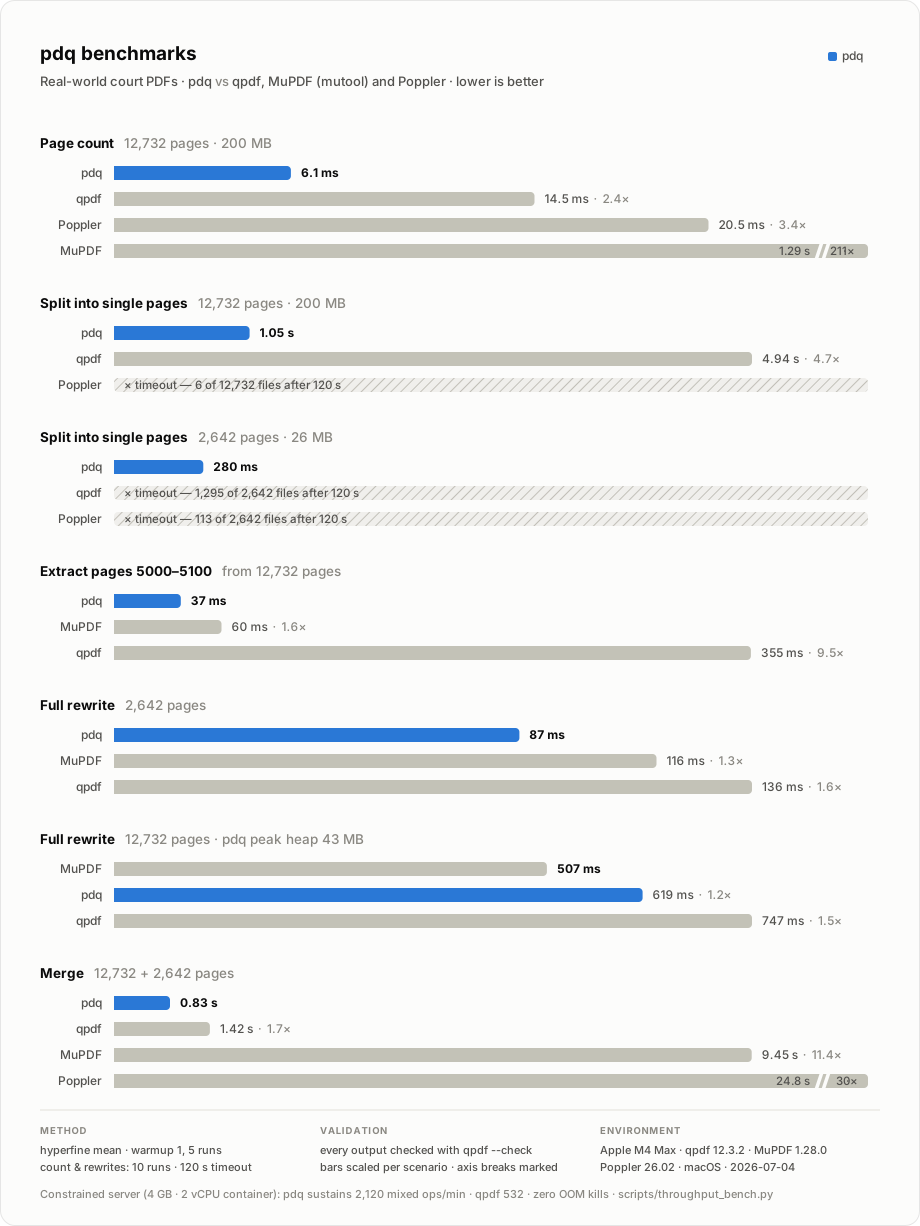
pdq splits a 200 MB, 12,732-page PDF into one file per page in **1.05 s**,
counts its pages in **6 ms**, and extracts a 100-page range from the middle
of it in **37 ms**. On a court PDF whose pages all share one resources
dictionary, established tools blow through a two-minute timeout; pdq
finishes in **280 ms**. Full numbers, validation method, and reproduction
steps in [Performance](#performance).
## Highlights
- **Fast on pathological files.** Memory-mapped input, an xref-only
bootstrap, lazy object parsing, and parallel output writes mean cost
scales with the pages you touch, not the file you opened.
- **Zero system dependencies.** One self-contained binary, no shelling out —
nothing to apt-install in the container image.
- **Encrypted inputs just work.** RC4, AES-128, and AES-256 PDFs are
decrypted on load. Owner-password-only files (the common case) open
without any flags; real passwords go through `--password`.
- **Damaged files are repaired.** Truncated or lying cross-reference tables
are rebuilt by scanning the raw file — the same recovery strategy
mainstream PDF readers use — automatically and only when needed.
- **Expressive page ranges.** `1-3`, `4-z`, `r2`, `7-3,1,r1` — pick pages
from either end of the document, in any order.
- **CLI and library.** Everything the CLI does is a `pdq::` function call
away, plus library-only extras like per-input page selection on merge.
## Install
From [crates.io](https://crates.io/crates/pdq):
```sh
cargo install pdq
```
Or build from source:
```sh
git clone https://github.com/meistrari/pdq
cd pdq
cargo install --path .
```
To use pdq as a library, add it to your project:
```sh
cargo add pdq
```
The prebuilt binaries and a source build carry two fixes to hayro's
interpreter that are still making their way upstream: memoized tint
transforms (much faster `render` on Separation/DeviceN images) and AGL-spec
glyph-name mapping (fewer U+FFFD in `pdq text`). cargo drops patched
dependencies when publishing, so a crates.io build runs without them —
correct and complete, just slower on those images and slightly more likely to
flag a page `degraded`. They land for everyone on the next hayro release.
## Quick start
```sh
# How many pages?
pdq page-count input.pdf
# One PDF per page (%d = page number, zero-padded)
pdq split-pages --output 'page-%d.pdf' input.pdf
# Chunks of at most 200 pages: chunk-1.pdf, chunk-2.pdf, ...
pdq split-pages --output 'chunk-%d.pdf' --pages-per-file 200 input.pdf
# Extract ranges into new files (one pass, both outputs)
pdq split input.pdf --out 1-3 intro.pdf --out 4-z rest.pdf
# Concatenate files
pdq merge --output merged.pdf a.pdf b.pdf c.pdf
# Every page's size and rotation as JSON, without rendering
pdq dimensions input.pdf
# Rasterize to PNG at 300 DPI
pdq render --output 'page-%d.png' --dpi 300 --pages 1-10 input.pdf
# Positioned text runs as JSON (for a selectable text layer)
pdq text --pages 1 input.pdf
```
Errors print a single `error: ...` line to stderr and exit non-zero, so pdq
is safe to script against. `page-count` prints only the number to stdout.
## Commands
### `pdq split` — extract page ranges
```sh
pdq split input.pdf --out RANGE PATH [--out RANGE PATH ...] [--password PW]
```
Each `--out` takes a [page range](#page-ranges) and an output path, and every
output is produced in the same run — pdq parses the input once and writes the
outputs in parallel. Pages can appear in multiple outputs, in any order, and
duplicated within one range.
```sh
pdq split deposition.pdf \
--out 1-9 cover-and-toc.pdf \
--out 10-z body.pdf \
--out 'r10-r1' last-ten-pages.pdf
```
Outputs carry only the resources their pages actually use: unused fonts,
images, and form XObjects shared across the source document are pruned so a
3-page extract of a 200 MB file is small, not 200 MB.
Outputs also keep page annotations (links, form widgets, signature
appearances), the trailer `/Info` dictionary, and the catalog's XMP
`/Metadata` stream. Annotation references into document structure, such as a
`/Dest` pointing at a page outside the output, are nulled so they never pull
unrelated pages into a subset. An embedded digital signature survives as
data but cannot stay valid on a subset: its `/ByteRange` covers the original
file's bytes. `merge` follows the same rules, taking `/Info` and XMP from
its first input.
A single `--out 1-z` output is a whole-document rewrite (normalize structure,
drop unreferenced objects, decrypt): pdq streams objects from the
memory-mapped input straight to disk, so peak memory stays a few tens of MB
regardless of file size — rewriting a 200 MB file allocates ~43 MB, not a
multiple of the document.
### `pdq split-pages` — burst into pages or chunks
```sh
pdq split-pages --output PATTERN [--pages-per-file N] [--password PW] input.pdf
```
`%d` in the pattern is replaced with the output's number. With the default
`--pages-per-file 1` that is the original page number, zero-padded to the
width of the last page (`page-00042.pdf` sorts correctly in a 12,000-page
burst). With `--pages-per-file N`, consecutive pages are grouped into files
of at most N pages and `%d` is the 1-based chunk index (the last chunk may
be short).
### `pdq merge` — concatenate PDFs
```sh
pdq merge --output merged.pdf first.pdf second.pdf [more.pdf ...] [--password PW]
```
Inputs are appended in argument order. Objects stream to the output as each
input is read, so merging huge files does not require holding them all in
memory. Merging a single healthy, unencrypted file degenerates to a
byte-for-byte copy. The library API can additionally select page ranges per
input — see [Using pdq as a library](#using-pdq-as-a-library).
### `pdq page-count` — count pages
```sh
pdq page-count [--strict] [--password PW] input.pdf
```
By default pdq trusts the root `/Pages` `/Count` and automatically falls
back to a validated page-tree walk when `/Count` is missing, malformed,
negative, or implausibly large.
Pass `--strict` to force the validated walk: it counts the exact leaf pages
`split`/`split-pages` would resolve and is immune to lying metadata.
### `pdq dimensions` — per-page geometry without rendering
```sh
pdq dimensions [--password PW] input.pdf
```
Prints every page's size and rotation as JSON on stdout, straight from the
page tree — no rasterization, so it stays a cheap metadata walk even on very
large documents:
```json
{"pages":2,"page_sizes":[{"width":419,"height":595,"rotation":0},{"width":340,"height":680,"rotation":90}]}
```
`width`/`height` are in PDF points (1/72 inch) with `/Rotate` already
applied — a page rotated 90 or 270 reports swapped width and height — and
the effective box is CropBox intersected with MediaBox, exactly the geometry
`render` uses. That makes the numbers safe to lay out a viewer before any
page is rendered: a render at `DPI` produces an image of exactly
`floor(width × (DPI/72))` × `floor(height × (DPI/72))` pixels, both steps
computed in single-precision (f32) arithmetic — in JavaScript,
`Math.floor(Math.fround(width * Math.fround(dpi / 72)))`. The precision
matters: the same formula in doubles predicts 1px too many on one axis at
some DPIs — on a US Letter page at 150, 200, or 300 DPI (612×792 pt at
150 DPI really renders 1275×1649, not the 1275×1650 doubles suggest).
`rotation` is normalized to 0, 90, 180, or 270.
Mixed-size documents report each page's true size, and per-page damage
degrades gracefully: a missing or malformed box falls back to the inherited
value, then to A4; a malformed `/Rotate` falls back to 0.
### `pdq render` — rasterize to PNG
```sh
pdq render --output PATTERN [--dpi DPI] [--pages RANGES] input.pdf
```
Rendering goes through [hayro](https://github.com/LaurenzV/hayro), a
pure-Rust PDF renderer, so the no-C-dependencies constraint still holds.
Pages render in parallel across all cores; `%d` in the pattern receives the
original, zero-padded page number, so `--pages 1,3` writes `page-01.png` and
`page-03.png`. Default DPI is 150.
`render` is behind the `render` cargo feature (on by default — see
[Feature flags and MSRV](#feature-flags-and-msrv)). hayro's parser opens
owner-password-only files, but `render` has no `--password` option, so PDFs
with a real user password cannot be rendered.
### `pdq text` — positioned text runs as JSON
```sh
pdq text [--pages RANGES] [--password PW] [--no-annotations] input.pdf
```
Extracts each selected page's text runs with their positions, using the same
hayro interpreter `render` uses, and prints a JSON array to stdout:
```json
[
{
"page": 1,
"page_width": 612,
"page_height": 792,
"degraded": false,
"runs": [
{ "text": "Invoice", "x": 72, "y": 57.6, "width": 57.024, "height": 18, "font_size": 18 }
]
}
]
```
- Coordinates are PDF points (px at 72 dpi), origin top-left, with `/Rotate`
and cropbox applied exactly as `render` applies them — overlaying the runs
on a `pdq render` image of the same page only requires multiplying by the
display scale.
- `font_size` is the on-page glyph height in points, derived from the
composed transform (like pdf.js's text-layer math), not the nominal `Tf`
size.
- `x`, `y`, `width`, `height` are the run's axis-aligned bounding box,
top-left first — a client can draw it as a highlight rectangle directly.
For horizontal text `x` is the baseline origin of the first glyph, `y` the
approximate glyph top (baseline minus 0.8 × `font_size`), `width` the sum
of glyph advances, and `height` equals `font_size`; text made vertical by
`/Rotate` yields a narrow, tall box instead.
- **Runs are not clipped to the page.** A run's box may fall partly or wholly
outside `[0, page_width] x [0, page_height]`, including at negative
coordinates — content painted past the MediaBox, such as a wide table
overflowing the sheet, or a CropBox smaller than the MediaBox. Clip the
rectangle for display; do not filter the run out, or you lose that text.
mutool, pdf.js and poppler under `-cropbox` all discard it, so pdq's output
is a superset of theirs.
- Word gaps encoded as TJ kerning offsets instead of space glyphs (LaTeX
output) are synthesized as spaces, like poppler and pdf.js do: a gap of
0.1–0.6 em past a glyph's advance becomes `' '`, anything wider starts a
new run.
- A scanned/image-only page succeeds with `"runs": []`.
- **`degraded: true`** flags pages whose text is known to be incomplete:
at least one visible glyph could not be mapped to Unicode (it is emitted as
U+FFFD instead of being silently dropped), or the page's annotation layer
was skipped (see below). The caller can distinguish "extraction failed"
from "no text on page", which pdf.js's `getTextContent` cannot signal.
- Invisible text (render mode 3, e.g. OCR layers under scanned pages) is
extracted.
- Annotation and form-field appearance streams are extracted too, like
`pdftotext` and `mutool draw -F txt` do: a filled text widget's value comes
back as a run positioned at the widget. `--no-annotations` restricts the
output to the page content stream. Hidden annotations are always excluded,
an annotation with no `/AP` yields no text, and a page carrying an
implausible number of them has the layer skipped and is marked `degraded`
— `src/text.rs` documents the exact bounds.
`text` is behind the `text` cargo feature (on by default) and, unlike
`render`, takes `--password` for encrypted inputs.
### Page ranges
Page numbers are 1-based; `z` and `rN` count from the end of the document.
| `5` | page 5 |
| `1-3` | pages 1, 2, 3 |
| `4-z` | page 4 through the last page |
| `z` | the last page |
| `r1` | the last page (`r2` is second-to-last, ...) |
| `r10-r1` | the last ten pages, in document order |
| `7-3` | pages 7 down to 3, in that (reversed) order |
| `1-3,7,r1` | comma-separated combination of any of the above |
Out-of-bounds pages are an error, not silently clamped.
## Encrypted PDFs
Encrypted inputs (RC4, AES-128, AES-256) are decrypted while loading, and
outputs are always written unencrypted.
Files encrypted with only an owner password — the overwhelmingly common
"permissions" encryption — open with no flags at all, because the empty user
password is tried first. Files that require a real password take
`--password` on `split`, `split-pages`, `merge`, `page-count`, and
`dimensions`; a wrong password is reported as exactly that, not as a parse
failure.
## Damaged PDFs
Files with damaged cross-reference data — truncated or garbage xref tables,
destroyed trailers, tables whose offsets point at the wrong objects — are
repaired automatically, the way mainstream PDF readers recover them: the
raw file is scanned for `N G obj` headers and the cross-reference table is
rebuilt from what is actually there, best effort.
Repair is strictly a last resort. It only starts after the normal parse
fails, or after a fetch proves the xref lies about an offset, so healthy
files never pay for it. A repaired read emits one warning line on stderr,
and outputs built from a repaired source are always full rewrites with a
fresh, valid xref — never byte copies of the damage.
Two classes stay hard errors by design: encrypted files with damaged xref
data (repair cannot decrypt; the error suggests a dedicated repair tool),
and files where no catalog can be recovered at all. In both cases the error
names the damaged cross-reference data rather than a generic parse failure.
## Performance
Measured 2026-07-04 on two real-world court PDFs: 200 MB / 12,732 pages and
26 MB / 2,642 pages. Wall time is `hyperfine --warmup 1 --runs 5` mean (page
count and full rewrites: warmup 2, 10 runs), 120 s timeout.
| Page count, 12,732p | **6.1 ms** | 14.5 ms | 1.29 s | 20.5 ms |
| Split into single pages, 12,732p | **1.05 s** | 4.94 s | n/a | >120 s (6 files out) |
| Split into single pages, 2,642p | **280 ms** | >120 s (1,295 out) | n/a | >120 s (113 out) |
| Extract pages 5000–5100 | **37 ms** | 355 ms | 60 ms | n/a |
| Full rewrite, 2,642p | **87 ms** | 136 ms | 116 ms | n/a |
| Merge 12,732p + 2,642p | **0.83 s** | 1.42 s | 9.45 s | 24.8 s |
| Full rewrite, 12,732p | 619 ms | 747 ms | **507 ms** | n/a |
MuPDF wins the 12,732-page rewrite (507 ms vs 619 ms) — pdq spends that
~20% streaming the rewrite through ~43 MB of peak heap instead of holding
the parsed document plus a full copy in memory, so rewrite memory stays
flat as files grow. Every other scenario is a pdq win. Every completed
output was validated by
page count and `qpdf --warning-exit-0 --check`; split scenarios validated
first, middle, and last files. qpdf ran with
`--remove-unreferenced-resources=no` on copy-like paths where applicable, so
it was not penalized for its slow default.
### Where the speed comes from
- **Xref-only bootstrap.** Opening a PDF parses just the cross-reference
chain and trailer — classic tables, xref streams, `/Prev` chains, and
hybrid `/XRefStm` — instead of every object in the file. That is why
counting 12,732 pages takes 6 ms. Any anomaly falls back to a full parse,
so the fast path can never reject a file the slow path would accept.
- **Lazy object parsing.** Split and merge parse only the objects reachable
from the pages you selected, on demand, straight from the memory-mapped
buffer, with a sharded cache keeping hot shared objects (fonts, resource
dictionaries) parsed exactly once across parallel workers.
- **Bounded page-tree walks.** Extracting pages 5000–5100 stops walking the
page tree at page 5100 rather than enumerating all 12,732.
- **Parallel writes.** Split outputs and rendered pages are written across
all cores.
- **Selective, not quadratic, resource pruning.** Outputs keep only the
resources their pages reference — without the pathological blowup that
makes other tools time out on documents where every page shares one giant
resources dictionary. Whole-document outputs skip pruning entirely and
stream objects from the memory-mapped input straight to disk — a full
rewrite of the 200 MB file peaks at ~43 MB of heap — and a single-input
merge of a healthy file is a plain byte copy.
### On a constrained server
Sustained throughput in a Linux container capped at **4 GB RAM / 2 vCPU**
(no swap), 45 s windows per cell, OOM kills counted as failures.
Continuous whole-document rewrites of the 200 MB / 12,732-page file, in
ops/min by worker count:
| 2 | 239 | 115 | **297** |
| 4 | 216 | 73 | **236** |
| 8 | **134** | 60 | 123 |
Mixed traffic (weighted mix per worker: 55 KB / 3.5 MB / 26 MB / 200 MB
rewrites, 100-page extracts, merges, and damaged-xref repairs):
| 2 | **2,120** | 532 |
| 4 | **1,945** | 494 |
| 8 | **1,289** | 391 |
Zero failures in every cell above. For contrast, pdq's previous eager
rewrite path OOM-killed 40% of requests at 8 concurrent big-file rewrites
in the same container — the streaming rewrite is what makes the worst
case degrade gracefully (CPU queuing) instead of dying. Damaged inputs
stay cheap under load: xref reconstruction plus rewrite of a 3.5 MB file
holds ~20 ms p50 at 8 workers.
Reproduce with `scripts/throughput_bench.py` (single-command or `--mix`
weighted-traffic mode) inside any memory/CPU-capped container:
```sh
docker run --memory=4g --memory-swap=4g --cpus=2 ... \
python3 throughput_bench.py --duration 45 --concurrency 4 \
-- pdq split big.pdf --out 1-z {out}
```
### Reproducing
The benchmark PDFs contain personal data and stay outside the repo, but
`scripts/make_fixtures.py` synthesizes PII-free replicas with the same
structural pathology — object counts, page-tree shape, shared-resources
pattern, filter zoo — that reproduce these timings within noise:
```sh
python3 scripts/make_fixtures.py big.pdf small.pdf
PDQ_BIG_PDF=$PWD/big.pdf \
PDQ_SMALL_PDF=$PWD/small.pdf \
scripts/benchmark.sh
```
Besides the hyperfine timings, the script measures peak memory (max RSS via
`/usr/bin/time`) for each scenario and writes it to `json/memory.json` in the
benchmark output directory.
The chart above is generated by `scripts/gen_benchmark_svg.py` (data at the
top of the script) into `assets/benchmark.svg`.
## Using pdq as a library
Everything the CLI does is available as a function, plus a few things the
CLI does not expose — most usefully, per-input page selection on merge.
Full API reference at [docs.rs/pdq](https://docs.rs/pdq).
```rust
use std::path::Path;
use pdq::{MergeInput, PageRangeGroup, SplitOutput};
fn main() -> pdq::Result<()> {
// Fast page count (trusts the document's /Count);
// pdq::page_count is the validated page-tree walk.
let pages = pdq::page_count_fast(Path::new("big.pdf"))?;
println!("{pages} pages");
// Per-page size (points) and rotation, without rendering.
for page in pdq::page_dimensions(Path::new("big.pdf"))? {
println!("{} x {} pt", page.width, page.height);
}
// Extract two ranges in one pass over the input.
pdq::split(
Path::new("big.pdf"),
&[
SplitOutput {
range: PageRangeGroup::parse("1-3")?,
path: "intro.pdf".into(),
},
SplitOutput {
range: PageRangeGroup::parse("4-z")?,
path: "rest.pdf".into(),
},
],
)?;
// One file per page.
pdq::split_pages(Path::new("big.pdf"), "page-%d.pdf")?;
// Merge whole files and page selections in one output.
pdq::merge(
&[
MergeInput::all("cover.pdf"),
MergeInput {
path: "body.pdf".into(),
ranges: vec![PageRangeGroup::parse("2-z")?],
},
],
Path::new("out.pdf"),
)?;
Ok(())
}
```
Encrypted inputs go through the `*_with_password` variants
(`split_with_password`, `page_count_with_password`, ...) or the options
structs (`SplitPagesOptions`, `MergeOptions`). Rendering is
`pdq::render_pages` with `RenderOptions { dpi, pages }`, behind the `render`
feature. Text extraction is `pdq::extract_text` with `ExtractTextOptions
{ pages, password, annotations }`, returning `Vec<PageText>`, behind the
`text` feature.
### Feature flags and MSRV
| `render` | yes | `pdq render` / `pdq::render_pages` via hayro |
| `text` | yes | `pdq text` / `pdq::extract_text` via hayro |
Build with `--no-default-features` for a smaller split/merge-only binary.
Minimum supported Rust version: **1.92**.
## Scope
pdq is built around the split/merge/count/render/text workflow and does it
completely: encrypted inputs, damaged-xref repair, object streams, hybrid
xrefs, and the long tail of real-world files its test corpus covers. It is
not a general PDF rewriting toolkit:
- Outputs are always written unencrypted; pdq does not add encryption.
- No linearization ("fast web view").
- Interactive features spread across pages — forms, outlines, named
destinations — are not restructured when splitting; page content and
resources are what is preserved.
- `render` cannot take a password (see [`pdq render`](#pdq-render--rasterize-to-png)).
- `text` and `render` can be killed by a crafted nesting bomb: hayro's object
lexer has no recursion cap, and a stack overflow aborts the process. pdq
gives it a large stack and rejects absurd `<<` nesting it can see, but
nesting hidden inside a compressed stream still aborts — `src/hayro_stack.rs`
documents the bounds. pdq's own parser does cap recursion, so `split`,
`merge`, `page-count` and `dimensions` are unaffected.
## Development
```sh
cargo test # unit + CLI + fixture suites
cargo clippy --all-targets -- -D warnings
cargo fmt --check
```
Tests use `qpdf` as a development-time validator when it is on `PATH`; it is
never a runtime dependency.
`tests/real_world.rs` builds raw-byte replicas of the two court-document
families from the benchmark corpus (deep balanced page tree with an image
filter zoo; flat page tree with one shared resources dictionary) and asserts
split/merge behavior on them, including resource-pruning regression guards.
`tests/corpus.rs` runs pdq against a directory of actual PDFs with qpdf as
ground truth, classifying each file (pass / note / skip / warn / fail):
```sh
scripts/fetch_corpus.sh --fixtures --qpdf --pdfjs # reproducible anywhere
scripts/fetch_corpus.sh --local ~/Downloads # plus your own PDFs
cargo test --release --test corpus -- --ignored --nocapture
```
No PDFs are versioned: `--qpdf`/`--pdfjs` fetch the public test corpora from
their upstream repositories, and `--fixtures` regenerates the anonymized
benchmark replicas (12,732 and 2,642 pages) from the seeded generator in
`scripts/make_fixtures.py` — private documents stay strictly local. The
corpus lives in `corpus/` (gitignored; local files are symlinked). Use
`PDQ_CORPUS_DIR` to point elsewhere, `PDQ_CORPUS_MAX_FILES` to cap a run,
and `PDQ_CORPUS_STRICT=1` to also fail on scope gaps where qpdf handles a
file that pdq refuses.
## License
[Artistic License 2.0](LICENSE).