# Parley
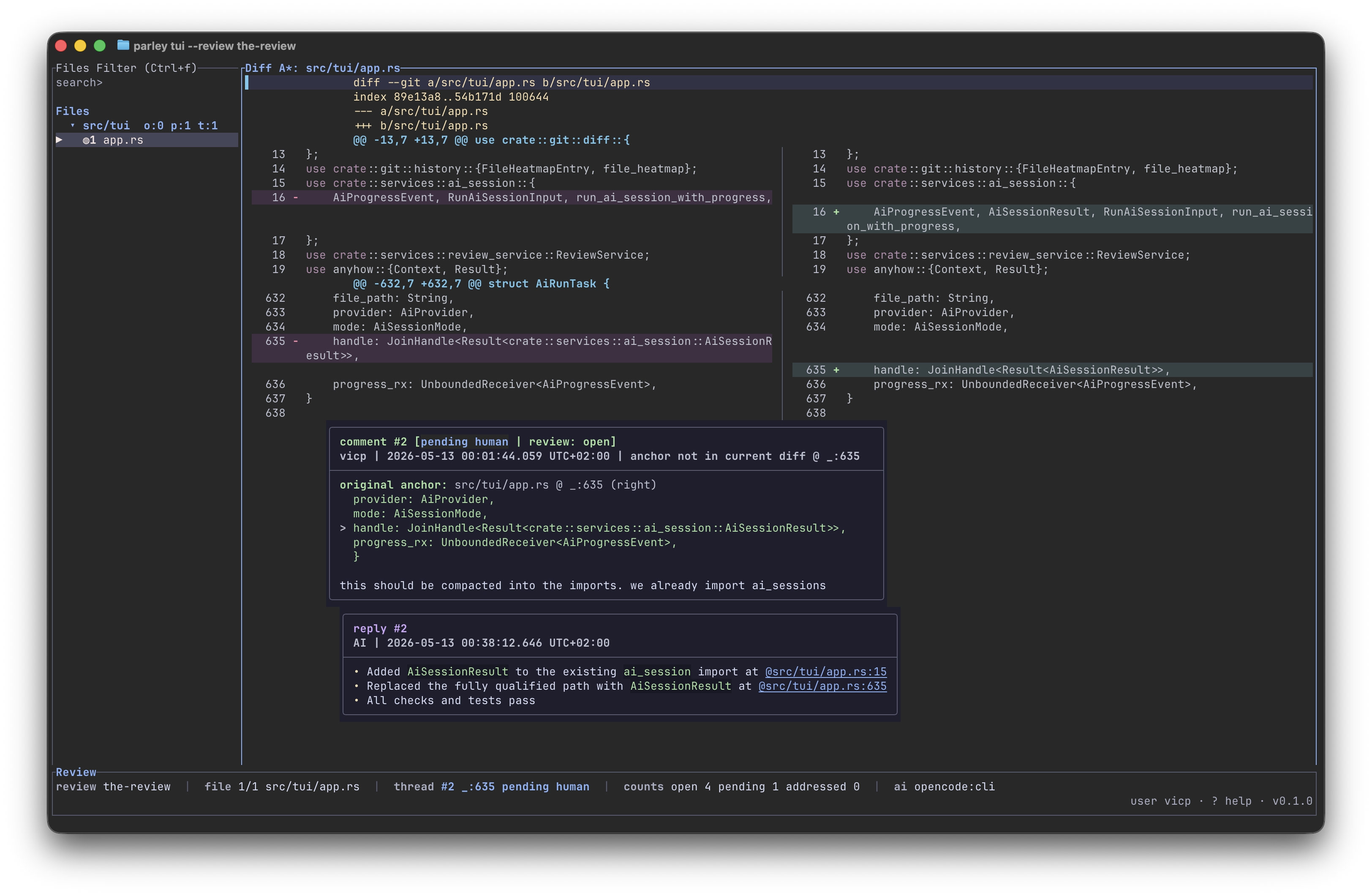
Parley is a terminal-first review tool for local Git diffs with structured, line-anchored discussion threads and optional AI-assisted replies/refactors.

It is designed for iterative review loops where code changes are generated or assisted by AI, but review state and thread resolution remain explicit and human-controlled.
Primary docs site: [https://parley.cloudflavor.io](https://parley.cloudflavor.io)
## Why Parley
- Review threads are anchored to specific diff lines, not loose notes.
- Thread status is explicit: `open`, `pending`, `addressed`.
- Review state exists for compatibility, but TUI completion is thread-based.
- TUI workflow is keyboard-first and optimized for rapid navigation.
- AI operations integrate into the same thread model instead of bypassing review state.
## Core Concepts
### Diff source vs review session
Parley separates:
- Diff source: what code you are reviewing (`working tree`, `--commit`, or `--base/--head` range)
- Review session: repo-scoped state under the active Parley store (review name, threaded comments, status history)
By default, Parley stores repo-scoped state under `$HOME/.config/parley/repos/<repo-name>-<hash>/`. If the repository already has a `.parley/` directory, Parley uses it instead. To opt a repository into local checked-in or shared state explicitly, run:
```bash
parley config use-local
```
### Thread lifecycle
- New comment -> `open`
- Reply by original thread author -> `open`
- Reply by different author (including AI in normal flows) -> `pending`
- Explicit resolution by original thread author -> `addressed`
### Review lifecycle
- Any `open` thread keeps review work active.
- `pending` means waiting for human review.
- `addressed` means the individual thread is resolved.
## Installation and Build
Prerequisites:
- Rust toolchain
- Git repository as working directory
- Terminal with TUI support
Install the `parley` binary:
```bash
cargo install parley-cli
```
Build locally:
```bash
cargo build --release
```
Run from source:
```bash
cargo run -- tui
```
## Quickstart
Create and start a review session:
```bash
parley review create my-review
parley review start my-review
```
Open TUI on current working tree changes:
```bash
parley tui --review my-review
```
Disable mouse capture for SSH/terminal compatibility:
```bash
parley tui --review my-review --no-mouse
```
Review historical diffs:
```bash
parley tui --review my-review --commit HEAD~2
parley tui --review my-review --base main --head feature/my-branch
parley tui --review my-review --base v0.1.0
# everything after HEAD~2 (exclude that commit)
parley tui --review my-review --base HEAD~2 --head HEAD
# everything after and including HEAD~2
parley tui --review my-review --base HEAD~2^ --head HEAD
```
Review the repository root as files instead of a git diff:
```bash
parley tui --review my-review --root
```
Root mode lazy-loads file contents. JSON files are displayed with pretty formatting, and Markdown files are rendered into readable text rows.
## CLI Reference
Top-level commands:
- `parley tui`
- `parley review <subcommand>`
- `parley mcp`
Common `review` subcommands:
- `create <name>`
- `start <name>` (shortcut for `set-state <name> under_review`)
- `list`
- `show <name> [--json]`
- `set-state <name> <open|under_review>`
- `add-comment ...`
- `add-reply ...`
- `mark-addressed ...`
- `mark-open ...`
- `run-ai-session ...`
## TUI Workflow and Key Controls
Thread actions:
- `m` or `c`: create thread on selected line
- `r`: reply to selected thread
- `a`: mark addressed
- `o`: mark open
- `f`: force-address selected thread
- `N` / `P`: next/previous thread
Review state actions:
- `s`: set `open`
- `w`: set `under_review`
- Thread completion is handled with `a`/`o`.
AI actions:
- `x`: AI refactor selected thread
- `X`: AI reply selected thread
- `A`: AI refactor review
- `K`: cancel active AI run
- `H`: per-file AI logs
- `L`: global AI activity/session list
Useful navigation:
- `h/l`: previous/next file
- `j/k`: line up/down
- `/query`: search
- `R`: refresh diff and review data
- `?`: in-app help
## AI Session Behavior
Providers:
- `codex`
- `claude`
- `opencode`
Modes:
- `refactor`
- `reply`
Eligibility summary:
- `refactor` targets `open` and `pending` threads.
- `reply` targets `open` and `pending` by default.
- Explicit selected-thread AI actions target the selected thread regardless of status.
- Provider startup/config errors and stderr are surfaced in the per-file AI logs popup.
## MCP Integration
Run MCP server over stdio:
```bash
parley mcp
```
Parley exposes JSON-RPC MCP tooling for review automation, including:
- `list_reviews`
- `get_review`
- `list_open_comments`
- `add_reply`
- `mark_comment_addressed`
- `mark_comment_open`
- `set_review_state`
- `run_ai_session`
## Local State and Configuration
Parley stores review data in the active store. By default that is:
```text
$HOME/.config/parley/repos/<repo-name>-<hash>/
```
If `.parley/` already exists in the repository, Parley uses it as the active store. Run `parley config use-local` to create it explicitly for repositories that should keep Parley state in the project.
By default, `.parley/` is excluded from review diff file lists when local storage is active.
To include it again, set:
```toml
ignore_parley_dir = false
```
in:
```text
$HOME/.config/parley/config.toml
```
## Documentation
Main docs website:
- [parley.cloudflavor.io](https://parley.cloudflavor.io)
Project docs in this repository:
- [Overview](docs/overview.md)
- [Quickstart](docs/quickstart.md)
- [Review Workflow](docs/review-workflow.md)
- [Keybindings](docs/keybindings.md)
- [MCP Integration](docs/mcp.md)
Docs site source and deployment tooling:
- [ui-docs/README.md](ui-docs/README.md)
## License
Apache-2.0