# par-term
[](https://crates.io/crates/par-term)




A cross-platform, GPU-accelerated terminal emulator frontend built with Rust, powered by [par-term-emu-core-rust](https://github.com/paulrobello/par-term-emu-core-rust). Designed for high performance, modern typography, and rich graphics support.
[](https://buymeacoffee.com/probello3)
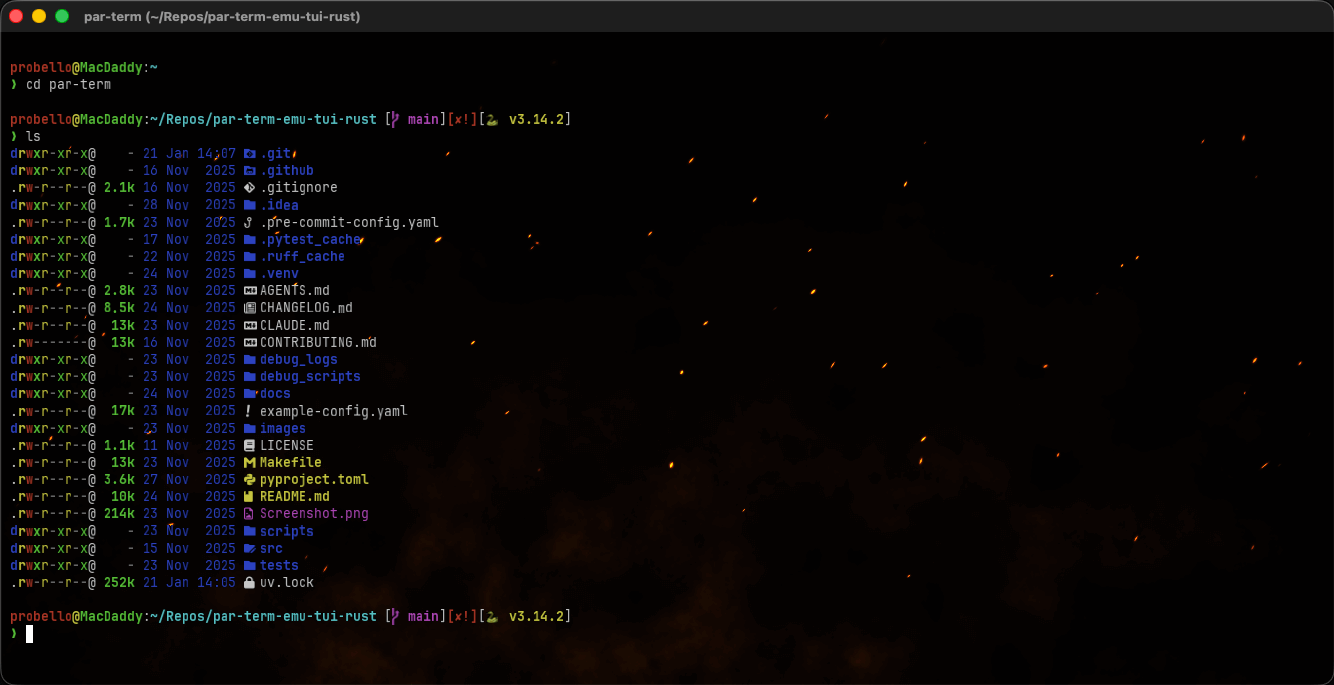
## What's New in 0.19.0
### ✨ New Features
- **Configurable Link Highlight Color**: Link highlight color for detected URLs and file paths is now configurable via `link_highlight_color` setting (default: bright cyan `#4FC3F7`), with a color picker in Settings > Terminal > Semantic History
- **Link Underline Rendering**: Detected URLs and file paths now render with visible underlines in the GPU text pipeline (previously the underline flag was set but never drawn)
- **Link Underline Toggle**: Added `link_highlight_underline` setting to enable/disable underlines on highlighted links (default: enabled)
- **Stipple Underline Style**: Added `link_underline_style` setting with Solid and Stipple (dotted) options — Stipple is the default, matching iTerm2's link underline aesthetic
- **Settings Search Auto-Focus**: The quick search input in the settings UI now receives focus automatically when the window opens, allowing immediate keyboard-driven filtering
### 🐛 Bug Fixes
- **Fast Window Shutdown**: Fixed slow app close (beachball on macOS) that scaled with number of open tabs — moved all blocking disk I/O (session save, command history, session loggers) to background threads, replaced long-sleeping status bar polling threads with 50ms interruptible loops, and signal pollers to stop at the start of shutdown so joins complete instantly
- **Settings Sidebar Icon**: Fixed Input tab (⌨️) showing an empty box due to trailing Unicode variation selector (U+FE0F) that egui cannot render
- **Miscellaneous Technical Symbol Rendering**: Fixed media control characters (⏺ ⏹ ⏸ ⏩ ⏪ etc., U+2300–U+23FF) rendering as colored emoji instead of monochrome symbols — extends the dingbat monochrome fix to cover the entire Miscellaneous Technical block
- **Crate Package Size**: Fixed crates.io publish failure by excluding non-essential files (shader textures, gallery images, macOS .icns, design docs) — reduced package from 24.7MiB to 3.9MiB
<details>
<summary><strong>What's New in 0.18.0</strong></summary>
### ✨ New Features
- **Quick Settings Shader Toggles**: BG Shader and Cursor Shader toggle checkboxes in the settings UI quick settings strip
- **Focus Event Forwarding**: Forward CSI focus-in/out sequences to PTYs with DECSET 1004 focus tracking enabled
### 🐛 Bug Fixes
- **Dingbat/Symbol Monochrome Rendering**: Fixed dingbat characters rendering as colorful emoji instead of monochrome symbols
- **Focus Click Clipboard Loss**: Suppress first mouse click that focuses the window to prevent clipboard clearing
- **Image Paste in Claude Code**: Fixed Cmd+V not forwarding to terminal when clipboard contains an image but no text
- **Settings Sidebar Icons**: Fixed empty box rendering for several tab icons
- **Shell Detection**: Improved `ShellType::detect()` with multi-strategy fallback
- **Settings Version Display**: Fixed settings UI displaying subcrate version instead of app version
- **Shell Integration Install/Uninstall**: Fixed Install and Uninstall buttons not working
### 🏗️ Architecture
- **Workspace Crate Extraction**: Extracted 8 modules into dedicated workspace subcrates for maintainability
</details>
<details>
<summary><strong>What's New in 0.17.1</strong></summary>
### 🔧 Bug Fixes & Dependency Updates
- **macOS Self-Update**: Auto-updater now removes macOS quarantine attributes (`xattr -cr`) from the downloaded `.app` bundle, preventing Gatekeeper from blocking the updated app on first launch
- **Dependency Updates**: Updated `clap`, `libc`, `uuid`, `arboard`, `regex`, `zip`, `mdns-sd`, `ureq`, and 27 transitive dependencies to latest versions
</details>
<details>
<summary><strong>What's New in 0.17.0</strong></summary>
### 🤖 Assistant Panel (AI Integration)
DevTools-style right-side panel for terminal state inspection and ACP agent integration.
- Toggle with `Cmd+I` (macOS) / `Ctrl+Shift+I` (other) or keybinding action
- 4 view modes (Cards, Timeline, Tree, List+Detail) for browsing command history
- ACP agent chat: connect to Claude Code and other ACP-compatible agents via JSON-RPC 2.0 over stdio
- 8 bundled agent configs: Claude Code, Amp, Augment, GitHub Copilot, Docker, Gemini CLI, OpenAI, OpenHands
- Agent command suggestions with Run (execute + notify) and Paste actions
- Auto-context feeding: sends command results to connected agent on completion
- Yolo mode: auto-approve all agent permission requests
- Resizable panel with drag handle; terminal reflows columns when panel opens/closes/resizes
### 🎨 Shader Assistant for ACP Agents
Context-triggered shader expertise for ACP agents.
- Auto-detects shader-related queries and active shader state
- Injects full shader reference into agent prompts (current state, available shaders, uniforms, GLSL template)
- Config file watcher for live-reloading agent-applied shader changes
### 📂 Workspace Crate Extraction
Major refactoring into modular workspace crates for maintainability.
- **par-term-fonts**: Font management and text shaping
- **par-term-terminal**: Terminal manager, scrollback, styled content
- **par-term-render**: GPU rendering engine, shaders, cell renderer
- **par-term-settings-ui**: Complete settings UI (28 tabs, sidebar, section helpers)
- All types re-exported from main crate for backward compatibility
### 📁 File Transfer UI
Native file dialogs and progress overlay for iTerm2 OSC 1337 file transfers.
- Native save dialog for downloads, file picker for uploads
- Real-time egui progress overlay with progress bars
- Desktop notifications for transfer lifecycle events
- Shell integration utilities: `pt-dl`, `pt-ul`, `pt-imgcat` for remote file operations
### 🐍 Scripting Manager
Python scripts that react to terminal events via the observer API.
- 12 event types (bell, cwd_changed, command_complete, etc.) and 9 command types
- Per-tab script lifecycle with auto-start and restart policies
- JSON protocol over stdin/stdout for bidirectional communication
- Markdown panels: scripts can register custom UI panels in Settings
### 🖼️ Per-Pane Background Images
Individual background images for each split pane with GPU texture caching.
- Per-pane image path, display mode (fit/fill/stretch/tile/center), and opacity
- Settings UI with pane index selector, file picker, mode dropdown, opacity slider
### 🌐 Dynamic Profiles from Remote URLs
Load team-shared profile definitions from remote URLs.
- Background auto-refresh with configurable timer and local cache
- Conflict resolution: Local Wins or Remote Wins
- Visual `[dynamic]` indicators; dynamic profiles are read-only
### 🔧 Other Changes
- **Duplicate Tab**: Right-click context menu option to duplicate any tab with same CWD and color
- **Auto Dark Mode**: Auto-switch terminal theme based on system light/dark appearance
- **Automatic Tab Style**: Tab bar style follows system theme with configurable light/dark mapping
- **macOS Target Space**: Open windows in a specific macOS Space (virtual desktop)
- **Configurable Link Handler**: Custom command for opening URLs instead of system default browser
- **Fast Window Shutdown**: Closing par-term is now visually instant instead of 8+ seconds
- **Shift+Tab Fix**: Now correctly sends CSI Z to terminal applications
</details>
<details>
<summary><strong>What's New in 0.16.0</strong></summary>
#### 🌐 SSH Host Management
Comprehensive SSH host profiles, quick connect, and auto-discovery.
- SSH Quick Connect dialog (`Cmd+Shift+S`) with search, keyboard navigation, grouped by source
- SSH config parser (`~/.ssh/config`), known hosts parser, shell history scanner
- mDNS/Bonjour SSH host discovery via `_ssh._tcp.local.` (opt-in)
- SSH-specific profile fields: host, user, port, identity file, extra args
- Automatic profile switching on SSH connection with auto-revert on disconnect
#### 📊 Status Bar
Configurable status bar with widget system and system monitoring.
- 10 built-in widgets: clock, username@hostname, current directory, git branch, CPU/memory usage, network status, bell indicator, current command, custom text
- Widget configurator in Settings UI with drag-and-drop reordering
- Auto-hide on fullscreen and/or mouse inactivity
#### 🔧 Other Changes
- **Profile Selection on New Tab**: Split `+`/`▾` button on tab bar for quick profile launch
- **Shell Selection Per Profile**: Configure specific shells per profile with platform-aware detection
- **Navigate to Settings from Application Menu**: Platform-aware settings access
- **Install Shell Integration on Remote Host**: Shell menu option with confirmation dialog
</details>
<details>
<summary><strong>What's New in 0.15.0</strong></summary>
#### 📂 Directory-Based Profile Switching
Automatically switch profiles based on current working directory.
- New `directory_patterns` field on profiles (glob patterns like `/Users/*/projects/work-*`)
- CWD changes detected via OSC 7 trigger profile matching
- Priority: explicit user selection > hostname match > directory match > default
- Settings UI for editing directory patterns per profile
#### 🎨 Tab Style Variants
Cosmetic tab bar presets with 5 built-in styles.
- Dark (default), Light, Compact, Minimal, and High Contrast presets
- Each preset applies coordinated color/size/spacing adjustments
- Config: `tab_style: dark|light|compact|minimal|high_contrast`
#### 🔊 Alert Sounds
Configurable sound effects for terminal events.
- Per-event sound configuration: Bell, Command Complete, New Tab, Tab Close
- Each event supports: enable/disable, volume, frequency, duration, custom sound file
- Custom sound files: WAV/OGG/FLAC format with `~` home directory expansion
- UI in Settings > Notifications > Alert Sounds
#### 🔍 Fuzzy Command History Search
Searchable overlay for browsing and selecting from command history.
- Fuzzy matching with ranked results via Skim algorithm
- Match highlighting, exit code indicators, and relative timestamps
- Keyboard navigation: Arrow Up/Down, Enter to insert, Esc to close
- History persisted across sessions; keybinding: Cmd+R (macOS), Ctrl+Alt+R (Linux/Windows)
#### ↩️ Session Undo — Reopen Closed Tabs
Recover accidentally closed tabs.
- Reopen with Cmd+Z (macOS) or Ctrl+Shift+Z (Linux/Windows)
- Toast notification shows undo keybinding hint and countdown
- Optional shell session preservation for full session restore with scrollback intact
- Configurable timeout and queue depth
#### 💾 Session Restore on Startup
Automatically save and restore session state.
- Saves open windows, tabs, pane layouts, and working directories on clean exit
- Restores full session on next launch including split pane trees with ratios
- Config: `restore_session: true` (default: false)
#### 📍 Tab Bar Position
Configurable tab bar placement with three positions.
- **Top** (default), **Bottom**, or **Left** (vertical sidebar)
- Configurable sidebar width for Left position (default 160px, range 100–300)
- All positions support tab bar visibility modes and live switching via Settings UI
#### 📥 Import/Export Preferences
Import and export terminal configuration.
- Export current config to a YAML file via native file dialog
- Import from local file or URL with replace or merge modes
- Merge mode only overrides values that differ from defaults
#### 🔧 Other Changes
- **Profile Emoji Picker**: Curated grid of ~70 terminal-relevant emojis in 9 categories for profile icons
- **Full Profile Auto-Switch Application**: Directory, hostname, and tmux session switching now apply all visual settings (icon, title, badge, command)
- **Profile Management in Settings**: Profile create/edit/delete/reorder UI moved inline to Settings > Profiles tab
- **Settings Quick Search**: Added missing search keywords across all settings tabs
- **HiDPI/DPI Scaling Fix**: All pixel-dimension config values now correctly scale on HiDPI displays
- **Text Shaper LRU Cache**: Upgraded from FIFO to proper LRU eviction for better cache hit rates
- **Default Update Check**: Changed from weekly to daily for faster update discovery
</details>
<details>
<summary><strong>What's New in 0.14.0</strong></summary>
#### 🔄 Self-Update
par-term can now update itself in-place — no package manager needed.
- **CLI**: `par-term self-update` with `--yes` flag for non-interactive use
- **Settings UI**: "Check Now" and "Install Update" buttons in Advanced > Updates
- Detects installation method (Homebrew, cargo, .app bundle, standalone binary) and shows appropriate instructions
#### ─── Command Separator Lines
Horizontal separator lines between shell commands in the terminal grid.
- Renders thin lines at prompt boundaries using shell integration (OSC 133) marks
- Exit-code coloring: green for success, red for failure, gray for unknown
- Configurable thickness, opacity, and custom fixed color
#### 🔀 Drag-and-Drop Tab Reordering
Reorder tabs by dragging them in the tab bar with ghost tab preview and insertion indicators.
#### 📐 Window Arrangements
Save and restore window layouts (iTerm2 parity) with monitor-aware positioning and auto-restore on startup.
#### 🔧 Other Changes
- **Variable Substitution in Config** (#102): Use `${VAR}` and `${VAR:-default}` in config.yaml values
- **Shell Integration Event Queuing**: OSC 133 markers now queue with cursor positions
- **Remember Settings Section States** (#105): Collapsible section states persist across sessions
</details>
<details>
<summary><strong>What's New in 0.13.0</strong></summary>
#### 📋 Vi-Style Copy Mode
Keyboard-driven text selection and navigation (iTerm2 parity).
- **Full vi motions**: `h/j/k/l`, `w/b/e`, `0/$`, `gg/G`, count prefixes, half/full page scrolling
- **Visual selection**: Character (`v`), Line (`V`), and Block (`Ctrl+V`) modes with yank to clipboard
- **Search**: `/pattern` forward, `?pattern` backward, `n/N` repeat (case-insensitive, wrapping)
- **Marks**: `m{a-z}` set, `'{a-z}` jump — persistent per-tab bookmarks through scrollback
- **Status bar**: Mode indicator (COPY/VISUAL/V-LINE/V-BLOCK/SEARCH) and cursor position
- **Settings**: Enable/disable, auto-exit on yank, status bar visibility (Settings > Input > Copy Mode)
#### 📝 Snippets & Actions Completion
- **Custom Variables UI**: Collapsible per-snippet variable editor (name/value grid)
- **Key Sequence Simulation**: `KeySequence` actions send terminal byte sequences (Ctrl combos, arrow keys, F-keys)
- **Import/Export**: Export/import snippets as YAML with duplicate detection and keybinding conflict resolution
#### 🔤 Unicode Normalization
Configurable normalization form (NFC/NFD/NFKC/NFKD/None) in Settings > Terminal > Unicode. Live-updates across all tabs.
#### 🔧 Fixed
- Color emoji rendering (Apple Color Emoji now renders as colored bitmaps instead of monochrome outlines)
- Tmux pane resize via mouse drag (drag events now forwarded when mouse tracking enabled)
- Text baseline alignment (eliminated per-glyph rounding artifacts)
- File/URL link highlighting offset with multi-byte UTF-8 characters
- Absolute file path detection in link highlighting regex
</details>
<details>
<summary><strong>What's New in 0.12.0</strong></summary>
#### 📝 Snippets & Actions System
Text automation and custom actions (iTerm2 parity).
- **Text Snippets**: Save text blocks with variable substitution (`\(variable)` syntax), 10 built-in + 12 session variables
- **Custom Actions**: Shell commands, text insertion, and keyboard shortcuts triggered via keybindings
- **Settings UI**: Two new tabs — Snippets (📝) and Actions (🚀) — with keybinding recording and conflict detection
- **Auto-Execute**: Optional checkbox to run commands immediately when keybinding is pressed
#### 📊 Progress Bar Rendering
Overlay progress bars via OSC 9;4 and OSC 934 protocols.
- Configurable style (bar or bar-with-text), position, height, opacity, and per-state colors
- Named concurrent progress bars stack vertically
- New `iProgress` shader uniform for progress-reactive shader effects
#### 📋 Paste Enhancements
- **Paste Delay**: Configurable delay between pasted lines (`paste_delay_ms`, 0-500ms)
- **Newline Control**: Three new Paste Special transforms — Single Line, Add Newlines, Remove Newlines
#### 🖥️ Shell Integration Enhancements
- **Command in Title**: Window title shows `[command_name]` during execution
- **Badge Variables**: `\(session.exit_code)` and `\(session.current_command)`
- **Remote Host**: OSC 1337 RemoteHost syncs hostname and username to badge variables
#### 🖼️ Image & Pane Improvements
- **Image Scaling**: Choose `nearest` or `linear` filtering for inline images
- **Aspect Ratio Control**: Toggle aspect ratio preservation for inline images
- **Pane Titles**: GPU-rendered title bars for split panes
- **Divider Styles**: Four visual styles — Solid, Double, Dashed, Shadow
#### ⌨️ Cross-Platform Keybindings
Redesigned Linux/Windows defaults to avoid conflicts with terminal control codes (Ctrl+C, Ctrl+V, etc.). macOS unchanged.
#### 🔧 Fixed
- Dingbat/symbol rendering as colored emoji instead of monochrome glyphs
- Pane focus indicator, background opacity, divider hover, and divider width settings (#88)
- Platform-specific keybinding labels in snippet rows
</details>
<details>
<summary><strong>What's New in 0.11.0</strong></summary>
#### ⚡ Triggers, Trigger Actions & Coprocesses
Full automation system for terminal output processing with regex triggers, 7 action types, coprocesses, and scrollbar marks.
#### ♿ Minimum Contrast Enforcement
WCAG-based accessibility — auto-adjusts text color when contrast ratio is too low.
#### 📂 Semantic History
Ctrl+click file paths in terminal output to open them in your editor.
#### 🔧 Configurable Log Level
Runtime log level control via `log_level` config or `--log-level` CLI flag.
</details>
<details>
<summary><strong>What's New in 0.10.0</strong></summary>
#### 🏷️ Per-Profile Badge Configuration
Full badge customization per profile (iTerm2 parity). Profiles can now override badge color, opacity, font, position, and size constraints individually.
#### ⚡ Performance: Maximize Throughput Mode
Manual toggle for prioritizing bulk output processing over immediate responsiveness. Toggle with `Cmd+Shift+T` (macOS) or `Ctrl+Shift+T` (other platforms).
#### 🖥️ Reduce Flicker
iTerm2-style flicker reduction for smoother terminal updates. Delays redraws while cursor is hidden (DECTCEM off).
#### 🎮 GPU Power Preference
Control which GPU is used for rendering on multi-GPU systems: `none`, `low_power`, or `high_performance`.
#### 🔄 Tmux Profile Auto-Switching
Automatically apply profiles when connecting to tmux sessions via `tmux_session_patterns` glob patterns.
#### ⌨️ Enhanced Keyboard Input
Modifier key remapping, physical key bindings, and modifyOtherKeys protocol support.
#### 🛡️ Close Confirmation for Running Jobs
Confirmation dialog when closing tabs/panes with active processes.
#### 🔧 Shell Exit Action
Configurable behavior when shell exits: `close`, `keep`, `restart_immediately`, `restart_with_prompt`, or `restart_after_delay`.
</details>
<details>
<summary><strong>What's New in 0.9.0</strong></summary>
#### 📋 Welcome Dialog Changelog Link
The welcome/onboarding popup now includes a "View Changelog" link for easy access to release notes.
#### 📁 Configurable Startup Directory
Control where new terminal sessions start with three modes: `home`, `previous`, or `custom`.
#### 🏷️ Badge System
iTerm2-style semi-transparent text overlays with 12 dynamic variables and full appearance customization.
#### 📊 Scrollbar Mark Tooltips
Hover over scrollbar command markers to see command text, execution time, duration, and exit code.
#### 🎨 Tab Bar Enhancements
- Tab stretch to fill bar width (`tab_stretch_to_fill`)
- HTML markup support in tab titles
</details>
<details>
<summary><strong>What's New in 0.7.0</strong></summary>
#### 🔌 Integrations Install System
Unified installation for optional par-term enhancements.
- **Shell Integration**: Scripts for bash/zsh/fish enabling prompt navigation, CWD tracking, and command status
- Install via CLI: `par-term install-shell-integration`
- Install via curl: `curl -fsSL https://paulrobello.github.io/par-term/install-shell-integration.sh | bash`
- **Shader Bundle with Manifest**: Tracks bundled vs user-created files using SHA256 hashes
- **Welcome Dialog**: First-run prompt offering to install both integrations
- **Settings UI Tab**: New "Integrations" tab (🔌) for managing installations
#### 👤 Profile System
iTerm2-style profiles for saved terminal configurations.
- **Profile Manager**: Create, edit, delete, and reorder named profiles
- **Profile Drawer**: Collapsible right-side panel for quick profile access
- **Profile Settings**: Name, emoji icon, working directory, custom command, tab name override
- **Persistence**: Profiles saved to `~/.config/par-term/profiles.yaml`
#### 📹 Session Logging & Recording
Automatic session logging to record terminal output.
- **Multiple Formats**: Plain text, HTML (with colors), Asciicast (asciinema-compatible)
- **Hotkey Toggle**: `Cmd/Ctrl+Shift+R` to start/stop session recording on demand
- **CLI Option**: `--log-session` flag to enable logging at startup
#### 🔳 tmux Integration Enhancements
- **Native Status Bar**: Session name, window list, and time display at terminal bottom
- **Bidirectional Pane Resize**: Resizing in par-term updates external tmux clients
- **Auto-Close Exited Panes**: Panes close when their shell process exits
#### 🔍 Terminal Search
Search through scrollback buffer with `Cmd/Ctrl+F`.
- Match highlighting with navigation (Enter/Shift+Enter)
- Search options: case sensitive, regex mode, whole word
- Proper Unicode support for multi-byte characters
#### 📋 Paste Special
Transform clipboard content before pasting with `Cmd/Ctrl+Shift+V`.
- 28 text transformations across shell escaping, case conversion, whitespace, and encoding
- Live preview with keyboard navigation
- Integration with clipboard history via `Shift+Enter`
#### ⌨️ Option Key as Meta/Esc
Essential feature for emacs/vim users.
- Configure left and right Option/Alt key behavior independently
- Three modes: Normal (special characters), Meta (high bit), Esc (ESC prefix)
</details>
<details>
<summary><strong>What's New in 0.6.0</strong></summary>
#### 🖼️ Shader Gallery
- **[Browse the Gallery](https://paulrobello.github.io/par-term/)**: See all shaders before installing
- **Auto-Updated**: Gallery automatically deploys when shaders are added or modified
#### ⌨️ Configurable Keybindings
- **Custom Bindings**: Edit `~/.config/par-term/keybindings.yaml`
- **Modifier Support**: Ctrl, Alt, Shift, Super in any combination
#### 🖥️ CLI Enhancements
- **`--screenshot <path>`**: Capture terminal to image file
- **`--shader <name>`**: Override background shader on launch
- **`--exit-after <seconds>`**: Auto-exit after duration
- **`--command <cmd>`**: Run specific command instead of default shell
</details>
<details>
<summary><strong>What's New in 0.5.0</strong></summary>
#### 🪟 Standalone Settings Window
- `F12` or `Cmd+,` (macOS) / `Ctrl+,` (Linux/Windows) to open
- Settings window stays visible when terminal gains focus
#### 🎨 Per-Shader Configuration System
- Shader metadata in GLSL files, per-shader overrides, global fallback
- Shader hot reload with desktop notifications
#### 🔤 Enhanced Unicode Rendering
- Grapheme clusters (flag emoji, ZWJ sequences, skin tones)
- Geometric box drawing and block elements
#### 🗂️ Tab Bar Enhancements
- 11 color options, per-tab colors, equal-width layout
#### 🔒 Window Transparency
- macOS blur, proper alpha handling, keep_text_opaque option
#### 🎮 Shader System
- Cubemap support, iTimeKeyPress, 9 new shaders
#### 🔋 Power Saving
- pause_shaders_on_blur, pause_refresh_on_blur, unfocused_fps
</details>
<details>
<summary><strong>What's New in 0.4.0</strong></summary>
### Multi-Tab Support
- `Cmd/Ctrl+T` new tab, `Cmd/Ctrl+W` close tab
- `Cmd/Ctrl+Shift+[/]` or `Ctrl+Tab` to switch tabs
- `Cmd/Ctrl+1-9` direct tab access
- Tab bar with close buttons, activity indicators, bell icons
### Multi-Window Support
- `Cmd/Ctrl+N` new window with independent PTY session
- Each window has its own tabs, scrollback, and state
### Native Menu Bar
- Cross-platform menus via [muda](https://github.com/tauri-apps/muda)
- Full keyboard accelerators for all menu items
### Custom Shader Enhancements
- Shadertoy-compatible iChannel1-4 texture support
- `custom_shader_brightness` for better text readability
- `cursor_shader_hides_cursor` for shader-controlled cursors
</details>
<details>
<summary><strong>What's New in 0.3.0</strong></summary>
### Ghostty-Compatible Cursor Shaders
- `iCurrentCursor`, `iPreviousCursor`, `iCurrentCursorColor`, `iTimeCursorChange` uniforms
- Built-in cursor shaders: sweep, warp, glow, blaze, trail, ripple, boom
- Geometric cursor rendering for all styles
### Fixes
- Login shell initialization and environment loading
</details>
<details>
<summary><strong>What's New in 0.2.0</strong></summary>
### Power Efficiency
- Event-driven rendering with `ControlFlow::Wait`
- Smart redraws only when content changes
### Stability
- Fixed dropped input during heavy rendering
- `parking_lot` mutex migration
- Graceful audio fallback
</details>
## Features
### Core Terminal Frontend
- **Cross-platform Support**: Native performance on macOS (Metal), Linux (Vulkan/X11/Wayland), and Windows (DirectX 12).
- **Multi-Window & Multi-Tab**: Multiple windows with independent tab sessions per window.
- **GPU-Accelerated Rendering**: Powered by `wgpu` with custom glyph atlas for blazing-fast text rasterization.
- **Inline Graphics**: Full support for Sixel, iTerm2, and Kitty graphics protocols.
- **Real PTY Integration**: Full pseudo-terminal support for interactive shell sessions.
- **Advanced Sequence Support**: VT100/VT220/VT320/VT420/VT520 compatibility via `par-term-emu-core-rust`.
- **Intelligent Reflow**: Full content reflow on window resize, preserving scrollback and visible state.
### Modern UI & Visuals
- **Custom GLSL Shaders**: 49+ included shaders with hot reload, per-shader config, and cubemap support.
- **Background Images**: Support for PNG/JPEG backgrounds with configurable opacity and scaling modes.
- **Window Transparency**: True per-pixel alpha with macOS blur support and text clarity options.
- **Visual Bell**: Flash-based alerts for terminal bell events.
- **Dynamic Themes**: Support for iTerm2-style color schemes (Dracula, Monokai, Solarized, etc.).
- **Standalone Settings**: Dedicated settings window (F12) for live configuration editing.
### Typography & Fonts
- **Styled Font Variants**: Explicit support for separate Bold, Italic, and Bold-Italic font families.
- **Unicode Range Mapping**: Assign specific fonts to Unicode ranges (perfect for CJK, Emoji, or Symbols).
- **Text Shaping**: HarfBuzz-powered shaping for ligatures, complex scripts, and emoji sequences.
- **Grapheme Clusters**: Proper rendering of flag emoji, ZWJ sequences, skin tone modifiers.
- **Box Drawing**: Geometric rendering for pixel-perfect TUI borders and block characters.
- **Smart Fallback**: Automatic system font discovery and fallback chain.
### Selection & Clipboard
- **Advanced Selection**: Block/Rectangular, Line-based, and Word-based selection modes.
- **Multi-platform Clipboard**: Seamless integration with system clipboards via `arboard`.
- **Middle-click Paste**: Standard Unix-style middle-click paste support.
- **Automatic Copy**: Optional "copy on select" behavior.
### Hyperlinks & URL Detection
- **OSC 8 Support**: Native support for application-provided hyperlinks.
- **Regex Detection**: Automatic detection of URLs in terminal output.
- **Interactive Links**: Ctrl+Click to open links in your default browser, with hover highlighting and tooltips.
## Documentation
### Getting Started
- **[Quick Start Guide](QUICK_START_FONTS.md)** - Get up and running with custom fonts.
- **[Examples](examples/README.md)** - Comprehensive configuration examples.
### Features
- **[Keyboard Shortcuts](docs/KEYBOARD_SHORTCUTS.md)** - Complete keyboard shortcut reference.
- **[Mouse Features](docs/MOUSE_FEATURES.md)** - Text selection, URL handling, and pane interaction.
- **[Semantic History](docs/SEMANTIC_HISTORY.md)** - Click file paths to open in your editor.
- **[Automation](docs/AUTOMATION.md)** - Regex triggers, actions, and coprocesses.
- **[Profiles](docs/PROFILES.md)** - Profile system for saving terminal configurations.
- **[Session Logging](docs/SESSION_LOGGING.md)** - Recording sessions in Plain/HTML/Asciicast formats.
- **[Search](docs/SEARCH.md)** - Terminal search with regex, case-sensitive, and whole-word modes.
- **[Paste Special](docs/PASTE_SPECIAL.md)** - 28 clipboard transformations for pasting.
- **[Copy Mode](docs/COPY_MODE.md)** - Vi-style keyboard-driven text selection and navigation.
- **[Snippets & Actions](docs/SNIPPETS.md)** - Text snippets with variables, custom actions, and keybinding management.
- **[Progress Bars](docs/PROGRESS_BARS.md)** - OSC 9;4 and OSC 934 progress bar rendering and shader integration.
- **[Accessibility](docs/ACCESSIBILITY.md)** - Minimum contrast enforcement and display options.
- **[Integrations](docs/INTEGRATIONS.md)** - Shell integration and shader installation system.
- **[Window Management](docs/WINDOW_MANAGEMENT.md)** - Window types, multi-monitor, and transparency.
- **[Window Arrangements](docs/ARRANGEMENTS.md)** - Save and restore window layouts with auto-restore.
- **[Command Separators](docs/COMMAND_SEPARATORS.md)** - Horizontal lines between shell commands with exit-code coloring.
- **[SSH Host Management](docs/SSH.md)** - SSH quick connect, host discovery, and SSH profiles.
- **[Status Bar](docs/STATUS_BAR.md)** - Configurable status bar with widgets and system monitoring.
- **[Tabs](docs/TABS.md)** - Tab management, duplicate tab, and tab behavior.
- **[Assistant Panel](docs/ASSISTANT_PANEL.md)** - AI agent integration with terminal state inspection.
- **[File Transfers](docs/FILE_TRANSFERS.md)** - OSC 1337 file transfers with shell utilities.
- **[Self-Update](docs/SELF_UPDATE.md)** - In-place update capability via CLI and Settings UI.
- **[Debug Logging](docs/LOGGING.md)** - Configurable log levels and troubleshooting.
### Shaders
- **[Shader Gallery](https://paulrobello.github.io/par-term/)** - Visual gallery of 49+ included shaders with screenshots.
- **[Shader Reference](docs/SHADERS.md)** - Complete list of bundled shaders.
- **[Custom Shaders Guide](docs/CUSTOM_SHADERS.md)** - Create custom GLSL shaders with hot reload and per-shader config.
- **[Compositor Details](docs/COMPOSITOR.md)** - Deep dive into the rendering architecture.
### Technical
- **[Architecture Overview](docs/ARCHITECTURE.md)** - High-level system architecture and components.
- **[Core Library](https://github.com/paulrobello/par-term-emu-core-rust)** - Documentation for the underlying terminal engine.
## Installation
### Homebrew (macOS)
```bash
brew install --cask paulrobello/tap/par-term
```
### From Source
Requires Rust 1.85+ (2024 edition) and modern graphics drivers:
```bash
# Clone the repository
git clone https://github.com/paulrobello/par-term
cd par-term
# Build and run (debug)
cargo run
# Build optimized release version
cargo build --release
./target/release/par-term
```
### macOS Bundle
To create a native macOS `.app` bundle with a dock icon:
```bash
make bundle
make run-bundle
```
### Linux Dependencies
On Linux (Ubuntu/Debian), you need GTK3 and X11/Wayland libraries:
```bash
sudo apt install libgtk-3-dev libxkbcommon-dev libwayland-dev libxcb-render0-dev libxcb-shape0-dev libxcb-xfixes0-dev libasound2-dev
```
### macOS Gatekeeper Notice
If macOS reports that par-term "is damaged and can't be opened", this is caused by the Gatekeeper quarantine attribute applied to unsigned binaries. Remove it with:
```bash
# For the release binary
xattr -cr target/release/par-term
# For the .app bundle
xattr -cr /Applications/par-term.app
```
> **Note:** The Homebrew cask install (`brew install --cask paulrobello/tap/par-term`) handles this automatically.
## Installing Shaders
par-term includes 49+ custom GLSL shaders for background effects and cursor animations. These need to be installed to your config directory.
### Built-in Installer (Recommended)
Use the built-in CLI command to download and install all shaders from the latest release:
```bash
# Install shaders (with confirmation prompt)
par-term install-shaders
# Install without prompts
par-term install-shaders -y
# Force overwrite existing shaders
par-term install-shaders --force
```
### Shell Script
Alternatively, use the shell script installer:
```bash
# Download and run the installer
curl -sL https://raw.githubusercontent.com/paulrobello/par-term/main/install_shaders.sh | sh
```
Or download and run manually:
```bash
curl -O https://raw.githubusercontent.com/paulrobello/par-term/main/install_shaders.sh
chmod +x install_shaders.sh
./install_shaders.sh
```
### Manual Install
1. Download `shaders.zip` from the [latest release](https://github.com/paulrobello/par-term/releases/latest)
2. Extract to your config directory:
- **macOS/Linux**: `~/.config/par-term/shaders/`
- **Windows**: `%APPDATA%\par-term\shaders\`
### From Source
If building from source, copy the shaders folder manually:
```bash
# macOS/Linux
cp -r shaders ~/.config/par-term/
# Windows (PowerShell)
Copy-Item -Recurse shaders $env:APPDATA\par-term\
```
### Using Shaders
Once installed, enable shaders in your `config.yaml`:
```yaml
# Background shader
custom_shader: "starfield.glsl"
custom_shader_enabled: true
# Cursor shader
cursor_shader: "cursor_glow.glsl"
cursor_shader_enabled: true
```
See the [Shader Gallery](docs/SHADERS.md) for previews of all included shaders.
## Keyboard Shortcuts
### Window & Tab Management
| `Cmd/Ctrl + N` | New window |
| `Cmd/Ctrl + T` | New tab |
| `Cmd/Ctrl + W` | Close tab (or window if single tab) |
| `Cmd/Ctrl + Q` | Quit (Windows/Linux) |
| `Cmd/Ctrl + Shift + ]` | Next tab |
| `Cmd/Ctrl + Shift + [` | Previous tab |
| `Ctrl + Tab` | Next tab (alternative) |
| `Ctrl + Shift + Tab` | Previous tab (alternative) |
| `Cmd/Ctrl + 1-9` | Switch to tab 1-9 |
| `Cmd/Ctrl + Shift + Left` | Move tab left |
| `Cmd/Ctrl + Shift + Right` | Move tab right |
### Navigation & Editing
| `PageUp` / `PageDown` | Scroll up/down one page |
| `Shift + Home` | Jump to top of scrollback |
| `Shift + End` | Jump to bottom (current) |
| `Cmd/Ctrl + C` | Copy selection |
| `Cmd/Ctrl + V` | Paste from clipboard |
| `Cmd/Ctrl + Shift + K` | Clear scrollback buffer |
| `Cmd/Ctrl + Shift + H` | Clipboard history |
| `Ctrl + L` | Clear visible screen |
| `Cmd/Ctrl + +/-/0` | Adjust font size / Reset |
| `Ctrl + Shift + S` | Take screenshot |
### UI Toggles
| `F1` | Toggle Help panel |
| `F3` | Toggle FPS overlay |
| `F5` | Reload configuration |
| `F11` | Toggle fullscreen |
| `F12` | Open Settings window |
| `Cmd + ,` / `Ctrl + ,` | Open Settings window (alternative) |
## Configuration
Configuration is stored in YAML format:
- **Unix**: `~/.config/par-term/config.yaml`
- **Windows**: `%APPDATA%\par-term\config.yaml`
```yaml
cols: 80
rows: 24
font_size: 13.0
font_family: "JetBrains Mono"
theme: "dark-background"
window_opacity: 0.95
scrollbar_position: "right"
# Tab bar settings
tab_bar_mode: "when_multiple" # always, when_multiple, never
tab_bar_height: 28.0
tab_show_close_button: true
tab_inherit_cwd: true
dim_inactive_tabs: true
inactive_tab_opacity: 0.6
# Transparency settings
keep_text_opaque: true
transparency_affects_only_default_background: true
blur_radius: 8 # macOS only
# Power saving
pause_shaders_on_blur: true
unfocused_fps: 30
# Cursor lock options (prevent apps from overriding)
lock_cursor_visibility: false
lock_cursor_style: false
lock_cursor_blink: false
# Custom shader settings
custom_shader: "starfield.glsl"
custom_shader_enabled: true
shader_hot_reload: true # Auto-reload on file changes
# Per-shader overrides (optional)
shader_configs:
starfield.glsl:
animation_speed: 0.8
brightness: 0.3
```
See `examples/config-complete.yaml` for a full list of options.
## Technology
- **Terminal Engine**: [par-term-emu-core-rust](https://github.com/paulrobello/par-term-emu-core-rust)
- **Graphics**: `wgpu` (WebGPU for Rust)
- **Text**: `swash` + `rustybuzz` (custom glyph atlas)
- **UI**: `egui` for settings and overlays
- **Windowing**: `winit`
- **Async**: `tokio`
## Contributing
Contributions are welcome! Please ensure you run `make checkall` before submitting any pull requests.
```bash
make fmt # Format code
make lint # Run clippy
make test # Run test suite
make checkall # Run all of the above
```
## License
This project is licensed under the MIT License - see the [LICENSE](LICENSE) file for details.
## Author
Paul Robello - probello@gmail.com
## Links
- **GitHub**: [https://github.com/paulrobello/par-term](https://github.com/paulrobello/par-term)
- **Core Library**: [https://github.com/paulrobello/par-term-emu-core-rust](https://github.com/paulrobello/par-term-emu-core-rust)
