# Introduction
**oxo-call** is an AI-powered command orchestration tool for bioinformatics. Instead of memorizing hundreds of flags across dozens of tools, you describe what you want to accomplish — and oxo-call translates that into a grounded command you can preview, explain, audit, and reproduce.
```bash
# You write:
oxo-call dry-run samtools "sort input.bam by coordinate using 4 threads"
# oxo-call generates:
samtools sort -@ 4 -o sorted.bam input.bam
```
This is not a simple LLM chat. oxo-call fetches the tool's actual `--help` output, injects curated expert knowledge (called a *skill*), and only then asks the LLM — making command generation substantially easier to trust in real research and engineering settings.
---
## How It Works
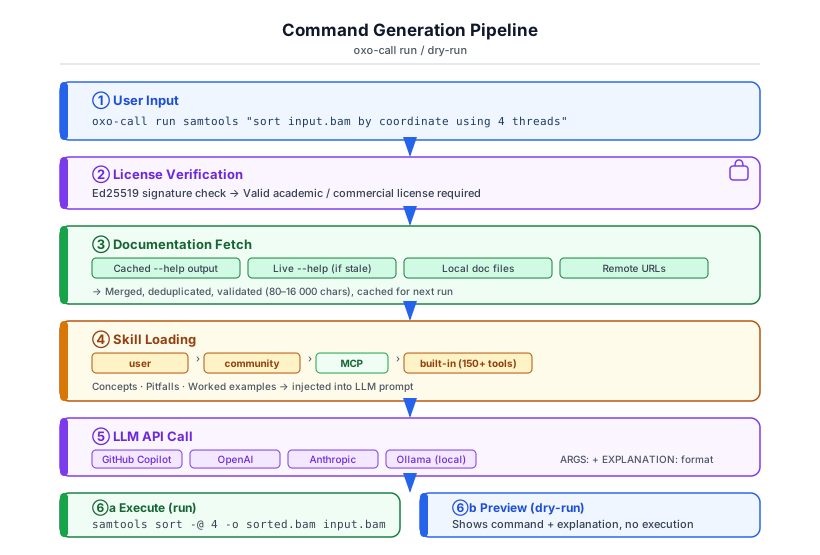
The docs answer *"what flags exist?"* The skill answers *"which flags should I use, and what mistakes should I avoid?"* Together, they produce commands that are both syntactically correct and semantically appropriate.
---
## Core Capabilities
| **159 built-in skills** | Start from domain-aware guidance for samtools, STAR, BWA, GATK, bcftools, fastp, and 150+ more tools |
| **Auto documentation** | Reuse real `--help` text automatically instead of hunting through man pages before every task |
| **Dry-run mode** | Inspect commands safely before they touch data or consume compute time |
| **Workflow engine** | Move from one-off commands to reusable DAG pipelines with Snakemake/Nextflow export |
| **History with provenance** | Keep auditable records of the generated command, tool version, model, and docs context |
| **Local LLM support** | Run with Ollama when data governance, offline work, or latency matter |
| **Job library** | Turn recurring commands into named, schedulable assets with history and LLM-assisted generation |
---
## Why It Feels Easier To Use
- **Plain-language in, exact flags out** — describe the biology or data task instead of remembering syntax
- **Preview before execution** — use `dry-run` to learn and verify before spending cluster time
- **Explanations included** — generated commands come with reasoning, which helps onboarding and review
- **Consistent from laptop to cluster** — the same interface works for local tools, remote docs, workflows, and HPC targets
- **Evidence-backed** — the docs-first + skill-first design is benchmarked at scale, not just marketed as a prompt trick
---
## Who Is This For?
**Bioinformaticians** working with many CLI tools daily — oxo-call handles flag lookup so you can focus on biology, not man pages.
**Researchers** who need reproducible pipelines — every generated command is logged with the documentation and model that produced it.
**Core facility staff** supporting multiple assay types — a single tool covers NGS, single-cell, metagenomics, and more.
**Students** learning bioinformatics for the first time — describe tasks in plain language and learn by reading the generated explanations.
---
## How to Use This Guide
This documentation is organized to get you productive quickly and still support deep technical inspection when you need it:
### If you are new to oxo-call
Start with **Getting Started**:
1. [Installation](./tutorials/installation.md) — install the binary
2. [License Setup](./tutorials/license.md) — get your free academic license
3. [Configuration](./tutorials/configuration.md) — connect your LLM
4. [Your First Command](./tutorials/first-command.md) — run something real in 10 minutes
### If you want hands-on practice
Work through the **Tutorials** in order:
- [SAM/BAM Processing](./tutorials/bam-workflow.md) — complete BAM pipeline
- [RNA-seq Walkthrough](./tutorials/rnaseq-walkthrough.md) — end-to-end analysis
- [Workflow Builder](./tutorials/workflow-builder.md) — automate multi-sample runs
### If you need to accomplish a specific task
Jump to **How-to Guides**:
- [Add docs for a new tool](./how-to/add-tool-docs.md)
- [Switch LLM provider](./how-to/change-llm-provider.md)
- [Create a custom skill](./how-to/create-custom-skill.md)
- [Build a production pipeline](./how-to/build-pipeline.md)
### If you need the full details
See **Command Reference** and **Architecture & Design** for complete specifications.
---
## Quick Example
Here is what a five-minute oxo-call session looks like:
```bash
# 1. Install
cargo install oxo-call
# 2. Set up (license + LLM token assumed)
export OXO_CALL_LICENSE=~/.config/oxo-call/license.oxo.json
oxo-call config set llm.api_token ghp_...
# 3. Enable shell completion (optional but recommended)
oxo-call completion bash > ~/.local/share/bash-completion/completions/oxo-call
# See: https://traitome.github.io/oxo-call/documentation/commands/completion/
# 4. Preview a command
oxo-call dry-run samtools "sort input.bam by coordinate and output to sorted.bam"
# → samtools sort -o sorted.bam input.bam
# 5. Execute it
oxo-call run samtools "sort input.bam by coordinate and output to sorted.bam"
# 6. Review what ran
oxo-call history list
```
Ready to begin? → [Installation](./tutorials/installation.md)
---
## Join the Community
oxo-call is a **user-driven, feedback-driven project**. Every bug report, feature request, and real-world use case you share directly influences what gets built next.
We actively welcome early adopters and testers — from students running their first RNA-seq pipeline to seasoned bioinformaticians automating complex workflows.
| 🐛 Report a bug | [Bug report](https://github.com/Traitome/oxo-call/issues/new?template=bug_report.md) |
| 💡 Request a feature | [Feature request](https://github.com/Traitome/oxo-call/issues/new?template=feature_request.md) |
| 🎯 Request a skill for a new tool | [Skill request](https://github.com/Traitome/oxo-call/issues/new?template=skill_request.md) |
| 🤝 Contribute code or skills | [Contributing guide](./development/contributing.md) |
> **Try it, break it, and tell us what happened.** Even a one-line comment on what went wrong — or right — helps us improve the tool for the whole community.