# OpenKoi
[](https://github.com/openkoi-ai/openkoi/actions/workflows/ci.yml)
[](https://crates.io/crates/openkoi)
[](https://crates.io/crates/openkoi)
[](https://github.com/openkoi-ai/openkoi/releases)
[](LICENSE)
[](https://openkoi.ai)
A self-iterating AI agent system. Single binary, local-first, model-agnostic.
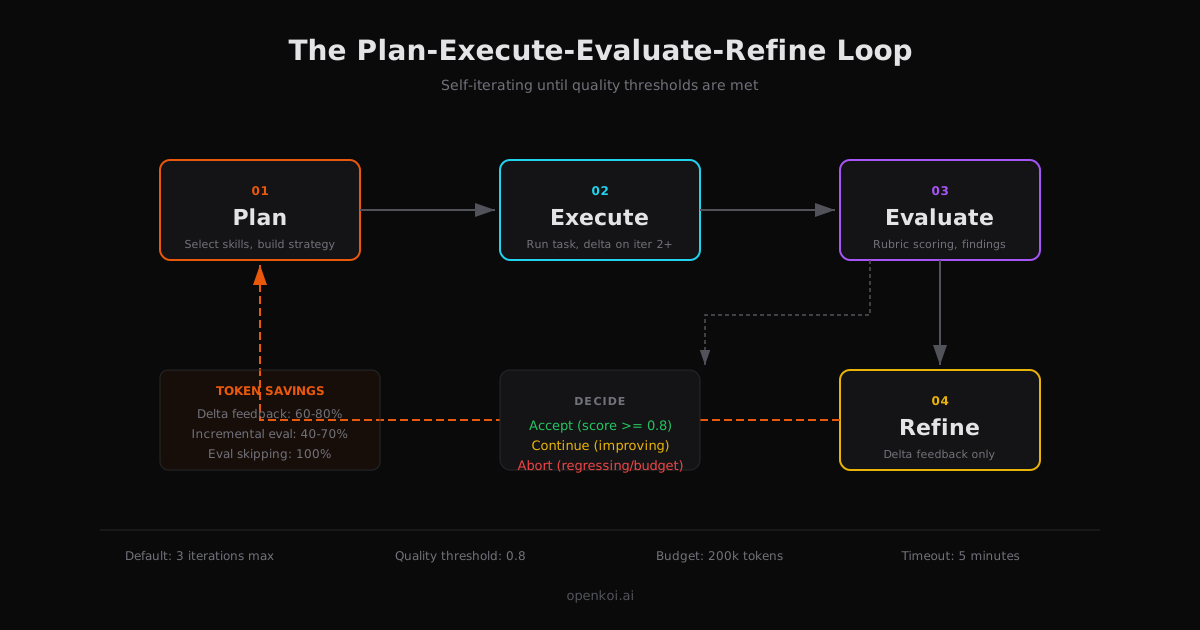
OpenKoi follows a **Plan-Execute-Evaluate-Refine** cycle — iterating on its own output until results meet your quality standards. It ships as a single static binary with zero runtime dependencies.
## Quick Start
```bash
# Install via Cargo
cargo install openkoi
# Or use the shell installer
```bash
openkoi "Refactor the auth module to use JWT tokens"
```
OpenKoi detects your API keys from the environment, picks the best available model, and starts working. No config file needed.
## Features
- **Self-iteration** — Plan, execute, evaluate, refine. The agent is its own reviewer.
- **8+ providers** — Anthropic, OpenAI, Google, Ollama, AWS Bedrock, Groq, DeepSeek, Moonshot/Kimi, and any OpenAI-compatible endpoint.
- **Dynamic model discovery** — Probes provider APIs for available models, caches results locally. Fuzzy validation with "did you mean?" suggestions for typos.
- **Role-based models** — Assign different models to executor, evaluator, planner, and embedder roles. Auto-resolves a small/fast model for cost-sensitive internal tasks.
- **Automatic retry** — Rate limits, server errors, and timeouts are retried with exponential backoff and jitter. Context overflow is detected and handled separately.
- **Real-time progress** — Structured progress output on stderr showing plan, iterations, scores, tool calls, and costs. Suppress with `--quiet`.
- **Live task monitoring** — `openkoi status --live` polls the running task every second with a progress bar, score, cost, and recent history.
- **Task state persistence** — Current task state written to `~/.openkoi/state/current-task.json`; completed tasks appended to `task-history.jsonl` with auto-rotation.
- **HTTP API** — Localhost REST API (port 9742) for submitting tasks, querying status, and reading cost data. Optional Bearer token auth.
- **Webhooks** — Fire HTTP callbacks on `task.complete`, `task.failed`, and `budget.warning` events.
- **Smart truncation** — Tool outputs exceeding 2000 lines or 50KB are truncated with the full output saved to `~/.openkoi/tool-output/`.
- **Context overflow handling** — Detects overflow errors from all major providers and prunes context instead of failing.
- **Persistent memory** — SQLite + vector search. Learnings persist across sessions.
- **Pattern mining** — Observes your usage, proposes new skills to automate recurring workflows.
- **Skill system** — OpenClaw-compatible `.SKILL.md` format. Write once, use with any provider.
- **Rich messaging** — Slack, Discord, and Telegram integrations send structured task results with fields, colors, and thread support.
- **3-tier plugins** — MCP (external tools), WASM (sandboxed), Rhai (scripting).
- **10 integrations** — Slack, Discord, MS Teams, GitHub, Jira, Linear, Notion, Google Docs, Telegram, Email.
- **TUI dashboard** — Real-time view of tasks, costs, learnings, plugins, and config.
- **Soul system** — Optional personality that evolves with your interaction patterns.
## CLI
```bash
openkoi "task" # Run a task (default 3 iterations)
openkoi chat # Interactive REPL
openkoi learn # Review proposed skills (interactive picker)
openkoi status # Show costs, memory, active models
openkoi status --live # Watch the running task in real-time
openkoi status --costs # Show cost tracking summary
openkoi doctor # Run diagnostics
openkoi connect # Interactive picker: choose provider or integration
openkoi connect copilot # Login to GitHub Copilot (direct)
openkoi connect chatgpt # Login to ChatGPT Plus/Pro (direct)
openkoi disconnect # Interactive picker: choose from connected providers
openkoi disconnect copilot # Remove stored credentials (direct)
openkoi daemon # Interactive picker: start/stop/status
openkoi export # Interactive picker: choose target and format
openkoi export all # Export all data as JSON (direct)
openkoi -m ? # Interactive model picker
openkoi --select-model # Same as -m ?
openkoi update # Self-update
```
### Task flags
```bash
openkoi "task" -i 5 # Set max iterations (default 3)
openkoi "task" --quality 0.9 # Set quality threshold (default 0.8)
openkoi "task" --quiet # Suppress progress output; only emit final result
openkoi "task" -m claude-sonnet-4 # Use a specific model
```
All commands that accept an argument also work without one — omitting the argument shows an interactive selection menu. Explicit arguments still work exactly as before.
## Providers
### Subscription-based (OAuth login, free with your existing plan)
Use `openkoi connect` to authenticate via device-code flow. No API key needed.
| GitHub Copilot | `openkoi connect copilot` | Device code (GitHub login) |
| ChatGPT Plus/Pro | `openkoi connect chatgpt` | Device code (OpenAI login) |
Tokens are stored in `~/.openkoi/auth.json` and refreshed automatically.
### API key providers
Set an environment variable or paste a key when prompted during `openkoi init`.
| Anthropic | `ANTHROPIC_API_KEY` |
| OpenAI | `OPENAI_API_KEY` |
| Google | `GOOGLE_API_KEY` |
| AWS Bedrock | `AWS_ACCESS_KEY_ID` + `AWS_SECRET_ACCESS_KEY` |
| Groq | `GROQ_API_KEY` |
| OpenRouter | `OPENROUTER_API_KEY` |
| Together | `TOGETHER_API_KEY` |
| DeepSeek | `DEEPSEEK_API_KEY` |
| Moonshot/Kimi | `MOONSHOT_API_KEY` |
| xAI | `XAI_API_KEY` |
| Qwen | `QWEN_API_KEY` |
API keys are saved to `~/.openkoi/credentials/<provider>.key` (owner-only permissions).
### Local
| Ollama | Auto-detected at `localhost:11434` |
| Custom (OpenAI-compatible) | `openkoi connect` picker or `config.toml` |
## Credential Discovery
OpenKoi auto-discovers credentials in this order:
1. **Environment variables** — `ANTHROPIC_API_KEY`, `OPENAI_API_KEY`, `GOOGLE_API_KEY`, etc.
2. **OAuth store** — GitHub Copilot, ChatGPT tokens from `openkoi connect`
3. **External CLIs** — Claude CLI (`~/.claude/.credentials.json`), Qwen CLI
4. **macOS Keychain** — Claude Code credentials (macOS only)
5. **Saved credentials** — `~/.openkoi/credentials/*.key`
6. **Local probes** — Ollama at `localhost:11434`
### Connect and Disconnect
```bash
# Interactive picker (shows all providers and integrations)
openkoi connect
# Or specify directly
openkoi connect copilot # GitHub Copilot
openkoi connect chatgpt # ChatGPT Plus/Pro
# Interactive disconnect (shows only currently connected providers)
openkoi disconnect
# Or specify directly
openkoi disconnect copilot
openkoi disconnect chatgpt
openkoi disconnect anthropic # Remove saved API key
openkoi disconnect all # Remove all OAuth tokens
# Show connection status
openkoi connect status
```
## HTTP API
The daemon exposes a localhost REST API on port 9742 for external tools, scripts, and web UIs.
| `POST` | `/api/v1/tasks` | Submit a new task |
| `GET` | `/api/v1/tasks` | List recent tasks |
| `GET` | `/api/v1/tasks/{id}` | Get task details |
| `POST` | `/api/v1/tasks/{id}/cancel` | Cancel a running task |
| `GET` | `/api/v1/status` | System status (version, daemon state, active task) |
| `GET` | `/api/v1/cost` | Cost summary for last 24 hours |
| `GET` | `/api/v1/health` | Health check |
```bash
# Submit a task
curl -X POST http://localhost:9742/api/v1/tasks \
-H "Content-Type: application/json" \
-d '{"description": "Fix the login bug", "max_iterations": 5}'
# Check status
curl http://localhost:9742/api/v1/status
```
Configure in `config.toml`:
```toml
[api]
enabled = true
port = 9742
token = "your-secret-token" # Optional Bearer auth
[api.webhooks]
on_task_complete = "https://example.com/hooks/complete"
on_task_failed = "https://example.com/hooks/failed"
on_budget_warning = "https://example.com/hooks/budget"
```
## Architecture
```
┌─────────────────┐
│ Orchestrator │
└────────┬────────┘
┌───────┬───────┼───────┬──────────┐
▼ ▼ ▼ ▼ ▼
Executor Evaluator Learner Pattern Integrations
│ Miner
▼
Tools (MCP / WASM / Rhai)
```
Supported platforms: **Linux** (x86_64, ARM64) and **macOS** (Intel, Apple Silicon). Built with Rust + Tokio. < 10ms startup, ~5MB idle memory, ~20MB binary.
## Skills
Skills are markdown files (`SKILL.md`) with YAML frontmatter that teach OpenKoi how to handle specific tasks. They use the same format as OpenClaw, so skills are portable between tools.
### How skills work
OpenKoi loads skills from multiple sources in precedence order:
| Bundled | Embedded in binary | Lowest |
| Managed | `~/.openkoi/skills/managed/` | |
| Workspace | `.agents/skills/` in your project | |
| User global | `~/.openkoi/skills/user/` | |
| Pattern-proposed | `~/.openkoi/skills/proposed/` | Highest |
When you run a task, the skill selector ranks eligible skills by semantic similarity and historical effectiveness, then injects the most relevant ones into the prompt. You don't need to specify which skill to use — OpenKoi picks automatically.
### Bundled skills
These ship with the binary and are always available:
| `self-iterate` | task | Guides OpenKoi when modifying its own codebase |
| `general` | evaluator | Fallback evaluator for any task |
| `code-review` | evaluator | Evaluates code for correctness, safety, style |
| `prose-quality` | evaluator | Evaluates writing for clarity, accuracy, tone |
| `sql-safety` | evaluator | Evaluates SQL for correctness, safety, performance |
| `api-design` | evaluator | Evaluates APIs for consistency, error handling |
| `test-quality` | evaluator | Evaluates tests for coverage, assertions, isolation |
### Writing a custom skill
Create a directory with a `SKILL.md` file:
```bash
mkdir -p .agents/skills/my-skill
```
```markdown
---
name: my-skill
description: Enforces our team's API conventions.
metadata:
categories: ["api", "code"]
---
# My Skill
When building API endpoints for this project:
- Use snake_case for all field names
- Return 404 with `{"error": "not_found"}` for missing resources
- Always include `X-Request-Id` header in responses
- Validate all path parameters before database queries
```
Place it in `.agents/skills/` for project-specific skills, or `~/.openkoi/skills/user/` for global skills. OpenKoi picks it up automatically on the next run.
### Example: self-iterate
The `self-iterate` skill is how OpenKoi works on its own codebase. When a task targets the OpenKoi source tree, the skill selector activates it automatically based on category matching (`self-improvement`, `rust`, `code`, `refactor`).
It enforces architectural invariants that must never be violated:
- **Single binary** — everything embeds via `include_str!`, no runtime file dependencies
- **Zero-dependency crypto** — SHA-256 and base64 are hand-rolled, only `getrandom` for CSPRNG
- **Provider parity** — all providers implement the same `ModelProvider` trait
- **Iteration safety** — circuit breakers (token budget, time budget, max iterations) cannot be weakened
- **Atomic writes** — all credential/config files use write-to-temp-then-rename
It also defines hard boundaries on recursive self-improvement: OpenKoi can improve its own skills, providers, and memory system, but cannot disable its own safety circuit breakers or bypass evaluation.
### Evaluator skills
Evaluator skills define **how OpenKoi judges its own output**. They specify scoring dimensions and rubrics:
```markdown
---
name: my-evaluator
kind: evaluator
description: Evaluates database migrations for safety.
metadata:
categories: ["database", "migration"]
dimensions:
- { name: reversibility, weight: 0.4 }
- { name: data_safety, weight: 0.35 }
- { name: performance, weight: 0.25 }
---
# Database Migration Evaluator
## Reversibility (40%)
- Is there a matching down migration?
- Can the migration be rolled back without data loss?
...
```
Place evaluator skills in `.agents/evaluators/` (project) or `~/.openkoi/evaluators/user/` (global).
### Managing skills
```bash
openkoi learn # Review pattern-proposed skills
openkoi learn --install # Install a managed skill
openkoi status # See active skills and effectiveness scores
```
OpenKoi's pattern miner watches your usage and proposes new skills when it detects recurring workflows. Run `openkoi learn` to review and approve them.
## Documentation
Full documentation at [openkoi.ai](https://openkoi.ai).
## License
[MIT](LICENSE)
