[](https://www.rust-lang.org)
[](https://www.rust-lang.org/)
[](https://ratatui.rs)
[](https://docker.com)
[](https://github.com/adolfousier/opencrabs/actions/workflows/ci.yml)
[](https://github.com/adolfousier/opencrabs)
# 🦀 OpenCrabs
**The autonomous, self-improving AI agent. Single Rust binary. Every channel.**
> Autonomous, self-improving multi-channel AI agent built in Rust. Inspired by [Open Claw](https://github.com/openclaw/openclaw).
```
___ ___ _
/ _ \ _ __ ___ _ _ / __|_ _ __ _| |__ ___
| (_) | '_ \/ -_) ' \ | (__| '_/ _` | '_ \(_-<
\___/| .__/\___|_||_| \___|_| \__,_|_.__//__/
|_|
🦀 The autonomous, self-improving AI agent. Single Rust binary. Every channel.
```
**Author:** [Adolfo Usier](https://github.com/adolfousier)
⭐ Star us on [GitHub](https://github.com/adolfousier/opencrabs) if you like what you see!
---
## Why OpenCrabs?
OpenCrabs runs as a **single binary on your terminal** — no server, no gateway, no infrastructure. It makes direct HTTPS calls to LLM providers from your machine. Nothing else leaves your computer.
### OpenCrabs vs Node.js Agent Frameworks
| | **OpenCrabs** (Rust) | **Node.js Frameworks** (e.g. Open Claw) |
|---|---|---|
| **Binary size** | **34–36 MB** single binary, zero dependencies | **1 GB+** `node_modules` with hundreds of transitive packages |
| **Runtime** | None — runs natively | Requires Node.js runtime + npm install |
| **Attack surface** | Zero network listeners. Outbound HTTPS only | Server infrastructure: open ports, auth layers, middleware |
| **API key security** | Keys on your machine only. `zeroize` clears them from RAM on drop, `[REDACTED]` in all debug output | Keys in env vars or config. GC doesn't guarantee memory clearing. Heap dumps can leak secrets |
| **Data residency** | 100% local — SQLite DB, embeddings, brain files, all in `~/.opencrabs/` | Server-side storage, potential multi-tenant data, network transit |
| **Supply chain** | Single compiled binary. Rust's type system prevents buffer overflows, use-after-free, data races at compile time | npm ecosystem: typosquatting, dependency confusion, prototype pollution |
| **Memory safety** | Compile-time guarantees — no GC, no null pointers, no data races | GC-managed, prototype pollution, type coercion bugs |
| **Concurrency** | tokio async + Rust ownership = zero data races guaranteed | Single-threaded event loop, worker threads share memory unsafely |
| **Native TTS/STT** | Built-in local speech-to-text (whisper.cpp) and text-to-speech — ~130 MB total stack, fully offline | No native voice. Requires external APIs (Google, AWS, Azure) or heavy Python dependencies (PyTorch, ~5 GB+) |
| **Telemetry** | Zero. No analytics, no tracking, no remote logging | Server infra typically includes monitoring, logging pipelines, APM |
### What stays local (never leaves your machine)
- All chat sessions and messages (SQLite)
- Tool executions (bash, file reads/writes, git)
- Memory and embeddings (local vector search)
- Voice transcription in local STT mode (whisper.cpp, on-device)
- Brain files, config, API keys
### What goes out (only when you use it)
- Your messages to the LLM provider API (Anthropic, OpenAI, GitHub Copilot, etc.)
- Web search queries (optional tool)
- GitHub API via `gh` CLI (optional tool)
- Browser automation (optional, `browser` feature — auto-detects Chromium-based browsers via CDP, not Firefox)
- Dynamic tool HTTP requests (only when you define HTTP tools in `tools.toml`)
---
## Table of Contents
- [Screenshots](#-screenshots)
- [Why OpenCrabs?](#why-opencrabs)
- [Core Features](#-core-features)
- [CLI Commands](#cli)
- [Migrating from Other Tools](#-migrating-from-other-tools)
- [Supported AI Providers](#-supported-ai-providers)
- [Agent-to-Agent (A2A) Protocol](#-agent-to-agent-a2a-protocol)
- [Quick Start](#-quick-start)
- [Onboarding Wizard](#-onboarding-wizard)
- [API Keys (keys.toml)](#-api-keys-keystoml)
- [Configuration (config.toml)](#-configuration-configtoml)
- [Commands (commands.toml)](#-commands-commandstoml)
- [Dynamic Tools (tools.toml)](#-dynamic-tools-toolstoml)
- [Using Local LLMs](#-using-local-llms)
- [Configuration](#-configuration)
- [Tool System](#-tool-system)
- [Keyboard Shortcuts](#-keyboard-shortcuts)
- [Brain System & 3-Tier Memory](#-brain-system--3-tier-memory)
- [Debug and Logging](#-debug-and-logging)
- [/goal — Autonomous Goal Loop](#-goal-autonomous-goal-loop)
- [Cron Jobs & Heartbeats](#-cron-jobs--heartbeats)
- [Architecture](#-architecture)
- [Project Structure](#-project-structure)
- [Development](#-development)
- [Platform Notes](#-platform-notes)
- [Troubleshooting](#-troubleshooting)
- [Companion Tools](#-companion-tools)
- [Disclaimers](#-disclaimers)
- [Contributing](#-contributing)
- [License](#-license)
- [Acknowledgments](#-acknowledgments)
---
## 🎬 Full onboard
https://github.com/user-attachments/assets/833dd5e9-3bcc-432a-96ac-3a5bb97b5966
## 🎬 Demo
https://github.com/user-attachments/assets/7f45c5f8-acdf-48d5-b6a4-0e4811a9ee23
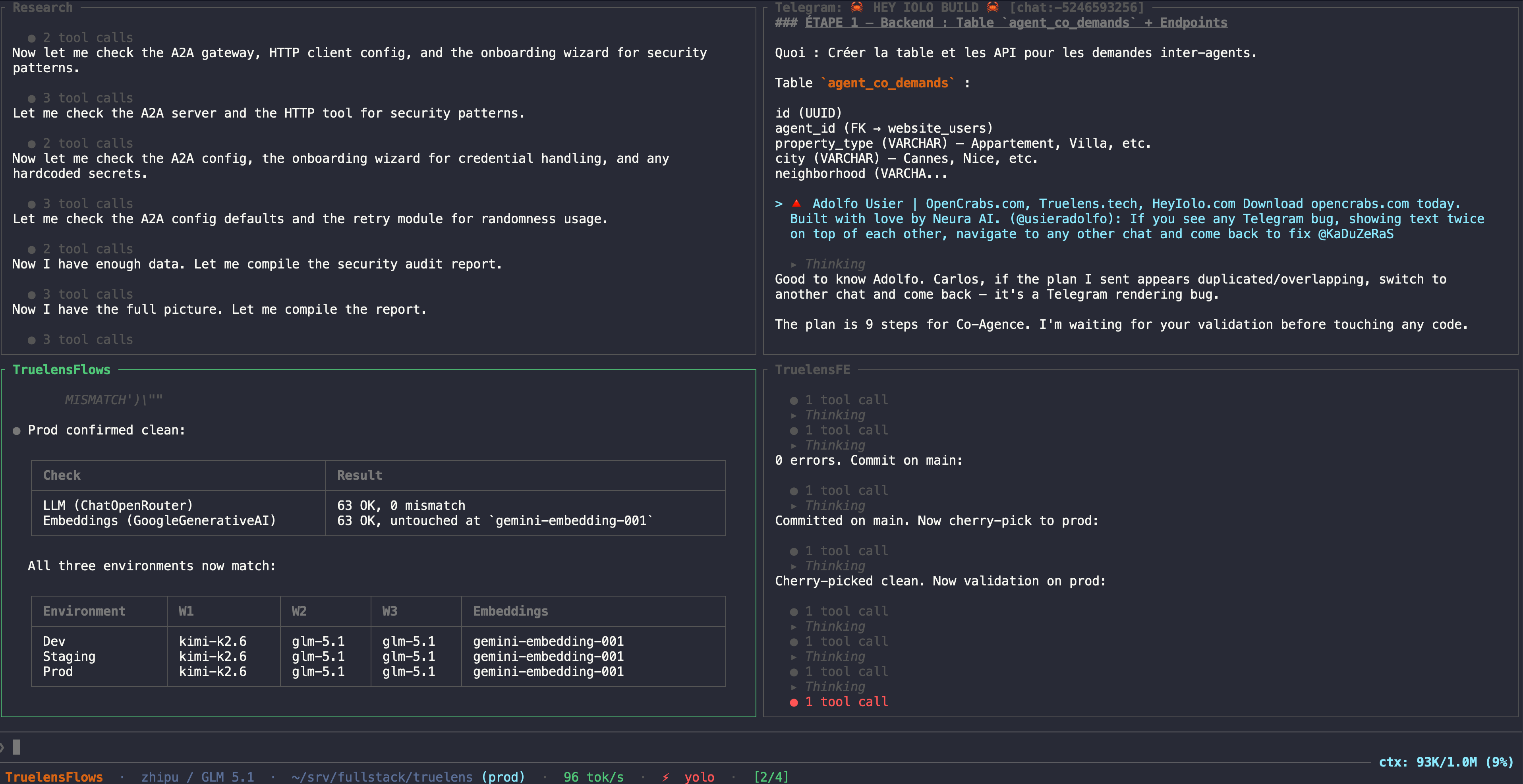
## 🖥️ Split Panes
---
## 🎯 Core Features
### AI & Providers
| Feature | Description |
|---------|-------------|
| **Multi-Provider** | **Xiaomi MiMo**, Anthropic Claude, OpenAI, GitHub Copilot (uses your Copilot subscription), OpenRouter (400+ models), MiniMax, Google Gemini, z.ai GLM (General API + Coding API), Claude CLI, OpenCode CLI, Codex CLI (uses your ChatGPT/Codex subscription), Qwen Native (free OAuth with multi-account rotation), Qwen Code CLI (1k free req/day), and any OpenAI-compatible API (Ollama, LM Studio, LocalAI). Model lists fetched live from provider APIs — new models available instantly. Custom provider dialog: paste-by-default for API keys, Enter-to-load live models, typed-not-in-list models accepted and merged. Each session remembers its provider + model and restores it on switch |
| **Fallback Providers** | Configure a chain of fallback providers — if the primary fails, each fallback is tried in sequence automatically. Any configured provider can be a fallback. Config: `[providers.fallback] providers = ["openrouter", "anthropic"]` |
| **Per-Provider Vision** | Set `vision_model` per provider — the LLM calls `analyze_image` as a tool, which uses the vision model on the same provider API to describe images. The chat model stays the same and gets vision capability via tool call. Gemini vision takes priority when configured. Auto-configured for known providers (e.g. MiniMax) on first run |
| **Prompt Caching** | Caches the stable context prefix (system prompt, brain files, earlier turns) on every caching-capable provider — Anthropic native (default), OpenAI/OpenRouter (`cache_enabled`), Qwen/Alibaba (zero-config auto), Xiaomi (server-side). Averaging ~87% cache efficiency in real use; watch it live in the Cache Efficiency card of `/usage`. Big reason a larger context window stays affordable |
| **Context Window & Auto-Compaction** | Per-provider `context_window` override (default 200k, works on every provider); transparent auto-compaction at 65% (soft, background) / 90% (hard) of the window gives effectively unlimited session memory with no manual clearing |
| **Real-time Streaming** | Character-by-character response streaming with animated spinner showing model name and live text |
| **Local LLM Support** | Run with LM Studio, Ollama, or any OpenAI-compatible endpoint — 100% private, zero-cost |
| **Usage Dashboard** | Per-message token count and cost displayed in header; `/usage` opens an interactive dashboard with daily activity charts, cost breakdowns by project/model/activity, core tool usage stats, and period filtering (Today/Week/Month/All-Time). Sessions are auto-categorized on startup (Development, Bug Fixes, Features, Refactoring, Testing, Documentation, CI/Deploy, etc.). Estimated costs for historical sessions shown as `~$X.XX` |
| **Context Awareness** | Live context usage indicator showing actual token counts (e.g. `ctx: 45K/200K (23%)`); auto-compaction at 70% with tool overhead budgeting; accurate tiktoken-based counting calibrated against API actuals |
| **3-Tier Memory** | (1) **Brain MEMORY.md** — user-curated durable memory, loaded on demand in the main session (see [Brain Files](#brain-files--one-file-one-job)), (2) **Daily Logs** — auto-compaction summaries at `~/.opencrabs/memory/YYYY-MM-DD.md`, (3) **Hybrid Memory Search** — FTS5 keyword search + vector embeddings combined via Reciprocal Rank Fusion. Three modes: **Local** (embeddinggemma-300M, 768-dim, no API key, works offline), **API** (any OpenAI-compatible `/v1/embeddings` endpoint: OpenAI, Ollama, Jina, etc.), or **FTS5-only** (no embeddings, VPS-friendly, ~0 RAM overhead). Auto-detects VPS environments and disables local embeddings |
| **Dynamic Brain System** | System brain assembled from workspace MD files (SOUL, USER, AGENTS, TOOLS, MEMORY) — all editable live between turns |
| **Multi-Agent Orchestration** | Spawn typed child agents (General, Explore, Plan, Code, Research) for parallel task execution. Five tools: `spawn_agent`, `wait_agent`, `send_input`, `close_agent`, `resume_agent`. Each type gets a role-specific system prompt and filtered tool registry. Configurable subagent provider/model. Children run in isolated sessions with auto-approve — no recursive spawning |
| **Recursive Self-Improvement** | ⚠️ Experimental. Automatic feedback ledger tracks every tool execution, user correction, and provider error. Three tools: `feedback_record` (log observations), `feedback_analyze` (query patterns), `self_improve` (autonomously apply brain file changes — no human approval). Changes logged to `~/.opencrabs/rsi/improvements.md` with daily archives. Startup digest injects performance summary into system prompt. **Upstream template sync** — automatically detects new releases, fetches updated brain file templates from the repo, diffs against local files, and appends only new sections (never overwrites user customizations). Backups created before every merge. Zero tokens spent when version unchanged. Zero setup — works out of the box via auto-migration |
### Multimodal Input
| Feature | Description |
|---------|-------------|
| **Image Attachments** | Paste image paths or URLs into the input — auto-detected and attached as vision content blocks for multimodal models. Also supports pasting raw image data from the clipboard (copied from a browser, screenshot tool, or any app) — on macOS via the clipboard as PNG, on Linux via wl-paste/xclip. The bytes are written to a temp file and routed through the existing image pipeline |
| **Video Attachments** | Send a video on any channel (mp4, m4v, mov, webm, mkv, avi, 3gp, flv) or paste a video path in the TUI — the agent calls the `analyze_video` tool, which routes through Google Gemini's multimodal video API (inline ≤18 MB, resumable Files API for larger). Requires `image.vision.enabled = true` with a Gemini API key in `config.toml`. Phase 1 is Gemini-native; a frame-extraction fallback for non-Gemini providers (ffmpeg → analyze_image per frame) is on the roadmap |
| **PDF Support** | Attach PDF files by path — native Anthropic PDF support; for other providers, text is extracted locally via `pdf-extract`. **Scanned / image-only PDFs** (no embedded text) are rendered to page images so vision models can read them — this needs **poppler** (`pdftoppm`) on the system: macOS `brew install poppler`, Debian/Ubuntu `apt install poppler-utils`, Fedora `dnf install poppler-utils`. The one-line installer sets this up automatically; without it, the PDF is still saved and its path handed to the agent (text extraction and the `pdf_to_images` tool can be retried once poppler is present) |
| **Document Parsing** | Built-in `parse_document` tool extracts text from PDF, DOCX, HTML, TXT, MD, JSON, XML |
| **Voice (STT)** | Voice notes transcribed via **Groq Whisper API** (`whisper-large-v3-turbo`), any **OpenAI-compatible STT endpoint** (set `stt_base_url` + `stt_model` — works with self-hosted Whisper, Deepgram-compatible proxies, etc.), **Voicebox STT** (self-hosted open-source voice stack — point `voicebox_stt_base_url` at your instance; 2s liveness probe runs before each request so a dead voicebox fails fast), or **Local** whisper.cpp via `whisper-rs` (runs on-device, Tiny 75 MB / Base 142 MB / Small 466 MB / Medium 1.5 GB, zero API cost). All dispatched through a single entry point so every channel gets the same provider priority chain — and an optional `[providers.stt].fallback_chain` lets the user codify "if my local voicebox is down, try Groq, then OpenAI" so transient outages auto-route to the next provider with zero user action. Choose mode in `/onboard:voice`. Included by default |
| **Voice (TTS)** | Agent replies to voice notes with audio via **OpenAI TTS API** (`gpt-4o-mini-tts`), any **OpenAI-compatible TTS endpoint** (set `tts_base_url` + `tts_model` + `tts_voice` — works with self-hosted Coqui/Bark, ElevenLabs-compatible proxies, etc.), **Voicebox TTS** (async `/generate` → poll `/generate/{id}/status` → fetch audio; set `voicebox_tts_base_url` + `voicebox_tts_profile_id`), or **Local** Piper TTS (runs on-device via Python venv, Ryan / Amy / Lessac / Kristin / Joe / Cori, zero API cost). All outputs normalised to OGG/Opus via `ensure_opus` before delivery — consistent format across every channel regardless of backend. `[providers.tts].fallback_chain` provides the same auto-failover behaviour as the STT side. Falls back to text if disabled |
| **Attachment Indicator** | Attached images show as `[IMG1:filename.png]` in the input title bar |
| **Image Generation** | Agent generates images via Google Gemini (`gemini-3.1-flash-image-preview` "Nano Banana") using the `generate_image` tool — enabled via `/onboard:image`. Returned as native images/attachments in all channels |
#### Vision setup — two paths, pick one
> **Using Xiaomi?** Share images and OpenCrabs automatically routes to MiMo's multimodal model — no separate vision key needed.
**Path A (preferred, simpler).** Set `vision_model = "<model>"` on your active `[providers.<name>]` block in `config.toml`. Works for every built-in and custom provider — the agent calls the vision model on the **same provider endpoint** via the `analyze_image` tool, so no second API key is needed. Pick a vision-capable model on that provider (DeepSeek chat models like `deepseek-v4-flash` reject `image_url` content, so point `vision_model` at a vision-capable variant of the same family — every provider has at least one).
```toml
[providers.opencode]
enabled = true
vision_model = "mimo-v2-omni" # any vision-capable model on this provider
```
**Path B (fallback).** Enable Gemini globally. Use this only when your active provider has no vision-capable model. Easiest way: run `/onboard:image` and the wizard walks you through. Manual setup:
```toml
# config.toml
[image.vision]
enabled = true
model = "gemini-3.1-flash-image-preview"
```
```toml
# keys.toml ← the Gemini key MUST live here, NOT in config.toml
[image]
api_key = "YOUR_GEMINI_KEY"
```
> **Gotcha:** `[image.vision] api_key = "..."` in `config.toml` is silently ignored — the field carries `#[serde(skip)]` for security. Use `keys.toml` `[image]` section, or `[providers.image.gemini]` in config.toml + the key in keys.toml.
**Diagnostic:** when vision is unavailable for any reason, `is_vision_available` logs the exact cause at INFO level in `~/.opencrabs/logs/opencrabs.YYYY-MM-DD` — search for `target=vision`.
#### Context window & auto-compaction (effectively unlimited memory)
OpenCrabs never makes you start a fresh session to "clear context." Instead it auto-compacts: as a session's history approaches the model's context window, it summarizes the older turns in place and keeps going. Two tiers:
- **65% — soft trigger:** spawns a background LLM compaction that summarizes history back down to ~65% of the budget. Non-blocking — the conversation keeps streaming.
- **90% — hard trigger:** synchronous compaction before the next request, so a single turn can never overflow the window.
The triggers are **percentages of the effective window**, so they scale to whatever you set: at the 200k default compaction kicks in around 130k; at a 1M window, around 650k.
It's **transparent** — most of the time you won't notice it happen at all. Occasionally you'll catch a brief inline notice while it summarizes (the agent tends to mention it dynamically, in its own voice), then the conversation carries on with the older turns condensed. You never have to start over or manually clear anything.
**The budget defaults to 200,000 tokens** — the battle-tested sweet spot: large enough for long sessions, small enough to keep each request fast and cheap. Override it **per provider** in `config.toml`:
```toml
[providers.xiaomi]
context_window = 1000000 # raise the budget; compaction still triggers at 65% / 90% of it
[providers.anthropic]
context_window = 1000000 # native providers too — Anthropic, Gemini, and the CLI providers
```
This override works for **every provider** — OpenAI-compatible (custom, xiaomi, qwen, openrouter, minimax, …) and the native Anthropic, Gemini, and CLI providers. A provider with no override inherits the 200k default.
> **Sizing guidance.** 200k is the battle-tested sweet spot for essentially **every cloud model**. Going bigger has two real downsides — **cost** and **context loss**:
>
> - **Cost** is the lesser one, and it's softened by caching: OpenCrabs uses prompt caching across every caching-capable provider (currently averaging ~87% efficiency), and a long context is mostly an unchanged prefix served from cache — so a bigger window costs far less than the raw token count suggests.
> - **Context loss** is the one to watch: most models degrade as the window fills — they lose track of the middle and recall less reliably. Only the latest SOTA models hold large context robustly: closed (Opus 4.7 / 4.8, Fable 5, GPT-5.5, Gemini 3.1, …) or open (Qwen 3.7, Kimi K2.7, MiMo V2.5, GLM 5.2, DeepSeek V4, and the newer releases that keep coming from these and other labs). So raise `context_window` mainly on those frontier models; on anything older or smaller, staying near 200k keeps answers sharper.
>
> **Local models want less:** 128k is a good sweet spot — go **lower** if your machine is tight on resources or you start noticing hallucinations/fabrications, and **higher** only if you have more than 32GB of RAM and have tested your model at a larger window. Not sure what fits your setup? Reach out to Adolfo for suggestions/support, or open a [GitHub discussion](https://github.com/adolfousier/opencrabs/discussions).
>
> **Leave auto-compaction on** — it's been battle-tested over months and needs no babysitting. Only run a *manual* compaction (the `/compact` command) if you have a specific, strong reason to summarize early; otherwise let it manage itself.
#### Prompt caching (every caching-capable provider)
A long context is mostly a **stable prefix** — system prompt, brain files, earlier turns rarely change between requests. OpenCrabs caches that prefix wherever the provider supports it, so you pay full price for it once and a fraction on every reuse. Across real usage it's currently averaging **~87% cache efficiency**, which you can watch live in the **Cache Efficiency** card of `/usage`. This is the main reason a larger `context_window` costs far less than its raw token count suggests.
How it turns on depends on the provider:
- **Anthropic** — native prompt caching, on by default: the `cache_control: ephemeral` markers and the caching beta header are added automatically to the system prompt and tools.
- **OpenAI / OpenAI-compatible** — OpenAI caches automatically server-side. **OpenRouter caches by default too** — OpenCrabs enables it automatically, so there's no flag to discover; set `cache_enabled = false` only if you specifically want to opt out.
- **Qwen / Alibaba** — auto-enabled, zero-config (detected by endpoint or a `qwen-` model name; unlocks Alibaba's explicit context cache, ~90% off on hits). See the Qwen note further below.
- **Xiaomi (MiMo)** — caches automatically server-side; nothing to configure.
```toml
[providers.openrouter]
enabled = true
# Caching is ON by default — uncomment only to opt out:
# cache_enabled = false
```
**About the TTL — it's system-controlled.** The prompt-prefix caching that drives that ~87% (Anthropic native, Qwen/Alibaba, Xiaomi) uses a **provider-fixed 5-minute TTL that OpenCrabs does not expose** — you can't change it, and you don't need to. It **renews on every cache hit**, so in an active session each message keeps the prefix warm and it survives the *whole* session, however long, as long as you're not idle for more than 5 minutes; only an idle gap longer than that expires it, and the next message simply re-creates it once. The short TTL is the safeguard: a long TTL would keep the cache **alive on the provider's servers during idle time**, which you pay to keep stored — exactly how caching bills run away (an idle cache left alive for days can rack up serious charges). Keeping it fixed protects everyone, especially non-technical users, by default.
The one user-settable TTL is `cache_ttl` (default 300s, range 1-86400), which sets OpenRouter's cache TTL via the `X-OpenRouter-Cache-TTL` header. OpenRouter caching is on by default with this conservative 300s; it does **not** touch the prompt-prefix caches above. Leave it at the default unless you specifically understand the cost tradeoff of a longer TTL (a longer one keeps the cache alive longer at standing cost).
#### Changing provider settings: edit the file, or just ask
`vision_model`, `context_window`, provider keys, allowlists — any setting — can be changed two ways, and **neither needs a restart**:
- **Edit `config.toml` / `keys.toml` directly.** A file watcher hot-reloads on save, so the running TUI *and* the headless daemon both pick the change up on the next message — provider swap, tool re-registration, context budget, commands, and skills all update live.
- **Ask OpenCrabs in natural language** — e.g. *"set my context window to 1M"*, *"use mimo-v2-omni for vision on xiaomi"*, *"add my OpenRouter key"*. It writes the change through the `config_manager` tool (`write_config`), and if the automatic hot-reload doesn't pick the save up for any reason, it can run `config_manager reload` to force a fresh load from disk on the spot.
### Messaging Integrations
| Feature | Description |
|---------|-------------|
| **Telegram Bot** | Full-featured Telegram bot — owner DMs share TUI session, groups get isolated per-group sessions (keyed by chat ID). Photo/voice support (STT transcribes incoming voice notes; TTS replies as OGG/Opus voice notes via `send_voice` when input was audio). Allowed user IDs, allowed chat/group IDs, `respond_to` filter (`all`/`dm_only`/`mention`). Passive group message capture — all messages stored for context even when bot isn't mentioned |
| **WhatsApp** | Connect via QR code pairing at runtime or from onboarding wizard. The pairing QR renders as a scannable PNG image in channels (not just unicode blocks), so you can scan it directly from Telegram/Discord/Slack. Text + image + voice (STT transcribes incoming voice notes; TTS replies as voice notes when input was audio and `tts_enabled=true`). Shared session with TUI, phone allowlist (`allowed_phones`), session persists across restarts |
| **Discord** | Full Discord bot — text + image + voice. Owner DMs share TUI session, guild channels get isolated per-channel sessions. Allowed user IDs, allowed channel IDs, `respond_to` filter. Full proactive control via `discord_send` (17 actions): `send`, `reply`, `react`, `unreact`, `edit`, `delete`, `pin`, `unpin`, `create_thread`, `send_embed`, `get_messages`, `list_channels`, `add_role`, `remove_role`, `kick`, `ban`, `send_file`. Generated images sent as native Discord file attachments |
| **Slack** | Full Slack bot via Socket Mode — owner DMs share TUI session, channels get isolated per-channel sessions. Text + image + voice (STT transcribes incoming audio attachments; TTS replies upload an OGG/Opus audio file via `files.upload` — renders inline with waveform UI — when input was audio and `tts_enabled=true`). Allowed user IDs, allowed channel IDs, `respond_to` filter. Full proactive control via `slack_send` (17 actions): `send`, `reply`, `react`, `unreact`, `edit`, `delete`, `pin`, `unpin`, `get_messages`, `get_channel`, `list_channels`, `get_user`, `list_members`, `kick_user`, `set_topic`, `send_blocks`, `send_file`. Generated images sent as native Slack file uploads. Bot token + app token from `api.slack.com/apps` (Socket Mode required). **Required Bot Token Scopes:** `chat:write`, `channels:history`, `groups:history`, `im:history`, `mpim:history`, `users:read`, `files:read`, `files:write`, `reactions:write`, `app_mentions:read` |
| **Trello** | Tool-only by default — the AI acts on Trello only when explicitly asked via `trello_send`. Opt-in polling via `poll_interval_secs` in config; when enabled, only `@bot_username` mentions from allowed users trigger a response. Full card management via `trello_send` (22 actions): `add_comment`, `create_card`, `move_card`, `find_cards`, `list_boards`, `get_card`, `get_card_comments`, `update_card`, `archive_card`, `add_member_to_card`, `remove_member_from_card`, `add_label_to_card`, `remove_label_from_card`, `add_checklist`, `add_checklist_item`, `complete_checklist_item`, `list_lists`, `get_board_members`, `search`, `get_notifications`, `mark_notifications_read`, `add_attachment`. API Key + Token from `trello.com/power-ups/admin`, board IDs and member-ID allowlist configurable |
#### File & Media Input Support
When users send files, images, or documents across any channel, the agent receives the content automatically — no manual forwarding needed. Example: a user uploads a dashboard screenshot to a Trello card with the comment _"I'm seeing this error"_ — the agent fetches the attachment, passes it through the vision pipeline, and responds with full context.
| Channel | Images (in) | Text files (in) | Documents (in) | Audio (in) | Audio reply (out) | Image gen (out) |
|---------|-------------|-----------------|----------------|------------|-------------------|-----------------|
| **Telegram** | ✅ vision pipeline | ✅ extracted inline | ✅ / PDF note | ✅ STT | ✅ TTS via `send_voice` (OGG/Opus) | ✅ native photo |
| **WhatsApp** | ✅ vision pipeline | ✅ extracted inline | ✅ / PDF note | ✅ STT | ✅ TTS via upload + `audio_message` (OGG/Opus, `ptt=true`) | ✅ native image |
| **Discord** | ✅ vision pipeline | ✅ extracted inline | ✅ / PDF note | ✅ STT | ✅ TTS as `response.ogg` attachment | ✅ file attachment |
| **Slack** | ✅ vision pipeline | ✅ extracted inline | ✅ / PDF note | ✅ STT | ✅ TTS via `files.upload` (OGG/Opus, inline waveform) | ✅ file upload |
| **Trello** | ✅ card attachments → vision | ✅ extracted inline | — | — | — | ✅ card attachment + embed |
| **TUI** | ✅ paste path → vision | ✅ paste path → inline | — | ✅ STT | — (terminal has no native audio) | ✅ `[IMG: name]` display |
Images are passed to the active model's vision pipeline if it supports multimodal input, or routed to the `analyze_image` tool (Google Gemini vision) otherwise. Text files (`.txt`, `.md`, `.json`, `.csv`, source code, etc.) are extracted as UTF-8 and included inline up to 8 000 characters — in the TUI simply paste or type the file path.
Videos uploaded on any channel (mp4, m4v, mov, webm, mkv, avi, 3gp, flv) auto-route to `analyze_video` when `image.vision.enabled = true` with a Gemini API key. The TUI also detects pasted video paths and labels them `Video #N` in the attachment indicator. Provider-side limits to keep in mind: Gemini's inline-bytes mode caps at ~20 MB (we use ≤18 MB), and the resumable Files API supports up to 2 GB / ~1 hour videos. Channel-side limits are tighter — Telegram's Bot API hard-caps `getFile` downloads at **20 MB** even though chats accept larger uploads, so videos over that size will get a friendly "compress to under 20 MB and resend" reply. Slack file downloads use the bot token (`files:read` scope) and inherit the workspace's per-file upload cap. Frame-extraction fallback for non-Gemini providers is not yet wired — without a Gemini key, video uploads return an "unsupported" notice.
#### Telegram rich message formatting
When a Telegram reply carries structured Markdown (tables, headings, lists, `- [ ]` task lists, fenced code, or math), OpenCrabs can render it natively using Telegram's rich messages (Bot API 10.1) — real tables, real section headings, real checkboxes — instead of plain text or basic HTML.
This is **opt-in** via `channels.telegram.rich_messages = true`, and **off by default**, because native rich messages are unreadable on **Telegram Web and older clients**: those clients show a "this message is not supported, update Telegram" placeholder, and the rich API has no text fallback. So enable it only when your audience is on current mobile/desktop apps. With the flag off (the default), the universal HTML rendering is used — and it was improved too: tables come out as aligned monospace grids, task items as `☐`/`☑`, with proper paragraph spacing, so structured replies look decent on every client.
When enabled, native rich applies to the agent's reply (sent as a fresh rich message so it renders cleanly) and to proactive `telegram_send` messages. Plain-prose replies are left untouched, so incidental characters like a stray `*` or `#` are never reinterpreted. If the rich send fails for any reason, OpenCrabs falls back silently to HTML, so a message is never dropped.
#### /cowork — Telegram-only workspace creation
The `/cowork` command creates a team workspace directly from Telegram. It is **Telegram-only** because it relies on Telegram-specific primitives: group creation via `?startgroup` deep links, invite links, QR codes from `t.me` URLs, and `new_chat_members` service messages for auto-registration. None of these exist in Discord, Slack, or WhatsApp.
**Prerequisite:** Telegram must be configured (bot token set via `/onboard:channels telegram` or manual `config.toml` setup).
**Flow:**
1. User sends `/cowork` in DM → bot asks for workspace name
2. User sends workspace name → bot generates a `?startgroup=cowork_<id>` deep link as an inline button
3. User taps the button → Telegram's native "create group" UI opens — user names the group, Telegram creates it and adds the bot
4. Bot detects the startgroup parameter → generates an invite link, creates a QR code PNG, sends it to the user's DM
5. New members who join the group via the invite link auto-register in `config.telegram.allowed_users` — the owner gets a confirmation message
**Cross-channel behavior:** `/cowork` works from any surface. In Telegram DMs, the native flow activates directly. From the TUI, Discord, Slack, or WhatsApp, the agent calls the `cowork_connect` tool which mints a session, registers it with the bot, and returns the `t.me` deep link plus a scannable QR code PNG. The TUI shows the clickable link; channels deliver the QR as a photo.
#### Telegram group security model
When `allowed_users` is configured, the bot enforces a strict allowlist on all incoming messages. The behavior differs between DMs and groups:
**In DMs:**
- Non-allowed users always get a reply: *"You are not authorized. Send /start to get your user ID."* — so they know what to do.
**In groups:**
- Non-allowed users get **silently dropped** (no reply, no processing) for normal messages.
- If the user explicitly **@mentions** or **replies to** the bot, they get the "not authorized" reply — so they know they need to be added.
- `/start` from non-allowed users is silently ignored when `silence_group_start = true` (default). Set to `false` to show the user ID reply in groups.
This prevents the bot from spamming "not authorized" in active groups where most members aren't on the allowlist. The bot only engages with non-allowed users when they explicitly reach out.
**Config:**
```toml
[channels.telegram]
allowed_users = ["123456789"] # Only these users can interact
respond_to = "mention" # Bot only responds to @mentions in groups
silence_group_start = true # Silently ignore /start from non-allowed users in groups
```
#### Voice and file pickup in groups
In mention-only groups (`respond_to = "mention"`), users can now share files and voice messages even when the bot isn't directly tagged in the same message. Here's how it works:
1. **Fire-and-forget file capture** — The bot downloads ALL incoming voice, video, document, and audio files from group messages to `~/.opencrabs/tmp/`, regardless of whether the bot was mentioned. This happens silently in the background.
2. **Tag-then-ask** — A user sends a voice message, then tags the bot in a follow-up message (e.g. `@bot what did I just say?`). The bot scans the tmp directory for recent voice files from that chat (5-minute window), transcribes the most recent one, and prepends the transcript to the user's message.
This solves the core UX problem in mention-only groups: previously, tagging the bot in the *same* message as a voice note didn't work because Telegram sends voice and text as separate messages.
**Supported file types:** `.ogg` (voice notes), `.mp4` (video notes), documents, and audio files.
### Terminal UI
| Feature | Description |
|---------|-------------|
| **Cursor Navigation** | Full cursor movement: Left/Right arrows, Ctrl+Left/Right word jump, Home/End, Delete, Backspace at position |
| **Input History** | Persistent command history (`~/.opencrabs/history.txt`), loaded on startup, capped at 500 entries |
| **Inline Tool Approval** | Claude Code-style `❯ Yes / Always / No` selector with arrow key navigation |
| **Inline Plan Approval** | Interactive plan review selector (Approve / Reject / Request Changes / View Plan) |
| **Session Management** | Create, rename, delete sessions with persistent SQLite storage; each session remembers its provider + model — switching sessions auto-restores the provider (no manual `/models` needed); token counts and context % per session. New sessions auto-generate a meaningful title from the first user message (no more "New Chat") |
| **Split Panes** | Horizontal (`\|` in sessions) and vertical (`_` in sessions) pane splitting — tmux-style. Each pane runs its own session with independent provider, model, and context. Run 10 sessions side by side, all processing in parallel. `Tab` to cycle focus, `Ctrl+X` to close pane |
| **Parallel Sessions** | Multiple sessions can have in-flight requests to different providers simultaneously. Send a message in one session, switch to another, send another — both process in parallel. Background sessions auto-approve tool calls; you'll see results when you switch back |
| **Scroll While Streaming** | Scroll up during streaming without being yanked back to bottom; auto-scroll re-enables when you scroll back down or send a message |
| **Path Normalization** | Home paths (`/home/user/...`) automatically collapsed to `~` in system prompt, tool call display, and brain files — keeps context lean and readable |
| **Recent File Memory** | Agent remembers recently accessed file paths across sessions — no need to re-specify paths you were just working on |
| **Compaction Summary** | Auto-compaction shows the full summary in chat as a system message — see exactly what the agent remembered |
| **Syntax Highlighting** | 100+ languages with line numbers via syntect |
| **Markdown Rendering** | Rich text formatting with code blocks, headings, lists, and inline styles |
| **Tool Context Persistence** | Tool call groups saved to DB and reconstructed on session reload — no vanishing tool history |
| **Multi-line Input** | Alt+Enter / Shift+Enter for newlines; Enter to send |
| **Abort Processing** | Escape×2 within 3 seconds to cancel any in-progress request |
| **Clipboard Image Paste** | Copy an image from a browser, screenshot tool, or any app and paste it directly into the input. Raw image bytes are read from the OS clipboard (macOS: osascript, Linux: wl-paste/xclip), written to a temp file, and attached through the existing image pipeline. No need to save to disk first |
| **Bang Operator (`!cmd`)** | Run any shell command directly from the input — no LLM round-trip. Output is shown as a system message in the working directory context |
| **Auto-Update** | Checks GitHub for new releases on startup and once every 24h in the background. When a new version is found it silently installs and hot-restarts. Disable via `[agent] auto_update = false` in `config.toml` to be prompted instead |
### Agent Capabilities
| Feature | Description |
|---------|-------------|
| **Full Terminal Access** | 30+ built-in tools (file I/O, glob, grep, web search, code execution, image gen/analysis, memory search, cron jobs) plus **any CLI tool on your system** via `bash` — GitHub CLI, Docker, SSH, Python, Node, ffmpeg, curl, and everything else just work |
| **RTK Token Savings** | Automatic bash output optimization via [RTK](https://github.com/rtk-ai/rtk) integration — enabled by default, zero config. Prepends `rtk` to supported commands (git, cargo, npm, pnpm, yarn, docker, kubectl, grep, find, ls, tree, curl, and 100+ more) to filter noise from command output. Reduces token usage on bash commands by 60-90% without losing critical information. Check savings with `/rtk` command. RTK binary bundled with prebuilt OpenCrabs releases and installed by `/evolve` on update; if it is ever missing, OpenCrabs auto-downloads the right binary for your platform on first use |
| **Per-Session Isolation** | Each session is an independent agent with its own provider, model, context, and tool state. Sessions can run tasks in parallel against different providers — ask Claude a question in one session while Kimi works on code in another |
| **Self-Healing** | Detects and recovers from phantom tool calls, gaslighting preambles, text repetition loops, XML tool call failures, and provider errors. Short-circuits repeated failing bash commands and rejects interactive commands that would hang. Automatic context compaction at 65% (soft) and 90% (hard). Sticky fallback promotion when primary recovers |
| **Self-Sustaining** | Agent can modify its own source, build, test, and hot-restart via Unix `exec()` |
| **Self-Improving** | Learns from experience — saves reusable workflows as custom commands, writes lessons learned to memory, updates its own brain files. All local, no data leaves your machine |
| **Autonomous /goal** | Set a goal with `/goal <text>` and the agent loops autonomously: executing, self-evaluating with an LLM judge, and continuing with a correction prompt until the goal is satisfied or the turn budget runs out. Supports `/goal pause`, `/goal resume`, `/goal status`, and `/goal clear` |
| **Dynamic Tools** | Define custom tools at runtime via `~/.opencrabs/tools.toml` — the agent can call them autonomously like built-in tools. HTTP and shell executors, template parameters (`{{param}}`), enable/disable without restart. The `tool_manage` meta-tool lets the agent create, remove, and reload tools on the fly |
| **Skills (cross-harness)** | Multi-stage workflow templates in the de-facto `SKILL.md` format used by Claude Code, Anthropic managed agents, and OpenClaw. Drop a `SKILL.md` under `~/.opencrabs/skills/<name>/` and it auto-registers as `/<name>` — no `commands.toml` entry needed. Works in the TUI **and** every connected channel (Telegram, Discord, Slack, WhatsApp). Built-ins ship with the binary (always version-matched); user skills override by file presence. Two built-ins out of the box: `/security-audit` (language-agnostic CVE & static-analysis audit, scores 0-100) and `/cost-estimate` (codebase valuation with AI-assisted ROI). Same `SKILL.md` is portable across harnesses |
| **Mission Control** | Full-screen `/mission-control` dialog showing every actionable artifact in one place: pending RSI proposals (inbox cards), recent RSI activity (improvements log feed), the schedule queue (cron jobs + paused/active state), and a live **Analytics** panel (brain file sizes, tool usage with proportional bars, failure rates, RSI applied by dimension). Apply or reject inbox proposals inline with `a` / `r` — same machinery as the agent's `rsi_proposals` tool, byte-identical install. Tab between panels, j/k to navigate, Enter for the detail popup, Esc to close. Cron paused jobs flag in orange, active in teal — at-a-glance state |
| **Skills picker** | Full-screen `/skills` dialog with a live filter input — start typing to narrow the list (case-insensitive on name + description), Tab / Shift-Tab cycle the filtered cards (wraps at the edges), Enter runs the selected skill (sends its body as a prompt to the agent), Esc closes. Built-in skills badge orange; user-installed skills badge teal. When the filter narrows to a single match, Enter just fires it — fastest path to launch a skill |
| **Browser Automation** | Native browser control via CDP (Chrome DevTools Protocol). Auto-detects your default Chromium-based browser (Chrome, Brave, Edge, Arc, Vivaldi, Opera, Chromium) and uses its profile — your logins, cookies, and extensions carry over. 7 browser tools: navigate, click, type, screenshot, eval JS, extract content, wait for elements. Headed or headless mode with display auto-detection. **Note:** Firefox is not supported (no CDP) — if Firefox is your default, OpenCrabs falls back to the first available Chromium browser. Feature-gated under `browser` (included by default) |
| **Natural Language Commands** | Tell OpenCrabs to create slash commands — it writes them to `commands.toml` autonomously via the `config_manager` tool |
| **Live Settings** | Agent can read/write `config.toml` at runtime; Settings TUI screen (press `S`) shows current config; approval policy persists across restarts. Default: auto-approve (use `/approve` to change) |
| **Web Search** | DuckDuckGo (built-in, no key needed) + EXA AI (neural, free via MCP) by default; Brave Search optional (key in `keys.toml`) |
| **Debug Logging** | `--debug` flag enables file logging; `DEBUG_LOGS_LOCATION` env var for custom log directory |
| **Agent-to-Agent (A2A)** | HTTP gateway implementing A2A Protocol RC v1.0 — peer-to-peer agent communication via JSON-RPC 2.0. Supports `message/send`, `message/stream` (SSE), `tasks/get`, `tasks/cancel`. Built-in `a2a_send` tool lets the agent proactively call remote A2A agents. Optional Bearer token auth. Includes multi-agent debate (Bee Colony) with confidence-weighted consensus. Task persistence across restarts |
| **Profiles** | Run multiple isolated instances from the same installation. Each profile gets its own config, keys, memory, sessions, and database. Create with `opencrabs profile create <name>`, switch with `-p <name>`. Migrate config between profiles with `profile migrate`. Export/import for sharing. Token-lock isolation prevents two profiles from using the same bot credential |
### CLI
| Command | Description |
|---------|-------------|
| `opencrabs` | Launch interactive TUI (default) |
| `opencrabs chat` | Launch TUI with optional `--session <id>` to resume, `--onboard` to force wizard |
| `opencrabs run <prompt>` | Execute a single prompt non-interactively. `--auto-approve` / `--yolo` for unattended. `--format text\|json\|markdown` |
| `opencrabs agent` | Interactive CLI agent — multi-turn conversation in your terminal, no TUI. `-m <msg>` for single-message mode |
| `opencrabs status` | System overview: version, provider, channels, database, brain, cron, dynamic tools |
| `opencrabs doctor` | Full diagnostics: config, provider connectivity, database, brain, channels, CLI tools in PATH |
| `opencrabs init` | Initialize configuration (`--force` to overwrite) |
| `opencrabs config` | Show current configuration (`--show-secrets` to reveal keys) |
| `opencrabs onboard` | Run the onboarding setup wizard |
| `opencrabs channel list` | List all configured channels with enabled/disabled status |
| `opencrabs channel doctor` | Run health checks on all enabled channels |
| `opencrabs memory list` | List brain files and memory entries |
| `opencrabs memory get <name>` | Show contents of a specific memory or brain file |
| `opencrabs memory stats` | Memory statistics: file count, total size, entry count |
| `opencrabs session list` | List all sessions with provider, model, token count (`--all` includes archived) |
| `opencrabs session get <id>` | Show session details and recent messages |
| `opencrabs db init` | Initialize database |
| `opencrabs db stats` | Show database statistics |
| `opencrabs db clear` | Clear all sessions and messages (`--force` to skip confirmation) |
| `opencrabs cron add\|list\|remove\|enable\|disable\|test` | Manage scheduled cron jobs |
| `opencrabs logs status\|view\|clean\|open` | Log management |
| `opencrabs service install\|start\|stop\|restart\|status\|uninstall` | OS service management (launchd on macOS, systemd on Linux) |
| `opencrabs daemon` | Run in headless daemon mode — channels only, no TUI |
| `opencrabs completions <shell>` | Generate shell completions (bash, zsh, fish, powershell) |
| `opencrabs migrate <source>` | Migrate from OpenClaw or Hermes. Scans the system, shows interactive picker, spawns agent to handle migration. `--dry-run` to preview |
| `opencrabs version` | Print version and exit |
Global flags: `--debug` (enable file logging), `--config <path>` (custom config file), `--profile <name>` / `-p <name>` (run as a named profile).
### Brain Files — One File, One Job
OpenCrabs's behavior lives in plain-markdown **brain files** in `~/.opencrabs/`. Each file owns exactly **one kind of content**, so a rule lives in one place and never drifts out of sync. The agent — and its self-improvement engine — route every learning to the file that owns it.
| File | Owns | Scope | In context |
|------|------|-------|-----------|
| **SOUL.md** | Who you are — **personality / voice** (how the agent *sounds*) | Generic | Always |
| **USER.md** | Facts about your human — identity, role, preferences | Personal | Always |
| **AGENTS.md** | Workspace process **+ the enforced hard rules** (safety/permission gates: never delete/push/email without approval) | Generic | **Always** |
| **MEMORY.md** | What the agent has *learned* — facts, corrections, lessons | Personal | On demand · main session only |
| **CODE.md** | How code is written — standards, testing, your language/framework preference | Generic | On demand |
| **TOOLS.md** | Tools — access, skills, commands | Generic | On demand |
| **SECURITY.md** | Security policy — code review, network, data, credentials | Generic | On demand |
| **BOOT.md** | Startup + runtime — boot steps, memory-save triggers, upgrade/evolve, running as a service | Generic | On demand |
**Loading is lazy, but the gates are always on.** Three files are injected on every turn — and survive new sessions and context compaction: `SOUL.md` (personality), `USER.md` (who you're helping), and `AGENTS.md` (the enforced hard rules). Everything else is listed in an "Available Context Files" index and pulled with the `load_brain_file` tool only when a task needs it — saving 10–20k tokens per turn. The hard rules live in always-loaded AGENTS (not in on-demand files) precisely so they can never be silently dropped; `MEMORY.md` is personal and loads only in your **main session**, never in shared/group chats.
**Generic vs. personal.** The generic files (SOUL/AGENTS/CODE/TOOLS/SECURITY/BOOT) ship as the same templates for everyone (you then customize them); `USER.md` and `MEMORY.md` accumulate per user and stay private. Each file declares its scope in a `> **Owns:**` header at the top, and the discipline is simple: **one kind of content per file, never duplicated across files** — copies drift and go stale. (`HEARTBEAT.md` is a small periodic-task checklist, empty by default.)
> **Deep dive:** for the full directive lifecycle (how directives flow from human/RSI through storage to system prompt), see the [Brain Constitution](src/docs/reference/BRAIN_CONSTITUTION.md).
### Profiles — Multi-Instance Crab Agents
Run multiple isolated OpenCrabs instances from the same installation. Each profile gets its own config, brain files, memory, sessions, database, and gateway service.
| Command | Description |
|---------|-------------|
| `opencrabs profile create <name>` | Create a new profile with fresh config and brain files |
| `opencrabs profile list` | List all profiles with last-used timestamps |
| `opencrabs profile delete <name>` | Delete a profile and all its data |
| `opencrabs profile export <name> -o profile.tar.gz` | Export a profile as a portable archive |
| `opencrabs profile import profile.tar.gz` | Import a profile from an archive |
| `opencrabs profile migrate --from <name> --to <name>` | Copy config and brain files between profiles (no DB or sessions) |
| `opencrabs -p <name>` | Launch OpenCrabs as the specified profile |
**Default profile:** `~/.opencrabs/` — works exactly as before. No migration needed. Users who never touch profiles see zero difference.
**TUI footer:** when you launch with `-p <name>` (or `OPENCRABS_PROFILE` set), the bottom status bar adds a `profile: <name>` chip so multi-profile users can tell at a glance which instance a given pane is bound to. Without `-p`, no chip is shown — the agent is using the base `~/.opencrabs/` directory and there is no real profile by that name to label.
**Named profiles** live at `~/.opencrabs/profiles/<name>/` with full isolation:
```
~/.opencrabs/
├── config.toml # default profile
├── opencrabs.db
├── profiles.toml # profile registry
├── locks/ # token-lock files
└── profiles/
├── hermes/ # named profile
│ ├── config.toml
│ ├── keys.toml
│ ├── opencrabs.db
│ ├── SOUL.md
│ └── memory/
└── scout/
└── ...
```
**Token-lock isolation:** Two profiles cannot use the same bot credential (Telegram token, Discord token, etc.). On startup, each profile acquires a lock on its channel tokens. If another profile already holds the lock, the channel refuses to start — preventing two instances from fighting over the same bot.
**Profile migration:** Use `opencrabs profile migrate --from default --to hermes` to copy all `.md` brain files, `.toml` config files, and `memory/` entries to a new profile. Sessions and database are not copied — the new profile starts clean. Add `--force` to overwrite existing files in the target profile. After migrating, customize the new profile's `SOUL.md`, `IDENTITY.md`, and `config.toml` to give it a different personality and provider setup.
### Running OpenCrabs — TUI vs Daemon
OpenCrabs runs in one of two modes. Pick the one that fits the machine, and **for any one profile run only one at a time**.
| Mode | How you start it | What it is | Use it on |
|------|------------------|------------|-----------|
| **TUI (interactive)** | Just run the binary: `opencrabs` | The full terminal UI — chat panes, sessions, settings. Your channels run too and share your session. | A machine you sit at (laptop / desktop) |
| **Daemon (headless)** | `opencrabs daemon`, or install it as a service: `opencrabs service install && opencrabs service start` | No UI. Channels only (Telegram / Discord / Slack / WhatsApp) + cron. Survives reboots, SSH disconnects, and crashes. | An always-on box / VPS |
**Why not both at once?** A bot credential (e.g. a Telegram token) can only hold one live `getUpdates` poll. If a daemon and a TUI both own the same profile's token they fight (HTTP 409) and the channel drops.
**The TUI always wins.** When you open the TUI while a daemon for the *same profile* is running, the TUI shuts that daemon down first, takes over the channels, and shows a banner saying so — your channels were already set up, so they just resume, **no reconnecting**. The daemon stays down until you start it again (`opencrabs service start`, or relaunch `opencrabs daemon`). So on a box where the daemon usually runs, the everyday flow is simply: open `opencrabs` when you want to sit down with it; close the TUI and `opencrabs service start` when you want it headless again.
**Auto-start on boot:**
- **Daemon** — use the service installer (`opencrabs service install`); it wires up systemd (Linux) / launchd (macOS) to start on boot and restart on crash. This is the recommended always-on setup, and what most people want.
- **TUI** — to have the terminal UI open automatically on login, that's a terminal / desktop autostart, *not* the service installer:
- **Linux desktop:** drop a `.desktop` file in `~/.config/autostart/` with `Exec=x-terminal-emulator -e opencrabs`.
- **macOS:** System Settings → General → Login Items → add a small `.command` script that runs `opencrabs` (or one that tells Terminal to open it).
- **VPS over SSH:** a TUI needs a live terminal, so run it inside `tmux`/`screen` and reattach — e.g. a `@reboot` cron or user service that runs `tmux new-session -d -s crab 'opencrabs'`, then `tmux attach -t crab` when you SSH in. On a headless VPS you usually want the daemon, not the TUI.
### Daemon & Service
Run profiles as background services:
```bash
# Install as system service (macOS launchd / Linux systemd)
opencrabs -p hermes service install
opencrabs -p hermes service start
# Each profile gets its own service
# macOS: com.opencrabs.daemon.hermes
# Linux: opencrabs-hermes.service
# Manage independently
opencrabs -p hermes service status
opencrabs -p hermes service stop
opencrabs -p hermes service uninstall
```
Multiple profiles can run as simultaneous daemon services with full isolation.
> **Strongly recommended for everyday users.** If you plan to use OpenCrabs daily, ask it to set itself up as a system service that starts and stops with your machine. Just say something like *"set yourself up to start with my computer"* or *"remove the auto-start service"* — the agent handles the launchd (macOS) or systemd (Linux) setup and removal for you automatically. This way OpenCrabs starts on boot, shuts down cleanly with the system, channels stay connected, and cron jobs keep ticking without you having to remember to start or stop it.
**Environment variable:** Set `OPENCRABS_PROFILE=hermes` to select a profile without the `-p` flag. Useful for systemd services, cron jobs, and daemon mode.
**Troubleshooting — daemon stays down:** first, did you open the TUI on this box? Opening `opencrabs` deliberately shuts the daemon down so the interactive session can own the channels (see **Running OpenCrabs — TUI vs Daemon** above) — it stays down until you `opencrabs service start` again. If that's not it: the daemon is meant to auto-recover (Linux `Restart=always`, macOS `KeepAlive`). If you installed the service on an older build, its unit file may still use `Restart=on-failure`, which does not restart after a clean exit and can leave the daemon down. Re-generate the unit with `opencrabs -p <name> service install` (then `service start`) to pick up the always-restart policy. Config, keys, commands, and tools hot-reload at runtime, so editing `~/.opencrabs/config.toml` (or `keys.toml`) never needs a daemon restart — if a change isn't taking effect, check the logs for a `ConfigWatcher: reloaded` line rather than restarting.
---
## 🔄 Migrating from Other Tools
Switching to OpenCrabs from another AI agent tool? There are two ways to do it.
### Option 1: CLI Command (automated)
The `migrate` command scans your system for existing tool instances, shows an interactive picker if it finds multiple, then spawns an agent to handle the actual migration:
```bash
# Migrate from OpenClaw
opencrabs migrate openclaw
# Migrate from Hermes
opencrabs migrate hermes
# Preview what would be migrated without making changes
opencrabs migrate openclaw --dry-run
```
What it migrates:
- **Brain files** (SOUL.md, USER.md, MEMORY.md, AGENTS.md, TOOLS.md)
- **Config** (provider, model, channels)
- **API keys and secrets**
- **Memory logs and skills** (if present)
The agent reads each source file, maps it to OpenCrabs format, and writes the result. If a brain file already has content, it merges rather than overwrites. After the agent finishes, a verification summary shows exactly which files were created, updated, or left unchanged.
Use `-p <name>` to migrate into a specific profile instead of the default:
```bash
opencrabs -p my-openclaw-setup migrate openclaw
```
### Option 2: Just Ask the Agent
No CLI command needed. Once OpenCrabs is running, tell it:
> *"I'm migrating from [tool name]. Research what files I have, audit the config structure, and report what I need to move over for a seamless migration."*
The agent will use its tools (read_file, web_search, grep) to inspect the source tool's directory, understand the config format, and either do the migration directly or give you a step-by-step plan. This works for **any** tool, not just OpenClaw and Hermes. Claude Code, Cursor, Aider, Windsurf, whatever. If it has config files and brain/personality files, OpenCrabs can figure out the mapping.
The agent-native approach handles edge cases that hardcoded parsers can't: custom configs, non-standard setups, partial installations, format changes across versions.
### Supported Sources
| Source | Directory | Config Format | Status |
|--------|-----------|---------------|--------|
| **OpenClaw** | `~/.openclaw/` | JSON5 (`openclaw.json`) | CLI + agent |
| **Hermes** | `~/.hermes/` | YAML (`config.yaml`) + `.env` | CLI + agent |
| **Claude Code** | `~/.claude/` | JSON | Agent only |
| **Anything else** | varies | varies | Agent only |
The CLI `migrate` command currently supports OpenClaw and Hermes. For everything else, the agent handles it via chat. Both approaches use the same underlying mechanism: read source files, map to OpenCrabs format, write the result.
---
## 🌐 Supported AI Providers
| Provider | Auth | Models | Streaming | Tools | Notes |
|----------|------|--------|-----------|-------|-------|
| **Xiaomi (MiMo)** | API key | mimo-v2.5-pro (1M ctx), v2-pro, v2.5, omni, flash | ✅ | ✅ | OpenAI-compatible. Get a key at platform.xiaomimimo.com. MiMo v2.5 is multimodal (native vision) |
| [Anthropic Claude](#anthropic-claude) | API key | Claude Opus 4.6, Sonnet 4.5, Haiku 4.5+ | ✅ | ✅ | Cost tracking, automatic retry |
| [OpenAI](#openai) | API key | GPT-5 Turbo, GPT-5 | ✅ | ✅ | |
| [GitHub Copilot](#github-copilot) | OAuth | GPT-4o, Claude Sonnet 4+ | ✅ | ✅ | Uses your Copilot subscription — no API charges |
| [OpenRouter](#openrouter--400-models-one-key) | API key | 400+ models | ✅ | ✅ | Free models available (DeepSeek-R1, Llama 3.3, etc.) |
| [Google Gemini](#google-gemini) | API key | Gemini 2.5 Flash, 2.0, 1.5 Pro | ✅ | ✅ | 1M+ context, vision, image generation |
| [MiniMax](#minimax) | API key | M2.7, M2.5, M2.1, Text-01 | ✅ | ✅ | Competitive pricing, auto-configured vision |
| [z.ai GLM](#zai-glm) | API key | GLM-4.5 through GLM-5 Turbo | ✅ | ✅ | General API + Coding API endpoints |
| [Claude CLI](#claude-code-cli) | CLI auth | Via `claude` binary | ✅ | ✅ | Uses your Claude Code subscription |
| [OpenCode CLI](#opencode-cli) | None | Free models (Mimo, etc.) | ✅ | ✅ | Free — no API key or subscription needed |
| [Codex CLI](#codex-cli) | CLI auth | GPT-5.5, 5.4, 5.4-mini, 5.3-codex | ✅ | ✅ | Uses your ChatGPT/Codex subscription |
| [Qwen (Native)](#qwen-native) | OAuth | Qwen3.6-Plus, Qwen3.5-Plus, Qwen3-Max | ✅ | ✅ | Free tier (60 req/min, 1k/day). Multi-account rotation multiplies quota |
| [Qwen Code CLI](#qwen-code-cli) | OAuth / API key | Qwen3-Coder-Plus, Qwen3.5-Plus, Qwen3.6-Plus | ✅ | ✅ | 1k free req/day via Qwen OAuth — no API key needed |
| [Ollama](#ollama) | Optional | Any pulled model | ✅ | ✅ | Local-first, zero API cost. Auto-detects localhost:11434 |
| [Custom](#custom-openai-compatible) | Optional | Any | ✅ | ✅ | LM Studio, Groq, NVIDIA, any OpenAI-compatible API |
### Anthropic Claude
**Models:** `claude-opus-4-6`, `claude-sonnet-4-5-20250929`, `claude-haiku-4-5-20251001`, plus legacy Claude 3.x models
**Setup** in `keys.toml`:
```toml
[providers.anthropic]
api_key = "sk-ant-api03-YOUR_KEY"
```
> **OAuth tokens no longer supported.** Anthropic disabled OAuth (`sk-ant-oat`) for third-party apps as of Feb 2026. Only console API keys (`sk-ant-api03-*`) work. See [anthropics/claude-code#28091](https://github.com/anthropics/claude-code/issues/28091).
**Features:** Streaming, tools, cost tracking, automatic retry with backoff
#### Claude Code CLI
Use your Claude Code CLI. OpenCrabs spawns the local `claude` CLI for completion.
**Setup:**
1. Install [Claude Code CLI](https://github.com/anthropics/claude-code) and authenticate (`claude login`)
2. Enable in `config.toml`:
```toml
[providers.claude_cli]
enabled = true
```
OpenCrabs handles all tools, memory, and context locally — the CLI is just the LLM backend.
### OpenAI
**Models:** GPT-5 Turbo, GPT-5
**Setup** in `keys.toml`:
```toml
[providers.openai]
api_key = "sk-YOUR_KEY"
```
### GitHub Copilot
**Use your GitHub Copilot subscription** — no API charges, no tokens to manage. OpenCrabs authenticates via the same OAuth device flow used by VS Code and other Copilot tools.
**Setup** — select GitHub Copilot in the onboarding wizard and press Enter. You'll see a one-time code to enter at [github.com/login/device](https://github.com/login/device). Once authorized, models are fetched from the Copilot API automatically.
**Requirements:** An active [GitHub Copilot](https://github.com/features/copilot) subscription (Individual, Business, or Enterprise).
<details><summary>Manual config (without wizard)</summary>
The OAuth token is saved automatically during onboarding. If you need to re-authenticate, run `/onboard:provider` and select GitHub Copilot.
Enable in `config.toml`:
```toml
[providers.github]
enabled = true
default_model = "gpt-4o"
base_url = "https://api.githubcopilot.com/chat/completions"
```
</details>
**Features:** Streaming, tools, OpenAI-compatible API at `api.githubcopilot.com`. Copilot-specific headers (`copilot-integration-id`, `editor-version`) are injected automatically. Short-lived API tokens are refreshed in the background every ~25 minutes.
### OpenRouter — 400+ Models, One Key
**Setup** in `keys.toml` — get a key at [openrouter.ai/keys](https://openrouter.ai/keys):
```toml
[providers.openrouter]
api_key = "sk-or-YOUR_KEY"
```
Access 400+ models from every major provider through a single API key — Anthropic, OpenAI, Google, Meta, Mistral, DeepSeek, Qwen, and many more. Includes **free models** (DeepSeek-R1, Llama 3.3, Gemma 2, Mistral 7B) and stealth/preview models as they drop.
Model list is **fetched live** from the OpenRouter API during onboarding and via `/models` — no binary update needed when new models are added.
### Google Gemini
**Models:** `gemini-2.5-flash`, `gemini-2.0-flash`, `gemini-1.5-pro` — fetched live from the Gemini API
**Setup** in `keys.toml` — get a key at [aistudio.google.com](https://aistudio.google.com):
```toml
[providers.gemini]
api_key = "AIza..."
```
Enable and set default model in `config.toml`:
```toml
[providers.gemini]
enabled = true
default_model = "gemini-2.5-flash"
```
**Features:** Streaming, tool use, vision, 1M+ token context window, live model list from `/models` endpoint
> **Image & video generation & vision:** Gemini also powers the separate `[image]` section for `generate_image`, `analyze_image`, and `analyze_video` agent tools. See [Image Generation & Vision](#-image-generation--vision) below.
### MiniMax
**Models:** `MiniMax-M2.7`, `MiniMax-M2.5`, `MiniMax-M2.1`, `MiniMax-Text-01`
**Setup** — get your API key from [platform.minimax.io](https://platform.minimax.io). Add to `keys.toml`:
```toml
[providers.minimax]
api_key = "your-api-key"
```
MiniMax is an OpenAI-compatible provider with competitive pricing. It does not expose a `/models` endpoint, so the model list comes from `config.toml` (pre-configured with available models).
### z.ai GLM
**Models:** `glm-4.5`, `glm-4.5-air`, `glm-4.6`, `glm-4.7`, `glm-5`, `glm-5-turbo` — fetched live from the z.ai API
**Setup** — get your API key from [open.bigmodel.cn](https://open.bigmodel.cn). Add to `keys.toml`:
```toml
[providers.zhipu]
api_key = "your-api-key"
```
Enable and choose endpoint type in `config.toml`:
```toml
[providers.zhipu]
enabled = true
default_model = "glm-4.7"
endpoint_type = "api" # "api" (General API) or "coding" (Coding API)
```
z.ai GLM (Zhipu AI) offers two endpoint types selectable during onboarding or via `/models`:
- **General API** (`api`) — standard chat completions at `open.bigmodel.cn/api/paas/v4`
- **Coding API** (`coding`) — code-optimized endpoint at `codeapi.bigmodel.cn/api/paas/v4`
Both use the same API key and model names. The endpoint type can be toggled in the onboarding wizard or `/models` dialog.
**Features:** Streaming, tools, OpenAI-compatible API, live model list from `/models` endpoint
### OpenCode CLI
Use the [OpenCode](https://github.com/opencode-ai/opencode) CLI as a free LLM backend — no API key or subscription needed. OpenCrabs spawns the local `opencode` binary for completions.
**Setup:**
1. Install [OpenCode CLI](https://github.com/opencode-ai/opencode) (`go install github.com/opencode-ai/opencode@latest` or download from releases)
2. Enable in `config.toml`:
```toml
[providers.opencode_cli]
enabled = true
default_model = "opencode/mimo-v2-pro-free"
```
Models are fetched live from `opencode models`. Free models like `mimo-v2-pro-free` work without any authentication.
**Features:** Streaming, tools, extended thinking support, NDJSON event protocol
### Codex CLI
Use your **ChatGPT/Codex subscription** — no API key, no API charges. OpenCrabs spawns the local `codex` binary for completions and piggybacks on the auth stored in `~/.codex/auth.json`.
**Setup:**
1. Install [Codex CLI](https://github.com/openai/codex): `npm install -g @openai/codex`
2. Run `codex` once and sign in with your ChatGPT account (or paste an API key).
3. Enable in `config.toml`:
```toml
[providers.codex_cli]
enabled = true
default_model = "gpt-5.5" # falls back to gpt-5.4 if 5.5 isn't in your account yet
```
**Models** (per [developers.openai.com/codex/models](https://developers.openai.com/codex/models)):
- `gpt-5.5` — newest frontier model (ChatGPT-auth only during rollout)
- `gpt-5.4` — recommended fallback when 5.5 isn't available; supports API access
- `gpt-5.4-mini` — fast, lower-cost option for lighter coding work
- `gpt-5.3-codex` — coding-optimized model that powers GPT-5.4 underneath
- `gpt-5.3-codex-spark` — research preview for ChatGPT Pro (real-time iteration)
- `gpt-5.2` — alternative tier for hard debugging
OpenCrabs handles all tools, memory, and context locally; codex is just the LLM backend. The CLI runs `codex exec --json --ephemeral --dangerously-bypass-approvals-and-sandbox` so each turn is a fresh session driven by OpenCrabs' conversation state.
**Features:** Streaming, tools (codex executes its own shell commands and they're surfaced to the TUI for display), JSONL event protocol
### Qwen (Native)
Direct integration with Qwen's API via OAuth device flow — **no API key needed**. Free tier gives 60 req/min and 1,000 req/day per account.
**Setup:** Select Qwen in `/onboard` or `/models` and follow the browser OAuth flow.
**Multi-account rotation:** Multiply your free quota by authenticating multiple Qwen accounts. When one account hits rate limits, OpenCrabs automatically rotates to the next — only falling to the fallback provider when all accounts are exhausted.
To enable rotation during setup:
1. Select Qwen in `/onboard` or `/models`
2. Press `Space` to toggle rotation
3. Press `2-9` to set the number of accounts (`1` = 10)
4. Press `Enter` — authenticate each account in sequence (sign out in your browser between accounts)
Adding more accounts later (e.g. 3→5) is incremental — only the new accounts need authentication. Configured providers show a green **✓** in the provider list.
Rotation accounts are stored in `keys.toml`:
```toml
[[providers.qwen_accounts]]
api_key = "..."
refresh_token = "..."
expiry_date = 1234567890
resource_url = "portal.qwen.ai"
[[providers.qwen_accounts]]
api_key = "..."
refresh_token = "..."
expiry_date = 1234567891
resource_url = "portal.qwen.ai"
```
With 3 accounts you get **180 req/min** and **3,000 req/day** before fallback kicks in.
### Qwen Code CLI
Use the [Qwen Code](https://github.com/qwen-code/qwen-code) CLI as a free LLM backend — **1,000 free requests/day** via Qwen OAuth. OpenCrabs spawns the local `qwen` binary for completions.
**Setup:**
1. Install Qwen Code CLI (`npm install -g @qwen-code/qwen-code` or `brew install qwen-code`)
2. Authenticate: run `qwen` and follow the OAuth flow (or set `DASHSCOPE_API_KEY` for API key auth)
3. Enable in `config.toml`:
```toml
[providers.qwen_code_cli]
enabled = true
default_model = "qwen3-coder-plus"
```
**Available models:** `qwen3-coder-plus`, `qwen3.5-plus`, `qwen3.6-plus`, `qwen3-coder-480a35`, `qwen3-coder-30ba3b`, `qwen3-max-2026-01-23`
**Features:** Streaming, tools, 256K context window, NDJSON event protocol (Gemini CLI fork)
### Ollama
Native built-in provider for [Ollama](https://ollama.com/) — no custom config needed. OpenCrabs auto-detects `localhost:11434` and lists your pulled models via `/models`.
**Setup:**
1. Install Ollama and pull a model: `ollama pull qwen2.5-coder:7b`
2. Enable in `config.toml`:
```toml
[providers.ollama]
enabled = true
default_model = "qwen2.5-coder:7b"
```
**Features:** Streaming, tools, zero API cost, local-first. Optional `api_key` for cloud Ollama (`api.ollama.com`). Models fetched live from Ollama API.
### Custom (OpenAI-Compatible)
**Use for:** LM Studio, Groq, or any OpenAI-compatible API.
**Setup** in `config.toml` — every custom provider needs a name (the label after `custom.`):
```toml
[providers.custom.lm_studio]
enabled = true
base_url = "http://localhost:1234/v1" # or your endpoint
default_model = "qwen2.5-coder-7b-instruct"
# Optional: list your available models — shows up in /models and /onboard
# so you can switch between them without editing config
models = ["qwen2.5-coder-7b-instruct", "llama-3-8B", "mistral-7B-instruct"]
```
> **Local LLMs (Ollama, LM Studio):** No API key needed — just set `base_url` and `default_model`.
>
> **Remote APIs (Groq, Together, etc.):** Add the key in `keys.toml` using the same name:
> ```toml
> [providers.custom.groq]
> api_key = "your-api-key"
> ```
> **Note:** `/chat/completions` is auto-appended to base URLs that don't include it.
> **Local reasoning models (`enable_thinking`):** when a custom provider's `base_url` points at a local host (`localhost`, `127.0.0.1`, `*.local`, or an RFC1918 private IP like `192.168.x.x` / `10.x.x.x` / `172.16.x.x`–`172.31.x.x`), OpenCrabs injects `chat_template_kwargs: {"enable_thinking": true}` into every request. This mirrors `llama-server --jinja --chat-template-kwargs '{"enable_thinking":true}'` — what Unsloth Studio launches with by default — so Qwen3 / Kimi / DeepSeek-R1 templates render `<tool_call>` tags and reasoning blocks correctly, and tool calls actually execute instead of being hallucinated as text. Set `enable_thinking = false` in the provider block to disable (falls back to fast, non-thinking mode). Cloud providers are unaffected.
>
> ```toml
> [providers.custom.lm_studio]
> enabled = true
> base_url = "http://localhost:1234/v1"
> default_model = "qwen3-30b-a3b"
> enable_thinking = false # optional — default is true for local providers
> ```
> **Qwen / Alibaba cache (zero-config):** when a custom provider's `base_url` points at a known Qwen / Alibaba endpoint (`dashscope.aliyuncs.com`, `dashscope-intl.aliyuncs.com`, `aliyun.com`, `dialagram.me`) or the request model name starts with `qwen-`, OpenCrabs auto-injects `cache_control: {"type": "ephemeral"}` markers on the system message, the last message (streaming), and the last tool definition. This unlocks Alibaba's [explicit context cache](https://www.alibabacloud.com/help/en/model-studio/explicit-cache-best-practice) — cache hits bill input tokens at 10% of the standard price (≈90% off), with a 25% surcharge on first creation and a 5-minute TTL auto-renewed on every hit. The detection runs per-request so a provider routing between Qwen and non-Qwen models only marks the Qwen ones. Non-Qwen backends ignore the marker (it's an unknown JSON field), so the only cost on a mismatch is a few wasted bytes per request.
>
> ```toml
> [providers.custom.dashscope]
> enabled = true
> base_url = "https://dashscope.aliyuncs.com/compatible-mode/v1"
> default_model = "qwen3-max"
> # No cache flags needed — auto-enabled on URL match.
> ```
**Multiple custom providers** coexist — define as many as you need with different names and switch between them via `/models`:
```toml
[providers.custom.lm_studio]
enabled = true
base_url = "http://localhost:1234/v1"
default_model = "qwen2.5-coder-7b-instruct"
[providers.custom.ollama]
enabled = false
base_url = "http://localhost:11434/v1"
default_model = "mistral"
```
The name after `custom.` is a label you choose (e.g. `lm_studio`, `nvidia`, `groq`). The one with `enabled = true` is active. Keys go in `keys.toml` using the same label. All configured custom providers persist — switching via `/models` just toggles `enabled`.
#### Free Prototyping with NVIDIA API + Kimi K2.5
[Kimi K2.5](https://build.nvidia.com/moonshotai/kimi-k2.5) is a frontier-scale multimodal Mixture-of-Experts (MoE) model available **for free** on the NVIDIA API Catalog — no billing setup or credit card required. It handles complex reasoning and image/video understanding, making it a strong free alternative to paid models like Claude or Gemini for experimentation and agentic workflows.
**Tested and verified** with OpenCrabs Custom provider setup.
**Quick start:**
1. Sign up at the [NVIDIA API Catalog](https://build.nvidia.com/) and verify your account
2. Go to the [Kimi K2.5 model page](https://build.nvidia.com/moonshotai/kimi-k2.5) and click **Get API Key** (or "View Code" to see an auto-generated key)
3. Configure in OpenCrabs via `/models` or `config.toml`:
```toml
[providers.custom.nvidia]
enabled = true
base_url = "https://integrate.api.nvidia.com/v1"
default_model = "moonshotai/kimi-k2.5"
```
```toml
# keys.toml
[providers.custom.nvidia]
api_key = "nvapi-..."
```
**Provider priority:** Claude CLI > OpenCode CLI > Codex CLI > OpenCode > Qwen > Anthropic > OpenAI > GitHub Copilot > Gemini > OpenRouter > MiniMax > z.ai GLM > Ollama > Custom. The first provider with `enabled = true` is used on new sessions. Each provider has its own API key in `keys.toml` — no sharing or confusion.
**Per-session provider:** Each session remembers which provider and model it was using. Switch to Claude in one session, Kimi in another — when you `/sessions` switch between them, the provider restores automatically. No need to `/models` every time. New sessions inherit the current provider.
### Fallback Providers
If your primary provider goes down, fallback providers are tried automatically in sequence. Any provider with API keys already configured can be a fallback:
```toml
[providers.fallback]
enabled = true
providers = ["openrouter", "anthropic"] # tried in order on failure
```
At runtime, if a request to the primary fails, each fallback is tried until one succeeds. Supports single (`provider = "openrouter"`) or multiple providers.
### Per-Provider Vision Model
If your default model doesn't support vision but another model on the same provider does, set `vision_model`. The LLM calls `analyze_image` as a tool — the vision model describes the image and returns the description to the chat model as context:
```toml
[providers.minimax]
default_model = "MiniMax-M2.7"
vision_model = "MiniMax-Text-01" # describes images for the chat model
```
MiniMax auto-configures this on first run. Works with any provider — just set `vision_model` to a vision-capable model on the same API.
---
## 🖼️ Image Generation & Vision
OpenCrabs supports image generation and vision analysis via Google Gemini by default — independent of the main chat provider, so you can use Claude for chat and Gemini for images. The `generate_image` tool can also be routed at any OpenAI-compatible images endpoint (OpenAI, OpenRouter, Together, etc.) via the per-provider `generation_model` override; see [Picking a different generation model](#picking-a-different-generation-model) below.
### Setup
1. Get a free API key from [aistudio.google.com](https://aistudio.google.com)
2. Run `/onboard:image` in chat (or go through onboarding Advanced mode) to configure
3. Or add manually to `keys.toml`:
```toml
[image]
api_key = "AIza..."
```
And `config.toml`:
```toml
[image.generation]
enabled = true
model = "gemini-3.1-flash-image-preview"
[image.vision]
enabled = true
model = "gemini-3.1-flash-image-preview"
```
### Agent Tools
When enabled, three tools become available to the agent automatically:
| Tool | Description |
|------|-------------|
| `generate_image` | Generate an image from a text prompt — saves to `~/.opencrabs/images/` and returns the file path |
| `analyze_image` | Analyze an image file or URL via Gemini vision — works even when your main model doesn't support vision |
| `analyze_video` | Analyze a video file via Gemini's multimodal video API — inline ≤18 MB, resumable Files API for larger (up to 2 GB / ~1 hour). Requires Gemini config; frame-extraction fallback for non-Gemini providers not yet wired |
**Example prompts:**
- _"Generate a pixel art crab logo"_ → agent calls `generate_image`, returns file path
- _"What's in this image: /tmp/screenshot.png"_ → agent calls `analyze_image` via Gemini
- _"Summarize what happens in /tmp/clip.mp4"_ → agent calls `analyze_video` via Gemini
### Model
Both tools use `gemini-3.1-flash-image-preview` ("Nano Banana") by default — Gemini's dedicated image-generation model that supports both vision input and image output in a single request.
### Picking a different generation model
The seeded Gemini default works out of the box, but you can override the model used by `generate_image` per-provider without leaving the TUI:
- **From the wizard** — `/onboard:image` shows a "Generation model" input below the toggle. Empty keeps the seeded default; type any model name to override.
- **From config.toml** — set `generation_model = "..."` under any `[providers.<name>]` block. The active session's provider wins over `image.generation.model`.
Backend dispatch is automatic, based on the provider's `base_url`:
| Provider URL | Wire backend | Example `generation_model` |
|--------------|--------------|----------------------------|
| `generativelanguage.googleapis.com` | Gemini `:generateContent` | `imagen-4.0-generate-001` |
| Anything else (openai, openrouter, custom, …) | OpenAI `/v1/images/generations` (Bearer auth) | `gpt-image-1`, `black-forest-labs/flux-1.1-pro`, `stable-diffusion-3.5-large` |
The OpenAI backend prefers `response_format=b64_json` and falls back to fetching the `url` field for providers that don't honour the format flag, so the saved file is always a local PNG.
---
## 🤝 Agent-to-Agent (A2A) Protocol
OpenCrabs includes a built-in A2A gateway — an HTTP server implementing the [A2A Protocol RC v1.0](https://google.github.io/A2A/) for peer-to-peer agent communication. Other A2A-compatible agents can discover OpenCrabs, send it tasks, and get results back — all via standard JSON-RPC 2.0. The agent can also proactively call remote A2A agents using the built-in `a2a_send` tool.
### Enabling A2A
Add to `~/.opencrabs/config.toml`:
```toml
[a2a]
enabled = true
bind = "127.0.0.1" # Loopback only (default) — use "0.0.0.0" to expose
port = 18790 # Gateway port
# api_key = "your-secret" # Optional Bearer token auth for incoming requests
# allowed_origins = ["http://localhost:3000"] # CORS (empty = blocked)
```
### Endpoints
| Endpoint | Method | Description |
|----------|--------|-------------|
| `/.well-known/agent.json` | GET | Agent Card — discover skills, capabilities, supported content types |
| `/a2a/v1` | POST | JSON-RPC 2.0 — `message/send`, `message/stream` (SSE), `tasks/get`, `tasks/cancel` |
| `/a2a/health` | GET | Health check |
### `a2a_send` Tool
The agent has a built-in `a2a_send` tool to communicate with remote A2A agents:
| Action | Description |
|--------|-------------|
| `discover` | Fetch a remote agent's Agent Card (no approval needed) |
| `send` | Send a task message to a remote agent |
| `get` | Check status of a remote task |
| `cancel` | Cancel a running remote task |
The tool supports optional `api_key` for authenticated endpoints and `context_id` for multi-turn conversations.
### Connecting Two Agents
**VPS agent** (`config.toml`):
```toml
[a2a]
enabled = true
bind = "0.0.0.0"
port = 18790
api_key = "shared-secret"
```
**Local agent** — connect via SSH tunnel (recommended, no ports to open):
```bash
ssh -L 18791:127.0.0.1:18790 user@your-vps
```
Now the local agent can reach the VPS agent at `http://127.0.0.1:18791`. The agent will use `a2a_send` with that URL automatically.
### Quick Start Examples
```bash
# Discover the agent
curl http://127.0.0.1:18790/.well-known/agent.json | jq .
# Send a message (creates a task)
curl -X POST http://127.0.0.1:18790/a2a/v1 \
-H "Content-Type: application/json" \
-H "Authorization: Bearer your-secret" \
-d '{
"jsonrpc": "2.0",
"id": 1,
"method": "message/send",
"params": {
"message": {
"role": "user",
"parts": [{"text": "What tools do you have?"}]
}
}
}'
# Poll a task by ID
curl -X POST http://127.0.0.1:18790/a2a/v1 \
-H "Content-Type: application/json" \
-H "Authorization: Bearer your-secret" \
-d '{"jsonrpc":"2.0","id":2,"method":"tasks/get","params":{"id":"TASK_ID"}}'
# Cancel a running task
curl -X POST http://127.0.0.1:18790/a2a/v1 \
-H "Content-Type: application/json" \
-H "Authorization: Bearer your-secret" \
-d '{"jsonrpc":"2.0","id":3,"method":"tasks/cancel","params":{"id":"TASK_ID"}}'
```
### Bee Colony Debate
OpenCrabs supports multi-agent structured debate via the **Bee Colony** protocol — based on [ReConcile (ACL 2024)](https://arxiv.org/abs/2309.13007) confidence-weighted voting. Multiple "bee" agents argue across configurable rounds, each enriched with knowledge context from QMD memory search, then converge on a consensus answer with confidence scores.
### Security & Persistence
- **Loopback only** by default — binds to `127.0.0.1`, not `0.0.0.0`
- **Bearer token auth** — set `api_key` to require `Authorization: Bearer <key>` on all JSON-RPC requests
- **CORS locked down** — no cross-origin requests unless `allowed_origins` is explicitly set
- **Task persistence** — active tasks survive restarts via SQLite
- For public exposure, use a reverse proxy (nginx/Caddy) with TLS + the `api_key` auth
---
## 🚀 Quick Start
### Option 1: Download Binary (just run it)
Grab a pre-built binary from [GitHub Releases](https://github.com/adolfousier/opencrabs/releases) — available for Linux (amd64/arm64), macOS (amd64/arm64), and Windows.
```bash
# macOS (Apple Silicon) — downloads latest, installs to /usr/local/bin
curl -sL "$(curl -s https://api.github.com/repos/adolfousier/opencrabs/releases/latest | sed -n 's/.*"\(https:\/\/[^"]*macos-arm64\.tar\.gz\)".*/\1/p')" | tar xz && chmod +x opencrabs && sudo mv opencrabs /usr/local/bin/
# macOS (Intel)
curl -sL "$(curl -s https://api.github.com/repos/adolfousier/opencrabs/releases/latest | sed -n 's/.*"\(https:\/\/[^"]*macos-amd64\.tar\.gz\)".*/\1/p')" | tar xz && chmod +x opencrabs && sudo mv opencrabs /usr/local/bin/
# Linux (x86_64)
curl -sL "$(curl -s https://api.github.com/repos/adolfousier/opencrabs/releases/latest | sed -n 's/.*"\(https:\/\/[^"]*linux-amd64\.tar\.gz\)".*/\1/p')" | tar xz && chmod +x opencrabs && sudo mv opencrabs /usr/local/bin/
# Linux (ARM64)
curl -sL "$(curl -s https://api.github.com/repos/adolfousier/opencrabs/releases/latest | sed -n 's/.*"\(https:\/\/[^"]*linux-arm64\.tar\.gz\)".*/\1/p')" | tar xz && chmod +x opencrabs && sudo mv opencrabs /usr/local/bin/
```
Then just type `opencrabs` to start. The onboarding wizard handles everything on first run.
> **Strongly recommended for everyday users.** Once installed, ask OpenCrabs to set itself up as a system service — it starts with your machine and shuts down cleanly when you power off. Just say *"set yourself up to start with my computer"* or *"remove the auto-start service"* anytime. OpenCrabs handles the launchd (macOS) or systemd (Linux) setup (and removal) automatically. You can also ask it to set up the `opencrabs` alias if you moved the binary somewhere outside your PATH.
> **Terminal permissions required.** OpenCrabs reads/writes brain files, config, and project files. Your terminal app needs filesystem access or the OS will block operations.
>
> | OS | What to do |
> |---|---|
> | **macOS** | **System Settings → Privacy & Security → Full Disk Access** → toggle your terminal app ON (Alacritty, iTerm2, Terminal, etc.). If not listed, click "+" and add it from `/Applications/`. Without this, macOS repeatedly prompts "would like to access data from other apps". |
> | **Windows** | Run your terminal (Windows Terminal, PowerShell, cmd) **as Administrator** on first run, or grant the terminal **write access** to `%USERPROFILE%\.opencrabs\` and your project directories. Windows Defender may also prompt — click "Allow". |
> | **Linux** | Ensure your user owns `~/.opencrabs/` and project directories. On SELinux/AppArmor systems, the terminal process needs read/write access to those paths. Flatpak/Snap terminals may need `--filesystem=home` or equivalent permission. |
> **Linux runtime dependencies:** The pre-built binary links against system libraries that may not be installed on minimal/VPS images:
> ```bash
> # Debian/Ubuntu
> sudo apt-get install libgomp1 libasound2
> # Fedora/RHEL
> sudo dnf install libgomp alsa-lib
> # Arch
> sudo pacman -S gcc-libs alsa-lib
> ```
> `libgomp` (GCC OpenMP) is required by the local embedding engine (`llama-cpp-2`). `libasound` is required for local speech-to-text audio I/O. macOS and Windows binaries have no extra prerequisites.
>
> **Local TTS (Piper) additionally requires Python 3 with the `venv` module:**
> ```bash
> # Debian/Ubuntu
> sudo apt-get install python3 python3-venv
> # Fedora/RHEL
> sudo dnf install python3
> # macOS
> brew install python3
> # Windows
> winget install Python.Python.3
> ```
> Not needed if you use API TTS (OpenAI) or disable TTS entirely.
> **Note:** `/rebuild` works even with pre-built binaries — it auto-clones the source to `~/.opencrabs/source/` on first use, then builds and hot-restarts. For active development or adding custom tools, Option 2 gives you the source tree directly.
### Option 2: Install via Cargo
```bash
cargo install opencrabs
```
> **Linux (Debian/Ubuntu):** Install system deps first: `sudo apt-get install build-essential pkg-config clang libclang-dev libasound2-dev libssl-dev cmake`
>
> **Large build:** The build can use 8GB+ in `/tmp`. If you run out of space: `CARGO_TARGET_DIR=~/.cargo/target cargo install opencrabs`
#### Feature Flags
All features are enabled by default. To customize, use `--no-default-features` and pick what you need:
```bash
# Install with only Telegram and Discord
cargo install opencrabs --no-default-features --features "telegram,discord"
# Everything except browser automation
cargo install opencrabs --no-default-features --features "telegram,whatsapp,discord,slack,trello,local-stt,local-tts"
```
| Feature | Crate | Description |
|---------|-------|-------------|
| `telegram` | teloxide | Telegram bot channel |
| `whatsapp` | whatsapp-rust | WhatsApp channel via multi-device API |
| `discord` | serenity | Discord bot channel |
| `slack` | slack-morphism | Slack bot channel (Socket Mode) |
| `trello` | — | Trello webhook channel |
| `local-stt` | rwhisper | On-device speech-to-text (requires CMake + C++ compiler) |
| `local-tts` | opusic-sys | On-device text-to-speech (requires `python3` + `python3-venv` at runtime) |
| `browser` | chromey | Browser automation via CDP (Chrome, Brave, Edge, Arc, Vivaldi, Opera — not Firefox) |
### Option 3: Build from Source (full control)
Required for `/rebuild`, adding custom tools, or modifying the agent.
**Prerequisites:**
- **Rust stable (1.91+)** — [Install Rust](https://rustup.rs/). The project includes a `rust-toolchain.toml` that selects the correct toolchain automatically
- **An API key** from at least one supported provider
- **SQLite** (bundled via sqlx)
- **macOS:** Xcode CLI Tools + `brew install cmake pkg-config` (requires macOS 15+)
- **Linux (Debian/Ubuntu):** `sudo apt-get install build-essential pkg-config clang libclang-dev libasound2-dev libssl-dev cmake`
- **Linux (Fedora/RHEL):** `sudo dnf install gcc gcc-c++ make pkg-config clang openssl-devel cmake alsa-lib-devel libgomp`
- **Linux (Arch):** `sudo pacman -S base-devel pkg-config clang openssl cmake alsa-lib gcc-libs`
> **One-liner setup:** `bash <(curl -sL https://raw.githubusercontent.com/adolfousier/opencrabs/main/src/scripts/setup.sh)` — detects your platform, installs all dependencies, and sets up Rust.
```bash
# Clone
git clone https://github.com/adolfousier/opencrabs.git
cd opencrabs
# Build & run (development)
cargo run --bin opencrabs
# Or build release and run directly
cargo build --release
./target/release/opencrabs
```
> **Linux on older CPUs (Sandy Bridge / AVX1-only, no AVX2):** The local STT and embedding engine require at minimum AVX instructions. If your CPU has AVX but not AVX2 (e.g. Intel Sandy Bridge, Ivy Bridge — roughly 2011–2012), you must build with:
> ```bash
> RUSTFLAGS="-C target-cpu=native" cargo run --bin opencrabs
> # or for release:
> RUSTFLAGS="-C target-cpu=native" cargo build --release
> ```
> CPUs without AVX at all are not supported for local STT/embedding. API STT mode works on any machine.
> **API Keys:** OpenCrabs uses `keys.toml` instead of `.env` for API keys. The onboarding wizard will help you set it up, or edit `~/.opencrabs/keys.toml` directly. Keys are handled at runtime — no OS environment pollution.
> **First run?** The onboarding wizard will guide you through provider setup, workspace, and more. See [Onboarding Wizard](#-onboarding-wizard).
### Option 3: Docker (sandboxed)
Run OpenCrabs in an isolated container. Build takes ~15min (Rust release + LTO).
```bash
# Clone and run
git clone https://github.com/adolfousier/opencrabs.git
cd opencrabs
# Run with docker compose
# API keys are mounted from keys.toml on host
docker compose -f src/docker/compose.yml up --build
```
Config, workspace, and memory DB persist in a Docker volume across restarts. API keys in `keys.toml` are mounted into the container at runtime — never baked into the image.
### CLI Commands
```bash
# Interactive TUI (default)
cargo run --bin opencrabs
cargo run --bin opencrabs -- chat
# Onboarding wizard (first-time setup)
cargo run --bin opencrabs -- onboard
cargo run --bin opencrabs -- chat --onboard # Force wizard before chat
# Non-interactive single command
cargo run --bin opencrabs -- run "What is Rust?"
cargo run --bin opencrabs -- run --format json "List 3 programming languages"
cargo run --bin opencrabs -- run --format markdown "Explain async/await"
# Configuration
cargo run --bin opencrabs -- init # Initialize config
cargo run --bin opencrabs -- config # Show current config
cargo run --bin opencrabs -- config --show-secrets
# Database
cargo run --bin opencrabs -- db init # Initialize database
cargo run --bin opencrabs -- db stats # Show statistics
# Profiles — multi-instance isolation
cargo run --bin opencrabs -- profile create hermes
cargo run --bin opencrabs -- profile list
cargo run --bin opencrabs -- -p hermes # Run as "hermes" profile
cargo run --bin opencrabs -- profile migrate --from default --to hermes
cargo run --bin opencrabs -- profile export hermes -o backup.tar.gz
cargo run --bin opencrabs -- profile import backup.tar.gz
cargo run --bin opencrabs -- profile delete hermes
# Debug mode
cargo run --bin opencrabs -- -d # Enable file logging
cargo run --bin opencrabs -- -d run "analyze this"
# Log management
cargo run --bin opencrabs -- logs status
cargo run --bin opencrabs -- logs view
cargo run --bin opencrabs -- logs view -l 100
cargo run --bin opencrabs -- logs clean
cargo run --bin opencrabs -- logs clean -d 3
# Migrate from other AI agent tools
cargo run --bin opencrabs -- migrate openclaw
cargo run --bin opencrabs -- migrate hermes
cargo run --bin opencrabs -- migrate openclaw --dry-run
```
> **Tip:** After `cargo build --release`, run the binary directly: `./target/release/opencrabs`
### Make It Available System-Wide
After downloading or building, add the binary to your PATH so you can run `opencrabs` from any project directory:
```bash
# Symlink (recommended — always points to latest build)
sudo ln -sf $(pwd)/target/release/opencrabs /usr/local/bin/opencrabs
# Or copy
sudo cp target/release/opencrabs /usr/local/bin/
```
Then from any project:
```bash
cd /your/project
opencrabs
```
Use `/cd` inside OpenCrabs to switch working directory at runtime without restarting.
**Output formats** for non-interactive mode: `text` (default), `json`, `markdown`
---
## 🧙 Onboarding Wizard
First-time users are guided through a 9-step setup wizard that appears automatically after the splash screen.
### How It Triggers
- **Automatic:** When no `~/.opencrabs/config.toml` exists and no API keys are set in `keys.toml`
- **CLI:** `cargo run --bin opencrabs -- onboard` (or `opencrabs onboard` after install)
- **Chat flag:** `cargo run --bin opencrabs -- chat --onboard` to force the wizard before chat
- **Slash command:** Type `/onboard` in the chat to re-run it anytime
### The 9 Steps
| Step | Title | What It Does |
|------|-------|-------------|
| 1 | **Mode Selection** | QuickStart (sensible defaults) vs Advanced (full control) |
| 2 | **Model & Auth** | Pick provider (Anthropic, OpenAI, GitHub Copilot, Gemini, OpenRouter, Minimax, z.ai GLM, Custom) → enter token/key or sign in via OAuth → model list fetched live from API → select model. Auto-detects existing keys from `keys.toml` |
| 3 | **Workspace** | Set brain workspace path (default `~/.opencrabs/`) → seed template files (SOUL.md, etc.) |
| 4 | **Gateway** | Configure HTTP API gateway: port, bind address, auth mode |
| 5 | **Channels** | Toggle messaging integrations (Telegram, Discord, WhatsApp, Slack, Trello) |
| 6 | **Voice** | Choose STT provider: **Off** / **Groq Whisper (API)** / **OpenAI-compatible (API)** / **Voicebox (self-hosted)** / **Local whisper.cpp**. Choose TTS provider: **Off** / **OpenAI TTS (API)** / **OpenAI-compatible (API)** / **Voicebox (self-hosted)** / **Local Piper**. Local modes show model/voice picker with download progress. OpenAI-compatible modes take base URL + model + key. Voicebox modes take base URL + profile_id (TTS) / base URL (STT) |
| 7 | **Image Handling** | Enable Gemini image generation and/or vision analysis — uses a separate Google AI key |
| 8 | **Daemon** | Install background service (systemd on Linux, LaunchAgent on macOS) |
| 9 | **Health Check** | Verify API key, config, workspace — shows pass/fail summary |
| 10 | **Brain Personalization** | Tell the agent about yourself and how you want it to behave → AI generates personalized brain files (SOUL.md, USER.md, etc.) |
**QuickStart mode** skips steps 4-8 with sensible defaults. **Advanced mode** lets you configure everything.
Type `/onboard:voice` or `/onboard:image` in chat to jump directly to Voice or Image setup anytime. These work from any channel (Telegram, Discord, Slack, WhatsApp) via text-driven handlers — not just the TUI. From a channel, the agent walks you through each step interactively. You can also pass arguments directly: `/onboard:channels telegram <BOT_TOKEN> <YOUR_NUMERIC_ID>` to set up Telegram in one line, or `/onboard:image gemini <API_KEY>` to configure vision with Google.
#### Local STT (whisper.cpp)
Run speech-to-text on-device with zero API cost. Included by default in prebuilt binaries and `cargo install opencrabs`.
In `/onboard:voice`, select **Local** mode, pick a model size, and press Enter to download. Models are stored at `~/.local/share/opencrabs/models/whisper/`.
> **Building from source:** Local STT requires CMake and a C++ compiler (for whisper.cpp). To exclude it: `cargo install opencrabs --no-default-features --features telegram,whatsapp,discord,slack,trello`
| Model | Size | Quality |
|-------|------|---------|
| Tiny | ~75 MB | Fast, lower accuracy |
| Base | ~142 MB | Good balance |
| Small | ~466 MB | High accuracy |
| Medium | ~1.5 GB | Best accuracy |
Config (`config.toml`):
```toml
[voice]
# Core toggles
stt_enabled = true
tts_enabled = true
# --- Local mode (whisper.cpp + Piper) ---
stt_mode = "local" # "api" (default) or "local"
local_stt_model = "local-base" # local-tiny, local-base, local-small, local-medium
tts_mode = "local" # "api" (default) or "local"
local_tts_voice = "ryan" # ryan, amy, lessac, kristin, joe, cori
# --- OpenAI-compatible API mode (any Whisper/Coqui-compatible endpoint) ---
# STT
stt_base_url = "https://your-stt-host/v1/audio/transcriptions"
stt_model = "whisper-large-v3"
# TTS
tts_base_url = "https://your-tts-host/v1/audio/speech"
tts_model = "tts-1"
tts_voice = "alloy"
# --- Voicebox (self-hosted open-source voice stack) ---
voicebox_stt_enabled = false
voicebox_stt_base_url = "http://localhost:8000"
voicebox_tts_enabled = false
voicebox_tts_base_url = "http://localhost:8000"
voicebox_tts_profile_id = "your-voice-profile-uuid"
```
**Provider priority** (first match wins, enforced in `voice::transcribe` and `voice::synthesize`):
- **STT:** Voicebox → OpenAI-compatible → Groq API → Local whisper.cpp
- **TTS:** Voicebox → OpenAI-compatible → OpenAI TTS API → Local Piper
**Fallback chain** (auto-failover when the primary fails — set under `[providers.stt]` / `[providers.tts]` in `keys.toml`):
```toml
[providers.stt]
fallback_chain = ["groq", "openai_compatible", "local"]
[providers.tts]
fallback_chain = ["openai_compatible", "openai", "local"]
```
When the primary returns a 5xx, fails a liveness probe (voicebox), or is otherwise unreachable, the dispatcher walks `fallback_chain` in order and tries each entry that has the credentials/config it needs. Empty/omitted chain → default priority order with the primary removed. STT labels: `voicebox`, `openai_compatible`, `groq`, `local`. TTS labels: `voicebox`, `openai_compatible`, `openai`, `local` (note `groq` is STT-only; TTS rejects it). Aliases: `openai-compatible`, `whisper`/`local_whisper`, `piper`/`local_piper`.
All TTS outputs are normalised to OGG/Opus via `ensure_opus` before reaching a channel — channels can send the bytes directly to `send_voice` (Telegram), `audio_message` with `ptt=true` (WhatsApp), file attachment (Discord), or `files.upload` (Slack) without format checks of their own.
#### Brain Personalization (Step 10)
Two input fields: **About You** (who you are) and **Your OpenCrabs** (how the agent should behave). The LLM uses these plus the 6 workspace template files to generate personalized brain files.
- **First run:** Empty fields, static templates as reference → LLM generates → writes to workspace
- **Re-run:** Fields pre-populated with truncated preview of existing `USER.md` / `IDENTITY.md` → edit to regenerate or `Esc` to skip
- **Regeneration:** LLM receives the **current workspace files** (not static templates), so any manual edits you made are preserved as context
- **Overwrite:** Only files with new AI-generated content are overwritten; untouched files keep their current state
- No extra persistence files — the brain files themselves are the source of truth
> **Start with templates, edit on top.** The default brain files (SOUL.md, USER.md, etc.) are starting points. Copy them from `src/docs/reference/templates/`, customize them to match your style, and paste during the onboarding brain step. Or simply ask OpenCrabs to fetch the latest templates from the repo with *"update my brain files from the repo"* — your personalized edits are always preserved. Template sync only appends new sections, never overwrites your changes.
### Wizard Navigation
| Key | Action |
|-----|--------|
| `Tab` / `Shift+Tab` | Navigate between fields |
| `Up` / `Down` | Scroll through lists |
| `Enter` | Confirm / next step |
| `Space` | Toggle checkboxes |
| `Esc` | Go back one step |
---
## 🔑 API Keys (keys.toml)
OpenCrabs uses `~/.opencrabs/keys.toml` as the **single source** for all API keys, bot tokens, and search keys. No `.env` files, no OS keyring, no environment variables for secrets. Keys are loaded at runtime and can be modified by the agent.
```toml
# ~/.opencrabs/keys.toml — chmod 600!
# LLM Providers
[providers.anthropic]
api_key = "sk-ant-api03-YOUR_KEY"
[providers.openai]
api_key = "sk-YOUR_KEY"
[providers.github]
api_key = "gho_..." # OAuth token (auto-saved by onboarding wizard)
[providers.openrouter]
api_key = "sk-or-YOUR_KEY"
[providers.minimax]
api_key = "your-minimax-key"
[providers.zhipu]
api_key = "your-zhipu-key" # Get from open.bigmodel.cn
[providers.gemini]
api_key = "AIza..." # Get from aistudio.google.com
[providers.custom.your_name]
api_key = "your-key" # not required for local LLMs
# Image Generation & Vision (independent of main chat provider)
[image]
api_key = "AIza..." # Same Google AI key as providers.gemini (can reuse)
# Messaging Channels — tokens/secrets only (config.toml holds allowed_users, allowed_channels, etc.)
[channels.telegram]
token = "123456789:ABCdef..."
[channels.discord]
token = "your-discord-bot-token"
[channels.slack]
token = "xoxb-your-bot-token"
app_token = "xapp-your-app-token" # Required for Socket Mode
[channels.trello]
app_token = "your-trello-api-key" # API Key from trello.com/power-ups/admin
token = "your-trello-api-token" # Token from the authorization URL
# Web Search
[providers.web_search.exa]
api_key = "your-exa-key"
[providers.web_search.brave]
api_key = "your-brave-key"
# Voice (STT/TTS) — dispatched in priority order: Voicebox → OpenAI-compatible → Groq → Local
# STT Groq API (legacy default): uses Groq Whisper
[providers.stt.groq]
api_key = "your-groq-key"
# STT OpenAI-compatible endpoint (any Whisper-compatible server: self-hosted, Deepgram proxy, etc.)
# Also set stt_base_url = "https://…/v1/audio/transcriptions" and stt_model in [voice] of config.toml
[providers.stt.openai_compatible]
api_key = "your-stt-key"
# STT Voicebox (self-hosted open-source voice stack) — no API key required
# Set voicebox_stt_enabled = true and voicebox_stt_base_url in [voice] of config.toml
# STT Local mode: no API key needed — runs whisper.cpp on device
# Set stt_mode = "local" and local_stt_model in config.toml
# STT fallback chain — when the active provider fails (5xx, liveness probe
# error, unreachable), the dispatcher walks this list in order and tries
# each entry that has the credentials/config it needs. Same shape as the
# completion-side fallback_providers chain. Labels (case-insensitive):
# "voicebox", "openai_compatible" (alias: "openai-compatible", "openai"),
# "groq", "local" (alias: "whisper", "local_whisper"). Empty/omitted means
# "use the default priority order with the primary removed".
[providers.stt]
fallback_chain = ["groq", "openai_compatible", "local"]
# TTS OpenAI API (legacy default): uses OpenAI TTS
[providers.tts.openai]
api_key = "your-openai-key"
# TTS OpenAI-compatible endpoint (self-hosted Coqui / Bark / ElevenLabs-compatible proxy)
# Also set tts_base_url = "https://…/v1/audio/speech" + tts_model + tts_voice in [voice]
[providers.tts.openai_compatible]
api_key = "your-tts-key"
# TTS Voicebox (self-hosted) — no API key required
# Set voicebox_tts_enabled = true, voicebox_tts_base_url, voicebox_tts_profile_id in [voice]
# TTS Local mode: no API key needed — runs Piper TTS on device
# Set tts_mode = "local" and local_tts_voice in config.toml
# TTS fallback chain — mirror of STT. Labels: "voicebox",
# "openai_compatible" (alias: "openai-compatible"), "openai",
# "local" (alias: "piper", "local_piper"). Note "groq" is STT-only — the
# TTS chain rejects it. Empty/omitted means "use the default priority".
[providers.tts]
fallback_chain = ["openai_compatible", "openai", "local"]
```
> **Note:** Anthropic OAuth tokens (`sk-ant-oat`) are no longer supported for third-party apps as of Feb 2026 ([anthropics/claude-code#28091](https://github.com/anthropics/claude-code/issues/28091)). Use console API keys (`sk-ant-api03-*`) instead.
> **Trello note:** `app_token` holds the Trello **API Key** and `token` holds the Trello **API Token** — `app_token` is the app-level credential and `token` is the user-level credential. Board IDs are configured via `board_ids` in `config.toml`.
> **Security:** Always `chmod 600 ~/.opencrabs/keys.toml` and add `keys.toml` to `.gitignore`.
---
## 🔐 Secret Sanitization & Redaction
OpenCrabs automatically redacts API keys and tokens from all outputs — conversation history, TUI display, tool approval dialogs, and external channel delivery (Telegram, Discord, Slack, WhatsApp). Secrets never persist to the database or appear in logs.
### How It Works
**Three layers of defense:**
1. **Prefix-based detection** — Keys with recognized prefixes are caught instantly (`sk-proj-...` → `sk-proj-[REDACTED]`)
2. **Hex token detection** — Contiguous hex strings of 32+ chars are redacted
3. **Mixed alphanumeric detection** — Opaque tokens of 28+ chars containing both letters and digits are caught as a safety net
**Structural redaction** also applies to:
- JSON fields named `authorization`, `api_key`, `token`, `secret`, `password`, etc.
- Inline patterns in bash commands (`bearer ...`, `x-api-key: ...`, `api_key=...`)
- URL query params and key=value assignments in any casing (`?api_key=...`, `&token=...`)
- URL passwords (`https://user:PASSWORD@host` → `https://user:[REDACTED]@host`)
- The one-line tool-call summary and RSI self-improvement notifications, not just the expanded views
### Supported Key Prefixes
OpenCrabs recognizes **60+ industry-standard key formats** out of the box:
| Category | Prefixes |
|----------|----------|
| **AI / LLM** | `sk-proj-` (OpenAI), `sk-ant-` (Anthropic), `sk-or-v1-` (OpenRouter), `sk-` (generic), `gsk_` (Groq), `nvapi-` (NVIDIA), `AIzaSy` (Google), `pplx-` (Perplexity), `hf_` (HuggingFace), `r8_` (Replicate) |
| **Cloud** | `AKIA` / `ASIA` (AWS), `DefaultEndpointsProtocol=` (Azure), `ya29.` (Google OAuth) |
| **Payments** | `sk_live_` / `sk_test_` / `pk_live_` / `pk_test_` / `rk_live_` / `rk_test_` (Stripe), `sq0atp-` / `sq0csp-` (Square) |
| **Git / DevOps** | `ghp_` / `gho_` / `ghu_` / `ghs_` / `github_pat_` (GitHub), `glpat-` / `gloas-` (GitLab), `npm_` (npm), `pypi-AgEIcHlwaS` (PyPI) |
| **Communication** | `xoxb-` / `xoxp-` / `xapp-` / `xoxs-` (Slack), `SG.` (SendGrid), `xkeysib-` (Brevo) |
| **SaaS** | `shpat_` / `shpca_` / `shppa_` / `shpss_` (Shopify), `ntn_` (Notion), `lin_api_` (Linear), `aio_` (Airtable), `phc_` (PostHog) |
| **Infrastructure** | `sntrys_` (Sentry), `dop_v1_` (DigitalOcean), `tskey-` (Tailscale), `tvly-` (Tavily), `hvs.` / `vault:v1:` (HashiCorp Vault) |
| **Auth / Crypto** | `eyJ` (JWT), `whsec_` (webhooks), `EAA` (Facebook/Meta), `ATTA` (Trello), `AGE-SECRET-KEY-` (age encryption) |
### Best Practice: Use Prefixed Keys
If you build or configure services that integrate with OpenCrabs, **use industry-standard key prefixes**. Keys with recognized prefixes are caught by the first and most reliable layer of redaction. Opaque tokens (random alphanumeric strings with no prefix) rely on the generic safety-net regex, which has a higher threshold to avoid false positives.
**Good:** `av_38947394723jkhkrjkhdfiuo83489732` — prefix makes it instantly recognizable
**Risky:** `38947394723jkhkrjkhdfiuo83489732` — still caught by mixed-alnum regex, but no prefix context in `[REDACTED]` output
### Memory Safety
API keys stored via `SecretString` are:
- **Zeroized on drop** — memory is overwritten when the value goes out of scope (not left for GC)
- **Never serialized** — `Debug`, `Display`, and `Serialize` all output `[REDACTED]`
- **Never logged** — `expose_secret()` is the only way to access the raw value
---
## 🏠 Using Local LLMs
OpenCrabs works with any OpenAI-compatible local inference server for **100% private, zero-cost** operation.
### LM Studio (Recommended)
1. Download and install [LM Studio](https://lmstudio.ai/)
2. Download a model (e.g., `qwen2.5-coder-7b-instruct`, `Mistral-7B-Instruct`, `Llama-3-8B`)
3. Start the local server (default port 1234)
4. Add to `config.toml` — no API key needed:
```toml
[providers.custom.lm_studio]
enabled = true
base_url = "http://localhost:1234/v1"
default_model = "qwen2.5-coder-7b-instruct" # Must EXACTLY match LM Studio model name
models = ["qwen2.5-coder-7b-instruct", "llama-3-8B", "mistral-7B-instruct"]
```
> **Critical:** The `default_model` value must exactly match the model name shown in LM Studio's Local Server tab (case-sensitive).
### Ollama
```bash
ollama pull mistral
```
Add to `config.toml` — no API key needed:
```toml
[providers.custom.ollama]
enabled = true
base_url = "http://localhost:11434/v1"
default_model = "mistral"
models = ["mistral", "llama3", "codellama"]
```
### Multiple Local Providers
Want both LM Studio and Ollama configured? Use named providers and switch via `/models`:
```toml
[providers.custom.lm_studio]
enabled = true
base_url = "http://localhost:1234/v1"
default_model = "qwen2.5-coder-7b-instruct"
models = ["qwen2.5-coder-7b-instruct", "llama-3-8B", "mistral-7B-instruct"]
[providers.custom.ollama]
enabled = false
base_url = "http://localhost:11434/v1"
default_model = "mistral"
models = ["mistral", "llama3", "codellama"]
```
The name after `custom.` is just a label you choose. The first one with `enabled = true` is used. Switch anytime via `/models` or `/onboard`.
### Recommended Models
| Model | RAM | Best For |
|-------|-----|----------|
| Qwen-2.5-7B-Instruct | 16 GB | Coding tasks |
| Mistral-7B-Instruct | 16 GB | General purpose, fast |
| Llama-3-8B-Instruct | 16 GB | Balanced performance |
| DeepSeek-Coder-6.7B | 16 GB | Code-focused |
| TinyLlama-1.1B | 4 GB | Quick responses, lightweight |
**Tips:**
- Start with Q4_K_M quantization for best speed/quality balance
- Set context length to 8192+ in LM Studio settings
- Use `Ctrl+N` to start a new session if you hit context limits
- GPU acceleration significantly improves inference speed
### Cloud vs Local Comparison
| Aspect | Cloud (Anthropic) | Local (LM Studio) |
|--------|-------------------|-------------------|
| Privacy | Data sent to API | 100% private |
| Cost | Per-token pricing | Free after download |
| Speed | 1-2s (network) | 2-10s (hardware-dependent) |
| Quality | Excellent (Claude 4.x) | Good (model-dependent) |
| Offline | Requires internet | Works offline |
See [LM_STUDIO_GUIDE.md](src/docs/guides/LM_STUDIO_GUIDE.md) for detailed setup and troubleshooting.
---
## 📝 Configuration
### Configuration Files
OpenCrabs uses three config files — all **hot-reloaded at runtime** (no restart needed):
| File | Purpose | Secret? |
|------|---------|---------|
| `~/.opencrabs/config.toml` | Provider settings, models, channels, allowed users | No — safe to commit |
| `~/.opencrabs/keys.toml` | API keys, bot tokens | **Yes** — `chmod 600`, never commit |
| `~/.opencrabs/commands.toml` | User-defined slash commands | No |
| `~/.opencrabs/tools.toml` | Runtime-defined agent tools (HTTP, shell) | No |
Changes to any of these files are picked up automatically within ~300ms while OpenCrabs is running. The active LLM provider, channel allowlists, approval policy, and slash command autocomplete all update without restart.
### Profiles (Multi-Instance)
Run multiple isolated OpenCrabs instances from the same installation. Each profile gets its own config, memory, sessions, skills, and gateway service.
```bash
# Create a new profile
opencrabs profile create hermes
# Run as a specific profile
opencrabs -p hermes
# Or set via environment variable
OPENCRABS_PROFILE=hermes opencrabs daemon
# List all profiles
opencrabs profile list
# Migrate config and brain files from one profile to another
# Copies: *.md, *.toml (config, keys, tools, commands), memory/ directory
# Skips: database, sessions, logs, locks
opencrabs profile migrate --from default --to hermes
opencrabs profile migrate --from default --to hermes --force # overwrite existing files
# Export/import for sharing or backup
opencrabs profile export hermes -o hermes-backup.tar.gz
opencrabs profile import hermes-backup.tar.gz
# Delete a profile
opencrabs profile delete hermes
```
**Directory layout:**
```
~/.opencrabs/ # "default" profile (backward compatible)
├── config.toml
├── keys.toml
├── opencrabs.db
├── memory/
├── profiles.toml # profile registry
├── locks/ # token-lock files
└── profiles/
└── hermes/ # named profile — fully isolated
├── config.toml
├── keys.toml
├── opencrabs.db
├── memory/
└── *.md
```
**Token-lock isolation:** Two profiles cannot use the same bot token (Telegram, Discord, Slack, Trello). On startup, OpenCrabs acquires PID-based locks for each channel credential. If another profile already holds that token, the channel refuses to start and notifies the user. Stale locks from crashed processes are automatically cleaned up.
**Migration workflow:** Use `profile migrate` to clone your configuration into a new profile, then customize the brain files (SOUL.md) to give the new instance its own personality. The original profile's database and sessions stay untouched.
Search order for `config.toml`:
1. `~/.opencrabs/config.toml` (primary)
2. `~/.config/opencrabs/config.toml` (legacy fallback)
3. `./opencrabs.toml` (current directory override)
---
## 🛠️ Configuration (config.toml)
Full annotated example — the onboarding wizard writes this for you, but you can edit it directly:
```toml
# ~/.opencrabs/config.toml
[agent]
approval_policy = "auto-always" # auto-always (default) | auto-session | ask
working_directory = "~/projects" # default working dir for Bash/file tools
redact_sensitive_data = true # redact IPs, tokens, passwords from tool output (set false for sysadmin work)
# ── Channels ──────────────────────────────────────────────────────────────────
[channels.telegram]
enabled = true
allowed_users = ["123456789"] # Telegram user IDs (get yours via /start)
respond_to = "all" # all | mention | dm_only
silence_group_start = true # true (default): silently ignore /start from non-allowed users in groups
[channels.discord]
enabled = true
allowed_users = ["637291214508654633"] # Discord user IDs
allowed_channels = ["1473207147025137778"]
respond_to = "mention" # all | mention | dm_only
[channels.slack]
enabled = true
allowed_users = ["U066SGWQZFG"] # Slack user IDs
allowed_channels = ["C0AEY3C2P9V"]
respond_to = "mention" # all | mention | dm_only
[channels.whatsapp]
enabled = true
allowed_phones = ["+1234567890"] # E.164 format
[channels.trello]
enabled = true
board_ids = ["your-board-id"] # From the board URL
# ── Providers ─────────────────────────────────────────────────────────────────
[providers.anthropic]
enabled = true
default_model = "claude-sonnet-4-6"
[providers.gemini]
enabled = false
[providers.openai]
enabled = false
default_model = "gpt-5-nano"
[providers.zhipu]
enabled = false
default_model = "glm-4.7"
endpoint_type = "coding" # "api" (General) or "coding" (Coding API)
# ── Image ─────────────────────────────────────────────────────────────────────
[image.generation]
enabled = true
model = "gemini-3.1-flash-image-preview"
[image.vision]
enabled = true
model = "gemini-3.1-flash-image-preview"
# ── Cron Defaults ────────────────────────────────────────────────────────────
[cron]
default_provider = "minimax" # Provider for cron jobs that don't specify one
default_model = "MiniMax-M2.7" # Model for cron jobs that don't specify one
```
> API keys go in `keys.toml`, not here. See [API Keys (keys.toml)](#-api-keys-keystoml).
---
## 📋 Commands (commands.toml)
User-defined slash commands — the agent writes these autonomously via the `config_manager` tool, or you can edit directly:
```toml
# ~/.opencrabs/commands.toml
[[commands]]
name = "/deploy"
description = "Deploy to staging server"
action = "prompt"
prompt = "Run ./deploy.sh staging and report the result."
[[commands]]
name = "/standup"
description = "Generate a daily standup summary"
action = "prompt"
prompt = "Summarize my recent git commits and open tasks for a standup. Be concise."
[[commands]]
name = "/rebuild"
description = "Build and restart OpenCrabs from source"
action = "prompt"
prompt = 'Run `RUSTFLAGS="-C target-cpu=native" cargo build --release` in /srv/rs/opencrabs. If it succeeds, ask if I want to restart now.'
```
Commands appear instantly in autocomplete (type `/`) after saving — no restart needed. The `action` field supports:
- `"prompt"` — sends the prompt text to the agent for execution
- `"system"` — displays the text inline as a system message
---
## 🔌 Dynamic Tools (tools.toml)
Runtime-defined tools that the agent can call autonomously — no rebuild, no restart. Unlike slash commands (`commands.toml`) which are user-triggered shortcuts, dynamic tools appear in the LLM's tool list and the agent decides when to use them.
```toml
# ~/.opencrabs/tools.toml
[[tools]]
name = "health_check"
description = "Check if a service is healthy"
executor = "http"
method = "GET"
url = "https://{{host}}/health"
headers = { "Authorization" = "Bearer {{token}}" }
timeout_secs = 10
requires_approval = false
[[tools.params]]
name = "host"
type = "string"
description = "Hostname to check"
required = true
[[tools.params]]
name = "token"
type = "string"
description = "API bearer token"
required = true
[[tools]]
name = "deploy_staging"
description = "Deploy the current branch to staging"
executor = "shell"
command = "cd ~/project && ./deploy.sh {{branch}} staging"
timeout_secs = 120
requires_approval = true
[[tools.params]]
name = "branch"
type = "string"
description = "Git branch to deploy"
required = true
```
**Executor types:**
| Executor | Fields | Description |
|----------|--------|-------------|
| `http` | `method`, `url`, `headers` | Makes an HTTP request. Template variables (`{{param}}`) are substituted in the URL, headers, and body |
| `shell` | `command` | Runs a shell command. Template variables substituted in the command string |
**Fields:**
| Field | Required | Default | Description |
|-------|----------|---------|-------------|
| `name` | Yes | | Tool name (used by the agent to call it) |
| `description` | Yes | | What the tool does (shown to the LLM) |
| `executor` | Yes | | `http` or `shell` |
| `enabled` | No | `true` | Whether the tool is active |
| `requires_approval` | No | `true` | Whether the user must approve each call |
| `timeout_secs` | No | `30` | Execution timeout in seconds |
| `params` | No | `[]` | Parameter definitions with name, type, description, required |
**Per-parameter value coercion** — each param in `params` supports optional `coerce_empty_to` and `coerce_null_to` fields. When a parameter arrives as `""` or `null`, the configured substitute value is used instead. Useful for optional flags and safe defaults:
```toml
[[tools.params]]
name = "verbose"
type = "string"
description = "Enable verbose output"
required = false
coerce_empty_to = "false" # omitted → "false" instead of ""
```
### Advanced: `$OPENCRABS_PARAMS`
For shell tools with many parameters or complex values (spaces, quotes, special characters), inline `{{param}}` substitution can produce broken shell commands. OpenCrabs provides the `$OPENCRABS_PARAMS` environment variable — it points to a temporary JSON file containing all coerced parameters:
```toml
[[tools]]
name = "send_notification"
description = "Send a notification via a CLI client"
executor = "shell"
command = "/usr/local/bin/notify-send --params-file "$OPENCRABS_PARAMS""
timeout_secs = 30
requires_approval = true
[[tools.params]]
name = "channel"
type = "string"
description = "Notification channel"
required = true
[[tools.params]]
name = "message"
type = "string"
description = "Message text"
required = true
```
The tool reads the JSON file via `--params-file`. For scripts that need individual values, pipe through `jq`:
```bash
#!/bin/sh
channel=$(cat "$OPENCRABS_PARAMS" | jq -r '.channel')
message=$(cat "$OPENCRABS_PARAMS" | jq -r '.message')
send-alert "$channel" "$message"
```
**Template substitution (`{{param}}`)** still works for simple cases. Use `--params-file "$OPENCRABS_PARAMS"` when parameters may contain spaces, quotes, or shell meta-characters.
**Management via agent:** The `tool_manage` meta-tool lets the agent create, remove, enable/disable, and reload tools at runtime. Tell it *"add a tool that checks my server health"* and it writes the definition to `tools.toml` automatically.
**Commands vs Tools:**
| | Commands (`commands.toml`) | Tools (`tools.toml`) |
|---|---|---|
| **Triggered by** | User types `/command` | Agent decides autonomously |
| **Appears in** | Autocomplete menu | LLM tool list |
| **Use case** | Shortcuts, workflows | Integrations, automations |
| **Action** | Sends a prompt to the agent | Executes HTTP request or shell command directly |
See [`tools.toml.example`](tools.toml.example) for a complete reference.
### Connecting to Remote MCP Servers
OpenCrabs can use tools from any [MCP (Model Context Protocol)](https://modelcontextprotocol.io) server by wiring the [`mcp`](https://github.com/avelino/mcp) CLI as a shell executor tool. This gives your agent access to external tools — GitHub repos, Slack, file systems, databases, or any custom MCP server — alongside its built-in toolset.
**What this is:** A shell-based bridge. OpenCrabs runs the `mcp` CLI binary as a shell command. The CLI handles the MCP protocol (HTTP/SSE, JSON-RPC, auth) and returns results as plain text. This is zero-maintenance for us and zero-new-dependency for OpenCrabs — users who need MCP support install the binary and configure `tools.toml`.
**What this is not:** A native MCP client. OpenCrabs does not speak the MCP protocol directly. If you need native MCP support (e.g. to expose OpenCrabs tools TO other MCP clients), that would be a different feature.
---
**Step 1: Install the `mcp` CLI**
```bash
curl -sSL https://raw.githubusercontent.com/avelino/mcp/main/install.sh | sh
```
The `mcp` CLI is a static Rust binary (~14MB) that works on Linux, macOS, and Windows. Verify it works:
```bash
mcp --help
```
For alternative install methods, see the [`mcp` README](https://github.com/avelino/mcp#installation).
---
**Step 2: Configure your MCP servers**
Create `~/.config/mcp/servers.json` (the `mcp` CLI's standard config location):
```json
{
"mcpServers": {
"github": {
"url": "https://api.mcp.github.com",
"headers": {
"Authorization": "Bearer ghp_YOUR_GITHUB_PAT"
}
}
}
}
```
Common MCP servers:
| Server | URL | Auth |
|--------|-----|------|
| GitHub | `https://api.mcp.github.com` | GitHub PAT |
| Slack | `https://api.slack.com/mcp` | Slack bot token |
| Filesystem | Local binary | N/A (runs locally) |
| Custom | Your own URL | Whatever your server expects |
For advanced options (custom CA certs, proxy, timeout), see the [mcp CLI config docs](https://github.com/avelino/mcp#configuration).
---
**Step 3: Wire tools in `tools.toml`**
For each MCP tool you want to expose, add a `[[tool]]` entry with `executor = "shell"`:
```toml
[[tool]]
name = "github_search_repos"
description = "Search GitHub repositories"
executor = "shell"
command = "mcp github search_repositories '{"query":"{{query}}","limit":{{limit}}}'"
timeout_secs = 30
requires_approval = false
enabled = true
[[tool.params]]
name = "query"
type = "string"
description = "Search query (e.g. 'language:rust stars:>100')"
required = true
[[tool.params]]
name = "limit"
type = "integer"
description = "Maximum results to return"
required = false
default = 10
```
The `{{param}}` template variables are substituted by OpenCrabs' shell executor before the command runs. Each `{{param}}` becomes the value passed by the agent (or the `default` if omitted).
---
**Step 4: Handle credentials**
Store secrets in `keys.toml` — never in `tools.toml` (which may be version-controlled):
```toml
[github_mcp]
token = "ghp_YOUR_GITHUB_PAT"
```
Reference them via shell variables in the `command`:
```toml
command = "GH_TOKEN={{env:github_mcp.token}} mcp github search_repositories '{"query":"{{query}}","limit":{{limit}}}'"
```
For testing, you can put the token directly in the command — but don't commit that.
---
**Shell executor gotchas**
- **Always use `executor = "shell"`** — the HTTP executor body templating has known issues with JSON arguments. Shell executor is the supported path for `mcp` CLI.
- **Quoting matters** — the `mcp` CLI expects the JSON arguments as a single string. Wrap in single quotes and escape inner quotes with `\'`.
- **Timeouts** — MCP tools can be slow. Set `timeout_secs` (default 30s) to avoid hanging. The shell executor kills the command and returns an error if it exceeds this.
- **Error handling** — if the `mcp` CLI returns a non-zero exit code, OpenCrabs treats it as a tool failure. Check the CLI's stdout/stderr for details.
- **Optional params** — when a parameter is omitted, the shell executor sends an empty string unless `default` is set. For MCP tools that treat `null`/omitted differently, set `default = ""` in the param definition so the JSON field is always present.
---
**Full example: GitHub MCP with multiple tools**
Here's a complete setup for two GitHub tools:
```toml
# ~/.opencrabs/tools.toml
[[tool]]
name = "github_search_repos"
description = "Search GitHub repositories"
executor = "shell"
command = "mcp github search_repositories '{"query":"{{query}}","limit":{{limit}}}'"
timeout_secs = 30
requires_approval = false
enabled = true
[[tool.params]]
name = "query"
type = "string"
description = "Search query"
required = true
[[tool.params]]
name = "limit"
type = "integer"
description = "Max results"
required = false
default = 10
[[tool]]
name = "github_get_file"
description = "Get a file from a GitHub repository"
executor = "shell"
command = "mcp github get_file '{"repo":"{{repo}}","path":"{{path}}","branch":"{{branch}}"}'"
timeout_secs = 30
requires_approval = false
enabled = true
[[tool.params]]
name = "repo"
type = "string"
description = "Owner/repo (e.g. 'torvalds/linux')"
required = true
[[tool.params]]
name = "path"
type = "string"
description = "File path in the repo"
required = true
[[tool.params]]
name = "branch"
type = "string"
description = "Branch name"
required = false
default = "main"
```
After reloading `tools.toml`, these tools appear in the agent's toolset alongside built-in tools — the agent can call them in any mode (TUI, `run`, `agent`, or channels).
---
**Need more config options?**
The `mcp` CLI supports custom transports, retry policies, and server-specific options. See its [README](https://github.com/avelino/mcp) for the full reference. OpenCrabs just invokes the binary — all protocol-level details are handled by the CLI.
---
### Example: Hybrid Setup (Local + Cloud)
Keep multiple providers configured — enable the one you want to use, disable the rest.
Switch anytime by toggling `enabled` or using `/onboard`.
In `config.toml`:
```toml
# Local LLM — currently active
[providers.custom.lm_studio]
enabled = true
base_url = "http://localhost:1234/v1"
default_model = "qwen2.5-coder-7b-instruct"
models = ["qwen2.5-coder-7b-instruct", "llama-3-8B"]
# Cloud API — disabled, enable when you need it
[providers.anthropic]
enabled = false
default_model = "claude-opus-4-6"
```
In `keys.toml`:
```toml
[providers.anthropic]
api_key = "sk-ant-api03-YOUR_KEY"
```
### Operational Environment Variables
All API keys and secrets are stored in `keys.toml` — **not** in environment variables. The only env vars OpenCrabs uses are operational:
| Variable | Description |
|----------|-------------|
| `DEBUG_LOGS_LOCATION` | Custom log directory path (default: `.opencrabs/logs/`) |
| `OPENCRABS_BRAIN_PATH` | Custom brain workspace path (default: `~/.opencrabs/`) |
---
## 💰 Pricing Customization (usage_pricing.toml)
OpenCrabs tracks real token costs per model using a centralized pricing table at `~/.opencrabs/usage_pricing.toml`. It's written automatically on first run with sensible defaults.
**Why it matters:**
- `/usage` dashboard shows real costs broken down by day, project, model, activity, and tool usage
- Old sessions with stored tokens but zero cost get estimated costs (shown as `~$X.XX` in yellow)
- Unknown models show `$0.00` instead of silently ignoring them
**Customizing prices:**
```toml
# ~/.opencrabs/usage_pricing.toml
# Edit live — changes take effect on next /usage open, no restart needed.
[providers.anthropic]
entries = [
{ prefix = "claude-sonnet-4", input_per_m = 3.0, output_per_m = 15.0 },
{ prefix = "claude-opus-4", input_per_m = 5.0, output_per_m = 25.0 },
{ prefix = "claude-haiku-4", input_per_m = 1.0, output_per_m = 5.0 },
]
[providers.minimax]
entries = [
{ prefix = "minimax-m2.5", input_per_m = 0.30, output_per_m = 1.20 },
]
# Add any provider — prefix is matched case-insensitively as a substring
[providers.my_custom_model]
entries = [
{ prefix = "my-model-v1", input_per_m = 1.00, output_per_m = 3.00 },
]
```
A full example with all built-in providers (Anthropic, OpenAI, MiniMax, Google, DeepSeek, Meta) is available at [`usage_pricing.toml.example`](./usage_pricing.toml.example) in the repo root.
---
## 🔧 Tool System
OpenCrabs includes 40+ built-in tools. The AI can use these during conversation:
#### File & Code
| Tool | Description |
|------|-------------|
| `read_file` | Read file contents with syntax awareness. Supports `hashline=true` mode for hash-anchored editing |
| `write_file` | Create or modify files |
| `edit_file` | Precise text replacements in files |
| `hashline_edit` | Hash-anchored file editing — reference lines by 2-char content hashes instead of reproducing text. Eliminates stale-line errors and reduces token usage, especially for weaker models. Use `read_file` with `hashline=true` to get line references |
| `bash` | Execute shell commands — **any CLI tool on your system works** |
| `ls` | List directory contents |
| `glob` | Find files matching patterns |
| `grep` | Search file contents with regex |
| `execute_code` | Run code in various languages |
| `notebook_edit` | Edit Jupyter notebooks |
| `parse_document` | Extract text from PDF, DOCX, HTML |
#### Search & Web
| Tool | Description |
|------|-------------|
| `web_search` | Search the web (DuckDuckGo, always available, no key needed) |
| `exa_search` | Neural web search via EXA AI (free via MCP, no API key needed; set key in `keys.toml` for higher rate limits) |
| `brave_search` | Web search via Brave Search (set key in `keys.toml` — free $5/mo credits at brave.com/search/api) |
| `http_request` | Make HTTP requests |
| `memory_search` | Hybrid semantic search across past memory logs — FTS5 keyword + vector embeddings combined via RRF. Local GGUF, OpenAI-compatible API, or FTS5-only mode |
| `session_search` | Hybrid FTS5 + vector search across every past session's message history. Same backends as `memory_search` |
#### Image & Video
| Tool | Description |
|------|-------------|
| `generate_image` | Generate images via Google Gemini — auto-sent as native images on all channels |
| `analyze_image` | Analyze images (local files or URLs) via vision model — uses Gemini vision or provider's `vision_model` |
| `analyze_video` | Analyze video files via Gemini's multimodal video API — inline ≤18 MB or resumable Files API for larger uploads (up to 2 GB / ~1 hour). Auto-routed when channels receive a video attachment |
#### Channel Tools
| Tool | Description |
|------|-------------|
| `telegram_send` | 19 actions: send, reply, edit, delete, pin, forward, send_photo, send_document, polls, buttons, admin ops |
| `discord_send` | 17 actions: send, reply, react, edit, delete, pin, threads, embeds, roles, kick, ban, send_file |
| `slack_send` | 17 actions: send, reply, react, edit, delete, pin, blocks, topics, members, send_file |
| `trello_send` | 22 actions: cards, comments, checklists, labels, members, attachments, board management, search |
| `channel_search` | Search captured message history across all channels (Telegram, Discord, Slack, WhatsApp) |
#### Agent & System
| Tool | Description |
|------|-------------|
| `task_manager` | Manage agent tasks |
| `plan` | Create structured execution plans |
| `config_manager` | Read/write config.toml and commands.toml at runtime (change settings, add/remove commands, reload config) |
| `session_context` | Access session information |
| `rename_session` | Rename the current session so `/sessions` shows a meaningful title instead of the channel default. Metadata-only, no approval required |
| `follow_up_question` | Ask the user a multi-choice question via native channel buttons (Telegram, Discord, Slack inline buttons; WhatsApp numbered text fallback). Returns the chosen option string. Use only when you genuinely cannot proceed without picking from a short list |
| `cron_manage` | Schedule recurring jobs — create, list, enable/disable, delete. Deliver results to any channel |
| `a2a_send` | Send tasks to remote A2A-compatible agents via JSON-RPC 2.0 |
| `tool_manage` | Manage runtime tools — list, add, remove, enable, disable, reload (`tools.toml`) |
| `slash_command` | Invoke any installed slash command (`/help`, `/usage`, `/models`, `/sessions`, custom commands from `commands.toml`) directly from the agent |
| `load_brain_file` | Load any brain context file from `~/.opencrabs/` on demand (USER.md, MEMORY.md, AGENTS.md, TOOLS.md, SECURITY.md, etc.) |
| `write_opencrabs_file` | Write or edit any file under `~/.opencrabs/` (brain files, memory logs, commands.toml). Enforces append-only + dedup-aware shrink + `.bak` snapshots on the 9 protected brain files (SOUL/USER/AGENTS/TOOLS/CODE/SECURITY/MEMORY/BOOT) |
| `evolve` | Download latest release binary from GitHub and hot-restart (no Rust toolchain needed). Also runs automatically on startup and every 24h when `[agent] auto_update = true` (default), and via the `/evolve` slash command — both paths invoke the tool directly without the LLM, so they can't be dropped or refused by a provider |
| `rebuild` | Build from source (`cargo build --release`) and hot-restart |
#### Plan Tool: Structured Task Execution
The `plan` tool manages multi-step workflows with dependency tracking, execution history, and automatic retry logic. Use it before any task with 3+ steps, dependencies between steps, or multi-file changes.
**Bundled reference plans** are embedded in the binary and available at runtime:
- `~/.opencrabs/profiles/<profile>/plans/coding-plans/` — Rust, Python plans (fast/medium/full variants)
- `~/.opencrabs/profiles/<profile>/plans/plan-json-spec.md` — JSON schema documentation
**Import a plan** from a bundled or local JSON file:
```json
{
"operation": "import",
"file_path": "~/.opencrabs/profiles/default/plans/coding-plans/rust-fast.json"
}
```
**Minimal import format** — only 6 fields required:
```json
{
"title": "My Plan",
"description": "Plan description",
"tasks": [
{ "title": "Task 1", "description": "What to do", "task_type": "code" },
{ "title": "Task 2", "description": "Next step", "task_type": "test" }
]
}
```
**Forward-only re-test pattern:** Plans are forward-only. A completed task stays completed. If a later task introduces a bug caught by an earlier test, add a new task (e.g., "Re-run tests after fix") rather than re-opening the completed one. Use `add_task` with `task_type: "test"` and reference the fixed task.
#### Recursive Self-Improvement (RSI) ⚠️ *Experimental*
Autonomous feedback loop that tracks performance and enables the agent to improve its own brain files over time — **no human approval needed**. The agent identifies patterns, applies fixes, and logs everything to `~/.opencrabs/rsi/`.
> ⚠️ **Experimental.** This feature is being tested and refined over the next few days. Brain file changes are logged and reversible, but monitor your `~/.opencrabs/rsi/improvements.md` to see what the agent is changing.
| Tool | Description |
|------|-------------|
| `feedback_record` | Record an observation to the feedback ledger — tool outcomes, user corrections, patterns, provider errors. Auto-recorded for all tool executions; also callable manually |
| `feedback_analyze` | Query the feedback ledger for patterns — overall summary, per-tool success rates, recent events, failure breakdown |
| `self_improve` | Autonomously apply improvements to brain files (SOUL.md, AGENTS.md, TOOLS.md, etc.) based on feedback analysis. Changes are logged to `~/.opencrabs/rsi/improvements.md` and archived daily in `~/.opencrabs/rsi/history/YYYY-MM-DD.md` |
> **How it works:** Every tool call automatically records success/failure to an append-only SQLite feedback ledger (fire-and-forget, never blocks). User corrections are detected via pattern matching (~30 negative signal phrases) and recorded automatically. On startup, a performance digest (failure rates, correction count, recent issues) is injected into the system prompt. The agent uses `feedback_analyze` to drill into patterns and `self_improve` to apply brain file edits autonomously — changes are logged to `~/.opencrabs/rsi/improvements.md` with daily archives. No human approval required.
>
> **Upstream template sync:** When a new OpenCrabs release is detected, the RSI engine automatically fetches updated brain file templates from the upstream repo, diffs them against your local files, and appends only new sections or subsections. Your personalized content is never overwritten. Backups are created before every merge. If no new release exists, zero network calls and zero tokens are spent.
**Self-Improvement Provider and Model** — run RSI cycles on a dedicated provider+model pair, separate from your interactive chat. Set both under `[agent]` in `config.toml`; the model is paired with the provider exactly like `subagent_provider`/`subagent_model`. When `self_improvement_provider` is unset, RSI inherits your active provider; when `self_improvement_model` is unset, it uses that provider's default model.
```toml
[agent]
self_improvement_provider = "<your-provider-name>" # provider for RSI cycles
self_improvement_model = "<model-id-on-that-provider>" # paired model
```
**Lazy Tool Loading** — **on by default, and recommended.** Instead of sending all ~95 tool schemas (~20k tokens) to the provider on *every* request, OpenCrabs ships only a small CORE set (file I/O, shell, search, task/plan/context, http, brain-file loader, config/session — ~4k tokens) plus a `tool_search` discovery tool. When the agent needs something else (browser, channels, sub-agents, media, system tools), it calls `tool_search("what I need")`, which returns the matching tool's schema and activates it for the rest of the session. This keeps a tool-light turn (e.g. a quick answer) from paying ~16k tokens of unused schemas — and that overhead is counted by the provider on every call, so it's real cost, not just display. The recommendation is to leave it on: load only the core set and let the agent pull the rest on demand.
Setting `lazy_tools = false` reverts to sending the **full tool-schema set — all ~95 tools (~20k tokens) — in every single request**, whether the turn uses them or not. Only do this if a model in your setup struggles to reach for `tool_search`.
```toml
[agent]
lazy_tools = false # default true (recommended); false = send EVERY tool schema, every request
```
#### Browser Automation (feature: `browser`)
Auto-detects your default Chromium-based browser and uses its native profile (cookies, logins, extensions). Supports **Chrome, Brave, Edge, Arc, Vivaldi, Opera, and Chromium**. If your default browser is Firefox or another non-Chromium browser, OpenCrabs falls back to the first available Chromium browser on your system. If no Chromium browser is found, a fresh Chrome instance is launched.
| Tool | Description |
|------|-------------|
| `browser_navigate` | Navigate to a URL, returns page title and final URL after redirects |
| `browser_click` | Click an element by CSS selector |
| `browser_type` | Type text into an element (by CSS selector or focused element) |
| `browser_screenshot` | Capture page screenshot (full page or element), returns base64 PNG |
| `browser_eval` | Execute JavaScript in page context and return the result |
| `browser_content` | Get page HTML or text-only content, optionally scoped by CSS selector |
| `browser_wait` | Wait for a CSS selector to appear (polls every 200ms, default 10s timeout) |
> **Why no Firefox?** Browser automation uses Chrome DevTools Protocol (CDP). Firefox dropped CDP support entirely — it now uses WebDriver BiDi, which is a different protocol. All Chromium-based browsers speak CDP natively.
**Sharing one browser across profiles ([#189](https://github.com/adolfousier/opencrabs/discussions/189)).** By default every profile spawns its own headless Chromium (~250-300MB each), so several active profiles can OOM a small VDS. Set `[browser] cdp_endpoint` to make all profiles connect to a single shared Chromium instead — dropping memory from ~750MB (3 × 250MB) to ~260MB. Start a standalone Chromium with remote debugging, then point each profile at it:
```bash
chromium --remote-debugging-port=9222 --headless --no-sandbox
```
```toml
[browser]
cdp_endpoint = "http://localhost:9222"
```
Prefer the `http://host:port` form — OpenCrabs queries `/json/version` to resolve the real devtools websocket URL. A bare `ws://host:port` is also accepted (normalized to `http://` internally); a full `ws://host:port/devtools/browser/<id>` URL is used as-is. A profile shutting down only disconnects — it never kills the shared browser, so the other profiles keep running.
#### Multi-Agent Orchestration
OpenCrabs supports spawning specialized sub-agents that run autonomously in isolated sessions. Each sub-agent gets its own context, tool registry, and cancel token.
| Tool | Description |
|------|-------------|
| `spawn_agent` | Spawn a typed child agent to handle a sub-task autonomously in the background |
| `wait_agent` | Wait for a spawned sub-agent to complete and return its output (configurable timeout) |
| `send_input` | Send follow-up input/instructions to a running sub-agent |
| `close_agent` | Terminate a running sub-agent and clean up resources |
| `resume_agent` | Resume a completed or failed sub-agent with a new prompt (preserves prior context) |
**Agent Types** — when spawning, an `agent_type` parameter selects a specialized role:
| Type | Role | Tools |
|------|------|-------|
| `general` | Full-capability agent (default) | All parent tools minus recursive/dangerous |
| `explore` | Fast codebase navigation — read-only | `read_file`, `glob`, `grep`, `ls` |
| `plan` | Architecture planning — read + analysis | `read_file`, `glob`, `grep`, `ls`, `bash` |
| `code` | Implementation — full write access | All parent tools minus recursive/dangerous |
| `research` | Web search + documentation lookup | `read_file`, `glob`, `grep`, `ls`, `web_search`, `http_client` |
Sub-agents never have access to recursive tools (`spawn_agent`, `resume_agent`, `wait_agent`, `send_input`, `close_agent`) or dangerous system tools (`rebuild`, `evolve`).
**Subagent Provider and Model** — two ways to control which provider and model a sub-agent uses, in order of precedence:
1. **Per-call parameters on `spawn_agent`, `resume_agent`, and `team_create`** — pass `provider` and `model` to route a single sub-agent (or each team member individually) to a specific model. Highest precedence. Use this when a skill orchestrates multiple steps that each want a different model (for example: plan with one model, code with another, review with a third).
2. **Config defaults** — set `subagent_provider` and `subagent_model` under `[agent]` in `config.toml` to route every spawned sub-agent the same way when no per-call override is passed.
3. **Parent inheritance** — when neither a per-call override nor a config default is set, the child inherits the parent session's provider and runs on that provider's default model.
```toml
[agent]
subagent_provider = "<your-provider-name>" # global default
subagent_model = "<model-id-on-that-provider>"
```
```jsonc
// Skill-driven workflow that uses different models per step
spawn_agent({ prompt: "Plan the refactor", provider: "zhipu", model: "glm-5" })
spawn_agent({ prompt: "Implement the plan", provider: "deepseek", model: "deepseek-coder" })
spawn_agent({ prompt: "Review the diff", provider: "zhipu", model: "glm-5" })
spawn_agent({ prompt: "Fix the review issues", provider: "minimax", model: "MiniMax-M3" })
// Or all four members spawned together as one team
team_create({
team_name: "build-review-fix",
agents: [
{ prompt: "Plan", provider: "zhipu", model: "glm-5" },
{ prompt: "Code", provider: "deepseek", model: "deepseek-coder" },
{ prompt: "Review", provider: "zhipu", model: "glm-5" },
{ prompt: "Fix", provider: "minimax", model: "MiniMax-M3" },
],
})
```
A typo in the `provider` field falls back to the parent's provider with a warning rather than failing the spawn, so a stale skill file can't break a session.
### System CLI Tools
OpenCrabs can leverage **any CLI tool installed on your system** via `bash`. Common integrations:
| Tool | Purpose | Example |
|------|---------|---------|
| `gh` | GitHub CLI — issues, PRs, repos, releases, actions | `gh issue list`, `gh pr create` |
| `gog` | Google CLI — Gmail, Calendar (OAuth) | `gog gmail search "is:unread"`, `gog calendar events` |
| `docker` | Container management | `docker ps`, `docker compose up` |
| `ssh` | Remote server access | `ssh user@host "command"` |
| `node` | Run JavaScript/TypeScript tools | `node script.js` |
| `python3` | Run Python scripts and tools | `python3 analyze.py` |
| `ffmpeg` | Audio/video processing | `ffmpeg -i input.mp4 output.gif` |
| `curl` | HTTP requests (fallback when `http_request` insufficient) | `curl -s api.example.com` |
Any tool on your `$PATH` works. If it runs in your terminal, OpenCrabs can use it.
---
## ⌨️ Keyboard Shortcuts
### Global
| Shortcut | Action |
|----------|--------|
| `Ctrl+C` | First press clears input, second press (within 3s) quits |
| `Ctrl+N` | New session |
| `Ctrl+L` | List/switch sessions |
| `Ctrl+K` | Clear current session |
| `Page Up/Down` | Scroll chat history |
| `Mouse Scroll` | Scroll chat history |
| `Escape` | Clear input / close overlay |
### Chat Mode
| Shortcut | Action |
|----------|--------|
| `Enter` | Send message |
| `Ctrl+J` | New line (vim — also Alt+Enter / Shift+Enter on supported terminals) |
| `←` / `→` | Move cursor one character |
| `↑` / `↓` | Navigate lines (multiline), jump to start/end (single-line), then history |
| `Ctrl+←` / `Ctrl+→` | Jump by word |
| `Home` / `End` | Start / end of current line |
| `Delete` | Delete character after cursor |
| `Ctrl+W` | Delete word before cursor (vim) |
| `Ctrl+U` | Delete to start of line (vim) |
| `Left-click` | Select/highlight a message |
| `Right-click` | Copy message to clipboard |
| `Escape` ×2 | Abort in-progress request |
| `/help` | Open help dialog |
| `/model` | Show current model |
| `/models` | Switch model (fetches live from provider API) |
| `/usage` | Usage dashboard — interactive overlay with daily activity, cost by project/model/activity, tool stats, and period filtering (T/W/M/A keys). Tab to navigate cards, Esc to close |
| `/onboard` | Run setup wizard (full flow) |
| `/onboard:provider` | Jump to provider/API key setup |
| `/onboard:workspace` | Jump to workspace settings |
| `/onboard:channels` | Jump to channel config |
| `/onboard:voice` | Jump to voice STT/TTS setup |
| `/onboard:image` | Jump to image handling setup |
| `/onboard:gateway` | Jump to API gateway settings |
| `/onboard:brain` | Jump to brain/persona setup |
| `/doctor` | Run connection health check |
| `/sessions` | Open session manager |
| `/sessions:<query>` | Filter sessions by name (Telegram/Discord/Slack) |
| `/approve` | Tool approval policy selector (approve-only / session / yolo) |
| `/compact` | Compact context (summarize + trim for long sessions) |
| `/rebuild` | Build from source & hot-restart — streams live compiler output to chat, auto exec() restarts on success (no prompt), auto-clones repo if no source tree found |
| `/whisper` | Voice-to-text — speak anywhere, pastes to clipboard |
| `/cd` | Change working directory (directory picker) |
| `/settings` or `S` | Open Settings screen (provider, approval, commands, paths) |
| `/stop` | Abort in-progress agent operation immediately (type `stop` or `/stop` in any channel or TUI) |
| `/new` | Start a new session |
| `/evolve` | Check for updates and install latest release |
| `/rtk` | Show RTK token savings statistics |
| `/mission-control` | Full-screen dialog: RSI proposals, activity log, cron schedule |
| `/skills` | Browse and run available skills |
### Channel Commands (Telegram, Discord, Slack, WhatsApp)
When connected via messaging channels, the following slash commands are available directly in chat. These are the channel equivalents of TUI commands — type them as regular messages.
| Command | Action |
|---------|--------|
| `/help` | List available channel commands |
| `/usage` | Usage dashboard — daily activity, cost breakdowns by project/model/activity, and tool stats with period filtering |
| `/models` | Switch AI model — shows platform-native buttons (Telegram inline keyboard, Discord buttons, Slack Block Kit). WhatsApp shows a plain text list |
| `/stop` | Abort the current agent operation immediately — cancels streaming, tool execution, and any pending approvals. Equivalent to double-Escape in the TUI |
| `/rtk` | Show RTK token savings statistics |
| `/new` | Start a new session |
| `/rename <title>` | Rename the current session |
| `/onboard:channels` | Channel setup wizard — configure Telegram, Discord, WhatsApp, Slack, or Trello from chat |
| `/onboard:voice` | Voice STT/TTS setup — pick provider, model, and credentials |
| `/onboard:image` | Image handling setup — configure vision analysis and image generation |
Model switching via `/models` changes the model within the current provider and takes effect immediately (no restart needed). The selection persists to `config.toml`.
Any message that isn't a recognized command is forwarded to the AI agent as normal.
### Sessions Mode
Each session shows its provider/model badge (e.g. `[anthropic/claude-sonnet-4-6]`) and token count. Sessions processing in the background show a spinner; sessions with unread responses show a green dot.
| Shortcut | Action |
|----------|--------|
| `↑` / `↓` | Navigate sessions |
| `/` | Search sessions by name (filters in real-time) |
| `Enter` | Load selected session (auto-restores its provider + model) |
| `R` | Rename session |
| `D` | Delete session |
| `F` | Browse session file artifacts |
| `P` | Projects (coming soon) |
| `Esc` | Back to chat |
### Projects & File Artifacts
OpenCrabs automatically tracks files created or edited during your sessions. No manual setup needed: every `write_file`, `edit_file`, and `hashline_edit` call logs the path to the session's file list. Clipboard paste images are tracked too.
**How it works:**
- **Automatic tracking** — when the agent writes or edits a file, the path is recorded in the session's artifact list with file size and timestamp
- **Clipboard paste** — images pasted from the browser or clipboard are saved to `~/.opencrabs/tmp/` and tracked as session artifacts
- **Browse with F** — in `/sessions` (Sessions Mode), press `F` on any session to open the file artifacts list
- **Open files** — select a file and press `Enter` to open it with your system's default app
- **Open location** — press `O` to open the containing folder in Finder/Explorer
- **Remove tracking** — press `D` to remove a file from the tracking list. This only removes the DB entry, the file itself stays on disk
- **Project archiving** — when a session is **assigned to a project**, its tracked files are copied into `~/.opencrabs/projects/<project-name>/files/` so a project's artifacts live together (and survive the `tmp` purge). This includes images shared on channels: a photo sent to a project-assigned Telegram session is archived there too — even one shared without @mentioning the bot and picked up when you tag it later. Sessions **not** assigned to a project leave their files in place (e.g. `~/.opencrabs/tmp/`) and just track the path.
- **Cleanup** — stale files can be cleaned up manually from the projects directory at any time
File artifacts are per-session. Switch sessions to see different file lists. The tracking is lightweight: it stores paths and metadata, not file contents (except for ephemeral clipboard pastes and project-archived files that would otherwise vanish).
### Tool Approval (Inline)
When the AI requests a tool that needs permission, an inline approval prompt appears in chat. Approvals are session-aware: background sessions auto-approve tool calls so they don't block, and switching sessions never loses a pending approval.
| Shortcut | Action |
|----------|--------|
| `↑` / `↓` | Navigate approval options |
| `Enter` | Confirm selected option |
| `D` / `Esc` | Deny the tool request |
| `V` | Toggle parameter details |
**Approval options (TUI and all channels):**
| Option | Effect |
|--------|--------|
| **Yes** | Approve this single tool call |
| **Always (session)** | Auto-approve all tools for this session (resets on restart) |
| **YOLO (permanent)** | Auto-approve all tools permanently, persists to `config.toml` |
| **No** | Deny this tool call |
Use `/approve` to change your approval policy at any time (persisted to `config.toml`):
| Policy | Description |
|--------|-------------|
| **Approve-only** | Prompt before every tool execution. Use this if you want to review each action the agent takes. Set with `/approve` → "Approve-only (always ask)" |
| **Allow all (session)** | Auto-approve all tools for the current session only, resets on restart |
| **Yolo mode** | Execute everything without approval (default for new users). Set with `/approve` → "Yolo mode" |
> **Note:** New installations default to Yolo mode so the agent can work autonomously out of the box. If you prefer to review each tool call, run `/approve` and select **Approve-only (always ask)**.
---
## 🔍 Debug and Logging
OpenCrabs uses a **conditional logging system** — no log files by default.
```bash
# Stack traces on crash
RUST_BACKTRACE=1 opencrabs
# Verbose console output (no file logging)
RUST_LOG=debug opencrabs
# Debug mode: rolling file logs to ~/.opencrabs/logs/, auto-cleanup after 7 days
opencrabs -d
# Both: file logs + verbose console output
RUST_LOG=debug opencrabs -d
```
All four work the same whether installed via `cargo install opencrabs` or built from source.
```bash
# Log management
opencrabs logs status # Check logging status
opencrabs logs view # View recent entries
opencrabs logs clean # Clean old logs
opencrabs logs clean -d 3 # Clean logs older than 3 days
```
**When debug mode (`-d`) is enabled:**
- Log files created in `~/.opencrabs/logs/`
- DEBUG level with thread IDs, file names, line numbers
- Daily rolling rotation, noisy crates (hyper, h2, reqwest) suppressed to warn
**When disabled (default):**
- No log files created
- Only warnings and errors to stderr
- Clean workspace
---
## 🧠 Brain System & 3-Tier Memory
OpenCrabs's brain is **dynamic and self-sustaining**. Instead of a hardcoded system prompt, the agent assembles its personality, knowledge, and behavior from workspace files that can be edited between turns.
### Brain Workspace
The brain reads markdown files from `~/.opencrabs/`:
```
~/.opencrabs/ # Home — everything lives here
├── SOUL.md # Personality, tone, hard behavioral rules
├── IDENTITY.md # Agent name, vibe, style, workspace path
├── USER.md # Who the human is, how to work with them
├── AGENTS.md # Workspace rules, memory system, safety policies
├── TOOLS.md # Environment-specific notes (SSH hosts, API accounts)
├── MEMORY.md # Long-term curated context (never touched by auto-compaction)
├── SECURITY.md # Security policies and access controls
├── BOOT.md # Startup checklist (optional, runs on launch)
├── HEARTBEAT.md # Periodic task definitions (optional)
├── BOOTSTRAP.md # First-run onboarding wizard (deleted after setup)
├── config.toml # App configuration (provider, model, approval policy)
├── keys.toml # API keys (provider, channel, STT/TTS)
├── commands.toml # User-defined slash commands
├── tools.toml # Runtime-defined agent tools (HTTP, shell)
├── opencrabs.db # SQLite — sessions, messages, plans
└── memory/ # Daily memory logs (auto-compaction summaries)
└── YYYY-MM-DD.md # One per day, multiple compactions stack
```
Brain files are re-read **every turn** — edit them between messages and the agent immediately reflects the changes. Missing files are silently skipped; a hardcoded brain preamble is always present.
### 3-Tier Memory Architecture
| Tier | Location | Purpose | Managed By |
|------|----------|---------|------------|
| **1. Brain MEMORY.md** | `~/.opencrabs/MEMORY.md` | Durable, curated knowledge loaded into system brain every turn | You (the user) |
| **2. Daily Memory Logs** | `~/.opencrabs/memory/YYYY-MM-DD.md` | Auto-compaction summaries with structured breakdowns of each session | Auto (on compaction) |
| **3. Hybrid Memory Search** | `memory_search` tool (FTS5 + vector) | Hybrid semantic search — BM25 keyword + vector embeddings combined via Reciprocal Rank Fusion. Local GGUF, OpenAI-compatible API, or FTS5-only mode | Agent (via tool call) |
**How it works:**
1. When context hits 70%, auto-compaction summarizes the conversation into a structured breakdown (current task, decisions, files modified, errors, next steps)
2. The summary is saved to a daily log at `~/.opencrabs/memory/2026-02-15.md` (multiple compactions per day stack in the same file)
3. The summary is shown to you in chat so you see exactly what was remembered
4. The file is indexed in the background into the FTS5 database so the agent can search past logs with `memory_search`
5. Brain `MEMORY.md` is **never touched** by auto-compaction — it stays as your curated, always-loaded context
#### Hybrid Memory Search (FTS5 + Vector Embeddings)
Memory search combines two strategies via **Reciprocal Rank Fusion (RRF)** for best-of-both-worlds recall:
1. **FTS5 keyword search** — BM25-ranked full-text matching with porter stemming
2. **Vector semantic search** — embeddings via local GGUF model or any OpenAI-compatible API
**Three embedding modes** (configured in `[memory]` section of `config.toml`):
| Mode | How | RAM | Setup |
|---|---|---|---|
| **Local** (default) | embeddinggemma-300M GGUF (~300 MB, auto-downloaded) | ~2.9 GB | Zero config, works offline |
| **API** | Any `/v1/embeddings` endpoint (OpenAI, Ollama, Jina, etc.) | ~0 MB | Set `url`, `model`, `api_key` in `[memory.embedding]` |
| **FTS5-only** | No embeddings, keyword search only | ~0 MB | Set `vector_enabled = false` in `[memory]` |
Auto-detects VPS environments and disables local embeddings automatically.
```
┌─────────────────────────────────────┐
│ ~/.opencrabs/memory/ │
│ ├── 2026-02-15.md │ Markdown files (daily logs)
│ ├── 2026-02-16.md │
│ └── 2026-02-17.md │
└──────────────┬──────────────────────┘
│ index on startup +
│ after each compaction
▼
┌─────────────────────────────────────────────────┐
│ memory.db (SQLite WAL mode) │
│ ┌───────────────────────┐ ┌──────────────────┐ │
│ │ documents + FTS5 │ │ vector embeddings│ │
│ │ (BM25, porter stem) │ │ (cosine sim) │ │
│ └───────────┬───────────┘ └────────┬─────────┘ │
└──────────────┼──────────────────────┼───────────┘
│ MATCH query │ cosine similarity
▼ ▼
┌─────────────────────────────────────────────────┐
│ Reciprocal Rank Fusion (k=60) │
│ Merges keyword + semantic results │
└─────────────────────┬───────────────────────────┘
▼
┌─────────────────────────────────────────────────┐
│ Hybrid-ranked results with snippets │
└─────────────────────────────────────────────────┘
```
**Embedding mode comparison:**
| | Local (embeddinggemma) | API (OpenAI, Ollama, etc.) | FTS5-only |
|---|---|---|---|
| **Cost** | Free forever | Varies by provider | Free |
| **Privacy** | 100% local | Data sent to API endpoint | 100% local |
| **Latency** | ~2ms (in-process) | 100-500ms (HTTP) | N/A |
| **Offline** | Works without internet | Requires internet | Works offline |
| **Setup** | Automatic, no API key | Set `[memory.embedding]` config | Set `vector_enabled = false` |
| **Quality** | Excellent for code/session recall | Depends on model | Keyword-only |
| **RAM** | ~2.9 GB | ~0 MB | ~0 MB |
| **VPS-friendly** | No (needs RAM) | Yes | Yes |
### User-Defined Slash Commands
Tell OpenCrabs in natural language: *"Create a /deploy command that runs deploy.sh"* — and it writes the command to `~/.opencrabs/commands.toml` via the `config_manager` tool:
```toml
[[commands]]
name = "/deploy"
description = "Deploy to staging server"
action = "prompt"
prompt = "Run the deployment script at ./src/scripts/deploy.sh for the staging environment."
[[commands]]
name = "/btw"
description = "Spawn a parallel agent for a side task"
action = "prompt"
prompt = "Spawn an isolated sub-agent to handle this task in parallel while the main conversation continues. Use the spawn_agent tool with agent_type 'general' and a descriptive label. The user's input after /btw is the task for the sub-agent."
```
Commands appear in autocomplete alongside built-in commands. After each agent response, `commands.toml` is automatically reloaded — no restart needed. Legacy `commands.json` files are auto-migrated on first load.
### Self-Sustaining Architecture
OpenCrabs can modify its own source code, build, test, and hot-restart itself — triggered by the agent via the `rebuild` tool or by the user via `/rebuild`:
```
/rebuild # User-triggered: build → restart prompt
rebuild tool # Agent-triggered: build → ProgressEvent::RestartReady → restart prompt
```
**How it works:**
1. The agent edits source files using its built-in tools (read, write, edit, bash)
2. `SelfUpdater::build()` runs `cargo build --release` asynchronously
3. On success, a `ProgressEvent::RestartReady` is emitted → bridged to `TuiEvent::RestartReady`
4. The TUI switches to **RestartPending** mode — user presses Enter to confirm
5. `SelfUpdater::restart(session_id)` replaces the process via Unix `exec()`
6. The new binary starts with `opencrabs chat --session <uuid>` — resuming the same conversation
7. A hidden wake-up message is sent to the agent so it greets the user and continues where it left off
**Two trigger paths:**
| Path | Entry point | Signal |
|------|-------------|--------|
| **Agent-triggered** | `rebuild` tool (called by the agent after editing source) | `ProgressCallback` → `RestartReady` |
| **User-triggered** | `/rebuild` slash command | `TuiEvent::RestartReady` directly |
**Key details:**
- The running binary is in memory — source changes on disk don't affect it until restart
- If the build fails, the agent stays running and can read compiler errors to fix them
- Session persistence via SQLite means no conversation context is lost across restarts
- After restart, the agent auto-wakes with session context — no user input needed
- Brain files (`SOUL.md`, `MEMORY.md`, etc.) are re-read every turn, so edits take effect immediately without rebuild
- User-defined slash commands (`commands.toml`) also auto-reload after each agent response
- Hot restart is Unix-only (`exec()` syscall); on Windows the build/test steps work but restart requires manual relaunch
**Modules:**
- `src/brain/self_update.rs` — `SelfUpdater` struct with `auto_detect()`, `build()`, `test()`, `restart()`
- `src/brain/tools/rebuild.rs` — `RebuildTool` (agent-callable, emits `ProgressEvent::RestartReady`)
### Self-Improving Agent
OpenCrabs learns from experience through three local mechanisms — no data ever leaves your machine:
**1. Procedural memory — custom commands from experience**
When the agent completes a complex workflow, overcomes errors, or follows user corrections, it can save that workflow as a reusable slash command via `config_manager add_command`. Next session, the command appears in autocomplete and the agent knows it exists.
**2. Episodic memory — lessons learned**
The agent writes important knowledge to `~/.opencrabs/` brain files as it works:
- `MEMORY.md` — infrastructure details, troubleshooting patterns, architecture decisions
- `USER.md` — your preferences, communication style, project context
- `memory/YYYY-MM-DD.md` — daily logs of integrations, fixes, and decisions
- Custom files (e.g., `DEPLOY.md`) — domain-specific knowledge
**3. Cross-session recall — hybrid search**
The `memory_search` and `session_search` tools use hybrid FTS5 + vector semantic search (Reciprocal Rank Fusion) to find relevant context from past sessions and memory files. Supports local embeddings (embeddinggemma-300M), OpenAI-compatible API embeddings, or FTS5-only mode.
### RSI Engine
OpenCrabs runs a background RSI (Recursive Self-Improvement) cycle that analyzes feedback and applies targeted fixes to brain files. Every tool execution, user correction, and provider error is logged to a SQLite feedback ledger. The cycle runs every hour, detects patterns (tool failure rates >20%, repeated user corrections, provider errors), and spawns a lightweight agent to apply fixes.
**Brain File Taxonomy** — RSI routes improvements to the correct brain file based on what went wrong:
| Brain File | What It Controls | When RSI Writes Here |
|---|---|---|
| `SOUL.md` | Behavior, tone, reasoning patterns | Phantom tool calls, verbose responses, wrong tone |
| `TOOLS.md` | Tool usage, argument formats, pitfalls | Repeated tool failures with similar args |
| `USER.md` | User preferences and corrections | Repeated user corrections |
| `MEMORY.md` | Persistent knowledge and context | Agent lacks context it should retain |
| `AGENTS.md` | Workspace rules, safety policies | Agent-level behavior issues |
| `CODE.md` | Coding standards | Code quality feedback |
| `SECURITY.md` | Security policies | Security-related feedback |
**RSI Proposals** — the RSI loop can propose new dynamic tools, slash commands, and skills based on gaps it observes. Proposals land in TOML inboxes at `~/.opencrabs/rsi/` and require human approval via Mission Control. Only safe-by-default tools are proposed (read-only verbs, GET requests). Every proposal cites the feedback events that drove it.
**RSI Hardening:**
- **Append-only brain files** — brain files are append-only with backup-before-write. The agent can only add new content, never delete or overwrite existing lines.
- **Brain dedup scan** — runs every 24 RSI cycles (~daily), clusters duplicate lines across all brain files, and files dedup proposals for human approval. Never auto-applies.
- **Repeat-violation escalation** — RSI tracks violation counters inline in brain file rules. When a rule keeps getting broken across sessions, the counter increases and the agent prioritizes fixing that pattern.
- **Brain file hygiene** — rejects raw failure-event logs from being written to brain files. Feedback dimensions are sanitized before persisting.
- **Backup rotation** — max 5 backups per file, max 7 days old. Prevents unbounded `.bak` accumulation.
> Full RSI documentation: [docs.opencrabs.com/self-improvement](https://docs.opencrabs.com/features/self-improvement.html)
**Key difference from cloud-based "self-improving" agents:** Your memory files, commands, and brain files are 100% local and belong to you. With local models (LM Studio, Ollama), everything stays on your machine. With cloud providers (Anthropic, MiniMax, OpenRouter), conversations go through their APIs — but these providers are privacy-first by default per their ToS, and you can opt out of logging and training data in their settings. Either way, your self-improvement data (skills, memory, commands) never leaves your machine.
---
## 🎯 /goal — Autonomous Goal Loop
OpenCrabs has an autonomous goal loop inspired by Claude Code's `/goal` command, but with a deeper implementation. Set a goal, and the agent loops autonomously: executing work, self-evaluating via an LLM judge, and continuing with correction prompts until the goal is satisfied or the turn budget runs out.
### Basic Usage
```bash
# Set a goal
/goal Refactor the authentication module to use JWT tokens
# Check progress
/goal status
# Pause the loop (e.g. to ask a question without triggering a new turn)
/goal pause
# Resume
/goal resume
# Clear the goal entirely
/goal clear
```
### How It Works
1. **You set a goal** with `/goal <text>`. The goal text describes a concrete, verifiable condition.
2. **The agent executes** a normal turn: reading files, editing code, running tests, etc.
3. **An LLM judge evaluates** whether the goal condition holds after the turn completes. The judge uses the same provider/model as the current session.
4. **If not done:** the judge returns a correction prompt with specific feedback. The agent gets a new turn with that correction appended as context, and the loop continues.
5. **If done:** the loop ends and reports success with the judge's reasoning.
6. **Turn budget exhausted:** after 20 turns (configurable), the loop stops and reports what was accomplished.
### Judge Decision Flow
The judge returns one of three verdicts:
| Verdict | Meaning |
|---------|---------|
| `Done { reason }` | Goal is satisfied. Loop ends with success. |
| `Continue { prompt, corrections }` | Goal not yet met. Agent gets a new turn with the correction prompt. |
| `Paused { reason }` | User paused via `/goal pause`. Loop holds until `/goal resume`. |
### Configuration
| Setting | Default | Description |
|---------|---------|-------------|
| Turn budget | 20 | Max autonomous turns before the loop stops |
| Judge model | Same as session | Uses whatever provider/model the current session is on |
| Fail-open parsing | 3 attempts | If the judge returns malformed JSON 3 times, the loop gives up gracefully |
### Compared to Claude Code
Claude Code's `/goal` uses a small fast evaluator model. OpenCrabs uses the same model as the session (you can always switch models mid-session with `/models` if you want a faster judge). OpenCrabs also adds `/goal pause` and `/goal resume` for situations where you need to interact with the agent without triggering another autonomous turn.
### Storage
Goal state is persisted in the database (`goal_state` table) and survives restarts. The goal, turn count, and accumulated context are all durable.
---
## ⏰ Cron Jobs & Heartbeats
OpenCrabs runs as a daemon on your machine — a persistent terminal agent that's always on. This makes scheduled tasks and background jobs native and trivial.
### Cron Jobs — Scheduled Isolated Sessions
Cron jobs run as isolated sessions in the background. Each job gets its own session, provider, model, and context — completely independent from your main chat.
```bash
# Add a cron job via CLI
opencrabs cron add \
--name "morning-briefing" \
--cron "0 9 * * *" \
--tz "America/New_York" \
--prompt "Check my email, calendar, and weather. Send a morning briefing." \
--deliver telegram:123456789
# List all jobs
opencrabs cron list
# Enable/disable
opencrabs cron enable morning-briefing
opencrabs cron disable morning-briefing
# Remove
opencrabs cron remove morning-briefing
```
The agent can also create, list, and manage cron jobs autonomously via the `cron_manage` tool — from any channel:
> "Set up a cron job that checks my Trello board every 2 hours and pings me on Telegram if any card is overdue"
| Option | Default | Description |
|--------|---------|-------------|
| `--cron` | required | 5-field cron expression — see **Cron expression format** below |
| `--tz` | `UTC` | IANA timezone; the schedule runs in this zone's local time, DST-aware (e.g. `America/New_York`) |
| `--prompt` | required | The instruction to execute |
| `--provider` | `[cron]` default or current | Override provider (e.g. `anthropic`, `gemini`, `minimax`) |
| `--model` | `[cron]` default or current | Override model |
| `--thinking` | `off` | Thinking mode: `off`, `on`, `budget` |
| `--auto-approve` | `true` | Auto-approve tool calls (isolated sessions) |
| `--deliver` | none | Channel to deliver results (e.g. `telegram:123456`, `discord:789`, `slack:C0123`) |
#### Cron expression format
Five fields: `minute hour day-of-month month day-of-week`. Two things differ from textbook Unix cron, and both are common mistakes:
- **Day-of-week is `1-7` = Sun-Sat** (1 = Sunday … 7 = Saturday). **`0` is invalid.** To avoid the off-by-one entirely, **use day names** — `Sun Mon Tue Wed Thu Fri Sat`, including ranges like `Mon-Fri`. Months take names too (`Jan-Mar`).
- **No `@daily` / `@hourly` macros** — write the explicit fields instead.
| Expression | Means |
|------------|-------|
| `0 9 * * *` | Every day at 09:00 |
| `*/30 * * * *` | Every 30 minutes |
| `0 9 * * Mon-Fri` | Weekdays at 09:00 |
| `0 22 * * Sun` | Sundays at 22:00 |
| `0 */6 * * *` | Every 6 hours |
| `30 14 1 * *` | The 1st of each month at 14:30 |
Creating a job (CLI or the `cron_manage` tool) **echoes the next few run times in your timezone** — always read them back to confirm the schedule fires when you meant. A wrong day-of-week parses fine but the next-run list makes it obvious.
**Provider priority:** per-job `--provider` > `[cron] default_provider` in config.toml > session's active provider. Set a global default for cron jobs to route them to a cheaper provider while keeping your interactive session on a premium one:
```toml
[cron]
default_provider = "minimax"
default_model = "MiniMax-M2.7"
```
### Heartbeats — Proactive Background Checks
When running as a daemon, OpenCrabs can perform periodic heartbeat checks. Configure `HEARTBEAT.md` in your workspace (`~/.opencrabs/HEARTBEAT.md`) with a checklist of things to monitor:
```markdown
# Heartbeat Checklist
- Check for urgent unread emails
- Check calendar for events in the next 2 hours
- If anything needs attention, message me on Telegram
- Otherwise, reply HEARTBEAT_OK
```
The heartbeat prompt is loaded into the agent's brain every turn. When the heartbeat fires, the agent reads `HEARTBEAT.md` and acts on it — checking email, calendar, notifications, or whatever you've configured.
### Heartbeat vs Cron
| | Heartbeat | Cron Job |
|---|-----------|----------|
| **Timing** | Periodic (every N minutes) | Exact schedule (cron expression) |
| **Session** | Main session (shared context) | Isolated session (independent) |
| **Context** | Has conversation history | Fresh context each run |
| **Use case** | Batch periodic checks | Standalone scheduled tasks |
| **Model** | Current session model | Configurable per job |
| **Cost** | Single turn per cycle | Full session per run |
**Rule of thumb:** Use heartbeats for lightweight monitoring that benefits from conversation context. Use cron jobs for standalone tasks that need exact timing, different models, or isolation.
### Autostart on Boot
To keep OpenCrabs always running, set it to start automatically with your system.
> **Profile-aware setup:** For named profiles, use `opencrabs -p <name> service install` instead of manual configuration. It generates the correct service name (`com.opencrabs.daemon.<name>` on macOS, `opencrabs-<name>.service` on Linux), includes the `-p` flag in the daemon args, and isolates log paths per profile. Multiple profiles can run as simultaneous daemon services.
The examples below show manual setup for the **default profile**. For named profiles, replace `daemon` with `-p <name> daemon` in the command arguments.
#### Linux (systemd)
```bash
mkdir -p ~/.config/systemd/user
cat > ~/.config/systemd/user/opencrabs.service << 'EOF'
[Unit]
Description=OpenCrabs AI Agent
After=network.target
[Service]
ExecStart=%h/.cargo/bin/opencrabs daemon
Restart=on-failure
RestartSec=5
Environment=OPENCRABS_HOME=%h/.opencrabs
[Install]
WantedBy=default.target
EOF
systemctl --user daemon-reload
systemctl --user enable opencrabs
systemctl --user start opencrabs
# Check status
systemctl --user status opencrabs
# View logs
journalctl --user -u opencrabs -f
```
> Replace `%h/.cargo/bin/opencrabs` with the actual path to your binary if you installed it elsewhere (e.g. `/usr/local/bin/opencrabs`).
#### macOS (launchd)
```bash
cat > ~/Library/LaunchAgents/com.opencrabs.agent.plist << 'EOF'
<?xml version="1.0" encoding="UTF-8"?>
<!DOCTYPE plist PUBLIC "-//Apple//DTD PLIST 1.0//EN"
"http://www.apple.com/DTDs/PropertyList-1.0.dtd">
<plist version="1.0">
<dict>
<key>Label</key>
<string>com.opencrabs.agent</string>
<key>ProgramArguments</key>
<array>
<string>/usr/local/bin/opencrabs</string>
<string>daemon</string>
</array>
<key>RunAtLoad</key>
<true/>
<key>KeepAlive</key>
<true/>
<key>StandardOutPath</key>
<string>/tmp/opencrabs.log</string>
<key>StandardErrorPath</key>
<string>/tmp/opencrabs.err</string>
</dict>
</plist>
EOF
launchctl load ~/Library/LaunchAgents/com.opencrabs.agent.plist
# Check status
launchctl list | grep opencrabs
# Stop and unload
launchctl unload ~/Library/LaunchAgents/com.opencrabs.agent.plist
```
> Update the path in `ProgramArguments` to match your install. For cargo installs: `~/.cargo/bin/opencrabs`. For source builds: `/path/to/target/release/opencrabs`.
#### Windows (Task Scheduler)
1. Press `Win + R`, type `taskschd.msc`, hit Enter
2. Click **Create Basic Task** in the right panel
3. Name: `OpenCrabs`, Description: `OpenCrabs AI Agent`
4. Trigger: **When I log on**
5. Action: **Start a program**
6. Program: `C:\Users\<you>\.cargo\bin\opencrabs.exe` (or wherever your binary lives)
7. Arguments: `daemon`
8. Check **Open the Properties dialog** before finishing
9. In Properties > Settings, check **If the task fails, restart every 1 minute**
Or via PowerShell:
```powershell
$action = New-ScheduledTaskAction -Execute "$env:USERPROFILE\.cargo\bin\opencrabs.exe" -Argument "daemon"
$trigger = New-ScheduledTaskTrigger -AtLogon
$settings = New-ScheduledTaskSettingsSet -RestartCount 3 -RestartInterval (New-TimeSpan -Minutes 1)
Register-ScheduledTask -TaskName "OpenCrabs" -Action $action -Trigger $trigger -Settings $settings -Description "OpenCrabs AI Agent"
```
> All platforms: cron jobs, heartbeats, and channel listeners (Telegram, Discord, Slack, WhatsApp) work in daemon mode. The TUI is not needed for background operation.
---
## 🏗️ Architecture
## 1. High-Level Overview
```mermaid
flowchart TB
TUI[TUI Interactive] --> AGENT[AgentService]
CLI[CLI Noninteractive] --> AGENT
DAEMON[Daemon Headless] --> CM[Channel Manager]
A2A[A2A Gateway] --> AGENT
TG[Telegram] --> CM
DC[Discord] --> CM
SL[Slack] --> CM
WA[WhatsApp] --> CM
TR[Trello] --> CM
VO[Voice STT TTS] --> CM
CM --> AGENT
AGENT --> BRAIN[BrainLoader]
AGENT --> TOOLS[ToolRegistry]
AGENT --> PROVIDERS[Provider System]
AGENT --> SELFHEAL[Self Healing Engine]
AGENT --> SUBAGENT[Sub Agent Manager]
AGENT --> DB[(SQLite)]
AGENT --> MEM[(Memory Store)]
SELFHEAL --> CONTEXT[Context Management]
SELFHEAL --> DETECTION[Detection and Recovery]
SELFHEAL --> PROVRECOV[Provider Recovery]
RSI[RSI Engine] --> FBLEDGER[(Feedback Ledger)]
RSI --> RSIAGENT[RSI Agent]
RSIAGENT --> BRAIN
CRON[Cron Scheduler] --> AGENT
```
## 2. Self Healing Engine
```mermaid
flowchart TB
AGENT[AgentService Tool Loop] --> CTX[Context Management]
AGENT --> DET[Detection]
AGENT --> PROV[Provider Recovery]
AGENT --> PERSIST[Persistence]
CTX --> SOFT[Soft Compaction at 65 pct]
SOFT --> KEEP[LLM summarizes to 55 pct]
CTX --> HARD[Hard Truncation at 90 pct]
HARD --> DROP[Drop oldest to 80 pct]
DROP --> SOFT
CTX --> EMERG[Emergency Compaction]
EMERG --> PRETRUNC[Pre truncate to 85 pct]
PRETRUNC --> SOFT
CTX --> CALIB[Token Calibration from provider]
CTX --> MARKER[Compaction Marker Recovery]
DET --> PHANTOM[Phantom Tool Detection]
PHANTOM --> CORRECTION[Inject correction and retry]
DET --> GASLIGHT[Gaslighting Preamble Strip]
GASLIGHT --> STRIPPARA[Strip leading paragraphs]
DET --> REPET[Text Repetition Detection]
REPET --> CANCELSTREAM[Cancel stream and retry]
DET --> LOOPDET[Tool Loop Detection]
LOOPDET --> BREAKLOOP[Break after 4 to 8 repeats]
DET --> USERCORR[User Correction Detection]
USERCORR --> RECORDFB[Record to feedback ledger]
DET --> XMLRECOV[XML Tool Call Recovery]
XMLRECOV --> SYNTH[Synthesize ToolUse blocks]
DET --> HTMLSTRIP[HTML Comment Stripping]
PROV --> RATELIMIT[Rate Limit Handler]
RATELIMIT --> WALKCHAIN[Walk fallback chain]
PROV --> STREAMERR[Stream Error Handler]
STREAMERR --> RETRY3[Retry 3x with backoff]
RETRY3 --> WALKCHAIN
PROV --> STREAMDROP[Stream Drop Handler]
STREAMDROP --> DROPRETRY[Retry 2x then fallback]
PROV --> ROTCONT[Rotation Continuation]
ROTCONT --> INJECTCONT[Inject continuation prompt]
PROV --> SWAPEVENT[Sticky Fallback Swap]
SWAPEVENT --> NOTIFY[SwapEvent to TUI]
PERSIST --> ATOMIC[Atomic Message Writes]
PERSIST --> CRASHTRACK[Crash Recovery Tracking]
PERSIST --> QUEUED[Queued Message Injection]
PERSIST --> SESSMODEL[Session Model Fallback]
PERSIST --> MARKERSTRIP[LLM Artifact Stripping]
```
## 3. RSI Recursive Self Improvement
```mermaid
flowchart TD
STARTUP([App Startup]) --> READTS[Read last cycle timestamp]
READTS --> CALC[Calculate remaining delay]
CALC --> SLEEP[Sleep remaining time]
SLEEP --> QUERY[Query feedback ledger total]
QUERY --> MIN{50 plus entries}
MIN --> |no|STAMP[Stamp last cycle file]
STAMP --> SLEEP
MIN --> |yes|CHANGED{Count changed}
CHANGED --> |no|STAMP
CHANGED --> |yes|DETECT[Detect Opportunities]
DETECT --> TOOLFAIL[Tool failure rate over 40 pct]
DETECT --> USERCORR[3 plus user corrections]
DETECT --> PROVERR[3 plus provider errors]
TOOLFAIL --> OPP[Opportunities with session model timestamps]
USERCORR --> OPP
PROVERR --> OPP
OPP --> HAS{Any found}
HAS --> |no|STAMP
HAS --> |yes|SPAWN[Spawn RSI Agent]
SPAWN --> FA[feedback analyze]
FA --> DECIDE{Fixable via brain files}
DECIDE --> |yes|READBRAIN[self improve read]
READBRAIN --> APPLY[self improve apply or update]
APPLY --> LOG[Log to improvements md]
LOG --> ARCHIVE[Archive to history]
DECIDE --> |no|GHCHECK{GitHub tool available}
GHCHECK --> |yes|GHLIST[List existing issues]
GHLIST --> GHCREATE[Create if no duplicate]
GHCHECK --> |no|SKIP[Skip]
ARCHIVE --> STAMP
GHCREATE --> STAMP
SKIP --> STAMP
APPLY --> SOUL[SOUL md]
APPLY --> TOOLSMD[TOOLS md]
APPLY --> USERMD[USER md]
APPLY --> AGENTSMD[AGENTS md]
APPLY --> CODEMD[CODE md]
APPLY --> SECURITYMD[SECURITY md]
```
## 4. Provider System and Fallback Chain
```mermaid
flowchart TD
REQ([LLM Request]) --> FB[FallbackProvider]
FB --> REMAP[Model Remapping]
REMAP --> ACTIVE[Active Provider]
ACTIVE --> |success|RESP([Response])
ACTIVE --> |error|WALK[Walk Fallback Chain]
WALK --> P1[Provider 2]
P1 --> |success|PROM1[Sticky Promotion]
P1 --> |fail|P2[Provider 3]
P2 --> |success|PROM2[Sticky Promotion]
P2 --> |fail|P3[Provider N]
P3 --> |success|PROM3[Sticky Promotion]
P3 --> |all fail|ERR([Return Error])
PROM1 --> RESP
PROM2 --> RESP
PROM3 --> RESP
ANTH[Anthropic Claude] --> FB
QWEN[Qwen OAuth] --> FB
GEMINI[Gemini] --> FB
OPENAI[OpenAI] --> FB
CUSTOM[Custom OpenAI compat] --> FB
CCLI[Claude CLI] --> FB
OCLI[OpenCode CLI] --> FB
XCLI[Codex CLI] --> FB
QCLI[Qwen Code CLI] --> FB
```
## 5. Qwen OAuth Rotation
```mermaid
flowchart TD
REQ([Request]) --> ROT[RotatingQwenProvider]
ROT --> A0[Account 0]
A0 --> |success|RESP([Response])
A0 --> |429|A1[Account 1]
A1 --> |success|RESP
A1 --> |429|A2[Account 2]
A2 --> |success|RESP
A2 --> |429|AN[Account N]
AN --> |all 429|EXHAUST[All Exhausted]
EXHAUST --> FALLBACK[Return error to FallbackProvider]
TM0[TokenManager 0] --> A0
TM1[TokenManager 1] --> A1
TM2[TokenManager 2] --> A2
TM0 --> BG0[Background refresh]
TM1 --> BG1[Background refresh]
TM2 --> BG2[Background refresh]
BG0 --> SLOT0[Persist to slot 0]
BG1 --> SLOT1[Persist to slot 1]
BG2 --> SLOT2[Persist to slot 2]
```
## 6. Tool Loop
```mermaid
flowchart TD
START([User Message]) --> BUDGET{Over 90 pct}
BUDGET --> |yes|HARD[Hard Truncate to 80 pct]
HARD --> RECHECK{Over 65 pct}
RECHECK --> |yes|COMPACT[LLM Auto-Compaction]
RECHECK --> |no|BUILD
BUDGET --> |65 to 89|COMPACT
COMPACT --> BUILD
BUDGET --> |under 65|BUILD[Build LLM Request]
BUILD --> STREAM[Provider stream]
STREAM --> |success|PARSE[Parse Response]
STREAM --> |rate limit|RATE[Walk Fallback Chain]
STREAM --> |stream error|SRETRY[Retry 3x then Fallback]
STREAM --> |prompt too long|EMERG[Emergency Compaction]
STREAM --> |drop|DRETRY[Retry 2x then Fallback]
STREAM --> |repetition|CANCEL[Cancel and Retry]
RATE --> PARSE
SRETRY --> PARSE
DRETRY --> PARSE
CANCEL --> SRETRY
EMERG --> BUILD
PARSE --> GASCHK{Gaslighting}
GASCHK --> |yes|STRIP[Strip preamble]
GASCHK --> |no|TOOLCHK
STRIP --> TOOLCHK
TOOLCHK{Has tool calls}
TOOLCHK --> |yes|XMLCHK{XML blocks}
TOOLCHK --> |no|PHANTCHK
XMLCHK --> |yes|XMLPARSE[Parse XML to ToolUse]
XMLCHK --> |no|EXEC
XMLPARSE --> EXEC
EXEC[Execute Each Tool] --> APPROVE{Needs approval}
APPROVE --> |yes|ASKUSER[Ask User]
ASKUSER --> |ok|RUNTOOL[Run Tool]
ASKUSER --> |denied|DENIED[Return denied]
APPROVE --> |no|RUNTOOL
RUNTOOL --> RECORD[Record feedback]
RECORD --> LOOPCHK{Same call 4 to 8x}
LOOPCHK --> |yes|BREAK([Break Loop])
LOOPCHK --> |no|PERSIST[Persist to DB]
PERSIST --> QUEUECHK{Queued message}
QUEUECHK --> |yes|INJECT[Inject user message]
QUEUECHK --> |no|BUDGET
INJECT --> BUDGET
PHANTCHK{Phantom detected}
PHANTCHK --> |yes first|PHANTRETRY[Inject correction]
PHANTRETRY --> BUDGET
PHANTCHK --> |no|ROTCHK{Provider rotated}
ROTCHK --> |yes first|ROTRETRY[Inject continuation]
ROTRETRY --> BUDGET
ROTCHK --> |no|DONE([Return Response])
PHANTCHK --> |retried|DONE
```
## 7. Sub Agents and Teams
```mermaid
flowchart TD
PARENT[Parent Agent] --> |spawn|FORK[Fork Context]
FORK --> C1[Child 1]
FORK --> C2[Child 2]
FORK --> C3[Child 3]
PARENT --> |send input|C1
PARENT --> |wait|C2
PARENT --> |close|C3
PARENT --> |resume|C1
PARENT --> |team create|TEAM[Create Team]
TEAM --> SPAWNN[Spawn N Agents]
SPAWNN --> BCAST[Broadcast prompt to all]
BCAST --> COLLECT[Collect responses]
COLLECT --> AGG[Aggregate]
AGG --> DELETE[Delete team]
```
## 8. Data Layer
```mermaid
flowchart LR
subgraph SQLite
sessions
messages
feedback_ledger
usage_ledger
plans
cron_jobs
channel_messages
files
end
subgraph MemoryStore
VEC[Vector Embeddings]
FTS[FTS5 Full Text]
VEC --> RRF[Hybrid RRF Ranking]
FTS --> RRF
end
subgraph ConfigFS
configtoml[config toml]
keystoml[keys toml]
brainfiles[Brain Files x8]
rsidir[RSI improvements and history]
profiles[Profile isolation]
end
```
## 9. Channel Integration
```mermaid
flowchart TD
MSG([Incoming Message]) --> CM[Channel Manager]
CM --> AUTH{Allowed user}
AUTH --> |no|DROP[Drop]
AUTH --> |yes|SESS{Existing session}
SESS --> |yes|LOAD[Load session]
SESS --> |no|CREATE[Create session]
LOAD --> AGENT[AgentService]
CREATE --> AGENT
AGENT --> REPLY[Response]
REPLY --> PERSISTDB[Persist to DB]
PERSISTDB --> SEND[Send to channel]
TG[Telegram] --> CM
DC[Discord] --> CM
SL[Slack] --> CM
WA[WhatsApp] --> CM
TR[Trello] --> CM
VO[Voice] --> CM
```
## 10. A2A Protocol
```mermaid
flowchart LR
CLIENT([Remote Agent]) --> SERVER[Axum HTTP Server]
SERVER --> AUTHCHK{Token valid}
AUTHCHK --> |no|REJECT[401]
AUTHCHK --> |yes|HANDLER[JSON RPC Handler]
HANDLER --> MSGSEND[message send]
HANDLER --> TASKGET[tasks get]
HANDLER --> TASKCANCEL[tasks cancel]
MSGSEND --> STORE[TaskStore]
STORE --> AGENT[AgentService]
AGENT --> RESULT[Task Result]
RESULT --> STORE
TASKGET --> STORE
DISC([Any Client]) --> CARD[Agent Card]
```
```
Presentation Layer
↓
CLI (Clap) + TUI (Ratatui + Crossterm)
↓
Brain Layer (Dynamic system brain, user commands, config management, self-update)
↓
Application Layer
↓
Service Layer (Session, Message, Agent, Plan)
↓
Data Access Layer (SQLx + SQLite)
↓
Integration Layer (LLM Providers, LSP)
```
**Key Technologies:**
| Component | Crate |
|-----------|-------|
| Async Runtime | Tokio |
| Terminal UI | Ratatui + Crossterm |
| CLI Parsing | Clap (derive) |
| Database | SQLx (SQLite) |
| Serialization | Serde + TOML |
| HTTP Client | Reqwest |
| Syntax Highlighting | Syntect |
| Markdown | pulldown-cmark |
| LSP Client | Tower-LSP |
| Provider Registry | Crabrace |
| Memory Search | qmd (FTS5 + vector embeddings) |
| Error Handling | anyhow + thiserror |
| Logging | tracing + tracing-subscriber |
| Security | zeroize |
---
## 📁 Project Structure
```
opencrabs/
├── src/
│ ├── main.rs # Entry point
│ ├── lib.rs # Library root (crate root — required by Rust)
│ ├── error/ # Error types (OpenCrabsError, ErrorCode)
│ ├── logging/ # Conditional logging system
│ ├── app/ # Application lifecycle
│ ├── brain/ # Intelligence layer — LLM providers, agent, tools, brain system
│ │ ├── agent/ # Agent service + context management
│ │ ├── provider/ # Provider implementations (Anthropic, GitHub Copilot, OpenAI-Compatible: OpenRouter, Minimax, z.ai GLM, Custom)
│ │ ├── tools/ # Tool system (read, write, bash, glob, grep, memory_search, etc.)
│ │ ├── tokenizer.rs # Token counting (tiktoken-based)
│ │ ├── prompt_builder.rs # BrainLoader — assembles system brain from workspace files
│ │ ├── commands.rs # CommandLoader — user-defined slash commands (TOML)
│ │ └── self_update.rs # SelfUpdater — build, test, hot-restart via exec()
│ ├── channels/ # Messaging integrations + voice (feature-gated)
│ │ ├── factory.rs # ChannelFactory — shared factory for channel agent services
│ │ ├── telegram/ # Telegram bot (agent, handler)
│ │ ├── whatsapp/ # WhatsApp Web client (agent, handler, store)
│ │ ├── discord/ # Discord bot (agent, handler)
│ │ ├── slack/ # Slack bot via Socket Mode (agent, handler)
│ │ ├── trello/ # Trello board poller (agent, client, handler, models)
│ │ └── voice/ # STT (Groq Whisper / whisper.cpp) + TTS (OpenAI / Piper)
│ ├── cli/ # Command-line interface (Clap)
│ ├── config/ # Configuration (config.toml + keys.toml)
│ ├── db/ # Database layer (SQLx + SQLite)
│ ├── services/ # Business logic (Session, Message, File, Plan)
│ ├── memory/ # Memory search (FTS5 + vector embeddings via qmd)
│ ├── tui/ # Terminal UI (Ratatui)
│ │ ├── onboarding.rs # 8-step onboarding wizard (state + logic)
│ │ ├── onboarding_render.rs # Wizard rendering
│ │ ├── splash.rs # Splash screen
│ │ ├── app.rs # App state + event handling
│ │ ├── render.rs # Main render dispatch
│ │ └── runner.rs # TUI event loop
│ ├── utils/ # Utilities (retry, etc.)
│ ├── migrations/ # SQLite migrations
│ ├── tests/ # 4,248 tests (see TESTING.md)
│ ├── benches/ # Criterion benchmarks
│ ├── assets/ # Icons, screenshots, visual assets
│ ├── scripts/ # Build and setup scripts
│ └── docs/ # Documentation templates
└── reference/ # Architecture docs, provider guide, brain constitution
├── Cargo.toml
├── config.toml.example
├── keys.toml.example
└── LICENSE.md
```
---
## 🛠️ Development
### Build from Source
```bash
# Development build
cargo build
# Release build (optimized, LTO, stripped)
cargo build --release
# Small release build
cargo build --profile release-small
# Run tests (4,248 tests across 319 test modules; 24 slower tests are
# #[ignore]d to keep the default run fast — profile tests that touch
# ~/.opencrabs, browser end-to-end tests, and opencode provider tests.
# Opt in with `cargo test --all-features -- --ignored` when needed)
cargo test --all-features
# See TESTING.md for full test coverage documentation
# Run benchmarks
cargo bench
# Format + lint
cargo fmt
cargo clippy -- -D warnings
```
### Feature Flags
| Feature | Description |
|---------|-------------|
| `telegram` | Telegram bot integration (default: enabled) |
| `whatsapp` | WhatsApp Web integration (default: enabled) |
| `discord` | Discord bot integration (default: enabled) |
| `slack` | Slack bot integration (default: enabled) |
| `trello` | Trello board polling + card management (default: enabled) |
| `local-stt` | Local speech-to-text via rwhisper (candle-based, pure Rust) |
| `local-tts` | Local text-to-speech via Piper (requires `python3` + `python3-venv` at runtime) |
| `profiling` | Enable pprof flamegraph profiling (Unix only) |
### Performance
| Metric | Value |
|--------|-------|
| Binary size | 34 MB (release, stripped, LTO) |
| RAM idle (RSS) | 57 MB |
| RAM active (100 msgs) | ~20 MB |
| Startup time | < 50 ms |
| Database ops | < 10 ms (session), < 5 ms (message) |
| Embedding engine | embeddinggemma-300M (~300 MB, local GGUF, auto-downloaded) or any OpenAI-compatible `/v1/embeddings` API |
#### Memory Search (qmd — FTS5 + Vector Embeddings)
Hybrid semantic search: FTS5 BM25 keyword matching + vector embeddings combined via Reciprocal Rank Fusion. Three modes: local GGUF (default, no API key), OpenAI-compatible API, or FTS5-only (VPS-friendly).
Benchmarked with `cargo bench --bench memory` on release builds:
| Operation | Time | Notes |
|-----------|------|-------|
| Store open | 1.81 ms | Cold start (create DB + schema) |
| Index file | 214 µs | Insert content + document |
| Hash skip | 19.5 µs | Already indexed, unchanged — fast path |
| FTS search (10 docs) | 397 µs | 2-term BM25 query |
| FTS search (50 docs) | 2.57 ms | Typical user corpus |
| FTS search (100 docs) | 9.22 ms | |
| FTS search (500 docs) | 88.1 ms | Large corpus |
| Vector search (10 docs) | 247 µs | 768-dim cosine similarity |
| Vector search (50 docs) | 1.02 ms | 768-dim cosine similarity |
| Vector search (100 docs) | 2.04 ms | 768-dim cosine similarity |
| Hybrid RRF (50 docs) | 3.49 ms | FTS + vector → Reciprocal Rank Fusion |
| Insert embedding | 301 µs | Single 768-dim vector |
| Bulk reindex (50 files) | 11.4 ms | From cold, includes store open |
| Deactivate document | 267 µs | Prune a single entry |
**Benchmarks** (release build, in-memory SQLite, criterion):
| Operation | Time |
|---|---|
| Index 50 files (first run) | 11.4 ms |
| Per-file index | 214 µs |
| Hash skip (unchanged file) | 19.5 µs |
| FTS search (10 docs) | 397 µs |
| FTS search (50 docs) | 2.57 ms |
| FTS search (100 docs) | 9.2 ms |
| Vector search (10 docs, 768-dim) | 247 µs |
| Vector search (50 docs, 768-dim) | 1.02 ms |
| Vector search (100 docs, 768-dim) | 2.04 ms |
| Hybrid RRF (FTS + vector, 50 docs) | 3.49 ms |
| Insert embedding | 301 µs |
| Deactivate document | 267 µs |
---
## 🐛 Platform Notes
> **Automated setup:** Run `src/scripts/setup.sh` to detect your platform and install everything automatically.
### Linux
```bash
# Debian/Ubuntu
sudo apt-get install build-essential pkg-config libssl-dev cmake
# Fedora/RHEL
sudo dnf install gcc gcc-c++ make pkg-config openssl-devel cmake
# Arch
sudo pacman -S base-devel pkg-config openssl cmake
```
#### Older CPUs (Sandy Bridge / AVX-only)
The default release binary requires AVX2 (Haswell 2013+). If you have an older CPU with only AVX support (Sandy Bridge/Ivy Bridge, 2011-2012), build from source with:
```bash
RUSTFLAGS="-C target-cpu=native" cargo build --release
```
Pre-built `*-compat` binaries are also available on the [releases page](https://github.com/adolfousier/opencrabs/releases) for AVX-only CPUs. If your CPU lacks AVX entirely (pre-2011), or you're on a low-RAM VPS, set `vector_enabled = false` in `[memory]` to disable vector embeddings and use FTS5-only keyword search.
### macOS
Requires **macOS 15 (Sequoia)** or later.
```bash
# Install build dependencies
brew install cmake pkg-config
```
#### Metal GPU crash on macOS 14 (Sonoma) or older
If you see this error when running OpenCrabs:
```
dyld: Symbol not found: _OBJC_CLASS_$_MTLResidencySetDescriptor
```
This happens because `llama.cpp` (used for local embeddings) compiles with Metal GPU support and unconditionally links Metal frameworks that require macOS 15+. There is currently no way to disable Metal at build time through the Rust `llama-cpp-sys-2` crate.
**Fix:** Update to macOS 15 (Sequoia) or later.
### Windows
Requires CMake, NASM, and Visual Studio Build Tools for native crypto dependencies:
```bash
# Option 1: Install build tools
# - CMake (add to PATH)
# - NASM (add to PATH)
# - Visual Studio Build Tools ("Desktop development with C++")
# Option 2: Use WSL2 (recommended)
sudo apt-get install build-essential pkg-config libssl-dev
```
See [BUILD_NOTES.md](src/docs/guides/BUILD_NOTES.md) for detailed troubleshooting.
---
## 🔧 Troubleshooting
### Telegram Won't Connect / Reconnect
If the Telegram bot stops responding or you need to re-link it, re-run the channels setup and re-confirm the token + your numeric user ID.
**Fix:**
1. Run `/onboard:channels` (TUI: opens the wizard; on a channel: the agent walks you through it).
2. Paste your **bot token** again if it's missing (get it from [@BotFather](https://t.me/BotFather)).
3. Paste your **numeric user ID** and hit Enter to confirm.
4. If the bot sends you a message on Telegram, it worked.
On a channel you can do it in one line: `/onboard:channels telegram <BOT_TOKEN> <YOUR_NUMERIC_ID>`.
**Why you have to provide your numeric ID:** Telegram's Bot API exposes only the *bot's* identity from a token (via `getMe`) — it has **no way to reveal who created the bot** in BotFather. A bot only learns a human's ID when that human messages it (the incoming update carries the sender's ID). The onboarding wizard auto-detects your ID via `getUpdates` when you leave the field blank, **but** that only works if (a) you've already messaged the bot and (b) the bot isn't already running and consuming those updates — which is exactly the case during a *reconnect*. So on reconnect, message the bot first, or just paste the ID (get it from [@userinfobot](https://t.me/userinfobot)).
### Agent Hallucinating Tool Calls
If the agent starts sending tool call approvals that don't render in the UI — meaning it believes it executed actions that never actually ran — the session context has become corrupted.
**Fix:** Start a new session.
1. Press `/` and type `sessions` (or navigate to the Sessions panel)
2. Press **N** to create a new session
3. Continue your work in the fresh session
This reliably resolves the issue. A fix is coming in a future release.
### Windows Defender Blocking OpenCrabs
Windows Defender (or other antivirus software) may flag `opencrabs.exe` as suspicious because it's an unsigned binary that executes shell commands and makes network requests. This is a false positive.
**Fix — Add an exclusion:**
1. Open **Windows Security** → **Virus & threat protection**
2. Scroll to **Virus & threat protection settings** → **Manage settings**
3. Scroll to **Exclusions** → **Add or remove exclusions**
4. Click **Add an exclusion** → **File** → select `opencrabs.exe`
**Or via PowerShell (admin):**
```powershell
Add-MpPreference -ExclusionPath "C:\path\to\opencrabs.exe"
```
If SmartScreen blocks the first run, click **More info** → **Run anyway**.
---
## 🧩 Companion Tools
### WhisperCrabs — Voice-to-Text
[WhisperCrabs](https://github.com/adolfousier/whispercrabs) is a floating voice-to-text tool. Click to record, click to stop, transcribes, copies to clipboard.
- **Local** (whisper.cpp, on-device) or **API** transcription
- Fully controllable via D-Bus — start/stop recording, switch providers, view history
- Works as an OpenCrabs tool: use D-Bus to control WhisperCrabs from the agent
### SocialCrabs — Social Media Automation
[SocialCrabs](https://github.com/adolfousier/socialcrabs) automates social media via **CLI + GraphQL** with human-like behavior simulation. Twitter/X, Instagram, LinkedIn. No browser needed for read operations.
**Setup:**
```bash
git clone https://github.com/adolfousier/socialcrabs.git
cd socialcrabs && npm install && npm run build
# Add cookies from browser DevTools to .env (auth_token + ct0 for Twitter)
# See SocialCrabs README for per-platform credential setup
node dist/cli.js session login x # Authenticate Twitter/X
node dist/cli.js session login ig # Authenticate Instagram
node dist/cli.js session login linkedin # Authenticate LinkedIn
node dist/cli.js session status # Check all sessions
```
**Usage with OpenCrabs:** Just ask naturally. OpenCrabs calls SocialCrabs CLI commands via `bash` automatically:
> "Check my Twitter mentions" / "Search LinkedIn for AI founders" / "Post this to X"
Read operations run automatically. Write operations (tweet, like, follow, comment, DM) always ask for your approval first.
**Twitter/X commands:**
```bash
node dist/cli.js x whoami # Check logged-in account
node dist/cli.js x mentions -n 5 # Your mentions
node dist/cli.js x home -n 5 # Your timeline
node dist/cli.js x search "query" -n 10 # Search tweets
node dist/cli.js x read <tweet-url> # Read a specific tweet
node dist/cli.js x tweet "Hello world" # Post a tweet
node dist/cli.js x reply <tweet-url> "text" # Reply to tweet
node dist/cli.js x like <tweet-url> # Like a tweet
node dist/cli.js x follow <username> # Follow a user
```
**Instagram commands:**
```bash
node dist/cli.js ig like <post-url>
node dist/cli.js ig comment <post-url> "text"
node dist/cli.js ig dm <username> "message"
node dist/cli.js ig follow <username>
node dist/cli.js ig followers <username> -n 10
node dist/cli.js ig posts <username> -n 3
```
**LinkedIn commands:**
```bash
node dist/cli.js linkedin like <post-url>
node dist/cli.js linkedin comment <post-url> "text"
node dist/cli.js linkedin connect <profile-url>
node dist/cli.js linkedin search "query" -n 10
node dist/cli.js linkedin engage --query="query" # Full engagement session
```
**Features:** Human-like behavior (randomized delays, natural typing), session persistence across restarts, built-in rate limiting, anti-detection, research-first workflow (scrape targets first, distribute engagement over time).
---
## ⚠️ Disclaimers
### Development Status
OpenCrabs is under active development. While functional, it may contain bugs or incomplete features.
### Token Cost Responsibility
**You are responsible for monitoring and managing your own API usage and costs.**
- API costs from cloud providers (Anthropic, OpenAI, etc.) are your responsibility
- Set billing alerts with your provider
- Consider local LLMs for cost-free operation
- Use the built-in `/usage` dashboard to monitor spending across projects, models, and activities
### Support
Cloud API issues, billing questions, and account problems should be directed to the respective providers. OpenCrabs provides the tool; you manage your API relationships.
---
## 🤝 Contributing
Contributions welcome! Please read [CONTRIBUTING.md](CONTRIBUTING.md) for guidelines.
```bash
# Setup
git clone https://github.com/adolfousier/opencrabs.git
cd opencrabs
cargo build
cargo test
# Make changes, then submit a PR
```
---
## 📄 License
**MIT License** — See [LICENSE.md](LICENSE.md) for details.
---
## 🙏 Acknowledgments
- **[Claude Code](https://github.com/anthropics/claude-code)** — Inspiration
- **[Crabrace](https://crates.io/crates/crabrace)** — Provider registry
- **[Ratatui](https://ratatui.rs/)** — Terminal UI framework
- **[Anthropic](https://anthropic.com/)** — Claude API
---
## 📞 Support
- **Issues:** [GitHub Issues](https://github.com/adolfousier/opencrabs/issues)
- **Discussions:** [GitHub Discussions](https://github.com/adolfousier/opencrabs/discussions)
- **Docs:** [Documentation](https://github.com/adolfousier/opencrabs/tree/main/src/docs)
---
## Star History Chart
[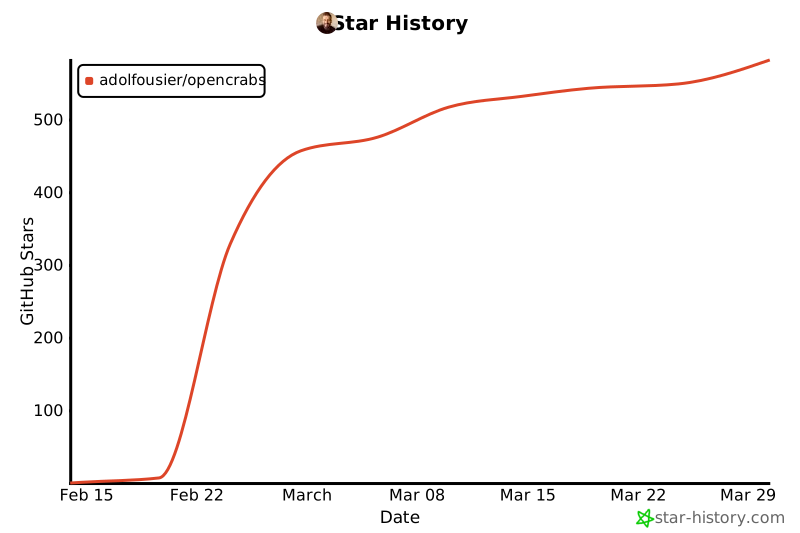](https://www.star-history.com/#adolfousier/opencrabs)
## ✨ Stay Tuned
---
**Built with Rust 🦀 by [Adolfo Usier](https://github.com/adolfousier)**
---
[Latest Release](https://github.com/adolfousier/opencrabs/releases/tag/v0.2.81)