
okpalette
Fast, deterministic categorical color palettes for Python.
Use okpalette when you need distinct, stable colors for labels, plots, dashboards, or reports.
Install
With uv:
Quickstart
Create stable colors for categories:
=
# ["#000058", "#90ff00", "#ff38ff", ...]
Get the same kind of palette from a shell:
Works great as a uv tool:
CLI success output is JSON only:
Extend colors you already have:
=
Rust API
Rust crates can use the generator directly without depending on Python:
[]
= "1.1"
The one-shot functions use the same defaults as the Python API and CLI:
use ;
let colors = generate_palette.unwrap;
let brand = ;
let extended = extend_palette.unwrap;
Use PaletteGenerator for reusable, typed configuration:
use ;
let generator = new
.grid_size
.constraints
.distance_weights
.backgrounds
.unwrap
.colorblind_mode;
let colors = generator.generate.unwrap;
let new_colors = generator.generate_extension.unwrap;
LabelPaletteRequest exposes the position-aware label generator. Typed colors,
constraints, parsing, and SVG/PNG rendering are also available from the crate
root; candidate search and label-assignment internals remain private.
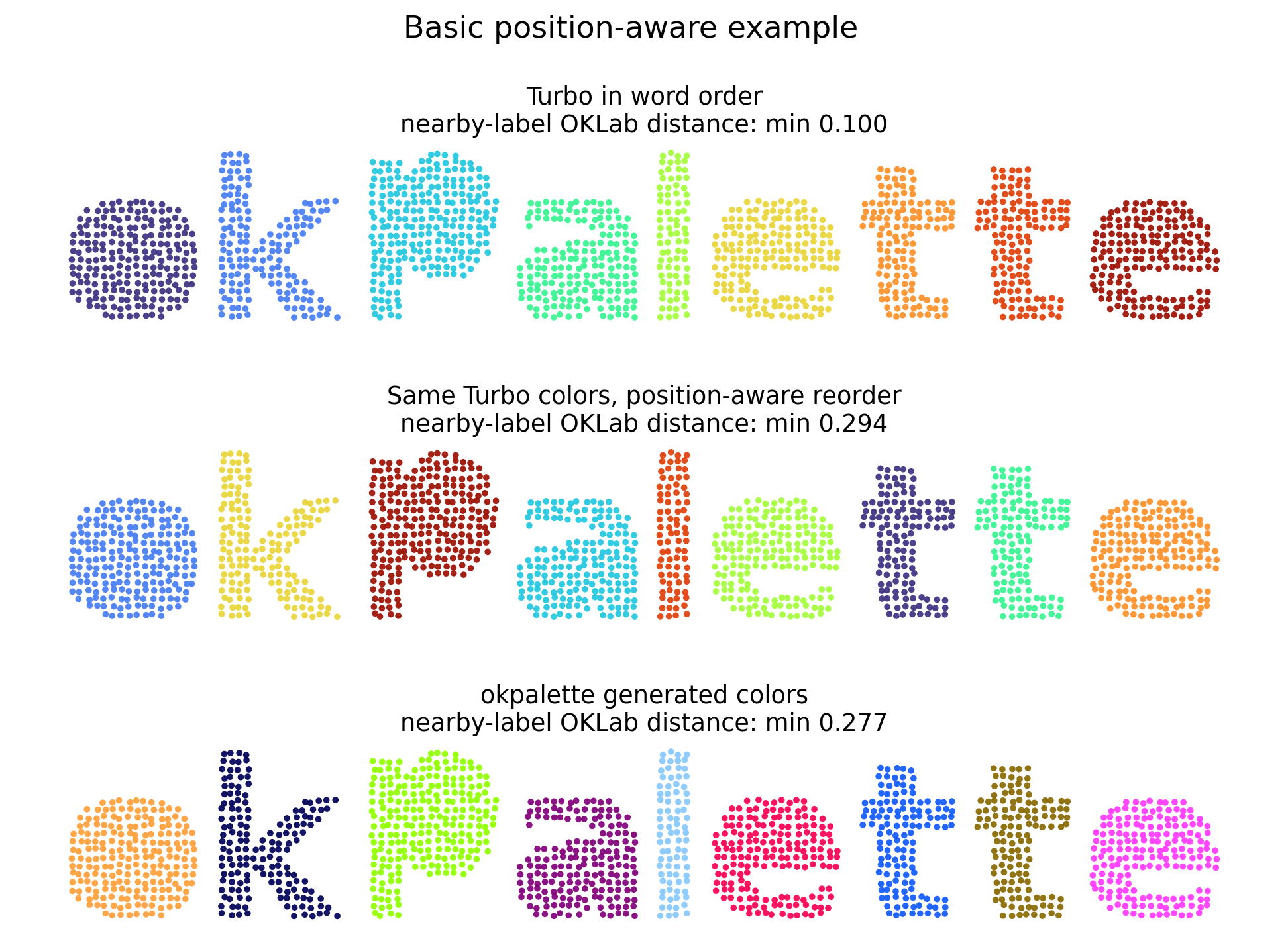
Use position-aware label colors when nearby labels should be easier to tell apart:
=
=
=
Example
Agent Skill
okpalette includes an optional packaged agent skill for simple JSON CLI usage.
Install it into a personal Codex or Claude skill directory:
Use --dry-run to print the target path without writing, and --overwrite to
replace an existing installed skill. The Codex installer respects $CODEX_HOME
and otherwise writes under ~/.codex; Claude skills are installed under
~/.claude.
Formats
Use RGB tuples when that fits your plotting library better:
=
# [(8, 0, 80), (224, 8, 0), ...]
=
# [(0.03137254901960784, 0.0, 0.3137254901960784), ...]
Extend Colors
Use extend_palette() when you already have brand colors or a small palette.
=
=
assert ==
assert == 12
Use existing colors as anchors without returning them:
=
Here target_size=10 still describes the final palette size, so new_colors
contains eight generated colors when brand contains two colors.
The same basic workflows are available through the CLI:
okpalette create and okpalette extend always write JSON on success, with
the stable shape {"colors":[...],"format":"hex"}. For --format rgb and
--format rgb01, tuple colors are serialized as JSON arrays. Validation and
generation errors write a short message to stderr and leave stdout empty.
Map Labels To Colors
Use create_label_palette() when positions should influence which label gets
which color. Nearby or overlapping labels are assigned more distinct colors.
=
=
=
# {"control": "#90ff00", "treated": "#000058", "outlier": "#ff38ff"}
Labels may be strings, integers, tuples, or other hashable Python objects. The returned dict preserves first-seen label order.
Keep specific label colors fixed:
=
For dataframe-like objects, read position and label columns by duck typing:
=
Use With Plotting Libraries
okpalette has no required Matplotlib, Altair, or Plotly dependency. The
default output is a list of lowercase hex strings, which all three libraries
accept directly. Use format="rgb01" for Matplotlib APIs that specifically
expect normalized RGB tuples.
Matplotlib color cycles and colormaps:
=
, =
=
Altair categorical scales and raw color columns:
=
=
=
# When a dataframe column already contains okpalette hex strings:
=
Plotly Express discrete sequences and maps:
=
=
=
=
Tune Appearance
Background Contrast
By default, palettes are generated without a background constraint. Pass both
background and background_contrast when you want colors separated from a
known plotting background. Use "normal" for the OKLab background-separation
heuristic, or "high" / "wcag" for WCAG 2.2 non-text contrast of at least
3.0:1 against every configured background color.
=
Avoid other colors:
=
background accepts one color or a sequence of colors and filters candidates
against those backgrounds. avoid_colors keeps exact colors out of the palette
and uses them as distance anchors.
Colorblind-aware generation
Opt into colorblind-aware generation when pairwise palette separability should be tested under selected color vision deficiency simulations:
=
CLI:
colorblind_mode may be None, "protan", "deutan", "tritan",
"red-green", or "all". The "red-green" mode optimizes against protan and
deutan simulations without including tritan; "daltonism" is accepted as a
compatibility alias, but "red-green" is the preferred spelling. The feature
uses Machado, Oliveira, and Fernandes 2009 severity-1.0 matrices on linear
sRGB and optimizes the worst-case OKLab distance across ordinary vision and the
selected simulations. It does not make a palette universally accessible or
colorblind-safe. If you also set
background_contrast="high" or "wcag", WCAG contrast is still checked against
the ordinary sRGB background, not against simulated colors.
Limit hue ranges
=
=
Common constraints:
=
=
=
lightness is OKLab L in 0..1. hue is OKLCH degrees in 0..360; ranges can wrap around zero.
Preview And Save
=
view_palette() works in notebooks through _repr_svg_() and _repr_png_().
For raw preview bytes:
=
=
Grid Size
grid_size controls how many candidate colors are searched.
= # step 16
= # step 8
= # step 4
=
If constraints leave too few candidates, okpalette raises ValueError with a hint
to relax lightness, chroma, hue, or grid_size.
API
How It Works
okpalette uses a greedy Glasbey-style algorithm. It starts with anchor colors
such as seeds, avoid colors, and the background, then repeatedly chooses the
candidate color that is farthest from the nearest anchor or selected color.
Distances are measured in OKLab. Lightness, chroma, and hue constraints are applied through OKLab and OKLCH before colors are selected.
When colorblind_mode is enabled, candidate distances are scored as the minimum
of ordinary OKLab distance and the OKLab distance after each selected Machado
2009 severity-1.0 simulation. This is a generation objective for palettes
tested under selected CVD simulations, not an accessibility certification.
For label palettes, okpalette builds a weighted label-neighborhood graph from
the input positions, then uses that graph while choosing and assigning colors.
The default max_points=50_000 bounds graph construction for large datasets;
use max_points=None to opt into all-points preprocessing.
The result is deterministic, fast, and stable when extending a palette. It is not a global optimizer.
Python And Wheels
okpalette supports Python 3.12 and newer. Prebuilt wheels use the Python
cp312-abi3 stable ABI and are built for Linux x86_64 and aarch64
manylinux2014, macOS aarch64, and Windows x64.
Other platforms install from the source distribution when a wheel is not available, which requires Rust and the normal Python build toolchain. Intel macOS, musllinux, Windows ARM64, and other secondary targets are not prebuilt wheel targets.
References
These references describe the methods and standards that inform okpalette.
They do not make generated palettes WCAG-compliant, colorblind-safe, or globally
optimal.
- Glasbey-style categorical palette generation: lmcinnes/glasbey and the Colorcet categorical guide.
- OKLab and OKLCH: A perceptual color space for image processing and MDN OKLCH documentation.
- WCAG 2.2 contrast: WCAG 2.2, Non-text Contrast, and relative luminance.
- Color vision deficiency simulation: Machado, Oliveira, and Fernandes 2009 and the CVD simulation project page.