






👋 Meet OasysDB
OasysDB is a lightweight and easy-to-use embedded vector database written in Rust. With its simple API, it requires no learning curve to understand and use. OasysDB also requires no server setup and configuration. It is designed to be embedded directly inside your AI application simply by adding it as a dependency.
# Rust via Crates.io
# Python via PyPI
Use Cases
OasysDB is very flexible! You can use it for systems related with vector similarity search such as:
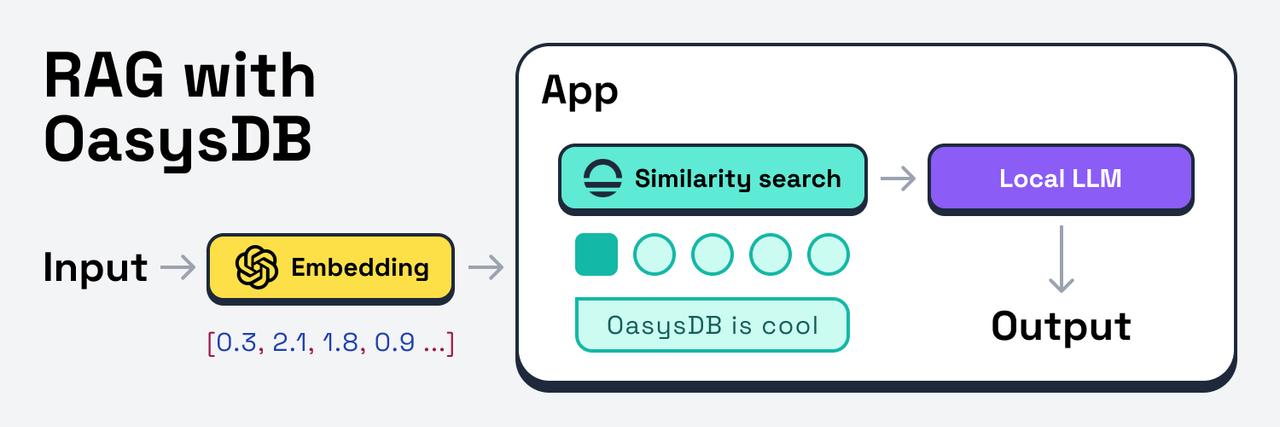
- Local RAG (Retrieval-Augmented Generation) pipeline with an LLM and embedding model to generate a context-aware output.
- Image similarity search engine to find similar images based on their semantic content. See Python demo.
- Real-time product recommendation system to suggest similar products based on the product features or user preferences.
- Add your use case here 😁
Features
Core Features
🔸 Embedded Database: Zero setup and no dedicated server or process required.
🔸 Optional Persistence: In-memory vector collections that can be persisted to disk.
🔸 Incremental Ops: Insert, modify, and delete vectors without rebuilding indexes.
🔸 Flexible Schema: Store additional and flexible metadata for each vector record.
Technical Features
🔹 Fast HNSW: Efficient vector similarity search with state-of-the-art algorithm.
🔹 Configurable Metric: Use Euclidean, Cosine, or other metric for your specific use-case.
🔹 Parallel Processing: Multi-threaded & SIMD-optimized vector distance calculation.
🔹 Built-in Incremental ID: No headache record management and efficient storage.
Design Philosophy
OasysDB is designed to be boring 😂
Simple and easy to use API with no learning curve. No worries about setting up a server or configuring the database. We want you to forget about the vector database stuff and actually focus on building your AI application fast.
Read more about the design philosophy of OasysDB in the Comprehensive Guide.
🚀 Quickstart with Rust

To get started with OasysDB in Rust, you need to add oasysdb to your Cargo.toml. You can do so by running the command below which will add the latest version of OasysDB to your project.
After that, you can use the code snippet below as a reference to get started with OasysDB. In short, use Collection to store your vector records or search similar vector and use Database to persist a vector collection to the disk.
use *;
Dealing with Metadata Types
In OasysDB, you can store additional metadata for each vector which is useful to associate the vectors with other data. The code snippet below shows how to insert the Metadata to the Record or extract it.
use *;
Feature Flags
OasysDB provides several feature flags to enable or disable certain features. You can do this by adding the feature flags to your project Cargo.toml file. Below are the available feature flags and their descriptions:
-
json: Enables easy Serde's JSON conversion from and to the metadata type. This feature is very useful if you have a complex metadata type or if you use APIs that communicate using JSON. -
gen: Enables the vector generator trait and modules to extract vector embeddings from your contents using OpenAI or other embedding models. This feature allows OasysDB to handle vector embedding extraction for you without separate dependencies.
🚀 Quickstart with Python

OasysDB also provides a Python binding which allows you to add it directly to your project. You can install the Python library of OasysDB by running the command below:
This command will install the latest version of OasysDB to your Python environment. After you're all set with the installation, you can use the code snippet below as a reference to get started with OasysDB in Python.
# Open the database.
=
# Replace with your own records.
=
# Create a vector collection.
=
=
# Optionally, persist the collection to the database.
# Replace with your own query.
=
# Search for the nearest neighbors.
=
# Print the result.
If you want to learn more about using OasysDB for real-world applications, you can check out the this Google Colab notebook which demonstrates how to use OasysDB to build a simple image similarity search engine: Image Search Engine with OasysDB
🎯 Benchmarks
OasysDB uses a built-in benchmarking suite using Rust's Criterion crate which we use to measure the performance of the vector database.
Currently, the benchmarks are focused on the performance of the collection's vector search functionality. We are working on adding more benchmarks to measure the performance of other operations.
If you are curious and want to run the benchmarks, you can use the command below to run the benchmarks. If you do run it, please share the results with us 😉
Memory Usage
OasysDB uses HNSW which is known to be a memory hog compared to other indexing algorithms. We decided to use it because of its performance even when storing large datasets of vectors with high dimension.
In the future, we might consider adding more indexing algorithms to make OasysDB more flexible and to cater to different use cases. If you have any suggestions of which indexing algorithms we should add, please let us know.
Anyway, if you are curious about the memory usage of OasysDB, you can use the command below to run the memory usage measurement script. You can tweak the parameters in the examples/measure-memory.rs file to see how the memory usage changes.
Quick Results
Even though the results may vary depending on the hardware and the dataset, we want to give you a quick idea of the performance of OasysDB. Here are some quick results from the benchmarks:
| Collection size | Embedding dimension | Memory usage | Search time |
|---|---|---|---|
| 10,000 | 128 | 7MB | 248.73µs |
| 1,000,000 | 128 | 569MB | 555.46µs |
| 10,000 | 768 | 302MB | 705.83µs |
| 1,000,000 | 768 | 3,011MB | 1.36ms |
| 1,000,000 | 3,072 | N/A | 3.07ms |
| 1,000,000 | 4,096 | N/A | 3.87ms |
These results are from a machine with an Apple M3 CPU with 128GB of RAM. The dataset used for the benchmarks is a random dataset generated by the Record::many_random function with additional random usize as its metadata and a random search vector.
🤝 Contributing
The easiest way to contribute to this project is to star this project and share it with your friends. This will help us grow the community and make the project more visible to others.
If you want to go further and contribute your expertise, we will gladly welcome your code contributions. For more information and guidance about this, please see contributing.md.
If you have deep experience in the space but don't have the free time to contribute codes, we also welcome advices, suggestions, or feature requests. We are also looking for advisors to help guide the project direction and roadmap.
If you are interested about the project in any way, please join us on Discord. Help us grow the community and make OasysDB better 😁
Code of Conduct
We are committed to creating a welcoming community. Any participant in our project is expected to act respectfully and to follow the Code of Conduct.
Disclaimer
This project is still in the early stages of development. We are actively working on it and we expect the API and functionality to change. We do not recommend using this in production yet.