
nolog logger
Convenient and 'beautiful by default' logger for debugging your programs.
Easy to use, you don't need to learn anything to start using it.
Zero deps. No unsafe (by #![deny(unsafe_code)]).
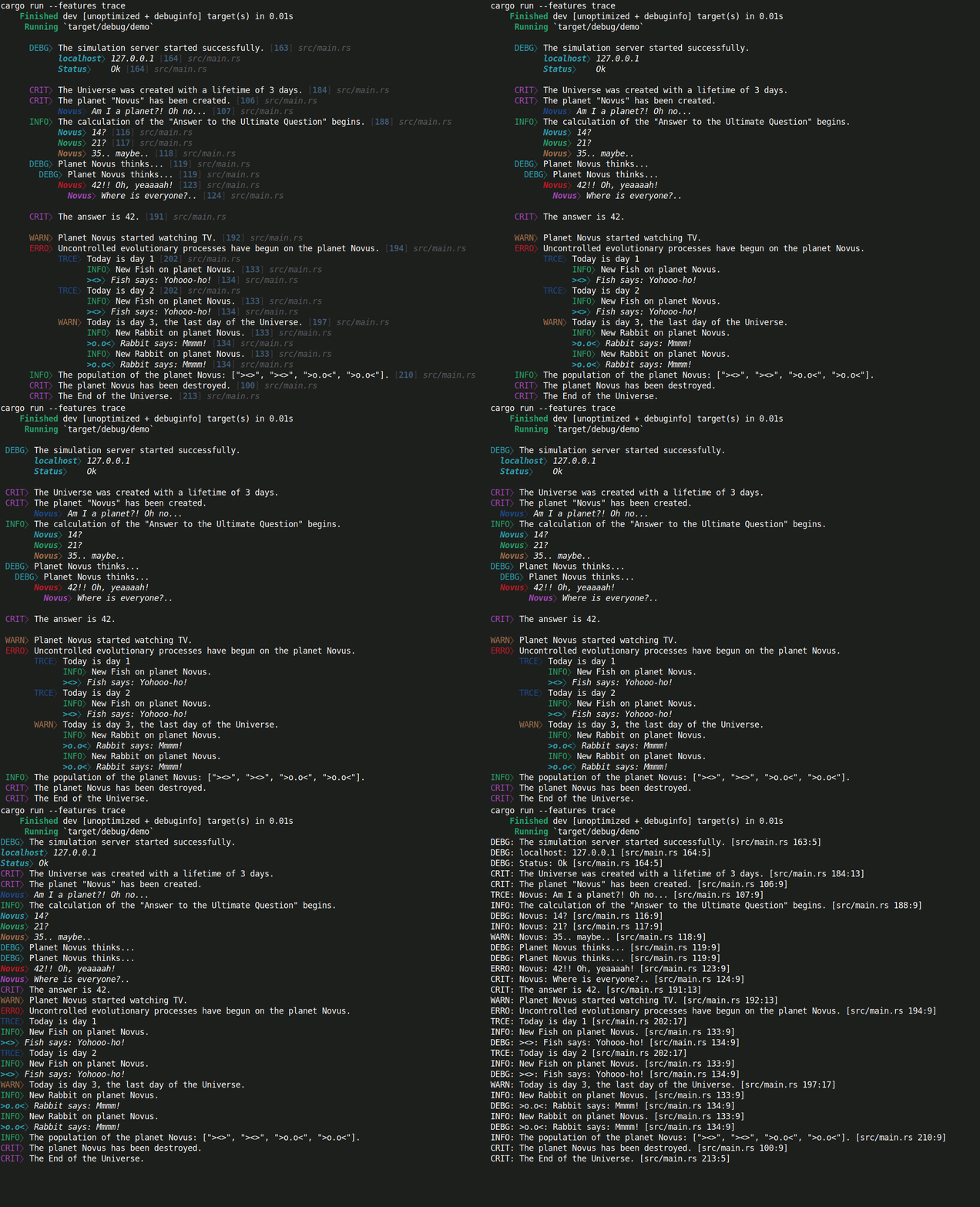
- In most cases
nologuses aformat_args!()(that avoids heap allocations) and compile-time level filtering by Cargo features. - Filtering by module path (
logmodfeature). - Display messages only from a selected section of code (
logonlyfeature). - Smart logging: hide all messages, show the previous
Хmessages if anerrororcritlevel message was triggered (logcatchfeature). - A custom indent can be added to the message, as well as a number of blank lines before and after it. You can use variables (eg loop counter) to set the indent for the selected message.
- Easily adjust and disable all indents and newlines with features.
- Сustomization: you can create your own color scheme for the logger.
- Support for named format arguments:
info!("{line_count} lines.");. - Support for
key => valuesyntax:info!("{server}" => "{ip}"); - Automatically disabled in the release build:
cargo run --release. If you want the log to be enabled in the release build, then usereleasefeature:nolog = {version = "*", features = ["release"]}. - All levels are disabled by default. Turning on the
debuglevel also turns on the levels above it:info,warn,error,crit. Level can be enabled using the console:cargo run --features debugor inCargo.toml:nolog = {version = "*", features = ["debug"]}. To enable all levels:cargo run --features trace. - By default, the log is writting to
stderr. You can log to a file withtofilefeature. You may set the buffer size. Automatic flush after each message will be used. If you want wait for the buffer to fill or to do it manually withlogflush!()then useno_auto_flushfeature. - You can add a timestamp like
[2022-07-10 06:49:33.646361181 UTC]using a third party library you like. An example is below. - Support for chaining multiple messages into one (they must all be
of the same type:
usualorkey-value):
info!;
Using nolog
Cargo.toml
[]
= { = "1", = [] }
[]
= []
# example `classic`
#nolog_setup = ["nolog/show_lvl_header_kv", "nolog/indent_ignore_all", "nolog/newline_ignore", "nolog/location_style_classic", "nolog/sep_colon"]
# example `classic_plain`
#nolog_setup = ["nolog/plain", "nolog/show_lvl_header_kv", "nolog/indent_ignore_all", "nolog/newline_ignore", "nolog/location_style_classic", "nolog/sep_colon"]
= ["nolog/trace", "nolog_setup"]
= ["nolog/debug", "nolog_setup"]
= ["nolog/info", "nolog_setup"]
= ["nolog/warn", "nolog_setup"]
= ["nolog/error", "nolog_setup"]
= ["nolog/crit", "nolog_setup"]
= ["nolog/logonly"]
= ["nolog/logcatch"]
= ["nolog/logmod"]
main.rs
extern crate nolog;
nolog has the same syntax as most loggers based on the log crate.
nolog extends the log crate syntax by adding new features.
However, nolog is not based on log crate, it just has the same
macro names.
Therefore, switching to nolog will require minimal changes in the code.
In fact, this boils down to a change in Cargo.toml
and line extern crate nolog;.
Then:
Or, for example
It's the same but noisier
Result:
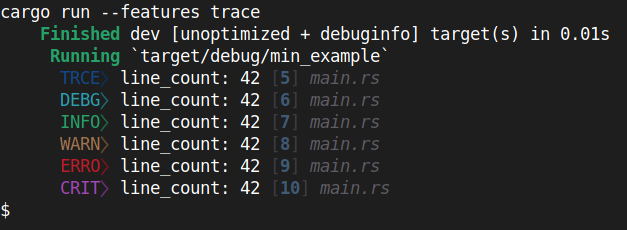
Tofile. Writing log entries to a file
Cargo.toml
#...
[]
= { = "1", = ["tofile"] }
#...
main.rs
use OpenOptions;
use ;
use PathBuf;
extern crate nolog;
Optionally, you can set the buffer size.
// Buffer `std::io::BufWriter` with capacity: 8000 bytes.
logfile!;
The default is to automatically flush after each message.
If you want wait for the buffer to fill or to do it manually
with logflush!() then use no_auto_flush feature.
Cargo.toml
#...
[]
= { = "1", = ["tofile", "no_auto_flush"] }
#...
Then use logflush!() to flush the log manually.
main.rs
...
// Initialization
// Don't use macros like `debug!("msg");` before initialization.
logfile!;
trace!;
logflush!;
...
How to add a timestamp
You can add a timestamp like [2022-07-10 06:49:33.646361181 UTC]
using a third party library you like.
For this example, we will use chrono crate.
Cargo.toml
#...
[]
= { = "1", = [] }
= "0.4"
[]
= ["nolog/custom_leading"]
= ["nolog/custom_trailing"]
= ["nolog/custom_before_msg"]
= ["nolog/custom_after_msg"]
= ["custom_leading"]
#...
We have 4 options here:
- "custom_leading" -
<TIMESTAMP>CRIT⧽ msg [5] src/main.rs - "custom_trailing" -
CRIT⧽ msg [5] src/main.rs<TIMESTAMP> - "custom_before_msg" -
CRIT⧽ <TIMESTAMP>msg [5] src/main.rs - "custom_after_msg" -
CRIT⧽ msg<TIMESTAMP> [5] src/main.rs
Log entry structure:
usual:
<indents><custom_leading><lvlheader><sep><custom_before_msg><msg><custom_after_msg><location><custom_trailing>
key-value:
<indents><custom_leading><lvlheader><sep_kv><custom_before_msg><key><sep_key><value_indent><value><custom_after_msg><location><custom_trailing>
Here is an example:
main.rs
extern crate nolog;
Output:
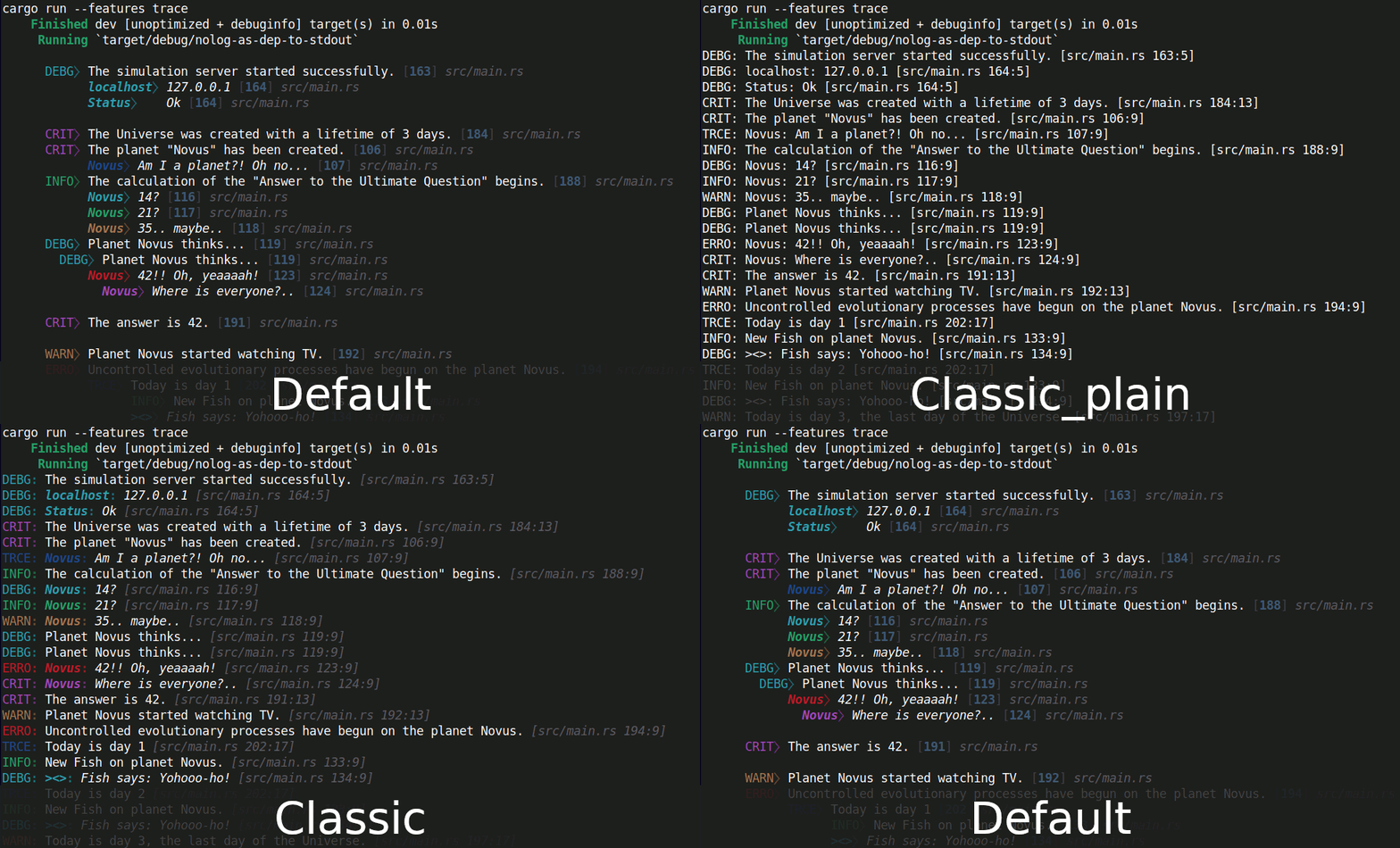
With classic style:
Styles
Default
= []
classic
= ["nolog/show_lvl_header_kv", "nolog/indent_ignore_all", "nolog/newline_ignore", "nolog/location_style_classic", "nolog/sep_colon"]
classic_plain
= ["nolog/plain", "nolog/show_lvl_header_kv", "nolog/indent_ignore_all", "nolog/newline_ignore", "nolog/location_style_classic", "nolog/sep_colon"]
Chaining
Messages in a chain should all be of the same type: usual or key-value
ususal
debug!;
key-value
debug!;
Logmod. Filtering by module path
Add it as early as possible in the code:
logmod!;
[]- Include a module and all its submodules.[=]- the same (Include a module and all its submodules).[!]- Exclude a module and all its submodules.[==]- Include only this module without submodules.[!=]- Exclude only this module without submodules.
Then
cargo run --features trace,logmod
Logonly. Display messages only from a selected section of code
This is useful for debugging to get messages from just a small piece of code.
logonly!;
Then
cargo run --features trace,logonly
You can use any brackets
logonly!(), logonly!{}, logonly![].
You can use multiple logonly!() blocks. Messages will be displayed from all.
It won't break your code when the logger turns off in release build. So you can leave these blocks in the code.
When disabled, the definition of this macro will be replaced with the following:
logonly
It simply writes down the code it received.
Logcatch. Smart logging
Hide all messages, show the previous Х messages if an error or crit
level message was triggered.
By default X=10. You can change this anywhere in the code.
// This will take effect for the code below.
logcatch!; // now X=2
To enable this feature, use:
cargo run --features trace,logcatch
Each new line created with newline!() or ->[_,1,1](about
what it will be below) counts as a separate message.
Quick disable and enable messages
You can disable individual messages without removing them from the code.
A macro like debug!([_]; "msg") will expand into an empty tuple ().
// on
info!;
// off
info!;
You can use any options you like:
On:
[#], [x], [v], [+], [on], [true], [your_var]
Off:
[ ], [_], [-], [off], [false], [your_var]
your_var should be bool.
To change states, you need to change only one character:
[_] --> [#].
This also works with chained messages, but disables the entire chain. You can't turn off a single message in a chain.
crit!;
You can turn off the action of block logonly. This will not affect
the code, the effect is as if macro logonly was not in this place.
logonly!
This way you can leave logonly!() in the code and if it is required
in the future just enable it.
Variables and expressions
If necessary, you can control messages using variables and expressions.
let my_log_enabled = true;
crit!;
let status = "ok";
crit!;
// ^ ^
// Add parentheses
...
crit!;
// ^ ^
// Add parentheses
Indentation and new lines
new lines
newline!(2); - It will simply write the passed number of new lines to the log.
Indentation
Indents are of several types:
Base indent
Base indent will be added to every line.
- Default for all:
6indents. One indent equals one space.
You can change base indent with cargo features:
indent_base_zeroindent_base_oneindent_base_twoindent_base_threeindent_base_fourindent_base_fiveindent_base_sevenindent_base_eightindent_base_nineindent_base_ten
For example in Cargo.toml:
= ["nolog/indent_base_zero"]
= ["nolog/trace", "nolog_setup"]
The indent of the selected message
- Default for
usual: 0 - Default for
key-value: 6
The default indentation is used if no value has been provided by the user.
You can specify indentation in the following way:
crit!(->[X,Y,Z] "msg");
X- Indents.Y- AddYblank lines before message (same effect asnewline!(Y)).Z- AddZblank lines after message.
All of these arguments are optional:
crit!;
crit!;
crit!;
crit!;
crit!;
If you want to add blank lines and leave the default indentation:
crit!;
crit!;
The same works for each message in the chain.
debug!;
key => value have an indentation of 6 by default, but you can reset
it by setting it to zero.
error!;
Or you can do it via Cargo.toml for all messages.
indent_kv_default_zeroindent_kv_default_oneindent_kv_default_twoindent_kv_default_threeindent_kv_default_fourindent_kv_default_fiveindent_kv_default_sevenindent_kv_default_eightindent_kv_default_nineindent_kv_default_ten
For example in Cargo.toml:
= ["nolog/indent_kv_default_zero"]
= ["nolog/trace", "nolog_setup"]
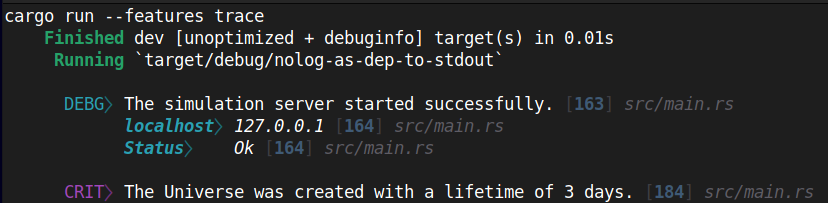
Key-values have the additional ability to set indentation not only for the key, but also for the value.
debug!;
This allows you to get nice aligned output if you want.
Indent variables
You can use variables to set the indentation and add blank lines.
for i in 0..2
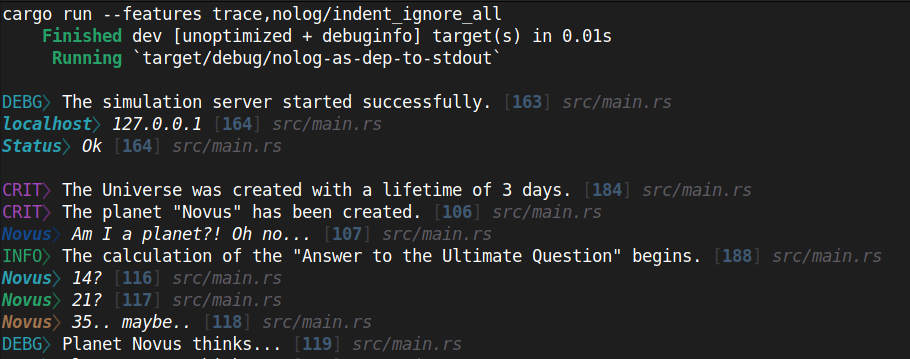
Ignore all indents
Ignore all types of indentation.
= ["nolog/indent_ignore_all"]
Ignore all newlines
= ["nolog/newline_ignore"]
Colors
nolog colored by default, use this feature for plain output:
= ["nolog/plain"]
Level headers
= ["nolog/show_lvl_header_kv"]
Show level name for key-value:
It's disabled by default:
Don't disable logger in release build
= { = "1", = ["release"] }
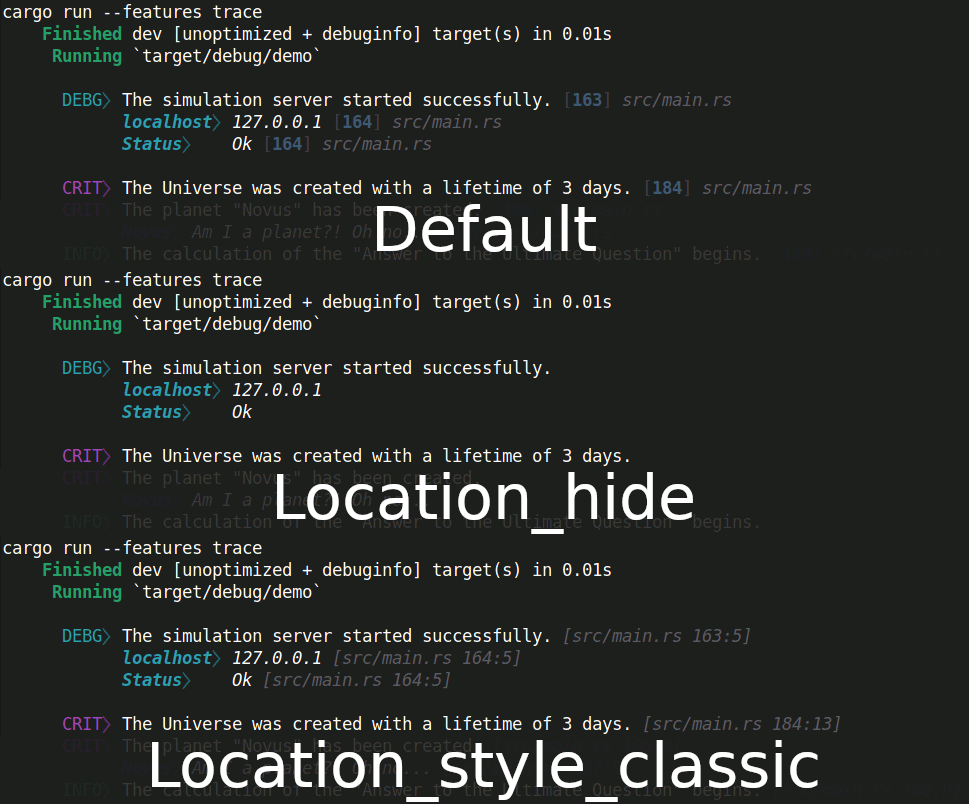
Location
Don't show location (like [src/main.rs 155:9])
= ["nolog/location_hide"]
Style like this: [src/main.rs 155:9]
= ["nolog/location_style_classic"]
Separator
Default = "⧽ "
- ": "
= ["nolog/sep_colon"]
- " "
= ["nolog/sep_space"]
- ""
= ["nolog/sep_hide"]
Custom color scheme
You can create your own color scheme for the logger.
Cargo.toml
#...
[]
= { = "1", = [] }
[]
= ["nolog/custom_colors"]
= ["custom_colors"]
#...
Here is an example:
main.rs
extern crate nolog;
Logging in tests
Logging in tests works exactly the same, except that Rust test programs hide standard output of successful tests.
Use the following code to see the output of successful tests.
The output of failed tests will be displayed anyway.
Changelog
- 1.0.1 - 1.0.8 – Small changes in Readme etc.
- 1.0.0 – Release. Completely rewritten.
- 0.1.1-0.2.3 – Early versions.