netls 1.1.0

Network connections viewer for daily use and automation - container visibility, JSON/CSV output, process tree, live watch mode
Documentation

netls

netls - a network connections viewer built for developer workflows and automation.

  • JSON & CSV output - pipe directly into jq, scripts, or AI agents
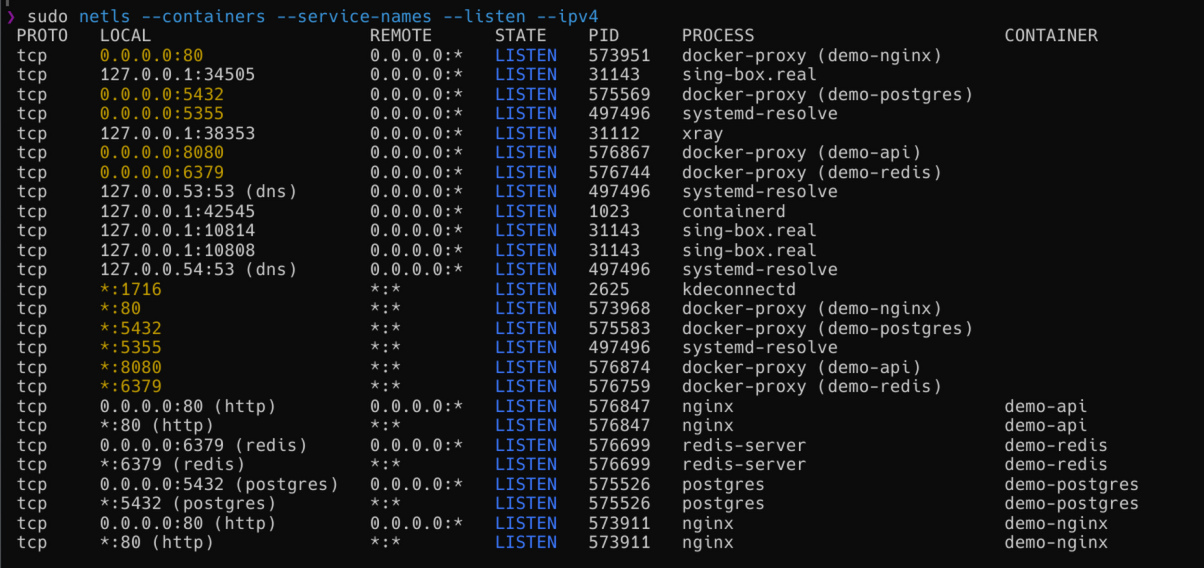
  • Container visibility - shows which container owns each connection (Docker and Podman)
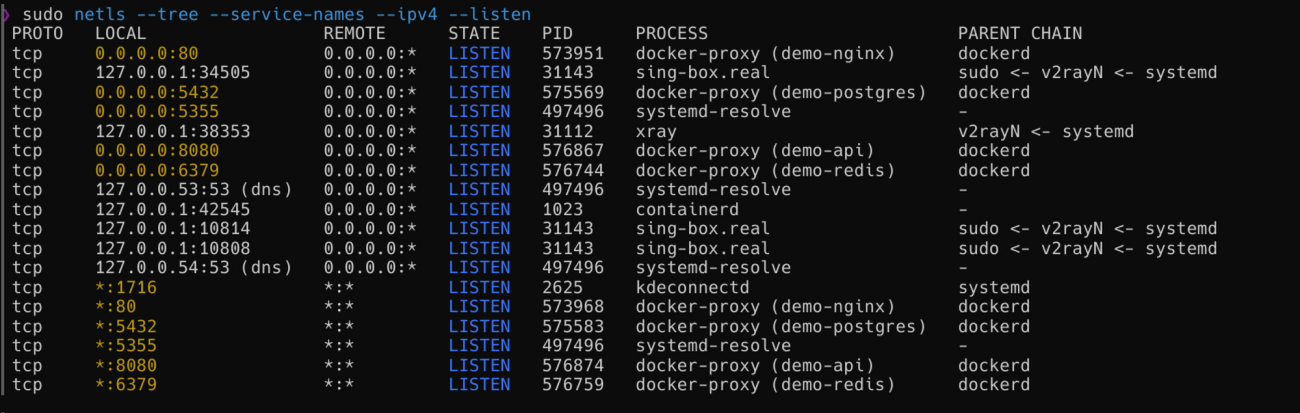
  • Process tree - trace any connection back to its parent process chain
  • Watch mode - live diff, see new and closed connections in real time
  • CI-friendly - --wait-for 8080 blocks until a port is up
  • Configs & profiles - save common flag sets and switch with one flag
  • And more - TUI, snapshot diff, service name annotations, port utilities
  • Linux & macOS - full support on both platforms; macOS works entirely without root

CI crates.io docs.rs

Contents

Quick look

Container visibility - which container owns each connection: netls --containers
Process tree - full parent chain per connection: netls --tree
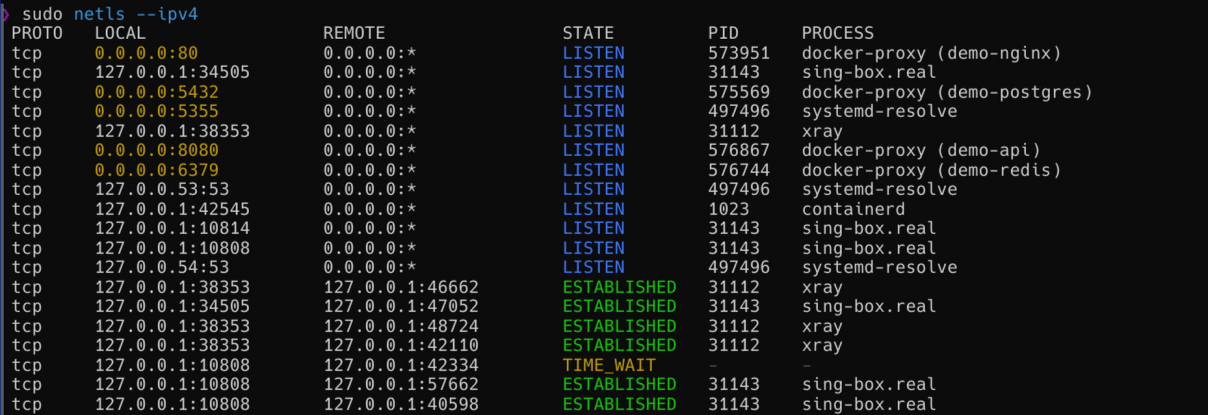
Default output: netls default output

Installation

Supported platforms: Linux, macOS. Requires Rust 1.88 or newer.

cargo install netls

Usage

netls                  # table (default)
netls --json           # JSON output (one object per line)
netls --json --pretty  # pretty-printed JSON
netls --csv            # CSV output
netls --watch          # refresh every 2s with diff
netls --watch 5        # refresh every 5s
netls --tui            # interactive TUI

Filters

netls --port 8080               # filter by port
netls --pid 1234                # filter by PID
netls --process nginx           # filter by process name (case-insensitive substring)
netls --state established       # filter by state
netls --proto tcp               # filter by protocol: tcp, udp, unix, icmp, raw
netls --proto icmp              # ICMP datagram sockets: blackbox_exporter, k8s probes, Go net/icmp monitors
netls --proto raw               # raw IP sockets (SOCK_RAW): tcpdump, routing daemons (bird, FRR), nmap
netls --ipv4                    # show only IPv4 connections
netls --ipv6                    # show only IPv6 connections
netls --no-loopback             # hide loopback connections (127.x and ::1)
netls --listen                  # show only listening sockets
netls --all                     # include Unix domain sockets (hidden by default)

Filters can be combined:

netls --proto tcp --state listen
netls --proto tcp --port 443 --json
netls --no-loopback --state established

Extra columns

netls --queues        # RECV-Q / SEND-Q (TCP buffer fill in bytes)
netls --service-names # annotate ports with service names (curated built-ins + /etc/services)
netls --age           # approximate connection age (Linux only)
netls --tree          # parent process chain: "bash <- tmux"
netls --systemd       # owning systemd unit: "nginx.service" (Linux only)
netls --fd            # open file-descriptor count/limit per process
netls --cmdline       # full command line instead of short process name
netls --containers    # include connections from Docker / Podman containers
netls --resolve-dns   # resolve remote IPs to hostnames (may be slow)
netls --resolve-proxy # show real originating process for proxied connections

Aggregation and analysis

netls --summary                   # connections grouped by protocol and state
netls --summary --warn-timewait   # warn if TIME_WAIT count exceeds 500
netls --summary --warn-timewait 200
netls --top                       # top 10 processes by connection count
netls --top 5
netls --count                     # print only the count of matching connections
netls --sort port                 # sort by column: proto, local, remote, state, pid, port, process
netls --group-by remote-ip        # group by field: remote-ip, process, port, proto

Snapshot and diff

netls --save before.json               # save current snapshot to file
netls --diff before.json               # compare current state with saved snapshot

Port utilities

netls --check-port 8080          # check if a port is free (exit 0 = free, 1 = in use)
netls --kill 8080                # send SIGTERM to process listening on port (asks for confirmation)
netls --kill 8080 --force        # skip confirmation
netls --wait-for 8080            # block until port is listening (timeout: 30s)
netls --wait-for 8080 --timeout 60

Output

Table (default)

Colors are enabled automatically when stdout is a terminal and disabled in pipes/redirects.

JSON

netls --json
{"proto":"tcp","local":"127.0.0.1:8080","remote":"127.0.0.1:54321","state":"ESTABLISHED","pid":1234,"process":"cargo","recv_q":0,"send_q":0}
{"proto":"tcp","local":"0.0.0.0:22","remote":"0.0.0.0:*","state":"LISTEN","pid":891,"process":"sshd","recv_q":0,"send_q":0}
{"proto":"tcp","local":"0.0.0.0:8443","remote":"0.0.0.0:*","state":"LISTEN","pid":null,"process":null,"recv_q":0,"send_q":0}

One JSON object per line. Use --pretty for human-readable output:

netls --json --pretty
{
  "proto": "tcp",
  "local": "0.0.0.0:22",
  "remote": "0.0.0.0:*",
  "state": "LISTEN",
  "pid": 891,
  "process": "sshd",
  "recv_q": 0,
  "send_q": 0
}

CSV

netls --csv
proto,local,remote,state,pid,process
tcp,127.0.0.1:8080,127.0.0.1:54321,ESTABLISHED,1234,cargo
tcp,0.0.0.0:22,0.0.0.0:*,LISTEN,891,sshd

Watch mode

netls --watch

Refreshes every 2 seconds. New connections are shown in green, closed connections in red. Exit with Ctrl+C.

netls --watch 5 --proto tcp --state established

TUI

netls --tui

Interactive mode with live updates, keyboard navigation, and inline filtering. Exit with q or Ctrl+C.

Configuration

netls can read defaults and named profiles from a TOML config file. Location (first match wins):

  1. --config PATH flag
  2. NETLS_CONFIG environment variable
  3. ~/.config/netls/config.toml (or the platform equivalent)

Example ~/.config/netls/config.toml:

# Applied at every invocation unless overridden on the command line
[defaults]
proto = "tcp"
sort = "port"
service_names = true

# Extend the built-in port -> service-name map
[ports]
3000 = "vite-dev"
4321 = "astro-dev"
9229 = "node-debug"

# Named overlays activated with --profile <name>
[profiles.k8s]
all = true
containers = true

[profiles.dev]
listen = true
no_loopback = true

[profiles.audit]
state = "listen"
no_loopback = true

Usage:

netls                     # applies [defaults]
netls --profile k8s       # applies [defaults] then [profiles.k8s] on top
netls --proto udp         # CLI flag overrides config, regardless of profile

Helper commands:

netls --init-config            # write a starter config to ~/.config/netls/config.toml
netls --init-config --force    # overwrite an existing file
netls --show-config            # print resolved config with origin per field

All three accept --config PATH to target a specific file instead of the default.

Notes:

  • Config field names match long-form CLI flags with - replaced by _ (no_loopback, service_names, group_by, etc.).
  • One-shot actions (--watch, --summary, --top, --count, --tui, --check-port, --kill, --wait-for, --save, --diff, --warn-timewait, --timeout, --force) are not configurable.
  • A non-empty [ports] auto-enables --service-names. Set service_names = false in [defaults] to opt out.
  • NETLS_CONFIG expands a leading ~ / ~/ to your home directory.

Negation flags

Every boolean flag that can be set from [defaults] or a profile has a --no-X counterpart to turn it back off on the command line. For example:

netls --profile dev --no-listen         # dev profile sets listen = true; cancel it
netls --profile dev --loopback          # dev profile sets no_loopback = true; cancel it
netls --no-service-names                # overrides the [ports] auto-enable

Negation flags are hidden from --help to keep it readable. If --X and --no-X appear on the same command line, the last one wins.

The --no-loopback flag is itself already negative; its antonym is --loopback.

As a library

netls is also a Rust library for programmatic access to socket information:

[dependencies]
netls = "1"
use netls::{Filter, Proto, State, snapshot};

fn main() -> anyhow::Result<()> {
    let filter = Filter::default().proto(Proto::Tcp).state(State::Established);
    let connections = snapshot(&filter)?;

    for conn in connections {
        println!("{} {} -> {}", conn.process.as_deref().unwrap_or("-"), conn.local, conn.remote);
    }

    Ok(())
}

License

Licensed under either of MIT or Apache-2.0 at your option.