# ndl - needle
[](https://github.com/pgray/ndl/actions/workflows/ci.yml)
[](https://crates.io/crates/ndl)
[](https://github.com/pgray/ndl/releases)
A minimal multi-platform TUI client for [Threads](https://threads.net) and [Bluesky](https://bsky.app) - stay aware of notifications without the distractions of a full social media interface.
## Why needle?
Social media notifications can pull you out of flow state. needle lets you:
- Monitor your feed in a lightweight terminal interface
- Quickly check and respond without opening a browser
- Keep your focus while staying connected
## Features
- **Multi-platform support** - Use both Threads and Bluesky simultaneously
- **Platform switching** - Toggle between platforms with `Tab` key
- **Cross-posting** - Post to all platforms at once with `Shift+P`
- **Vim-style navigation** - `h`, `j`, `k`, `l` for intuitive movement
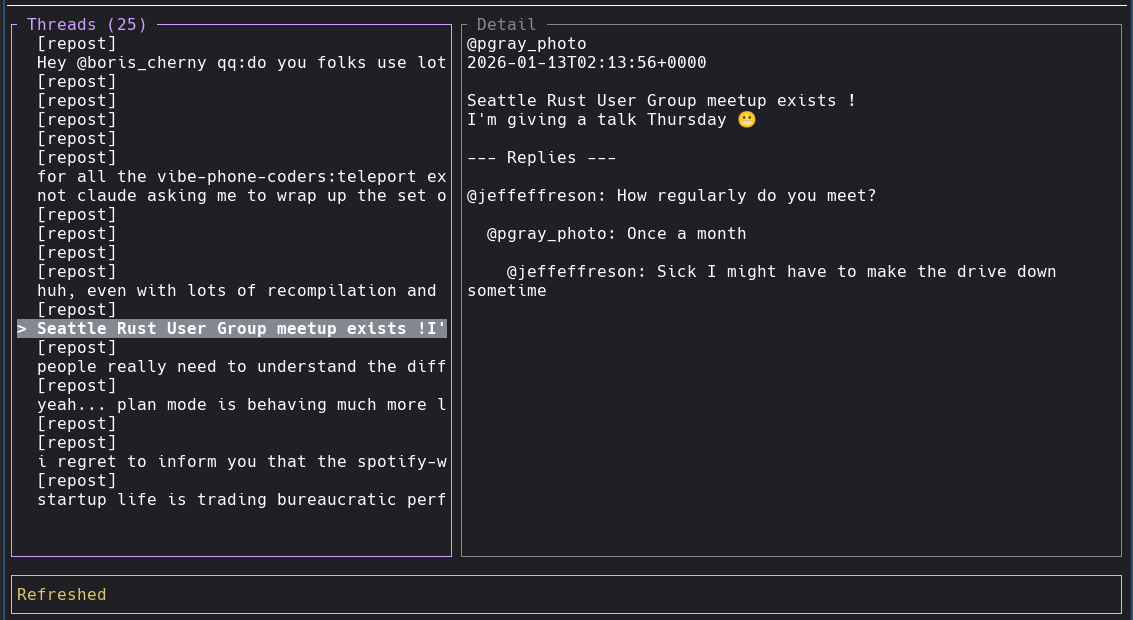
- **Two-panel layout** - Threads list on left, detail view on right (swappable)
- **Thread feed** - View your threads with auto-refresh every 15 seconds
- **Nested replies** - See replies to threads, including replies-to-replies (2 levels deep)
- **Quick replies** - Respond to threads without leaving the terminal
- **Post new threads** - Create new posts directly from the terminal
- **Media type indicators** - Reposts, images, videos, and carousels clearly labeled
- **Minimal footprint** - Runs in a terminal, no Electron bloat
## Project Structure
This is a Cargo workspace with two binaries and a shared library:
- **ndl** - The TUI client
- **ndld** - OAuth server for hosted authentication (keeps client_secret secure on server)
- **ndl-core** - Shared library for OAuth types and token exchange
## Installation
**[Latest Release](https://github.com/pgray/ndl/releases)**
```bash
cargo install ndl
```
### From source
```bash
git clone https://github.com/pgray/ndl
cd ndl
cargo build --release --workspace
```
On Linux, the build uses [wild](https://github.com/davidlattimore/wild) linker for faster builds.
Install with `cargo install wild-linker` and ensure `clang` is available.
## Configuration
needle supports both Threads and Bluesky. You can configure one or both platforms.
### Threads Authentication
See [OAUTH.md](OAUTH.md) for detailed Threads API setup instructions.
#### Default: Hosted Auth
By default, ndl uses the hosted auth server at `ndl.pgray.dev` - no setup required:
```bash
ndl login # Login to Threads
# or
ndl login threads # Explicitly specify Threads
```
### Bluesky Authentication
Bluesky uses username/password authentication:
```bash
ndl login bluesky
```
You'll be prompted for:
- **Identifier**: Your handle (e.g., `user.bsky.social`) or email
- **Password**: Your password or an [app-specific password](https://bsky.app/settings/app-passwords) (recommended)
Credentials are saved to `~/.config/ndl/config.json`:
```json
{
"access_token": "...",
"bluesky": {
"identifier": "user.bsky.social",
"password": "your-app-password",
"session": "..."
}
}
```
### Custom Auth Server
To use a different auth server:
```bash
# Via environment variable
export NDL_OAUTH_ENDPOINT=https://your-ndld-server.com
ndl login
# Or add to ~/.config/ndl/config.json:
# "auth_server": "https://your-ndld-server.com"
```
### Local OAuth
If you have your own Threads API credentials and want to run OAuth locally:
```bash
# Set empty endpoint to disable hosted auth
export NDL_OAUTH_ENDPOINT=""
export NDL_CLIENT_ID=your_client_id
export NDL_CLIENT_SECRET=your_client_secret
ndl login
```
### Logout
```bash
ndl logout
```
### Version
```bash
ndl --version
```
Config is stored at `~/.config/ndl/config.json`.
## Running the Auth Server (ndld)
If you want to host your own OAuth server:
```bash
export NDL_CLIENT_ID=your_client_id
export NDL_CLIENT_SECRET=your_client_secret
export NDLD_PUBLIC_URL=https://your-domain.com # Must match Threads app redirect URI
export NDLD_PORT=8080 # Optional, defaults to 8080
cargo run -p ndld
```
### With Let's Encrypt (ACME)
Automatic TLS certificates via Let's Encrypt:
```bash
export NDLD_ACME_DOMAIN=ndl.example.com
export NDLD_ACME_EMAIL=admin@example.com
export NDLD_ACME_DIR=/var/lib/ndld/acme # Optional, for cert persistence
export NDLD_PORT=443
cargo run -p ndld
```
Set `NDLD_ACME_STAGING=1` to use Let's Encrypt staging environment for testing.
### With Manual TLS
```bash
export NDLD_TLS_CERT=/path/to/cert.pem
export NDLD_TLS_KEY=/path/to/key.pem
cargo run -p ndld
```
### Docker Compose (Recommended)
```bash
cp .env.example .env
# Edit .env with your credentials
# Create data directory with correct ownership (ndld runs as UID 10001)
sudo mkdir -p /ndld-data
sudo chown 10001:10001 /ndld-data
docker compose up -d
```
### Docker
```bash
docker build -f ndld/Dockerfile -t ndld .
docker run -p 8080:8080 \
-e NDL_CLIENT_ID=your_client_id \
-e NDL_CLIENT_SECRET=your_client_secret \
-e NDLD_PUBLIC_URL=https://your-domain.com \
ndld
```
For Let's Encrypt in Docker:
```bash
# Create data directory with correct ownership (ndld runs as UID 10001)
sudo mkdir -p /var/lib/ndld
sudo chown 10001:10001 /var/lib/ndld
docker run -p 443:443 \
-e NDL_CLIENT_ID=your_client_id \
-e NDL_CLIENT_SECRET=your_client_secret \
-e NDLD_PUBLIC_URL=https://your-domain.com \
-e NDLD_PORT=443 \
-e NDLD_ACME_DOMAIN=your-domain.com \
-e NDLD_ACME_EMAIL=admin@your-domain.com \
-v /var/lib/ndld:/var/lib/ndld \
ndld
```
For manual TLS in Docker:
```bash
docker run -p 443:443 \
-e NDL_CLIENT_ID=your_client_id \
-e NDL_CLIENT_SECRET=your_client_secret \
-e NDLD_PUBLIC_URL=https://your-domain.com \
-e NDLD_PORT=443 \
-e NDLD_TLS_CERT=/certs/cert.pem \
-e NDLD_TLS_KEY=/certs/key.pem \
-v /path/to/certs:/certs:ro \
ndld
```
The server exposes:
- `GET /` - Landing page with project info
- `GET /privacy-policy` - Privacy policy
- `GET /tos` - Terms of service
- `POST /auth/start` - Start OAuth session
- `GET /auth/callback` - OAuth callback (configure in Threads app)
- `GET /auth/poll/{session_id}` - Poll for auth completion
- `GET /health` - Health check
## Usage
```bash
ndl
```
When you have multiple platforms configured, ndl automatically enters multi-platform mode. You'll see platform indicators in the status bar (e.g., `[Threads] Bluesky`) showing which platform is currently active (in brackets).
### Multi-Platform Mode
- **Switch platforms**: Press `Tab` to toggle between configured platforms
- **Cross-post**: Press `Shift+P` to post to all platforms simultaneously
- **Per-platform timelines**: Each platform maintains its own timeline and state
- **Selective login**: You can use just Threads, just Bluesky, or both
### Keybindings
| `j`/`Down` | Move down |
| `k`/`Up` | Move up |
| `h`/`Left` | Focus threads panel |
| `l`/`Right` | Focus detail panel |
| `t` | Swap panel positions |
| `p` | Post new thread |
| `P` | Cross-post to all platforms |
| `r` | Reply to selected thread |
| `R` | Refresh feed |
| `Tab`/`]` | Switch platform (multi-platform) |
| `Enter` | Select / focus detail |
| `Esc` | Back / cancel |
| `?` | Toggle help |
| `q` | Quit |
## Releasing
```bash
gh workflow run release.yml -f version=X.Y.Z
```
This bumps versions, creates a tag, builds binaries, publishes to crates.io, and pushes the Docker image.
## Roadmap
### Core Features
- [x] OAuth login with auto-generated localhost certs
- [x] Hosted OAuth server (ndld) for secure credential management
- [x] View threads feed
- [x] View thread details with nested replies
- [x] Reply to threads
- [x] Post new threads
- [x] Auto-refresh (15s)
### Multi-Platform Support
- [x] Platform abstraction layer
- [x] Bluesky integration (AT Protocol)
- [x] Platform switching UI
- [x] Cross-posting to multiple platforms
- [x] Per-platform state management
- [x] Session persistence for Bluesky
- [x] Full post text extraction for Bluesky
- [x] Bluesky reply support with proper threading
### Future Enhancements
- [ ] Like/repost actions
- [ ] Media preview (images)
- [ ] More platforms (Mastodon, etc.)
## Privacy
ndl and ndld do not track, collect, or store any personal information. See [PRIVACY.md](PRIVACY.md) for details.
## License
MIT
## References
### APIs & Protocols
- [Threads API docs](https://developers.facebook.com/docs/threads)
- [AT Protocol](https://atproto.com/) - Bluesky's underlying protocol
- [Bluesky API docs](https://docs.bsky.app/)
- [ATrium](https://github.com/sugyan/atrium) - Rust AT Protocol SDK
### Libraries
- [ratatui](https://docs.rs/ratatui/latest/ratatui/index.html) - TUI framework
- [bsky-sdk](https://crates.io/crates/bsky-sdk) - Bluesky Rust SDK
### Other
- [initial human written readme](./README.human.md)