<h1 align="center">
gltf
</h1>
<p align="center">
<a href="https://crates.io/crates/gltf">
<img src="https://img.shields.io/crates/v/gltf.svg" alt="crates.io">
</a>
<a href="https://docs.rs/gltf">
<img src="https://docs.rs/gltf/badge.svg" alt="docs.rs">
</a>
</p>
---
> **⚠️ Fork Notice:** > This is a maintained fork of the original [`gltf`](https://crates.io/crates/gltf) crate. Since the original repository has been inactive, this fork was created to support modern 3D rendering engines (specifically the [Myth Engine](https://github.com/panxinmiao/myth)), bringing critical support for new glTF 2.0 extensions like Meshopt Compression.
This crate is intended to load [glTF 2.0](https://www.khronos.org/gltf), a file format designed for the efficient transmission of 3D assets.
`rustc` version 1.61 or above is required.
### Reference infographic
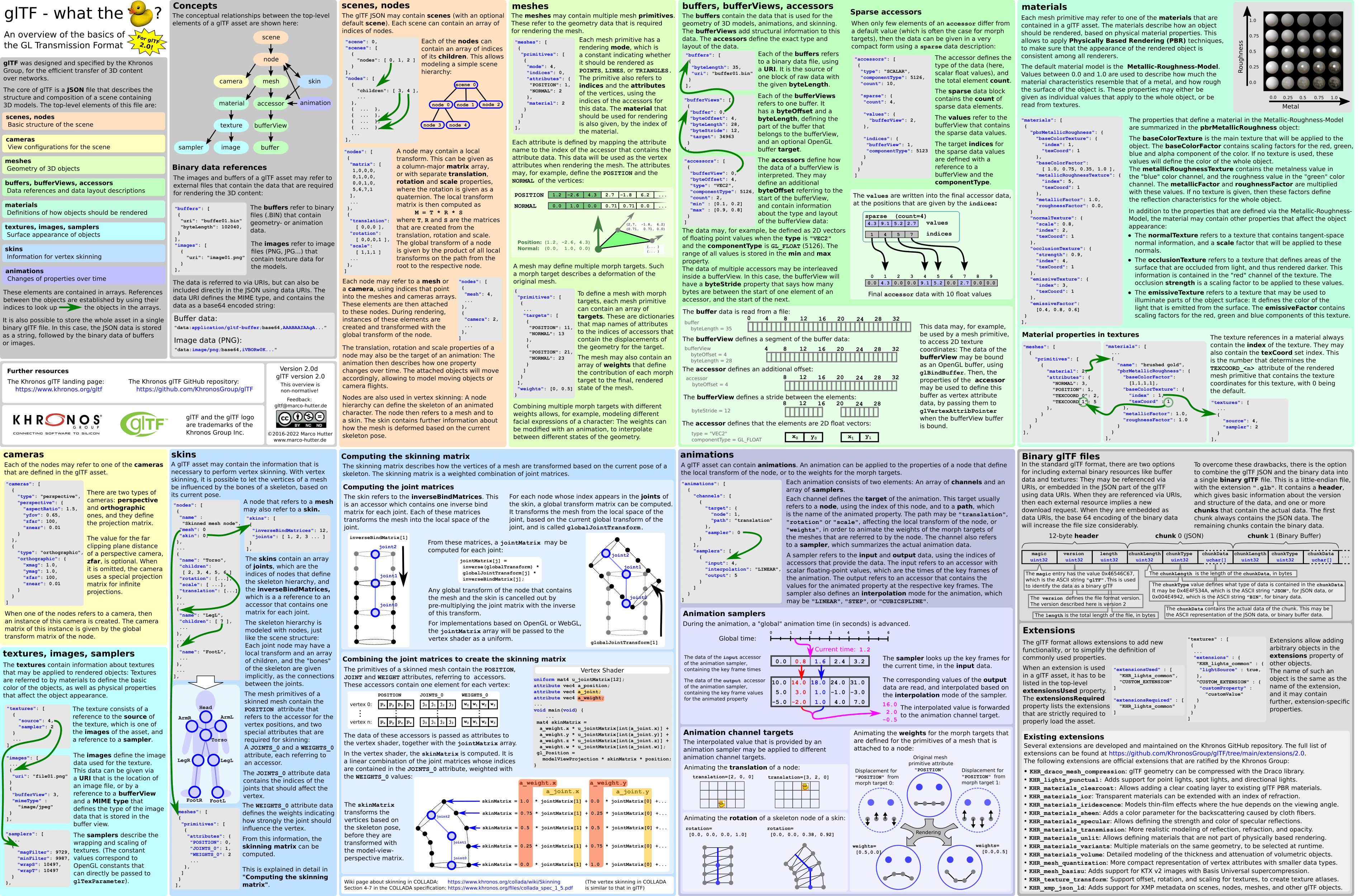
<p align="center">From <a href="https://github.com/javagl/gltfOverview">javagl/gltfOverview</a></p>
<p align="center"><a href="https://www.khronos.org/files/gltf20-reference-guide.pdf">PDF version</a></p>
### Usage
See the [crate documentation](https://docs.rs/myth-gltf) for example usage.
### Features
#### Extras and names
By default, `myth-gltf` ignores all `extras` and `names` included with glTF assets. You can negate this by enabling the `extras` and `names` features, respectively.
```toml
[dependencies.myth-gltf]
version = "1.4.2"
features = ["extras", "names"]
```
#### glTF extensions
The following glTF extensions are supported by the crate:
- `KHR_lights_punctual`
- `KHR_materials_pbrSpecularGlossiness`
- `KHR_materials_unlit`
- `KHR_texture_transform`
- `KHR_materials_variants`
- `KHR_materials_volume`
- `KHR_materials_specular`
- `KHR_materials_transmission`
- `KHR_materials_ior`
- `KHR_materials_emissive_strength `
- `EXT_texture_webp`
To use an extension, list its name in the `features` section.
```toml
[dependencies.gltf]
features = ["KHR_materials_unlit"]
```
### Examples
#### gltf-display
Demonstrates how the glTF JSON is deserialized.
```sh
cargo run --example gltf-display path/to/asset.gltf
```
#### gltf-export
Demonstrates how glTF JSON can be built and exported using the `gltf-json` crate.
```sh
cargo run --example gltf-export
```
#### gltf-roundtrip
Deserializes and serializes the JSON part of a glTF asset.
```sh
cargo run --example gltf-roundtrip path/to/asset.gltf
```
#### gltf-tree
Visualises the scene heirarchy of a glTF asset, which is a strict tree of nodes.
```sh
cargo run --example gltf-tree path/to/asset.gltf
```
### Tests
Running tests locally requires to clone the [`glTF-Sample-Assets`](https://github.com/KhronosGroup/glTF-Sample-Assets) repository first.
```sh
git clone https://github.com/KhronosGroup/glTF-Sample-Assets.git
```