---
title: Working in teams
description: Authorize teammates and manage a shared vault.
sidebar:
order: 2
---
murk's vault is per-recipient: every teammate has their own key, and adding
or removing someone is a normal git-tracked change to the vault file: no
shared password to rotate, no separate secrets server to run.
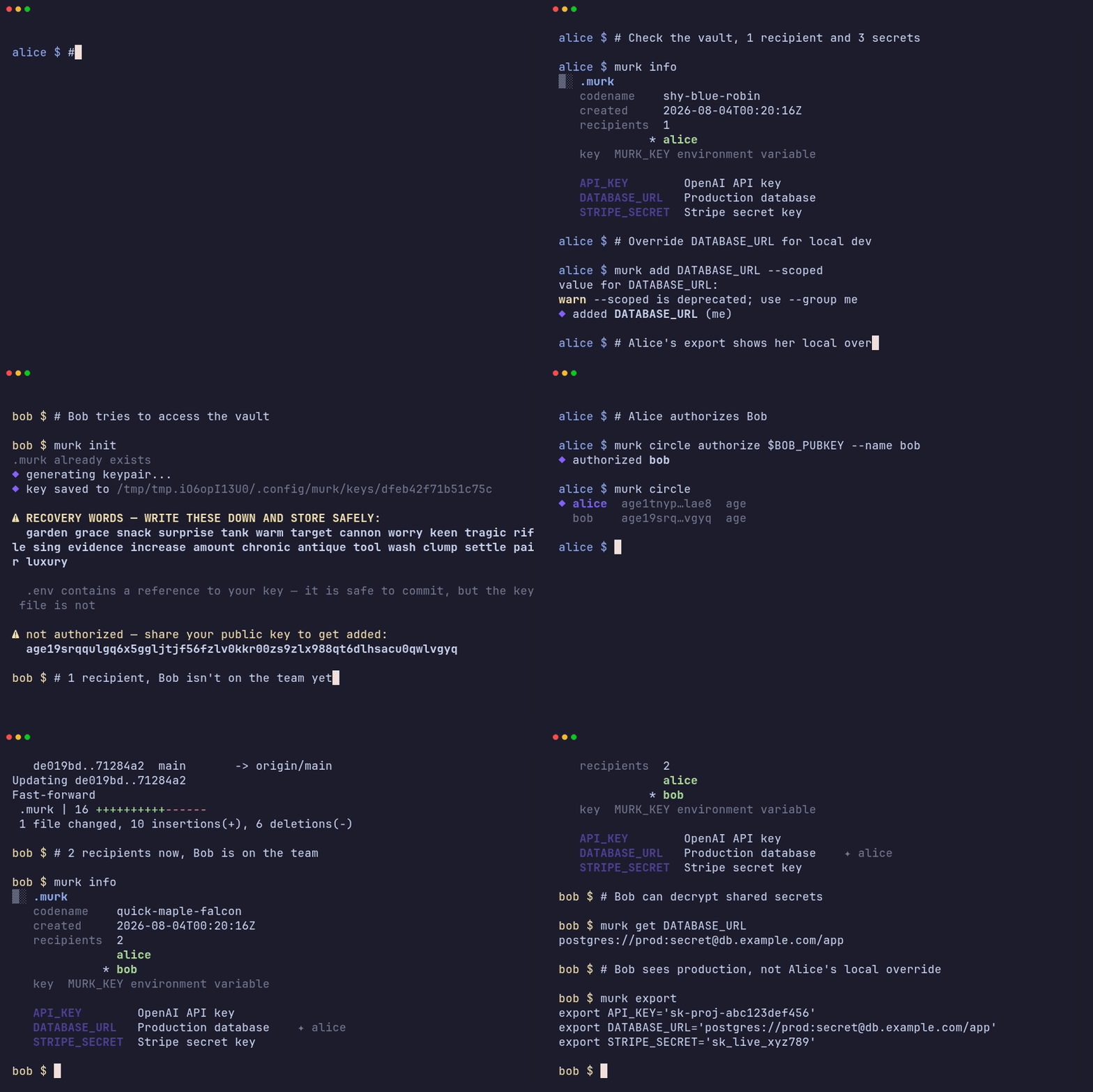
## Adding a teammate
Each person generates their own keypair first:
```bash
# Alice sets up the vault
murk init
murk add DATABASE_URL
# Bob generates his own key
murk init
```
Then an existing recipient authorizes Bob's public key:
```bash
murk circle authorize age1bob... --name bob@example.com
```
Once Bob is authorized, the vault is re-encrypted to include his key, and he
can decrypt everything in the shared layer:
```bash
murk export
```
Bob can still keep his own local overrides on top of the shared secrets. See
[shared vs scoped secrets](/guides/shared-vs-scoped/):
```bash
murk add DATABASE_URL --group me
```
## Authorizing via GitHub
Manual key exchange works, but the easier path for most teams is authorizing
by GitHub username:
```bash
murk circle authorize github:bob
```
This fetches Bob's SSH public keys from `https://github.com/bob.keys` (no
authentication required) and adds them as recipients: no pasting an age
public key over Slack. `ssh-ed25519` keys are accepted by default;
`ssh-rsa` keys need `--allow-ssh-rsa` because ed25519 is recommended.
### Recipient pinning
The first successful `murk circle authorize github:bob` records the SHA-256
fingerprints of the fetched keys in the encrypted vault metadata. If Bob's
GitHub keys change later, the next `authorize github:bob` refuses to proceed
silently: it flags the diff and requires `--force` to accept the new keys.
This catches both benign key rotation and a compromised GitHub account adding
an attacker's key, and turns either into something a human has to actively
confirm rather than something that happens invisibly.
Because this pinning trusts GitHub as a key directory and trusts that the
username belongs to who you think it does, treat `authorize github:user` with
the same care you'd give any access grant: verify identity out of band for
sensitive vaults. See the [threat model](/security/threat-model/) for the
full trust analysis.
## Listing and managing recipients
```bash
murk circle # list recipients
murk circle revoke RECIPIENT # remove a recipient (see offboarding)
```
For encrypting a secret to only a subset of the team (not the whole
recipient list), use named groups: `murk group create|ls|add|rm NAME`. See
the [CLI reference](/reference/cli/#murk-group) for the full flag surface.
When someone leaves the team, don't just stop there. See
[offboarding a teammate](/guides/offboarding/) for revocation and rotation.