# modelscope-ng
[中文](README_zh.md) | [English](README.md)


A CLI tool for downloading models from Modelscope.
This project is a fork of [xgpxg/modelscope](https://github.com/xgpxg/modelscope).
Features:
- ⬇️ Download models from Modelscope
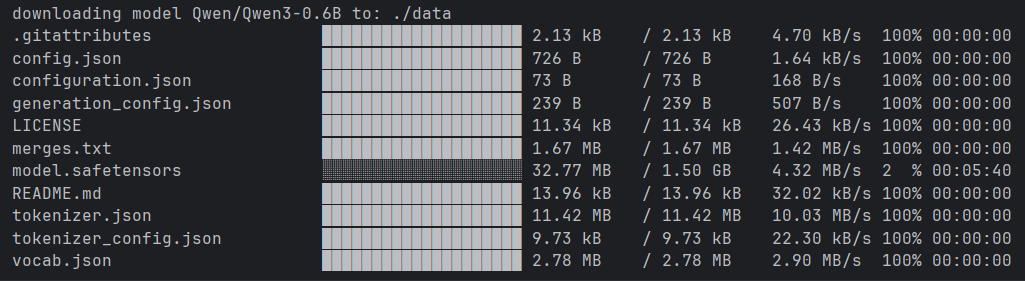
- 🫏 Show progress bar
- ⚡ Multi-threaded download
- 🔗 Resume interrupted downloads
Supported OS:
- Windows
- macOS
- Linux
## Installation
You can install it in one of the following ways:
- Install using Cargo
```shell
cargo install modelscope-ng
```
- Use precompiled package
Download the binary package for your operating system from
the [release page](https://github.com/Liangdi/modelscope/releases) and extract it.
## Usage
```shell
modelscope-ng download -m <MODEL_ID> -s <SAVE_DIR>
```
## Commands
```shell
Usage: modelscope-ng <COMMAND>
Commands:
download Download model
download-file Download a single file from a model
login Login to modelscope use your token
logout Logout
list List all local models
help Print this message or the help of the given subcommand(s)
Options:
-h, --help Print help
-V, --version Print version
```
### Download a Single File
You can download a single file from a model using the `download-file` command:
```shell
modelscope-ng download-file -m <MODEL_ID> -f <FILE_PATH> -s <SAVE_DIR>
```
Example:
```shell
modelscope-ng download-file -m Qwen/Qwen3-0.6B -f config.json -s ./data
```
## Library
Add crate:
```shell
cargo add modelscope-ng
```
Example:
```rust
use modelscope_ng::ModelScope;
#[tokio::main]
async fn main() -> anyhow::Result<()> {
let model_id = "Qwen/Qwen3-0.6B";
let save_dir = "./data";
ModelScope::download(model_id, save_dir).await?;
Ok(())
}
```
## Using Callbacks
The library provides a callback mechanism to track download progress. You can implement the `ProgressCallback` trait to customize how progress is reported.
### ProgressCallback Trait
```rust
#[async_trait]
pub trait ProgressCallback: Send + Sync {
/// Called when a file download starts
async fn on_file_start(&self, file_name: &str, file_size: u64);
/// Called when file download progress updates
async fn on_file_progress(&self, file_name: &str, downloaded: u64, total: u64);
/// Called when a file download completes
async fn on_file_complete(&self, file_name: &str);
/// Called when a file download fails
async fn on_file_error(&self, file_name: &str, error: &str);
}
```
### Built-in Callback Implementations
#### 1. ProgressBarCallback (Default)
Shows progress bars for each file being downloaded:
```rust
use modelscope_ng::{ModelScope, ProgressBarCallback};
#[tokio::main]
async fn main() -> anyhow::Result<()> {
let model_id = "Qwen/Qwen3-0.6B";
let save_dir = "./data";
let callback = ProgressBarCallback::new();
ModelScope::download_with_callback(model_id, save_dir, callback).await?;
Ok(())
}
```
#### 2. SimpleCallback
Prints progress information to the console:
```rust
use modelscope_ng::{ModelScope, SimpleCallback};
#[tokio::main]
async fn main() -> anyhow::Result<()> {
let model_id = "Qwen/Qwen3-0.6B";
let save_dir = "./data";
ModelScope::download_with_callback(model_id, save_dir, SimpleCallback).await?;
Ok(())
}
```
### Custom Callback Implementation
You can create your own callback implementation:
```rust
use async_trait::async_trait;
use modelscope_ng::{ModelScope, ProgressCallback};
#[derive(Clone)]
struct CustomCallback;
#[async_trait]
impl ProgressCallback for CustomCallback {
async fn on_file_start(&self, file_name: &str, file_size: u64) {
println!("Starting download: {} ({} bytes)", file_name, file_size);
}
async fn on_file_progress(&self, file_name: &str, downloaded: u64, total: u64) {
let percent = if total > 0 {
(downloaded as f64 / total as f64 * 100.0) as u32
} else {
0
};
println!("Progress: {} - {}%", file_name, percent);
}
async fn on_file_complete(&self, file_name: &str) {
println!("Completed: {}", file_name);
}
async fn on_file_error(&self, file_name: &str, error: &str) {
eprintln!("Error downloading {}: {}", file_name, error);
}
}
#[tokio::main]
async fn main() -> anyhow::Result<()> {
let model_id = "Qwen/Qwen3-0.6B";
let save_dir = "./data";
let callback = CustomCallback;
ModelScope::download_with_callback(model_id, save_dir, callback).await?;
Ok(())
}
```
### Downloading a Single File with Callback
You can also use callbacks when downloading a single file:
```rust
use modelscope_ng::{ModelScope, SimpleCallback};
#[tokio::main]
async fn main() -> anyhow::Result<()> {
let model_id = "Qwen/Qwen3-0.6B";
let file_path = "config.json";
let save_dir = "./data";
ModelScope::download_single_file_with_callback(
model_id,
file_path,
save_dir,
SimpleCallback
).await?;
Ok(())
}
```
