# Meteostat for Rust
[](https://crates.io/crates/meteostat)
[](https://docs.rs/meteostat)
[](https://github.com/RuurdBijlsma/meteostat_rs/blob/main/LICENSE)
[](https://github.com/RuurdBijlsma/meteostat_rs)
[](https://github.com/RuurdBijlsma/meteostat_rs/actions/workflows/ci.yml)
**The Weather's Record Keeper - In Rust!**
This crate provides a convenient asynchronous Rust interface for accessing historical weather and climate data
from [Meteostat](https://meteostat.net/), leveraging their publicly available **bulk data interface**. It allows
fetching data for thousands of weather stations worldwide.
> **Meteostat is a free and open provider of weather & climate data.** They do the hard work of collecting, processing,
> and providing the data. This crate is simply a Rust client for their bulk API. Please consider supporting Meteostat if
> you find their data useful: [**Donate to Meteostat**](https://meteostat.net/en/patrons).
Take a look at yesterday's temperatures or discover the weather hundreds of years ago, right from your Rust application.
## Key Features
* **Fetch by Station ID or Location:** Initiate requests via frequency-specific clients (`client.hourly()`, `client.daily()`, etc.) and then specify either `.station("ID")` or `.location(LatLon)`.
* **Find Nearby Stations:** Search for stations near coordinates using `client.find_stations()`, optionally filtering by distance and required data availability (inventory).
* **Multiple Frequencies:** Supports [**Hourly**](https://dev.meteostat.net/bulk/hourly.html#endpoints), [**Daily**](https://dev.meteostat.net/bulk/daily.html), [**Monthly**](https://dev.meteostat.net/bulk/monthly.html), and [**Climate Normals**](https://dev.meteostat.net/bulk/normals.html) data.
* **Efficient Data Handling:** Returns data as wrappers around [Polars](https://pola.rs/) **`LazyFrame`s** (e.g., `HourlyLazyFrame`), allowing for powerful, memory-efficient filtering and manipulation *before* collecting results.
* **Convenient Filtering:** Frame wrappers provide methods for easy filtering by date, year, month, or datetime ranges (e.g., `daily_lazy.get_for_period(Year(2023))`).
* **Automatic Caching:** Downloads and caches station metadata and weather data files locally to speed up subsequent requests and reduce load on Meteostat's servers.
* **Asynchronous:** Built with `tokio` for non-blocking I/O.
## Installation
Add `meteostat` to your `Cargo.toml` dependencies:
```bash
cargo add meteostat
```
## Basic Usage
Here's a quick example demonstrating fetching data by location and station ID:
```rust
use meteostat::{Meteostat, LatLon, MeteostatError, Month, Year};
use polars::prelude::*;
use chrono::{DateTime, Utc, TimeZone};
#[tokio::main]
async fn main() -> Result<(), MeteostatError> {
// Initialize the client (uses default cache directory)
let client = Meteostat::new().await?;
// --- Example 1: Get Hourly data for a location ---
let berlin_center = LatLon(52.52, 13.40);
let hourly_lazy = client // Start with the main client
.hourly() // Select the hourly data client
.location(berlin_center) // Specify location (returns builder)
.call() // Execute the location request
.await?; // -> Result<HourlyLazyFrame, MeteostatError>
// Filter the HourlyLazyFrame for a specific time range
let start_datetime = Utc.with_ymd_and_hms(2022, 1, 10, 0, 0, 0).unwrap(); // Jan 10 2022 00:00 UTC
let end_datetime = Utc.with_ymd_and_hms(2022, 1, 10, 5, 59, 59).unwrap(); // Jan 10 2022 05:59 UTC
let specific_hours = hourly_lazy
.get_range(start_datetime, end_datetime)? // Use range filter on HourlyLazyFrame
.frame // Access the underlying Polars LazyFrame
.collect()?; // Collect the results
println!(
"Hourly data near Berlin for 2022-01-10 00:00-05:59:\n{}",
specific_hours.head(Some(6)) // Show up to 6 hours
);
// --- Example 2: Get Daily data for a station ID ---
let station_id = "10637"; // Amsterdam Schiphol
let daily_lazy = client // Start with the main client
.daily() // Select the daily data client
.station(station_id) // Specify station ID
.await?; // -> Result<DailyLazyFrame, MeteostatError>
// Filter the DailyLazyFrame for a specific year
let daily_2023 = daily_lazy
.get_for_period(Year(2023))? // Use period filter on DailyLazyFrame
.frame // Access the underlying Polars LazyFrame
.collect()?;
println!(
"\nDaily data for Station {} in {}:\n{}",
station_id,
2023,
daily_2023.head(Some(5))
);
Ok(())
}
```
*(See more examples in the [examples directory](https://github.com/RuurdBijlsma/meteostat_rs/tree/main/examples))*
## Finding Stations
You can search for stations near a specific location using `client.find_stations()`:
```rust
use meteostat::{Meteostat, MeteostatError, LatLon, InventoryRequest, Frequency, RequiredData};
#[tokio::main]
async fn main() -> Result<(), MeteostatError> {
let client = Meteostat::new().await?;
let nyc = LatLon(40.7128, -74.0060);
// Find the 3 closest stations within 100km of NYC
// that have reported *any* Daily data.
let inventory_req = InventoryRequest::new(Frequency::Daily, RequiredData::Any);
let stations = client.find_stations() // Direct method on Meteostat client
.location(nyc)
.max_distance_km(100.0)
.station_limit(3)
.inventory_request(inventory_req)
.call()
.await?;
println!("Found {} stations near NYC matching criteria:", stations.len());
for station in stations {
println!(" - ID: {}, Name: {:?}", station.id, station.name.get("en"));
}
Ok(())
}
```
## Data Handling
### Polars `LazyFrame` Wrappers
All weather data fetching methods return a specific wrapper struct (e.g., `HourlyLazyFrame`, `DailyLazyFrame`) which contains a Polars `LazyFrame`. This allows you to:
1. **Use convenience filters:** Apply common filters directly using methods on the wrapper (e.g., `daily_lazy.get_for_period(Year(2023))`).
2. **Access the underlying frame:** Get the `LazyFrame` via the `.frame` field for advanced Polars operations (joins, aggregations, complex selections, etc.).
3. **Optimize queries:** Polars optimizes the execution plan built from chained operations.
4. **Collect when ready:** Use `.frame.collect()?` on the wrapper to execute the plan and get a `DataFrame` in memory.
This is particularly beneficial when dealing with potentially large historical datasets.
### Caching
The crate automatically caches downloaded data to avoid redundant downloads and respect Meteostat's resources:
* **Station Metadata:** The list of all stations (`stations/lite.json.gz`) is downloaded once and cached.
* **Weather Data:** Individual station data files (e.g., `hourly/10637.csv.gz`) are downloaded and cached per station and frequency.
By default, cache files are stored in your system's standard cache directory (e.g., `~/.cache/meteostat-rs` on Linux, `%LOCALAPPDATA%/meteostat_rs_cache` on Windows).
You can specify a custom cache location using `Meteostat::with_cache_folder(path)`.
## Filtering Data Frames
Each data frequency (`Hourly`, `Daily`, `Monthly`, `Climate`) has its own `LazyFrame` wrapper struct (`HourlyLazyFrame`, `DailyLazyFrame`, etc.) that provides convenient methods for common filtering tasks.
Access these wrappers by first selecting the frequency client and then fetching the data:
```rust
use meteostat::{Meteostat, MeteostatError, Year, Month};
use polars::prelude::*;
use chrono::{NaiveDate, Utc, TimeZone};
#[tokio::main]
async fn main() -> Result<(), MeteostatError> {
let client = Meteostat::new().await?;
let station_id = "10637"; // Schiphol
// --- Filter Daily Data by Year ---
let daily_lazy = client.daily().station(station_id).await?;
let daily_2022_lazy = daily_lazy.get_for_period(Year(2022))?;
let daily_2022_df = daily_2022_lazy.frame.collect()?;
println!("Daily data for 2022:\n{}", daily_2022_df.head(Some(3)));
// --- Filter Hourly Data by Datetime Range ---
let hourly_lazy = client.hourly().station(station_id).await?;
let start_dt = Utc.with_ymd_and_hms(2023, 5, 1, 6, 0, 0).unwrap(); // May 1st 2023, 06:00 UTC
let end_dt = Utc.with_ymd_and_hms(2023, 5, 1, 12, 0, 0).unwrap(); // May 1st 2023, 12:00 UTC
let hourly_morning_lazy = hourly_lazy.get_range(start_dt, end_dt)?;
let hourly_morning_df = hourly_morning_lazy.frame.collect()?;
println!("\nHourly data for morning of 2023-05-01:\n{}", hourly_morning_df.head(Some(3)));
// --- Get a Single Daily Row ---
let daily_lazy_again = client.daily().station(station_id).await?;
let specific_date = NaiveDate::from_ymd_opt(2023, 10, 26).unwrap();
let single_day_lazy = daily_lazy_again.get_at(specific_date)?;
let single_day_df = single_day_lazy.frame.collect()?;
println!("\nDaily data for {}:\n{}", specific_date, single_day_df);
// --- Get a Single Monthly Row ---
let monthly_lazy = client.monthly().station(station_id).await?;
let specific_month = Month::new(7, 2023); // July 2023
let single_month_lazy = monthly_lazy.get_at(specific_month)?;
let single_month_df = single_month_lazy.frame.collect()?;
println!("\nMonthly data for {:?}:\n{}", specific_month, single_month_df);
// --- Get Specific Climate Normals Row ---
let climate_lazy = client.climate().station(station_id).await?;
// Normals for July for the 1991-2020 period
let climate_row_lazy = climate_lazy.get_at(Year(1991), Year(2020), 7)?;
let climate_row_df = climate_row_lazy.frame.collect()?;
println!("\nClimate normals for July (1991-2020):\n{}", climate_row_df);
Ok(())
}
```
See the documentation for the specific frame wrappers for all available filtering methods:
* [`HourlyLazyFrame`](https://docs.rs/meteostat/latest/meteostat/struct.HourlyLazyFrame.html)
* [`DailyLazyFrame`](https://docs.rs/meteostat/latest/meteostat/struct.DailyLazyFrame.html)
* [`MonthlyLazyFrame`](https://docs.rs/meteostat/latest/meteostat/struct.MonthlyLazyFrame.html)
* [`ClimateLazyFrame`](https://docs.rs/meteostat/latest/meteostat/struct.ClimateLazyFrame.html)
For more complex filtering or analysis, access the underlying Polars `LazyFrame` via the `.frame` field on the wrapper structs.
## Data Source and Attribution
* All weather data is sourced from **[Meteostat](https://meteostat.net/)**.
* This crate uses Meteostat's **free bulk data interface**. No API key is required.
## API Documentation
Full API documentation is available on [docs.rs](https://docs.rs/meteostat).
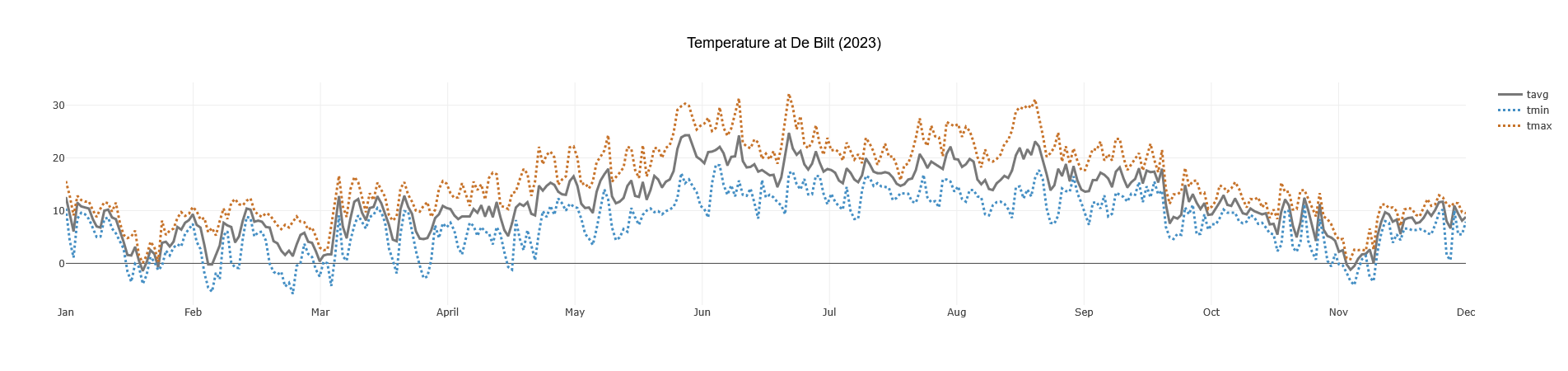
## Example: Plotting Data
You can easily use the `DataFrame` output with plotting libraries like `plotlars`.
```rust
// Requires the 'examples' feature: cargo run --example graph_data --features examples
use std::error::Error;
use meteostat::{Frequency, LatLon, Meteostat, MeteostatError, Year}; // Updated import
use plotlars::{Line, LinePlot, Plot, Rgb, Text};
use polars::prelude::*;
#[tokio::main]
async fn main() -> Result<(), Box<dyn Error>> {
let meteostat = Meteostat::new().await?;
let location = LatLon(52.118641, 5.185589); // De Bilt, Netherlands
let weather_data: DataFrame = meteostat
.daily() // Select daily client
.location(location) // Specify location
.call() // Execute request
.await? // -> Result<DailyLazyFrame, MeteostatError>
.get_for_period(Year(2023))? // Filter the DailyLazyFrame
.frame // Access the inner LazyFrame
.collect()?; // Collect into DataFrame
println!(
"Daily Data for De Bilt (2023):\n{}",
weather_data.head(Some(5))
);
plot_temperature(&weather_data);
Ok(())
}
fn plot_temperature(dataset: &DataFrame) {
LinePlot::builder()
.data(dataset)
.x("date")
.y("tavg") // Average temperature
.additional_lines(vec!["tmin", "tmax"]) // Min and Max temps
.colors(vec![
Rgb(120, 120, 120), // Grey for average
Rgb(69, 143, 196), // Blue for min
Rgb(199, 115, 42), // Orange for max
])
.lines(vec![Line::Solid, Line::Dot, Line::Dot])
.width(3.0)
.plot_title(
Text::from("Temperature at De Bilt (2023)")
.font("Arial")
.size(18),
)
.build()
.plot();
}
```
To run this specific example, enable the `examples` feature:
`cargo run --example graph_data --features examples`
*(This will generate a plot similar to the one shown at the top of this README)*
## Contributing
Contributions, bug reports, and feature requests are welcome! Please feel free to open an issue or submit a pull request
on the [GitHub repository](https://github.com/RuurdBijlsma/meteostat_rs).
## License
This crate is licensed under the Apache License 2.0. See
the [LICENSE](https://github.com/RuurdBijlsma/meteostat_rs/blob/main/LICENSE.md) file for details.